This configuration file serves as the single source of truth for all Emacs customizations. It includes notes on setup and usage. It is continuously updated to reflect my current usage patterns.
1. Emacs
- emacs.d/malb.org at master · malb/emacs.d · GitHub
- https://smallwat3r.com/blog/vanilla-emacs-config
- Former Emacs maintainer John Wiegley’s config
- GitHub - munen/emacs.d: My emacs configuration documented in literate program…
- Literate Emacs Configuration - Look here for org-export customizations
- GitHub - joseph8th/literatemacs: My literate Emacs config
- Robert Zaremba “Scale it”, Emacs cheatsheet
- “ - str ’(kf-htmlegalize-region skeleton-point (point)) ”
- Quick Help: Emacs as a Text Productivity Platform : emacs
- My Emacs Configuration
- GitHub - karthink/.emacs.d: My personal emacs settings
- From Doom to Vanilla Emacs - blog.dornea.nu
- GitHub - dorneanu/dotemacs: Collection of Emacs configurations
- Two Years of Emacs Solo: 35 Modules, Zero External Packages, and a Full Refac…
- nixos-config/dotfiles/doom/config.org at master · joshuablais/nixos-config · …
- GitHub - tecosaur/emacs-config: My configuration for Doom Emacs. Mirror of ht…
- dot-doom/doom.org at master · zzamboni/dot-doom · GitHub
- Emacs Configs
- Use GNU Emacs
Greetings! This is my own Emacs configuration, which runs on Windows Subsystem for Linux (WSL). Instructions for installing Emacs on WSL2. Contact me if something is unclear or should you have any questions.
The configuration lives in ~/project-carlo/emacs/, which Guix Home links to ~/.config/emacs/, and this document is its source. early-init.el, init.el, the test suite and one lisp/bhw-*.el module for each section below are tangled from it, and the modules load in the order of the sections. It runs on Guix System, and Guix installs Emacs and every package: they are listed in my Guix configuration, which Guix Home applies. What is written by hand sits in the same repository: site-lisp/, scripts/ and the smoke tests under tests/. Run the following on a new computer,
  mkdir ~/.ssh
  # Download Keepass and SSH keys from Cloud backup.
  # Copy over SSH private keys through Windows Explorer =\\wsl$=
  # in Windows Explorer address bar.
  chmod 600 ~/.ssh/github
  # See heading "Github Tutorial" if you are unfamiliar with git.
  # The configuration is in ~/project-carlo, a repository with no remote:
  # copy it over from the old computer or a backup.
  # I will need to setup GPG. Unlock KeePass database for GPG private key.
  # Project Maria is encrypted with git-remote-gcrypt.
  git clone git@github.com:bhwdev/project-maria.git ~/project-maria
  # Emacs, its packages and the programs it runs: Guix Home, from the
  # repository my Guix configuration is tangled to, then
  guix home reconfigure -L ~/project-carlo ~/project-carlo/config/home/wsl.scm
  # Copy over project-jerome manually
  scp -r root@oci-a1-flex:/project-jerome ~/
If you are setting up on a new computer then you will have install and configure everything under B. Important in Linux Program Directory. See emacs private config
SPC i y to autocomplete paste SPC h r r SPC h k SPC s E SPC h d f SPC h d p c Spacemacs refugee, Winum config, doom-localleader-key, org mode bold highlighting
1.1. Emacs Initialization
;;; init.el --- Entry point -*- lexical-binding: t; -*-
Emacs reads the -*- ... -*- file-variable cookie from the first line of a
file and nowhere else, so org’s :comments link tangle link – which lands
above everything else in the file – silently displaced it and loaded every
tangled file with dynamic binding. Each tangle target therefore opens with a
one-line :comments no block holding just its cookie; the body keeps its link
comments, so detangling still works.
Startup has two stages. early-init.el runs before the first frame exists.
init.el sets up directories and then requires one module per section of
this document, in document order. The
modules live in lisp/ and are prefixed bhw-. The packages are already on
the load path by then: Guix’s Emacs puts every emacs-* package of the
profile there, autoloads and all, from its site-start.el.
1.1.1. Early init
;;; early-init.el --- Before the first frame -*- lexical-binding: t; -*-
;; Guix owns packages.  Left alone, package.el would also activate whatever
;; it finds under its own directory before init.el has run.
(setq package-enable-at-startup nil)

;; No garbage collection while init runs.  `gcmh-mode', switched on at the end
;; of bhw-defaults, sets the working threshold.
(setq gc-cons-threshold most-positive-fixnum)

;; Native-compiled code goes under var/ with everything else Emacs writes.
;; Test boots share it: .eln files are a content-addressed cache, not state.
(when (fboundp 'startup-redirect-eln-cache)
  (startup-redirect-eln-cache
   (expand-file-name "var/eln-cache/" user-emacs-directory)))
(setq native-comp-async-report-warnings-errors nil)

;; No menu bar, tool bar or scroll bars, decided before the first frame is
;; drawn so that they never flash.
(push '(menu-bar-lines . 0) default-frame-alist)
(push '(tool-bar-lines . 0) default-frame-alist)
(push '(vertical-scroll-bars) default-frame-alist)
(setq menu-bar-mode nil
      tool-bar-mode nil
      scroll-bar-mode nil
      frame-resize-pixelwise t)

;; The font is named here so that a frame is born with it rather than resized
;; to it.  bhw-ui does the rest: the other faces, emoji, the resize commands.
(defvar bhw/font
  (font-spec :family "IosevkaTermSlab Nerd Font Mono" :size 26.0 :weight 'medium)
  "The default font.  A float size is in points.")
(push (cons 'font (font-xlfd-name bhw/font)) default-frame-alist)

(push '(inhibit-double-buffering . t) default-frame-alist)
1.1.2. Bootstrap
Everything Emacs writes at runtime goes under var/. Setting BHW_TEST
moves that to var-test/ and switches off every timer and network client, so
a throwaway daemon can load this configuration beside the session that is
actually in use without touching its mail, its Matrix queue or its clock.
BHW_TEST=1 bash -l -c 'exec emacs --init-directory="$HOME/project-carlo/emacs" --fg-daemon=bhw-test' &
emacsclient -s bhw-test -e '(bhw/reload-status)'
emacsclient -s bhw-test -e '(let (kill-emacs-hook) (kill-emacs))'
;;---------------------------------------------------------------------------
;; Directories.
(defconst bhw/user-dir
  (file-name-as-directory (file-truename (expand-file-name user-emacs-directory)))
  "Root of this configuration, by its truename.
~/.config/emacs is a link to it, and buffers visit truenames, so paths
built on this one name files as their buffers do, and `project-current',
which walks up the directory names, finds the repository it is in.")

(defconst bhw/test-boot-p (and (getenv "BHW_TEST") t)
  "Non-nil in a throwaway boot started with BHW_TEST set.
Such a boot keeps its state in var-test/ and starts no timers, mail
sync, or network clients.")

(defconst bhw/var-dir
  (expand-file-name (if bhw/test-boot-p "var-test/" "var/") bhw/user-dir)
  "Everything Emacs writes at runtime.")

(defconst bhw/cache-dir (expand-file-name "cache/" bhw/var-dir)
  "State that can be deleted and will be rebuilt.")

(defconst bhw/data-dir (expand-file-name "data/" bhw/var-dir)
  "State that cannot be rebuilt: history, bookmarks, queues.")

(dolist (dir (list bhw/cache-dir bhw/data-dir))
  (make-directory dir t))

;; Packages write wherever `user-emacs-directory' points, and few of them say
;; where.  Pointing it into var/ keeps all of that out of this repository
;; and, in a test boot, away from the real session's files.  The
;; configuration itself is `bhw/user-dir'.
(setq user-emacs-directory bhw/cache-dir)

(dolist (dir '("site-lisp/" "lisp/"))
  (add-to-list 'load-path (expand-file-name dir bhw/user-dir)))

(require 'bhw-lib)
Every module assumes its packages are already installed and activated, which
Guix’s site-start.el has seen to before this file runs. A module that fails
is reported and skipped rather than taking the rest of the session down with
it; the load stamp is then left unset, which is what the test suite and
bhw/reload-status look at.
;;---------------------------------------------------------------------------
;; The modules.
(defconst bhw/modules
  '(bhw-defaults
    bhw-reload
    bhw-evil
    bhw-leader
    bhw-completion
    bhw-ui
    bhw-modeline
    bhw-window
    bhw-workspace
    bhw-editor
    bhw-daemon
    bhw-dired
    bhw-eww
    bhw-term
    bhw-checkers
    bhw-code
    bhw-project
    bhw-pdf
    bhw-vc
    bhw-claude
    bhw-lexic
    bhw-biblio
    bhw-lang
    bhw-common-lisp
    bhw-org
    bhw-org-agenda
    bhw-org-attach
    bhw-org-edna
    bhw-org-node
    bhw-org-similar
    bhw-org-noter
    bhw-org-table-widget
    bhw-org-transclusion
    bhw-org-tangle
    bhw-exc
    bhw-office-to-org
    bhw-org-clock-analyzer
    bhw-org-contacts
    bhw-org-publish
    bhw-org-reveal
    bhw-python
    bhw-mail
    bhw-elfeed
    bhw-ement
    bhw-transmission
    bhw-apps)
  "Modules to load, in the order their sections appear in dotemacs.org.")

(defvar bhw/module-errors nil
  "Alist of (MODULE . ERROR) for modules that failed on the last (re)load.")

(defun bhw/load-modules (&optional reload)
  "Load every module in `bhw/modules', in order.
With RELOAD non-nil, load each file again even if it is already
provided.  A module that signals is recorded in `bhw/module-errors'
and reported, and the remaining modules still load."
  (setq bhw/module-errors nil)
  (dolist (module bhw/modules)
    (condition-case-unless-debug err
        (if reload
            (load (symbol-name module) nil 'nomessage)
          (require module))
      (error
       (push (cons module err) bhw/module-errors)
       (display-warning 'bhw
                        (format "%s failed to load: %s"
                                module (error-message-string err))
                        :error))))
  (setq bhw/module-errors (nreverse bhw/module-errors)))

(bhw/load-modules)
1.1.3. Environment
Emacs has the login shell’s environment without help from this
configuration. The daemon is the emacs service of the user shepherd (Guix
Home, in my dotfiles), which starts it through bash -l, so it begins with
what ~/.profile sets up: the search paths of the Guix profiles (PATH,
EMACSLOADPATH, XDG_DATA_DIRS, DICPATH and the rest), ~/.local/bin,
where the claude CLI is, and WSL’s /bin and the Windows PATH, whose
powershell.exe and wslpath are called by name. The test boots start
through bash -l as well, so they see the same.
1.1.4. Library
Helpers the other modules share. Keys first: there is no general.el and no
map! here. The leader is an ordinary keymap, bhw/define-keys binds into
any keymap and labels the bindings for which-key in one pass, and the
localleader is a table from mode to keymap that is looked up when the key is
pressed.
;;; bhw-lib.el --- Shared helpers -*- lexical-binding: t; -*-
(require 'cl-lib)
(require 'which-key)

;;---------------------------------------------------------------------------
;; Keys.
(defvar bhw/leader-map (make-sparse-keymap)
  "Keymap behind the SPC leader.")

(defvar bhw/localleader-alist nil
  "Alist of (MODE . KEYMAP) for localleader bindings.
MODE is a major or minor mode symbol.")

(defun bhw/localleader-keymap ()
  "Return the localleader keymap for the current buffer, or nil.
Composes the maps of every enabled minor mode registered in
`bhw/localleader-alist' ahead of the major mode's, which is resolved
most-specific parent first."
  (let ((maps (append
               (cl-loop for (mode . map) in bhw/localleader-alist
                        when (and (memq mode minor-mode-list)
                                  (boundp mode) (symbol-value mode))
                        collect map)
               (cl-loop for mode in (derived-mode-all-parents major-mode)
                        for map = (alist-get mode bhw/localleader-alist)
                        when map collect map))))
    (when maps (make-composed-keymap maps))))

(defconst bhw/localleader-item
  `(menu-item "Local mode" nil
              :filter ,(lambda (&optional _) (bhw/localleader-keymap)))
  "Binding that resolves to the current buffer's localleader keymap.")

(defun bhw/define-keys (keymap bindings)
  "Define BINDINGS in KEYMAP with which-key labels.
BINDINGS is a list of (KEY DEF LABEL) entries.  KEY is in `kbd'
syntax.  DEF is a command or keymap, or nil for a prefix that only
carries LABEL.  LABEL may be omitted.

A key that currently holds a command becomes a prefix when something
is bound beneath it, instead of signalling \"starts with non-prefix
key\"."
  (let (labels)
    (pcase-dolist (`(,key ,def ,label) bindings)
      (when def
        (let ((keys (kbd key)))
          (cl-loop for end from 1 below (length keys)
                   for prefix = (seq-subseq keys 0 end)
                   for bound = (lookup-key keymap prefix)
                   when (and bound (not (numberp bound)) (not (keymapp bound)))
                   do (define-key keymap prefix nil))
          (define-key keymap keys def)))
      (when label
        (push key labels)
        (push label labels)))
    (when labels
      (apply #'which-key-add-keymap-based-replacements
             keymap (nreverse labels)))))

(defun bhw/localleader-define (mode bindings)
  "Define BINDINGS under the localleader for MODE.
BINDINGS are as for `bhw/define-keys'.  MODE's keymap is created on
first use."
  (let ((map (or (alist-get mode bhw/localleader-alist)
                 (setf (alist-get mode bhw/localleader-alist)
                       (make-sparse-keymap)))))
    (bhw/define-keys map bindings)))
The rest is ported from Doom Emacs’ core library (MIT licence, Henrik Lissner and contributors), renamed and with its macros written out.
;;---------------------------------------------------------------------------
;; Syntax.
(defun bhw/point-in-string-p (&optional pos)
  "Return non-nil if POS, default point, is inside a string."
  ;; `syntax-ppss' moves point to the position it is given.
  (ignore-errors
    (save-excursion
      (nth 3 (syntax-ppss (or pos (point)))))))

(defun bhw/point-in-comment-p (&optional pos)
  "Return non-nil if POS, default point, is inside a comment."
  (let ((pos (or pos (point))))
    (ignore-errors
      (save-excursion
        ;; Not in a comment if inside a string.
        (unless (nth 3 (syntax-ppss pos))
          (or (nth 4 (syntax-ppss pos))
              ;; On a comment delimiter.  A newline ends comments in many
              ;; modes but should count as whitespace here.
              (and (< pos (point-max))
                   (memq (char-syntax (char-after pos)) '(?< ?>))
                   (not (eq (char-after pos) ?\n)))
              ;; Two-character delimiters: `syntax-ppss' cannot know yet
              ;; whether / starts a comment or is a division.
              (when-let* ((s (car (syntax-after pos))))
                (or (and (/= 0 (logand (ash 1 16) s))
                         (nth 4 (syntax-ppss (+ pos 2))))
                    (and (/= 0 (logand (ash 1 17) s))
                         (nth 4 (syntax-ppss (+ pos 1))))
                    (and (/= 0 (logand (ash 1 18) s))
                         (nth 4 (syntax-ppss (- pos 1))))
                    (and (/= 0 (logand (ash 1 19) s))
                         (nth 4 (syntax-ppss (- pos 2))))))))))))

;;---------------------------------------------------------------------------
;; The region.  Evil's visual state counts as one.
(defun bhw/region-active-p ()
  "Return non-nil if there is a selection, Evil's visual state included."
  (declare (side-effect-free t))
  (or (use-region-p)
      (and (bound-and-true-p evil-local-mode)
           (evil-visual-state-p))))

(defun bhw/region-beginning ()
  "Return the position where the selection begins."
  (declare (side-effect-free t))
  (or (and (bound-and-true-p evil-local-mode)
           (evil-visual-state-p)
           (markerp evil-visual-beginning)
           (marker-position evil-visual-beginning))
      (region-beginning)))

(defun bhw/region-end ()
  "Return the position where the selection ends."
  (declare (side-effect-free t))
  (or (and (bound-and-true-p evil-local-mode)
           (evil-visual-state-p)
           (markerp evil-visual-end)
           (marker-position evil-visual-end))
      (region-end)))

(defun bhw/region (&optional no-properties)
  "Return the selected text, or nil if nothing is selected.
With NO-PROPERTIES non-nil, strip its text properties."
  (when (bhw/region-active-p)
    (funcall (if no-properties
                 #'buffer-substring-no-properties
               #'buffer-substring)
             (bhw/region-beginning) (bhw/region-end))))

(defun bhw/thing-at-point-or-region (&optional thing prompt)
  "Return the selection, else THING at point, else the identifier at point.
A THING that is a string is returned as it is.  When nothing is found
and PROMPT is non-nil, read a string, prompting with PROMPT if it is
one."
  (cond ((stringp thing) thing)
        ((bhw/region-active-p) (bhw/region t))
        (thing (thing-at-point thing t))
        ((require 'xref nil t)
         ;; Eglot answers `xref-backend-identifier-at-point' with a fixed
         ;; string instead of the identifier.
         (if (eq (xref-find-backend) 'eglot)
             (thing-at-point 'symbol t)
           (xref-backend-identifier-at-point (xref-find-backend))))
        (prompt (read-string (if (stringp prompt) prompt "")))))

(defun bhw/orderless-quote (string)
  "Return STRING as Orderless input that matches STRING and nothing else.
Orderless splits its input at spaces, reads each piece as a regexp, and
gives some characters a meaning of their own where they begin or end a
piece: those of `orderless-affix-dispatch-alist', and a closing $.  A
character class takes that meaning away; ^ cannot stand alone in one,
and is quoted with a backslash like any other regexp character."
  (let ((affixes (cons ?$ (mapcar #'car (bound-and-true-p
                                         orderless-affix-dispatch-alist)))))
    (cl-flet* ((plain (text)
                 (replace-regexp-in-string " " "\\\\ " (regexp-quote text)))
               (edge (text)
                 (if (and (memq (aref text 0) affixes) (not (equal text "^")))
                     (format "[%s]" text)
                   (plain text))))
      (pcase (length string)
        (0 "")
        (1 (edge string))
        (_ (concat (edge (substring string 0 1))
                   (plain (substring string 1 -1))
                   (edge (substring string -1))))))))

;;---------------------------------------------------------------------------
;; Projects, on project.el.
(defun bhw/project-root (&optional dir)
  "Return the root of the project containing DIR, or nil outside a project.
DIR defaults to `default-directory'.  The result is absolute and ends
in a slash."
  (when-let* ((project (project-current nil (or dir default-directory))))
    (file-name-as-directory (expand-file-name (project-root project)))))

(defun bhw/project-name (&optional dir)
  "Return the name of the project containing DIR, or \"-\" outside a project."
  (if-let* ((project (project-current nil (or dir default-directory))))
      (project-name project)
    "-"))

(defun bhw/project-find-file (dir)
  "Jump to a file under DIR, searched recursively.
A project root lists the project's files, less what the project
ignores.  Any other directory lists every file beneath it."
  (unless (file-directory-p dir)
    (error "Directory %S does not exist" dir))
  (unless (file-readable-p dir)
    (error "Directory %S isn't readable" dir))
  (let* ((default-directory (file-truename (file-name-as-directory dir)))
         (project (project-current nil default-directory)))
    (condition-case nil
        (if (and project
                 (file-equal-p (project-root project) default-directory))
            (project-find-file-in nil nil project)
          (project-find-file-in nil (list default-directory)
                                (or project (cons 'transient default-directory))
                                t))
      ;; project.el signals this on a directory with no files in it.
      (wrong-type-argument (call-interactively #'find-file)))))

(defun bhw/project-browse (dir)
  "Run `find-file' starting from DIR."
  (let ((default-directory (file-truename (file-name-as-directory
                                           (expand-file-name dir)))))
    (call-interactively #'find-file)))

;;---------------------------------------------------------------------------
;; Buffers.  A real buffer is one worth returning to: a file, a Dired
;; listing, a shell.  The rest are scaffolding, and the commands that pick
;; "the next buffer" skip them.
(defvar bhw/fallback-buffer-name "*scratch*"
  "Buffer to fall back on when there is nothing else to show.")

(defun bhw/fallback-buffer ()
  "Return the fallback buffer, creating it if need be."
  (let (buffer-list-update-hook)
    (get-buffer-create bhw/fallback-buffer-name)))

(defvar bhw/buffer-list-function #'buffer-list
  "Function returning the buffers that the buffer commands act on.
bhw-workspace narrows it to the buffers of the current workspace.")

(defun bhw/buffer-list ()
  "Return the buffers that the buffer commands act on."
  (funcall bhw/buffer-list-function))

(defvar bhw/real-buffer-functions nil
  "Predicates that make a buffer real.
Each is called with the buffer.  The first to return non-nil settles
it, ahead of `bhw/unreal-buffer-functions'.")

(defvar bhw/unreal-buffer-functions
  '(minibufferp bhw/special-buffer-p bhw/non-file-visiting-buffer-p)
  "Predicates that make a buffer unreal.
Each is called with the buffer.  The first to return non-nil settles
it.")

(defvar bhw/real-buffer-modes
  '(dired-mode comint-mode term-mode shell-mode eshell-mode)
  "Major modes whose buffers are real.")

(defvar-local bhw/real-buffer-p nil
  "Non-nil if this buffer is real whatever the predicates say.")

(defun bhw/special-buffer-p (buf)
  "Return non-nil if the name of BUF starts with an asterisk."
  (char-equal ?* (aref (buffer-name buf) 0)))

(defun bhw/temp-buffer-p (buf)
  "Return non-nil if the name of BUF starts with a space."
  (char-equal ?\s (aref (buffer-name buf) 0)))

(defun bhw/non-file-visiting-buffer-p (buf)
  "Return non-nil if BUF visits no file."
  (not (buffer-file-name (or (buffer-base-buffer buf) buf))))

(defun bhw/real-buffer-p (buffer-or-name)
  "Return non-nil if BUFFER-OR-NAME is a real buffer.
That is a live buffer whose name does not start with a space and for
which one of these holds, tried in order: its local variable
`bhw/real-buffer-p' is non-nil; its major mode derives from one of
`bhw/real-buffer-modes'; a function in `bhw/real-buffer-functions'
returns non-nil; no function in `bhw/unreal-buffer-functions' does.
An indirect buffer is judged by its base buffer."
  (when-let* ((buf (get-buffer buffer-or-name)))
    (when-let* ((base (buffer-base-buffer buf)))
      (setq buf base))
    (and (buffer-live-p buf)
         (not (bhw/temp-buffer-p buf))
         (or (buffer-local-value 'bhw/real-buffer-p buf)
             (provided-mode-derived-p (buffer-local-value 'major-mode buf)
                                      bhw/real-buffer-modes)
             (run-hook-with-args-until-success 'bhw/real-buffer-functions buf)
             (not (run-hook-with-args-until-success
                   'bhw/unreal-buffer-functions buf))))))

(defun bhw/unreal-buffer-p (buffer-or-name)
  "Return non-nil if BUFFER-OR-NAME is not a real buffer."
  (not (bhw/real-buffer-p buffer-or-name)))

(defun bhw/mark-buffer-as-real-h ()
  "Make this buffer a real one, whatever the predicates would say."
  (setq-local bhw/real-buffer-p t))

(defun bhw/real-buffer-list (&optional buffer-list)
  "Return the real buffers in BUFFER-LIST, default `bhw/buffer-list'."
  (cl-remove-if-not #'bhw/real-buffer-p (or buffer-list (bhw/buffer-list))))

(defun bhw/visible-buffers (&optional all-frames)
  "Return the buffers shown in a window of the selected frame.
With ALL-FRAMES non-nil, of every visible frame."
  (delete-dups
   (cl-loop for frame in (if all-frames
                             (visible-frame-list)
                           (list (selected-frame)))
            nconc (mapcar #'window-buffer (window-list frame)))))

(defun bhw/buried-buffers (&optional buffer-list)
  "Return the buffers in BUFFER-LIST that no window shows.
BUFFER-LIST defaults to `bhw/buffer-list'."
  (cl-remove-if #'get-buffer-window (or buffer-list (bhw/buffer-list))))

(defun bhw/project-buffer-list (&optional dir)
  "Return the buffers of the project containing DIR.
DIR defaults to `default-directory'.  Outside a project, return every
buffer in `bhw/buffer-list'."
  (let ((buffers (bhw/buffer-list)))
    (if-let* ((project (project-current nil (or dir default-directory))))
        (let ((in-project (project-buffers project)))
          (cl-remove-if-not (lambda (buf) (memq buf in-project)) buffers))
      buffers)))

(defun bhw/fixup-windows (windows)
  "Make each of WINDOWS show a real buffer or, failing that, the fallback."
  (dolist (window windows)
    (with-selected-window window
      (when (bhw/unreal-buffer-p (window-buffer))
        (previous-buffer)
        (when (bhw/unreal-buffer-p (window-buffer))
          (switch-to-buffer (bhw/fallback-buffer)))))))

(defun bhw/kill-buffer-fixup-windows (buffer)
  "Kill BUFFER, then give each window that showed it a real buffer."
  (let ((windows (get-buffer-window-list buffer)))
    (kill-buffer buffer)
    (bhw/fixup-windows (cl-remove-if-not #'window-live-p windows))))

(defun bhw/kill-buffer-and-windows (buffer)
  "Kill BUFFER and delete every window showing it."
  (dolist (window (get-buffer-window-list buffer))
    (unless (one-window-p t)
      (delete-window window)))
  (kill-buffer buffer))

(defun bhw/buffer-frame-predicate (buf)
  "Return non-nil if `next-buffer' and its kin may land on BUF.
For the `buffer-predicate' frame parameter."
  (or (bhw/real-buffer-p buf)
      (eq buf (bhw/fallback-buffer))))

(defun bhw/protect-fallback-buffer-h ()
  "Refuse to kill the fallback buffer.
For `kill-buffer-query-functions'."
  (not (eq (current-buffer) (bhw/fallback-buffer))))

(defun bhw/kill-current-buffer-a (&rest _)
  "Fall back on the fallback buffer when the last real buffer goes.
Before-until advice for `kill-current-buffer'.  The fallback buffer
itself is not killed.  A real buffer still shown in another window is
only replaced in this one.  When no real buffer is left that is not
already on screen, this window shows the fallback buffer.  Unreal
buffers are left to `kill-current-buffer'."
  (let ((buf (current-buffer)))
    (cond ((eq buf (bhw/fallback-buffer))
           (message "Can't kill the fallback buffer.")
           t)
          ((and (bhw/real-buffer-p buf)
                (run-hook-with-args-until-failure 'kill-buffer-query-functions))
           (let ((visible-p (delq (selected-window)
                                  (get-buffer-window-list buf nil t))))
             (unless visible-p
               (when (and (buffer-file-name (buffer-base-buffer))
                          (buffer-modified-p buf)
                          (not (y-or-n-p
                                (format "Buffer %s is modified; kill anyway?"
                                        buf))))
                 (user-error "Aborted")))
             (let ((inhibit-redisplay t)
                   buffer-list-update-hook
                   kill-buffer-query-functions)
               (when (or
                      ;; No real buffer is left that is not already shown.
                      (not (cl-set-difference (bhw/real-buffer-list)
                                              (bhw/visible-buffers t)))
                      ;; Or there is nowhere to go back to.
                      (memq (switch-to-prev-buffer nil t) (list buf 'nil)))
                 (switch-to-buffer (bhw/fallback-buffer)))
               (unless visible-p
                 (with-current-buffer buf
                   (restore-buffer-modified-p nil))
                 (kill-buffer buf)))
             (run-hooks 'buffer-list-update-hook)
             t)))))

(advice-add 'kill-current-buffer :before-until #'bhw/kill-current-buffer-a)
(add-hook 'kill-buffer-query-functions #'bhw/protect-fallback-buffer-h)
(setf (alist-get 'buffer-predicate default-frame-alist)
      #'bhw/buffer-frame-predicate)

;;---------------------------------------------------------------------------
;; Escape.  `keyboard-quit' is too blunt.  C-g, and ESC in normal state,
;; first quit whatever is active: search highlights, templates, a popup.  Only
;; when nothing claims the keypress does it fall through to `keyboard-quit'.
(defvar bhw/escape-hook nil
  "Functions run by `bhw/escape'.
The first to return non-nil ends the run and consumes the keypress.")

(defun bhw/escape (&optional interactive)
  "Quit what is active; failing that, `keyboard-quit'."
  (interactive (list 'interactive))
  (let ((inhibit-quit t))
    (cond ((minibuffer-window-active-p (minibuffer-window))
           (when interactive
             (setq this-command 'abort-recursive-edit))
           (abort-recursive-edit))
          ((run-hook-with-args-until-success 'bhw/escape-hook))
          ;; Never abort a keyboard macro.
          ((or defining-kbd-macro executing-kbd-macro) nil)
          ((unwind-protect (keyboard-quit)
             (when interactive
               (setq this-command 'keyboard-quit)))))))

(global-set-key [remap keyboard-quit] #'bhw/escape)
(with-eval-after-load 'eldoc
  (eldoc-add-command 'bhw/escape))

;;---------------------------------------------------------------------------
;; Programs.
(defun bhw/call-process (command &rest args)
  "Run COMMAND with ARGS and return (EXIT-CODE . OUTPUT).
OUTPUT is what it printed, with the whitespace at either end removed.
The exit code is -1 if the program could not be run at all."
  (with-temp-buffer
    (cons (or (ignore-errors (apply #'call-process command nil t nil args))
              -1)
          (string-trim (buffer-string)))))

;;---------------------------------------------------------------------------
;; Packages.
(defun bhw/package-file-p (file)
  "Return non-nil if FILE is part of an installed package.
That is, if it is in the Guix store, symbolic links followed: the
profile's share/emacs/site-lisp/ is links into it."
  (file-in-directory-p file "/gnu/store/"))

;;---------------------------------------------------------------------------
;; For the hooks of modes in which line numbers mean nothing.
(defun bhw/disable-line-numbers-h ()
  "Turn line numbers off in this buffer."
  (display-line-numbers-mode -1))

;;---------------------------------------------------------------------------
;; Links.  Here and not with Org, because EWW binds it too and loads first.
(defun bhw/org-yank-link ()
  "Copy the URL at point to the kill ring.
On an Org link that is its target alone, without the description."
  (interactive)
  (let ((url (thing-at-point 'url)))
    (kill-new (or url (user-error "No URL at point")))
    (message "Copied link: %s" url)))
;;---------------------------------------------------------------------------
;; A hook for each major mode that runs once a buffer's local variables are
;; in: MODE-local-vars-hook.  A mode's own hook runs before the file's and
;; the directory's variables are read, too early for anything they are meant
;; to configure, a language server above all.  And unlike a mode's hook it
;; runs for the buffer's own mode only, not for the modes that one derives
;; from.  From Doom Emacs' core (MIT licence).
(defvar bhw/inhibit-local-vars-hooks nil
  "Non-nil once this buffer's MODE-local-vars-hook has run.
Set in each buffer as it runs.  Bound to t around code that sets a mode
up for a moment's work, where the hooks would be wasted.")

(defun bhw/run-local-vars-hooks-h ()
  "Run the hook named MODE-local-vars-hook for this buffer's major mode."
  (unless (or bhw/inhibit-local-vars-hooks
              delay-mode-hooks
              ;; Not in the buffers programs keep for themselves.
              (string-prefix-p
               " " (buffer-name (or (buffer-base-buffer)
                                    (current-buffer)))))
    (setq-local bhw/inhibit-local-vars-hooks t)
    (run-hooks (intern (format "%s-local-vars-hook" major-mode)))))

(defun bhw/run-local-vars-hooks-maybe-h ()
  "Run the local-variables hook of a buffer that visits no file.
No local variables are read for one, so nothing else would."
  (unless (or delay-mode-hooks buffer-file-name)
    (bhw/run-local-vars-hooks-h)))

(add-hook 'hack-local-variables-hook #'bhw/run-local-vars-hooks-h)
(add-hook 'after-change-major-mode-hook #'bhw/run-local-vars-hooks-maybe-h 100)
(provide 'bhw-lib)
;;; bhw-lib.el ends here
1.2. Package Configuration
Guix installs every package this configuration uses, into the profile of
Guix Home. My Guix configuration lists them (its module (config home
packages)) by the area of the configuration that uses them, and pins to a
commit the few that Guix lacks or has at a version the configuration was not
written against. Guix’s Emacs loads guix-emacs from its site-start.el,
which puts every emacs-* package of the profile on the load path and loads
its autoloads, so a module can assume its packages are there.
To add a package, put it in that list, apply it with guix home reconfigure,
and either restart or run M-x guix-emacs-autoload-packages, which finds what
is new in the profile. To remove one, take it out of the list together with
whatever configures it and any smoke test that names it, reconfigure, and
restart: the package’s code stays loaded in the running session until then.
1.3. Emacs Configuration
Miscellaneous configuration for features built in to Emacs which do not belong clearly to a well-defined package.
The cookie sits in its own :comments no block; see Emacs Initialization.
;;; bhw-defaults.el --- Paths, frames and core settings -*- lexical-binding: t; -*-
(defconst +project-maria-dir+ (expand-file-name "~/project-maria/")
  "Absolute path to the project-maria directory.")
(defconst +project-jerome-dir+ (expand-file-name "~/project-jerome/")
  "Absolute path to the project-jerome directory.")

;;---------------------------------------------------------------------------
;; New frames open fullscreen on the largest display.
;;
;; WSLg decides *which* monitor that is.  Its compositor (weston +
;; rdprail-shell) places a new X window at its requested position, but
;; only when the window is not already fullscreen by the time the shell
;; maps its surface.  A fullscreen request that arrives before the map goes
;; to whichever output last had pointer or keyboard focus, and the
;; requested position is never consulted (`set_fullscreen' and `map' in
;; rdprail-shell/shell.c).  The shell maps the surface asynchronously, after
;; the X window is mapped, so `frame-visible-p' and every frame-creation
;; hook run too early: requesting fullscreen from
;; `server-after-make-frame-hook' lost that race in 14 of 19 launches
;; measured on 2026-10-14.  Where a frame that loses lands depends on what
;; had focus last, which is why the wrong monitor looked intermittent.
;;
;; So aim the frame with `default-frame-alist' before it is born, and
;; request fullscreen on its first focus.  The shell focuses a surface at
;; the end of mapping it, after placing it, and this window manager ignores
;; a client's own _NET_ACTIVE_WINDOW request, so a new frame's first focus
;; means it is already on the monitor it was aimed at.  Moving a frame
;; afterwards and then fullscreening it does not work: the two requests
;; reach the compositor together, and it fullscreens onto whichever output
;; it believes the frame occupies when the fullscreen request lands, which
;; is often still the old one.
(defvar bhw/frame-fullscreen 'fullboth
  "Fullscreen state applied to new graphical frames once they are mapped.
Set to nil to leave new frames alone.")

(defvar bhw/frame-fullscreen-timeout 5
  "Seconds a new frame waits for its first focus before going fullscreen anyway.
A fallback for a window manager that does not focus new frames.")

(defvar bhw/frames-awaiting-focus nil
  "New frames that go fullscreen on their first focus.")

(defun bhw/main-display-geometry (&optional display)
  "Return (X Y WIDTH HEIGHT) of the display to open new frames on.
That is the largest monitor by pixel area, and of two the same size, the
one nearer the origin of the virtual desktop.  Output names are useless
as keys under WSLg: none is marked primary, and the same physical panel
is rdp-0, rdp-2 or rdp-4 depending on the order displays were attached.
Returns the origin on a terminal, where there is no geometry to ask for."
  (or (and (display-graphic-p display)
           (car (sort (mapcar (lambda (m) (alist-get 'geometry m))
                              (display-monitor-attributes-list display))
                      (lambda (a b)
                        (let ((area-a (* (nth 2 a) (nth 3 a)))
                              (area-b (* (nth 2 b) (nth 3 b))))
                          (or (> area-a area-b)
                              (and (= area-a area-b)
                                   (< (+ (abs (nth 0 a)) (abs (nth 1 a)))
                                      (+ (abs (nth 0 b)) (abs (nth 1 b)))))))))))
      (list 0 0 0 0)))

(defun bhw/update-frame-birth-position (&optional _terminal)
  "Aim new frames at the largest display: put its origin in the frame alists.
Re-run whenever the monitor layout changes: docking and undocking
renumbers and repositions WSLg's outputs, so yesterday's co-ordinates can
name a monitor that is no longer there.

Also strips any `fullscreen' entry, which is what makes this idempotent
across a reload: a frame born fullscreen ignores its position
entirely, so the state has to be applied after the fact by
`bhw/fullscreen-new-frame' and must never be left in the alists."
  (pcase-let ((`(,x ,y ,_w ,_h) (bhw/main-display-geometry)))
    (dolist (sym '(initial-frame-alist default-frame-alist))
      ;; 1 rather than 0: a requested 0 is dropped as "unspecified" and the
      ;; frame is scattered.  Fullscreen swallows the one-pixel offset.
      (set sym (cons (cons 'left (max x 1))
                     (cons (cons 'top (max y 1))
                           (assq-delete-all
                            'top (assq-delete-all
                                  'left (assq-delete-all
                                         'fullscreen (symbol-value sym))))))))))

(defun bhw/frame-apply-fullscreen (frame)
  "Apply `bhw/frame-fullscreen' to FRAME, if it is still waiting for it.
Called on FRAME's first focus, or after `bhw/frame-fullscreen-timeout',
whichever comes first; the second call finds nothing left to do."
  (when (memq frame bhw/frames-awaiting-focus)
    (setq bhw/frames-awaiting-focus (delq frame bhw/frames-awaiting-focus))
    (when (frame-live-p frame)
      (set-frame-parameter frame 'fullscreen bhw/frame-fullscreen))))

(defun bhw/frame-fullscreen-on-first-focus ()
  "Fullscreen each frame in `bhw/frames-awaiting-focus' that has focus now.
Runs from `after-focus-change-function'.  Frames that have been deleted
in the meantime are dropped."
  (dolist (frame (copy-sequence bhw/frames-awaiting-focus))
    (when (or (not (frame-live-p frame))
              (eq (frame-focus-state frame) t))
      (bhw/frame-apply-fullscreen frame))))

(defun bhw/fullscreen-new-frame (&optional frame)
  "Fullscreen FRAME once the compositor has placed it.
Fullscreen is not put in `default-frame-alist', and is not requested
here either: a frame that is fullscreen before WSLg's shell maps it
ignores its requested position.  FRAME is queued instead, and goes
fullscreen on its first focus, which the shell gives it only once it is
on the monitor `bhw/update-frame-birth-position' aimed it at.

Invisible frames are skipped and deliberately left unmarked: `server'
creates emacsclient frames with `visibility' nil and maps them only
afterwards, so `after-make-frame-functions' runs too early to see them,
and `server-after-make-frame-hook' does the work instead.  Child frames
position themselves relative to their parent (corfu popups and friends)
and TTY frames have no geometry, so both are left alone."
  (let ((frame (or frame (selected-frame))))
    (when (and bhw/frame-fullscreen
               (display-graphic-p frame)
               (frame-visible-p frame)
               (not (frame-parameter frame 'parent-frame))
               (not (frame-parameter frame 'bhw--placed)))
      (set-frame-parameter frame 'bhw--placed t)
      (push frame bhw/frames-awaiting-focus)
      (run-with-timer bhw/frame-fullscreen-timeout nil
                      #'bhw/frame-apply-fullscreen frame)
      ;; Already focused, if the shell was quicker than this hook.
      (bhw/frame-fullscreen-on-first-focus)
      ;; Cheap, and self-heals the aim if the layout changed without
      ;; `display-monitors-changed-functions' firing.
      (bhw/update-frame-birth-position))))

(bhw/update-frame-birth-position)
(add-hook 'display-monitors-changed-functions #'bhw/update-frame-birth-position)
(add-function :after after-focus-change-function
              #'bhw/frame-fullscreen-on-first-focus)

;; emacsclient frames, frames made from inside Emacs, and the initial
;; frame of a non-daemon session, respectively.
(add-hook 'server-after-make-frame-hook #'bhw/fullscreen-new-frame)
(add-hook 'after-make-frame-functions #'bhw/fullscreen-new-frame)
(add-hook 'window-setup-hook #'bhw/fullscreen-new-frame)

(require 'bhw-personal-info)

(defun bhw/always-save-advice (oldfn &rest args)
  "Call OLDFN with ARGS, answering its \"exit anyway?\" question with yes.
Every other `yes-or-no-p' OLDFN asks still reaches the user.  ARGS are
passed through untouched: `restart-emacs' is (save-buffers-kill-emacs nil
t), and dropping that second argument turned every restart into a quit."
  (cl-letf* ((real-yes-or-no-p (symbol-function 'yes-or-no-p))
             ((symbol-function 'yes-or-no-p)
              (lambda (msg)
                (or (string= msg "Modified buffers exist; exit anyway? ")
                    (funcall real-yes-or-no-p msg)))))
    (apply oldfn args)))

(advice-add #'save-buffers-kill-emacs :around #'bhw/always-save-advice)

(setf org-directory +project-maria-dir+
      auto-save-interval 300
      auto-revert-interval 30
      auto-save-timeout nil
      browse-url-generic-program  "/mnt/c/Program Files (x86)/Microsoft/Edge/Application/msedge.exe"
      browse-url-browser-function #'browse-url-generic
      initial-major-mode 'org-mode)

;; A Windows program started from a Linux directory is given that directory
;; as \\wsl.localhost\Guix\... and does nothing until Windows has opened it.
;; When the share stops answering the browser never starts, and nothing says
;; so, because `browse-url-generic' does not wait for it.  A URL needs no
;; working directory, so the browser is started from its own, on C:.
(defun bhw/browse-url-generic-from-program-dir-a (fn &rest args)
  "Call FN, `browse-url-generic', with ARGS from the browser's own directory.
A `browse-url-generic-program' that names no directory, or one that is
not there, is started from `default-directory' as before."
  (let* ((dir (and browse-url-generic-program
                   (file-name-directory browse-url-generic-program)))
         (default-directory (if (and dir (file-directory-p dir))
                                dir
                              default-directory)))
    (apply fn args)))

(advice-add #'browse-url-generic :around
            #'bhw/browse-url-generic-from-program-dir-a)

;; To a Windows program file:///tmp/x is C:\tmp\x.  mu4e's "view in
;; browser" hands `browse-url' "file://" and a Linux path of its own making,
;; so the URL is rewritten where Linux hands over to Windows, whoever made
;; it.  `browse-url-filename-alist' cannot do it: only `browse-url-of-file'
;; reads it, and it would rewrite the URLs handed to EWW, a Linux program,
;; as well.
(defun bhw/browse-url-windows-file-url (url)
  "Return URL as a Windows program on this WSL distribution must see it.
A file URL for a path under a drive's mount, /mnt/X/, names the drive;
one for any other local path names the path on the distribution's
\\\\wsl.localhost share.  Every other URL, and a file URL that already
names a host, is returned as it is.  The rest of the path, encoding and
all, is kept."
  (let ((distro (getenv "WSL_DISTRO_NAME")))
    (cond ((string-match "\\`file:///mnt/\\([a-z]\\)\\(?:/\\|\\'\\)" url)
           (concat "file:///" (match-string 1 url) ":/"
                   (substring url (match-end 0))))
          ((and distro (string-match "\\`file:///\\(?:[^/]\\|\\'\\)" url))
           (concat "file://wsl.localhost/" distro "/" (substring url 8)))
          (t url))))

(defun bhw/browse-url-generic-windows-file-url-a (args)
  "Rewrite the URL in ARGS, `browse-url-generic''s, for a Windows browser.
A `browse-url-generic-program' that is not an .exe gets ARGS unchanged."
  (if (and browse-url-generic-program
           (string-suffix-p ".exe" browse-url-generic-program t))
      (cons (bhw/browse-url-windows-file-url (car args)) (cdr args))
    args))

(advice-add #'browse-url-generic :filter-args
            #'bhw/browse-url-generic-windows-file-url-a)
1.3.1. Core defaults
Doom set every value below, and this configuration came to rely on them
without saying so. The list is the difference between a Doom session and
emacs -Q, less whatever belonged to a feature that was dropped. It is not
a copy of Doom’s source.
;;---------------------------------------------------------------------------
;; UTF-8 everywhere, whatever the locale the daemon was started in.  Setting
;; the language environment also sets an input method, which is not wanted.
(set-language-environment "UTF-8")
(setq default-input-method nil)

;;---------------------------------------------------------------------------
;; Files.  No lockfiles and no backups.  Auto-save stays on and keeps its
;; files out of the working tree.
(setq create-lockfiles nil
      make-backup-files nil
      version-control t
      backup-by-copying t
      delete-old-versions t
      kept-old-versions 5
      kept-new-versions 5
      backup-directory-alist
      `(("." . ,(expand-file-name "backup/" bhw/cache-dir)))
      tramp-backup-directory-alist backup-directory-alist
      auto-save-include-big-deletions t
      auto-save-list-file-prefix (expand-file-name "autosave/" bhw/cache-dir)
      auto-save-file-name-transforms
      `(("\\`/[^/]*:\\([^/]*/\\)*\\([^/]*\\)\\'"
         ,(concat auto-save-list-file-prefix "tramp-\\2-") sha1)
        (".*" ,auto-save-list-file-prefix sha1))
      find-file-visit-truename t
      vc-follow-symlinks t
      find-file-suppress-same-file-warnings t
      confirm-nonexistent-file-or-buffer nil
      require-final-newline t
      auto-mode-case-fold nil)
(make-directory auto-save-list-file-prefix t)

(defun bhw/create-missing-directories-h ()
  "Offer to create the directory of a new file whose directory is missing."
  (unless (file-remote-p buffer-file-name)
    (let ((dir (file-name-directory buffer-file-name)))
      (and (not (file-directory-p dir))
           (y-or-n-p (format "Directory %s does not exist.  Create it? " dir))
           (progn (make-directory dir 'parents) t)))))
(add-hook 'find-file-not-found-functions #'bhw/create-missing-directories-h)

(defun bhw/guess-mode-h ()
  "Guess the major mode when a file is saved in `fundamental-mode'.
Something may have changed since the buffer was opened: it has a name
now, or a shebang line."
  (when (eq major-mode 'fundamental-mode)
    (let ((buffer (or (buffer-base-buffer) (current-buffer))))
      (and (buffer-file-name buffer)
           ;; Only a buffer that is being looked at.
           (eq buffer (window-buffer (selected-window)))
           (set-auto-mode)
           (not (eq major-mode 'fundamental-mode))))))
(add-hook 'after-save-hook #'bhw/guess-mode-h)

;; Where the built-in packages keep their state.  `user-emacs-directory'
;; already points into var/ (see init.el), so anything not named here lands
;; in the cache; what must survive a cache wipe is named and kept in data/.
(setq bookmark-default-file (expand-file-name "bookmarks" bhw/data-dir)
      project-list-file (expand-file-name "projects" bhw/data-dir)
      custom-file (expand-file-name "custom.el" bhw/data-dir)
      ;; abbrev is preloaded and took its default from the directory Emacs
      ;; started in, the configuration's own.
      abbrev-file-name (expand-file-name "abbrev_defs" bhw/data-dir)
      transient-history-file (expand-file-name "transient/history" bhw/data-dir)
      transient-levels-file (expand-file-name "transient/levels" bhw/data-dir)
      transient-values-file (expand-file-name "transient/values" bhw/data-dir)
      recentf-save-file (expand-file-name "recentf" bhw/cache-dir)
      savehist-file (expand-file-name "savehist" bhw/cache-dir)
      save-place-file (expand-file-name "saveplace" bhw/cache-dir)
      tramp-persistency-file-name (expand-file-name "tramp" bhw/cache-dir)
      url-configuration-directory (expand-file-name "url/" bhw/cache-dir)
      nsm-settings-file (expand-file-name "network-security.data" bhw/cache-dir)
      ;; Not derived from `user-emacs-directory': Org defaults to ~/.cache.
      org-persist-directory (expand-file-name "org/persist/" bhw/cache-dir))

;; Transient menus: every suffix up to level 5, shown below the window they
;; were called from and kept up while the minibuffer reads, and ESC backs
;; out one level.
(with-eval-after-load 'transient
  (setq transient-default-level 5
        transient-display-buffer-action
        '(display-buffer-below-selected
          (dedicated . t)
          (inhibit-same-window . t))
        transient-show-during-minibuffer-read t)
  (define-key transient-map [escape] #'transient-quit-one))
(when (file-exists-p custom-file)
  (load custom-file nil 'nomessage))

;; This directory holds code that is meant to run.
(add-to-list 'safe-local-variable-directories bhw/user-dir)
(add-to-list 'trusted-content (abbreviate-file-name bhw/user-dir))

;;---------------------------------------------------------------------------
;; Editing.
(setq-default indent-tabs-mode nil
              tab-width 4
              fill-column 80
              word-wrap t
              truncate-lines t)
(setq truncate-partial-width-windows nil
      tab-always-indent nil
      sentence-end-double-space nil
      kill-do-not-save-duplicates t
      mouse-yank-at-point t
      blink-matching-paren nil
      show-paren-delay 0.1
      show-paren-when-point-inside-paren t
      show-paren-when-point-in-periphery t)

;; Typing replaces the selection, but only in insert state.  In every other
;; state a selection is something to operate on.
(defun bhw/disable-delete-selection-mode-h ()
  "Turn `delete-selection-mode' off.  For `evil-insert-state-exit-hook'."
  (delete-selection-mode -1))
(add-hook 'evil-insert-state-entry-hook #'delete-selection-mode)
(add-hook 'evil-insert-state-exit-hook #'bhw/disable-delete-selection-mode-h)

;;---------------------------------------------------------------------------
;; Display.
(setq hscroll-margin 2
      hscroll-step 1
      scroll-preserve-screen-position t
      auto-window-vscroll nil
      fast-but-imprecise-scrolling t
      redisplay-skip-fontification-on-input t
      inhibit-compacting-font-caches t
      mouse-wheel-scroll-amount '(2 ((shift) . hscroll))
      mouse-wheel-scroll-amount-horizontal 2
      split-height-threshold nil
      frame-title-format '("%b – Emacs")
      icon-title-format frame-title-format
      window-divider-default-places t
      window-divider-default-bottom-width 1
      window-divider-default-right-width 1
      tooltip-resize-echo-area t
      ;; Doom's workspaces switched uniquify off because persp-mode tracks
      ;; buffers by name.  Left off so buffer names stay what they were.
      uniquify-buffer-name-style nil)
(setq-default cursor-in-non-selected-windows nil
              display-line-numbers-width 3
              ;; Absolute numbers count from the top of the file in a
              ;; narrowed buffer.  Buffer-local when set, hence here.
              display-line-numbers-widen t
              ;; Left-to-right text only: skips the bidirectional scan.
              bidi-display-reordering 'left-to-right
              bidi-paragraph-direction 'left-to-right)
(setq bidi-inhibit-bpa t)
(blink-cursor-mode -1)
(tooltip-mode -1)
(window-divider-mode 1)

;;---------------------------------------------------------------------------
;; Prompts and the minibuffer.
(setq echo-keystrokes 0.02
      ring-bell-function #'ignore
      use-dialog-box nil
      use-short-answers t
      enable-recursive-minibuffers t
      read-extended-command-predicate #'command-completion-default-include-p
      ;; Keep point out of the prompt text.
      minibuffer-prompt-properties
      '(read-only t intangible t cursor-intangible t face minibuffer-prompt))
(add-hook 'minibuffer-setup-hook #'cursor-intangible-mode)

;;---------------------------------------------------------------------------
;; Subprocesses, help and security.
(setq comint-prompt-read-only t
      comint-buffer-maximum-size 2048
      compilation-always-kill t
      compilation-ask-about-save nil
      compilation-scroll-output 'first-error
      compilation-max-output-line-length nil
      ad-redefinition-action 'accept
      apropos-do-all t
      eval-expression-print-length nil
      eval-expression-print-level nil
      jka-compr-verbose nil
      gnutls-min-prime-bits 3072
      gnutls-algorithm-priority
      "SECURE128:+SECURE192:-VERS-ALL:+VERS-TLS1.3:+VERS-TLS1.2")
(add-hook 'compilation-filter-hook #'ansi-color-compilation-filter)

;;---------------------------------------------------------------------------
;; Comint buffers: shells and REPLs.  From Doom's core.
;; No undo history while a command's output is being printed: undo could
;; destroy output as it arrives, or delete text beyond the current prompt.
;; The history comes back, empty, once output has begun on a line of its own.
(add-hook 'comint-exec-hook #'buffer-disable-undo)

(defun bhw/comint-reenable-undo-a (process _string)
  "Give the buffer of PROCESS its undo history back, empty.
After advice for `comint-output-filter'."
  (unless buffer-read-only ; not output-only buffers such as compilation's
    (with-current-buffer (process-buffer process)
      (when-let* ((start-marker comint-last-output-start))
        (when (and (< start-marker
                      (or (if process (process-mark process))
                          (point-max-marker)))
                   ;; IELM's output does not always start on a new line.
                   (eq (char-before start-marker) ?\n))
          (buffer-enable-undo)
          (setq buffer-undo-list nil))))))
(advice-add 'comint-output-filter :after #'bhw/comint-reenable-undo-a)

(defun bhw/comint-protect-output-a (process _string)
  "Make what PROCESS has printed so far read-only.
After advice for `comint-output-filter'.  Earlier output in a shell or a
REPL is otherwise easy to edit from normal state, which leaves the buffer
half broken until a few RETs flush it out, and those may run the broken
text."
  (with-current-buffer (process-buffer process)
    (let ((start-marker comint-last-output-start)
          (end-marker (process-mark process)))
      (when (and start-marker (< start-marker end-marker))
        (let ((inhibit-read-only t))
          ;; All past output is read-only,
          (add-text-properties comint-last-input-start (1- end-marker)
                               '(read-only t))
          ;; and nothing can be typed into the middle of it.
          (remove-text-properties start-marker (1- end-marker)
                                  '(rear-nonsticky))
          ;; At the very end text can always be appended: some REPLs go on
          ;; writing after their prompt.
          (add-text-properties (1- end-marker) end-marker
                               '(rear-nonsticky t))
          ;; The newline that ends the input, just before the output.
          (when (eq (char-before start-marker) ?\n)
            (remove-text-properties (1- start-marker) start-marker
                                    '(rear-nonsticky))
            (add-text-properties (1- start-marker) start-marker
                                 '(read-only t))))))))
(advice-add 'comint-output-filter :after #'bhw/comint-protect-output-a)

(defun bhw/comint-move-cursor-to-prompt-h ()
  "Go to the last prompt before a character typed above it is inserted.
Typing there would only signal that the text is read-only."
  (and (eq this-command 'self-insert-command)
       comint-last-prompt
       (> (cdr comint-last-prompt) (point))
       (goto-char (cdr comint-last-prompt))))

(defun bhw/comint-init-move-cursor-to-prompt-h ()
  "Arm `bhw/comint-move-cursor-to-prompt-h' in this comint buffer."
  (unless buffer-read-only ; not output-only buffers such as compilation's
    (add-hook 'pre-command-hook #'bhw/comint-move-cursor-to-prompt-h nil t)))
(add-hook 'comint-mode-hook #'bhw/comint-init-move-cursor-to-prompt-h)
(with-eval-after-load 'comp-run
  ;; with-editor misbehaves when native-compiled.
  (add-to-list 'native-comp-jit-compilation-deny-list "/with-editor\\.el\\'"))

;;---------------------------------------------------------------------------
;; Recent files.
(setq recentf-max-saved-items 200
      ;; A daemon never quits, so tidy and save on a timer as well.
      recentf-auto-cleanup (if (daemonp) 600 'never)
      recentf-autosave-interval (and (daemonp) 1200))
(with-eval-after-load 'recentf
  (add-to-list 'recentf-exclude
               (concat "^" (regexp-quote (or (getenv "XDG_RUNTIME_DIR") "/run"))))
  ;; Text properties bloat the file and serve no purpose in it.  Must run
  ;; before the other handlers.
  (add-to-list 'recentf-filename-handlers #'substring-no-properties)
  ;; `recentf-cleanup' has to run before `recentf-save-list', hence the depth.
  (add-hook 'kill-emacs-hook #'recentf-cleanup -50))

(defun bhw/recentf-touch-h (&optional frame)
  "Move the selected window's file to the front of the recent-files list.
Opening a file is not the only way to use it; switching back to it counts."
  (when (bound-and-true-p recentf-mode)
    (with-current-buffer (window-buffer (frame-selected-window frame))
      (recentf-track-opened-file))))
(add-hook 'window-buffer-change-functions #'bhw/recentf-touch-h)
(add-hook 'window-selection-change-functions #'bhw/recentf-touch-h)

(defun bhw/recentf-add-dired-directory-h ()
  "Add the directory Dired is showing to the recent-files list."
  (when (bound-and-true-p recentf-mode)
    (recentf-add-file default-directory)))
(add-hook 'dired-mode-hook #'bhw/recentf-add-dired-directory-h)

;;---------------------------------------------------------------------------
;; History that survives a restart.
(setq savehist-save-minibuffer-history t
      savehist-autosave-interval nil    ; save on kill only
      savehist-additional-variables
      '(kill-ring register-alist search-ring regexp-search-ring))

(defun bhw/savehist-strip-properties (tree)
  "Return TREE with the text properties stripped from every string in it."
  (cond ((stringp tree) (substring-no-properties tree))
        ((consp tree)
         (let* ((head (cons nil nil))
                (tail head))
           (while (consp tree)
             (setcdr tail (list (bhw/savehist-strip-properties (car tree))))
             (setq tail (cdr tail)
                   tree (cdr tree)))
           ;; A dotted tail is kept, and stripped: a register is
           ;; (CHAR . STRING).
           (when tree (setcdr tail (bhw/savehist-strip-properties tree)))
           (cdr head)))
        (t tree)))

(defun bhw/savehist-unpropertize-h ()
  "Strip text properties from saved variables.
They inflate the file and some of them cannot be read back."
  (dolist (var (append savehist-additional-variables
                       savehist-minibuffer-history-variables))
    (when (boundp var)
      (set var (bhw/savehist-strip-properties (symbol-value var))))))

(defun bhw/savehist-drop-unprintable-registers-h ()
  "Leave registers that cannot be written out of the saved copy.
One window configuration would otherwise make savehist discard
`register-alist' whole.  Buffer-local in savehist's own buffer, so the
live registers are untouched."
  (setq-local register-alist
              (cl-remove-if-not #'savehist-printable register-alist)))

(add-hook 'savehist-save-hook #'bhw/savehist-unpropertize-h)
(add-hook 'savehist-save-hook #'bhw/savehist-drop-unprintable-registers-h)

(defun bhw/save-place-recenter-h ()
  "Recenter after `save-place' has moved point in a file buffer."
  (when buffer-file-name (ignore-errors (recenter))))
(add-hook 'save-place-after-find-file-hook #'bhw/save-place-recenter-h)

(defun bhw/save-place-only-at-bobp-a (&rest _)
  "Let `save-place' move point only if nothing else already has."
  (bobp))
(advice-add 'save-place-find-file-hook :before-while
            #'bhw/save-place-only-at-bobp-a)

(setq winner-dont-bind-my-keys t
      auto-revert-verbose t
      auto-revert-stop-on-user-input nil
      revert-without-query '("."))

;; Doom deferred each of these to the first keypress or the first file.
;; A daemon starts once, so they simply start with it.
(recentf-mode 1)
(savehist-mode 1)
(save-place-mode 1)
(winner-mode 1)
;; Windows on these are not worth coming back to.
(dolist (name '("*Compile-Log*" "*inferior-lisp*" "*Fuzzy Completions*"
                "*Apropos*" "*Help*" "*cvs*" "*Buffer List*" "*Ibuffer*"
                "*esh command on file*"))
  (add-to-list 'winner-boring-buffers name t))
(global-so-long-mode 1)
(global-auto-revert-mode 1)

;;---------------------------------------------------------------------------
;; Garbage collection.  early-init.el switched it off for the length of init;
;; `gcmh' collects when idle and raises the threshold while typing.  These are
;; Doom's values, and bhw-daemon retunes them for long sessions.
(setq gcmh-idle-delay 'auto
      gcmh-auto-idle-delay-factor 10
      gcmh-high-cons-threshold (* 64 1024 1024))
(gcmh-mode 1)
Deleting moves to the trash: Dired’s deletions, SPC f D, and any other
caller of delete-file or delete-directory that passes TRASH. Emacs
follows the freedesktop.org Trash specification, so the files land in
$XDG_DATA_HOME/Trash with a .trashinfo each, where trash-cli’s
trash-list and trash-restore find them. But Emacs has that one trash for
every file system, and would copy a file on a Windows drive home to put it
there. Such a file goes to trash-cli’s trash-put instead, which files it
in .Trash-1000 at the top of its drive, where trash-cli also looks (its Guix
package is patched for that, in guix.org’s Tools). A test boot keeps its
trash in var-test/.
(setq delete-by-moving-to-trash t)
;; A test boot deletes files of its own (smoke-commands): out of the real
;; trash with them.
(when bhw/test-boot-p
  (setq trash-directory (expand-file-name "trash/" bhw/cache-dir)))

(defun bhw/windows-drive-file-p (file)
  "True if FILE is on a Windows drive, which WSL mounts at /mnt/X/.
FILE's directory is resolved, so a path through a link into a drive
counts; FILE itself may be a link, and then the link is what is trashed."
  (and (not (file-remote-p file))
       (string-match-p
        "\\`/mnt/[a-z]/"
        (file-name-as-directory
         (file-truename (file-name-directory
                         (directory-file-name (expand-file-name file))))))))

(defun bhw/trash-on-its-drive-a (orig file)
  "Trash FILE with trash-put if it is on a Windows drive.
Around advice for `move-file-to-trash'."
  (if (and (null trash-directory)
           (bhw/windows-drive-file-p file)
           (executable-find "trash-put"))
      (with-temp-buffer
        (unless (eql 0 (call-process "trash-put" nil t nil
                                     "--" (expand-file-name file)))
          (error "%s" (string-trim (buffer-string)))))
    (funcall orig file)))
(advice-add 'move-file-to-trash :around #'bhw/trash-on-its-drive-a)
(provide 'bhw-defaults)
;;; bhw-defaults.el ends here
1.3.2. Config Test Harness
;;; bhw-reload.el --- Reload harness and config test runner -*- lexical-binding: t; -*-
bhw/reload loads every module again, in order. A module that fails is
reported and skipped, so a mid-file error cannot leave the rest of the session
unconfigured without saying so. The harness records when a reload starts and
starts the ERT suite tangled from Config Test Suite on bhw/after-reload-hook,
which sits inside an unwind-protect: the tests run even when a module blew
up, exactly the moment they are most needed. They run in a test boot of
their own, tests/suite.sh in the background, so the session goes on while
they do and nothing a test binds, stubs or waits on can reach it: run here,
a few of org-similar’s tests spun until the next key was read, which a busy
Emacs never does, and froze the session for 13 minutes. The boot first
requires every feature the session has loaded and reloads once, so the tests
that skip until their package is loaded, and those of what a reload leaves
behind, run there as they would here. bhw/config-tests-on-reload
switches the suite off; a test boot starts with it off. The stamp variables
pair with the Config Load Sentinel block at the very end of this
configuration. This module loads early so the harness survives a failure in
anything after it.
;;---------------------------------------------------------------------------
;; Reload and test harness.  The tests live in tests/config-tests.el,
;; (re)loaded on demand so a broken test file can never break startup or
;; reload.
(defvar bhw/modules)
(defvar bhw/module-errors)
(defvar bhw/test-boot-p)

(defvar bhw/config-load-stamp nil
  "Time every module last finished loading without error.
nil, or a value older than `bhw/config-reload-start-time', means the last
(re)load died partway through.")

(defvar bhw/config-reload-start-time nil
  "Time the last `bhw/reload' began, per `bhw/before-reload-hook'.")

(defvar bhw/config-tests-last-report nil
  "(TIME . SUMMARY) from the most recent harness ERT run, or the one running.
Read by `bhw/reload-status' to report test outcomes.")

(defvar bhw/config-tests-on-reload (not bhw/test-boot-p)
  "Non-nil to run the ERT suite in a test boot after every `bhw/reload'.
On, except in a test boot: there the reloads are themselves what is
being measured, and the suite is run by hand, once.")

(defvar bhw/config-tests--run nil
  "The `tests/suite.sh' process the last reload started, while it runs.")

(defvar bhw/before-reload-hook nil
  "Run by `bhw/reload' before any module is loaded.")

(defvar bhw/after-reload-hook nil
  "Run by `bhw/reload' after the last module, even if one failed.")

(defun bhw/config--lexical-probe ()
  "Return a closure over a lexical variable, for the config test suite.
Calling the returned function signals (void-variable bhw--lexical-probe)
when this file was loaded with dynamic binding, which is what happens if
anything ever displaces the `lexical-binding' cookie from line 1 again."
  (let ((bhw--lexical-probe t))
    (lambda () bhw--lexical-probe)))

(defun bhw/config-mark-loaded ()
  "Set `bhw/config-load-stamp', unless a module failed to load.
A stamp that is missing or stale is how a partial load is told from a
complete one."
  (unless bhw/module-errors
    (setq bhw/config-load-stamp (float-time))))

(defun bhw/config-tests-record-reload-h ()
  "Record when a reload starts, for `bhw/config-test--load-stamp'."
  (setq bhw/config-reload-start-time (float-time)))

(defun bhw/config-tests-run-h ()
  "Start the config test suite in a test boot.  Never signals: reload must survive.
`tests/suite.sh' boots a daemon on socket bhw-suite, which requires every
feature in `features' here and reloads before the suite; its result goes
to `bhw/config-tests--finish'.  A run still going when the next reload
comes is killed, its boot with it."
  (when bhw/config-tests-on-reload
    (condition-case-unless-debug err
        (let ((script (expand-file-name "tests/suite.sh" bhw/user-dir))
              (feature-file (make-temp-file "bhw-suite-features" nil ".eld")))
          (when (process-live-p bhw/config-tests--run)
            ;; Emacs makes each child lead a process group, and the boot
            ;; stays in it: `delete-process' signals the whole group.
            (let ((old bhw/config-tests--run))
              (setq bhw/config-tests--run nil)
              (delete-process old)))
          (with-temp-file feature-file
            (let ((print-length nil) (print-level nil))
              (prin1 (reverse features) (current-buffer))))
          (setq bhw/config-tests-last-report
                (cons (float-time) "running in a test boot (socket bhw-suite)"))
          (setq bhw/config-tests--run
                (let ((process-environment
                       (append (list "BHW_TEST_SOCK=bhw-suite"
                                     (concat "BHW_SUITE_FEATURES=" feature-file))
                               process-environment)))
                  (make-process
                   :name "bhw-suite"
                   :buffer (generate-new-buffer " *bhw-suite*")
                   :command (list script)
                   :connection-type 'pipe
                   :noquery t
                   :sentinel (lambda (proc _event)
                               (when (memq (process-status proc) '(exit signal))
                                 (bhw/config-tests--finish proc feature-file)))))))
      (error (message "bhw/config-tests: harness error: %S" err)))))

(defun bhw/config-tests--finish (proc feature-file)
  "Record what PROC, a run of `tests/suite.sh', found; show a failure.
A run that a later reload replaced only cleans up after itself."
  (ignore-errors (delete-file feature-file))
  (let* ((buffer (process-buffer proc))
         (out (if (buffer-live-p buffer)
                  (prog1 (with-current-buffer buffer (buffer-string))
                    (kill-buffer buffer))
                "")))
    (when (eq proc bhw/config-tests--run)
      (setq bhw/config-tests--run nil)
      (let* ((result (and (string-match "^(:total " out)
                          (ignore-errors
                            (car (read-from-string out (match-beginning 0))))))
             (total (plist-get result :total))
             (bad (plist-get result :bad))
             (summary
              (cond ((null result)
                     (format "no result: suite.sh exited %d" (process-exit-status proc)))
                    ((null bad)
                     (format "%d/%d passed, %d skipped"
                             (plist-get result :passed) total (plist-get result :skipped)))
                    (t (format "%d of %d FAILED: %s" (length bad) total
                               (mapconcat (lambda (cell) (symbol-name (car cell))) bad ", "))))))
        (setq bhw/config-tests-last-report (cons (float-time) summary))
        (message "bhw/config-tests: %s" summary)
        (when (or (null result) bad)
          (with-current-buffer (get-buffer-create "*bhw-config-tests*")
            (let ((inhibit-read-only t))
              (erase-buffer)
              (insert (format "bhw/config-tests, %s, in a test boot: %s\n\n"
                              (format-time-string "%F %R") summary))
              (if (null result)
                  (insert out)
                (dolist (cell bad)
                  (insert (format "%s\n  %s\n" (car cell) (cdr cell))))
                (insert "\nRun one again: tests/suite.sh 'NAME'\n")))
            (special-mode)
            (goto-char (point-min))
            (display-buffer (current-buffer))))))))

(add-hook 'bhw/before-reload-hook #'bhw/config-tests-record-reload-h)
(add-hook 'bhw/after-reload-hook  #'bhw/config-tests-run-h 99)

(defun bhw/reload-status ()
  "Describe the last (re)load in one line."
  (cond
   (bhw/module-errors
    (format "FAILED: %s"
            (mapconcat (lambda (cell)
                         (format "%s (%s)" (car cell)
                                 (error-message-string (cdr cell))))
                       bhw/module-errors "; ")))
   ((null bhw/config-load-stamp)
    "FAILED: load stamp never set; init.el did not reach its last form")
   ((and bhw/config-reload-start-time
         (< bhw/config-load-stamp bhw/config-reload-start-time))
    "FAILED: load stamp is older than the last reload")
   (t
    (format "ok: %d modules loaded%s"
            (length bhw/modules)
            (if bhw/config-tests-last-report
                (format "; tests: %s" (cdr bhw/config-tests-last-report))
              "")))))

(defun bhw/reload ()
  "Load every module again, in order, then report."
  (interactive)
  (run-hooks 'bhw/before-reload-hook)
  (unwind-protect
      (progn (bhw/load-modules 'reload)
             (bhw/config-mark-loaded))
    (run-hooks 'bhw/after-reload-hook))
  (message "bhw/reload: %s" (bhw/reload-status)))
(provide 'bhw-reload)
;;; bhw-reload.el ends here
1.3.3. Evil
Vim emulation, loaded before everything that binds keys by state. Most of
this section is ported from Doom Emacs’ :editor evil module (MIT licence,
Henrik Lissner and contributors): the commands, text objects and advice keep
their behaviour and take a bhw/ name. What Doom built on evil-escape,
evil-snipe and evil-easymotion is left out with those packages.
;;; bhw-evil.el --- Evil and its companions -*- lexical-binding: t; -*-
Settings and load
;;---------------------------------------------------------------------------
;; These have to be set before Evil loads.
(setq evil-want-keybinding nil          ; evil-collection supplies these
      evil-want-C-g-bindings t
      evil-want-C-i-jump nil
      evil-want-C-u-scroll t            ; the universal argument is on SPC u
      evil-want-C-u-delete t
      evil-want-C-w-delete t
      evil-want-Y-yank-to-eol t
      evil-want-abbrev-expand-on-insert-exit nil
      evil-respect-visual-line-mode t
      evil-undo-system 'undo-redo)

(setq evil-ex-search-vim-style-regexp t
      evil-ex-visual-char-range t       ; column range for ex commands
      evil-mode-line-format nil
      evil-symbol-word-search t
      evil-default-cursor #'bhw/evil-default-cursor-fn
      evil-normal-state-cursor 'box
      evil-emacs-state-cursor '(box bhw/evil-emacs-cursor-fn)
      evil-insert-state-cursor 'bar
      evil-visual-state-cursor 'hollow
      evil-ex-interactive-search-highlight 'selected-window
      evil-kbd-macro-suppress-motion-error t
      evil-visual-update-x-selection-p nil
      save-silently t)

(defun bhw/evil-update-cursor-color-h (&rest _)
  "Take the cursor colours for normal and emacs state from the theme."
  (put 'cursor 'evil-emacs-color (face-foreground 'warning nil t))
  (put 'cursor 'evil-normal-color (face-background 'cursor nil t)))

(defun bhw/evil--set-cursor-color (property)
  "Colour the cursor with the colour stored under PROPERTY, if there is one."
  (let ((color (get 'cursor property)))
    (when (stringp color)
      (evil-set-cursor-color color))))

(defun bhw/evil-default-cursor-fn ()
  "Colour the cursor for normal state."
  (bhw/evil--set-cursor-color 'evil-normal-color))

(defun bhw/evil-emacs-cursor-fn ()
  "Colour the cursor for emacs state."
  (bhw/evil--set-cursor-color 'evil-emacs-color))

(add-hook 'enable-theme-functions #'bhw/evil-update-cursor-color-h -100)
(add-hook 'server-after-make-frame-hook #'bhw/evil-update-cursor-color-h)

(require 'evil)
(evil-select-search-module 'evil-search-module 'evil-search)

(when evil-respect-visual-line-mode
  (evil-define-minor-mode-key 'motion 'visual-line-mode
    [up]   #'evil-previous-visual-line
    [down] #'evil-next-visual-line
    [home] #'evil-beginning-of-visual-line
    [end]  #'evil-end-of-visual-line))

(with-eval-after-load 'eldoc
  (eldoc-add-command 'evil-normal-state 'evil-insert 'evil-change
                     'evil-delete 'evil-replace))
Commands
;;---------------------------------------------------------------------------
;; Commands.
(defvar bhw/evil-want-o/O-to-continue-comments t
  "Non-nil if o and O continue a comment when point is on a comment line.")

(defvar bhw/evil-want-move-window-to-wrap-around nil
  "Non-nil if the window-move commands wrap around at the frame's edge.")

(defvar bhw/evil-preprocessor-regexp "^\\s-*#[a-zA-Z0-9_]"
  "What ]# and [# jump between.  By default, C preprocessor directives.")

(defun bhw/evil-escape ()
  "Leave insert, replace, visual or operator state, as ESC would.
C-g is bound to this in those states."
  (interactive)
  (pcase evil-state
    ((or 'insert 'replace) (evil-normal-state))
    ('visual (evil-exit-visual-state))
    (_ (keyboard-quit))))

(defun bhw/evil-shift-right ()
  "Shift the selection right and keep it selected."
  (interactive)
  (call-interactively #'evil-shift-right)
  (evil-normal-state)
  (evil-visual-restore))

(defun bhw/evil-shift-left ()
  "Shift the selection left and keep it selected."
  (interactive)
  (call-interactively #'evil-shift-left)
  (evil-normal-state)
  (evil-visual-restore))

(defun bhw/evil--move-lines (fn count)
  "Call FN, a wizard command that moves the region, on the selected lines.
COUNT is how far.  The lines are taken whole however they were selected,
as `:move' takes them, and are selected by the line afterwards: wizard
moves the text of the region as it stands, and leaves a selection by the
character behind."
  (let ((type (evil-visual-type))
        (dir (evil-visual-direction)))
    ;; A last line with no newline would be joined to its neighbour.
    (save-excursion
      (goto-char (point-max))
      (unless (bolp) (insert "\n")))
    (let* ((beg (save-excursion (goto-char (region-beginning)) (pos-bol)))
           (end (save-excursion (goto-char (region-end))
                                (if (and (bolp) (> (point) beg))
                                    (point)
                                  (pos-bol 2)))))
      (goto-char beg)
      (set-mark end)
      (funcall fn count)
      (evil-visual-select (region-beginning) (region-end)
                          (if (eq type 'screen-line) type 'line) dir nil))))

(defun bhw/evil-move-lines-down (count)
  "Move the selected lines down COUNT lines and keep them selected."
  (interactive "p")
  (bhw/evil--move-lines #'wizard-move-region-down count))

(defun bhw/evil-move-lines-up (count)
  "Move the selected lines up COUNT lines and keep them selected."
  (interactive "p")
  (bhw/evil--move-lines #'wizard-move-region-up count))

(defun bhw/evil-alt-paste ()
  "Call `evil-paste-after' with `evil-kill-on-visual-paste' inverted.
By default that replaces the selection with the clipboard without
putting the selection on the clipboard."
  (interactive)
  (let ((evil-kill-on-visual-paste (not evil-kill-on-visual-paste)))
    (call-interactively #'evil-paste-after)))

(defun bhw/evil-reselect-paste ()
  "Return to visual state and reselect the last pasted region."
  (interactive)
  (cl-destructuring-bind (_ _ _ beg end &optional _)
      evil-last-paste
    (evil-visual-make-selection
     (save-excursion (goto-char beg) (point-marker))
     end)))

(defun bhw/evil--window-swap (direction &optional invert-wrap)
  "Move the current window to the next window in DIRECTION.
With only one window, split in that direction and move there.  With no
window that way but others elsewhere, move to the far edge.  At the
edge of the frame, wrap around if
`bhw/evil-want-move-window-to-wrap-around' says so; INVERT-WRAP
inverts that."
  (unless (memq direction '(left right up down))
    (user-error "Invalid direction: %s" direction))
  (when (window-dedicated-p)
    (user-error "Cannot swap a dedicated window"))
  (let* ((this-window (selected-window))
         (that-window (window-in-direction direction nil this-window))
         (that-buffer (window-buffer that-window)))
    (when (or (minibufferp that-buffer)
              (window-dedicated-p this-window))
      (setq that-buffer nil that-window nil))
    (if (not (or that-window (one-window-p t)))
        (if (and (window-at-side-p
                  this-window (pcase direction ('up 'top) ('down 'bottom) (_ direction)))
                 (not (cl-loop for dir in (if (memq direction '(left right))
                                              '(up down) '(left right))
                               if (window-in-direction dir nil this-window)
                               return t)))
            (if (funcall (if invert-wrap #'not #'identity)
                         bhw/evil-want-move-window-to-wrap-around)
                (call-interactively
                 (pcase direction
                   ('left  #'evil-window-move-far-right)
                   ('right #'evil-window-move-far-left)
                   ('up    #'evil-window-move-very-bottom)
                   ('down  #'evil-window-move-very-top)))
              (user-error "Window is already at the edge"))
          (call-interactively
           (pcase direction
             ('left  #'evil-window-move-far-left)
             ('right #'evil-window-move-far-right)
             ('up    #'evil-window-move-very-top)
             ('down  #'evil-window-move-very-bottom))))
      (unless that-window
        (setq that-window (split-window this-window nil direction))
        (with-selected-window that-window
          (switch-to-buffer (bhw/fallback-buffer)))
        (setq that-buffer (window-buffer that-window)))
      (window-swap-states this-window that-window)
      (select-window that-window))))

(defun bhw/evil-window-move-left (&optional arg)
  "Swap this window with the one to its left."
  (interactive "P")
  (bhw/evil--window-swap 'left (or arg bhw/evil-want-move-window-to-wrap-around)))

(defun bhw/evil-window-move-right (&optional arg)
  "Swap this window with the one to its right."
  (interactive "P")
  (bhw/evil--window-swap 'right (or arg bhw/evil-want-move-window-to-wrap-around)))

(defun bhw/evil-window-move-up (&optional arg)
  "Swap this window with the one above."
  (interactive "P")
  (bhw/evil--window-swap 'up (or arg bhw/evil-want-move-window-to-wrap-around)))

(defun bhw/evil-window-move-down (&optional arg)
  "Swap this window with the one below."
  (interactive "P")
  (bhw/evil--window-swap 'down (or arg bhw/evil-want-move-window-to-wrap-around)))

(defun bhw/evil-window-split-and-follow ()
  "Split the window horizontally and select the new one."
  (interactive)
  (let ((evil-split-window-below (not evil-split-window-below)))
    (call-interactively #'evil-window-split)))

(defun bhw/evil-window-vsplit-and-follow ()
  "Split the window vertically and select the new one."
  (interactive)
  (let ((evil-vsplit-window-right (not evil-vsplit-window-right)))
    (call-interactively #'evil-window-vsplit)))

(evil-define-operator bhw/evil-apply-macro (beg end)
  "Apply a macro to each line."
  :move-point nil
  (interactive "<r>")
  (let ((register (or evil-this-register (read-char)))
        macro)
    (cond ((or (and (eq register ?@) (eq evil-last-register ?:))
               (eq register ?:))
           (setq macro (lambda () (evil-ex-repeat nil))
                 evil-last-register ?:))
          ((eq register ?@)
           (unless evil-last-register
             (user-error "No previously executed keyboard macro"))
           (setq macro (evil-get-register evil-last-register t)))
          ((setq macro (evil-get-register register t)
                 evil-last-register register)))
    (unless macro
      (user-error "No macro recorded in %c register" register))
    (evil-change-state 'normal)
    (evil-with-single-undo
      (let ((lines (count-lines beg end)))
        (message "Applied macro in %c register %d times" register lines)
        (apply-macro-to-region-lines beg end macro)
        (message "Applied macro in %c register %d times...DONE" register lines)))))

(evil-define-operator bhw/evil-narrow-buffer (beg end &optional bang)
  "Narrow the buffer to the region, or widen it if it is narrowed.
With BANG, narrow in an indirect clone of the buffer instead."
  :move-point nil
  (interactive "<r><!>")
  (if (not bang)
      (if (buffer-narrowed-p)
          (widen)
        (narrow-to-region beg end))
    (when (buffer-narrowed-p)
      (bhw/widen-indirectly-narrowed-buffer t))
    (bhw/narrow-buffer-indirectly beg end)))

(evil-define-operator bhw/evil-yank-unindented (beg end _type _register _yank-handler)
  "Yank the text of the motion with its common indentation removed."
  :move-point nil
  :repeat nil
  (interactive "<R><x><y>")
  (let ((indent (save-excursion (goto-char beg) (current-indentation)))
        (text (buffer-substring beg end)))
    (with-temp-buffer
      (insert text)
      (indent-rigidly (point-min) (point-max) (- indent))
      (evil-yank (point-min) (point-max)))))

;; Next and previous, in the manner of vim-unimpaired.
(defun bhw/evil-next-beginning-of-method (count)
  "Jump to the beginning of the COUNT-th function after point."
  (interactive "p")
  (beginning-of-defun (- count)))

(defun bhw/evil-previous-beginning-of-method (count)
  "Jump to the beginning of the COUNT-th function before point."
  (interactive "p")
  (beginning-of-defun count))

(defalias 'bhw/evil-next-end-of-method #'end-of-defun
  "Jump to the end of the COUNT-th function after point.")

(defun bhw/evil-previous-end-of-method (count)
  "Jump to the end of the COUNT-th function before point."
  (interactive "p")
  (end-of-defun (- count)))

(defun bhw/evil-next-preproc-directive (count)
  "Jump to the COUNT-th preprocessor directive after point."
  (interactive "p")
  (if (re-search-forward bhw/evil-preprocessor-regexp nil t count)
      (goto-char (match-beginning 0))
    (user-error "No preprocessor directives %s point"
                (if (> count 0) "after" "before"))))

(defun bhw/evil-previous-preproc-directive (count)
  "Jump to the COUNT-th preprocessor directive before point."
  (interactive "p")
  (bhw/evil-next-preproc-directive (- count)))

(defun bhw/evil-next-comment (count)
  "Jump to the beginning of the COUNT-th comment after point."
  (interactive "p")
  (let ((orig-pt (point)))
    (require 'newcomment)
    (dotimes (_ (abs count))
      (cond ((> count 0)
             (while (and (not (eobp)) (bhw/point-in-comment-p))
               (forward-line 1))
             (unless (comment-search-forward (point-max) 'noerror)
               (goto-char orig-pt)
               (user-error "No comment after point")))
            (t
             (while (and (not (bobp)) (bhw/point-in-comment-p))
               (forward-line -1))
             (unless (comment-search-backward nil 'noerror)
               (goto-char orig-pt)
               (user-error "No comment before point")))))))

(defun bhw/evil-previous-comment (count)
  "Jump to the beginning of the COUNT-th comment before point."
  (interactive "p")
  (bhw/evil-next-comment (- count)))

(defun bhw/evil-insert-newline-below (count)
  "Insert COUNT blank lines below the current line, staying in place."
  (interactive "p")
  (dotimes (_ count)
    (save-excursion (evil-insert-newline-below))))

(defun bhw/evil-insert-newline-above (count)
  "Insert COUNT blank lines above the current line, staying in place."
  (interactive "p")
  (dotimes (_ count)
    (save-excursion (evil-insert-newline-above))))

(defun bhw/evil-next-frame (count)
  "Focus the next frame."
  (interactive "p")
  (dotimes (_ (abs count))
    (let ((frame (if (> count 0) (next-frame) (previous-frame))))
      (if (eq frame (selected-frame))
          (user-error "No other frame")
        (select-frame-set-input-focus frame)))))

(defun bhw/evil-previous-frame (count)
  "Focus the previous frame."
  (interactive "p")
  (bhw/evil-next-frame (- count)))

(defun bhw/evil--next-file (n)
  "Return the file N places after this one in its directory."
  (unless buffer-file-name
    (user-error "Must be called from a file-visiting buffer"))
  (let* ((directory (file-name-directory buffer-file-name))
         (filename (file-name-nondirectory buffer-file-name))
         (files (cl-remove-if-not
                 #'file-regular-p       ; no directories
                 (file-expand-wildcards (file-name-concat directory "[!.]*") t)))
         (index (cl-position filename files
                             :test (lambda (a b)
                                     (file-equal-p (expand-file-name a directory) b)))))
    (when (null index)
      (user-error "Couldn't find this file in current directory"))
    (let ((index (+ index n)))
      (cond ((>= index (length files))
             (user-error "No files after this one"))
            ((< index 0)
             (user-error "No files before this one"))
            ((expand-file-name (nth index files) directory))))))

(defun bhw/evil-next-file (count)
  "Open the file after this one, alphabetically, in the same directory."
  (interactive "p")
  (find-file (bhw/evil--next-file count)))

(defun bhw/evil-previous-file (count)
  "Open the file before this one, alphabetically, in the same directory."
  (interactive "p")
  (find-file (bhw/evil--next-file (- count))))

(defun bhw/evil--encode (beg end fn)
  "Replace the text between BEG and END with FN applied to it."
  (save-excursion
    (goto-char beg)
    (let* ((end (if (eq evil-this-type 'line) (1- end) end))
           (text (buffer-substring-no-properties beg end)))
      (delete-region beg end)
      (insert (funcall fn text)))))

(evil-define-operator bhw/evil-url-encode (beg end)
  "URL-encode the text of the motion."
  (bhw/evil--encode beg end #'url-encode-url))

(evil-define-operator bhw/evil-url-decode (beg end)
  "URL-decode the text of the motion as UTF-8."
  (bhw/evil--encode
   beg end
   (lambda (text) (decode-coding-string (url-unhex-string text t) 'utf-8))))

(evil-define-operator bhw/evil-c-string-encode (beg end)
  "Backslash-escape quotes and backslashes in the text of the motion."
  (bhw/evil--encode
   beg end
   (lambda (text)
     (replace-regexp-in-string "[\"\\]" (lambda (ch) (concat "\\" ch)) text))))

(evil-define-operator bhw/evil-c-string-decode (beg end)
  "Remove the backslash escapes from the text of the motion."
  (bhw/evil--encode
   beg end
   (lambda (text)
     (replace-regexp-in-string "\\\\[\"\\]" (lambda (str) (substring str 1)) text))))
Text objects
;;---------------------------------------------------------------------------
;; Text objects.
(evil-define-text-object bhw/evil-whole-buffer-txtobj (count &optional _beg _end _type)
  "Select the whole buffer."
  (evil-range (point-min) (point-max) type))

(evil-define-text-object bhw/evil-defun-txtobj (count &optional _beg _end _type)
  "Select the top-level form or function definition at point."
  (cl-destructuring-bind (beg . end)
      (bounds-of-thing-at-point 'defun)
    (evil-range beg end type)))

(evil-define-text-object bhw/evil-inner-url-txtobj (count &optional _beg _end _type)
  "Select the URL at point, without its protocol and query string."
  (cl-destructuring-bind (beg . end)
      (bounds-of-thing-at-point 'url)
    (evil-range
     (save-excursion
       (goto-char beg)
       (re-search-forward "://" end t))
     (save-excursion
       (goto-char end)
       (- (if-let* ((pos (re-search-backward "[?#]" beg t)))
              pos
            end)
          (if (evil-visual-state-p) 1 0)))
     type)))

(evil-define-text-object bhw/evil-outer-url-txtobj (count &optional _beg _end _type)
  "Select the whole URL at point."
  (cl-destructuring-bind (beg . end)
      (bounds-of-thing-at-point 'url)
    (evil-range beg (- end (if (evil-visual-state-p) 1 0)) type)))

(defconst bhw/evil--quote-pairs
  '((?\' . ?\') (?\" . ?\") (?` . ?`) (?‘ . ?’) (?“ . ?”))
  "Quote pairs the any-quote text objects recognise, as (OPEN . CLOSE).")

(defun bhw/evil--quote-range (open close beg end type count inclusive)
  "Return the range of the string between OPEN and CLOSE at or after point.
With INCLUSIVE non-nil the quotes are part of it.  Signals if there is
no such string."
  (save-excursion
    (if (eq open close)
        ;; A count of 2 is how Evil, as Vim, takes the quotes and no
        ;; whitespace with them.
        (evil-select-quote open beg end type (if inclusive 2 1))
      (evil-select-paren open close beg end type count inclusive))))

(defun bhw/evil--any-quote-range (beg end type count inclusive)
  "Return the range of the closest quoted string, whatever its quotes.
Of the strings point is in, the one that holds least; if it is in none,
the one that starts soonest after it."
  (let ((pt (point))
        best rank)
    (pcase-dolist (`(,open . ,close) bhw/evil--quote-pairs)
      (when-let* ((outer (ignore-errors
                           (bhw/evil--quote-range open close beg end type count t)))
                  (from (evil-range-beginning outer))
                  (to (evil-range-end outer))
                  ;; Around point comes before ahead of it, then the
                  ;; smaller or the nearer.
                  (this (cond ((and (<= from pt) (< pt to)) (cons 0 (- to from)))
                              ((> from pt) (cons 1 (- from pt))))))
        (when (or (null rank)
                  (< (car this) (car rank))
                  (and (= (car this) (car rank)) (< (cdr this) (cdr rank))))
          (setq best (cons open close)
                rank this))))
    (unless best
      (user-error "No quoted string found"))
    (bhw/evil--quote-range (car best) (cdr best) beg end type count inclusive)))

(evil-define-text-object bhw/evil-inner-any-quote (count &optional beg end _type)
  "Select inside the closest quotes."
  :extend-selection nil
  (bhw/evil--any-quote-range beg end type count nil))

(evil-define-text-object bhw/evil-outer-any-quote (count &optional beg end _type)
  "Select the closest quotes and what they hold."
  :extend-selection nil
  (bhw/evil--any-quote-range beg end type count t))
Advice
;;---------------------------------------------------------------------------
;; Advice.  Each of these changes how a stock Evil command behaves.
(defun bhw/evil--persist-state-a (fn &rest args)
  "Keep Evil's state across a change of major mode."
  (if (bound-and-true-p evil-state)
      (evil-save-state (apply fn args))
    (apply fn args)))
(advice-add #'set-auto-mode :around #'bhw/evil--persist-state-a)

(defun bhw/evil--clean-isearch-overlays-a (&rest _)
  "Remove the isearch overlays an ex search leaves behind."
  (isearch-clean-overlays))
(advice-add #'evil-ex-search :after #'bhw/evil--clean-isearch-overlays-a)

(defun bhw/evil--tutorial-in-emacs-state-a (&rest _)
  "The Emacs tutorial teaches Emacs keys."
  (evil-emacs-state +1))
(advice-add #'help-with-tutorial :after #'bhw/evil--tutorial-in-emacs-state-a)

(defun bhw/evil-escape-a (&rest _)
  "Run `bhw/escape' when ESC is pressed in normal state."
  (when (called-interactively-p 'any)
    (call-interactively #'bhw/escape)))
(advice-add #'evil-force-normal-state :after #'bhw/evil-escape-a)

(defun bhw/evil-disable-ex-highlights-h ()
  "Clear ex search highlights.  For `bhw/escape-hook'."
  (when (or (evil-ex-hl-active-p 'evil-ex-search)
            (bound-and-true-p bhw/modeline--search-here))
    (evil-ex-nohighlight)
    t))
(add-hook 'bhw/escape-hook #'bhw/evil-disable-ex-highlights-h)

(defun bhw/evil-display-vimlike-save-message-h ()
  "Report a save the way Vim does: name, lines, characters."
  (message "\"%s\" %dL, %dC written"
           (if buffer-file-name
               (file-relative-name (file-truename buffer-file-name)
                                   (bhw/project-root))
             (buffer-name))
           (count-lines (point-min) (point-max))
           (buffer-size)))
(add-hook 'after-save-hook #'bhw/evil-display-vimlike-save-message-h)

(defun bhw/evil--dont-move-cursor-a (fn &rest args)
  "Leave point where it was after `evil-indent'."
  (save-excursion (apply fn args)))
(advice-add #'evil-indent :around #'bhw/evil--dont-move-cursor-a)

(defun bhw/evil--make-numbered-markers-global-a (char)
  "Treat the markers 2 to 9 as global."
  (and (>= char ?2) (<= char ?9)))
(advice-add #'evil-global-marker-p :after-until
            #'bhw/evil--make-numbered-markers-global-a)

(defun bhw/evil-join-a (fn beg end)
  "Join lines, dropping comment delimiters between joined comment lines.
Adapted from https://github.com/emacs-evil/evil/issues/606."
  (if-let* (((not (= (line-end-position) (point-max))))
            (cend (save-excursion (goto-char end) (line-end-position)))
            (cbeg (save-excursion
                    (goto-char beg)
                    (and (bhw/point-in-comment-p
                          (save-excursion
                            (goto-char (line-beginning-position 2))
                            (skip-syntax-forward " \t")
                            (point)))
                         (or (comment-search-backward (line-beginning-position) t)
                             (comment-search-forward  (line-end-position) t)
                             (and (bhw/point-in-comment-p beg)
                                  (stringp comment-continue)
                                  (or (search-forward comment-continue
                                                      (line-end-position) t)
                                      beg)))))))
      (let* ((count (count-lines beg end))
             (count (if (> count 1) (1- count) count)))
        (uncomment-region (line-beginning-position 2)
                          (save-excursion
                            (goto-char cend)
                            (line-end-position 0)))
        (dotimes (_ count)
          (join-line 1)
          (save-match-data
            (when (or (and comment-continue
                           (not (string-empty-p comment-continue))
                           (looking-at (concat "\\(\\s-*"
                                               (regexp-quote comment-continue)
                                               "\\) ")))
                      (and comment-start-skip
                           (not (string-empty-p comment-start-skip))
                           (looking-at (concat "\\(\\s-*" comment-start-skip "\\)"))))
              (replace-match "" t nil nil 1)
              (just-one-space)))))
    ;; Outside a comment the stock behaviour is right.
    (funcall fn beg end)))
(advice-add #'evil-join :around #'bhw/evil-join-a)

(defun bhw/evil--no-squeeze-on-fill-a (fn &rest args)
  "Keep `evil-fill' from collapsing runs of whitespace."
  (let ((fill (symbol-function 'fill-region)))
    (cl-letf (((symbol-function 'fill-region)
               (lambda (from to &optional justify _nosqueeze to-eop)
                 (funcall fill from to justify t to-eop))))
      (apply fn args))))
(advice-add #'evil-fill :around #'bhw/evil--no-squeeze-on-fill-a)
(advice-add #'evil-fill-and-move :around #'bhw/evil--no-squeeze-on-fill-a)

;; One set of registers: Emacs' register commands see Evil's.
(defvar bhw/evil--use-evil-registers t)

(defun bhw/evil--use-evil-registers-a (fn register)
  "Let `get-register' read Evil's registers while Evil is on."
  (if (and (characterp register)
           bhw/evil--use-evil-registers
           (or (bound-and-true-p evil-mode)
               (bound-and-true-p evil-local-mode)))
      (if (char-equal register ?=)      ; last expression register input
          evil-last-=-register-input
        (let (bhw/evil--use-evil-registers)
          (evil-get-register register t)))
    (funcall fn register)))
(advice-add #'get-register :around #'bhw/evil--use-evil-registers-a)

(defun bhw/evil--propagate-registers-a (fn &rest args)
  "Show Evil's registers to Emacs' register commands while Evil is on."
  (let ((register-alist
         (if (and bhw/evil--use-evil-registers
                  (or (bound-and-true-p evil-mode)
                      (bound-and-true-p evil-local-mode)))
             (evil-register-list)
           register-alist)))
    (apply fn args)))
(dolist (fn '(register-swap-out register-buffer-to-file-query
              register-read-with-preview-fancy list-registers))
  (advice-add fn :around #'bhw/evil--propagate-registers-a))

(defun bhw/evil-replace-filename-modifiers-a (file-name)
  "Resolve Vim's filename modifiers in FILE-NAME.
Supports most of them (%, #, :p :h :t :r :e :S :~ :. :s :gs), and %:P
for the project root.  See
http://vimdoc.sourceforge.net/htmldoc/cmdline.html#filename-modifiers."
  (let ((origin-buffer (current-buffer))
        case-fold-search)
    (with-temp-buffer
      (let ((buffer-file-name (buffer-file-name origin-buffer)))
        (save-excursion (insert file-name))
        (while (re-search-forward "\\(^\\|[^\\\\]\\)\\(\\([%#]\\)\\(:\\([PphtreS~.]\\|g?s\\)\\)*\\)" nil t)
          (if (null buffer-file-name)
              (replace-match (match-string 1) t t nil 2)
            (let ((beg (match-beginning 2))
                  (path (pcase (match-string 3)
                          ("%" (file-relative-name buffer-file-name default-directory))
                          ("#" (and (other-buffer origin-buffer)
                                    (buffer-file-name (other-buffer origin-buffer)))))))
              (save-match-data
                (goto-char beg)
                (while (re-search-forward ":\\([PphtreS~.]\\|g?s\\)" (+ (point) 3) t)
                  (let* ((modifier (match-string 1))
                         (global (string-prefix-p "gs" modifier)))
                    (when global
                      (setq modifier (substring modifier 1)))
                    (setq path
                          (pcase (and path (substring modifier 0 1))
                            ('nil "")
                            ("p" (expand-file-name path))
                            ("~" (concat "~/" (file-relative-name path "~")))
                            ("." (file-relative-name path))
                            ("t" (file-name-nondirectory (directory-file-name path)))
                            ("r" (file-name-sans-extension path))
                            ("e" (file-name-extension path))
                            ("S" (shell-quote-argument path))
                            ("h"
                             (let ((parent (file-name-directory (expand-file-name path))))
                               (unless (file-equal-p path parent)
                                 (if (file-name-absolute-p path)
                                     (directory-file-name parent)
                                   (file-relative-name parent)))))
                            ("s"
                             (when-let* ((args (evil-delimited-arguments
                                                (substring modifier 1) 2)))
                               (let ((pattern (evil-transform-vim-style-regexp (car args)))
                                     (replace (cadr args)))
                                 (replace-regexp-in-string
                                  (if global pattern (concat "\\(" pattern "\\).*\\'"))
                                  (evil-transform-vim-style-regexp replace) path t t
                                  (unless global 1)))))
                            ("P"
                             (let ((root (bhw/project-root
                                          (file-name-directory (expand-file-name path)))))
                               (unless root
                                 (user-error "Not in a project"))
                               (abbreviate-file-name root)))))
                    ;; Strip a trailing slash.
                    (or (string-empty-p path)
                        (not (equal (substring path -1) "/"))
                        (setq path (substring path 0 -1))))))
              (replace-match path t t nil 2))))
        (replace-regexp-in-string "\\\\\\([#%]\\)" "\\1" (buffer-string) t)))))
(advice-add #'evil-ex-replace-special-filenames :override
            #'bhw/evil-replace-filename-modifiers-a)

(defun bhw/evil--fix-dabbrev-in-minibuffer-h ()
  "Make dabbrev expansion work in the minibuffer by redefining / there."
  (set-syntax-table (let ((table (make-syntax-table)))
                      (modify-syntax-entry ?/ "." table)
                      table)))
(add-hook 'minibuffer-inactive-mode-hook #'bhw/evil--fix-dabbrev-in-minibuffer-h)

;; Splitting.  The ping-pong between the two windows updates the window
;; history, so closing either split afterwards returns to the other rather
;; than to some unrelated window.
(evil-define-command bhw/evil-window-split-a (&optional count file)
  "`evil-window-split' that keeps the window history right."
  :repeat nil
  (interactive "P<f>")
  (let ((origwin (selected-window))
        window-selection-change-functions)
    (select-window (split-window origwin count 'below))
    (unless evil-split-window-below
      (select-window origwin)))
  (run-hook-with-args 'window-selection-change-functions nil)
  (recenter)
  (when (and (not count) evil-auto-balance-windows)
    (balance-windows (window-parent)))
  (when file (evil-edit file)))
(advice-add #'evil-window-split :override #'bhw/evil-window-split-a)

(evil-define-command bhw/evil-window-vsplit-a (&optional count file)
  "`evil-window-vsplit' that keeps the window history right."
  :repeat nil
  (interactive "P<f>")
  (let ((origwin (selected-window))
        window-selection-change-functions)
    (select-window (split-window origwin count 'right))
    (unless evil-vsplit-window-right
      (select-window origwin)))
  (run-hook-with-args 'window-selection-change-functions nil)
  (recenter)
  (when (and (not count) evil-auto-balance-windows)
    (balance-windows (window-parent)))
  (when file (evil-edit file)))
(advice-add #'evil-window-vsplit :override #'bhw/evil-window-vsplit-a)

;; o and O continue a comment.
(defun bhw/evil--insert-newline (&optional above)
  "Insert a line below, or ABOVE, continuing a comment if point is in one."
  (let ((pos (save-excursion (beginning-of-line-text) (point)))
        comment-auto-fill-only-comments)
    (evil-narrow-to-field
      (if above
          (if (save-excursion (nth 4 (syntax-ppss pos)))
              (evil-save-goal-column
                (setq evil-auto-indent nil)
                (goto-char pos)
                (let ((ws (abs (skip-chars-backward " \t"))))
                  (save-excursion
                    (if comment-line-break-function
                        (funcall comment-line-break-function nil)
                      (comment-indent-new-line))
                    (when (and (derived-mode-p 'c-mode 'c++-mode 'objc-mode
                                               'java-mode 'js2-mode)
                               (eq (char-after) ?/))
                      (insert "*"))
                    (insert
                     (make-string (max 0 (+ ws (skip-chars-backward " \t")))
                                  32)))
                  (insert (make-string (max 1 ws) 32))))
            (evil-move-beginning-of-line)
            (insert (if use-hard-newlines hard-newline "\n"))
            (forward-line -1)
            (back-to-indentation))
        (evil-move-end-of-line)
        (cond ((bhw/point-in-comment-p pos)
               (setq evil-auto-indent nil)
               (if comment-line-break-function
                   (funcall comment-line-break-function nil)
                 (comment-indent-new-line)))
              (t
               (insert (if use-hard-newlines hard-newline "\n"))
               (back-to-indentation)))))))

(defun bhw/evil--insert-newline-below-and-respect-comments-a (fn count)
  "Make `evil-open-below' continue a comment."
  (if (or (not bhw/evil-want-o/O-to-continue-comments)
          (not (eq this-command 'evil-open-below))
          (evil-insert-state-p)
          (evil-emacs-state-p))
      (funcall fn count)
    (cl-letf (((symbol-function 'evil-insert-newline-below)
               (lambda () (bhw/evil--insert-newline))))
      (let ((evil-auto-indent evil-auto-indent))
        (funcall fn count)))))
(advice-add #'evil-open-below :around
            #'bhw/evil--insert-newline-below-and-respect-comments-a)

(defun bhw/evil--insert-newline-above-and-respect-comments-a (fn count)
  "Make `evil-open-above' continue a comment."
  (if (or (not bhw/evil-want-o/O-to-continue-comments)
          (not (eq this-command 'evil-open-above))
          (evil-insert-state-p)
          (evil-emacs-state-p))
      (funcall fn count)
    (cl-letf (((symbol-function 'evil-insert-newline-above)
               (lambda () (bhw/evil--insert-newline 'above))))
      (let ((evil-auto-indent evil-auto-indent))
        (funcall fn count)))))
(advice-add #'evil-open-above :around
            #'bhw/evil--insert-newline-above-and-respect-comments-a)

(defun bhw/evil--visual-paste-over-whole-lines-a (fn &rest args)
  "Have `evil-visual-paste' put lines over lines and leave no empty line.
Two faults of Evil's, both there as of 2026-07 (6a3e1dd).

Under `visual-line-mode' V selects by the screen line, and Evil pastes
over such a selection as over one made by the character: lines put in
get an empty line above them, and a word put in is joined to the line
below.  Here a selection that begins with a line and ends with one is
pasted over as lines.  A row out of the middle of a wrapped line is
left to Evil, and so is a last line that has no newline.

And when the lines pasted over were the last of the buffer and took
its last newline with them, point is left below the last line, where
Evil pastes after it: an empty line again, and no newline at the end.
Pasted before point, the lines go where the others were."
  (cl-letf* ((paste-after (symbol-function 'evil-paste-after))
             ((symbol-function 'evil-paste-after)
              (lambda (&rest args)
                (apply (if (and (bolp) (eobp)) #'evil-paste-before paste-after)
                       args))))
    (if (and (evil-visual-state-p)
             (eq (evil-visual-type) 'screen-line)
             (save-excursion (goto-char evil-visual-beginning) (bolp))
             (save-excursion (goto-char evil-visual-end) (bolp)))
        ;; What `evil-visual-type' answers with, when there is one.
        (let ((evil-this-type 'line))
          (apply fn args))
      (apply fn args))))
(advice-add #'evil-visual-paste :around
            #'bhw/evil--visual-paste-over-whole-lines-a)
Indentation of what is yanked and pasted
y leaves out the indentation that the lines it yanks have in common, and
p and P give the lines they put in the indentation of the line point is
on. A block of code yanked at one depth goes in at another without a shift
afterwards, and what reaches the clipboard for another program starts at the
margin. This is what wizard’s wizard-copy-unindented and
wizard-paste-indented do, and they are not what is bound here. They are
plain commands: on y and p they would take the motions, the counts, the
registers and the pasting of lines as lines away. And they turn every tab
in the text into spaces, the ones inside a line with the ones that indent
it. So the same is done as advice on Evil’s own commands, and only leading
whitespace is ever rewritten.
What is yanked by the line is what changes. Text taken by the character or as a block is yanked and put back as it stood, because its lines line up with where it began and not with a margin. Text of several lines that comes from another program has no such history: it loses the indentation its lines share, and from its second line on takes the current line’s.
;;---------------------------------------------------------------------------
;; Indentation of what is yanked and pasted.
(defun bhw/evil--reindent (text column &optional tail)
  "Return TEXT with the indentation its lines share replaced by COLUMN.
Blank lines do not count.  With TAIL non-nil the first line only loses
what is shared: it is going in where point is.  Nothing but leading
whitespace changes, and that is made of tabs or of spaces as the current
buffer makes it."
  (let ((tabs indent-tabs-mode)
        (width tab-width)
        shared)
    (with-temp-buffer
      (setq indent-tabs-mode tabs
            tab-width width)
      (let ((inhibit-read-only t))
        (insert text)
        (goto-char (point-min))
        (while (not (eobp))
          (unless (looking-at-p "[ \t]*$")
            (setq shared (min (or shared (current-indentation))
                              (current-indentation))))
          (forward-line 1))
        (when shared
          (let ((rest (progn (goto-char (point-min))
                             (forward-line (if tail 1 0))
                             (point))))
            (unless (= column shared)
              (indent-rigidly rest (point-max) (- column shared)))
            (unless (or (not tail) (zerop shared))
              (indent-rigidly (point-min) rest (- shared))))))
      (buffer-string))))

(defun bhw/evil-yank-lines-unindented-a (fn beg end &optional type register yank-handler)
  "Have `y' leave out the indentation that the lines it yanks share.
Whole lines only, and only `y' itself: what `d', `c' and `Y' put by is
as it stood, and so is what is yanked by the character or as a block.
Around advice for `evil-yank'."
  (if (not (and (memq type '(line screen-line))
                (eq this-command 'evil-yank)))
      (funcall fn beg end type register yank-handler)
    (let ((text (bhw/evil--reindent (filter-buffer-substring beg end) 0)))
      (with-temp-buffer
        (insert text)
        (funcall fn (point-min) (point-max) type register yank-handler)))))
(advice-add 'evil-yank :around #'bhw/evil-yank-lines-unindented-a)

(defvar bhw/evil--foreign-kills (make-hash-table :test #'eq :weakness 'key)
  "The kills that came from another program, as keys.")

(defvar bhw/evil--paste-indentation nil
  "The indentation pasted lines are to take, or nil for the current line's.
Bound by `bhw/evil-visual-paste-indented-a'.")

(defun bhw/evil--paste-text (register)
  "Return what a paste from REGISTER, or from the kill ring, puts in.
A kill that another program has just put on the clipboard is noted in
`bhw/evil--foreign-kills'."
  (if register
      (evil-get-register register)
    (let* ((head (car kill-ring))
           (text (current-kill 0)))
      (unless (eq head (car kill-ring))
        (puthash text t bhw/evil--foreign-kills))
      text)))

(defun bhw/evil-paste-indented-a (fn count &optional register yank-handler)
  "Have what `p' and `P' put in take the indentation of the current line.
Lines that were yanked or deleted as lines lose the indentation they
share and take the line's, as Vim's ]p has it.  Text of several lines
from another program does the same from its second line on; its first
goes in at point.  What Evil took by the character or as a block is put
back as it was.  The kill itself is never changed.
Around advice for `evil-paste-after' and `evil-paste-before'."
  (if (or (evil-visual-state-p) (minibufferp))
      (funcall fn count register yank-handler)
    (let* ((text (bhw/evil--paste-text register))
           (handler (and (stringp text)
                         (get-text-property 0 'yank-handler text)))
           (text (cond ((not (stringp text)) text)
                       ((eq (or yank-handler (car-safe handler))
                            #'evil-yank-line-handler)
                        (let ((lines (bhw/evil--reindent
                                      text (or bhw/evil--paste-indentation
                                               (current-indentation)))))
                          ;; Indentation put in at the very start has none.
                          (put-text-property 0 (length lines)
                                             'yank-handler handler lines)
                          lines))
                       ((and (gethash text bhw/evil--foreign-kills)
                             (string-search "\n" text))
                        (bhw/evil--reindent text (current-indentation) t))
                       (t text)))
           ;; The text is handed over as `evil-paste-pop' hands a kill
           ;; over, and no register is asked twice: the = register
           ;; evaluates what is typed at it.
           (kill-ring (list text))
           (kill-ring-yank-pointer kill-ring)
           (interprogram-paste-function nil))
      (prog1 (funcall fn count nil yank-handler)
        ;; There is no `evil-paste-pop' after a paste from a register.
        (when register
          (setq evil-last-paste nil))))))
(advice-add 'evil-paste-after :around #'bhw/evil-paste-indented-a)
(advice-add 'evil-paste-before :around #'bhw/evil-paste-indented-a)

(defun bhw/evil-visual-paste-indented-a (fn count &optional register)
  "Have lines that replace a selection take its first line's indentation.
By the time they go in the selection is gone, and the current line is
another.  Around advice for `evil-visual-paste'."
  (if (not (evil-visual-state-p))
      (funcall fn count register)
    ;; Evil fetches the kill before `bhw/evil-paste-indented-a' could see
    ;; that it is new.
    (unless register
      (bhw/evil--paste-text nil))
    (let ((bhw/evil--paste-indentation
           (save-excursion (goto-char evil-visual-beginning)
                           (current-indentation))))
      (funcall fn count register))))
(advice-add 'evil-visual-paste :around #'bhw/evil-visual-paste-indented-a)
Ex commands
;;---------------------------------------------------------------------------
;; Ex commands.
(defvar bhw/evil--flag nil)

(defun bhw/evil--ex-match-init (name &optional face update-hook)
  "Create or delete the highlight NAME, per `bhw/evil--flag'."
  (with-current-buffer evil-ex-original-buffer
    (cond
     ((eq bhw/evil--flag 'start)
      (evil-ex-make-hl name
        :face (or face 'evil-ex-lazy-highlight)
        :update-hook (or update-hook #'evil-ex-pattern-update-ex-info))
      (setq bhw/evil--flag 'update))
     ((eq bhw/evil--flag 'stop)
      (evil-ex-delete-hl name)))))

(defun bhw/evil--ex-buffer-match (arg &optional hl-name flags beg end)
  "Highlight matches of the pattern ARG while it is being typed."
  (when (and (eq bhw/evil--flag 'update)
             evil-ex-substitute-highlight-all
             (not (zerop (length arg))))
    (condition-case lossage
        (let* ((pattern (evil-ex-make-substitute-pattern arg (or flags (list))))
               (range (or (evil-copy-range evil-ex-range)
                          (evil-range (or beg (line-beginning-position))
                                      (or end (line-end-position))
                                      'line
                                      :expanded t))))
          (evil-expand-range range)
          (evil-ex-hl-set-region hl-name
                                 (max (evil-range-beginning range) (window-start))
                                 (min (evil-range-end range) (window-end)))
          (evil-ex-hl-change hl-name pattern))
      (end-of-file
       (evil-ex-pattern-update-ex-info nil "incomplete replacement"))
      (user-error
       (evil-ex-pattern-update-ex-info nil (format "?%s" lossage))))))

(defun bhw/evil-ex-regexp-match (flag &optional arg invert)
  "Ex argument handler that previews a regexp's matches."
  (let ((hl-name 'evil-ex-buffer-match)
        (bhw/evil--flag flag))
    (with-selected-window (minibuffer-selected-window)
      (bhw/evil--ex-match-init hl-name)
      (cl-destructuring-bind (&optional arg flags)
          (evil-delimited-arguments arg 2)
        (let ((evil-ex-substitute-global
               (if invert
                   (not evil-ex-substitute-global)
                 evil-ex-substitute-global)))
          (bhw/evil--ex-buffer-match arg hl-name (string-to-list flags)))))))

(evil-define-command bhw/evil-align (beg end pattern &optional flags)
  "Ex interface to `align-regexp'.
PATTERN is a vim-style regexp.  The flag g repeats the alignment on
every match in a line."
  (interactive "<r></>")
  (align-regexp
   beg end
   (concat "\\(\\s-*\\)" (evil-transform-vim-style-regexp pattern))
   1 1 (memq ?g flags)))

(evil-define-command bhw/evil-align-right (beg end pattern &optional flags)
  "Ex interface to `align-regexp' that right-aligns the matches.
PATTERN is a vim-style regexp.  The flag g repeats the alignment on
every match in a line."
  (interactive "<r></>")
  (align-regexp
   beg end
   (concat "\\(" (evil-transform-vim-style-regexp pattern) "\\)")
   -1 1 (memq ?g flags)))

(evil-define-command bhw/evil-pwd (bang)
  "Show the working directory.  With BANG, copy it to the clipboard."
  (interactive "<!>")
  (if (not bang)
      (pwd)
    (kill-new default-directory)
    (message "Copied to clipboard")))

(evil-define-command bhw/evil-compile (arguments &optional bang)
  "Run `compile-command' with ARGUMENTS.
With BANG, show the output in a comint buffer.  Understands Vim's file
modifiers, such as %:p:h."
  (interactive "<sh><!>")
  (compile (evil-ex-replace-special-filenames
            (format "%s %s" (eval compile-command) arguments))
           bang))

(evil-define-command bhw/evil-make (arguments &optional bang)
  "Run make with ARGUMENTS.
With BANG, show the output in a comint buffer.  Understands Vim's file
modifiers, such as %:p:h."
  (interactive "<sh><!>")
  (let ((compile-command "make"))
    (bhw/evil-compile (if (stringp arguments)
                          (evil-ex-replace-special-filenames arguments)
                        "")
                      bang)))

(evil-define-command bhw/evil-reverse-lines (beg end)
  "Reverse the lines between BEG and END."
  (interactive "<r>")
  (reverse-region beg end))

(evil-define-command bhw/evil-cd (&optional path)
  "Change `default-directory' to PATH, default the home directory."
  (interactive "<f>")
  (let ((path (or path "~")))
    (cd path)
    (message "Changed directory to '%s'"
             (abbreviate-file-name (expand-file-name path)))))

(evil-ex-define-argument-type ex
  "Handle an ex command."
  :collection
  (lambda (string pred action)
    (let (evil-ex-complete-emacs-commands)
      (complete-with-action action (evil-ex-completion-table) string pred))))

(evil-define-interactive-code "<ex>"
  "Ex command argument."
  :ex-arg ex
  (list (when evil-called-from-ex-p evil-ex-argument)))

(evil-define-command bhw/evil-help (&optional query)
  "Look up the documentation for QUERY.
If QUERY is an ex command, describe the function behind it.  Otherwise
run an apropos search for it.  With no QUERY, prompt for an ex command."
  (interactive "<ex>")
  (when (or (null query)
            (string-empty-p (string-trim query)))
    (setq query
          (completing-read
           "Select evil ex command: "
           (cl-remove-duplicates evil-ex-commands :key #'cdr :from-end t)
           nil t)))
  (save-match-data
    (if-let* ((ex (evil-ex-completed-binding query t)))
        (funcall (if (fboundp 'helpful-function)
                     #'helpful-function
                   #'describe-function)
                 ex)
      (cond ((or (string-match "^ *[^a-z0-9-_]$" query)
                 (condition-case nil
                     (ignore (string-match-p query ""))
                   (invalid-regexp t)))
             (user-error "Invalid query: %S" query))
            ((< (string-width query) 3)
             (user-error "Query too short (must be > 2 characters): %S" query))
            ((message "Searching for %S, this may take a while..." query)
             (apropos query t))))))

(evil-ex-define-cmd "al[ign]"   #'bhw/evil-align)
(evil-ex-define-cmd "ral[ign]"  #'bhw/evil-align-right)
(evil-ex-define-cmd "na[rrow]"  #'bhw/evil-narrow-buffer)
(evil-ex-define-cmd "rev[erse]" #'bhw/evil-reverse-lines)
(evil-ex-define-cmd "h[elp]"    #'bhw/evil-help)
(evil-ex-define-cmd "kill"      #'kill-current-buffer)
(evil-ex-define-cmd "msg"       #'view-echo-area-messages)
(evil-ex-define-cmd "a"         #'find-sibling-file)
(evil-ex-define-cmd "cd"        #'bhw/evil-cd)
(evil-ex-define-cmd "pwd"       #'bhw/evil-pwd)
(evil-ex-define-cmd "com[pile]" #'bhw/evil-compile)
(evil-ex-define-cmd "make"      #'bhw/evil-make)
(evil-ex-define-cmd "mk"        #'bhw/evil-make)
(evil-ex-define-cmd "cap[ture]" #'org-capture)
Companions
;;---------------------------------------------------------------------------
;; evil-collection: Evil keys for the rest of Emacs.
(defvar bhw/evil-collection-disabled-list
  '(;; evil-collection binds sb/sm/sr under `s' in pdf-view; this
    ;; configuration puts avy on `s' there and binds the mode itself.
    pdf
    ;; Bound here instead, or not worth their keys.
    anaconda-mode company eglot elisp-mode ert lispy)
  "Modules of `evil-collection-mode-list' that are not set up.")

(setq evil-collection-setup-minibuffer nil
      evil-collection-want-unimpaired-p nil
      evil-collection-outline-enable-in-minor-mode-p nil)

(require 'evil-collection)

(dolist (sym bhw/evil-collection-disabled-list)
  (if-let* ((elt (assq sym evil-collection-mode-list)))
      (setq evil-collection-mode-list (delete elt evil-collection-mode-list))
    (setq evil-collection-mode-list (delq sym evil-collection-mode-list))))

(setq evil-collection-binding-overrides
      '((repl-submit :enabled nil)
        (repl-newline :enabled nil)
        (pop-definition :enabled nil)
        (find-file :enabled nil)
        (find-definition :enabled nil)
        (find-usages :enabled nil)
        (lookup-doc :enabled nil)
        (goto-repl :enabled nil))
      ;; Never let a mode take the leader keys.
      evil-collection-key-blacklist
      (delete-dups (append '("SPC" "," "M-m" "M-SPC")
                           evil-collection-key-blacklist
                           '("gz" "<escape>"))))

(evil-mode 1)

(defvar bhw/evil-collection-initialised nil
  "Non-nil once `evil-collection-init' has run.")
;; Once, and not again on a reload: for every keymap that is not loaded yet
;; each run leaves one more function on `after-load-functions'.
(unless bhw/evil-collection-initialised
  (evil-collection-init)
  (setq bhw/evil-collection-initialised t))

;;---------------------------------------------------------------------------
;; Surround, with embrace for the pairs surround does not know.
(global-evil-surround-mode 1)

;;---------------------------------------------------------------------------
;; The smaller ones.
;; evil-nerd-commenter defines these three without autoload cookies.
(dolist (entry '((evilnc-comment-operator . "evil-nerd-commenter-operator")
                 (evilnc-inner-comment . "evil-nerd-commenter-operator")
                 (evilnc-outer-commenter . "evil-nerd-commenter-operator")))
  (autoload (car entry) (cdr entry) nil t))
;; Evil puts this one on C-w f, and ffap has no autoload cookie on it.
(autoload 'ffap-other-window "ffap" nil t)

;; evil-traces previews ex commands as they are typed.  Nothing needs it
;; until the first `:', so it loads then.
(defun bhw/evil--init-traces-a (&rest _)
  "Turn on `evil-traces-mode' the first time the ex line opens."
  (advice-remove 'evil-ex #'bhw/evil--init-traces-a)
  (require 'evil-traces)
  (dolist (argtype '((bhw/evil-align . evil-traces-global)
                     (bhw/evil-align-right . evil-traces-global)))
    (add-to-list 'evil-traces-argument-type-alist argtype))
  (evil-traces-mode 1))
(advice-add 'evil-ex :before #'bhw/evil--init-traces-a)
Keys
;;---------------------------------------------------------------------------
;; Keys.  State by state, as Doom bound them.
(evil-define-key* '(insert replace visual operator) 'global
  (kbd "C-g") #'bhw/evil-escape)

(evil-define-key* 'normal 'global
  (kbd "] SPC") #'bhw/evil-insert-newline-below
  (kbd "[ SPC") #'bhw/evil-insert-newline-above
  "]o"  #'bhw/evil-insert-newline-below
  "[o"  #'bhw/evil-insert-newline-above
  "]b"  #'next-buffer
  "[b"  #'previous-buffer
  "]f"  #'bhw/evil-next-file
  "[f"  #'bhw/evil-previous-file
  "]F"  #'bhw/evil-next-frame
  "[F"  #'bhw/evil-previous-frame
  "gp"  #'bhw/evil-reselect-paste
  "g="  #'evil-numbers/inc-at-pt
  "g-"  #'evil-numbers/dec-at-pt
  "gl"  #'evil-lion-left
  "gL"  #'evil-lion-right
  "zx"  #'kill-current-buffer)

(evil-define-key* 'motion 'global
  [C-i] #'evil-jump-forward
  "[u"  #'bhw/evil-url-encode
  "]u"  #'bhw/evil-url-decode
  "[y"  #'bhw/evil-c-string-encode
  "]y"  #'bhw/evil-c-string-decode
  "]#"  #'bhw/evil-next-preproc-directive
  "[#"  #'bhw/evil-previous-preproc-directive
  "]c"  #'bhw/evil-next-comment
  "[c"  #'bhw/evil-previous-comment
  "]e"  #'next-error
  "[e"  #'previous-error
  "]h"  #'outline-next-visible-heading
  "[h"  #'outline-previous-visible-heading
  "]m"  #'bhw/evil-next-beginning-of-method
  "[m"  #'bhw/evil-previous-beginning-of-method
  "]M"  #'bhw/evil-next-end-of-method
  "[M"  #'bhw/evil-previous-end-of-method)

(evil-define-key* 'visual 'global
  "@"   #'bhw/evil-apply-macro
  "gp"  #'bhw/evil-alt-paste
  "g="  #'evil-numbers/inc-at-pt-incremental
  "g-"  #'evil-numbers/dec-at-pt-incremental
  "g+"  #'evil-numbers/inc-at-pt
  "gl"  #'evil-lion-left
  "gL"  #'evil-lion-right
  "<"   #'bhw/evil-shift-left
  ">"   #'bhw/evil-shift-right
  (kbd "M-j") #'bhw/evil-move-lines-down
  (kbd "M-k") #'bhw/evil-move-lines-up
  "S"   #'evil-surround-region)

(evil-define-key* '(normal visual) 'global
  "g@"  #'bhw/evil-apply-macro
  "gc"  #'evilnc-comment-operator
  "gO"  #'imenu
  "gy"  #'bhw/evil-yank-unindented
  "zn"  #'bhw/evil-narrow-buffer)

(evil-define-key* 'operator 'global
  "s"   #'evil-surround-edit
  "S"   #'evil-Surround-edit)

(global-set-key [remap comment-line] #'evilnc-comment-or-uncomment-lines)

;; Windows, under C-w and later under SPC w.
(dolist (binding
         `(("C-h" . evil-window-left)
           ("C-j" . evil-window-down)
           ("C-k" . evil-window-up)
           ("C-l" . evil-window-right)
           ("C-w" . other-window)
           ("S"   . bhw/evil-window-split-and-follow)
           ("V"   . bhw/evil-window-vsplit-and-follow)
           ("H"   . bhw/evil-window-move-left)
           ("J"   . bhw/evil-window-move-down)
           ("K"   . bhw/evil-window-move-up)
           ("L"   . bhw/evil-window-move-right)
           ("u"   . winner-undo)
           ("C-u" . winner-undo)
           ("C-r" . winner-redo)
           ("d"   . evil-window-delete)
           ("T"   . tear-off-window)))
  (define-key evil-window-map (kbd (car binding)) (cdr binding)))

;; Text objects: inner and outer.
(pcase-dolist (`(,key ,inner ,outer)
               '(("c" evilnc-inner-comment evilnc-outer-commenter)
                 ("f" bhw/evil-defun-txtobj bhw/evil-defun-txtobj)
                 ("g" bhw/evil-whole-buffer-txtobj bhw/evil-whole-buffer-txtobj)
                 ("i" evil-indent-plus-i-indent evil-indent-plus-a-indent)
                 ("j" evil-indent-plus-i-indent-up-down evil-indent-plus-a-indent-up-down)
                 ("k" evil-indent-plus-i-indent-up evil-indent-plus-a-indent-up)
                 ("q" bhw/evil-inner-any-quote bhw/evil-outer-any-quote)
                 ("u" bhw/evil-inner-url-txtobj bhw/evil-outer-url-txtobj)))
  (define-key evil-inner-text-objects-map key inner)
  (define-key evil-outer-text-objects-map key outer))

;; Vim's omni-completion keys, on cape.
(evil-define-key* 'insert 'global
  (kbd "C-x C-l") #'cape-line
  (kbd "C-x C-k") #'cape-keyword
  (kbd "C-x C-f") #'cape-file
  (kbd "C-x C-]") #'complete-tag
  (kbd "C-x s")   #'cape-dict
  (kbd "C-x C-s") #'tempel-complete
  (kbd "C-x C-o") #'completion-at-point
  (kbd "C-x C-n") #'cape-dabbrev)
(provide 'bhw-evil)
;;; bhw-evil.el ends here
1.3.4. Leader
SPC is the leader in normal, visual and motion state, and , is the
localleader, with SPC m as a second way to reach it. Outside those states
the leader is on M-m. A global minor mode owns the binding, so no major
mode’s keys can shadow it. The tree below is Doom’s, less what was dropped;
keys that belong to a later section of this document are bound there.
;;; bhw-leader.el --- The SPC leader and its tree -*- lexical-binding: t; -*-
;;---------------------------------------------------------------------------
;; The leader keys themselves.
(define-minor-mode bhw/leader-mode
  "Global minor mode providing SPC as the leader key."
  :global t :lighter nil :group 'evil
  :keymap (make-sparse-keymap))

(bhw/leader-mode 1)

(evil-define-key* '(normal visual motion) bhw/leader-mode-map
  (kbd "SPC") bhw/leader-map
  (kbd ",")   bhw/localleader-item)
(define-key bhw/leader-map "m" bhw/localleader-item)

;; Outside normal state.  M-SPC is what Doom used, but Windows keeps
;; Alt+Space for itself under WSLg, so M-m is the one that works here.
(global-set-key (kbd "M-m") bhw/leader-map)
(global-set-key (kbd "M-SPC") bhw/leader-map)

;; SPC u SPC u, like C-u C-u.
(define-key universal-argument-map (kbd "SPC u") #'universal-argument-more)

;;---------------------------------------------------------------------------
;; which-key shows what a prefix leads to.
(setq which-key-sort-order #'which-key-key-order-alpha
      which-key-sort-uppercase-first nil
      which-key-add-column-padding 1
      which-key-min-display-lines 7
      which-key-side-window-slot -10
      which-key-idle-delay 2
      which-key-idle-secondary-delay 2
      which-key-ellipsis "…"
      which-key-allow-multiple-replacements t
      which-key-compute-remaps t
      ;; which-key took this from `echo-keystrokes' when it was loaded,
      ;; before the configuration had lowered that, and would put its own
      ;; quarter of a second back.
      which-key-echo-keystrokes echo-keystrokes)
(which-key-setup-side-window-bottom)
(which-key-add-key-based-replacements "SPC" "<leader>" "," "<localleader>")
(which-key-mode 1)

;;---------------------------------------------------------------------------
;; Commands that exist only to be on a leader key.
;; compile.el gives `recompile' no autoload cookie, and SPC c C calls it.
(autoload 'recompile "compile" nil t)

(defun bhw/insert-current-file-path ()
  "Insert the path of the file this buffer visits."
  (interactive)
  (bhw/insert-file-path t))

(defun bhw/evil-ex-read-shell ()
  "Open the ex line ready to insert the output of a shell command."
  (interactive)
  (evil-ex "r!echo "))

(defun bhw/search-all-buffers ()
  "Search every open buffer."
  (interactive)
  (consult-line-multi 'all-buffers))
Commands
The commands behind the tree that belong to no package: files, buffers,
scratch buffers, projects, search. They are ported from Doom Emacs’ core
library and its :config default and :completion vertico modules (MIT
licence, Henrik Lissner and contributors), renamed to bhw/, with
project.el where Doom called projectile. Commands that belong to a later
section (lookup, eval, format, git links, the terminal, popups, word wrap,
font size) are defined there.
Files. Copy, move and delete act on the file the buffer visits and then tell version control, the recent-files list and save-place about it.
;;---------------------------------------------------------------------------
;; Files.
(defun bhw/files--update-refs (&rest files)
  "Tell vc, magit, recentf and save-place that FILES changed on disk."
  (let (toplevels)
    (dolist (file files)
      (when (featurep 'vc)
        (vc-file-clearprops file)
        (when-let* ((buffer (get-file-buffer file)))
          (with-current-buffer buffer
            (vc-refresh-state))))
      (when (featurep 'magit)
        (when-let* ((default-directory
                     (magit-toplevel (file-name-directory file))))
          (cl-pushnew default-directory toplevels :test #'equal)))
      (unless (file-readable-p file)
        (when (bound-and-true-p recentf-mode)
          (recentf-remove-if-non-kept file))))
    (dolist (default-directory toplevels)
      (magit-refresh))
    (when (bound-and-true-p save-place-mode)
      (save-place-forget-unreadable-files))))

(defun bhw/delete-this-file (&optional path force-p)
  "Delete PATH and kill its buffers.
PATH defaults to the file this buffer visits.  With FORCE-P, the prefix
argument, delete without asking."
  (interactive
   (list (buffer-file-name (buffer-base-buffer))
         current-prefix-arg))
  (let* ((path (or path (buffer-file-name (buffer-base-buffer))))
         (short-path (and path (abbreviate-file-name path))))
    (unless path
      (user-error "Buffer is not visiting any file"))
    (unless (file-exists-p path)
      (error "File doesn't exist: %s" path))
    (unless (or force-p (y-or-n-p (format "Really delete %S?" short-path)))
      (user-error "Aborted"))
    (let ((buf (current-buffer)))
      (unwind-protect
          (progn (delete-file path t) t)
        (if (file-exists-p path)
            (error "Failed to delete %S" short-path)
          ;; Windows that showed the file move on to a real buffer.
          (bhw/kill-this-buffer-in-all-windows buf t)
          (bhw/files--update-refs path)
          (message "Deleted %S" short-path))))))

(defun bhw/copy-this-file (new-path &optional force-p)
  "Copy this buffer's file to NEW-PATH, then visit NEW-PATH.
With FORCE-P, the prefix argument, overwrite an existing file without
asking."
  (interactive
   (list (read-file-name "Copy file to: ")
         current-prefix-arg))
  (unless (and buffer-file-name (file-exists-p buffer-file-name))
    (user-error "Buffer is not visiting any file"))
  (let ((old-path (buffer-file-name (buffer-base-buffer)))
        (new-path (expand-file-name new-path)))
    (make-directory (file-name-directory new-path) t)
    (copy-file old-path new-path (or force-p 1))
    (find-file new-path)
    (bhw/files--update-refs old-path new-path)
    (message "File copied to %S" (abbreviate-file-name new-path))))

(defun bhw/move-this-file (new-path &optional force-p)
  "Move this buffer's file to NEW-PATH.
With FORCE-P, the prefix argument, overwrite an existing file without
asking."
  (interactive
   (list (read-file-name "Move file to: ")
         current-prefix-arg))
  (unless (and buffer-file-name (file-exists-p buffer-file-name))
    (user-error "Buffer is not visiting any file"))
  (let ((old-path (buffer-file-name (buffer-base-buffer)))
        (new-path (expand-file-name new-path)))
    (when (directory-name-p new-path)
      (setq new-path (concat new-path (file-name-nondirectory old-path))))
    (make-directory (file-name-directory new-path) t)
    (rename-file old-path new-path (or force-p 1))
    (set-visited-file-name new-path t t)
    (bhw/files--update-refs old-path new-path)
    (message "File moved to %S" (abbreviate-file-name new-path))))

(defun bhw/files--sudo-path (file)
  "Return the Tramp path that opens FILE as root."
  (let ((host (or (file-remote-p file 'host) "localhost")))
    (concat "/" (when (file-remote-p file)
                  (concat (file-remote-p file 'method) ":"
                          (if-let* ((user (file-remote-p file 'user)))
                              (concat user "@" host)
                            host)
                          "|"))
            "sudo:root@" host
            ":" (or (file-remote-p file 'localname)
                    file))))

(defun bhw/files--local-name (path)
  "Return PATH without its remote prefix."
  (and path (or (file-remote-p path 'localname) path)))

(defun bhw/files--call-with-local-name (fn)
  "Call FN with this buffer's file and directory stripped of a remote prefix.
`save-place' then treats a file opened through sudo as the local file
it is, and keeps one position for both."
  (when (bound-and-true-p save-place-mode)
    (let ((buffer-file-name (bhw/files--local-name buffer-file-name))
          (default-directory (bhw/files--local-name default-directory)))
      (funcall fn))))

(defun bhw/sudo-find-file (file &optional arg)
  "Open FILE as root.
If the current buffer visits FILE and is modified, offer to save it
first; with prefix ARG, save it without asking."
  (interactive
   (list (read-file-name "Open file as root: ")
         current-prefix-arg))
  (let ((window-start (window-start))
        (buffer (current-buffer)))
    (when (and buffer-file-name (file-equal-p buffer-file-name file))
      (when (buffer-modified-p)
        (save-some-buffers arg (lambda () (eq (current-buffer) buffer))))
      (bhw/files--call-with-local-name #'save-place-to-alist))
    (prog1
        ;; No auto-save in the Tramp buffer.  It can start processes that
        ;; hang in the background and leave the buffer unusable for the rest
        ;; of the session, because Tramp caches them.
        (let ((auto-save-default nil)
              (remote-file-name-inhibit-auto-save t)
              (remote-file-name-inhibit-auto-save-visited t)
              save-place-mode)
          (find-file (bhw/files--sudo-path (expand-file-name file))))
      ;; Point is off the first line only if the buffer was already open.
      ;; Record where it was, in case that is wanted again.
      (unless (bobp)
        (if (bound-and-true-p better-jumper-mode)
            (better-jumper-set-jump)
          (evil-set-jump))
        ;; `save-place-find-file-hook' only acts with point at the start.
        (goto-char (point-min)))
      (bhw/files--call-with-local-name #'save-place-find-file-hook)
      (set-window-start nil window-start))))

(defun bhw/sudo-this-file ()
  "Open the current file as root."
  (interactive)
  (bhw/sudo-find-file
   (or (buffer-file-name (buffer-base-buffer))
       (when (derived-mode-p 'dired-mode 'wdired-mode)
         default-directory)
       (user-error "Current buffer isn't visiting a file"))))

(defun bhw/sudo-save-buffer ()
  "Save this file as root."
  (interactive)
  (let ((file (bhw/files--sudo-path (buffer-file-name (buffer-base-buffer)))))
    (if-let* ((buffer (find-file-noselect file)))
        (let ((origin (current-buffer)))
          (copy-to-buffer buffer (point-min) (point-max))
          (unwind-protect
              (with-current-buffer buffer
                (save-buffer))
            (unless (eq origin buffer)
              (kill-buffer buffer))
            (with-current-buffer origin
              (revert-buffer t t))))
      (user-error "Unable to open %S" file))))
Buffers. The kill commands take the prefix argument to mean “of this
project only”. What counts as a real buffer, and what SPC b d lands on,
is in the Library.
;;---------------------------------------------------------------------------
;; Buffers.
(defun bhw/save-and-kill-buffer ()
  "Save the current buffer to its file, then kill it."
  (interactive)
  (save-buffer)
  (kill-current-buffer))

(defun bhw/kill-this-buffer-in-all-windows (buffer &optional dont-save)
  "Kill BUFFER and give each window that showed it a real buffer.
With DONT-SAVE, discard unsaved changes without asking."
  (interactive
   (list (current-buffer) current-prefix-arg))
  (cl-assert (bufferp buffer) t)
  (when (and (buffer-modified-p buffer) dont-save)
    (with-current-buffer buffer
      (set-buffer-modified-p nil)))
  (bhw/kill-buffer-fixup-windows buffer))

(defun bhw/buffers--killed (buffer-list interactive message)
  "Return how many buffers in BUFFER-LIST are dead.
If INTERACTIVE, report the number with the format string MESSAGE
instead."
  (let ((count (cl-count-if-not #'buffer-live-p buffer-list)))
    (if interactive
        (message message count)
      count)))

(defun bhw/kill-all-buffers (&optional buffer-list interactive)
  "Kill every buffer and close every window but one.
With a prefix argument, kill only the buffers of the current project.
From Lisp, kill BUFFER-LIST; INTERACTIVE non-nil reports the count."
  (interactive
   (list (if current-prefix-arg
             (bhw/project-buffer-list)
           (bhw/buffer-list))
         t))
  (if (null buffer-list)
      (message "No buffers to kill")
    (save-some-buffers)
    (delete-other-windows)
    (when (memq (current-buffer) buffer-list)
      (switch-to-buffer (bhw/fallback-buffer)))
    (mapc #'kill-buffer buffer-list)
    (bhw/buffers--killed buffer-list interactive "Killed %d buffers")))

(defun bhw/kill-other-buffers (&optional buffer-list interactive)
  "Kill every buffer but the current one, and the windows showing them.
With a prefix argument, kill only the buffers of the current project.
From Lisp, kill BUFFER-LIST; INTERACTIVE non-nil reports the count."
  (interactive
   (list (delq (current-buffer)
               (if current-prefix-arg
                   (bhw/project-buffer-list)
                 (bhw/buffer-list)))
         t))
  (mapc #'bhw/kill-buffer-and-windows buffer-list)
  (bhw/buffers--killed buffer-list interactive "Killed %d other buffers"))

(defun bhw/kill-buried-buffers (&optional buffer-list interactive)
  "Kill the buffers that no window shows.
With a prefix argument, only those of the current project.  From Lisp,
kill BUFFER-LIST; INTERACTIVE non-nil reports the count."
  (interactive
   (list (bhw/buried-buffers
          (if current-prefix-arg (bhw/project-buffer-list)))
         t))
  (mapc #'kill-buffer buffer-list)
  (bhw/buffers--killed buffer-list interactive "Killed %d buried buffers"))

(defun bhw/toggle-narrow-buffer (beg end)
  "Narrow the buffer to BEG and END, or widen it if it is narrowed.
Interactively that is the region, or the current line without one."
  (interactive (if (region-active-p)
                   (list (bhw/region-beginning) (bhw/region-end))
                 (list (pos-bol) (pos-eol))))
  (if (buffer-narrowed-p)
      (widen)
    (narrow-to-region beg end)))

(defvar-local bhw/buffers--narrowed-base nil
  "The buffer this one was cloned from by `bhw/narrow-buffer-indirectly'.")

(defun bhw/narrow-buffer-indirectly (beg end)
  "Narrow to BEG and END in an indirect clone of this buffer.
Other windows showing the buffer keep the whole of it.
`bhw/widen-indirectly-narrowed-buffer' undoes this, one level at a
time."
  (interactive (if (region-active-p)
                   (list (bhw/region-beginning) (bhw/region-end))
                 (list (pos-bol) (pos-eol))))
  (deactivate-mark)
  (let ((orig-buffer (current-buffer)))
    (with-current-buffer (switch-to-buffer (clone-indirect-buffer nil nil))
      (narrow-to-region beg end)
      (setq bhw/buffers--narrowed-base orig-buffer))))

(defun bhw/widen-indirectly-narrowed-buffer (&optional arg)
  "Undo `bhw/narrow-buffer-indirectly', one level at a time.
Kill the indirect buffer and return to the one it was cloned from.
With prefix ARG, kill every level and return to the base buffer.  A
buffer narrowed the ordinary way is widened."
  (interactive "P")
  (unless (buffer-narrowed-p)
    (user-error "Buffer isn't narrowed"))
  (let ((orig-buffer (current-buffer))
        (base-buffer bhw/buffers--narrowed-base))
    (cond ((or (not base-buffer)
               (not (buffer-live-p base-buffer)))
           (widen))
          (arg
           (let ((buffer orig-buffer)
                 (buffers-to-kill (list orig-buffer)))
             (while (setq buffer (buffer-local-value
                                  'bhw/buffers--narrowed-base buffer))
               (push buffer buffers-to-kill))
             (switch-to-buffer (buffer-base-buffer))
             (mapc #'kill-buffer (remove (current-buffer) buffers-to-kill))))
          ((switch-to-buffer base-buffer)
           (kill-buffer orig-buffer)))))
Scratch buffers. SPC x toggles one that outlives the session: its text,
point and major mode are written to var/data/scratch/ when its window
closes and read back the next time. SPC p x keeps one per project.
;;---------------------------------------------------------------------------
;; Persistent scratch buffers.
(defvar bhw/scratch-default-file "__default"
  "File name, less extension, for the scratch buffer of no project.")

(defvar bhw/scratch-dir (expand-file-name "scratch/" bhw/data-dir)
  "Where scratch buffers are saved.")

(defvar bhw/scratch-initial-major-mode nil
  "Major mode for a scratch buffer that has no saved state.
t takes the mode of the buffer the command was called from, nil leaves
it in `fundamental-mode', and a symbol names the mode.")

(defvar bhw/scratch-buffers nil
  "The scratch buffers opened this session.")

(defvar-local bhw/scratch-current-project nil
  "The name of the project this scratch buffer belongs to.")
(put 'bhw/scratch-current-project 'permanent-local t)

(defun bhw/scratch--initial-mode ()
  "Return the major mode for a fresh scratch buffer, or nil for none."
  (cond ((eq bhw/scratch-initial-major-mode t)
         (unless (or buffer-read-only
                     (derived-mode-p 'special-mode)
                     (string-match-p "^ ?\\*" (buffer-name)))
           major-mode))
        ((null bhw/scratch-initial-major-mode) nil)
        ((symbolp bhw/scratch-initial-major-mode)
         bhw/scratch-initial-major-mode)))

(defun bhw/scratch--file (project-name)
  "Return the file that holds the scratch buffer of PROJECT-NAME."
  (expand-file-name (concat (or project-name bhw/scratch-default-file) ".el")
                    bhw/scratch-dir))

(defun bhw/scratch--load (project-name)
  "Fill the current buffer from the saved scratch buffer of PROJECT-NAME.
Return non-nil if there was one."
  (setq bhw/scratch-current-project
        (or project-name bhw/scratch-default-file))
  (let ((file (bhw/scratch--file bhw/scratch-current-project)))
    (make-directory bhw/scratch-dir t)
    (when (file-readable-p file)
      (message "Reading %s" file)
      (cl-destructuring-bind (content point mode)
          (with-temp-buffer
            (save-excursion (insert-file-contents file))
            (read (current-buffer)))
        (erase-buffer)
        (when (fboundp mode)
          (funcall mode))
        (insert content)
        (goto-char point)
        t))))

(defun bhw/scratch-persist-buffer-h ()
  "Save the current scratch buffer to `bhw/scratch-dir'."
  (let ((content (buffer-substring-no-properties (point-min) (point-max)))
        (point (point))
        (mode major-mode))
    (make-directory bhw/scratch-dir t)
    (with-temp-file (bhw/scratch--file bhw/scratch-current-project)
      (prin1 (list content point mode) (current-buffer)))))

(defun bhw/scratch-persist-buffers-h ()
  "Save every scratch buffer to `bhw/scratch-dir'."
  (setq bhw/scratch-buffers
        (cl-delete-if-not #'buffer-live-p bhw/scratch-buffers))
  (dolist (buffer bhw/scratch-buffers)
    (with-current-buffer buffer
      (bhw/scratch-persist-buffer-h))))

(defun bhw/scratch--persist-once-h (&rest _)
  "Save every scratch buffer, once, at the next change of window or buffer."
  (remove-hook 'window-buffer-change-functions #'bhw/scratch--persist-once-h)
  (remove-hook 'window-selection-change-functions #'bhw/scratch--persist-once-h)
  (bhw/scratch-persist-buffers-h))

(unless noninteractive
  (add-hook 'kill-emacs-hook #'bhw/scratch-persist-buffers-h))

(defun bhw/scratch-buffer (&optional dont-restore-p mode directory project-name)
  "Return the scratch buffer of PROJECT-NAME, or the one of no project.
A buffer that has to be created is filled from its saved state, unless
DONT-RESTORE-P, and put in major MODE if that leaves it in
`fundamental-mode'.  DIRECTORY becomes its `default-directory'."
  (let* ((buffer-name (if project-name
                          (format "*bhw:scratch (%s)*" project-name)
                        "*bhw:scratch*"))
         (buffer (get-buffer buffer-name)))
    (with-current-buffer (or buffer (get-buffer-create buffer-name))
      (setq default-directory directory)
      (setq-local so-long--inhibited t)
      (if dont-restore-p
          (erase-buffer)
        (unless buffer
          (bhw/scratch--load project-name)
          (when (and (eq major-mode 'fundamental-mode)
                     (functionp mode))
            (funcall mode))))
      (cl-pushnew (current-buffer) bhw/scratch-buffers)
      (add-hook 'window-buffer-change-functions #'bhw/scratch--persist-once-h)
      (add-hook 'window-selection-change-functions #'bhw/scratch--persist-once-h)
      (add-hook 'kill-buffer-hook #'bhw/scratch-persist-buffer-h nil 'local)
      (current-buffer))))

(defun bhw/open-scratch-buffer (&optional arg project-p same-window-p)
  "Pop up the persistent scratch buffer.
With prefix ARG, start it empty instead of restoring what was saved.
PROJECT-P non-nil means the scratch buffer of the current project.
SAME-WINDOW-P non-nil shows it in the selected window."
  (interactive "P")
  (funcall (if same-window-p #'switch-to-buffer #'pop-to-buffer)
           (bhw/scratch-buffer arg
                               (bhw/scratch--initial-mode)
                               default-directory
                               (and project-p (bhw/project-name)))))

(defun bhw/switch-to-scratch-buffer (&optional arg project-p)
  "Show the persistent scratch buffer in the selected window.
ARG and PROJECT-P are as for `bhw/open-scratch-buffer'."
  (interactive "P")
  (bhw/open-scratch-buffer arg project-p 'same-window))

(defun bhw/switch-to-project-scratch-buffer (&optional arg)
  "Show the current project's scratch buffer in the selected window.
With prefix ARG, start it empty instead of restoring what was saved."
  (interactive "P")
  (bhw/open-scratch-buffer arg 'project 'same-window))

(defun bhw/toggle-scratch-buffer (&optional arg project-p same-window-p)
  "Close the persistent scratch buffer's window, or open it if it has none.
ARG, PROJECT-P and SAME-WINDOW-P are as for `bhw/open-scratch-buffer'."
  (interactive "P")
  (let* ((buf (bhw/scratch-buffer arg
                                  (bhw/scratch--initial-mode)
                                  default-directory
                                  (and project-p (bhw/project-name))))
         (win (get-buffer-window buf)))
    (if win
        (delete-window win)
      (funcall (if same-window-p #'switch-to-buffer #'pop-to-buffer) buf))))

(defun bhw/toggle-project-scratch-buffer (&optional arg same-window-p)
  "Toggle the current project's scratch buffer.
ARG and SAME-WINDOW-P are as for `bhw/open-scratch-buffer'."
  (interactive "P")
  (bhw/toggle-scratch-buffer arg 'project same-window-p))
Projects and directories. Doom kept its own code in one directory and
this configuration in another, so it had two pairs of shortcuts. Here
there is one directory, bhw/user-dir, and both pairs open it.
;;---------------------------------------------------------------------------
;; Projects and directories.
(defvar bhw/project-search-path nil
  "Directories that `bhw/discover-projects' looks for projects under.
An element is a directory, or (DIRECTORY . t) to search it at every
depth instead of one level down.")

;; In bhw-project, which loads after this file and before any command runs.
(declare-function bhw/project-forget-dead-projects "bhw-project")

(defun bhw/project--read-other (prompt)
  "Read the root of a known project with PROMPT.
The current project is left out, and so are projects that are gone."
  (bhw/project-forget-dead-projects)
  (let* ((current (when-let* ((root (bhw/project-root)))
                    (abbreviate-file-name root)))
         (roots (remove current (project-known-project-roots))))
    (unless roots
      (user-error "There are no known projects"))
    (completing-read
     prompt
     (lambda (string pred action)
       (if (eq action 'metadata)
           '(metadata (category . file))
         (complete-with-action action roots string pred)))
     nil t)))

(defun bhw/find-file-in-other-project (root)
  "Jump to a file in the known project rooted at ROOT."
  (interactive (list (bhw/project--read-other "Find file in project: ")))
  (unless (file-directory-p root)
    (error "Project directory '%s' doesn't exist" root))
  (bhw/project-find-file root))

(defun bhw/browse-in-other-project (root)
  "Run `find-file' from the known project rooted at ROOT."
  (interactive (list (bhw/project--read-other "Browse in project: ")))
  (unless (file-directory-p root)
    (error "Project directory '%s' doesn't exist" root))
  (bhw/project-browse root))

(defun bhw/browse-project ()
  "Run `find-file' from the root of the current project."
  (interactive)
  (bhw/project-browse (or (bhw/project-root) default-directory)))

(defun bhw/find-file-under-here ()
  "Jump to a file under the current directory, searched recursively."
  (interactive)
  (bhw/project-find-file default-directory))

(defun bhw/browse-in-emacsd ()
  "Run `find-file' from `bhw/user-dir'."
  (interactive)
  (bhw/project-browse bhw/user-dir))

(defun bhw/find-file-in-emacsd ()
  "Jump to a file of this configuration.
It is a directory of a larger repository, where `bhw/project-find-file'
would list every file under it, var/ too: list the repository's files
under it instead."
  (interactive)
  (if-let* ((project (project-current nil bhw/user-dir)))
      (project-find-file-in nil (list bhw/user-dir) project)
    (bhw/project-find-file bhw/user-dir)))

(defalias 'bhw/open-private-config #'bhw/browse-in-emacsd)
(defalias 'bhw/find-file-in-private-config #'bhw/find-file-in-emacsd)

(defun bhw/dired (arg)
  "Open a directory in Dired.
With prefix ARG, choose from the known projects instead."
  (interactive "P")
  (if arg
      (dired (completing-read "Open dired in project: "
                              (progn (bhw/project-forget-dead-projects)
                                     (project-known-project-roots))))
    (call-interactively #'dired)))

(defun bhw/discover-projects (arg)
  "Remember the projects found under `bhw/project-search-path'.
With prefix ARG, ask for the directory to look under."
  (interactive "P")
  (cond (arg (call-interactively #'project-remember-projects-under))
        ((null bhw/project-search-path)
         (user-error "`bhw/project-search-path' is empty; don't know where to search"))
        (t
         (dolist (entry bhw/project-search-path)
           (pcase-let ((`(,dir . ,recursive) (if (consp entry)
                                                 entry
                                               (list entry))))
             (if (file-accessible-directory-p dir)
                 (project-remember-projects-under dir recursive)
               (message "%S was inaccessible and couldn't be searched" dir)))))))
Search. ripgrep through consult, from the project root or from the
current directory, and consult-line for the buffer. A selection becomes
the first query.
;;---------------------------------------------------------------------------
;; Search.
(cl-defun bhw/vertico-file-search (&key query in all-files (recursive t) prompt args)
  "Search files with ripgrep, live, through consult.
QUERY is the initial input; the selection, if there is one, by default.
IN is the directory to search from, by default the root of the current
project, or the current directory outside one.  ALL-FILES includes
hidden and ignored files.  RECURSIVE nil stays out of subdirectories.
PROMPT replaces the default prompt.  ARGS is a list of further ripgrep
arguments."
  (declare (indent defun))
  (unless (executable-find "rg" t)
    (user-error "Couldn't find ripgrep in your PATH"))
  (require 'consult)
  (setq deactivate-mark t)
  (let* ((directory (or in (bhw/project-root) default-directory))
         (prompt (if (stringp prompt) (string-trim prompt) "Search"))
         (query (or query
                    (when (bhw/region-active-p)
                      (regexp-quote (bhw/region t))))))
    (dlet ((consult-ripgrep-args
            (concat "rg "
                    (if all-files "-uu ")
                    (unless recursive "--maxdepth 1 ")
                    "--null --line-buffered --color=never --max-columns=1000 "
                    "--path-separator /   --smart-case --no-heading "
                    "--with-filename --line-number --search-zip "
                    "--hidden -g !.git -g !.svn -g !.hg "
                    (mapconcat #'identity args " ")))
           (consult-async-split-style consult-async-split-style)
           (consult-async-split-styles-alist
            (copy-sequence consult-async-split-styles-alist)))
      ;; A query that contains the split character needs another one.
      (when query
        (cl-destructuring-bind (&key separator initial function)
            (alist-get consult-async-split-style consult-async-split-styles-alist)
          (if (eq consult-async-split-style 'perl)
              ;; The perl style opens with #.  If the query has one, open
              ;; with a character it does not have.
              (when (string-match-p (char-to-string initial) query)
                (setf (alist-get 'perlalt consult-async-split-styles-alist)
                      `(:initial ,(or (cl-loop for char in (list "%" "@" "!" "&" "/" ";")
                                               unless (string-match-p char query)
                                               return char)
                                      "%")
                        :separator ,separator
                        :function ,function)
                      consult-async-split-style 'perlalt))
            ;; Other styles: escape the separator where the query has it.
            (when separator
              (setq query
                    (replace-regexp-in-string
                     (regexp-quote (char-to-string separator))
                     (concat "\\" (char-to-string separator))
                     query t t))))))
      (consult--grep prompt #'consult--ripgrep-make-builder directory query))))

(defun bhw/vertico-project-search (&optional arg initial-query directory)
  "Search the project with ripgrep, live.
With prefix ARG, include hidden and ignored files.  INITIAL-QUERY and
DIRECTORY override the first query and where the search starts."
  (interactive "P")
  (bhw/vertico-file-search :query initial-query :in directory :all-files arg))

(defun bhw/vertico-project-search-from-cwd (&optional arg initial-query)
  "Search the current directory with ripgrep, live.
With prefix ARG, include hidden and ignored files.  INITIAL-QUERY is
the first query."
  (interactive "P")
  (bhw/vertico-project-search arg initial-query default-directory))

(defun bhw/vertico-search-symbol-at-point ()
  "Search the current buffer for the symbol at point."
  (interactive)
  (consult-line (thing-at-point 'symbol)))

(defun bhw/search-cwd (&optional arg)
  "Search the files under the current directory.
With prefix ARG, ask for the directory to search."
  (interactive "P")
  (let ((default-directory
         (if arg
             (read-directory-name "Search directory: ")
           default-directory)))
    (bhw/vertico-project-search-from-cwd)))

(defun bhw/search-other-cwd ()
  "Search the files under a directory to be asked for."
  (interactive)
  (bhw/search-cwd 'other))

(defun bhw/search-emacsd ()
  "Search the files of this configuration."
  (interactive)
  (let ((default-directory bhw/user-dir))
    (bhw/vertico-project-search-from-cwd)))

(defun bhw/search-buffer ()
  "Search the current buffer.
A selection that spans lines restricts the search to those lines.  A
selection within one line is searched for."
  (interactive)
  (let (start end multiline-p)
    (save-restriction
      (when (region-active-p)
        (setq start (region-beginning)
              end   (region-end)
              multiline-p (/= (line-number-at-pos start)
                              (line-number-at-pos end)))
        (deactivate-mark)
        (when multiline-p
          (narrow-to-region start end)))
      (if (and start end (not multiline-p))
          (consult-line
           (bhw/orderless-quote (buffer-substring-no-properties start end)))
        (call-interactively #'consult-line)))))

(defun bhw/search-project (&optional arg)
  "Search the current project.
With prefix ARG, include hidden and ignored files."
  (interactive "P")
  (let ((default-directory
         (if (eq arg 'other)
             (bhw/project--read-other "Search project: ")
           default-directory)))
    (bhw/vertico-project-search (unless (eq arg 'other) arg))))

(defun bhw/search-other-project ()
  "Search a known project to be asked for."
  (interactive)
  (bhw/search-project 'other))

(defun bhw/search-project-for-symbol-at-point (symbol dir)
  "Search the project rooted at DIR for SYMBOL.
Interactively, SYMBOL is the selection or the symbol at point and DIR
is the current project; with a prefix argument, a known project to be
asked for."
  (interactive
   (list (or (bhw/thing-at-point-or-region) "")
         (if current-prefix-arg
             (bhw/project--read-other "Search project: ")
           (bhw/project-root))))
  (bhw/vertico-project-search nil symbol dir))
Paths, text and the toggles.
;;---------------------------------------------------------------------------
;; Paths and text.
(defun bhw/yank-buffer-contents ()
  "Copy the whole buffer to the kill ring."
  (interactive)
  (clipboard-kill-ring-save (point-min) (point-max)))

(defun bhw/yank-buffer-path (&optional root)
  "Copy the path of the current buffer's file to the kill ring.
With ROOT, copy it relative to that directory."
  (interactive)
  (if-let* ((filename (or (buffer-file-name (buffer-base-buffer))
                          (bound-and-true-p list-buffers-directory))))
      (let ((path (abbreviate-file-name
                   (if root
                       (file-relative-name filename root)
                     filename))))
        (kill-new path)
        (if (string= path (car kill-ring))
            (message "Copied path: %s" path)
          (user-error "Couldn't copy filename in current buffer")))
    (error "Couldn't find filename in current buffer")))

(defun bhw/yank-buffer-path-relative-to-project (&optional include-root)
  "Copy the path of the current buffer's file, relative to its project.
With prefix INCLUDE-ROOT, start the path at the project's own
directory."
  (interactive "P")
  (bhw/yank-buffer-path
   (if include-root
       (file-name-directory (directory-file-name (bhw/project-root)))
     (bhw/project-root))))

(defun bhw/insert-file-path (arg)
  "Insert the name of the file this buffer visits.
With prefix ARG, insert its whole path.  A buffer without a file gives
its directory."
  (interactive "P")
  (let ((path (or buffer-file-name default-directory)))
    (insert
     (if arg
         (abbreviate-file-name path)
       (file-name-nondirectory path)))))

(defun bhw/delete-trailing-newlines ()
  "Delete the blank lines at the end of the buffer."
  (interactive)
  (save-excursion
    (goto-char (point-max))
    (delete-blank-lines)))

;;---------------------------------------------------------------------------
;; Toggles.
(defun bhw/toggle-indent-style ()
  "Switch this buffer between indenting with tabs and with spaces."
  (interactive)
  (setq indent-tabs-mode (not indent-tabs-mode))
  (message "Indent style changed to %s" (if indent-tabs-mode "tabs" "spaces")))

(defvar bhw/toggle--line-number-style)

(defun bhw/toggle-line-numbers ()
  "Cycle through absolute, relative and no line numbers.
The cycle starts from `display-line-numbers-type'.  In
`visual-line-mode', relative numbers count screen lines."
  (interactive)
  (require 'display-line-numbers)
  (unless (boundp 'bhw/toggle--line-number-style)
    (setq bhw/toggle--line-number-style display-line-numbers-type))
  (let* ((styles `(t ,(if visual-line-mode 'visual 'relative) nil))
         (order (cons display-line-numbers-type
                      (remq display-line-numbers-type styles)))
         (queue (memq bhw/toggle--line-number-style order))
         (next (if (= (length queue) 1)
                   (car order)
                 (car (cdr queue)))))
    (setq bhw/toggle--line-number-style next)
    (dlet ((display-line-numbers-type next))
      (display-line-numbers-mode +1))
    (message "Switched to %s line numbers"
             (pcase next
               ('t "normal")
               ('nil "disabled")
               (_ (symbol-name next))))))

;;---------------------------------------------------------------------------
;; The session and help.
(defun bhw/restart-server ()
  "Restart the Emacs server."
  (interactive)
  (server-force-delete)
  (while (server-running-p)
    (sleep-for 1))
  (server-start))

(defvar bhw/profiler--running nil
  "Non-nil while `bhw/toggle-profiler' has the profiler running.")

(defun bhw/toggle-profiler ()
  "Start the profiler; called again, show its report and stop it."
  (interactive)
  (if (not bhw/profiler--running)
      (profiler-start 'cpu+mem)
    (profiler-report)
    (profiler-stop))
  (setq bhw/profiler--running (not bhw/profiler--running)))

(defun bhw/man-or-woman ()
  "Read a manual page with `man', or with `woman' where man is missing."
  (interactive)
  (call-interactively
   (if (executable-find "man")
       (or (command-remapping #'man) #'man)
     #'woman)))

(defun bhw/diagnostics (&optional project)
  "List the diagnostics for the current buffer.
With PROJECT, the prefix argument, list those of every buffer of its
project."
  (interactive "P")
  (unless (bound-and-true-p flymake-mode)
    (user-error "No diagnostics here: flymake is not on"))
  (consult-flymake project))
The keys for these that are not on the leader.
;;---------------------------------------------------------------------------
;; Keys outside the tree.
(evil-define-key* 'normal 'global
  "ZX" #'bhw/save-and-kill-buffer
  "zN" #'bhw/widen-indirectly-narrowed-buffer
  (kbd "C-=")   #'text-scale-increase
  (kbd "C--")   #'text-scale-decrease
  (kbd "C-S-f") #'toggle-frame-fullscreen)

(evil-define-key* 'insert 'global
  (kbd "S-RET") #'electric-newline-and-maybe-indent
  [S-return]    #'electric-newline-and-maybe-indent)
Help
SPC h is the help map itself, so these keys work after C-h too. This is
Doom’s rearrangement of it, less Doom’s own documentation commands.
;;---------------------------------------------------------------------------
;; Help.
;; `help-for-help' on C-h gets in the way of which-key's paging under a help
;; prefix; it stays on ? and F1.
(define-key help-map (kbd "C-h") nil)

(bhw/define-keys help-map
  '(("a"   apropos)
    ("A"   apropos-documentation)
    ("b"   nil "bindings")
    ("b b" describe-bindings)
    ("b f" which-key-show-full-keymap)
    ("b i" which-key-show-minor-mode-keymap)
    ("b k" which-key-show-keymap)
    ("b m" which-key-show-major-mode)
    ("b t" which-key-show-top-level)
    ("C-c" describe-coding-system)
    ("C-k" describe-key-briefly)
    ("C-l" describe-language-environment)
    ("C-m" info-emacs-manual)
    ("F"   describe-face)
    ("P"   find-library)
    ("r"   nil "reload")
    ("r r" bhw/reload)
    ("t"   load-theme)
    ("T"   bhw/toggle-profiler)
    ("W"   bhw/man-or-woman)))
The tree
Generated from the Doom session’s own keymap, so the keys and labels are the
ones already in the fingers, then kept by hand. A command named bhw/… is
one of Doom’s, ported into this configuration.
;;---------------------------------------------------------------------------
;; The tree.
(bhw/define-keys bhw/leader-map
  '(("*"   bhw/search-project-for-symbol-at-point "Search for symbol in project")
    ("."   find-file                              "Find file")
    ("/"   bhw/search-project                     "Search project")
    (":"   execute-extended-command               "M-x")
    (";"   pp-eval-expression                     "Eval expression")
    ("<"   switch-to-buffer                       "Switch buffer")
    ("`"   evil-switch-to-windows-last-buffer     "Switch to last buffer")
    ("RET" bookmark-jump                          "Jump to bookmark")
    ("u"   universal-argument                     "Universal argument")
    ("X"   org-capture                            "Org Capture")
    ("x"   bhw/toggle-scratch-buffer              "Toggle scratch buffer")
    ("~"   bhw/popup-toggle                       "Toggle last popup")
    ("h" help-command "help")
    ("w" evil-window-map "window")
    ))

;; wizard's clones keep point and the scroll position, and take no search
;; highlight with them; its reload saves the buffer, kills it and visits
;; the file again, which a revert does not do.  That one has no autoload
;; cookie.
(autoload 'wizard-reload-current-buffer "wizard" nil t)

(bhw/define-keys bhw/leader-map
  '(("b"   nil                                        "buffer")
    ("b -" bhw/toggle-narrow-buffer                   "Toggle narrowing")
    ("b B" switch-to-buffer                           "Switch buffer")
    ("b c" wizard-clone-indirect-buffer               "Clone buffer other window")
    ("b K" bhw/kill-all-buffers                       "Kill all buffers")
    ("b M" bookmark-delete                            "Delete bookmark")
    ("b N" evil-buffer-new                            "New empty buffer")
    ("b O" bhw/kill-other-buffers                     "Kill other buffers")
    ("b R" rename-buffer                              "Rename buffer")
    ("b S" evil-write-all                             "Save all buffers")
    ("b X" bhw/switch-to-scratch-buffer               "Switch to scratch buffer")
    ("b Z" bhw/kill-buried-buffers                    "Kill buried buffers")
    ("b [" previous-buffer                            "Previous buffer")
    ("b ]" next-buffer                                "Next buffer")
    ("b C" wizard-clone-and-switch-to-indirect-buffer "Clone buffer")
    ("b d" kill-current-buffer                        "Kill buffer")
    ("b h" wizard-reload-current-buffer               "Save and reopen buffer")
    ("b i" ibuffer                                    "ibuffer")
    ("b k" kill-current-buffer                        "Kill buffer")
    ("b l" evil-switch-to-windows-last-buffer         "Switch to last buffer")
    ("b m" bookmark-set                               "Set bookmark")
    ("b n" next-buffer                                "Next buffer")
    ("b o" wizard-switch-to-base-buffer               "Switch to base buffer")
    ("b p" previous-buffer                            "Previous buffer")
    ("b r" revert-buffer                              "Revert buffer")
    ("b s" basic-save-buffer                          "Save buffer")
    ("b u" bhw/sudo-save-buffer                       "Save buffer as root")
    ("b x" bhw/open-scratch-buffer                    "Pop up scratch buffer")
    ("b y" bhw/yank-buffer-contents                   "Yank buffer")
    ("b z" bury-buffer                                "Bury buffer")))

(bhw/define-keys bhw/leader-map
  '(("c"   nil                               "code")
    ("c C" recompile                         "Recompile")
    ("c D" bhw/lookup-references             "Jump to references")
    ("c E" bhw/evil-eval-replace-region      "Evaluate & replace region")
    ("c W" bhw/delete-trailing-newlines      "Delete trailing newlines")
    ("c a" eglot-code-actions                "LSP Execute code action")
    ("c c" compile                           "Compile")
    ("c d" bhw/lookup-definition             "Jump to definition")
    ("c e" bhw/eval-buffer-or-region         "Evaluate buffer/region")
    ("c f" bhw/format-region-or-buffer       "Format buffer/region")
    ("c i" bhw/lookup-implementations        "Find implementations")
    ("c j" consult-eglot-symbols             "Jump to symbol in current workspace")
    ("c k" bhw/lookup-documentation          "Jump to documentation")
    ("c r" eglot-rename                      "LSP Rename")
    ("c s" bhw/eval-buffer-or-region-in-repl "Send buffer/region to repl")
    ("c t" bhw/lookup-type-definition        "Find type definition")
    ("c w" delete-trailing-whitespace        "Delete trailing whitespace")
    ("c x" bhw/diagnostics                   "List errors")))

(bhw/define-keys bhw/leader-map
  '(("f"   nil                                      "file")
    ("f C" bhw/copy-this-file                       "Copy this file")
    ("f D" bhw/delete-this-file                     "Delete this file")
    ("f E" bhw/browse-in-emacsd                     "Browse emacs.d")
    ("f F" bhw/find-file-under-here                 "Find file from here")
    ("f P" bhw/open-private-config                  "Browse private config")
    ("f R" bhw/move-this-file                       "Rename/move file")
    ("f S" write-file                               "Save file as...")
    ("f U" bhw/sudo-this-file                       "Sudo this file")
    ("f Y" bhw/yank-buffer-path-relative-to-project "Yank file path from project")
    ("f c" editorconfig-find-current-editorconfig   "Open project editorconfig")
    ("f d" bhw/dired                                "Find directory")
    ("f e" bhw/find-file-in-emacsd                  "Find file in emacs.d")
    ("f f" find-file                                "Find file")
    ("f l" locate                                   "Locate file")
    ("f p" bhw/find-file-in-private-config          "Find file in private config")
    ("f r" recentf-open-files                       "Recent files")
    ("f s" basic-save-buffer                        "Save file")
    ("f u" bhw/sudo-find-file                       "Sudo find file")
    ("f y" bhw/yank-buffer-path                     "Yank file path")))

(bhw/define-keys bhw/leader-map
  '(("g"     nil                           "git")
    ("g c"   nil                           "create")
    ("g f"   nil                           "find")
    ("g l"   nil)
    ("g o"   nil                           "open in browser")
    ("g '"   forge-dispatch                "Forge dispatch")
    ("g ."   magit-file-dispatch           "Magit file dispatch")
    ("g /"   magit-dispatch                "Magit dispatch")
    ("g B"   magit-blame-addition          "Magit blame")
    ("g C"   magit-clone                   "Magit clone")
    ("g D"   magit-file-delete             "Magit file delete")
    ("g F"   magit-fetch                   "Magit fetch")
    ("g G"   magit-status-here             "Magit status here")
    ("g L"   magit-log-buffer-file         "Magit buffer log")
    ("g R"   vc-revert                     "Revert file")
    ("g S"   magit-file-stage              "Git stage this file")
    ("g U"   magit-file-unstage            "Git unstage this file")
    ("g Y"   bhw/vc-git-link-kill-homepage "Copy link to homepage")
    ("g b"   magit-branch-checkout         "Magit switch branch")
    ("g c R" magit-clone                   "Clone repo")
    ("g c b" magit-branch-and-checkout     "Branch")
    ("g c c" magit-commit-create           "Commit")
    ("g c f" magit-commit-fixup            "Fixup")
    ("g c i" forge-create-issue            "Issue")
    ("g c p" forge-create-pullreq          "Pull request")
    ("g c r" magit-init                    "Initialize repo")
    ("g f c" magit-show-commit             "Find commit")
    ("g f f" magit-find-file               "Find file")
    ("g f g" magit-find-git-config-file    "Find gitconfig file")
    ("g f i" forge-visit-issue             "Find issue")
    ("g f p" forge-visit-pullreq           "Find pull request")
    ("g g"   magit-status                  "Magit status")
    ("g l i" forge-list-issues             "List issues")
    ("g l n" forge-list-notifications      "List notifications")
    ("g l p" forge-list-pullreqs           "List pull requests")
    ("g l r" magit-list-repositories       "List repositories")
    ("g l s" magit-list-submodules         "List submodules")
    ("g o I" forge-browse-issues           "Browse issues")
    ("g o P" forge-browse-pullreqs         "Browse pull requests")
    ("g o c" forge-browse-commit           "Browse commit")
    ("g o h" bhw/vc-git-link-homepage      "Browse homepage")
    ("g o i" forge-browse-issue            "Browse an issue")
    ("g o o" bhw/vc-git-link               "Browse file or region")
    ("g o p" forge-browse-pullreq          "Browse a pull request")
    ("g o r" forge-browse-remote           "Browse remote")
    ("g t"   git-timemachine-toggle        "Git time machine")
    ("g y"   bhw/vc-git-link-kill          "Copy link to remote")))

(bhw/define-keys bhw/leader-map
  '(("i"   nil                          "insert")
    ("i F" bhw/insert-current-file-path "Current file path")
    ("i e" emoji-search                 "Emoji")
    ("i f" bhw/insert-file-path         "Current file name")
    ("i p" bhw/evil-ex-read-shell       "Evil ex path")
    ("i r" evil-show-registers          "From evil register")
    ("i s" bhw/templates-insert         "Template")
    ("i u" insert-char                  "Unicode")
    ("i y" consult-yank-pop             "From clipboard")))

(bhw/define-keys bhw/leader-map
  '(("n"   nil                     "notes")
    ("n N" org-capture-goto-target "Goto capture")
    ("n a" org-agenda              "Org agenda")
    ("n b" citar-open-notes        "Bibliographic notes")
    ("n e" org-noter               "Org noter")
    ("n l" org-store-link          "Org store link")
    ("n m" org-tags-view           "Tags search")
    ("n n" org-capture             "Org capture")
    ("n v" org-search-view         "View search")))

(bhw/define-keys bhw/leader-map
  '(("o"     nil                               "open")
    ("o a"   nil                               "org agenda")
    ("o -"   dired-jump                        "Dired")
    ("o /"   dirvish                           "Open directory in dirvish")
    ("o A"   org-agenda                        "Org agenda")
    ("o F"   select-frame-by-name              "Select frame")
    ("o P"   bhw/dired-dirvish-side-and-follow "Find file in project sidebar")
    ("o R"   bhw/eval-open-repl-same-window    "REPL (same window)")
    ("o a a" org-agenda                        "Agenda")
    ("o a m" org-tags-view                     "Tags search")
    ("o a t" org-todo-list                     "Todo list")
    ("o a v" org-search-view                   "View search")
    ("o b"   browse-url-of-file                "Default browser")
    ("o f"   make-frame                        "New frame")
    ("o p"   dirvish-side                      "Project sidebar")
    ("o r"   bhw/eval-open-repl-other-window   "REPL")
    ("o t"   bhw/ghostel-toggle                "Toggle ghostel popup")))

(bhw/define-keys bhw/leader-map
  '(("p"   nil                                  "project")
    ("p ." bhw/browse-project                   "Browse project")
    ("p >" bhw/browse-in-other-project          "Browse other project")
    ("p D" bhw/discover-projects                "Discover projects in folder")
    ("p F" bhw/find-file-in-other-project       "Find file in other project")
    ("p X" bhw/switch-to-project-scratch-buffer "Switch to scratch buffer")
    ("p o" find-sibling-file                    "Find sibling file")
    ("p x" bhw/toggle-project-scratch-buffer    "Toggle scratch buffer")))

(bhw/define-keys bhw/leader-map
  '(("q"   nil                           "quit/session")
    ("q F" bhw/kill-all-buffers          "Clear current frame")
    ("q K" save-buffers-kill-emacs       "Kill Emacs (and daemon)")
    ("q Q" evil-quit-all-with-error-code "Quit Emacs without saving")
    ("q d" bhw/restart-server            "Restart emacs server")
    ("q f" delete-frame                  "Delete frame")
    ("q q" save-buffers-kill-terminal    "Quit Emacs")
    ("q r" restart-emacs                 "Restart Emacs")))

(bhw/define-keys bhw/leader-map
  '(("s"   nil                                "search")
    ("s B" bhw/search-all-buffers             "Search all open buffers")
    ("s D" bhw/search-other-cwd               "Search other directory")
    ("s I" consult-imenu-multi                "Jump to symbol in open buffers")
    ("s L" ffap-menu                          "Jump to link")
    ("s P" bhw/search-other-project           "Search other project")
    ("s S" bhw/vertico-search-symbol-at-point "Search buffer for thing at point")
    ("s b" bhw/search-buffer                  "Search buffer")
    ("s d" bhw/search-cwd                     "Search current directory")
    ("s i" imenu                              "Jump to symbol")
    ("s j" evil-show-jumps                    "Jump list")
    ("s m" bookmark-jump                      "Jump to bookmark")
    ("s p" bhw/search-project                 "Search project")
    ("s r" evil-show-marks                    "Jump to mark")
    ("s s" bhw/search-buffer                  "Search buffer")
    ("s u" vundo                              "Undo history")))

(bhw/define-keys bhw/leader-map
  '(("t"   nil                                       "toggle")
    ("t F" toggle-frame-fullscreen                   "Frame fullscreen")
    ("t I" bhw/toggle-indent-style                   "Indent style")
    ("t b" bhw/big-font-mode                         "Big mode")
    ("t c" global-display-fill-column-indicator-mode "Fill Column Indicator")
    ("t f" flymake-mode                              "Flymake")
    ("t h" wizard-toggle-highlight-at-point          "Highlight symbol")
    ("t l" bhw/toggle-line-numbers                   "Line numbers")
    ("t r" read-only-mode                            "Read-only mode")
    ("t s" jinx-mode                                 "Spell checker")
    ("t v" visible-mode                              "Visible mode")
    ("t w" bhw/word-wrap-mode                        "Soft line wrapping")))
(provide 'bhw-leader)
;;; bhw-leader.el ends here
1.3.5. Completion Module Config
;;; bhw-completion.el --- Vertico, Consult and friends -*- lexical-binding: t; -*-
C-; to embark act. w afterwards to copy file path.
Emacs Carnival Feb 2026 wrap-up: Completion :: Sacha Chua
;;---------------------------------------------------------------------------
(with-eval-after-load 'vertico
  (keymap-set vertico-map "C-d" #'vertico-quick-jump))

(setq completion-ignore-case t
      read-file-name-completion-ignore-case t
      read-buffer-completion-ignore-case t)

;; In visual state as well: there the motion map, where ; repeats the last
;; f or t, comes before normal state's.
(evil-define-key* '(normal visual) 'global ";" #'consult-line)
(bhw/define-keys bhw/leader-map '(("SPC" consult-buffer)))
Vertico, Orderless and Marginalia
The minibuffer side of completion: Vertico lists the candidates, Orderless
matches them against space-separated pieces in any order, and Marginalia
annotates them. The settings and helpers are Doom Emacs’ :completion
vertico module (MIT licence, Henrik Lissner and contributors).
A piece of input can say how it wants to be matched, by a character at
either end: ! not containing, & in the annotation, % ignoring accents,
` as initials, = literally, ^ as a literal prefix, ~ flex. \ in
front of the character takes the meaning away.
;;---------------------------------------------------------------------------
;; Vertico.
(setq vertico-resize nil
      vertico-count 17
      vertico-cycle t)
(vertico-mode 1)

(defun bhw/vertico-crm-indicator-a (args)
  "Mark the prompt of a multiple-choice read, and show its separator.
Filter-args advice for `completing-read-multiple'; ARGS are its
arguments."
  (cons (format "[CRM%s] %s"
                (replace-regexp-in-string
                 "\\`\\[.*?]\\*\\|\\[.*?]\\*\\'" ""
                 crm-separator)
                (car args))
        (cdr args)))
(advice-add 'completing-read-multiple :filter-args #'bhw/vertico-crm-indicator-a)

(defun bhw/vertico-completion-in-region (&rest args)
  "Complete in the minibuffer, through consult, while Vertico is on.
The default `completion-in-region-function'.  Corfu replaces it in the
buffers where it is on."
  (apply (if vertico-mode
             #'consult-completion-in-region
           #'completion--in-region)
         args))
(setq-default completion-in-region-function #'bhw/vertico-completion-in-region)

(defun bhw/vertico-embark-preview ()
  "Preview the current candidate, unless a consult command does so itself."
  (interactive)
  (unless (bound-and-true-p consult--preview-function)
    (unless (require 'embark nil t)
      (user-error "Embark not installed, aborting..."))
    (save-selected-window
      (dlet (embark-quit-after-action)
        (embark-dwim)))))

(defun bhw/vertico-enter-or-preview ()
  "Enter the directory that is the current candidate, or preview the candidate."
  (interactive)
  (when (> 0 vertico--index)
    (user-error "No vertico session is currently active"))
  (if (and (let ((cand (vertico--candidate)))
             (or (string-suffix-p "/" cand)
                 (and (vertico--remote-p cand)
                      (string-suffix-p ":" cand))))
           (not (equal vertico--base ""))
           (eq 'file (vertico--metadata-get 'category)))
      (vertico-insert)
    (condition-case _
        (bhw/vertico-embark-preview)
      (user-error (vertico-directory-enter)))))

(defun bhw/vertico--completing-files-p ()
  "Return non-nil if this minibuffer is completing file names.
Vertico knows once it has listed the candidates, but a key typed ahead
of that is looked up before it has; then the completion table is asked."
  (eq 'file
      (or (vertico--metadata-get 'category)
          (completion-metadata-get
           (completion-metadata
            (buffer-substring-no-properties (minibuffer-prompt-end)
                                            (max (minibuffer-prompt-end) (point)))
            minibuffer-completion-table
            minibuffer-completion-predicate)
           'category))))

(defun bhw/vertico--when-completing-files (command)
  "Return a key binding that is COMMAND while completing file names.
Otherwise the key means what it means without this binding."
  `(menu-item "" ,command
    :filter ,(lambda (cmd)
               (when (bhw/vertico--completing-files-p)
                 cmd))))

(dolist (binding
         `(("M-RET"   . vertico-exit-input)
           ("C-SPC"   . bhw/vertico-embark-preview)
           ("C-j"     . vertico-next)
           ("C-M-j"   . vertico-next-group)
           ("C-k"     . vertico-previous)
           ("C-M-k"   . vertico-previous-group)
           ("C-h"     . ,(bhw/vertico--when-completing-files 'vertico-directory-up))
           ("C-l"     . ,(bhw/vertico--when-completing-files 'bhw/vertico-enter-or-preview))
           ("DEL"     . vertico-directory-delete-char)
           ("C-x C-d" . consult-dir)
           ("C-x C-j" . consult-dir-jump-file)))
  (define-key vertico-map (kbd (car binding)) (cdr binding)))

;; ~/foo/bar/~/ becomes ~/ and ~/foo/bar/// becomes /, as soon as typed.
(add-hook 'rfn-eshadow-update-overlay-hook #'vertico-directory-tidy)

;; Two commands that would pop up *Completions* on their own.
(advice-add 'tmm-add-prompt :after #'minibuffer-hide-completions)

(defun bhw/vertico--suppress-completion-help-a (fn &rest args)
  "Call FN with ARGS, with `minibuffer-completion-help' doing nothing.
Around advice for `ffap-menu-ask'."
  (cl-letf (((symbol-function 'minibuffer-completion-help) #'ignore))
    (apply fn args)))
(advice-add 'ffap-menu-ask :around #'bhw/vertico--suppress-completion-help-a)

;;---------------------------------------------------------------------------
;; Candidates restyled by kind: directories among files, and modes that are
;; switched on among commands.
(vertico-multiform-mode 1)

(defvar bhw/vertico-transform-functions nil
  "Functions that each candidate is passed through before it is drawn.
Set per completion category or command in `vertico-multiform-categories'
and `vertico-multiform-commands'.")

(cl-defmethod vertico--format-candidate :around
  (cand prefix suffix index start &context ((not bhw/vertico-transform-functions) null))
  (dolist (fun (ensure-list bhw/vertico-transform-functions))
    (setq cand (funcall fun cand)))
  (cl-call-next-method cand prefix suffix index start))

(defun bhw/vertico-highlight-directory-fn (file)
  "Give FILE the face of a directory if it ends in a slash."
  (when (string-suffix-p "/" file)
    (add-face-text-property 0 (length file) 'marginalia-file-priv-dir 'append file))
  file)

(defun bhw/vertico-highlight-enabled-mode-fn (cmd)
  "Give CMD a face of its own if it names a mode that is switched on."
  (let ((sym (intern cmd)))
    (with-current-buffer (nth 1 (buffer-list))
      (if (or (eq sym major-mode)
              (and
               (memq sym minor-mode-list)
               (boundp sym)
               (symbol-value sym)))
          (add-face-text-property 0 (length cmd) 'font-lock-constant-face 'append cmd)))
    cmd))

(add-to-list 'vertico-multiform-categories
             '(file
               (bhw/vertico-transform-functions . bhw/vertico-highlight-directory-fn)))
(add-to-list 'vertico-multiform-commands
             '(execute-extended-command
               (bhw/vertico-transform-functions . bhw/vertico-highlight-enabled-mode-fn)))

;;---------------------------------------------------------------------------
;; Orderless.
(require 'orderless)

(defun bhw/vertico-orderless-dispatch (pattern _index _total)
  "Like `orderless-affix-dispatch', but a backslash disarms the affix.
PATTERN is one piece of the input."
  (let ((len (length pattern))
        (alist orderless-affix-dispatch-alist))
    (when (> len 0)
      (cond
       ;; An affix character alone matches everything.
       ((and (= len 1) (alist-get (aref pattern 0) alist)) #'ignore)
       ;; Prefix.
       ((when-let* ((style (alist-get (aref pattern 0) alist))
                    ((not (char-equal (aref pattern (max (1- len) 1)) ?\\))))
          (cons style (substring pattern 1))))
       ;; Suffix.
       ((when-let* ((style (alist-get (aref pattern (1- len)) alist))
                    ((not (char-equal (aref pattern (max 0 (- len 2))) ?\\))))
          (cons style (substring pattern 0 -1))))))))

(defun bhw/vertico-orderless-disambiguation-dispatch (word _index _total)
  "Make WORD work as regexp$ and as .ext against consult's candidates.
Consult appends invisible characters to tell equal candidates apart,
which a $ would otherwise never get past."
  (let ((tofu-re
         (if (boundp 'consult--tofu-regexp)
             (concat consult--tofu-regexp "*\\'")
           "\\'")))
    (cond
     ((string-suffix-p "$" word)
      `(orderless-regexp . ,(concat (substring word 0 -1) tofu-re)))
     ;; A file extension.
     ((and (or minibuffer-completing-file-name
               (derived-mode-p 'eshell-mode))
           (string-match-p "\\`\\.." word))
      `(orderless-regexp . ,(concat "\\." (substring word 1) tofu-re))))))

(setq orderless-affix-dispatch-alist
      '((?! . orderless-without-literal)
        (?& . orderless-annotation)
        (?% . char-fold-to-regexp)
        (?` . orderless-initialism)
        (?= . orderless-literal)
        (?^ . orderless-literal-prefix)
        (?~ . orderless-flex))
      orderless-style-dispatchers
      '(bhw/vertico-orderless-dispatch
        bhw/vertico-orderless-disambiguation-dispatch)
      orderless-component-separator #'orderless-escapable-split
      completion-styles '(orderless basic)
      completion-category-defaults nil)
;; Despite the name, Orderless is still what matches file names.
(setf (alist-get 'file completion-category-overrides)
      '((styles orderless partial-completion)))
;; Otherwise `find-file' is highlighted differently from every other command.
(set-face-attribute 'completions-first-difference nil :inherit nil)

;;---------------------------------------------------------------------------
;; Marginalia.
(marginalia-mode 1)
(keymap-set minibuffer-local-map "M-A" #'marginalia-cycle)
Consult and Embark
Consult supplies the commands that search and pick with a preview, and takes
over the built-in ones it betters. Embark acts on whatever is under point
or selected in the minibuffer: C-;, then a key. Both as Doom set them up.
A selection within one line is what consult-line and consult-buffer
start with: v, pick the text, then ; or SPC SPC. consult-line
searches for it as it stands; consult-buffer reads it as if it had been
typed. A selection of several lines is not a query, and stays.
C-c C-e in the minibuffer exports the candidates to a buffer where they are
edited in place: grep results, files, lines. Grep results, there or in a
*grep* buffer (i), are Emacs’s own grep-edit-mode, which changes a
file’s buffer as the line is edited. ZZ, :w or C-c C-c saves the files
changed and leaves; ZQ leaves them unsaved; ESC asks. A matched line can
be changed but not deleted.
;;---------------------------------------------------------------------------
;; Consult, in place of the built-in commands.
(dolist (remap '((bookmark-jump                 . consult-bookmark)
                 (evil-show-marks               . consult-mark)
                 (evil-show-jumps               . bhw/vertico-jump-list)
                 (evil-show-registers           . consult-register)
                 (goto-line                     . consult-goto-line)
                 (imenu                         . consult-imenu)
                 (Info-search                   . consult-info)
                 (locate                        . consult-locate)
                 (load-theme                    . consult-theme)
                 (recentf-open-files            . consult-recent-file)
                 (switch-to-buffer              . consult-buffer)
                 (switch-to-buffer-other-window . consult-buffer-other-window)
                 (switch-to-buffer-other-frame  . consult-buffer-other-frame)
                 (yank-pop                      . consult-yank-pop)
                 (list-directory                . consult-dir)
                 (describe-bindings             . embark-bindings)))
  (global-set-key (vector 'remap (car remap)) (cdr remap)))

(defun bhw/consult-project-root (&optional _may-prompt)
  "Return the root of the current project, for `consult-project-function'."
  (bhw/project-root))

(defun bhw/consult-selection-input (&optional literal)
  "Return the selection as the first input of a consult command, or nil.
Only a selection within one line counts, without the white space at its
ends, and it is left once it has been read; any other stays as it is.
With LITERAL non-nil the text is quoted by `bhw/orderless-quote'."
  (when-let* (((bhw/region-active-p))
              (text (string-trim (bhw/region t)))
              ((not (string-empty-p text)))
              ((not (string-search "\n" text))))
    ;; Left before the minibuffer opens, or a preview would stretch the
    ;; selection to wherever it moves point.  `evil-exit-visual-state'
    ;; also takes point back to the character the cursor was on.
    (if (and (bound-and-true-p evil-local-mode) (evil-visual-state-p))
        (evil-exit-visual-state)
      (deactivate-mark))
    (if literal (bhw/orderless-quote text) text)))

(defun bhw/consult-line-selection-a (args)
  "Give `consult-line' the selection to search for, if it has no input.
ARGS are its arguments, the input first."
  (if (car args)
      args
    (cons (bhw/consult-selection-input 'literal) (cdr args))))

(with-eval-after-load 'consult
  (setq consult-project-function #'bhw/consult-project-root
        consult-narrow-key "<"
        consult-line-numbers-widen t
        consult-async-min-input 2
        consult-async-refresh-delay  0.15
        consult-async-input-throttle 0.2
        consult-async-input-debounce 0.1
        consult-fd-args
        '("fd"
          "--color=never"
          ;; https://github.com/sharkdp/fd/issues/839
          "--full-path --absolute-path"
          "--hidden --exclude .git"))

  ;; Searches preview on C-SPC only: opening every file the cursor passes
  ;; over is slow and litters the buffer list.  `consult-customize' is a
  ;; macro of a package that loads after this file is read, hence `eval'.
  (eval '(progn
           (consult-customize
            consult-ripgrep consult-git-grep consult-grep
            consult-bookmark consult-recent-file
            consult-source-recent-file consult-source-project-recent-file
            consult-source-bookmark
            bhw/search-project bhw/search-other-project
            bhw/search-project-for-symbol-at-point
            bhw/search-cwd bhw/search-other-cwd
            bhw/search-emacsd
            :preview-key "C-SPC")
           (consult-customize
            consult-theme
            :preview-key '("C-SPC" :debounce 0.5 any))
           ;; `consult-buffer' has no argument for its input.  The selection
           ;; goes in as if typed: fd and ripgrep read it as well as
           ;; Orderless, and a leading ~/ means something to each of them.
           (consult-customize
            consult-buffer
            :initial (bhw/consult-selection-input)))
        t)

  ;; `consult-line' is handed the selection as its argument, by advice.  As
  ;; an option it would displace the input the command works out for
  ;; itself, the search string when it is called from isearch; and the
  ;; lines are listed from the one point is on, which until the selection
  ;; is left can be the line after it.
  (advice-add 'consult-line :filter-args #'bhw/consult-line-selection-a)

  ;; Evil's registers, in `consult-register'.
  (advice-add 'consult-register--alist :around #'bhw/evil--propagate-registers-a))

(with-eval-after-load 'consult-dir
  (add-to-list 'consult-dir-sources 'consult-dir--source-tramp-ssh t)
  (add-to-list 'consult-dir-sources 'consult-dir--source-tramp-local t))

;; Editing grep results in place is Emacs's own `grep-edit-mode'.  An edit
;; goes into the file's buffer as it is made, and is not saved: that is
;; left to the way out, for the buffers the edits went into.
(defvar-local bhw/grep-edit--buffers nil
  "The buffers this Grep-Edit buffer has changed.")

(defun bhw/grep-edit-note-buffer-h (beg _end _length)
  "Note the buffer that the change at BEG went into.
For `after-change-functions' in a grep buffer, while in Grep-Edit mode."
  (when-let* (((eq major-mode 'grep-edit-mode))
              (targets (get-text-property
                        (save-excursion (goto-char beg) (pos-bol))
                        'occur-target)))
    (cl-pushnew (marker-buffer (caar targets)) bhw/grep-edit--buffers)))

(defun bhw/grep-edit-init-h ()
  "Start noting the buffers this Grep-Edit buffer changes."
  (setq bhw/grep-edit--buffers nil)
  (add-hook 'after-change-functions #'bhw/grep-edit-note-buffer-h nil t))
(add-hook 'grep-edit-mode-hook #'bhw/grep-edit-init-h)

(defun bhw/grep-edit--changed-buffers ()
  "The buffers changed through this Grep-Edit buffer and not yet saved."
  (seq-filter (lambda (buffer)
                (and (buffer-live-p buffer)
                     (buffer-file-name buffer)
                     (buffer-modified-p buffer)))
              bhw/grep-edit--buffers))

(defun bhw/grep-edit-finish ()
  "Leave Grep-Edit mode and save the files changed through it."
  (interactive)
  (let ((buffers (bhw/grep-edit--changed-buffers)))
    (grep-edit-save-changes)
    (dolist (buffer buffers)
      (with-current-buffer buffer
        (save-buffer)))))

(defun bhw/grep-edit-exit-h ()
  "Leave Grep-Edit mode, asking whether to save the files it changed.
For `bhw/escape-hook'."
  (when (eq major-mode 'grep-edit-mode)
    (let ((buffers (bhw/grep-edit--changed-buffers)))
      (if (and buffers
               (y-or-n-p (format "Save the %d changed file%s? "
                                 (length buffers)
                                 (if (cdr buffers) "s" ""))))
          (bhw/grep-edit-finish)
        (grep-edit-save-changes)))
    t))
(add-hook 'bhw/escape-hook #'bhw/grep-edit-exit-h)

(with-eval-after-load 'grep
  ;; Evil's `e' hides the key grep mode has for it.
  (evil-define-key* 'normal grep-mode-map
    "i" #'grep-change-to-grep-edit-mode)
  (define-key grep-edit-mode-map (kbd "C-c C-c") #'bhw/grep-edit-finish)
  (define-key grep-edit-mode-map [remap evil-write] #'bhw/grep-edit-finish)
  (evil-define-key* 'normal grep-edit-mode-map
    "ZZ" #'bhw/grep-edit-finish
    "ZQ" #'grep-edit-save-changes))

(defun bhw/vertico-jump-list (jump)
  "Go to JUMP, an entry of the jump list, chosen with a preview."
  (interactive
   (let (buffers)
     (require 'consult)
     (require 'better-jumper)
     (unwind-protect
         (list
          (consult--read
           (nreverse
            (delete-dups
             (delq
              nil (mapcar
                   (lambda (mark)
                     (when mark
                       (cl-destructuring-bind (path pt _id) mark
                         (let* ((visiting (find-buffer-visiting path))
                                (buf (or visiting (find-file-noselect path t)))
                                (dir default-directory))
                           (unless visiting
                             (push buf buffers))
                           (with-current-buffer buf
                             (goto-char pt)
                             (font-lock-fontify-region
                              (line-beginning-position) (line-end-position))
                             (format "%s:%d: %s"
                                     (car (cl-sort (list (abbreviate-file-name (buffer-file-name buf))
                                                         (file-relative-name (buffer-file-name buf) dir))
                                                   #'< :key #'length))
                                     (line-number-at-pos)
                                     (string-trim-right (or (thing-at-point 'line) ""))))))))
                   (cddr (better-jumper-jump-list-struct-ring
                          (better-jumper-get-jumps (better-jumper--get-current-context))))))))
           :prompt "jumplist: "
           :sort nil
           :require-match t
           :category 'jump-list))
       (mapc #'kill-buffer buffers))))
  (if (not (string-match "^\\([^:]+\\):\\([0-9]+\\): " jump))
      (user-error "No match")
    (let ((file (match-string-no-properties 1 jump))
          (line (match-string-no-properties 2 jump)))
      (find-file file)
      (goto-char (point-min))
      (forward-line (string-to-number line)))))

;;---------------------------------------------------------------------------
;; Embark.
(global-set-key (kbd "C-;") #'embark-act)
(dolist (binding '(("C-;"     . embark-act)
                   ("C-c C-;" . embark-export)
                   ("C-c C-l" . embark-collect)
                   ("C-c C-e" . bhw/vertico-embark-export-write)))
  (keymap-set minibuffer-local-map (car binding) (cdr binding)))

(defun bhw/vertico-embark-export-write ()
  "Export the candidates to a buffer where they can be edited in place.
Grep results go to `grep-edit-mode', files to wdired, lines to
`occur-edit-mode'."
  (interactive)
  (require 'embark)
  (dlet ((embark-after-export-hook
          `(,@embark-after-export-hook
            ,(pcase-let ((`(,type . _)
                          (run-hook-with-args-until-success 'embark-candidate-collectors)))
               (pcase type
                 ('consult-grep #'grep-change-to-grep-edit-mode)
                 ('file #'wdired-change-to-wdired-mode)
                 ('consult-location #'occur-edit-mode)
                 ('consult-xref (if (fboundp 'xref-change-to-xref-edit-mode)
                                    #'xref-change-to-xref-edit-mode
                                  (user-error "Writable xref export requires Emacs 31+")))
                 (x (user-error "embark category %S doesn't support writable export" x)))))))
    (embark-export)))

(defun bhw/vertico-embark-magit-status (file)
  "Run `magit-status' on the repository that holds FILE."
  (interactive "GFile: ")
  (magit-status (locate-dominating-file file ".git")))

(defun bhw/vertico-embark-open-in-new-workspace (file)
  "Open FILE in a new workspace."
  (interactive "GFile:")
  (bhw/workspace-new)
  (find-file file))

(with-eval-after-load 'embark
  (require 'consult)
  (bhw/popup-rule "^\\*Embark Export:" :size 0.35 :ttl 0 :quit nil)
  (bhw/define-keys embark-file-map
    '(("S"     bhw/sudo-find-file                       "Open target with sudo")
      ("g"     bhw/vertico-embark-magit-status          "Open magit-status of target")
      ("TAB"   bhw/vertico-embark-open-in-new-workspace "Open in new workspace")
      ("<tab>" bhw/vertico-embark-open-in-new-workspace "Open in new workspace"))))
Consult Config
SPC SPC (consult-buffer) lists, in this order: the lines of the buffer it
was called from, as consult-line lists and colours them; org-node’s notes by
title; the buffers; notes about what is typed, from org-similar’s index (as
SPC n s finds them); ripgrep over project-maria; fd over the home directory.
A group shows only while something in it matches, and all but the buffers
wait for something to be typed, so on an empty input the buffers come first
and RET goes back to the last one. < and a group’s letter narrows to it:
l, n, b, s, m, f.
The notes about the input are those that score at least 0.5 against it, or 0.55 for a verse: what a buffer’s name scores falls below that, so for one the group stays away. A query waits for four characters and a pause in the typing. It costs the embedding server about 30 ms and a tenth of a second of CPU, and Emacs 35 ms for the search; the first starts the server, which holds 1.2 GB until it has been idle for fifteen minutes.
;;---------------------------------------------------------------------------
(with-eval-after-load 'consult
  (require 'org-node)

  ;; `abbreviate-file-name' recompiles `directory-abbrev-alist' regexps on
  ;; every call: 4.0s over the ~164k candidates a common bigram like "do"
  ;; produces. All Find candidates are rooted at $HOME, so a literal prefix
  ;; swap is equivalent and ~100x cheaper.
  (defconst bhw/consult--home-prefix (expand-file-name "~/")
    "Expanded $HOME prefix that `bhw/consult--abbrev-home' swaps for ~/.")

  (defun bhw/consult--abbrev-home (path)
    "Replace a literal `bhw/consult--home-prefix' in PATH with ~/."
    (if (string-prefix-p bhw/consult--home-prefix path)
        (concat "~/" (substring path (length bhw/consult--home-prefix)))
      path))

  (defun bhw/consult--unabbrev-home-input (input)
    "Expand a leading ~/ in every whitespace-separated token of INPUT.
`bhw/consult--abbrev-home' abbreviates only the *display* string; `fd'
still filters the unabbreviated absolute paths it emits, so a token typed
as ~/dir/file (e.g. copied back out of the candidate list) could never
match.  Rewrite it to the expanded prefix before the builder compiles the
input into `--and' patterns."
    (replace-regexp-in-string
     (rx (or bos (any " \t")) (group "~/"))
     bhw/consult--home-prefix input t t 1))

  (defvar consult-fd-args)
  (defvar consult-ripgrep-args)
  (defvar consult-async-split-style)

  (defvar bhw/consult-source-filesystem
    `(:name     "Find"
      :narrow   ?f
      :category file
      :face     consult-file
      :history  file-name-history
      :action   ,#'consult--file-action
      :state    ,#'consult--file-preview
      ;; Async: `fd' filters by the typed input, so nothing is materialized
      ;; until you type >= 3 chars (`:min-input' below — the global
      ;; `consult-async-min-input' is lowered to 2, and common bigrams match
      ;; six-figure candidate sets against `--full-path'). `--max-results'
      ;; bounds the worst-case flood consult must ingest on the main thread.
      ;; `--no-ignore-vcs' because `fd' otherwise honors every enclosing
      ;; .gitignore: ~/project-maria/.gitignore lists *.pdf/*.tex/*.bbl, which
      ;; made ~28 real files in that tree unreachable from `consult-buffer'
      ;; while `consult-recent-file' (plain `recentf-list') still found them.
      ;; It does NOT disable the global ignore file (~/.config/fd/ignore), so
      ;; Trash and /mnt/{c,e} stay excluded -- only `-I' would drop those too.
      ;; The `let*' bakes our flags into the builder closure WITHOUT mutating
      ;; the global `consult-fd-args' (so plain `M-x consult-fd' is
      ;; unaffected). `--search-path' yields absolute paths;
      ;; `bhw/consult--abbrev-home' restores the ~/ display and
      ;; `bhw/consult--unabbrev-home-input' undoes it on the way back in.
      :async
      ,(let* ((consult-fd-args
               '("fd"
                 "--full-path --color=never --hidden --follow --type f --exclude .git --no-ignore-vcs --max-results=5000"))
              (builder (consult--fd-make-builder (list (expand-file-name "~")))))
         (consult--process-collection
             (lambda (input)
               (funcall builder (bhw/consult--unabbrev-home-input input)))
           :transform (consult--async-map #'bhw/consult--abbrev-home)
           :highlight t
           :file-handler t
           :min-input 3))))

  (defvar bhw/consult-source-project-maria
    `(:name     "Project-Maria rg"
      :narrow   ?m
      :category consult-grep
      :history  consult--grep-history
      :state    ,#'consult--grep-state
      :action   ,(lambda (c) (consult--jump (consult--grep-position c)))
      :async
      ;; Content grep over prose: a 2-char input like "th" returns ~71k
      ;; match lines (12MB) for the main thread to parse and propertize.
      ;; Require 4 chars and cap matches per file; the `let*' shadows
      ;; `consult-ripgrep-args' only for this builder (args are read at
      ;; builder-creation time), leaving `M-x consult-ripgrep' untouched.
      ,(let* ((consult-ripgrep-args (concat consult-ripgrep-args " --max-count=10"))
              (builder (consult--ripgrep-make-builder (list +project-maria-dir+))))
         (consult--process-collection builder
           :transform (consult--grep-format builder)
           :file-handler t
           :min-input 4))))

  ;; `mapatoms' over the full obarray (~128k symbols) building ~13k command-name
  ;; strings costs ~85ms and triggers GC on EVERY consult-buffer open.  The
  ;; command set is effectively static between `load's, so cache the list and
  ;; invalidate it only when new code is loaded (rare after startup) via a
  ;; *named* `after-load-functions' hook (named so a reload re-adds it
  ;; idempotently instead of leaking duplicate anonymous closures).
  (defvar bhw/consult--emacs-commands-cache nil
    "Cached list of command-name strings for `bhw/consult-source-emacs-commands'.")

  (defun bhw/consult--emacs-commands ()
    "Return all command names as strings, rebuilding the cache on demand."
    (or bhw/consult--emacs-commands-cache
        (setq bhw/consult--emacs-commands-cache
              (let (cmds)
                (mapatoms (lambda (s) (when (commandp s) (push (symbol-name s) cmds))))
                cmds))))

  (defun bhw/consult--invalidate-emacs-commands-cache (&rest _)
    "Drop the cached Emacs-commands list so it is rebuilt after new code loads."
    (setq bhw/consult--emacs-commands-cache nil))
  (add-hook 'after-load-functions #'bhw/consult--invalidate-emacs-commands-cache)

  (defvar bhw/consult-source-emacs-commands
    (list :name     "Emacs Commands"
          :narrow   ?e
          :category 'command
          :items    #'bhw/consult--emacs-commands
          :action   (lambda (cmd-str) (command-execute (intern-soft cmd-str))))
    "Source for Emacs commands, used in `consult-buffer'.")

  (defvar org-node-history nil
    "History of the org-node selections made in `consult-buffer'.
It is the :history of `bhw/consult-source-org-node': consult adds each
selection to it, and signalled `void-variable' before it was defined.")

  ;; With one source async, consult makes every source async, and an :items
  ;; source's strings are filtered by `consult--async-static'.  The sources
  ;; below list nothing for a short input, an empty one included, as an
  ;; :items source cannot.
  (defun bhw/consult--typed-collection (fun min-input)
    "Async collection of what FUN finds for an input of MIN-INPUT or more.
FUN takes the input and a callback, as `consult--async-dynamic' calls it.
A shorter input empties the list, and the group goes."
    (consult--async-dynamic
     (lambda (input callback)
       ;; The first call empties the list, whether or not anything follows.
       (funcall callback nil)
       (when (>= (length input) min-input)
         (funcall fun input callback)))))

  (defun bhw/consult--filter (input items)
    "The ITEMS that INPUT matches, highlighted, as `consult--async-static' has them."
    (pcase-let ((`(,regexps . ,highlight)
                 (consult--compile-regexp input 'emacs completion-ignore-case)))
      (condition-case nil
          (let* ((completion-regexp-list regexps)
                 (all (all-completions "" items)))
            (when highlight
              (cl-loop for s in-ref all do (funcall highlight (setf s (copy-sequence s)))))
            all)
        (invalid-regexp nil))))

  (defun bhw/consult--typed-items (items min-input)
    "Async collection of the strings ITEMS returns, filtered by the input.
ITEMS is called once a session, when the input first reaches MIN-INPUT."
    (lambda (sink)
      (let (cands)
        (funcall (bhw/consult--typed-collection
                  (lambda (input callback)
                    (funcall callback
                             (bhw/consult--filter input (or cands (setq cands (funcall items))))))
                  min-input)
                 sink))))

  ;; The lines of the buffer, found as `consult-line-multi' finds them: a
  ;; search of the buffer for each input, 5-30 ms in a 35,000-line one.
  (defun bhw/consult--lines-from (line lines)
    "LINES from LINE on, then those before it, as `consult-line' lists them.
In the buffer's order if `consult-line-start-from-top'."
    (let ((from (and (not consult-line-start-from-top)
                     (cl-member-if (lambda (cand)
                                     (>= (cdr (get-text-property 0 'consult-location cand)) line))
                                   lines))))
      (if from (append from (cl-ldiff lines from)) lines)))

  (defun bhw/consult--line-collection (sink)
    "Async collection of the lines of the buffer `consult-buffer' was called from.
SINK is the next function of the pipeline."
    (let* (buffer line
           (async (funcall (bhw/consult--typed-collection
                            (lambda (input callback)
                              (when (buffer-live-p buffer)
                                (consult--line-multi-candidates
                                 (list buffer) input
                                 (lambda (lines)
                                   (funcall callback (bhw/consult--lines-from line lines))))))
                            consult-async-min-input)
                           sink)))
      (lambda (action)
        (when-let* (((eq action 'setup))
                    (window (minibuffer-selected-window)))
          (setq buffer (window-buffer window)
                line (with-current-buffer buffer
                       (line-number-at-pos (window-point window) consult-line-numbers-widen))))
        (funcall async action))))

  (defun bhw/consult--line-position (cand)
    "Where the match on line CAND is, and its matches, for `consult--jump'."
    (when-let* ((marker (car (consult--get-location cand)))
                (buffer (marker-buffer marker)))
      (pcase-let ((`(,offset . ,matches)
                   (consult--point-placement cand 0 'completions-first-difference)))
        (cons (if (eq buffer (current-buffer))
                  (+ marker offset)
                (set-marker (make-marker) (+ marker offset) buffer))
              matches))))

  (defun bhw/consult--line-state ()
    "Preview and go to a line of `bhw/consult-source-line', at its match."
    (let ((jump (consult--jump-state)))
      (lambda (action cand)
        (funcall jump action (and cand (bhw/consult--line-position cand))))))

  (defun bhw/consult--line-annotate (cand)
    "The number of line CAND."
    (propertize (number-to-string (cdr (get-text-property 0 'consult-location cand)))
                'face 'consult-line-number))

  (defvar bhw/consult-source-line
    (list :name     "Line"
          :narrow   ?l
          :category 'consult-location
          ;; Their text is no lines to read.
          :enabled  (lambda ()
                      (not (or (minibufferp)
                               (derived-mode-p '(pdf-view-mode doc-view-mode image-mode
                                                 archive-mode tar-mode)))))
          :annotate #'bhw/consult--line-annotate
          :state    #'bhw/consult--line-state
          :async    #'bhw/consult--line-collection)
    "The lines of the buffer `consult-buffer' was called from, as in `consult-line'.")

  ;; A line takes its buffer's colours as it is drawn, as in `consult-line':
  ;; colouring every line found would fontify most of the buffer for a
  ;; two-letter input.  `consult-line' does it in its annotation function;
  ;; in `consult-buffer' Marginalia's annotations replace consult's, and are
  ;; cached by text, so here it is one of the transforms Vertico draws a
  ;; candidate through.
  (defun bhw/consult--line-fontify (cand)
    "Line CAND in the faces its text has in the buffer, as `consult-line' shows it.
A copy; CAND itself if the line has changed since it was found, or if
CAND is no line."
    ;; Where the line is: (BUFFER . POS), or a marker once it has been previewed.
    (let* ((pos (car (get-text-property 0 'consult-location cand)))
           (buffer (if (consp pos) (car pos) (and (markerp pos) (marker-buffer pos)))))
      (when (and consult-fontify-preserve (buffer-live-p buffer))
        (with-current-buffer buffer
          (save-excursion
            (goto-char (if (consp pos) (cdr pos) pos))
            (let ((beg (pos-bol))
                  (end (pos-eol)))
              (when (string-prefix-p (buffer-substring-no-properties beg end) cand)
                (setq cand (copy-sequence cand))
                (consult--fontify-region beg end)
                ;; Appended: the match's highlight stays on top.
                (consult--copy-faces beg end cand))))))
      cand))

  (add-to-list 'vertico-multiform-categories
               '(multi-category (bhw/vertico-transform-functions . bhw/consult--line-fontify)))

  ;; Notes about the input, as `org-similar-find' finds them.
  (defvar bhw/consult-org-similar-cut-offs '((notes . 0.5) (scripture . 0.55))
    "The least score a hit of each partition needs in `consult-buffer'.
Measured 2026-10-22: a buffer's name (\"dot\", \"scratch\", \"messages\")
scores at most 0.42 against a note and 0.49 against a verse, a query
meant for the notes 0.56-0.71 and 0.55-0.66.  A z-score does not tell
them apart: a buffer's name has z 3-5 too.")

  (defun bhw/consult--org-similar-candidates (hits)
    "Candidates for those of HITS, from `org-similar-search-async', that score enough."
    (cl-loop for (id score part) in hits
             for i from 0
             for entry = (and (>= score (alist-get part bhw/consult-org-similar-cut-offs 1.0))
                              (org-mem-entry-by-id id))
             when entry
             collect (let ((cand (concat (org-mem-entry-title entry) (consult--tofu-encode i))))
                       (put-text-property 0 1 'bhw/org-similar-hit (cons entry score) cand)
                       cand)))

  (defun bhw/consult--org-similar-search (sink)
    "Async function: search org-similar for each input, and give SINK the hits.
An input under four characters gives none."
    (let (cancel)
      (lambda (action)
        (when (and cancel (or (stringp action) (memq action '(cancel destroy))))
          (funcall cancel)
          (setq cancel nil)
          (funcall sink [indicator finished]))
        (pcase action
          ((pred stringp)
           (if (< (length action) 4)
               (progn (funcall sink 'flush) (funcall sink 'refresh))
             (funcall sink [indicator running])
             (setq cancel
                   (org-similar-search-async
                    action
                    (lambda (outcome)
                      (setq cancel nil)
                      (funcall sink 'flush)
                      (funcall sink (if (eq (car outcome) 'ok) [indicator finished] [indicator failed]))
                      (when-let* (((eq (car outcome) 'ok))
                                  (cands (bhw/consult--org-similar-candidates (cdr outcome))))
                        (funcall sink cands))
                      (funcall sink 'refresh))
                    10 10)))
           nil)
          (_ (funcall sink action))))))

  (defvar bhw/consult-source-org-similar
    (list :name     "Notes About"
          :narrow   ?s
          :category 'org-node
          :face     'consult-file
          :enabled  (lambda () (bound-and-true-p org-similar-mode))
          :annotate (lambda (cand)
                      (pcase-let ((`(,entry . ,score) (get-text-property 0 'bhw/org-similar-hit cand)))
                        (format "%.2f  %s" score (file-name-nondirectory (org-mem-entry-file entry)))))
          :action   (lambda (cand)
                      (org-node-goto (car (get-text-property 0 'bhw/org-similar-hit cand)) t))
          ;; A query for each pause of 0.3 s in the typing, at most one in 0.6 s.
          :async    (consult--async-pipeline
                     (consult--async-throttle 0.6 0.3)
                     #'bhw/consult--org-similar-search))
    "Notes about the input, from org-similar's index, for `consult-buffer'.")

  (defvar bhw/consult-source-org-node
    (list :name     "Org Node"
          :narrow   ?n
          :category 'org-node
          :face     'consult-file
          :history  'org-node-history
          :async    (bhw/consult--typed-items
                     (lambda ()
                       (org-node-cache-ensure)
                       (hash-table-keys org-node--candidate<>entry))
                     1)
          :action   (lambda (cand)
                      (require 'org-id)
                      (let ((node (gethash cand org-node--candidate<>entry)))
                        (if node
                            (org-node-goto node)
                          ;; Fallback if the user somehow selects a non-existent item
                          ;; though :new usually handles creation
                          (org-node-create cand (org-id-new)))))
          :new      (lambda (cand)
                      (require 'org-id)
                      ;; Handle blank input for creation specifically
                      (let ((title (if (string-blank-p cand)
                                       (funcall org-node-blank-input-title-generator)
                                     cand)))
                        (org-node-create title (org-id-new)))))
    "Source for `org-node' to be used in `consult-buffer'.")

  ;; The notes about the input come after the buffers: their hits arrive a
  ;; moment after the rest and would push the buffers down as RET is typed.
  (setf consult-buffer-sources '(bhw/consult-source-line
                                 bhw/consult-source-org-node
                                 consult-source-buffer
                                 bhw/consult-source-org-similar
                                 bhw/consult-source-project-maria
                                 bhw/consult-source-filesystem))

  ;; Perl split routes plain input to the async source only, leaving sync sources unfiltered.
  ;; Named advice so re-`load'ing this config replaces it instead of stacking
  ;; anonymous duplicates (same rationale as the named hook above).
  (defun bhw/consult-buffer-no-async-split-a (orig &rest args)
    "Call ORIG (`consult-buffer') with `consult-async-split-style' disabled."
    (let ((consult-async-split-style 'none))
      (apply orig args)))
  (advice-add 'consult-buffer :around #'bhw/consult-buffer-no-async-split-a))
Corfu and Cape
Completion while typing in a buffer: Corfu pops the candidates up at point,
after two characters and a quarter of a second, and Cape supplies sources for
them, file names among them. Nothing is selected until asked for, so RET
is still RET unless a candidate was picked with C-j, C-k or TAB. The
set-up is Doom Emacs’ :completion corfu module (MIT licence, Henrik
Lissner and contributors).
;;---------------------------------------------------------------------------
;; Corfu.
(defvar bhw/corfu-want-ret-to-confirm t
  "What RET does while Corfu's popup is open.
t inserts the selected candidate, and is plain RET if none is selected.
nil closes the popup and is plain RET.  `both' inserts and then is
RET.  `minibuffer' is `both' in the minibuffer and t elsewhere.")

(defvar bhw/corfu-want-minibuffer-completion t
  "Whether Corfu is on in the minibuffer.
t only where `completion-at-point' is bound there and no other
completion UI is active, nil never, `aggressive' wherever no other UI
is active.")

(defvar bhw/corfu-inhibit-auto-functions '(evil-replace-state-p)
  "Predicates that keep Corfu from popping up as you type.
Called with no arguments; one non-nil answer is enough.")

(setq corfu-auto t
      corfu-auto-delay 0.24
      corfu-auto-prefix 2
      global-corfu-modes
      '((not erc-mode
             circe-mode
             help-mode
             gud-mode
             vterm-mode)
        t)
      corfu-cycle t
      corfu-preselect 'prompt
      corfu-count 16
      corfu-max-width 120
      corfu-on-exact-match nil
      corfu-quit-at-boundary 'separator
      corfu-quit-no-match 'separator
      corfu-popupinfo-delay '(0.5 . 1.0))

(defun bhw/corfu--other-completion-active-p ()
  "Return non-nil if another completion UI has the minibuffer."
  (or (bound-and-true-p vertico--input)
      (and (featurep 'auth-source)
           (eq (current-local-map) read-passwd-map))
      (where-is-internal 'minibuffer-complete (list (current-local-map)))))

(defun bhw/corfu-enable-in-minibuffer-p ()
  "Return non-nil if Corfu should be on in this minibuffer.
See `bhw/corfu-want-minibuffer-completion'."
  (pcase bhw/corfu-want-minibuffer-completion
    ('nil nil)
    ('aggressive (not (bhw/corfu--other-completion-active-p)))
    (_ (and (where-is-internal #'completion-at-point
                               (list (current-local-map)))
            (not (bhw/corfu--other-completion-active-p))))))

(setq global-corfu-minibuffer #'bhw/corfu-enable-in-minibuffer-p)
(global-corfu-mode 1)
(corfu-history-mode 1)
(corfu-popupinfo-mode 1)
(add-to-list 'savehist-additional-variables 'corfu-history)

(add-to-list 'corfu-continue-commands #'bhw/corfu-move-to-minibuffer)
(add-to-list 'corfu-continue-commands #'bhw/corfu-smart-sep-toggle-escape)
(add-hook 'evil-insert-state-exit-hook #'corfu-quit)

(defun bhw/corfu--insert-before-exit-minibuffer-a ()
  "Bring the minibuffer's visual hints up to date before it is left.
Before advice for `exit-minibuffer'.  After completing with Corfu in
the minibuffer, the timers that draw search highlights and match counts
have not yet seen what was inserted."
  (when (and (frame-live-p corfu--frame)
             (frame-visible-p corfu--frame))
    (when (member isearch-lazy-highlight-timer timer-idle-list)
      (apply (timer--function isearch-lazy-highlight-timer)
             (timer--args isearch-lazy-highlight-timer)))
    (when (member (bound-and-true-p evil--ex-search-update-timer)
                  timer-idle-list)
      (apply (timer--function evil--ex-search-update-timer)
             (timer--args evil--ex-search-update-timer)))))
(advice-add 'exit-minibuffer :before #'bhw/corfu--insert-before-exit-minibuffer-a)

(defun bhw/corfu--auto-disable-ispell-capf-a (fn &rest args)
  "Call FN with ARGS; if ispell is not set up, say so once and stop asking.
Around advice for `ispell-completion-at-point', which otherwise
complains in every text buffer."
  (condition-case-unless-debug e
      (apply fn args)
    (error
     (message "Error: %s" (error-message-string e))
     (message "Auto-disabling `text-mode-ispell-word-completion'")
     (setq text-mode-ispell-word-completion nil)
     (remove-hook 'completion-at-point-functions #'ispell-completion-at-point t))))
(advice-add 'ispell-completion-at-point :around
            #'bhw/corfu--auto-disable-ispell-capf-a)

(defvar corfu-auto)
(defvar corfu-cycle)

(defun bhw/corfu--inhibit-auto-a (fn &rest args)
  "Call FN with ARGS, with `corfu-auto' off if a predicate objects.
Around advice for `corfu--popup-support-p'.  The predicates are
`bhw/corfu-inhibit-auto-functions'."
  (let ((corfu-auto
         (if corfu-auto
             (not (run-hook-with-args-until-success
                   'bhw/corfu-inhibit-auto-functions)))))
    (apply fn args)))
(advice-add 'corfu--popup-support-p :around #'bhw/corfu--inhibit-auto-a)

;;---------------------------------------------------------------------------
;; Corfu commands.
(defun bhw/corfu-move-to-minibuffer ()
  "Take the candidates Corfu is showing to the minibuffer."
  (interactive)
  (unless completion-in-region--data
    (user-error "No completion active"))
  (pcase-let ((`(,beg ,end ,table ,pred ,extras)
               completion-in-region--data))
    (let ((completion-extra-properties extras)
          completion-cycle-threshold
          completion-cycling)
      (consult-completion-in-region beg end table pred))))

(defun bhw/corfu-smart-sep-toggle-escape ()
  "Insert `corfu-separator', or escape the one before point, or unescape it."
  (interactive)
  (cond ((and (char-equal (char-before) corfu-separator)
              (char-equal (char-before (1- (point))) ?\\))
         (save-excursion (delete-char -2)))
        ((char-equal (char-before) corfu-separator)
         (save-excursion (backward-char 1)
                         (insert-char ?\\)))
        ((call-interactively #'corfu-insert-separator))))

(defun bhw/corfu-dabbrev-this-buffer ()
  "Complete from the words of this buffer."
  (interactive)
  (require 'cape)
  (dlet ((cape-dabbrev-buffer-function #'current-buffer))
    (cape-dabbrev t)))

(defun bhw/corfu-dabbrev-or-next (&optional arg)
  "Select the next candidate, or with no popup open complete from buffer words.
ARG is how many candidates to move by.  The words come from this buffer,
or from every buffer of its mode if `evil-complete-all-buffers' is set."
  (interactive "p")
  (if corfu--candidates
      (corfu-next arg)
    (require 'cape)
    (dlet ((cape-dabbrev-buffer-function
            (if (bound-and-true-p evil-complete-all-buffers)
                #'cape-same-mode-buffers
              #'current-buffer)))
      (cape-dabbrev t)
      (when (> corfu--total 0)
        (corfu--goto (or arg 0))))))

(defun bhw/corfu-dabbrev-or-last (&optional arg)
  "Select the previous candidate, or complete from buffer words.
As `bhw/corfu-dabbrev-or-next', from the other end.  ARG is how many
candidates to move by."
  (interactive "p")
  (if corfu--candidates
      (corfu-previous arg)
    (require 'cape)
    (dlet ((cape-dabbrev-buffer-function
            (if (bound-and-true-p evil-complete-all-buffers)
                #'cape-same-mode-buffers
              #'current-buffer)))
      (cape-dabbrev t)
      (when (> corfu--total 0)
        (corfu--goto (- corfu--total (or arg 1)))))))

(defun bhw/corfu-insert-and-complete ()
  "Enter insert state and complete at point."
  (interactive)
  (call-interactively #'evil-insert-state)
  (call-interactively #'completion-at-point))

(defun bhw/corfu-change-and-complete ()
  "Change the selection and complete at point."
  (interactive)
  (call-interactively #'evil-change)
  (call-interactively #'completion-at-point))

(defun bhw/corfu-page-up ()
  "Move up a popup's worth of candidates, without wrapping round."
  (interactive)
  (let (corfu-cycle)
    (funcall-interactively #'corfu-next (- corfu-count))))

(defun bhw/corfu-page-down ()
  "Move down a popup's worth of candidates, without wrapping round."
  (interactive)
  (let (corfu-cycle)
    (funcall-interactively #'corfu-next corfu-count)))

(defun bhw/corfu-popupinfo-page-up ()
  "Scroll the documentation popup up by its least height."
  (interactive)
  (corfu-popupinfo-scroll-down corfu-popupinfo-min-height))

(defun bhw/corfu-popupinfo-page-down ()
  "Scroll the documentation popup down by its least height."
  (interactive)
  (corfu-popupinfo-scroll-up corfu-popupinfo-min-height))

;;---------------------------------------------------------------------------
;; Corfu keys.
(evil-define-key* 'insert corfu-mode-map
  (kbd "C-@")   #'completion-at-point
  (kbd "C-SPC") #'completion-at-point
  (kbd "C-n")   #'bhw/corfu-dabbrev-or-next
  (kbd "C-p")   #'bhw/corfu-dabbrev-or-last)
(evil-define-key* 'normal corfu-mode-map
  (kbd "C-SPC") #'bhw/corfu-insert-and-complete)
(evil-define-key* 'visual corfu-mode-map
  (kbd "C-SPC") #'bhw/corfu-change-and-complete)
(evil-define-key* 'insert 'global
  (kbd "C-x C-p") #'bhw/corfu-dabbrev-this-buffer)

(let ((reset
       ;; DEL takes back a candidate that was inserted as a preview, and is
       ;; plain DEL otherwise.
       `(menu-item "Reset completion" corfu-reset
         :filter ,(lambda (cmd)
                    (when (and (>= corfu--index 0)
                               (eq corfu-preview-current 'insert))
                      cmd))))
      (ret
       `(menu-item "Insert completion DWIM" corfu-insert
         :filter ,(lambda (cmd)
                    (pcase bhw/corfu-want-ret-to-confirm
                      ('nil (corfu-quit) nil)
                      ('t (if (or (>= corfu--index 0)
                                  (and prefix-arg
                                       (bound-and-true-p corfu-indexed-mode)))
                              cmd))
                      ('both (funcall-interactively cmd) nil)
                      ('minibuffer
                       (if (minibufferp nil t)
                           (ignore (funcall-interactively cmd))
                         (if (>= corfu--index 0) cmd)))
                      (_ cmd))))))
  (dolist (binding `(("C-k"         . corfu-previous)
                     ("C-j"         . corfu-next)
                     ("C-p"         . corfu-previous)
                     ("C-n"         . corfu-next)
                     ("C-u"         . bhw/corfu-page-up)
                     ("C-d"         . bhw/corfu-page-down)
                     ("C-S-s"       . bhw/corfu-move-to-minibuffer)
                     ("DEL"         . ,reset)
                     ("<backspace>" . ,reset)
                     ("RET"         . ,ret)
                     ("<return>"    . ,ret)
                     ("TAB"         . corfu-next)
                     ("<tab>"       . corfu-next)
                     ("S-TAB"       . corfu-previous)
                     ("<backtab>"   . corfu-previous)))
    (define-key corfu-map (kbd (car binding)) (cdr binding)))
  (define-key corfu-map [remap corfu-insert-separator]
              #'bhw/corfu-smart-sep-toggle-escape)
  (evil-define-key* 'insert corfu-map
    (kbd "C-SPC")    #'corfu-insert-separator
    (kbd "RET")      ret
    (kbd "<return>") ret
    (kbd "TAB")      #'corfu-next
    (kbd "<tab>")    #'corfu-next))

(dolist (binding '(("C-h"      . corfu-popupinfo-toggle)
                   ;; The other way round from what popupinfo assumes: with
                   ;; Evil, j is down.
                   ("C-S-k"    . corfu-popupinfo-scroll-down)
                   ("C-S-j"    . corfu-popupinfo-scroll-up)
                   ("C-<up>"   . corfu-popupinfo-scroll-down)
                   ("C-<down>" . corfu-popupinfo-scroll-up)
                   ("C-S-p"    . corfu-popupinfo-scroll-down)
                   ("C-S-n"    . corfu-popupinfo-scroll-up)
                   ("C-S-u"    . bhw/corfu-popupinfo-page-up)
                   ("C-S-d"    . bhw/corfu-popupinfo-page-down)))
  (define-key corfu-popupinfo-map (kbd (car binding)) (cdr binding)))

;;---------------------------------------------------------------------------
;; Cape: more to complete from.
(defun bhw/corfu-add-cape-file-h ()
  "Complete file names in this buffer."
  (add-hook 'completion-at-point-functions #'cape-file -10 t))
(add-hook 'prog-mode-hook #'bhw/corfu-add-cape-file-h)

(defun bhw/corfu-add-cape-elisp-block-h ()
  "Complete Emacs Lisp inside this buffer's source blocks."
  (add-hook 'completion-at-point-functions #'cape-elisp-block 0 t))
(add-hook 'org-mode-hook #'bhw/corfu-add-cape-elisp-block-h)
(add-hook 'markdown-mode-hook #'bhw/corfu-add-cape-elisp-block-h)

(defun bhw/corfu-add-tempel-capf-h ()
  "Offer this buffer's templates as candidates."
  (add-hook 'completion-at-point-functions #'tempel-complete 30 t))
(dolist (hook '(prog-mode-hook text-mode-hook conf-mode-hook))
  (add-hook hook #'bhw/corfu-add-tempel-capf-h))

;; These sources claim the completion for themselves even when they have
;; nothing to offer; made non-exclusive, the next source gets a turn.
(advice-add 'comint-completion-at-point :around #'cape-wrap-nonexclusive)
(advice-add 'eglot-completion-at-point :around #'cape-wrap-nonexclusive)
(advice-add 'pcomplete-completions-at-point :around #'cape-wrap-nonexclusive)
Minibuffer keys
Keys for editing in the minibuffer with the habits of insert state: C-j and
C-k move through the candidates or the history, C-w deletes a word
without touching the kill ring, C-u deletes to the start, C-r pastes a
register, C-s searches the history, and ESC quits at once.
;;---------------------------------------------------------------------------
;; Minibuffer keys.
(defvar bhw/minibuffer-maps
  '(minibuffer-local-map
    minibuffer-local-ns-map
    minibuffer-local-completion-map
    minibuffer-local-must-match-map
    minibuffer-local-isearch-map
    read-expression-map)
  "The keymaps a minibuffer can have.")

(defun bhw/delete-backward-word (arg)
  "Delete ARG words backward, leaving the kill ring alone."
  (interactive "p")
  (let ((kill-ring nil) (kill-ring-yank-pointer nil))
    (ignore-errors (backward-kill-word arg))))

(defun bhw/minibuffer-undo ()
  "Undo in the minibuffer, quietly when there is nothing to undo."
  (interactive)
  (ignore-errors (call-interactively #'undo)))

(dolist (map bhw/minibuffer-maps)
  (dolist (binding '(("<escape>" . abort-recursive-edit)
                     ("C-a"      . move-beginning-of-line)
                     ("C-r"      . evil-paste-from-register)
                     ("C-u"      . evil-delete-back-to-indentation)
                     ("C-w"      . bhw/delete-backward-word)
                     ("C-z"      . bhw/minibuffer-undo)
                     ("C-j"      . next-line)
                     ("C-k"      . previous-line)
                     ("C-S-j"    . scroll-up-command)
                     ("C-S-k"    . scroll-down-command)
                     ("C-s"      . consult-history)))
    (define-key (symbol-value map) (kbd (car binding)) (cdr binding))))

;; Where the minibuffer holds an expression, lines are history entries.
(define-key read-expression-map (kbd "C-j") #'next-line-or-history-element)
(define-key read-expression-map (kbd "C-k") #'previous-line-or-history-element)

;; The ex line and the search line.
(dolist (map (list evil-ex-completion-map evil-ex-search-keymap))
  (define-key map (kbd "C-a") #'evil-beginning-of-line)
  (define-key map (kbd "C-b") #'evil-backward-char)
  (define-key map (kbd "C-f") #'evil-forward-char)
  (define-key map (kbd "C-j") #'next-complete-history-element)
  (define-key map (kbd "C-k") #'previous-complete-history-element))
(define-key evil-ex-completion-map (kbd "C-s") #'consult-history)
(provide 'bhw-completion)
;;; bhw-completion.el ends here
1.3.6. User Interface Config
;;; bhw-ui.el --- Fonts, theme and scrolling -*- lexical-binding: t; -*-
;;---------------------------------------------------------------------------
(dotimes (i 10)
  (define-key bhw/leader-map (number-to-string i)
              (intern (format "winum-select-window-%s"
                              (if (= i 0) "0-or-10" (number-to-string i))))))

;; Number each frame's windows on their own.  winum's default `global' scope
;; counts the windows of every frame, oldest frame first, so an org-noter frame
;; opened beside an older frame started its PDF at SPC 2 or 3.  Frame-local,
;; every frame's top-left window -- the org-noter PDF -- is SPC 1.  The cost:
;; SPC N no longer jumps into another frame's windows.
(setq winum-scope 'frame-local)

(setf display-line-numbers-type nil
      confirm-kill-emacs nil
      confirm-kill-processes nil
      nerd-icons-font-family "IosevkaTermSlab Nerd Font Mono")
Font
The font itself, bhw/font, is set in Early init, because a frame has to
be born with it. This part gives the same font to fixed-pitch, points
emoji at an emoji font, and resizes the font on every frame at once: C-M-=
and C-M-- step it, C-+ puts it back, and SPC t b is a larger size for
showing the screen to someone else. C-= and C-- are the built-in text
scale, which only touches the current buffer. The method is Doom’s (MIT
licence, Henrik Lissner and contributors).
;;---------------------------------------------------------------------------
;; Fonts.
(defvar bhw/emoji-fallback-font-families
  '("Apple Color Emoji" "Segoe UI Emoji" "Noto Color Emoji" "Noto Emoji")
  "Font families to use for emoji.  The first one installed wins.")

(defvar bhw/font-increment 2
  "Points that `bhw/increase-font-size' and its opposite step by.")

(defvar bhw/big-font-increment 4
  "Points that `bhw/big-font-mode' adds to the font.")

(defvar bhw/font--base-size nil
  "Size of `bhw/font' before it was resized, or nil if it has not been.")

(defun bhw/init-fonts-h (&optional reload)
  "Give the selected frame its fonts; with RELOAD, every frame.
The default and fixed-pitch faces take `bhw/font'.  The result is also
written into the user theme, so that frames made later start with it
and loading a theme does not undo it."
  (let ((done (unless reload (get 'bhw/font 'initialized-frames))))
    (dolist (frame (if reload (frame-list) (list (selected-frame))))
      (unless (memq frame done)
        (when (display-multi-font-p frame)
          (dolist (face '(default fixed-pitch))
            (set-face-attribute face frame
                                :width 'normal :weight 'normal
                                :slant 'normal :font bhw/font)
            (custom-push-theme
             'theme-face face 'user 'set
             (let ((specs (or (cadr (assq 'user (get face 'theme-face)))
                              '((t nil))))
                   new-specs)
               (dolist (spec specs)
                 (let ((display (car spec))
                       (plist (copy-tree (nth 1 spec))))
                   (when (or (memq display '(t default))
                             (face-spec-set-match-display display frame))
                     (dolist (attr '(:family :foundry :slant :weight :height :width))
                       (setq plist (plist-put plist attr
                                              (face-attribute face attr frame)))))
                   (push (list display plist) new-specs)))
               (nreverse new-specs)))
            (put face 'face-modified nil)))
        (setq done (cons frame (cl-delete-if-not #'frame-live-p done)))))
    (put 'bhw/font 'initialized-frames done))
  (when (display-multi-font-p)
    ;; Fontsets belong to the session, not the frame, and do not depend on
    ;; the size: once is enough.  Repeated `set-fontset-font' calls have
    ;; been known to crash Emacs.
    (unless (get 'bhw/font 'initialized)
      (when-let* ((families (font-family-list))
                  (emoji (cl-find-if (lambda (family) (member family families))
                                     bhw/emoji-fallback-font-families)))
        (set-fontset-font t 'emoji emoji)
        ;; Emoji fonts also cover part of what Emacs calls the symbol script.
        (set-fontset-font t 'symbol emoji nil 'append))
      (put 'bhw/font 'initialized t)
      (setq reload t))
    (when reload
      (run-hooks 'after-setting-font-hook))))

(defun bhw/font--set-size (size)
  "Make SIZE the size of `bhw/font', on every frame and for new ones."
  (font-put bhw/font :size size)
  (setf (alist-get 'font default-frame-alist) (font-xlfd-name bhw/font))
  (bhw/init-fonts-h 'reload))

(defun bhw/adjust-font-size (increment)
  "Add INCREMENT points to the font on every frame.
An INCREMENT of nil restores the size the font started with.  Return
non-nil if the size changed."
  (unless (display-multi-font-p)
    (user-error "Cannot resize fonts in terminal Emacs"))
  (if (null increment)
      (when bhw/font--base-size
        (bhw/font--set-size bhw/font--base-size)
        (setq bhw/font--base-size nil)
        t)
    (let* ((size (font-get bhw/font :size))
           (new-size (+ size increment)))
      (when (<= new-size 0)
        (error "The font is too small to be resized (%s)" new-size))
      (unless bhw/font--base-size
        (setq bhw/font--base-size size))
      (bhw/font--set-size new-size)
      t)))

(defun bhw/increase-font-size (count &optional increment)
  "Enlarge the font on every frame, COUNT steps of INCREMENT points."
  (interactive "p")
  (bhw/adjust-font-size (* count (or increment bhw/font-increment))))

(defun bhw/decrease-font-size (count &optional increment)
  "Shrink the font on every frame, COUNT steps of INCREMENT points."
  (interactive "p")
  (bhw/adjust-font-size (* (- count) (or increment bhw/font-increment))))

(define-minor-mode bhw/big-font-mode
  "A larger font on every frame, for showing the screen to someone else."
  :init-value nil
  :lighter " BIG"
  :global t
  :group 'faces
  (bhw/adjust-font-size nil)
  (when bhw/big-font-mode
    (bhw/adjust-font-size bhw/big-font-increment)))

(defun bhw/reset-font-size ()
  "Undo the font-size commands, `bhw/big-font-mode' and the text scale."
  (interactive)
  (let (success)
    (when (and (boundp 'text-scale-mode-amount)
               (/= text-scale-mode-amount 0))
      (text-scale-set 0)
      (setq success t))
    (cond (bhw/big-font-mode
           (message "Disabling `bhw/big-font-mode'")
           (bhw/big-font-mode -1)
           (setq success t))
          ((bhw/adjust-font-size nil)
           (setq success t)))
    (unless success
      (user-error "The font hasn't been resized"))))

(evil-define-key* 'normal 'global
  (kbd "C-+")   #'bhw/reset-font-size
  (kbd "C-M-=") #'bhw/increase-font-size
  (kbd "C-M--") #'bhw/decrease-font-size)
Theme
Zenburn: greys and muted colours of low contrast. It replaced doom-gruvbox on 2026-10-15, for the eyes: text at 7.6:1 to the background rather than 9.6:1, on a lighter grey, and no colour of the code or of Org under 3:1 where gruvbox had one at 2.4:1 and more under 4.5:1. Two of its faces are made easier to find: the current candidate of a completion list and the other matches of a search, which it marks with a background barely darker than the buffer’s. The font and the theme are applied when the first frame appears, not at startup: a daemon has no display until then.
;;---------------------------------------------------------------------------
;; Theme.
(defvar bhw/theme 'zenburn
  "The theme to enable when the first frame appears.")

(defvar bhw/theme-faces
  ;; Zenburn's bg+1, where it has bg-05: 1.3 times the buffer's luminance
  ;; rather than 1.1.
  '((vertico-current ((t (:background "#4F4F4F" :extend t))))
    (lazy-highlight ((t (:foreground "#D0BF8F" :weight bold :background "#4F4F4F")))))
  "Faces set over `bhw/theme', as `custom-theme-set-faces' takes them.")

(defun bhw/init-theme-h (&rest _)
  "Enable `bhw/theme', with `bhw/theme-faces' over it, unless it is enabled."
  (unless (custom-theme-enabled-p bhw/theme)
    (if (custom-theme-p bhw/theme)
        (enable-theme bhw/theme)
      (load-theme bhw/theme t))
    ;; Only now: on a theme not yet enabled, `custom-theme-set-faces' adds a
    ;; second spec beside the theme's own, and enabling it lets the theme's
    ;; win.  On an enabled one it replaces it, and enabling again shows it.
    (apply #'custom-theme-set-faces bhw/theme bhw/theme-faces)
    (enable-theme bhw/theme)))

;; emacsclient frames in a daemon; the one frame of a session that is not.
(let ((hook (if (daemonp) 'server-after-make-frame-hook 'after-init-hook)))
  (add-hook hook #'bhw/init-fonts-h -100)
  (add-hook hook #'bhw/init-theme-h -90))
Current line and TODO keywords
The line point is on is highlighted in buffers that hold text or a list,
and not while there is a selection, whose bounds it would hide. TODO,
FIXME and their kin are highlighted in comments; ]t and [t jump
between them.
The keywords are highlighted by wizard’s wizard-hl-todo-local-mode, which
is a handful of font-lock rules and took the place of hl-todo. Two things
are added to it here. Its rules take a keyword wherever it stands, and in
either case where the mode’s font-lock ignores case, as Common Lisp’s does;
bhw/hl-todo-here-p keeps them to comments and strings and to capitals.
And its global mode, wizard-hl-todo-mode, switches itself on in every
buffer there is. Where a mode has no font-lock rules of its own, adding one
turns font-lock on, and font-lock takes off the faces that were put there by
hand; and in Org, TODO is a word of Org’s own. So the mode goes on the
hooks of the modes that hold code or prose instead, and leaves Org out.
;;---------------------------------------------------------------------------
;; The current line.
(defvar bhw/hl-line-modes
  '(prog-mode text-mode conf-mode special-mode org-agenda-mode dired-mode)
  "Major modes whose buffers highlight the current line.")

(dolist (mode bhw/hl-line-modes)
  (add-hook (intern (format "%s-hook" mode)) #'hl-line-mode))

(defvar-local bhw/hl-line--suspended nil
  "Non-nil while a selection has `hl-line-mode' switched off here.")

(defun bhw/hl-line-suspend-h ()
  "Switch `hl-line-mode' off for as long as there is a selection."
  (when (bound-and-true-p hl-line-mode)
    (hl-line-mode -1)
    (setq bhw/hl-line--suspended t)))

(defun bhw/hl-line-resume-h ()
  "Switch `hl-line-mode' back on once the selection is gone."
  (when bhw/hl-line--suspended
    (hl-line-mode +1)
    (kill-local-variable 'bhw/hl-line--suspended)))

(defun bhw/hl-line-forget-h ()
  "Do not resume a `hl-line-mode' that was switched off by hand."
  (unless (bound-and-true-p hl-line-mode)
    (kill-local-variable 'bhw/hl-line--suspended)))

(add-hook 'activate-mark-hook #'bhw/hl-line-suspend-h)
(add-hook 'deactivate-mark-hook #'bhw/hl-line-resume-h)
(add-hook 'hl-line-mode-hook #'bhw/hl-line-forget-h)

;;---------------------------------------------------------------------------
;; TODO keywords in comments.
(setq wizard-hl-todo-keywords
      '(("TODO" warning bold)           ; to change or add later
        ("FIXME" error bold)            ; broken, unimplemented or slow
        ("REVIEW" font-lock-keyword-face bold) ; to revisit
        ("HACK" font-lock-constant-face bold)  ; questionable on purpose
        ("DEPRECATED" font-lock-doc-face bold) ; going away
        ("BUG" error bold)
        ("XXX" font-lock-constant-face bold)
        ("NOTE" success bold)))

(defun bhw/hl-todo-here-p ()
  "Non-nil if the keyword just matched is one to highlight.
It is in a comment or a string, in a text mode as in code: YAML and JSON
are text modes.  And it is spelt as `wizard-hl-todo-keywords' spells it."
  (and (nth 8 (syntax-ppss))
       (assoc (match-string-no-properties 1) wizard-hl-todo-keywords)))

(defun bhw/hl-todo-guard-rules-a (rules)
  "Have each of RULES, wizard's font-lock rules, ask `bhw/hl-todo-here-p'.
Filter-return advice for `wizard--compile-hl-todo-keywords'."
  (mapcar (pcase-lambda (`(,regexp ,group ,face . ,rest))
            `(,regexp ,group (and (bhw/hl-todo-here-p) ,face) ,@rest))
          rules))
(advice-add 'wizard--compile-hl-todo-keywords
            :filter-return #'bhw/hl-todo-guard-rules-a)

(defun bhw/hl-todo-h ()
  "Highlight TODO keywords in this buffer, unless it is an Org buffer."
  (unless (derived-mode-p 'org-mode)
    (wizard-hl-todo-local-mode 1)))

(dolist (hook '(prog-mode-hook text-mode-hook conf-mode-hook))
  (add-hook hook #'bhw/hl-todo-h))

(defun bhw/hl-todo-next (count)
  "Move to the COUNT-th highlighted TODO keyword after point.
Before it, if COUNT is negative."
  (interactive "p")
  (let ((regexp (concat "\\<\\("
                        (regexp-opt (mapcar #'car wizard-hl-todo-keywords))
                        "\\)\\>"))
        (case-fold-search nil)
        (origin (point)))
    (dotimes (_ (abs count))
      (when (and (> count 0) (looking-at regexp))
        (goto-char (match-end 0)))
      (while (and (or (if (> count 0)
                          (re-search-forward regexp nil t)
                        (re-search-backward regexp nil t))
                      (progn (goto-char origin)
                             (user-error "No more TODO keywords")))
                  (not (bhw/hl-todo-here-p))))
      (goto-char (match-beginning 0)))))

(defun bhw/hl-todo-previous (count)
  "Move to the COUNT-th highlighted TODO keyword before point."
  (interactive "p")
  (bhw/hl-todo-next (- count)))

(evil-define-key* 'motion 'global
  "]t" #'bhw/hl-todo-next
  "[t" #'bhw/hl-todo-previous)
1.3.7. Smooth Scrolling Config
https://old.reddit.com/r/emacs/comments/1vz1uc4/configuring_emacs_scrolling_for_better/
Native pixel-level smooth scrolling (Emacs 29+, no external package), tuned to
prioritize trackpad responsiveness over smoothness while keeping both where
they don’t conflict. Under WSLg the trackpad arrives as discrete X11 wheel
events, so the defaults animate every notch — momentum (kinetic drift after
lift), per-notch interpolation, and progressive acceleration compound into
perceptible lag. Disabling those gives 1:1 finger tracking; genuine
pixel-precision deltas are still scrolled smoothly, and interpolate-page keeps
keyboard scroll-up/down-command (C-v / M-v, evil C-f / C-b) smooth
since that path never touches the trackpad.
;;---------------------------------------------------------------------------
;; Pixel-level smooth scrolling for the mouse wheel / trackpad (Emacs 29+,
;; native — no external package).
;;
;; Tuned to prioritize trackpad responsiveness over smoothness (keeping both
;; where they don't conflict). Interpolation/momentum add perceptible lag under
;; WSLg, where trackpad gestures arrive as discrete X11 wheel events:
;;   - no momentum -> scrolling stops the instant you lift; no kinetic drift.
;;   - no mouse interpolation -> each wheel notch scrolls immediately instead of
;;     animating over `...-interpolation-total-time'; genuine pixel-precision
;;     deltas (if the device sends them) are still scrolled smoothly.
;;   - no progressive speed -> scroll distance stays proportional, no overshoot.
;; `interpolate-page' stays on: it smooths keyboard `scroll-up/down-command'
;; (C-v / M-v, evil C-f / C-b), which never touches the trackpad path.
(pixel-scroll-precision-mode 1)
(setf pixel-scroll-precision-use-momentum nil
      pixel-scroll-precision-interpolate-mice nil
      pixel-scroll-precision-interpolate-page t
      mouse-wheel-progressive-speed nil)

;; Keyboard-driven scrolling: keep point off the window edge and scroll one
;; line at a time instead of recentering with a jump.  (Core defaults sets
;; `scroll-preserve-screen-position' and `auto-window-vscroll'.)
(setf scroll-margin 3
      scroll-conservatively 101)
(provide 'bhw-ui)
;;; bhw-ui.el ends here
1.3.8. Modeline
The mode line, built straight into mode-line-format with no package behind
it. It is Doom Emacs’ +light modeline (MIT licence, Henrik Lissner and
contributors), renamed and with its macros written out. From the left: a
coloured bar that also fixes the height; the size of the buffer, or a count
when something is being counted (search matches, a substitution, multiple
cursors, a macro being recorded); the file, relative to the directory that
holds its project; line, column and how far down; and, while there is one,
the size of the selection. From the right: flymake’s verdict, the encoding
when it is not UTF-8 with Unix line ends, the git branch, the major mode, and
whatever else asks for room, such as the running clock.
;;; bhw-modeline.el --- The mode line -*- lexical-binding: t; -*-
;; The icon functions carry no autoload cookies, and the formats below call
;; them as they are defined.
(require 'nerd-icons)

;;---------------------------------------------------------------------------
;; Options and faces.
(defvar bhw/modeline-height 31
  "Height of the mode line, in pixels.
The bar at its left edge is what enforces it, so it does nothing in a
terminal.  Call `bhw/modeline-refresh-bars-h' after changing it.")

(defvar bhw/modeline-bar-width 3
  "Width of the bar at the left edge of the mode line, in pixels.
nil makes the bar invisible; it still sets the height.  Call
`bhw/modeline-refresh-bars-h' after changing it.")

(defvar bhw/modeline-format-alist nil
  "Alist of mode-line formats defined with `bhw/modeline-define'.
Each entry is (NAME LEFT . RIGHT), the two halves of the mode line.")

;; These four faces keep the names many themes colour a mode line by, zenburn
;; among them, so that such a theme styles this one too.
(defface doom-modeline-bar '((t (:inherit highlight)))
  "Face of the bar at the left edge of the selected window's mode line.")

(defface doom-modeline-bar-inactive '((t (:inherit mode-line-inactive)))
  "Face of the bar at the left edge of any other window's mode line.")

(defface doom-modeline-highlight '((t (:inherit mode-line-highlight)))
  "Face for highlighted panels of the mode line, such as match counts.")

(defface doom-modeline-alternate-highlight '((t (:inherit mode-line-highlight)))
  "A second face for highlighted panels of the mode line.")

;;---------------------------------------------------------------------------
;; Helpers.
(defun bhw/modeline--make-xpm (color width height)
  "Return a string showing a COLOR bar of WIDTH by HEIGHT pixels."
  (propertize
   " " 'display
   (let ((data (make-list height (make-list width 1)))
         (color (or color "None")))
     (ignore-errors
       (create-image
        (concat
         (format "/* XPM */\nstatic char * percent[] = {\n\"%i %i 2 1\",\n\". c %s\",\n\"  c %s\","
                 (length (car data))
                 (length data)
                 color
                 color)
         (apply #'concat
                (cl-loop with idx = 0
                         with len = (length data)
                         for dl in data
                         do (cl-incf idx)
                         collect
                         (concat "\""
                                 (cl-loop for d in dl
                                          if (= d 0) collect (string-to-char " ")
                                          else collect (string-to-char "."))
                                 (if (eq idx len) "\"};" "\",\n")))))
        'xpm t :ascent 'center)))))

(defun bhw/modeline-format-icon (icon-set icon label &optional face help-echo voffset)
  "Return ICON from ICON-SET followed by LABEL, both in FACE.
ICON-SET is one of octicon, faicon, codicon and material.  HELP-ECHO is
the tooltip and VOFFSET the icon's vertical adjustment."
  (let ((icon-set-fn (pcase icon-set
                       ('octicon #'nerd-icons-octicon)
                       ('faicon #'nerd-icons-faicon)
                       ('codicon #'nerd-icons-codicon)
                       ('material #'nerd-icons-mdicon))))
    (propertize (concat (funcall icon-set-fn
                                 icon
                                 :face face
                                 :height 1.1
                                 :v-adjust (or voffset -0.225))
                        (propertize label 'face face))
                'help-echo help-echo)))

(defun bhw/modeline-define (name lhs rhs)
  "Define the mode-line format NAME as LHS and RHS.
They are the left and right halves, in the form `mode-line-format'
takes."
  (setf (alist-get name bhw/modeline-format-alist)
        (cons lhs rhs)))

(defun bhw/modeline-set (name &optional default)
  "Give this buffer the mode-line format NAME.
With DEFAULT non-nil, make it the format of every buffer that has no
other."
  (if-let* ((format (assq name bhw/modeline-format-alist)))
      (cl-destructuring-bind (lhs . rhs) (cdr format)
        (if default
            (setq-default bhw/modeline-format-left lhs
                          bhw/modeline-format-right rhs)
          (setq bhw/modeline-format-left lhs
                bhw/modeline-format-right rhs)))
    (error "Could not find %S modeline format" name)))
Each segment is a variable whose value is a piece of mode-line format.
Emacs ignores :eval and :propertize in such a variable unless it is
marked risky, so each one is.
;;---------------------------------------------------------------------------
;; Segments.
(defvar-local bhw/modeline-format-left nil
  "The left half of the mode line.")
(put 'bhw/modeline-format-left 'risky-local-variable t)

(defvar-local bhw/modeline-format-right nil
  "The right half of the mode line.")
(put 'bhw/modeline-format-right 'risky-local-variable t)

;;; The bar.
(defvar bhw/modeline-active-bar ""
  "The bar for the selected window's mode line.")
(defvar bhw/modeline-inactive-bar ""
  "The bar for every other window's mode line.")

(defconst bhw/modeline-bar
  '(:eval (if (mode-line-window-selected-p)
              bhw/modeline-active-bar
            bhw/modeline-inactive-bar))
  "The bar at the left edge of the mode line.")
(put 'bhw/modeline-bar 'risky-local-variable t)

(defun bhw/modeline-refresh-bars-h (&rest _)
  "Redraw the bars, in the current theme's colours.
The colours are those of a graphical frame if there is one: in a daemon
the selected frame can be the terminal it was started from."
  (let* ((frame (if (display-graphic-p)
                    (selected-frame)
                  (or (seq-find #'display-graphic-p (frame-list))
                      (selected-frame))))
         (width (or bhw/modeline-bar-width 1))
         (height (max bhw/modeline-height 0))
         (active-bg (face-background 'doom-modeline-bar frame t))
         (inactive-bg (face-background 'doom-modeline-bar-inactive frame t)))
    (when (or (null bhw/modeline-bar-width)
              (= bhw/modeline-bar-width 0))
      (setq active-bg nil
            inactive-bg nil))
    (setq bhw/modeline-active-bar
          (bhw/modeline--make-xpm (and bhw/modeline-bar-width active-bg)
                                  width height)
          bhw/modeline-inactive-bar
          (bhw/modeline--make-xpm (and bhw/modeline-bar-width inactive-bg)
                                  width height))))

(add-hook 'enable-theme-functions #'bhw/modeline-refresh-bars-h 90)
;; And for each emacsclient frame, in case the bars were last drawn while the
;; daemon had no graphical frame to take colours from.
(add-hook 'server-after-make-frame-hook #'bhw/modeline-refresh-bars-h)

;;; Counts: search matches, substitutions, cursors, a macro being recorded.
;; isearch counts its own matches, in its prompt.  Evil's search does not go
;; through isearch, so its matches are counted here, for the segment below.
(setopt isearch-lazy-count t)

(defvar bhw/modeline-search-count-max 1000
  "Count no more than this many matches of a search.")

(defvar-local bhw/modeline--search-matches nil
  "Where the matches of this buffer's search start, as (KEY . STARTS).
KEY is the pattern and the state of the text STARTS were found in.")

(defvar-local bhw/modeline--search-here nil
  "Which match of the search point is on, 0 for none; nil shows no count.")

(defun bhw/modeline--search-starts (pattern)
  "Return where the matches of Evil search PATTERN start in this buffer.
The list stops one past `bhw/modeline-search-count-max'."
  (let ((key (list pattern (buffer-chars-modified-tick)
                   (point-min) (point-max))))
    (unless (equal key (car bhw/modeline--search-matches))
      (let ((case-fold-search (evil-ex-pattern-ignore-case pattern))
            (regexp (evil-ex-pattern-regex pattern))
            (left (1+ bhw/modeline-search-count-max))
            starts)
        (save-excursion
          (goto-char (point-min))
          (while (and (> left 0) (re-search-forward regexp nil t))
            (push (match-beginning 0) starts)
            (setq left (1- left))
            ;; An empty match, as of "^", is found again unless stepped over.
            (when (= (match-beginning 0) (match-end 0))
              (if (eobp) (setq left 0) (forward-char)))))
        (setq bhw/modeline--search-matches (cons key (nreverse starts)))))
    (cdr bhw/modeline--search-matches)))

(defun bhw/modeline--search-count-a (fn &optional pattern &rest args)
  "Call FN with PATTERN and ARGS, then note which match it found.
Around advice for `evil-ex-find-next', which every Evil search goes through."
  (let* ((found (apply fn pattern args))
         (beg (and found (match-beginning 0))))
    ;; The count is an ornament: it must not fail a search that succeeded.
    (setq bhw/modeline--search-here
          (ignore-errors
            (let ((starts (save-match-data
                            (bhw/modeline--search-starts
                             (or pattern evil-ex-search-pattern)))))
              (if beg (1+ (or (cl-position beg starts) -1)) 0))))
    (force-mode-line-update)
    found))
(advice-add 'evil-ex-find-next :around #'bhw/modeline--search-count-a)

(defun bhw/modeline--search-reset (&rest _)
  "Show no search count in this buffer."
  (setq bhw/modeline--search-here nil
        bhw/modeline--search-matches nil))
;; Clear the count when a search is over.
(advice-add 'evil-force-normal-state :before #'bhw/modeline--search-reset)

(defun bhw/modeline--search-reset-a (name)
  "Show no search count once highlight NAME, if it is the search's, is gone.
After advice for `evil-ex-delete-hl'."
  (when (eq name 'evil-ex-search)
    (bhw/modeline--search-reset)))
(advice-add 'evil-ex-delete-hl :after #'bhw/modeline--search-reset-a)

(defun bhw/modeline--search ()
  "Return the index of the current search match and how many there are."
  (when bhw/modeline--search-here
    (propertize
     (let ((total (length (cdr bhw/modeline--search-matches))))
       (if (> total bhw/modeline-search-count-max)
           (format " %d+ " bhw/modeline-search-count-max)
         (format " %d/%d " bhw/modeline--search-here total)))
     'face (if (mode-line-window-selected-p) 'doom-modeline-highlight))))

(defun bhw/modeline--evil-substitute ()
  "Return the number of matches of the ex substitution being typed."
  (when (and (bound-and-true-p evil-local-mode)
             (or (assq 'evil-ex-substitute evil-ex-active-highlights-alist)
                 (assq 'evil-ex-global-match evil-ex-active-highlights-alist)
                 (assq 'evil-ex-buffer-match evil-ex-active-highlights-alist)))
    (propertize
     (let ((range (if evil-ex-range
                      (cons (car evil-ex-range) (cadr evil-ex-range))
                    (cons (line-beginning-position) (line-end-position))))
           (pattern (car-safe (evil-delimited-arguments evil-ex-argument 2))))
       (if pattern
           (format " %s matches " (how-many pattern (car range) (cdr range)))
         " - "))
     'face (if (mode-line-window-selected-p) 'doom-modeline-highlight))))

(defun bhw/modeline--multiple-cursors ()
  "Return the number of evil-mc cursors."
  (when (bound-and-true-p evil-mc-cursor-list)
    (let ((count (length evil-mc-cursor-list)))
      (when (> count 0)
        (let ((face (cond ((not (mode-line-window-selected-p)) 'mode-line-inactive)
                          (evil-mc-frozen 'doom-modeline-highlight)
                          ('doom-modeline-alternate-highlight))))
          (concat (propertize " " 'face face)
                  (nerd-icons-faicon "nf-fa-i_cursor" :face face :v-adjust -0.0575)
                  (propertize " " 'face `(:inherit (variable-pitch ,face)))
                  (propertize (format "%d " count)
                              'face face)))))))

(defun bhw/modeline--macro-recording ()
  "Return the register of the keyboard macro being recorded or run."
  (when (and (mode-line-window-selected-p)
             (or defining-kbd-macro
                 executing-kbd-macro))
    (let ((sep (propertize " " 'face 'doom-modeline-highlight)))
      (concat sep
              (propertize (if (bound-and-true-p evil-this-macro)
                              (char-to-string evil-this-macro)
                            "Macro")
                          'face 'doom-modeline-highlight)
              sep
              (nerd-icons-octicon "nf-oct-triangle_right"
                                  :face 'doom-modeline-highlight
                                  :v-adjust -0.05)
              sep))))

(defconst bhw/modeline-matches
  '(:eval
    (let ((meta (concat (bhw/modeline--macro-recording)
                        (bhw/modeline--search)
                        (bhw/modeline--evil-substitute)
                        (bhw/modeline--multiple-cursors))))
      (or (and (not (equal meta "")) meta)
          " %I ")))
  "Whatever is being counted, or failing that the size of the buffer.")
(put 'bhw/modeline-matches 'risky-local-variable t)

;;; The major mode, and no minor modes.
(defconst bhw/modeline-modes
  '(""
    (:propertize mode-name
     face bold
     mouse-face doom-modeline-highlight)
    mode-line-process
    "%n"
    " ")
  "The major mode, its process status, and whether the buffer is narrowed.")
(put 'bhw/modeline-modes 'risky-local-variable t)

;;; The buffer: its file relative to the directory holding the project.
;; Working that path out is too slow to do on every redraw, so it is cached
;; and refreshed when it can have changed.
(defvar-local bhw/modeline--buffer-id-cache nil
  "This buffer's file name as the mode line shows it, or nil.")

(defun bhw/modeline--generate-buffer-id-cache-h (&rest _)
  "Refresh `bhw/modeline--buffer-id-cache'."
  (when after-init-time
    (setq bhw/modeline--buffer-id-cache
          (let ((file-name (buffer-file-name (buffer-base-buffer))))
            (unless (or (null default-directory)
                        (null file-name)
                        (file-remote-p file-name))
              (when-let* ((project-root (bhw/project-root)))
                (file-relative-name (or buffer-file-truename
                                        (file-truename file-name))
                                    (concat project-root ".."))))))))

(dolist (hook '(change-major-mode-after-body-hook
                after-save-hook                   ; saved somewhere else
                after-set-visited-file-name-hook  ; renamed
                after-revert-hook))               ; changed underneath
  (add-hook hook #'bhw/modeline--generate-buffer-id-cache-h))
;; And on coming back to Emacs, in case the project changed outside it.
(add-function :after after-focus-change-function
              #'bhw/modeline--generate-buffer-id-cache-h)

(defconst bhw/modeline-buffer-identification
  '((:eval
     (propertize
      (or bhw/modeline--buffer-id-cache "%b")
      'face (cond ((buffer-modified-p) '(error bold mode-line-buffer-id))
                  ((mode-line-window-selected-p) 'mode-line-buffer-id))
      'help-echo (or bhw/modeline--buffer-id-cache (buffer-name))))
    (buffer-read-only (:propertize " RO" face warning)))
  "The buffer's file or name, red when modified, and RO when read-only.")
(put 'bhw/modeline-buffer-identification 'risky-local-variable t)

;;; Position.
(defconst bhw/modeline-position '("  %l:%C %p  ")
  "Line, column, and how far down the buffer.")
(put 'bhw/modeline-position 'risky-local-variable t)

;;; flymake.
(defun bhw/modeline-checker-verdict ()
  "Return flymake's verdict on this buffer, colour-coded, with an icon.
The states are those of flymake's own mode line: a backend has yet to
report, there is a count to give, or every backend has disabled itself,
which is what one does whose program is not installed.  Nil where there
is nothing to check with."
  (let ((running (flymake-running-backends)))
    (cond ((seq-difference running (flymake-reporting-backends))
           (bhw/modeline-format-icon 'faicon "nf-fa-hourglass" "*" 'mode-line-inactive "Running..."))
          (running
           (let ((error 0) (warning 0) (note 0))
             ;; What each backend last reported, as flymake keeps it.
             ;; `flymake-diagnostics' would look through every overlay in
             ;; the buffer instead, two thousand of them in hq.org.
             (maphash
              (lambda (_backend state)
                (dolist (diagnostic (flymake--state-diags state))
                  ;; A type is one of flymake's three or names one as its
                  ;; category.
                  (let ((type (flymake-diagnostic-type diagnostic)))
                    (pcase (or (get type 'flymake-category) type)
                      ('flymake-error   (cl-incf error))
                      ('flymake-warning (cl-incf warning))
                      (_                (cl-incf note))))))
              flymake--state)
             (if (= 0 error warning note)
                 (bhw/modeline-format-icon 'material "nf-md-check" "" 'success)
               (bhw/modeline-format-icon
                'codicon "nf-cod-error"
                (number-to-string (+ error warning note))
                (cond ((> error 0)   'error)
                      ((> warning 0) 'warning)
                      ('success))
                (format "Errors: %d, Warnings: %d, Notes: %d"
                        error
                        warning
                        note)))))
          ((flymake-disabled-backends)
           (bhw/modeline-format-icon
            'material "nf-md-sim_alert" "!" 'warning
            (format "Disabled: %s"
                    (mapconcat (lambda (backend) (format "%s" backend))
                               (flymake-disabled-backends) ", ")))))))

;; Worked out at each redisplay: flymake has no hook to say that a report
;; came in.
(defconst bhw/modeline-checker
  '(flymake-mode
    (:eval (when-let* ((verdict (bhw/modeline-checker-verdict)))
             (concat verdict "   "))))
  "Flymake's verdict on this buffer, where flymake is on.")
(put 'bhw/modeline-checker 'risky-local-variable t)

;;; The selection.
(defsubst bhw/modeline--column (pos)
  "Return the column of POS."
  (save-excursion (goto-char pos)
                  (current-column)))

(defconst bhw/modeline-selection-info
  '(:eval
    (when (or (and (bound-and-true-p evil-local-mode)
                   (eq evil-state 'visual))
              mark-active)
      (cl-destructuring-bind (beg . end)
          (if (bound-and-true-p evil-visual-selection)
              (cons evil-visual-beginning evil-visual-end)
            (cons (region-beginning) (region-end)))
        (propertize
         (let ((lines (count-lines beg (min end (point-max)))))
           (concat " "
                   (cond ((or (bound-and-true-p rectangle-mark-mode)
                              (and (bound-and-true-p evil-visual-selection)
                                   (eq 'block evil-visual-selection)))
                          (let ((cols (abs (- (bhw/modeline--column end)
                                              (bhw/modeline--column beg)))))
                            (format "%dx%dB" lines cols)))
                         ((and (bound-and-true-p evil-visual-selection)
                               (eq evil-visual-selection 'line))
                          (format "%dL" lines))
                         ((> lines 1)
                          (format "%dC %dL" (- end beg) lines))
                         ((format "%dC" (- end beg))))
                   (when (derived-mode-p 'text-mode)
                     (format " %dW" (count-words beg end)))
                   " "))
         'face (if (mode-line-window-selected-p) 'success)))))
  "The size of the selection: characters and lines, or rows by columns
for a block, and words too in text modes.")
(put 'bhw/modeline-selection-info 'risky-local-variable t)

(defun bhw/modeline-add-selection-segment-h ()
  "Show the selection segment in this buffer's mode line."
  (add-to-list 'bhw/modeline-format-left 'bhw/modeline-selection-info 'append))

(defun bhw/modeline-remove-selection-segment-h ()
  "Take the selection segment out of this buffer's mode line."
  (cl-callf2 delq 'bhw/modeline-selection-info bhw/modeline-format-left))

(add-hook 'activate-mark-hook #'bhw/modeline-add-selection-segment-h)
(add-hook 'deactivate-mark-hook #'bhw/modeline-remove-selection-segment-h)

;;; Encoding, shown only when it is not the usual one.
(defconst bhw/modeline-encoding
  '(:eval
    (let ((sys (coding-system-plist buffer-file-coding-system))
          (eol (coding-system-eol-type-mnemonic buffer-file-coding-system)))
      (concat (unless (equal eol "LF")
                (concat "  " eol " "))
              (if (memq (plist-get sys :category)
                        '(coding-category-undecided coding-category-utf-8))
                  (unless (string-match-p "utf-8" (symbol-name buffer-file-coding-system))
                    "UTF-8  ")
                (concat (upcase (symbol-name (plist-get sys :name)))
                        "  ")))))
  "The line ending if it is not LF, and the encoding if it is not UTF-8.")
(put 'bhw/modeline-encoding 'risky-local-variable t)

;; What `coding-system-eol-type-mnemonic' answers with.
(setq eol-mnemonic-dos "CRLF"
      eol-mnemonic-mac "CR"
      eol-mnemonic-unix "LF"
      eol-mnemonic-undecided "??")

;;; The page of a PDF.
(defvar-local bhw/modeline-pdf-page nil
  "The page of the PDF this buffer shows, and how many it has.")
(put 'bhw/modeline-pdf-page 'risky-local-variable t)

(defun bhw/modeline-update-pdf-pages ()
  "Set `bhw/modeline-pdf-page'."
  (setq bhw/modeline-pdf-page
        (format "  P%d/%d "
                ;; `pdf-view-current-page' is a macro of a package that
                ;; loads later than this file.
                (eval '(pdf-view-current-page))
                (pdf-cache-number-of-pages))))

(add-hook 'pdf-view-change-page-hook #'bhw/modeline-update-pdf-pages)
The formats. main is what a buffer gets unless a hook says otherwise.
;;---------------------------------------------------------------------------
;; Formats.
(bhw/modeline-define 'main
  '(""
    bhw/modeline-matches
    " "
    bhw/modeline-buffer-identification
    bhw/modeline-position)
  `(""
    mode-line-misc-info
    bhw/modeline-modes
    (vc-mode ("  "
              ,(nerd-icons-octicon "nf-oct-git_branch" :v-adjust 0.0)
              vc-mode " "))
    "  "
    bhw/modeline-encoding
    bhw/modeline-checker))

(bhw/modeline-define 'project
  `(" "
    ,(nerd-icons-octicon
      "nf-oct-file_directory"
      :face 'bold
      :v-adjust -0.06
      :height 1.1)
    (:propertize (" " (:eval (abbreviate-file-name default-directory)))
                 face bold))
  '("" mode-line-misc-info bhw/modeline-modes))

(bhw/modeline-define 'special
  '("" bhw/modeline-matches
    " " bhw/modeline-buffer-identification)
  '("" bhw/modeline-modes))

(bhw/modeline-define 'pdf
  '(""
    bhw/modeline-matches
    " "
    bhw/modeline-buffer-identification
    bhw/modeline-pdf-page)
  '(""
    bhw/modeline-modes
    "  "))

(bhw/modeline-set 'main 'default)

(defun bhw/modeline-set-special-format-h (&rest _)
  "Give this buffer the `special' mode line."
  (bhw/modeline-set 'special))

(defun bhw/modeline-set-pdf-format-h (&rest _)
  "Give this buffer the `pdf' mode line."
  (bhw/modeline-set 'pdf))

(add-hook 'special-mode-hook #'bhw/modeline-set-special-format-h)
(add-hook 'image-mode-hook #'bhw/modeline-set-special-format-h)
(add-hook 'pdf-tools-enabled-hook #'bhw/modeline-set-pdf-format-h)
Some buffers are better off with no mode line at all. Emacs 31 has a minor mode for that; until then this is the same thing under the same name.
;;---------------------------------------------------------------------------
;; Buffers without a mode line.  `static-if', not `unless', keeps the
;; definitions at top level, where the byte compiler wants `defvar-local'.
(static-if (fboundp 'mode-line-invisible-mode)
    nil
  (defvar-local mode-line-invisible--buf-state nil)
  (define-minor-mode mode-line-invisible-mode
    "Toggle the mode-line visibility of the current buffer.
Hide the mode line if it is shown, and show it if it's hidden."
    :global nil
    :group 'mode-line
    (if mode-line-invisible-mode
        (progn
          (add-hook 'after-change-major-mode-hook #'mode-line-invisible-mode nil t)
          (setq mode-line-invisible--buf-state
                `(mode-line-format
                  ,(local-variable-p 'mode-line-format)
                  ,mode-line-format))
          (setq-local mode-line-format nil))
      (remove-hook 'after-change-major-mode-hook #'mode-line-invisible-mode t)
      (when mode-line-invisible--buf-state
        (setq mode-line-invisible--buf-state
              (cl-destructuring-bind (var local val) mode-line-invisible--buf-state
                (if local (set var val) (kill-local-variable var)))))
      (unless mode-line-format
        (setq-local mode-line-format (default-value 'mode-line-format)))
      (when (called-interactively-p 'any)
        (force-mode-line-update))))
  (put 'mode-line-invisible--buf-state 'permanent-local t)
  (put 'mode-line-invisible-mode 'permanent-local-hook t))

;; Manual pages and completion lists.
(add-hook 'Man-mode-hook #'mode-line-invisible-mode)
(add-hook 'completion-list-mode-hook #'mode-line-invisible-mode)

(defun bhw/modeline-init-project-or-hide-h ()
  "Show the project in magit's status buffer; hide the mode line elsewhere."
  (if (eq major-mode 'magit-status-mode)
      (bhw/modeline-set 'project)
    (mode-line-invisible-mode +1)))
(add-hook 'magit-mode-hook #'bhw/modeline-init-project-or-hide-h)
Switching it on. A buffer-local minor mode puts the format in each buffer, and a global one turns that on everywhere, so a major mode that sets a mode line of its own is overruled.
;;---------------------------------------------------------------------------
;; The mode itself.
(defvar bhw/modeline--old-format (default-value 'mode-line-format)
  "The mode-line format in force before this one.")

(define-minor-mode bhw/modeline-mode
  "Show this configuration's mode line in the current buffer."
  :init-value nil
  :global nil
  (if bhw/modeline-mode
      (setq mode-line-format
            (cons
             "" '(bhw/modeline-bar
                  bhw/modeline-format-left
                  (:eval
                   (propertize
                    " "
                    'display
                    `((space :align-to (- (+ right right-fringe right-margin)
                                          ,(string-width
                                            (format-mode-line '("" bhw/modeline-format-right))))))))
                  bhw/modeline-format-right)))
    (setq mode-line-format bhw/modeline--old-format)))

(define-globalized-minor-mode bhw/modeline-global-mode
  bhw/modeline-mode bhw/modeline-mode
  :group 'mode-line)

;; The buffer size in the matches segment (%I) needs this.
(add-hook 'bhw/modeline-global-mode-hook #'size-indication-mode)

(bhw/modeline-refresh-bars-h)
(bhw/modeline-global-mode 1)
(provide 'bhw-modeline)
;;; bhw-modeline.el ends here
1.3.9. Windows
Window numbers, the window commands Doom added to C-w and SPC w, and
popups.
;;; bhw-window.el --- Window numbers, window commands and popups -*- lexical-binding: t; -*-
Each window has a number; SPC 1 to SPC 9 select by it (bound in
User Interface Config), and so do C-w 1 to C-w 9.
;;---------------------------------------------------------------------------
;; Window numbers.
;; winum would otherwise write its number into `mode-line-format'.
(setq winum-auto-setup-mode-line nil)
(winum-mode 1)

(dotimes (i 10)
  (define-key evil-window-map (number-to-string i)
              (intern (format "winum-select-window-%s"
                              (if (= i 0) "0-or-10" (number-to-string i))))))
The window commands are ported from Doom Emacs’ core library (MIT licence,
Henrik Lissner and contributors). winner-undo, on C-w u, undoes each of
them.
;;---------------------------------------------------------------------------
;; Window commands.
(defun bhw/window-maximize-buffer ()
  "Close the other windows to give this one the frame.
A popup is first raised into an ordinary window."
  (interactive)
  (when (bhw/popup-window-p)
    (bhw/popup-raise (selected-window)))
  (delete-other-windows))

(defun bhw/window-enlargen ()
  "Enlarge this window as far as it goes, shrinking the others."
  (interactive)
  (let* ((window (selected-window))
         (dedicated-p (window-dedicated-p window))
         (preserved-p (window-parameter window 'window-preserved-size))
         (ignore-window-parameters t)
         (window-resize-pixelwise nil)
         (frame-resize-pixelwise nil))
    (unwind-protect
        (progn
          (when dedicated-p
            (set-window-dedicated-p window nil))
          (when preserved-p
            (set-window-parameter window 'window-preserved-size nil))
          (maximize-window window))
      (set-window-dedicated-p window dedicated-p)
      (when preserved-p
        (set-window-parameter window 'window-preserved-size preserved-p)))))

(defun bhw/window-maximize-horizontally ()
  "Delete every window to the left and right of this one."
  (interactive)
  (require 'windmove)
  (save-excursion
    (while (ignore-errors (windmove-left)) (delete-window))
    (while (ignore-errors (windmove-right)) (delete-window))))

(defun bhw/window-maximize-vertically ()
  "Delete every window above and below this one."
  (interactive)
  (require 'windmove)
  (save-excursion
    (while (ignore-errors (windmove-up)) (delete-window))
    (while (ignore-errors (windmove-down)) (delete-window))))

(dolist (binding '(("o"   . bhw/window-enlargen)
                   ("m m" . bhw/window-maximize-buffer)
                   ("m s" . bhw/window-maximize-horizontally)
                   ("m v" . bhw/window-maximize-vertically)))
  (define-key evil-window-map (kbd (car binding)) (cdr binding)))
(which-key-add-keymap-based-replacements evil-window-map "m" "maximize")
Popups
A popup is a window for a buffer that is looked at and then dismissed:
help, messages, a compilation. It opens along an edge of the frame, at a
set size, usually with no mode line, and stays out of the way of C-w w.
ESC or C-g closes it, from inside or outside; SPC ~ closes whatever is
open or brings the last one back; C-~ turns one into an ordinary window;
C-x p steps between them.
Doom did this with a window manager of its own. This is a rule table over
Emacs’ side windows instead, so two things differ: popups on the same edge
replace one another where Doom stacked them, and a rule cannot compute its
mode line. A rule is a condition on the buffer, as buffer-match-p takes
it, and these options:
:ignore- leave the buffer to Emacs. For buffers whose package arranges its own windows.
:sidebottom(the default),top,leftorright.:size- a fraction of the frame, a number of lines or columns, or a function called with the window. 0.16 by default.
:slot- where along the edge. Popups with the same side and slot replace each other; different slots sit next to each other.
:selecttto move into the popup when it opens.:modelinetto keep the mode line.:quit- what ESC does.
t(the default) closes it from anywhere,currentonly from inside it,otheronly from outside,nilnever. :ttl- seconds after closing until the buffer is killed. 5 by
default, 0 for at once,
nilto keep the buffer.
A rule defined later is tried first.
;;---------------------------------------------------------------------------
;; Popups.
(defvar bhw/popup-defaults
  (list :side 'bottom :size 0.16 :slot 0 :quit t :ttl 5)
  "Options a popup rule has unless it says otherwise.")

(defvar bhw/popup-margin-width 1
  "Columns of margin on each side of a popup, or nil to leave margins alone.")

(defvar bhw/popup--last nil
  "The buffers of the popups last closed by a popup command.")

(defvar bhw/popup--inhibit-ttl nil
  "Non-nil while popups are being closed only to be shown again.")

(defvar-local bhw/popup--timer nil
  "The timer that will kill this buffer, now that its popup is closed.")

(defvar bhw/popup-buffer-mode-map
  (let ((map (make-sparse-keymap)))
    ;; For buffers in emacs state, where ESC is otherwise a prefix.  This
    ;; reaches GUI frames only; in a terminal there is C-g.
    (define-key map [escape] #'bhw/escape)
    map)
  "Keymap active in a buffer shown in a popup.")

(define-minor-mode bhw/popup-buffer-mode
  "Minor mode for a buffer shown in a popup window."
  :init-value nil
  :keymap bhw/popup-buffer-mode-map
  (when (and bhw/popup-buffer-mode (timerp bhw/popup--timer))
    ;; Shown again before its time was up.
    (cancel-timer bhw/popup--timer)
    (setq bhw/popup--timer nil)))
(put 'bhw/popup-buffer-mode 'permanent-local t)

(defun bhw/popup-window-p (&optional window)
  "Return WINDOW if it is a popup.  WINDOW defaults to the selected one."
  (let ((window (or window (selected-window))))
    (and (window-live-p window)
         (window-parameter window 'bhw-popup)
         window)))

(defun bhw/popup-windows ()
  "Return the popup windows of the selected frame."
  (cl-remove-if-not #'bhw/popup-window-p (window-list)))

(defun bhw/popup--option (window option)
  "Return the value of OPTION in the rule that made the popup WINDOW."
  (plist-get (window-parameter window 'bhw-popup) option))

(defun bhw/popup-shrink-to-fit (&optional window)
  "Shrink WINDOW to its buffer, unless the buffer is empty.
For the :size of a popup rule."
  (let ((window (or window (selected-window))))
    (unless (= (buffer-size (window-buffer window)) 0)
      ;; Not `shrink-window-if-larger-than-buffer': it does nothing in a
      ;; window that has yet to be drawn, which a new popup always is.
      (fit-window-to-buffer window (window-total-height window)
                            window-min-height))))

(defun bhw/popup--kill-buffer (buffer ttl)
  "Kill BUFFER and its process, unless a window shows it again.
In that case try again in TTL seconds."
  (let ((inhibit-quit t))
    (cond ((not (buffer-live-p buffer)))
          ((not (get-buffer-window buffer t))
           (with-demoted-errors "Error killing popup buffer: %s"
             (with-current-buffer buffer
               (let (confirm-kill-processes
                     kill-buffer-query-functions)
                 (when-let* ((process (get-buffer-process buffer)))
                   (when (eq (process-type process) 'real)
                     (kill-process process)))
                 ;; Killing the debugger's buffer calls `top-level', which
                 ;; throws out of whatever is running.
                 (cl-letf (((symbol-function 'top-level) #'ignore))
                   (kill-buffer buffer))))))
          (t
           (let ((ttl (if (= ttl 0)
                          (or (plist-get bhw/popup-defaults :ttl) 3)
                        ttl)))
             (with-current-buffer buffer
               (setq bhw/popup--timer
                     (run-at-time ttl nil #'bhw/popup--kill-buffer buffer ttl))))))))

(defun bhw/popup--delete-window (window)
  "Delete the popup WINDOW and tidy up after it.
This is the `delete-window' parameter of every popup, so it runs however
the window goes.  The buffer is killed once its :ttl is up."
  (let ((buffer (window-buffer window))
        (ttl (bhw/popup--option window :ttl))
        (inhibit-quit t))
    (let ((ignore-window-parameters t))
      (delete-window window))
    (when (and (not (window-live-p window))
               (buffer-live-p buffer))
      (with-current-buffer buffer
        (bhw/popup-buffer-mode -1)
        (unless bhw/popup--inhibit-ttl
          (when (eq ttl t)
            (setq ttl (plist-get bhw/popup-defaults :ttl)))
          (cond ((null ttl))
                ((functionp ttl) (funcall ttl buffer))
                ((not (integerp ttl))
                 (signal 'wrong-type-argument (list 'integerp ttl)))
                ((= ttl 0) (bhw/popup--kill-buffer buffer 0))
                (t (setq bhw/popup--timer
                         (run-at-time ttl nil #'bhw/popup--kill-buffer
                                      buffer ttl)))))))))

(defun bhw/popup--init (window rule)
  "Make WINDOW, which now shows a buffer matching RULE, a popup."
  (set-window-parameter window 'bhw-popup rule)
  (set-window-parameter window 'no-other-window t)
  (set-window-parameter window 'delete-window #'bhw/popup--delete-window)
  (set-window-parameter window 'mode-line-format
                        (unless (plist-get rule :modeline) 'none))
  (window-preserve-size
   window (memq (window-parameter window 'window-side) '(left right)) t)
  (with-selected-window window
    (set-window-fringes nil 0 0 fringes-outside-margins)
    (when (and bhw/popup-margin-width
               (not (memq (window-parameter window 'window-side) '(left right))))
      (set-window-margins nil bhw/popup-margin-width bhw/popup-margin-width))
    (bhw/popup-buffer-mode 1)))

(defun bhw/popup-display-buffer (buffer alist)
  "Display BUFFER in a popup window, as ALIST describes.
An action function for `display-buffer'; `bhw/popup-rule' writes the
ALIST.  A popup already showing BUFFER is reused, and one showing
another buffer in the same place gives way."
  (let* ((rule (cdr (assq 'bhw-popup alist)))
         (side (plist-get rule :side))
         (slot (plist-get rule :slot))
         (window-min-height 3)
         (window
          ;; A window that shows BUFFER already is used as it is, popup or
          ;; not, and keeps its size.
          (or (display-buffer-reuse-window
               buffer (cl-remove-if (lambda (entry)
                                      (memq (car-safe entry)
                                            '(window-width window-height)))
                                    alist))
              (progn
                (dolist (other (bhw/popup-windows))
                  (when (and (eq (window-parameter other 'window-side) side)
                             (eql (window-parameter other 'window-slot) slot))
                    (delete-window other)))
                (when-let* ((new (display-buffer-in-side-window buffer alist)))
                  (bhw/popup--init new rule)
                  new)))))
    (when window
      (when (eq (plist-get rule :select) t)
        (select-window window))
      window)))

(defun bhw/popup-rule (condition &rest options)
  "Show buffers that match CONDITION in a popup, as OPTIONS say.
CONDITION is what `buffer-match-p' accepts, most often a regexp on the
buffer's name.  OPTIONS is a plist of :ignore, :side, :size, :slot,
:select, :modeline, :quit and :ttl; whatever it leaves out comes from
`bhw/popup-defaults'.  A rule defined later is tried first, and
defining a rule again replaces it where it stands."
  (declare (indent 1))
  (setf (alist-get condition display-buffer-alist nil nil #'equal)
        (if (plist-get options :ignore)
            (list nil)
          (let* ((rule (append options bhw/popup-defaults))
                 (side (plist-get rule :side)))
            `((bhw/popup-display-buffer)
              (side . ,side)
              (slot . ,(plist-get rule :slot))
              (,(if (memq side '(left right)) 'window-width 'window-height)
               . ,(plist-get rule :size))
              (bhw-popup . ,rule))))))

(defun bhw/popup-rules (rules)
  "Define each of RULES, a list of (CONDITION . OPTIONS), in order."
  (dolist (rule rules)
    (apply #'bhw/popup-rule rule)))

;; Popups keep what makes them popups when a window configuration is saved
;; and restored.
(dolist (parameter '(bhw-popup delete-window))
  (setf (alist-get parameter window-persistent-parameters) 'writable))

;;---------------------------------------------------------------------------
;; Popup commands.
(defun bhw/popup-close (&optional window force-p)
  "Close WINDOW if it is a popup; WINDOW defaults to the selected one.
A popup whose :quit is nil or `other' stays, unless FORCE-P, the prefix
argument.  Return non-nil if the popup was closed."
  (interactive
   (list (selected-window)
         current-prefix-arg))
  (let ((window (or window (selected-window))))
    (when (and (bhw/popup-window-p window)
               (or force-p
                   (memq (bhw/popup--option window :quit) '(t current))))
      (setq bhw/popup--last (list (window-buffer window)))
      (delete-window window)
      t)))

(defun bhw/popup-close-all (&optional force-p)
  "Close every popup.
A popup whose :quit is nil or `current' stays, unless FORCE-P, the
prefix argument.  Return non-nil if any popup was closed."
  (interactive "P")
  (let (targets)
    (dolist (window (bhw/popup-windows))
      (when (or force-p
                (memq (bhw/popup--option window :quit) '(t other)))
        (push window targets)))
    (when targets
      (setq bhw/popup--last (mapcar #'window-buffer targets))
      (mapc #'delete-window targets)
      t)))

(defun bhw/popup-restore ()
  "Show again the popups that were closed last."
  (interactive)
  (let ((buffers (cl-remove-if-not #'buffer-live-p bhw/popup--last)))
    (unless buffers
      (error "No popups to restore"))
    (setq bhw/popup--last nil)
    (mapc #'display-buffer buffers)
    t))

(defun bhw/popup-toggle ()
  "Close the popups that are open, or bring back the ones closed last.
With neither, show *Messages*."
  (interactive)
  (let ((bhw/popup--inhibit-ttl t))
    (cond ((bhw/popup-windows) (bhw/popup-close-all t))
          ((ignore-errors (bhw/popup-restore)))
          ((display-buffer (get-buffer "*Messages*"))))))

(defun bhw/popup-raise (window &optional arg)
  "Turn the popup WINDOW into an ordinary window and select it.
Interactively that is the selected window if it is a popup, or else the
frame's only popup, or else one to be chosen.  With prefix ARG, show
the buffer in another window instead of this one."
  (interactive
   (list
    (let ((win (selected-window)))
      (if (bhw/popup-window-p win)
          win
        (if-let* ((popups
                   (cl-loop for w in (bhw/popup-windows)
                            collect (cons (buffer-name (window-buffer w)) w))))
            (if (cdr popups)
                (or (cdr (assoc (completing-read
                                 "Select window: " (mapcar #'car popups))
                                popups))
                    (user-error "Aborted"))
              (cdar popups))
          (user-error "No popup windows to raise"))))
    current-prefix-arg))
  (unless (bhw/popup-window-p window)
    (user-error "Cannot raise a non-popup window"))
  (let ((buffer (window-buffer window))
        (bhw/popup--inhibit-ttl t)
        (last bhw/popup--last))
    (bhw/popup-close window 'force)
    (setq bhw/popup--last last)
    (let (display-buffer-alist)
      (if arg
          (pop-to-buffer buffer)
        (switch-to-buffer buffer)))
    (selected-window)))

(defun bhw/popup-other ()
  "Select the next popup, as `other-window' does for ordinary windows."
  (interactive)
  (if-let* ((popups (cl-remove-if-not
                     (lambda (w) (or (bhw/popup-window-p w)
                                     ;; `other-window' skips these too, so
                                     ;; reach them from here.
                                     (window-parameter w 'no-other-window)))
                     (window-list))))
      (select-window (if (or (bhw/popup-window-p)
                             (window-parameter nil 'no-other-window))
                         (let ((window (selected-window)))
                           (or (car-safe (cdr (memq window popups)))
                               (car (delq window popups))
                               (car popups)))
                       (car popups)))
    (user-error "No popups are open")))

(defun bhw/popup-close-on-escape-h ()
  "Close this popup; from outside one, close them all.
For `bhw/escape-hook'."
  (if (bhw/popup-window-p)
      (bhw/popup-close)
    (bhw/popup-close-all)))
(add-hook 'bhw/escape-hook #'bhw/popup-close-on-escape-h 'append)

(defun bhw/popup--windmove-into-popups-a (fn &rest args)
  "Call FN with ARGS, with popups counted as windows like any other.
Around advice for the windmove commands, so that C-w j can enter a
popup although `other-window' passes it by."
  (dlet ((windmove-allow-all-windows t))
    (apply fn args)))
(dolist (fn '(windmove-up windmove-down windmove-left windmove-right))
  (advice-add fn :around #'bhw/popup--windmove-into-popups-a))

(global-set-key (kbd "C-`")   #'bhw/popup-toggle)
(global-set-key (kbd "C-~")   #'bhw/popup-raise)
(global-set-key (kbd "C-x p") #'bhw/popup-other)
The rules for what Emacs itself and the sections above put on screen. Later sections add their own next to the code that makes the buffer.
;;---------------------------------------------------------------------------
;; Popup rules.
(bhw/popup-rules
 '(("^\\*Completions" :ignore t)
   ("^\\*Local Variables\\*$" :slot 1 :size bhw/popup-shrink-to-fit)
   ("^\\*compilation" :size 0.3 :ttl 0)
   ("^\\*\\(?:[Cc]ompile-Log\\|Messages\\)" :size 0.3 :ttl nil)
   ;; What SPC ; prints when it does not fit in the echo area.
   ("^\\*Pp E" :size bhw/popup-shrink-to-fit :ttl 0)
   ;; Scratch buffers: to be typed in, so they keep their mode line and ESC
   ;; leaves them be.
   ("^\\*bhw:scratch" :size 0.35 :select t :modeline t :quit nil :ttl t)
   ("^\\*\\(?:Wo\\)?Man " :size 0.45 :select t :ttl 0)
   ("^\\*Calc" :size 0.4 :select t :quit nil :ttl 0)
   ("^\\*Customize" :side right :slot 2 :size 0.5 :select t :quit nil)
   ("^\\*\\([Hh]elp\\|Apropos\\)" :size 0.42 :select t)
   ("^\\*info\\*$" :size 0.45 :select t)
   ("^\\*Warnings" :size 0.25)
   ("^\\*Backtrace" :size 0.4 :quit nil)
   ;; The two profiler reports open together, so side by side.
   ("^\\*CPU-Profiler-Report " :slot 1 :size 0.4 :quit nil)
   ("^\\*Memory-Profiler-Report " :slot 2 :size 0.4 :quit nil)
   ("^\\*Process List\\*" :size 0.25 :select t)
   ("^\\*evil-registers" :size 0.3)
   ("^\\*Command Line" :size 8)
   ("^\\*\\(?:Proced\\|timer-list\\|Abbrevs\\|Output\\|Occur\\|unsent mail.*?\\|message\\)\\*"
    :ignore t)
   ("^ \\*transient" :ignore t)))
(provide 'bhw-window)
;;; bhw-window.el ends here
1.3.10. Workspaces
A workspace is a window layout with the buffers that belong to it: one per project, usually. Doom built them on persp-mode. Here a workspace is a tab of the built-in tab bar, with the bar itself hidden and the list shown in the echo area instead, the way Doom showed it. Each tab also carries the list of buffers opened in it and, if it was opened on a project, the project’s root. The commands and their keys are Doom’s (MIT licence, Henrik Lissner and contributors), less saving and loading.
One thing follows from the tab bar: workspaces belong to a frame. A second frame has its own, and closing a frame kills no buffers.
;;; bhw-workspace.el --- Workspaces on the tab bar -*- lexical-binding: t; -*-
(require 'tab-bar)

;;---------------------------------------------------------------------------
;; Options and faces.
(defvar bhw/workspace-main "main"
  "Name of the workspace a frame starts with, and of the last one left.")

(defvar bhw/workspace-on-switch-project-behavior 'non-empty
  "What switching to a project does about workspaces.
t opens the project in a workspace of its own.  `non-empty' does that
only if the current workspace has buffers, and takes the current one
over otherwise.  nil always takes the current one over.")

(defvar bhw/workspace-switch-project-function #'bhw/project-find-file
  "Function called with a project's root after switching to the project.")

(defface bhw/workspace-tab-selected-face '((t (:inherit highlight)))
  "Face of the current workspace in the list `bhw/workspace-display' shows.")

(defface bhw/workspace-tab-face '((t (:inherit default)))
  "Face of the other workspaces in the list `bhw/workspace-display' shows.")

;; No tab bar on screen, new workspaces open on the fallback buffer at the
;; end of the list, and closing one returns to the one used before it.
(setq tab-bar-show nil
      tab-bar-new-tab-choice #'bhw/fallback-buffer
      tab-bar-new-tab-to 'rightmost
      tab-bar-close-tab-select 'recent)
(tab-bar-mode 1)

;;---------------------------------------------------------------------------
;; Workspaces as tabs.  A tab is (tab . ALIST) or (current-tab . ALIST), and
;; tab-bar carries keys it does not know from one to the other, so what a
;; workspace owns is kept in its alist: `bhw-buffers', `bhw-project' and
;; `bhw-winner'.  That survives renaming, and two workspaces may share a
;; name.
(defun bhw/workspace--tabs (&optional frame)
  "Return the workspaces of FRAME, as tabs."
  (funcall tab-bar-tabs-function frame))

(defun bhw/workspace--current (&optional frame)
  "Return the tab that is the current workspace of FRAME."
  (tab-bar--current-tab-find (bhw/workspace--tabs frame)))

(defun bhw/workspace--get (name &optional frame)
  "Return the first workspace of FRAME called NAME, or nil."
  (seq-find (lambda (tab) (equal (alist-get 'name tab) name))
            (bhw/workspace--tabs frame)))

(defun bhw/workspace--resolve (workspace)
  "Return the tab WORKSPACE stands for.
WORKSPACE is nil for the current workspace, a name, or a tab."
  (cond ((null workspace) (bhw/workspace--current))
        ((stringp workspace)
         (or (bhw/workspace--get workspace)
             (error "No workspace called '%s' was found" workspace)))
        (t workspace)))

(defun bhw/workspace-list-names (&optional frame)
  "Return the names of the workspaces of FRAME, in order."
  (mapcar (lambda (tab) (alist-get 'name tab)) (bhw/workspace--tabs frame)))

(defun bhw/workspace-exists-p (name)
  "Return non-nil if there is a workspace called NAME."
  (member name (bhw/workspace-list-names)))

(defun bhw/workspace-current-name (&optional frame)
  "Return the name of the current workspace of FRAME."
  (alist-get 'name (bhw/workspace--current frame)))

(defun bhw/workspace-project (&optional workspace)
  "Return the project root WORKSPACE was opened on, or nil.
WORKSPACE is as for `bhw/workspace--resolve'."
  (alist-get 'bhw-project (bhw/workspace--resolve workspace)))

(defun bhw/workspace--generate-id ()
  "Return the number for the next workspace to be named #N."
  (or (cl-loop for name in (bhw/workspace-list-names)
               when (string-match-p "^#[0-9]+$" name)
               maximize (string-to-number (substring name 1)) into max
               finally return (if max (1+ max)))
      1))

;;---------------------------------------------------------------------------
;; The buffers of a workspace.
(defun bhw/workspace-buffer-list (&optional workspace)
  "Return the buffers of WORKSPACE, most recently shown first.
WORKSPACE is as for `bhw/workspace--resolve'.  The list is a copy."
  (let ((tab (bhw/workspace--resolve workspace)))
    (copy-sequence
     (setf (alist-get 'bhw-buffers (cdr tab))
           (cl-delete-if-not #'buffer-live-p
                             (alist-get 'bhw-buffers (cdr tab)))))))

(defun bhw/workspace-contains-buffer-p (buffer &optional workspace)
  "Return non-nil if BUFFER belongs to WORKSPACE.
WORKSPACE is as for `bhw/workspace--resolve'."
  (memq (get-buffer buffer)
        (alist-get 'bhw-buffers (bhw/workspace--resolve workspace))))

(defun bhw/workspace-add-buffer (buffer &optional workspace)
  "Put BUFFER at the head of the buffers of WORKSPACE.
WORKSPACE is as for `bhw/workspace--resolve'."
  (let ((tab (bhw/workspace--resolve workspace))
        (buffer (get-buffer buffer)))
    (when (buffer-live-p buffer)
      (setf (alist-get 'bhw-buffers (cdr tab))
            (cons buffer (delq buffer (alist-get 'bhw-buffers (cdr tab))))))))

(defun bhw/workspace-remove-buffer (buffer &optional workspace)
  "Take BUFFER out of the buffers of WORKSPACE, without killing it.
WORKSPACE is as for `bhw/workspace--resolve'."
  (let ((tab (bhw/workspace--resolve workspace)))
    (setf (alist-get 'bhw-buffers (cdr tab))
          (delq (get-buffer buffer) (alist-get 'bhw-buffers (cdr tab))))))

(defun bhw/workspace--track-buffers-h (frame)
  "Add the real buffers in the windows of FRAME to its current workspace.
For `window-buffer-change-functions'.  Minibuffers and other unreal
buffers are never tracked."
  (when (frame-live-p frame)
    (let ((tab (bhw/workspace--current frame)))
      (dolist (window (window-list frame 'no-minibuffer))
        (let ((buffer (window-buffer window)))
          (when (bhw/real-buffer-p buffer)
            (bhw/workspace-add-buffer buffer tab)))))))

(defun bhw/workspace-add-current-buffer-h ()
  "Add the current buffer to the current workspace.
For hooks that run where no window has changed yet."
  (when (bhw/real-buffer-p (current-buffer))
    (bhw/workspace-add-buffer (current-buffer))))

(add-hook 'window-buffer-change-functions #'bhw/workspace--track-buffers-h)
(add-hook 'bookmark-after-jump-hook #'bhw/workspace-add-current-buffer-h)

;; The buffer commands, and the question of which buffer to fall back on,
;; look no further than the current workspace.
(setq bhw/buffer-list-function #'bhw/workspace-buffer-list)

(defun bhw/workspace--evil-alternate-buffer-a (&optional window)
  "Return the last buffer WINDOW showed that is in the current workspace.
Override advice for `evil-alternate-buffer'."
  (let* ((prev-buffers
          (cl-remove-if-not #'bhw/workspace-contains-buffer-p
                            (window-prev-buffers)
                            :key #'car))
         (head (car prev-buffers)))
    (if (eq (car head) (window-buffer window))
        (cadr prev-buffers)
      head)))
(advice-add 'evil-alternate-buffer :override
            #'bhw/workspace--evil-alternate-buffer-a)

;;---------------------------------------------------------------------------
;; The list in the echo area.
(defun bhw/workspace--tabline ()
  "Return the workspaces as a line of numbered names."
  (let ((current (tab-bar--current-tab-index (bhw/workspace--tabs))))
    (mapconcat
     #'identity
     (cl-loop for name in (bhw/workspace-list-names)
              for i from 0
              collect
              (propertize (format " [%d] %s " (1+ i) name)
                          'face (if (eql i current)
                                    'bhw/workspace-tab-selected-face
                                  'bhw/workspace-tab-face)))
     " ")))

(defun bhw/workspace--message-body (message &optional type)
  "Return the workspace list followed by MESSAGE, coloured by TYPE."
  (concat (bhw/workspace--tabline)
          (propertize " | " 'face 'font-lock-comment-face)
          (propertize (format "%s" message)
                      'face (pcase type
                              ('error 'error)
                              ('warn 'warning)
                              ('success 'success)
                              ('info 'font-lock-comment-face)))))

(defun bhw/workspace-message (message &optional type)
  "Show MESSAGE in the echo area, after the list of workspaces.
TYPE is one of error, warn, success and info."
  (message "%s" (bhw/workspace--message-body message type)))

(defun bhw/workspace-error (message &optional noerror)
  "Signal an error that shows MESSAGE after the list of workspaces.
With NOERROR, only show it."
  (funcall (if noerror #'message #'error)
           "%s" (bhw/workspace--message-body message 'error)))

(defun bhw/workspace-display (&rest _)
  "Show the workspaces, like tabs, in the echo area."
  (interactive)
  (let (message-log-max)
    (message "%s" (bhw/workspace--tabline))))

;;---------------------------------------------------------------------------
;; winner keeps one history of window layouts per frame, so C-w u would walk
;; from one workspace's layouts into another's.  Each workspace keeps its
;; own instead.
(defun bhw/workspace--save-winner (tab)
  "Store winner's history on TAB."
  (when (bound-and-true-p winner-mode)
    (setf (alist-get 'bhw-winner (cdr tab))
          (list winner-currents
                winner-ring-alist
                winner-pending-undo-ring))))

(defun bhw/workspace--load-winner (tab)
  "Make the history stored on TAB winner's own."
  (when (bound-and-true-p winner-mode)
    (cl-destructuring-bind (currents alist pending-undo-ring)
        (or (alist-get 'bhw-winner tab) (list nil nil nil))
      (setq winner-undo-frame nil
            winner-currents currents
            winner-ring-alist alist
            winner-pending-undo-ring pending-undo-ring))))

(defun bhw/workspace--after-select-h (from _to)
  "Swap winner's history and show the list, on leaving the tab FROM.
For `tab-bar-tab-post-select-functions'."
  (when from
    (bhw/workspace--save-winner from))
  ;; tab-bar hands over the destination as it was while it was not
  ;; current; the tab that now stands in its place is the one to use.
  (bhw/workspace--load-winner (bhw/workspace--current))
  (bhw/workspace-display))

(add-hook 'tab-bar-tab-post-select-functions #'bhw/workspace--after-select-h)
(add-hook 'tab-bar-tab-post-open-functions #'bhw/workspace-display)
(advice-add 'tab-bar-close-tab :after #'bhw/workspace-display)
(advice-add 'tab-bar-rename-tab :after #'bhw/workspace-display)

(defun bhw/workspace--deactivate-mark-a (&rest _)
  "Drop the selection before another workspace is shown.
Before advice for `tab-bar-select-tab'; a selection would otherwise
come along."
  (deactivate-mark))
(advice-add 'tab-bar-select-tab :before #'bhw/workspace--deactivate-mark-a)

;;---------------------------------------------------------------------------
;; A frame's first workspace is called "main".
(defun bhw/workspace--init-frame-h (&optional frame)
  "Name the one workspace FRAME starts with, if it has no name yet."
  (let ((frame (or frame (selected-frame))))
    (when (frame-live-p frame)
      (let ((tabs (bhw/workspace--tabs frame)))
        (when (and (null (cdr tabs))
                   (not (alist-get 'explicit-name (car tabs))))
          (with-selected-frame frame
            (tab-bar-rename-tab bhw/workspace-main)))))))

(add-hook 'after-make-frame-functions #'bhw/workspace--init-frame-h)
(mapc #'bhw/workspace--init-frame-h (frame-list))
Creating, switching, renaming and closing.
;;---------------------------------------------------------------------------
;; Actions.
(defvar bhw/popup--inhibit-ttl)

(defun bhw/workspace--create (name)
  "Make an empty workspace called NAME, select it and return its tab."
  (when (bhw/workspace-exists-p name)
    (error "A workspace named '%s' already exists" name))
  (bhw/workspace--save-winner (bhw/workspace--current))
  ;; The popups of the workspace being left stay in its layout; their
  ;; buffers must not be killed for leaving it.
  (let ((bhw/popup--inhibit-ttl t))
    (tab-bar-new-tab))
  (tab-bar-rename-tab name)
  (let ((tab (bhw/workspace--current)))
    (setf (alist-get 'bhw-buffers (cdr tab)) nil
          (alist-get 'bhw-project (cdr tab)) nil
          (alist-get 'bhw-winner (cdr tab)) nil)
    (bhw/workspace--load-winner tab)
    tab))

(defun bhw/workspace-switch (name &optional auto-create-p)
  "Switch to the workspace called NAME.
With AUTO-CREATE-P, create it if there is none; otherwise that is an
error.  Return non-nil if NAME is now current."
  (cond ((equal name (bhw/workspace-current-name)))
        ((bhw/workspace-exists-p name)
         (tab-bar-select-tab
          (1+ (cl-position name (bhw/workspace-list-names) :test #'equal))))
        (auto-create-p (bhw/workspace--create name))
        (t (error "%s is not an available workspace" name)))
  (equal (bhw/workspace-current-name) name))

(defun bhw/workspace--other-buffers (tab)
  "Return the buffers of every workspace but TAB, on every frame."
  (let (buffers)
    (dolist (frame (frame-list))
      (dolist (other (bhw/workspace--tabs frame))
        (unless (eq other tab)
          (setq buffers (append (alist-get 'bhw-buffers other) buffers)))))
    buffers))

(defun bhw/workspace--kill (name)
  "Close the workspace called NAME and kill the buffers only it has.
Return non-nil if it is gone."
  (let* ((tab (bhw/workspace--resolve name))
         (kept (bhw/workspace--other-buffers tab))
         (buffers (cl-remove-if (lambda (buffer) (memq buffer kept))
                                (bhw/workspace-buffer-list tab)))
         (bhw/popup--inhibit-ttl t))
    (tab-bar-close-tab
     (1+ (cl-position tab (bhw/workspace--tabs))))
    (dolist (buffer buffers)
      (when (buffer-live-p buffer)
        (kill-buffer buffer)))
    (not (memq tab (bhw/workspace--tabs)))))

;;---------------------------------------------------------------------------
;; Commands.
(defun bhw/workspace-new (&optional name clone-p)
  "Create a workspace called NAME and switch to it.
NAME defaults to # and the next free number.  With CLONE-P, the prefix
argument, the new workspace starts as a copy of the current one."
  (interactive (list nil current-prefix-arg))
  (unless name
    (setq name (format "#%s" (bhw/workspace--generate-id))))
  (condition-case e
      (cond ((bhw/workspace-exists-p name)
             (error "%s already exists" name))
            (clone-p
             (let ((buffers (bhw/workspace-buffer-list))
                   (project (bhw/workspace-project)))
               (tab-bar-duplicate-tab)
               (tab-bar-rename-tab name)
               (let ((tab (bhw/workspace--current)))
                 (setf (alist-get 'bhw-buffers (cdr tab)) buffers
                       (alist-get 'bhw-project (cdr tab)) project
                       (alist-get 'bhw-winner (cdr tab)) nil))))
            (t
             (bhw/workspace-switch name t)
             (bhw/workspace-display)))
    ((debug error) (bhw/workspace-error (cadr e) t))))

(defun bhw/workspace-new-named (name)
  "Create a workspace called NAME and switch to it."
  (interactive "sWorkspace Name: ")
  (bhw/workspace-new name))

(defun bhw/workspace-rename (new-name)
  "Rename the current workspace to NEW-NAME."
  (interactive
   (list (completing-read "New workspace name: "
                          (list (bhw/workspace-current-name)))))
  (let ((old-name (bhw/workspace-current-name)))
    (tab-bar-rename-tab new-name)
    (bhw/workspace-message (format "Renamed '%s'->'%s'" old-name new-name)
                           'success)))

(defun bhw/workspace-kill (name)
  "Close the workspace called NAME, by default the current one.
Its buffers are killed unless another workspace has them too.  With a
prefix argument, ask which workspace.  The last workspace is not closed
but emptied and called \"main\" again."
  (interactive
   (let ((current-name (bhw/workspace-current-name)))
     (list
      (if current-prefix-arg
          (completing-read (format "Kill workspace (default: %s): " current-name)
                           (bhw/workspace-list-names)
                           nil nil nil nil current-name)
        current-name))))
  (condition-case-unless-debug ex
      (let ((workspaces (bhw/workspace-list-names)))
        (if (not (member name workspaces))
            (bhw/workspace-message (format "'%s' workspace doesn't exist" name) 'warn)
          (cond ((not (equal (bhw/workspace-current-name) name))
                 (bhw/workspace--kill name))
                ((cdr workspaces)
                 (bhw/workspace--kill name)
                 (unless (bhw/buffer-frame-predicate (window-buffer))
                   (switch-to-buffer (bhw/fallback-buffer))))
                (t
                 (bhw/kill-all-buffers (bhw/buffer-list))
                 (let ((tab (bhw/workspace--current)))
                   (setf (alist-get 'bhw-project (cdr tab)) nil))
                 (tab-bar-rename-tab bhw/workspace-main)))
          (bhw/workspace-message (format "Deleted '%s' workspace" name) 'success)))
    (error (bhw/workspace-error (error-message-string ex) t))))

(defun bhw/workspace-switch-to (index)
  "Switch to the workspace at INDEX, counted from 0, or called INDEX.
A name that no workspace has makes a new one.  Interactively, read a
name, or take the index from the prefix argument."
  (interactive
   (list (or current-prefix-arg
             (completing-read "Switch to workspace: "
                              (bhw/workspace-list-names)))))
  (when (and (stringp index)
             (string-match-p "^[0-9]+$" index))
    (setq index (string-to-number index)))
  (condition-case-unless-debug ex
      (let ((names (bhw/workspace-list-names))
            (old-name (bhw/workspace-current-name)))
        (cond ((numberp index)
               (unless (nth index names)
                 (error "No workspace at #%s" (1+ index)))
               (tab-bar-select-tab (1+ index)))
              ((stringp index)
               (bhw/workspace-switch index t))
              (t
               (error "Not a valid index: %s" index)))
        (unless (called-interactively-p 'interactive)
          (if (equal (bhw/workspace-current-name) old-name)
              (bhw/workspace-message (format "Already in %s" old-name) 'warn)
            (bhw/workspace-display))))
    (error (bhw/workspace-error (error-message-string ex) t))))

;; SPC TAB 1 to SPC TAB 9, by position.
(dotimes (i 9)
  (defalias (intern (format "bhw/workspace-switch-to-%d" (1+ i)))
    (lambda () (interactive) (bhw/workspace-switch-to i))
    (format "Switch to workspace %d." (1+ i))))

(defun bhw/workspace-switch-to-final ()
  "Switch to the last workspace in the list."
  (interactive)
  (bhw/workspace-switch-to (1- (length (bhw/workspace-list-names)))))

(defun bhw/workspace-other ()
  "Switch to the workspace that was current before this one."
  (interactive)
  (if (cdr (bhw/workspace--tabs))
      (tab-bar-switch-to-recent-tab)
    (bhw/workspace-error "No other workspaces" t)))

(defun bhw/workspace-cycle (n)
  "Switch N workspaces to the right, or to the left if N is negative."
  (interactive (list 1))
  (condition-case-unless-debug ex
      (let* ((tabs (bhw/workspace--tabs))
             (count (length tabs))
             (index (tab-bar--current-tab-index tabs)))
        (when (= count 1)
          (user-error "No other workspaces"))
        (bhw/workspace-switch-to (mod (+ index n) count))
        (unless (called-interactively-p 'interactive)
          (bhw/workspace-display)))
    (user-error (bhw/workspace-error (cadr ex) t))
    (error (bhw/workspace-error (error-message-string ex) t))))

(defun bhw/workspace-switch-left (&optional n)
  "Switch N workspaces to the left."
  (interactive "p")
  (bhw/workspace-cycle (- n)))

(defun bhw/workspace-switch-right (&optional n)
  "Switch N workspaces to the right."
  (interactive "p")
  (bhw/workspace-cycle n))

(require 'evil)       ; loaded already; this tells the compiler its macros

(evil-define-command bhw/workspace-switch-next (&optional count)
  "Switch to the next workspace, or with COUNT to the one at that index."
  (interactive "<c>")
  (if count (bhw/workspace-switch-to count) (bhw/workspace-cycle +1)))

(evil-define-command bhw/workspace-switch-previous (&optional count)
  "Switch to the previous workspace, or with COUNT to the one at that index."
  (interactive "<c>")
  (if count (bhw/workspace-switch-to count) (bhw/workspace-cycle -1)))

(defun bhw/workspace-close-window-or-workspace ()
  "Delete the selected window, or the workspace if it is the last one in it."
  (interactive)
  (cond ((or (window-dedicated-p)
             (cdr (cl-remove-if #'window-dedicated-p (window-list))))
         (evil-window-delete))
        ((cdr (bhw/workspace--tabs))
         (bhw/workspace-kill (bhw/workspace-current-name)))
        (t (bhw/workspace-error "Can't delete last workspace" t))))
A project gets a workspace of its own. SPC p p asks for a project and
switches to its workspace, making one if there is none, unless the current
workspace is still empty, in which case it takes that one over. Then it
asks for a file, unless called with a prefix argument.
;;---------------------------------------------------------------------------
;; Projects.
(defun bhw/workspace--for-project (name root)
  "Return a workspace for the project at ROOT, and the name it has or needs.
The value is (TAB . NAME).  TAB is nil if the workspace is yet to be
made.  NAME starts as the project's NAME; if a workspace of another
project has that name already, parent directories are put in front of
it until it is free."
  (cl-flet ((same-root-p (tab)
              (and tab
                   (ignore-errors
                     (file-equal-p (alist-get 'bhw-project tab) root)))))
    (let ((tab (bhw/workspace--get name)))
      (cond ((same-root-p tab) (cons tab name))
            ((null tab) (cons nil name))
            (t
             (let* ((parts (nreverse (split-string root "/" t)))
                    (pre (cdr parts))
                    (post (list (car parts))))
               (while (and pre
                           (setq tab (bhw/workspace--get
                                      (setq name (string-join post "/"))))
                           (not (same-root-p tab)))
                 (push (pop pre) post))
               (cons (and (same-root-p tab) tab) name)))))))

(defun bhw/workspace-switch-to-project (&optional dir)
  "Switch to the project at DIR, in a workspace of its own.
See `bhw/workspace-on-switch-project-behavior' for when the current
workspace is taken over instead.  Afterwards call
`bhw/workspace-switch-project-function', which by default asks for a
file of the project, unless there is a prefix argument."
  (interactive (list (project-prompt-project-dir)))
  (let* ((default-directory (file-name-as-directory
                             (expand-file-name (or dir default-directory))))
         (pname (bhw/project-name))
         (proot (file-truename default-directory)))
    (when (equal pname "-")
      (setq pname (file-name-nondirectory (directory-file-name proot))))
    (if (and bhw/workspace-on-switch-project-behavior
             (or (eq bhw/workspace-on-switch-project-behavior t)
                 (bhw/workspace-buffer-list)))
        (pcase-let ((`(,tab . ,name) (bhw/workspace--for-project pname proot)))
          (if tab
              (bhw/workspace-switch name)
            (bhw/workspace--create name))
          (setf (alist-get 'bhw-project (cdr (bhw/workspace--current))) proot)
          (bhw/workspace--enter-project proot)
          (bhw/workspace-message
           (format "Switched to '%s' in new workspace" name)
           'success))
      (setf (alist-get 'bhw-project (cdr (bhw/workspace--current))) proot)
      (with-demoted-errors "Workspace error: %s"
        (tab-bar-rename-tab pname))
      (bhw/workspace--enter-project proot)
      (message "Switched to '%s'" pname))))

(defun bhw/workspace--enter-project (root)
  "Point the fallback buffer at ROOT, then ask for a file there.
The second half is `bhw/workspace-switch-project-function' and is left
out under a prefix argument."
  (with-current-buffer (bhw/fallback-buffer)
    (setq-local default-directory root)
    (hack-dir-local-variables-non-file-buffer))
  (unless current-prefix-arg
    (funcall bhw/workspace-switch-project-function root)))
SPC , lists the buffers of the current workspace. Typing a number and a
space narrows to another workspace’s, and choosing one of those goes there.
;;---------------------------------------------------------------------------
;; Switching buffer within a workspace.
(autoload 'consult--multi "consult")
(defvar consult--buffer-display)

(defun bhw/workspace--buffer-state ()
  "Return a consult state function that previews buffers.
A buffer that is only looked at does not join the workspace."
  (if (memq consult--buffer-display
            '(switch-to-buffer switch-to-buffer-other-window))
      ;; Only this window and the other one can be previewed in: a frame
      ;; or a tab made for a preview would not be cleaned up.
      (let ((orig-buf (current-buffer))
            other-win
            cleanup-buffers)
        (lambda (action cand)
          (when (eq action 'preview)
            (when (and (eq consult--buffer-display #'switch-to-buffer-other-window)
                       (not other-win))
              (switch-to-buffer-other-window orig-buf)
              (setq other-win (selected-window)))
            (let ((win (or other-win (selected-window))))
              (when (window-live-p win)
                (with-selected-window win
                  (cond
                   ((and cand (get-buffer cand))
                    (unless (bhw/workspace-contains-buffer-p cand)
                      (cl-pushnew (get-buffer cand) cleanup-buffers))
                    (switch-to-buffer cand 'norecord))
                   ((buffer-live-p orig-buf)
                    (switch-to-buffer orig-buf 'norecord)
                    (mapc #'bhw/workspace-remove-buffer cleanup-buffers)))))))))
    #'ignore))

(defun bhw/workspace--buffer-sources ()
  "Return one consult buffer source for each workspace.
All but the current one start hidden, behind a narrowing key."
  (let ((current (bhw/workspace--current))
        (keys (append (number-sequence ?1 ?9)
                      (number-sequence ?a ?z)
                      (number-sequence ?A ?Z)))
        (i 0))
    (mapcar (lambda (tab)
              (prog1
                  `(:name     ,(alist-get 'name tab)
                    :hidden   ,(not (eq tab current))
                    :narrow   ,(nth i keys)
                    :category buffer
                    :state    bhw/workspace--buffer-state
                    :index    ,i
                    :items    ,(lambda ()
                                 (consult--buffer-query
                                  :sort 'visibility
                                  :as #'buffer-name
                                  :predicate
                                  (lambda (buf)
                                    (memq buf (alist-get 'bhw-buffers tab))))))
                (cl-incf i)))
            (bhw/workspace--tabs))))

(defun bhw/workspace-switch-to-buffer (&optional force-same-workspace)
  "Switch to a buffer of this workspace, or of another one.
A number and a space show the buffers of the workspace with that
number.  Choosing one of them switches to that workspace, unless
FORCE-SAME-WORKSPACE, the prefix argument, in which case the buffer is
shown here."
  (interactive "P")
  (when-let* ((buffer (consult--multi (bhw/workspace--buffer-sources)
                                      :require-match
                                      (confirm-nonexistent-file-or-buffer)
                                      :prompt (format "Switch to buffer (%s): "
                                                      (bhw/workspace-current-name))
                                      :history 'consult--buffer-history
                                      :sort nil)))
    (let ((index (plist-get (cdr buffer) :index)))
      (if (or (null index)
              (eql index (tab-bar--current-tab-index (bhw/workspace--tabs)))
              force-same-workspace)
          (funcall consult--buffer-display (car buffer))
        (tab-bar-select-tab (1+ index))
        (message "Switched to %S workspace" (bhw/workspace-current-name))
        (if-let* ((window (get-buffer-window (car buffer))))
            (select-window window)
          (funcall consult--buffer-display (car buffer)))))))
;;---------------------------------------------------------------------------
;; Keys.
(bhw/define-keys bhw/leader-map
  '(("TAB"     nil                           "workspace")
    ("TAB TAB" bhw/workspace-display         "Display tab bar")
    ("TAB ."   bhw/workspace-switch-to       "Switch workspace")
    ("TAB `"   bhw/workspace-other           "Switch to last workspace")
    ("TAB n"   bhw/workspace-new             "New workspace")
    ("TAB N"   bhw/workspace-new-named       "New named workspace")
    ("TAB r"   bhw/workspace-rename          "Rename workspace")
    ("TAB d"   bhw/workspace-kill            "Kill this workspace")
    ("TAB ["   bhw/workspace-switch-left     "Previous workspace")
    ("TAB ]"   bhw/workspace-switch-right    "Next workspace")
    ("TAB 1"   bhw/workspace-switch-to-1     "Switch to 1st workspace")
    ("TAB 2"   bhw/workspace-switch-to-2     "Switch to 2nd workspace")
    ("TAB 3"   bhw/workspace-switch-to-3     "Switch to 3rd workspace")
    ("TAB 4"   bhw/workspace-switch-to-4     "Switch to 4th workspace")
    ("TAB 5"   bhw/workspace-switch-to-5     "Switch to 5th workspace")
    ("TAB 6"   bhw/workspace-switch-to-6     "Switch to 6th workspace")
    ("TAB 7"   bhw/workspace-switch-to-7     "Switch to 7th workspace")
    ("TAB 8"   bhw/workspace-switch-to-8     "Switch to 8th workspace")
    ("TAB 9"   bhw/workspace-switch-to-9     "Switch to 9th workspace")
    ("TAB 0"   bhw/workspace-switch-to-final "Switch to final workspace")
    (","       bhw/workspace-switch-to-buffer  "Switch workspace buffer")
    ("b b"     bhw/workspace-switch-to-buffer  "Switch workspace buffer")
    ("p p"     bhw/workspace-switch-to-project "Switch project")))

(evil-define-key* 'normal 'global
  "gt" #'bhw/workspace-switch-next
  "gT" #'bhw/workspace-switch-previous
  "]w" #'bhw/workspace-switch-right
  "[w" #'bhw/workspace-switch-left
  (kbd "C-t")   #'bhw/workspace-new
  (kbd "C-S-t") #'bhw/workspace-display)

(dotimes (i 9)
  (global-set-key (kbd (format "M-%d" (1+ i)))
                  (intern (format "bhw/workspace-switch-to-%d" (1+ i)))))
(global-set-key (kbd "M-0") #'bhw/workspace-switch-to-final)

;; Deleting the last window of a workspace closes the workspace.
(global-set-key [remap delete-window] #'bhw/workspace-close-window-or-workspace)
(global-set-key [remap evil-window-delete] #'bhw/workspace-close-window-or-workspace)

;; Vim's tab commands, on workspaces.
(evil-ex-define-cmd "tabc[lose]"  #'bhw/workspace-kill)
(evil-ex-define-cmd "tabclear"    #'bhw/kill-all-buffers)
(evil-ex-define-cmd "tabf[irst]"  #'bhw/workspace-switch-to-1)
(evil-ex-define-cmd "tabl[ast]"   #'bhw/workspace-switch-to-final)
(evil-ex-define-cmd "tabn[ew]"    #'bhw/workspace-new)
(evil-ex-define-cmd "tabnext"     #'bhw/workspace-switch-next)
(evil-ex-define-cmd "tabprev"     #'bhw/workspace-switch-previous)
(evil-ex-define-cmd "tabr[ename]" #'bhw/workspace-rename)
(evil-ex-define-cmd "tabs"        #'bhw/workspace-display)
(provide 'bhw-workspace)
;;; bhw-workspace.el ends here
1.3.11. Editor Config
;;; bhw-editor.el --- Editing behaviour and Evil tweaks -*- lexical-binding: t; -*-
For a guide, see Github - Noctuid Evil Guide
joaotavora/yasnippet#998 expand with no trigger key
Endless Parentheses - Fill and unfill paragraphs with a single key
;;---------------------------------------------------------------------------
(dolist (pair '(([?\(] . [?\[]) ([?\[] . [?\(])
                ([?\)] . [?\]]) ([?\]] . [?\)])))
  (define-key key-translation-map (car pair) (cdr pair)))
;; Bind `s` in both motion and normal state maps for avy.  Normal state
;; needs an explicit binding so modes with `s` as a prefix (e.g. dirvish)
;; can still override it locally.
(dolist (m (list evil-motion-state-map evil-normal-state-map))
  (define-key m (kbd "s") 'avy-goto-word-or-subword-1))
(define-key evil-normal-state-map (kbd "q") 'kill-current-buffer)

;; `,' is the localleader (see Leader), never Evil's reverse-find.
(evil-define-key* 'normal 'global
  ","           nil
  (kbd "C-j")   #'bhw/evil-insert-newline-below
  (kbd "C-k")   #'bhw/evil-insert-newline-above)
(setf avy-all-windows t)

;; `M-q' cycles through four layouts: the first press fills to
;; `fill-column', and each immediate repeat takes the next of
;; `bhw/fill-cycle-layouts' -- one sentence to a line, each sentence still
;; filled; one sentence to a line however long; all on one line -- and then
;; fills again.  The sentence layouts are Emacs's semantic-linefeed filling
;; (`fill-region-as-paragraph-semlf'); the long ones fill as if
;; `fill-column' had no bound.  Both go through
;; `fill-region-as-paragraph-function', which `fill-paragraph',
;; `fill-region' and `org-fill-paragraph' all end in.  Remapping
;; `fill-paragraph' rather than binding `M-q' keeps every other route to it
;; (e.g. evil's `gq' operator calls `fill-region', which is untouched)
;; consistent, and leaves `M-q' in code to `prog-fill-reindent-defun'.
;;
;; With a region -- an evil visual selection counts -- every paragraph in it
;; is filled, and later presses keep cycling that same stretch of text.
;; Both halves of that need the bounds kept in markers rather than read off
;; the region each time: the fill rewrites the text under them, and evil
;; drops the selection the moment the command returns
;; (`evil-visual-post-command' exits visual state after any non-motion
;; command), so from the second press on there is no region left to read.
;; Where the cycle is is explicit state for the same reason -- the upstream
;; fill/unfill toggle (Endless Parentheses, linked above) cleared
;; `this-command', which made `last-command' unreadable on the next press,
;; and that is exactly the signal the stored region has to be recovered
;; from.
;;
;; Org needs two extra pieces.  It remaps `fill-paragraph' to
;; `org-fill-paragraph' in `org-mode-map', and a mode map outranks the
;; global map, so without the `after! org' binding below `M-q' would never
;; reach this command in Org buffers.  And the element-aware filler has to
;; be dispatched to explicitly, since nothing here goes back through the
;; remap; otherwise filling an Org paragraph would fall back to the plain
;; text algorithm and mangle lists, tables and block syntax.
(defconst bhw/fill-cycle-layouts
  '((nil . nil)
    (fill-region-as-paragraph-semlf . nil)
    (fill-region-as-paragraph-semlf . t)
    (nil . t))
  "The layouts `bhw/fill-cycle' goes through, in order.
Each is (FUNCTION . UNBOUNDED): the `fill-region-as-paragraph-function'
to fill with, nil for the buffer's own, and whether to fill as if
`fill-column' had no bound.")

(defvar bhw/fill-cycle--last nil
  "What the last `bhw/fill-cycle' call did.
A list (BUFFER BEG END STEP): where it ran, markers around the text it
filled -- nil for the single paragraph at point -- and the index in
`bhw/fill-cycle-layouts' of the layout it left that text in.")

(defun bhw/fill-cycle ()
  "Like `fill-paragraph', but cycle through other layouts if repeated.
See `bhw/fill-cycle-layouts'.  A prefix argument justifies the layouts
that wrap at `fill-column'.  With an active region -- an evil visual
selection counts -- fill every paragraph in it, and keep cycling that
same text on subsequent presses.  In Org buffers fill through
`org-fill-paragraph'."
  (interactive)
  (let* (;; The cycle only continues within the buffer it started in: the
         ;; markers live there, and so does the text the step refers to.
         (last (and (eq last-command 'bhw/fill-cycle)
                    (eq (nth 0 bhw/fill-cycle--last) (current-buffer))
                    bhw/fill-cycle--last))
         (step (if last
                   (% (1+ (nth 3 last)) (length bhw/fill-cycle-layouts))
                 0))
         (layout (nth step bhw/fill-cycle-layouts))
         (orgp (derived-mode-p 'org-mode))
         (beg (nth 1 last))
         (end (nth 2 last)))
    (unless beg
      (when (use-region-p)
        ;; END has to advance as filling inserts text before it; BEG must
        ;; not, or it would drift off the start of the first paragraph.
        (setq beg (copy-marker (region-beginning))
              end (copy-marker (region-end) t))))
    (let* (;; Full justification pads lines out to `fill-column', so it
           ;; means nothing where there is no `fill-column'.
           (justify (and (not (cdr layout)) current-prefix-arg 'full))
           (fill-column (if (cdr layout) most-positive-fixnum fill-column))
           (fill-region-as-paragraph-function
            (or (car layout) fill-region-as-paragraph-function)))
      (cond
       ((null beg)
        (if orgp (org-fill-paragraph justify) (fill-paragraph justify)))
       (orgp
        ;; `org-fill-paragraph' fills a region element by element, but reads
        ;; it off the mark instead of taking it as arguments.
        (save-mark-and-excursion
          (let ((transient-mark-mode t))
            (set-mark beg)
            (goto-char end)
            (org-fill-paragraph justify t))))
       (t
        (save-mark-and-excursion
          ;; `fill-region' starts at BEG's own line, so a selection that
          ;; begins midway through a paragraph would leave the lines above
          ;; it unfilled and rewrap the rest as a paragraph of its own.
          ;; Snap BEG back to the start of the paragraph it lands in.
          (goto-char beg)
          (fill-forward-paragraph 1)
          (fill-forward-paragraph -1)
          (set-marker beg (point))
          (fill-region beg end justify)))))
    (setq bhw/fill-cycle--last
          (list (current-buffer) beg end step))))

(global-set-key [remap fill-paragraph] #'bhw/fill-cycle)
(with-eval-after-load 'org
  (define-key org-mode-map [remap fill-paragraph] #'bhw/fill-cycle))
The rest of this section is what Doom Emacs supplied around editing, ported
from its :editor and :emacs modules and its core (MIT licence, Henrik
Lissner and contributors).
Undo
Undo and redo are Emacs’s own undo-only and undo-redo: linear, and
never wrapping round into redoing by accident. Evil’s u and C-r are the
same two. On a selection, u undoes only the changes made inside it, and
the u after it goes on back through the same text (Emacs’s undo in
region); lowercasing the selection, which Vim and Evil have on u, is
gu. The history of every file is saved under var/cache/ and read
back when the file is next opened, so undo works across restarts. SPC s
u draws the history as a tree (vundo).
;;---------------------------------------------------------------------------
;; Undo.  Larger limits, so that history is not thrown away under load.
(setq undo-limit 256000
      undo-strong-limit 2000000
      undo-outer-limit 36000000)

(define-minor-mode bhw/undo-mode
  "Undo without redoing, and redo with a key of its own."
  :keymap (let ((map (make-sparse-keymap)))
            (define-key map [remap undo] #'undo-only)
            (define-key map (kbd "C-_")     #'undo-only)
            (define-key map (kbd "M-_")     #'undo-redo)
            (define-key map (kbd "C-x r u") #'undo-fu-session-save)
            (define-key map (kbd "C-x r U") #'undo-fu-session-recover)
            map)
  :init-value nil
  :global t
  :group 'undo)
(bhw/undo-mode 1)

;; On a selection, undo only what changed inside it.  gu still lowercases.
(evil-define-key* 'visual 'global "u" #'evil-undo)

;; History that survives a restart.
(setq undo-fu-session-directory (expand-file-name "undo-fu-session/" bhw/cache-dir)
      undo-fu-session-incompatible-files
      '("\\.gpg$" "/COMMIT_EDITMSG\\'" "/git-rebase-todo\\'"))
(when (executable-find "zstd")
  (setq undo-fu-session-compression 'zst))

(defun bhw/undo-fu-session-hashed-file-name-a (file)
  "Return the history file for FILE, named by a hash of FILE's path.
Override advice for `undo-fu-session--make-file-name', whose own names
spell the path out and can be too long for the file system.  The
naming is the one Doom used, so histories written there still load."
  (concat (expand-file-name
           (sha1 (file-name-nondirectory
                  (let ((backup-directory-alist
                         `(("." . ,undo-fu-session-directory))))
                    (make-backup-file-name-1 file))))
           undo-fu-session-directory)
          (undo-fu-session--file-name-ext)))
(advice-add 'undo-fu-session--make-file-name :override
            #'bhw/undo-fu-session-hashed-file-name-a)

(undo-fu-session-global-mode 1)

(with-eval-after-load 'vundo
  (setq vundo-glyph-alist vundo-unicode-symbols
        vundo-compact-display t)
  (define-key vundo-mode-map [remap bhw/escape] #'vundo-quit))
Whitespace and indentation
Whitespace at odds with the buffer’s indentation style is shown: tabs where it indents with spaces, leading spaces where it indents with tabs. The style of a file that belongs to no project is guessed from its contents (dtrt-indent). Trailing whitespace is trimmed on save, but only on lines that were touched (ws-butler).
A buffer has one indentation width. The mode’s own variable sets it, and
tab-width, standard-indent and Evil’s >> and << follow, so that a
shift moves a line by one level of the language at hand: two columns in
Lisp, four in Python. M-x bhw/set-indent-width changes it for a buffer.
;;---------------------------------------------------------------------------
;; Whitespace that does not fit the indentation style.
(defun bhw/whitespace-highlight-incorrect-indentation-h ()
  "Highlight whitespace at odds with `indent-tabs-mode'.
That is tabs if it is nil, and spaces at the start of lines if it is t.
Does nothing in buffers that visit no file or are read-only, or if
`whitespace-mode' is on everywhere already."
  (unless (or (eq major-mode 'fundamental-mode)
              (bound-and-true-p global-whitespace-mode)
              (null buffer-file-name)
              buffer-read-only)
    (require 'whitespace)
    (set (make-local-variable 'whitespace-style)
         (cl-union (if indent-tabs-mode
                       '(indentation)
                     '(tabs tab-mark))
                   (when whitespace-mode
                     (remq 'face whitespace-active-style))))
    (cl-pushnew 'face whitespace-style) ; must be first
    (whitespace-mode +1)))
(add-hook 'after-change-major-mode-hook
          #'bhw/whitespace-highlight-incorrect-indentation-h 'append)

(defun bhw/whitespace--in-parent-frame-p ()
  "Return non-nil unless the selected frame is a child frame.
In a child frame, a completion popup say, the markers are only noise."
  (null (frame-parameter nil 'parent-frame)))

(with-eval-after-load 'whitespace
  (setq whitespace-line-column nil
        whitespace-style
        '(face indentation tabs tab-mark spaces space-mark newline newline-mark
          trailing lines-tail)
        whitespace-display-mappings
        '((tab-mark ?\t [?› ?\t])
          (newline-mark ?\n [?¬ ?\n])
          (space-mark ?\  [?·] [?.])))
  (add-function :before-while whitespace-enable-predicate
                #'bhw/whitespace--in-parent-frame-p))

;;---------------------------------------------------------------------------
;; Guessing a file's indentation.
(defvar bhw/whitespace-guess-excluded-modes
  '(pascal-mode
    so-long-mode
    ;; Lisp indentation is not a fixed width.
    emacs-lisp-mode
    ;; Meaningless in Org, where a `tab-width' other than 8 is an error.
    org-mode)
  "Major modes whose indentation is not guessed.")

(defvar bhw/whitespace-guess-in-projects nil
  "Non-nil to guess indentation in files that belong to a project too.
Off, because a project has better ways of saying how it is indented.")

(defvar-local bhw/whitespace-guess-inhibit nil
  "Non-nil if this buffer's indentation is settled and not to be guessed.")

(defun bhw/whitespace-guess-indentation-h ()
  "Guess this buffer's indentation from its contents, where that makes sense."
  (unless (or (not after-init-time)
              (bound-and-true-p so-long-detected-p)
              bhw/whitespace-guess-inhibit
              (eq major-mode 'fundamental-mode)
              (member (substring (buffer-name) 0 1) '(" " "*"))
              (apply #'derived-mode-p bhw/whitespace-guess-excluded-modes)
              buffer-read-only
              (and (not bhw/whitespace-guess-in-projects)
                   (bhw/project-root)))
    ;; Logged, but kept out of the echo area.
    (let ((inhibit-message (not init-file-debug)))
      (dtrt-indent-mode +1))))
(add-hook 'change-major-mode-after-body-hook #'bhw/whitespace-guess-indentation-h)
(add-hook 'read-only-mode-hook #'bhw/whitespace-guess-indentation-h)

(setq dtrt-indent-run-after-smie t   ; in SMIE modes too
      dtrt-indent-max-lines 2000)    ; 5000 by default; this is faster

(defvar dtrt-indent-run-after-smie)

(defun bhw/whitespace--guess-smie-modes-a (fn &optional arg)
  "Call FN with ARG, containing the errors some SMIE modes throw.
Around advice for `dtrt-indent-mode'.  Without it a mode that cannot
have its indentation guessed leaves the buffer half set up."
  (let ((dtrt-indent-run-after-smie dtrt-indent-run-after-smie)
        (guess (symbol-function 'smie-config-guess)))
    (cl-letf (((symbol-function 'smie-config-guess)
               (lambda ()
                 (condition-case e (funcall guess)
                   (error (setq dtrt-indent-run-after-smie t)
                          (message "[WARNING] Indent detection: %s"
                                   (error-message-string e))
                          (message ""))))))
      (funcall fn arg))))

(with-eval-after-load 'dtrt-indent
  ;; `bhw/set-indent' looks after these; dtrt-indent is not to set them too.
  (dolist (var (get 'tab-width 'bhw/indent-vars))
    (setq dtrt-indent-hook-generic-mapping-list
          (rassq-delete-all var dtrt-indent-hook-generic-mapping-list)))
  (advice-add 'dtrt-indent-mode :around #'bhw/whitespace--guess-smie-modes-a))

;;---------------------------------------------------------------------------
;; One width for a buffer's indentation.  Every mode keeps its own in a
;; variable of its own, and `tab-width', `standard-indent' and Evil's shift
;; width know nothing of it: >> would shift a line of Lisp by four columns
;; where the mode indents by two.  When a mode is set up, all of them are
;; made to agree with the mode's variable.  From Doom Emacs' core (MIT
;; licence).
(defvar bhw/indent-excluded-modes '(special-mode org-mode)
  "Major modes whose indentation variable is not guessed from their name.")

(defun bhw/set-indent-vars (modes vars)
  "Name VARS as the variables that hold the indentation width in MODES.
MODES and VARS are each a symbol or a list of them.  With MODES t, VARS
are made to follow `tab-width' in every mode.  A mode whose variable is
called MODE-indent-offset, MODE-indent-level, MODE-tab-width or
MODE-basic-offset, or that dtrt-indent knows, need not be named."
  (let ((vars (ensure-list vars)))
    (if (eq modes t)
        (put 'tab-width 'bhw/indent-vars vars)
      (dolist (mode (ensure-list modes))
        (put mode 'bhw/indent-vars vars)))))

(defun bhw/indent-var-for-mode (mode)
  "Guess from its name the variable that holds MODE's indentation width."
  (unless (apply #'provided-mode-derived-p mode bhw/indent-excluded-modes)
    (let* ((mode* (symbol-name mode))
           (mode** (cl-loop for s in '("-mode" "-base" "-ts")
                            do (setq mode* (string-remove-suffix s mode*))
                            finally return mode*))
           (suffixes `(,@(if (string-suffix-p "-ts-mode" mode*)
                             '(-ts-mode-indent-offset
                               -ts-indent-offset))
                       -indent-offset
                       -indent-level
                       -tab-width
                       -basic-offset)))
      (cl-loop for suffix in suffixes
               for sym = (intern-soft (format "%s%s" mode** suffix))
               if (and sym (boundp sym))
               return sym))))

(defun bhw/indent-vars-for-mode (mode)
  "Return the variables that hold MODE's indentation width."
  (unless (eq mode 'fundamental-mode)
    (or (get mode 'bhw/indent-vars)
        (when (boundp 'dtrt-indent-hook-mapping-list)
          (ensure-list
           (nth 2 (assq major-mode dtrt-indent-hook-mapping-list))))
        (ensure-list (bhw/indent-var-for-mode mode)))))

(defun bhw/set-indent (&optional width)
  "Make `tab-width' and its followers match this mode's indentation.
With WIDTH, set the mode's own variables to it as well."
  (when-let* ((vars (bhw/indent-vars-for-mode major-mode))
              (width* (or width
                          (cl-loop for v in vars
                                   if (boundp v)
                                   if (symbol-value v)
                                   return it))))
    (setq-local tab-width width*
                standard-indent width*)
    (dolist (var (append (get 'tab-width 'bhw/indent-vars) vars))
      (set (make-local-variable var) width*))))
(add-hook 'change-major-mode-after-body-hook #'bhw/set-indent -100)

(defun bhw/set-indent-width (width)
  "Change this buffer's indentation to WIDTH columns."
  (interactive
   (list (if (integerp current-prefix-arg)
             current-prefix-arg
           (read-number "New indent size: "))))
  (bhw/set-indent width)
  (when (bound-and-true-p dtrt-indent-original-indent)
    (setq dtrt-indent-original-indent nil))
  (message "Changed buffer's indent-size to %d" width))

(bhw/set-indent-vars t 'evil-shift-width)
(bhw/set-indent-vars '(lisp-mode lisp-interaction-mode lisp-data-mode)
                     'lisp-body-indent)

;;---------------------------------------------------------------------------
;; Trailing whitespace, trimmed on save on the lines that changed.
(ws-butler-global-mode 1)
(dolist (mode '(special-mode comint-mode term-mode eshell-mode diff-mode))
  (add-to-list 'ws-butler-global-exempt-modes mode))
Word wrap
Long lines are wrapped on screen, not in the file, and the continuation is
indented to line up with the start of the line (visual-wrap-prefix-mode,
built into Emacs since 30.1). SPC t w toggles it in a
buffer; it is on everywhere but in special buffers.
;;---------------------------------------------------------------------------
;; Word wrap.
(defvar bhw/word-wrap-extra-indent nil
  "Extra indentation for the wrapped part of a line of code.
`double' is twice the mode's indentation, `single' is once, an integer
is that many columns, and anything else is none.")

(defvar bhw/word-wrap-fill-style nil
  "Where `bhw/word-wrap-mode' wraps.
`auto' wraps at `fill-column' and leaves `auto-fill-mode' alone, `soft'
wraps there and switches `auto-fill-mode' off, and nil wraps at the
window's edge.")

(defvar bhw/word-wrap-disabled-modes '(fundamental-mode so-long-mode)
  "Major modes in which `bhw/global-word-wrap-mode' leaves wrapping off.")

(defvar bhw/word-wrap-visual-modes '(org-indent-mode markdown-indent-mode)
  "Modes that indent on screen themselves, where no wrap prefix is added.")

(defvar bhw/word-wrap-text-modes
  '(text-mode markdown-mode markdown-view-mode gfm-mode gfm-view-mode rst-mode
    latex-mode)
  "Major modes whose wrapped lines get no extra indentation.")

(defvar bhw/word-wrap--major-mode-is-visual nil)
(defvar bhw/word-wrap--major-mode-is-text nil)
(defvar bhw/word-wrap--enable-visual-wrap-mode nil)
(defvar bhw/word-wrap--enable-visual-line-mode nil)
(defvar bhw/word-wrap--enable-visual-fill-mode nil)
(defvar bhw/word-wrap--disable-auto-fill-mode nil)
(defvar bhw/word-wrap--major-mode-indent-var nil)

(defun bhw/word-wrap--calc-extra-indent (p)
  "Return the extra indentation for a line wrapped at P."
  (if (not (or bhw/word-wrap--major-mode-is-text
               (bhw/point-in-string-p p)
               (bhw/point-in-comment-p p)))
      (pcase bhw/word-wrap-extra-indent
        ('double
         (* 2 (symbol-value bhw/word-wrap--major-mode-indent-var)))
        ('single
         (symbol-value bhw/word-wrap--major-mode-indent-var))
        ((and (pred integerp) fixed)
         fixed)
        (_ 0))
    0))

(defun bhw/word-wrap--adjust-extra-indent-a (fn beg end)
  "Call FN on BEG and END with the extra indentation that suits BEG.
Around advice for `visual-wrap-fill-context-prefix'."
  (dlet ((visual-wrap-extra-indent (bhw/word-wrap--calc-extra-indent beg)))
    (funcall fn beg end)))

(define-minor-mode bhw/word-wrap-mode
  "Wrap long lines on screen, indented to suit the language.
The buffer's text is not changed.  Wrapped lines are indented to match
the line they continue; in code, outside strings and comments, they are
indented further by `bhw/word-wrap-extra-indent'.  Lines wrap at the
edge of the window unless `bhw/word-wrap-fill-style' says otherwise."
  :init-value nil
  (if bhw/word-wrap-mode
      (progn
        (setq-local
         bhw/word-wrap--major-mode-is-visual
         (cl-loop for mode in bhw/word-wrap-visual-modes
                  if (or (eq major-mode mode)
                         (and (boundp mode)
                              (symbol-value mode)))
                  return t)
         bhw/word-wrap--major-mode-is-text
         (memq major-mode bhw/word-wrap-text-modes)
         bhw/word-wrap--enable-visual-wrap-mode
         (and (not (bound-and-true-p visual-wrap-prefix-mode))
              (not bhw/word-wrap--major-mode-is-visual))
         bhw/word-wrap--enable-visual-line-mode
         (not (bound-and-true-p visual-line-mode))
         bhw/word-wrap--enable-visual-fill-mode
         (and (not (bound-and-true-p visual-fill-column-mode))
              (memq bhw/word-wrap-fill-style '(auto soft)))
         bhw/word-wrap--disable-auto-fill-mode
         (and (bound-and-true-p auto-fill-function)
              (eq bhw/word-wrap-fill-style 'soft)))
        (unless bhw/word-wrap--major-mode-is-visual
          (when (require 'dtrt-indent nil t)
            ;; dtrt-indent knows which variable holds each mode's indentation.
            (setq-local bhw/word-wrap--major-mode-indent-var
                        (let ((indent-var (caddr (dtrt-indent--search-hook-mapping major-mode))))
                          (if (listp indent-var)
                              (car indent-var)
                            indent-var)))
            (advice-add 'visual-wrap-fill-context-prefix :around
                        #'bhw/word-wrap--adjust-extra-indent-a)))
        (when bhw/word-wrap--enable-visual-wrap-mode
          (visual-wrap-prefix-mode +1))
        (when bhw/word-wrap--enable-visual-line-mode
          (visual-line-mode +1))
        (when bhw/word-wrap--enable-visual-fill-mode
          (visual-fill-column-mode +1))
        (when bhw/word-wrap--disable-auto-fill-mode
          (auto-fill-mode -1)))
    (unless bhw/word-wrap--major-mode-is-visual
      (advice-remove 'visual-wrap-fill-context-prefix
                     #'bhw/word-wrap--adjust-extra-indent-a))
    (when bhw/word-wrap--enable-visual-wrap-mode
      (visual-wrap-prefix-mode -1))
    (when bhw/word-wrap--enable-visual-line-mode
      (visual-line-mode -1))
    (when bhw/word-wrap--enable-visual-fill-mode
      (visual-fill-column-mode -1))
    (when bhw/word-wrap--disable-auto-fill-mode
      (auto-fill-mode +1))))

(defun bhw/word-wrap--enable-global-mode ()
  "Turn `bhw/word-wrap-mode' on, except in special and excluded modes."
  (unless (or (eq (get major-mode 'mode-class) 'special)
              (memq major-mode bhw/word-wrap-disabled-modes))
    (bhw/word-wrap-mode +1)))

(define-globalized-minor-mode bhw/global-word-wrap-mode
  bhw/word-wrap-mode
  bhw/word-wrap--enable-global-mode
  :group 'visual-line)

(defun bhw/word-wrap-adapt-to-line-numbers-h ()
  "Leave room for line numbers when wrapping at `fill-column'."
  (if (bound-and-true-p display-line-numbers)
      (let ((width (line-number-display-width)))
        (when (> width 0)
          (setq-local visual-fill-column-extra-text-width (cons 0 (+ width 2)))))
    (setq-local visual-fill-column-extra-text-width nil))
  (visual-fill-column--adjust-window))

(with-eval-after-load 'visual-fill-column
  (add-hook 'visual-fill-column-mode-hook #'bhw/word-wrap-adapt-to-line-numbers-h)
  (add-hook 'display-line-numbers-mode-hook #'bhw/word-wrap-adapt-to-line-numbers-h))

(add-hook 'text-mode-hook #'bhw/word-wrap-mode 'append)
(bhw/global-word-wrap-mode 1)
Pairs
Brackets and quotes are closed as they are typed (electric-pair-mode),
with some judgement: no closing quote next to a word, no closing bracket in
front of one. SPC or RET inside an empty pair of brackets opens it out.
What is a pair is for the mode’s syntax table to say, so only single
characters are closed: /*, <!-- and the code fence of Markdown are
typed in full.
In code and markup puni keeps what is killed balanced. In insert state
M-d, M-DEL and C-S-k stop at a delimiter they would orphan, and
C-c DEL deletes regardless. C-M-f and C-M-b move over an expression,
C-M-a and C-M-e to the ends of the one point is in. Its commands for
reshaping (puni-slurp-forward, puni-barf-forward, puni-raise,
puni-splice, puni-squeeze) are on no key. Evil’s keys come first
where both have one, and Backspace stays the one further down, which
deletes whatever is before point.
;;---------------------------------------------------------------------------
;; Pairs.
(defvar bhw/pairs-lisp-modes
  '(lisp-data-mode scheme-mode clojure-mode sly-mrepl-mode
    inferior-emacs-lisp-mode)
  "Modes in which ( is closed in front of another (.")

(defun bhw/pairs--string-prefix-p ()
  "Return non-nil if the quote before point has a Python string prefix, as in f\"."
  (and (derived-mode-p 'python-base-mode)
       (save-excursion
         (backward-char)
         (looking-back "\\_<[bBfFrRuU]\\{1,2\\}" (line-beginning-position)))))

(defun bhw/pairs-inhibit-p (char)
  "Return non-nil if CHAR, just typed, is to be left without its other half.
For `electric-pair-inhibit-predicate'."
  (let ((next (char-after))
        (prev (char-before (1- (point)))))
    (or
     ;; More often a comparison, a redirection or a tag than half of a
     ;; pair, though Org gives it the syntax of a bracket.
     (eq char ?<)
     ;; In front of a word, where the other half would only be in the way.
     (and next (memq (char-syntax next) '(?w ?_)))
     ;; In front of another of the same.  In Lisp, ( does open a new form
     ;; in front of another.
     (and (eq char next)
          (not (and (eq char ?\()
                    (apply #'derived-mode-p bhw/pairs-lisp-modes))))
     ;; A quote straight after a word is an apostrophe, or the end of a
     ;; string.
     (and (memq char '(?\" ?\'))
          prev
          (memq (char-syntax prev) '(?w ?_))
          (not (bhw/pairs--string-prefix-p)))
     ;; Otherwise as Emacs has it: not where a closing half is waiting to
     ;; be matched.
     (electric-pair-default-inhibit char))))

(setq electric-pair-inhibit-predicate #'bhw/pairs-inhibit-p)

(defun bhw/pairs-space-h ()
  "Open out the empty pair of brackets a space was typed into: {|} to { | }.
For `post-self-insert-hook'."
  (when (and electric-pair-mode
             (eq last-command-event ?\s)
             (eq (char-before) ?\s))
    (let* ((open (char-before (1- (point))))
           (close (alist-get open '((?\( . ?\)) (?\[ . ?\]) (?\{ . ?\})))))
      (when (and close
                 (eq (char-after) close)
                 ;; Not [ where a space in it means something: a vector, a
                 ;; checkbox.
                 (not (and (eq open ?\[)
                           (derived-mode-p 'emacs-lisp-mode 'org-mode
                                           'markdown-mode 'markdown-ts-mode))))
        (save-excursion (insert " "))))))
(add-hook 'post-self-insert-hook #'bhw/pairs-space-h)

(defun bhw/pairs-in-minibuffer-maybe-h ()
  "Leave pairs alone in a minibuffer, unless it reads Lisp or an ex command."
  (unless (or (eq this-command 'evil-ex)
              (eq (syntax-table) emacs-lisp-mode-syntax-table))
    (electric-pair-local-mode -1)))
(add-hook 'minibuffer-setup-hook #'bhw/pairs-in-minibuffer-maybe-h)

;; Replace state types over what is there, the other half of a pair
;; included.
(defvar-local bhw/pairs--suspended nil
  "Non-nil while replace state has pairs switched off here.")

(defun bhw/pairs-suspend-h ()
  "Switch pairs off for as long as replace state lasts."
  (when electric-pair-mode
    (setq bhw/pairs--suspended t)
    (electric-pair-local-mode -1)))

(defun bhw/pairs-resume-h ()
  "Switch pairs back on after replace state."
  (when bhw/pairs--suspended
    (electric-pair-local-mode 1)
    (kill-local-variable 'bhw/pairs--suspended)))

(add-hook 'evil-replace-state-entry-hook #'bhw/pairs-suspend-h)
(add-hook 'evil-replace-state-exit-hook #'bhw/pairs-resume-h)

(electric-pair-mode 1)

;; puni.  Not in the minibuffer or in prose, where a stray bracket or
;; apostrophe is nothing to be strict about.
(dolist (hook '(prog-mode-hook sgml-mode-hook nxml-mode-hook tex-mode-hook))
  (add-hook hook #'puni-mode))
;; Backspace is the one below, which knows about indentation.  The keymap
;; comes whole with puni's autoloads, so it is there before puni is loaded.
(define-key puni-mode-map (kbd "DEL") nil)

(with-eval-after-load 'python
  ;; Python's own DEL gets in the way of the one below.
  (define-key (or (bound-and-true-p python-base-mode-map)
                  python-mode-map)
              (kbd "DEL") nil))

;;---------------------------------------------------------------------------
;; Backspace.  In the indentation it takes a line back one level, to the
;; previous multiple of `tab-width', where the indentation is spaces.
;; Between the two halves of a pair it deletes both, between two spaces
;; inside one it deletes both spaces, and on the empty line of
;;   {
;;   |
;;   }
;; it leaves {|}.  From Doom Emacs' :config default (MIT licence).
(defvar bhw/delete-backward-functions ()
  "Functions that may do the work of a backspace, run until one returns non-nil.
With no arguments, where neither of the pairs rules applied.")

(defun bhw/pairs--empty-p ()
  "Return non-nil if point is between the two halves of an empty pair."
  (when-let* ((open (char-before))
              (close (char-after)))
    (pcase-let ((`(,syntax ,pair) (electric-pair-syntax-info open)))
      (and (memq syntax '(?\( ?\" ?\$))
           (eq pair close)))))

(defun bhw/pairs--blank-inside (&optional multiline)
  "Return the bounds of the blank that fills the pair of brackets around point.
Nil unless there is as much of it before point as after.  With
MULTILINE the blank may run over several lines."
  (let* ((blank (if multiline " \t\n" " \t"))
         (beg (save-excursion (skip-chars-backward blank) (point)))
         (end (save-excursion (skip-chars-forward blank) (point))))
    (when-let* (((< beg (point)))
                ((= (- (point) beg) (- end (point))))
                (close (alist-get (char-before beg)
                                  '((?\( . ?\)) (?\[ . ?\]) (?\{ . ?\})))))
      (and (eq (char-after end) close)
           (cons beg end)))))

(defun bhw/backward-delete-whitespace-to-column ()
  "Delete back to the previous column of whitespace, or as much whitespace as
possible, or just one char if that's not possible."
  (interactive)
  (let (current-column)
    (cond ;; Delete up to the nearest tab column IF only whitespace between
          ;; point and bol.
          ((and (not indent-tabs-mode)
                (> tab-width 1)
                (not (bolp))
                (not (bhw/point-in-string-p))
                (>= (abs (save-excursion (skip-chars-backward " \t")))
                    (setq current-column (current-column))))
           (delete-char (- (1+ (% (1- current-column) tab-width)))))

          ;; Otherwise do a regular delete
          ((delete-char -1)))))

(defun bhw/delete-backward-char-a (n &optional killflag)
  "Same as `delete-backward-char', but preforms these additional checks:

+ If point is between the two halves of an empty pair, delete both.
+ If point is surrounded by (balanced) whitespace and a brace delimiter ({} []
  ()), delete a space on either side of the cursor.
+ If point is at BOL and surrounded by braces on adjacent lines, collapse
  newlines:
  {
  |
  } => {|}
+ Otherwise, resort to `bhw/backward-delete-whitespace-to-column'.
+ Resorts to `delete-char' if n > 1"
  (interactive "p\nP")
  (or (integerp n)
      (signal 'wrong-type-argument (list 'integerp n)))
  (cond ((and (use-region-p)
              delete-active-region
              (= n 1))
         ;; If a region is active, kill or delete it.
         (if (eq delete-active-region 'kill)
             (kill-region (region-beginning) (region-end) 'region)
           (funcall region-extract-function 'delete-only)))
        ;; In Overwrite mode, maybe untabify while deleting
        ((null (or (null overwrite-mode)
                   (<= n 0)
                   (memq (char-before) '(?\t ?\n))
                   (eobp)
                   (eq (char-after) ?\n)))
         (let ((ocol (current-column)))
           (delete-char (- n) killflag)
           (save-excursion
             (insert-char ?\s (- ocol (current-column)) nil))))
        ;;
        ((= n 1)
         (cond ((or (not electric-pair-mode)
                    (and (memq (char-before) (list ?\  ?\t))
                         (save-excursion
                           (and (/= (skip-chars-backward " \t" (line-beginning-position)) 0)
                                (bolp)))))
                (bhw/backward-delete-whitespace-to-column))
               ((bhw/pairs--empty-p)
                (delete-char -1 killflag)
                (delete-char 1))
               ((bhw/pairs--blank-inside)
                (delete-char -1 killflag)
                (delete-char 1))
               ((when-let* ((bounds (and (bolp)
                                         (bhw/pairs--blank-inside 'multiline))))
                  (delete-region (car bounds) (cdr bounds))
                  t))
               ((run-hook-with-args-until-success 'bhw/delete-backward-functions))
               ((bhw/backward-delete-whitespace-to-column))))
        ;; Otherwise, do simple deletion.
        ((delete-char (- n) killflag))))
(advice-add 'delete-backward-char :override #'bhw/delete-backward-char-a)
Growing the selection
v in visual state grows the selection to the next thing that holds it:
the word, the symbol, the string, the list, the function, and in prose the
sentence and the paragraph (expreg, which reads the syntax table and, where
there is one, the tree-sitter parse). V straight afterwards takes the
last step back. So vv selects the word under the cursor and vvv what
the word belongs to. Both keys keep their Vim meaning where growing has
none: v turns a selection of lines or of a block into one of characters,
and V turns a selection into lines unless v has just grown it.
;;---------------------------------------------------------------------------
;; Growing the selection.
(defun bhw/expreg-expand ()
  "Grow the selection to the next larger thing around the cursor."
  (interactive)
  (require 'expreg)
  (when (derived-mode-p 'text-mode)
    (add-to-list 'expreg-functions #'expreg--sentence))
  ;; A selection `v' has only just begun is the character under the cursor,
  ;; and Evil hands it over as a region with point after that character.
  ;; expreg looks around point, so point goes onto the character.
  (when (and (use-region-p)
             (= (- (region-end) (region-beginning)) 1))
    (let ((beg (region-beginning)))
      (set-mark (region-end))
      (goto-char beg)))
  (expreg-expand))

(defun bhw/expreg--expand-filter (cmd)
  "Return CMD in a selection of characters, the kind expreg makes."
  (and (eq (evil-visual-type) evil-visual-char) cmd))

(defun bhw/expreg--contract-filter (cmd)
  "Return CMD straight after the selection was grown or shrunk."
  (and (memq last-command '(bhw/expreg-expand expreg-contract)) cmd))

;; A binding with a :filter that returns nil leaves the key to Evil.
(evil-define-key* 'visual 'global
  "v" '(menu-item "Grow selection" bhw/expreg-expand
        :filter bhw/expreg--expand-filter)
  "V" '(menu-item "Shrink selection" expreg-contract
        :filter bhw/expreg--contract-filter))
Jump list
C-o and C-i walk back and forth through the places jumped from, across
buffers (better-jumper). Killing a buffer leaves a jump behind, so C-o
reopens a file closed by mistake.
;;---------------------------------------------------------------------------
;; The jump list.
(global-set-key [remap evil-jump-forward]     #'better-jumper-jump-forward)
(global-set-key [remap evil-jump-backward]    #'better-jumper-jump-backward)
(global-set-key [remap xref-pop-marker-stack] #'better-jumper-jump-backward)
(global-set-key [remap xref-go-back]          #'better-jumper-jump-backward)
(global-set-key [remap xref-go-forward]       #'better-jumper-jump-forward)
(better-jumper-mode 1)

(defun bhw/set-jump-a (fn &rest args)
  "Set a jump, then call FN with ARGS without letting it set another.
Around advice for commands that move a long way."
  (better-jumper-set-jump (if (markerp (car args)) (car args)))
  (dlet ((evil--jumps-jumping t)
         (better-jumper--jumping t))
    (apply fn args)))

(defun bhw/set-jump-maybe-a (fn &rest args)
  "Call FN with ARGS and set a jump where it started, if it moved point.
Around advice."
  (let ((origin (point-marker))
        (result
         (dlet ((evil--jumps-jumping t)
                (better-jumper--jumping t))
           (apply fn args)))
        (dest (point-marker)))
    (unless (equal origin dest)
      (with-current-buffer (marker-buffer origin)
        (better-jumper-set-jump
         (if (markerp (car args))
             (car args)
           origin))))
    (set-marker origin nil)
    (set-marker dest nil)
    result))

(defun bhw/set-jump-h ()
  "Set a jump and return nil, so that a hook carries on."
  (when (get-buffer-window)
    (better-jumper-set-jump))
  nil)

;; Only for buffers killed while on screen, which is to say by hand.
(add-hook 'kill-buffer-hook #'bhw/set-jump-h)
(advice-add 'outline-up-heading :around #'bhw/set-jump-a)
(advice-add 'imenu :around #'bhw/set-jump-a)
Folding
za toggles the fold at point, zc and zo close and open it, zO opens it
and all inside it, zm and zr close and open every fold, zj and zk
move between closed folds. Kirigami puts that one set of keys in front of
whichever way of folding the buffer has: outline headings (Org and Markdown
among them), or the blocks hideshow finds, from the parse in a tree-sitter
mode and from the syntax elsewhere. A buffer folds one way; where both
would do, outline does. Hideshow is switched on in a buffer the first time
a fold is asked for there, and no sooner.
;;---------------------------------------------------------------------------
;; Folding.
(defvar bhw/fold-ellipsis " [...] "
  "What stands in for folded text.")

(defface bhw/fold-hideshow-folded-face
  '((t (:inherit font-lock-comment-face :weight light)))
  "Face of `bhw/fold-ellipsis' where hideshow has folded code.")

(with-eval-after-load 'org
  (setq org-ellipsis bhw/fold-ellipsis))

;;; hideshow.
(defun bhw/fold-hideshow-set-up-overlay-fn (ov)
  "Show `bhw/fold-ellipsis' for the fold OV."
  (when (eq 'code (overlay-get ov 'hs))
    (overlay-put
     ov 'display (propertize bhw/fold-ellipsis
                             'face 'bhw/fold-hideshow-folded-face))))

(with-eval-after-load 'hideshow
  (setq hs-hide-comments-when-hiding-all nil
        hs-set-up-overlay #'bhw/fold-hideshow-set-up-overlay-fn)
  ;; Languages hideshow needs telling about.
  (unless (assq 't hs-special-modes-alist)
    (setq hs-special-modes-alist
          (append
           '((nxml-mode "<!--\\|<[^/>]*[^/]>"
                        "-->\\|</[^/>]*[^/]>"
                        "<!--" sgml-skip-tag-forward nil)
             (latex-mode
              ;; `latex-forward-sexp' starts on the \begin.
              "\\\\begin{[a-zA-Z*]+}"
              "\\\\end{[a-zA-Z*]+}"
              "%"
              (lambda (_arg)
                ;; Folding the whole document would be no use.
                (unless (looking-at-p "\\\\begin{document}")
                  (latex-forward-sexp 1)))
              nil))
           hs-special-modes-alist
           '((t))))))

;;; Something to fold with.
(defvar kirigami-fold-list)

(defun bhw/fold--backend-p ()
  "Return non-nil if a mode that Kirigami folds with is on in this buffer."
  (cl-loop for (modes) in kirigami-fold-list
           thereis (cl-loop for mode in modes
                            thereis (or (eq major-mode mode)
                                        (and (boundp mode)
                                             (symbol-value mode))))))

(defun bhw/fold--ensure-backend-h (&rest _)
  "Turn on hideshow in this buffer, if nothing to fold with is on.
In a tree-sitter mode hideshow folds what the parse calls a list.  On
`kirigami-pre-action-predicates', where returning nil would forbid the
fold, so this always returns non-nil."
  (cond ((bhw/fold--backend-p))
        ;; hideshow refuses a mode that has no comment syntax.
        ((and (bound-and-true-p comment-start)
              (bound-and-true-p comment-end))
         (hs-minor-mode +1)))
  t)
(add-hook 'kirigami-pre-action-predicates #'bhw/fold--ensure-backend-h)

(with-eval-after-load 'kirigami
  ;; Kirigami gives hideshow nothing to do for zO.  hideshow keeps no fold
  ;; inside a fold, so opening a block is opening all of it.
  (when-let* ((handler (assoc '(hs-minor-mode) kirigami-fold-list)))
    (setcdr handler (plist-put (cdr handler) :open-rec
                               (plist-get (cdr handler) :open)))))

;;; Moving between folds, which Kirigami leaves alone.
(defun bhw/fold-next (count)
  "Go to the COUNT-th closed fold after point, of any kind."
  (interactive "p")
  (cl-loop with orig-pt = (point)
           for fn in
           (list (lambda ()
                   ;; hideshow finds blocks by a regexp, which a tree-sitter
                   ;; mode leaves unset; the folds are its overlays either way.
                   (when (bound-and-true-p hs-minor-mode)
                     (cl-loop for ov in (if (> count 0)
                                            (overlays-in (point) (point-max))
                                          (overlays-in (point-min) (point)))
                              when (and (overlay-get ov 'hs)
                                        (if (> count 0)
                                            (> (1- (overlay-start ov)) orig-pt)
                                          (< (overlay-end ov) orig-pt)))
                              collect (overlay-start ov))))
                 (lambda ()
                   (when (or (bound-and-true-p outline-minor-mode)
                             (derived-mode-p 'outline-mode))
                     (cl-destructuring-bind (count fn bound-fn)
                         (if (> count 0)
                             `(,count outline-next-visible-heading eobp)
                           `(,(- count) outline-previous-visible-heading bobp))
                       (let (pts)
                         (while (and (not (funcall bound-fn))
                                     (funcall fn count)
                                     (or (not (outline-invisible-p (pos-eol)))
                                         (prog1 (>= (cl-decf count) 0)
                                           (push (point) pts)))))
                         (nreverse pts))))))
           if (save-excursion (funcall fn))
           nconc it into points
           finally do
           (if-let* ((pt (nth (1- (abs count)) (sort points (if (> count 0) #'< #'>)))))
               (goto-char pt)
             (user-error "No more folds %s point" (if (> count 0) "after" "before")))))

(defun bhw/fold-previous (count)
  "Go to the COUNT-th closed fold before point, of any kind."
  (interactive "p")
  (bhw/fold-next (- count)))

;; Evil's own fold commands know fewer ways of folding, and outline less well.
(dolist (remap '((evil-toggle-fold   . kirigami-toggle-fold)
                 (evil-close-fold    . kirigami-close-fold)
                 (evil-open-fold     . kirigami-open-fold)
                 (evil-open-fold-rec . kirigami-open-fold-rec)
                 (evil-close-folds   . kirigami-close-folds)
                 (evil-open-folds    . kirigami-open-folds)))
  (global-set-key (vector 'remap (car remap)) (cdr remap)))

(evil-define-key* 'motion 'global
  "zj" #'bhw/fold-next
  "zk" #'bhw/fold-previous)
Formatting
Buffers are reformatted when saved, by whatever formatter apheleia knows for
the language, if it is installed. C-u SPC f s saves without. SPC c f
formats the selection or the buffer now, and gQ is an operator that formats
what it is given.
;;---------------------------------------------------------------------------
;; Formatting.
(defvar bhw/format-on-save-disabled-modes
  '(sql-mode           ; sqlformat is broken
    tex-mode           ; latexindent is broken
    latex-mode
    org-msg-edit-mode) ; mail has no formatter
  "Major modes whose buffers are not reformatted on save.
t means none are; nil means all are.")

;; apheleia has no keymap of its own.  This one becomes its keymap by being
;; registered here: the mode is defined in the package's autoloads, before
;; this runs, and would pick the map up only when apheleia itself loads, at
;; the first save.
(defvar apheleia-mode-map (make-sparse-keymap))
(setf (alist-get 'apheleia-mode minor-mode-map-alist) apheleia-mode-map)

(defun bhw/format-maybe-inhibit-h ()
  "Return non-nil if this buffer should not be reformatted on save.
For `apheleia-inhibit-functions'."
  (or (eq major-mode 'fundamental-mode)
      (string-blank-p (buffer-name))
      (eq bhw/format-on-save-disabled-modes t)
      (not (null (memq major-mode bhw/format-on-save-disabled-modes)))))
(add-hook 'apheleia-inhibit-functions #'bhw/format-maybe-inhibit-h)

(apheleia-global-mode 1)

(defvar apheleia-mode)

(defun bhw/format-save-buffer (arg)
  "Save the buffer; with prefix ARG, without reformatting it."
  (interactive "P")
  (let ((apheleia-mode (and apheleia-mode (memq arg '(nil 1)))))
    (call-interactively #'save-buffer)))
(define-key apheleia-mode-map [remap basic-save-buffer] #'bhw/format-save-buffer)

(with-eval-after-load 'apheleia
  ;; apheleia knows shfmt and gives it no mode.
  (add-to-list 'apheleia-mode-alist '(sh-mode . shfmt))
  ;; As shipped, every prettier formatter is told the indentation Emacs
  ;; uses, which overrides the project's own prettier configuration.  Say
  ;; nothing about indentation where the project has such a configuration.
  (let ((shipped '(apheleia-formatters-js-indent "--use-tabs" "--tab-width"))
        (ours '(when apheleia-formatters-respect-indent-level
                 (unless (or (cl-loop for file
                                      in '(".prettierrc"
                                           ".prettierrc.json"
                                           ".prettierrc.yml"
                                           ".prettierrc.yaml"
                                           ".prettierrc.json5"
                                           ".prettierrc.js" "prettier.config.js"
                                           ".prettierrc.mjs" "prettier.config.mjs"
                                           ".prettierrc.cjs" "prettier.config.cjs"
                                           ".prettierrc.toml")
                                      if (locate-dominating-file default-directory file)
                                      return t)
                             (when-let* ((pkg (locate-dominating-file default-directory "package.json")))
                               (require 'json)
                               (let ((json-key-type 'alist))
                                 (assq 'prettier
                                       (json-read-file (expand-file-name "package.json" pkg))))))
                   (apheleia-formatters-indent "--use-tabs" "--tab-width")))))
    (dolist (formatter '(prettier prettier-css prettier-html prettier-javascript
                         prettier-json prettier-scss prettier-svelte
                         prettier-typescript prettier-yaml))
      ;; `remove' of both, so that a reload does not add ours twice.
      (setf (alist-get formatter apheleia-formatters)
            (append (remove ours (remove shipped (alist-get formatter apheleia-formatters)))
                    (list ours))))))

(autoload 'apheleia--get-formatters "apheleia-formatters")

(defun bhw/format--current-indentation ()
  "Return the indentation of the first line that is not blank."
  (save-excursion
    (goto-char (point-min))
    (skip-chars-forward " \t\n")
    (current-indentation)))

(defun bhw/format--region (start end &optional callback)
  "Format the text between START and END, then call CALLBACK.
Few formatters can work on part of a file, so the text is copied to a
buffer of its own, formatted as if it were a whole file, and put back."
  (when-let* ((command (apheleia--get-formatters
                        (if current-prefix-arg
                            'prompt
                          'interactive)))
              (cur-buffer (current-buffer))
              (formatted-buffer (get-buffer-create " *apheleia-formatted*"))
              (indent 0))
    (unwind-protect
        (with-current-buffer formatted-buffer
          (erase-buffer)
          (setq-local coding-system-for-read 'utf-8)
          (setq-local coding-system-for-write 'utf-8)
          ;; Make the copy as like the original as possible, for formatters
          ;; that are Lisp functions and look at the buffer's settings.
          (cl-loop for (var . val)
                   in (cl-remove-if-not #'listp (buffer-local-variables cur-buffer))
                   ;; This one changes how the text is read and written.
                   unless (eq var 'enable-multibyte-characters)
                   do (set (make-local-variable var) val))
          (insert-buffer-substring-no-properties cur-buffer start end)
          ;; A file starts in column 0.
          (setq indent (bhw/format--current-indentation))
          (when (> indent 0)
            (indent-rigidly (point-min) (point-max) (- indent)))
          (apheleia-format-buffer
           command
           (lambda ()
             (with-current-buffer formatted-buffer
               (when (> indent 0)
                 ;; Put the indentation back, less whatever the formatter
                 ;; added of its own.
                 (indent-rigidly (point-min) (point-max)
                                 (max 0 (- indent (bhw/format--current-indentation)))))
               (set-buffer-modified-p nil))
             (with-current-buffer cur-buffer
               (with-silent-modifications
                 (replace-region-contents start end (lambda () formatted-buffer) 5))
               (when callback (funcall callback))
               (kill-buffer formatted-buffer)))))
      (when (bhw/region-active-p)
        (setq deactivate-mark t)))))

(require 'evil)       ; loaded already; this tells the compiler its macros

(evil-define-operator bhw/format-region (beg end)
  "Format the text between BEG and END."
  (interactive "<r>")
  (bhw/format--region beg end (lambda () (message "Region reformatted!"))))

(defun bhw/format-region-or-buffer ()
  "Format the selection, or the whole buffer if nothing is selected."
  (interactive)
  (if (bhw/region-active-p)
      (bhw/format--region (bhw/region-beginning) (bhw/region-end)
                          (lambda () (message "Region reformatted!")))
    (call-interactively #'apheleia-format-buffer)))

(evil-define-key* 'normal 'global "gQ" #'bhw/format-region)
Templates
A template is typed by its name and TAB, with fields to fill in that TAB
moves between and S-TAB moves back through (tempel). Typing into a field
that still shows its prompt replaces the prompt, M-k empties a field and
ESC in normal state finishes the template. SPC i s inserts a template
chosen by name, around the selection if there is one; so does TAB in visual
state, and C-x C-s in insert state completes a name.
The templates are my own, in templates.eld in this configuration, under
the name of the mode they are for; M-x bhw/templates-edit opens the file,
and a change to it is picked up when it is saved. For ideas, see
tempel-collection, which was installed here until 2026-10-15.
Two of them, in Org, are for planning; each starts a new line if point is
not at the start of one, and makes its heading one level below the heading
point is in. smart is a goal: a heading saying what it is, then a field
for each letter of SMART, in the usual reading of George T. Doran’s
acronym (Management Review 70, 1981): what exactly is to be done
(Specific), what will show it done (Measurable), with what it can be done
(Achievable), why it matters (Relevant) and by when (Time-bound). The last
field takes what Org’s date prompt takes, +3m, dec 31, 2027-06-30, and
as it is typed it becomes the heading’s DEADLINE, which puts the goal in
the agenda.
npm is a project laid out by David Allen’s natural planning model
(Getting Things Done, chapter 3): a PROJ heading named by its outcome,
and under it a heading for each of his five steps, in his order. Purpose
and principles: why do it, and within what limits. Outcome: what wild
success would look like, with the SMART fields under it; their date is the
project’s DEADLINE. Brainstorm: every idea, unjudged. Organize: the
parts, their order, what matters most. Last, the next action, a TODO
with an EFFORT for the free-slot planner, which also keeps the project off
the stuck list. A small project needs only some of the steps; delete the
others. A field skipped with TAB keeps its question, a note of what is
still open; M-k empties it.
C-TAB makes a throwaway template out of the current line or the
selection, in which each ~word is a field, and in insert state expands
it.
;;---------------------------------------------------------------------------
;; Templates.
(defvar bhw/templates-file (expand-file-name "templates.eld" bhw/user-dir)
  "Where private templates live.")

;; Tempel would look under `user-emacs-directory', which is var/.
(setq tempel-path bhw/templates-file)

(defun bhw/templates-active-p ()
  "Return non-nil if point is inside a template that is being filled in."
  (and (bound-and-true-p tempel--active)
       (<= (tempel--beginning) (point) (tempel--end))))

(defun bhw/templates-done-h ()
  "Finish the templates being filled in.  For `bhw/escape-hook'."
  (when (bound-and-true-p tempel--active)
    (tempel-done t)
    t))
(add-hook 'bhw/escape-hook #'bhw/templates-done-h)

(defun bhw/templates-insert ()
  "Insert a template chosen by name, around the selection if there is one.
End in insert state, in the first field."
  (interactive)
  (when (use-region-p)
    ;; The blanks at either end of a selection are not meant to be wrapped.
    (let ((beg (save-excursion (goto-char (region-beginning))
                               (skip-chars-forward " \t")
                               (point)))
          (end (save-excursion (goto-char (region-end))
                               (skip-chars-backward " \t")
                               (point))))
      (when (< beg end)
        (set-mark beg)
        (goto-char end))))
  (call-interactively #'tempel-insert)
  (when (and (bound-and-true-p evil-local-mode)
             (not (or (evil-emacs-state-p)
                      (evil-insert-state-p)))
             tempel--active)
    (evil-insert-state 1)))

(defun bhw/templates-edit ()
  "Open the private templates, at those for this buffer's mode if it has any."
  (interactive)
  (let ((mode (symbol-name major-mode)))
    (find-file bhw/templates-file)
    (goto-char (point-min))
    (unless (re-search-forward (format "^%s\\_>" (regexp-quote mode)) nil t)
      (goto-char (point-max)))))

(defun bhw/templates-org-deadline (date)
  "Return a DEADLINE line for DATE, read as Org's date prompt reads it.
For the Org templates `smart' and `npm', which pass the field that says
by when, as \"+3m\" or \"dec 31\"; the line follows the field as it is
typed.  Empty while DATE is."
  (if (or (not (stringp date)) (string-blank-p date))
      ""
    (condition-case nil
        (concat "DEADLINE: "
                (format-time-string (org-time-stamp-format)
                                    (org-read-date nil t date))
                "\n")
      (error ""))))

(with-eval-after-load 'tempel
  ;; TAB itself is answered further down, with everything else it does.
  (define-key tempel-map (kbd "<backtab>") #'tempel-previous))

;; What a language server sends as a snippet, a call with its arguments for
;; one, Eglot expands only through yasnippet, unless told of tempel.
(with-eval-after-load 'eglot
  (eglot-tempel-mode 1))

;;; Throwaway templates.
(defvar bhw/templates--throwaway nil
  "The template `bhw/templates-create-throwaway' made last.")

(defun bhw/templates-create-throwaway (beg end)
  "Make a template of the text from BEG to END, by default this line.
Each ~WORD in it becomes a field that starts out as WORD, and where a
WORD comes more than once the later ones follow the first.  The ~ are
removed from the buffer."
  (interactive (if (use-region-p)
                   (list (region-beginning) (region-end))
                 (list (line-beginning-position) (line-end-position))))
  (let ((end (copy-marker end))
        (from beg)
        seen template)
    (save-excursion
      (goto-char beg)
      (while (re-search-forward "~\\(\\(?:\\sw\\|\\s_\\)+\\)" end t)
        (let* ((word (match-string-no-properties 1))
               ;; Prefixed, so that no word is taken for one of Tempel's
               ;; own elements or for a variable.
               (name (intern (concat "bhw-field-" word))))
          (push (buffer-substring-no-properties from (match-beginning 0))
                template)
          (push (if (memq name seen) name `(p ,word ,name)) template)
          (push name seen)
          (replace-match word t t)
          (setq from (point))))
      (push (buffer-substring-no-properties from end) template))
    (set-marker end nil)
    (deactivate-mark)
    (setq bhw/templates--throwaway (nreverse template))
    (message "Template made; C-TAB in insert state expands it")))

(defun bhw/templates-expand-throwaway ()
  "Insert the template `bhw/templates-create-throwaway' made last."
  (interactive)
  (unless bhw/templates--throwaway
    (user-error "No throwaway template yet; C-TAB in normal state makes one"))
  (tempel-insert bhw/templates--throwaway))

(evil-define-key* '(normal visual) 'global
  (kbd "C-<tab>") #'bhw/templates-create-throwaway)
(evil-define-key* 'insert 'global
  (kbd "C-<tab>") #'bhw/templates-expand-throwaway)
Multiple cursors
evil-mc puts down extra cursors, on gz: gzd at the next match, gzj
and gzk on the line below and above, gzz here, gzq to be rid of them.
;;---------------------------------------------------------------------------
;; Multiple cursors.
;; evil-mc.  Its own keymap claims too much; this one is nearly empty.
(defvar evil-mc-key-map (make-sparse-keymap))
(dolist (command '(evil-mc-make-cursor-here
                   evil-mc-make-all-cursors
                   evil-mc-undo-all-cursors
                   evil-mc-pause-cursors
                   evil-mc-resume-cursors
                   evil-mc-make-and-goto-first-cursor
                   evil-mc-make-and-goto-last-cursor
                   evil-mc-make-cursor-in-visual-selection-beg
                   evil-mc-make-cursor-in-visual-selection-end
                   evil-mc-make-cursor-move-next-line
                   evil-mc-make-cursor-move-prev-line
                   evil-mc-make-cursor-at-pos
                   evil-mc-has-cursors-p
                   evil-mc-make-and-goto-next-cursor
                   evil-mc-skip-and-goto-next-cursor
                   evil-mc-make-and-goto-prev-cursor
                   evil-mc-skip-and-goto-prev-cursor
                   evil-mc-make-and-goto-next-match
                   evil-mc-skip-and-goto-next-match
                   evil-mc-make-and-goto-prev-match
                   evil-mc-skip-and-goto-prev-match))
  (autoload command "evil-mc" nil t))

(defun bhw/multiple-cursors--dont-reinit-vars-a (fn &rest args)
  "Call FN with ARGS, leaving evil-mc's variables as they are.
Around advice for `evil-mc-mode'."
  (cl-letf (((symbol-function 'evil-mc-initialize-vars) #'ignore))
    (apply fn args)))

(defun bhw/multiple-cursors--make-repeatable-a (fn)
  "Call FN as many times as the numeric prefix argument says.
Around advice for evil-mc's commands that add or skip a cursor."
  (dotimes (_ (if (integerp current-prefix-arg) current-prefix-arg 1))
    (funcall fn)))

(defun bhw/multiple-cursors-escape-multiple-cursors-h ()
  "Remove every extra cursor.  For `bhw/escape-hook'."
  (when (evil-mc-has-cursors-p)
    (evil-mc-undo-all-cursors)
    (evil-mc-resume-cursors)
    t))

(with-eval-after-load 'evil-mc
  ;; evil-mc declares its variables and hooks lazily and means its modes to
  ;; be on all the time, cursors or not.  Here they are set up once, and the
  ;; mode is on only while there are cursors.
  (evil-mc-define-vars)
  (evil-mc-initialize-vars)
  (add-hook 'evil-mc-before-cursors-created #'evil-mc-pause-incompatible-modes)
  (add-hook 'evil-mc-before-cursors-created #'evil-mc-initialize-active-state)
  (add-hook 'evil-mc-after-cursors-deleted  #'evil-mc-teardown-active-state)
  (add-hook 'evil-mc-after-cursors-deleted  #'evil-mc-resume-incompatible-modes)
  (advice-add 'evil-mc-initialize-hooks :override #'ignore)
  (advice-add 'evil-mc-teardown-hooks :override #'evil-mc-initialize-vars)
  (advice-add 'evil-mc-initialize-active-state :before #'turn-on-evil-mc-mode)
  (advice-add 'evil-mc-teardown-active-state :after #'turn-off-evil-mc-mode)
  (advice-add 'evil-mc-mode :around #'bhw/multiple-cursors--dont-reinit-vars-a)

  (setq evil-mc-enable-bar-cursor t)

  ;; Commands evil-mc does not know how to run at every cursor.
  (dolist (fn '((backward-kill-word)
                (undo-only . evil-mc-execute-default-undo)
                (undo-redo . evil-mc-execute-default-redo)
                (evil-delete-back-to-indentation . evil-mc-execute-default-call)
                (bhw/evil-escape . evil-mc-execute-default-evil-normal-state)
                (evil-numbers/inc-at-pt-incremental)
                (evil-numbers/dec-at-pt-incremental)
                (evil-digit-argument-or-evil-beginning-of-visual-line
                 (:default . evil-mc-execute-default-call)
                 (visual . evil-mc-execute-visual-call))))
    (setf (alist-get (car fn) evil-mc-custom-known-commands)
          (if (and (cdr fn) (listp (cdr fn)))
              (cdr fn)
            (list (cons :default
                        (or (cdr fn)
                            #'evil-mc-execute-default-call-with-count))))))

  (dolist (command '(evil-mc-make-and-goto-first-cursor
                     evil-mc-make-and-goto-last-cursor
                     evil-mc-make-and-goto-prev-cursor
                     evil-mc-make-and-goto-next-cursor
                     evil-mc-skip-and-goto-prev-cursor
                     evil-mc-skip-and-goto-next-cursor
                     evil-mc-make-and-goto-prev-match
                     evil-mc-make-and-goto-next-match
                     evil-mc-skip-and-goto-prev-match
                     evil-mc-skip-and-goto-next-match))
    (advice-add command :around #'bhw/multiple-cursors--make-repeatable-a))

  ;; Entering insert state is as good a sign as any that the cursors are
  ;; wanted now.
  (add-hook 'evil-insert-state-entry-hook #'evil-mc-resume-cursors)
  (add-hook 'bhw/escape-hook #'bhw/multiple-cursors-escape-multiple-cursors-h)

  (evil-add-command-properties 'bhw/evil-align :evil-mc t)
  (evil-define-key* '(normal visual) evil-mc-key-map
    "g."          nil
    (kbd "C-n")   #'evil-mc-make-and-goto-next-cursor
    (kbd "C-S-n") #'evil-mc-make-and-goto-last-cursor
    (kbd "C-p")   #'evil-mc-make-and-goto-prev-cursor
    (kbd "C-S-p") #'evil-mc-make-and-goto-first-cursor))

(defun bhw/multiple-cursors-evil-mc-toggle-cursors ()
  "Freeze the extra cursors where they are, or thaw them."
  (interactive)
  (unless (evil-mc-has-cursors-p)
    (user-error "No cursors exist to be toggled"))
  (setq evil-mc-frozen (not (and (evil-mc-has-cursors-p)
                                 evil-mc-frozen)))
  (if evil-mc-frozen
      (message "evil-mc paused")
    (message "evil-mc resumed")))

(evil-define-command bhw/multiple-cursors-evil-mc-toggle-cursor-here ()
  "Put a cursor at point, or remove the one that is there.
With a line or block selection, put one on each of its lines, in the
column of point."
  :repeat nil
  :keep-visual nil
  :evil-mc t
  (interactive)
  (require 'evil-mc)
  (cond ((and (evil-mc-has-cursors-p)
              (evil-normal-state-p)
              (let* ((pos (point))
                     (cursor (cl-find-if (lambda (cursor)
                                           (eq pos (evil-mc-get-cursor-start cursor)))
                                         evil-mc-cursor-list)))
                (when cursor
                  (evil-mc-delete-cursor cursor)
                  (setq evil-mc-cursor-list (delq cursor evil-mc-cursor-list))
                  t))))
        ((memq evil-this-type '(block line))
         (let ((col (evil-column))
               (line-at-pt (line-number-at-pos)))
           ;; Evil's selection ends one character late.
           (when (= evil-visual-direction 1)
             (cl-decf col)
             (backward-char))
           (save-excursion
             (evil-apply-on-block
              (lambda (ibeg _)
                (unless (or (= line-at-pt (line-number-at-pos ibeg))
                            (invisible-p ibeg))
                  (goto-char ibeg)
                  (move-to-column col)
                  (when (= (current-column) col)
                    (evil-mc-make-cursor-here))))
              evil-visual-beginning
              (if (eq evil-this-type 'line) (1- evil-visual-end) evil-visual-end)
              nil)
             (evil-exit-visual-state))))
        (t
         (evil-mc-pause-cursors)
         ;; Frozen, on the assumption that more are to be placed first.
         (evil-mc-make-cursor-here))))

(evil-define-command bhw/multiple-cursors-evil-mc-undo-cursor ()
  "Remove the cursor made last, or every cursor in the selection."
  :repeat nil
  :evil-mc t
  (interactive)
  (require 'evil-mc)
  (if (evil-visual-state-p)
      (or (mapc (lambda (c)
                  (evil-mc-delete-cursor c)
                  (setq evil-mc-cursor-list (delq c evil-mc-cursor-list)))
                (cl-remove-if-not
                 (lambda (pos)
                   (and (>= pos evil-visual-beginning)
                        (<  pos evil-visual-end)))
                 evil-mc-cursor-list
                 :key #'evil-mc-get-cursor-start))
          (message "No cursors to undo in region"))
    (evil-mc-undo-last-added-cursor)))

(pcase-dolist (`(,key . ,command)
               '(("d" . evil-mc-make-and-goto-next-match)
                 ("D" . evil-mc-make-and-goto-prev-match)
                 ("s" . evil-mc-skip-and-goto-next-match)
                 ("S" . evil-mc-skip-and-goto-prev-match)
                 ("c" . evil-mc-skip-and-goto-next-cursor)
                 ("C" . evil-mc-skip-and-goto-prev-cursor)
                 ("j" . evil-mc-make-cursor-move-next-line)
                 ("k" . evil-mc-make-cursor-move-prev-line)
                 ("m" . evil-mc-make-all-cursors)
                 ("n" . evil-mc-make-and-goto-next-cursor)
                 ("N" . evil-mc-make-and-goto-last-cursor)
                 ("p" . evil-mc-make-and-goto-prev-cursor)
                 ("P" . evil-mc-make-and-goto-first-cursor)
                 ("q" . evil-mc-undo-all-cursors)
                 ("t" . bhw/multiple-cursors-evil-mc-toggle-cursors)
                 ("u" . bhw/multiple-cursors-evil-mc-undo-cursor)
                 ("z" . bhw/multiple-cursors-evil-mc-toggle-cursor-here)))
  (evil-define-key* '(normal visual) 'global (concat "gz" key) command))
(evil-define-key* 'visual 'global
  "gzI" #'evil-mc-make-cursor-in-visual-selection-beg
  "gzA" #'evil-mc-make-cursor-in-visual-selection-end)
TAB
One key, several jobs, tried in this order. In insert state: move to the next field of a template, expand the template whose name was just typed, complete if Corfu has candidates up, indent. In the other states: wrap the selected lines in a template, toggle a closed fold on this line, do what the mode itself has on TAB, jump to the matching bracket.
;;---------------------------------------------------------------------------
;; TAB.  A binding with a :filter is asked each time what the key means; nil
;; leaves the key to whatever else is bound to it.
(defun bhw/tab--bound-elsewhere-p (keymaps)
  "Return non-nil if TAB is bound in one of KEYMAPS."
  (seq-some (lambda (keymap)
              (and keymap
                   (seq-some (lambda (key)
                               (let ((binding (lookup-key keymap key)))
                                 (and binding (not (numberp binding)))))
                             (list [tab] (kbd "TAB")))))
            keymaps))

(defun bhw/tab--insert-filter (cmd)
  "Return what TAB means in insert state; CMD is the fallback."
  (cond ((bhw/tab--bound-elsewhere-p (list overriding-terminal-local-map))
         cmd)
        ((bhw/templates-active-p)
         #'tempel-next)
        ;; Called like this it only reports, as it does for Corfu: non-nil
        ;; if a template is named before point.
        ((tempel-expand)
         #'tempel-expand)
        ((and (bound-and-true-p corfu-mode)
              corfu--candidates)
         (if (derived-mode-p 'eshell-mode 'comint-mode)
             #'completion-at-point
           #'indent-for-tab-command))))

(defun bhw/tab--motion-filter (cmd)
  "Return what TAB means in normal, visual and motion state; CMD is the fallback."
  (cond ((bhw/tab--bound-elsewhere-p (list overriding-terminal-local-map))
         cmd)
        ((and (evil-visual-state-p)
              (or (eq evil-visual-selection 'line)
                  (not (memq (char-after)
                             (list ?\( ?\[ ?\{ ?\} ?\] ?\))))))
         #'bhw/templates-insert)
        ((save-excursion (end-of-line) (invisible-p (point)))
         #'kirigami-toggle-fold)
        ;; A mode's own TAB is not to be overridden by this one.
        ((bhw/tab--bound-elsewhere-p
          (list (evil-get-auxiliary-keymap (current-local-map) evil-state)
                (current-local-map)))
         cmd)
        (t #'evil-jump-item)))

(evil-define-key* 'insert 'global
  [tab] `(menu-item "Evil insert smart tab" nil :filter bhw/tab--insert-filter))
(evil-define-key* 'motion 'global
  [tab] `(menu-item "Evil motion smart tab" nil :filter bhw/tab--motion-filter))
(provide 'bhw-editor)
;;; bhw-editor.el ends here
Savehist Config (unused)
For more session management solutions. spacemacs - High CPU/memory usage and abnormally large savehist file? - Emacs…
If you recreate this situation, and the file is really massive, opening it in Emacs to check might not be a great idea. I would use grep to find out the offset for each variable, and just look for any really big jumps:
$ grep -E -b -o '^\(setq [^ ]+' ~/project-carlo/emacs/var/cache/savehist
(Or whatever your savehist-file path is – the standard filename is ~/.emacs.d/history but I presume ~/.emacs.d/.cache/savehist is what Spacemacs configures.)
  (setf history-length 25
        savehist-save-minibuffer-history nil
        savehist-autosave-interval nil
        kill-ring-max 200
        savehist-mode nil)
  (delq 'mark-ring savehist-additional-variables)
  (delq 'global-mark-ring savehist-additional-variables)
  (delq 'search-ring savehist-additional-variables)
  (delq 'regexp-search-ring savehist-additional-variables)
  (delq 'extended-command-history savehist-additional-variables)
  (delq 'kill-ring savehist-additional-variables)
  (put 'bibtex-completion-cache 'history-length 10)
  (push 'bibtex-completion-cache savehist-additional-variables)
  (push 'helm-ff-history savehist-additional-variables)
  (push 'org-clock-history savehist-additional-variables)
  ;; Emacs profiler shows `savehist-autosave' is very performance intensive.
  (add-hook 'kill-emacs-hook #'savehist-save) ; Savehist only on exit.
1.3.12. Emacs Config
;;; bhw-daemon.el --- Long-lived daemon: GC, recentf, frame rescue -*- lexical-binding: t; -*-
;;---------------------------------------------------------------------------
;; Deviations from the gcmh defaults that bhw-defaults sets (Doom's: 64mb,
;; `auto' idle delay), tuned for long-lived (multi-day) sessions where each
;; full GC measures ~0.5-0.7s: raise the active threshold to 256mb so heavy
;; scrolling rarely trips a collection mid-motion, and use a fixed 15s idle
;; delay (instead of `auto', which fired ~5s after every pause) so the
;; unavoidable freeze lands when genuinely idle rather than between
;; keystrokes.  bhw-defaults loads first, so these values win.
;; NOTE: this only changes GC *timing/frequency*; per-GC duration scales with
;; heap size, so a periodic Emacs restart remains the real fix for the lag.
(setq gcmh-idle-delay 15
      gcmh-high-cons-threshold (* 256 1024 1024)) ; 256mb

;; `recentf-filename-handlers' abbreviates before these are matched, so $HOME
;; paths arrive as ~/...  Anchored: a bare "/tmp/" also dropped any path that
;; merely contained a tmp directory.
(with-eval-after-load 'recentf
  (add-to-list 'recentf-exclude "\\`~/project-jerome/email-archive/")
  (add-to-list 'recentf-exclude "\\`/tmp/"))
Emacs started with --fg-daemon keeps a frame on the pseudo-terminal
initial_terminal — F1 in the frame list. That frame is live, it answers
t to frame-visible-p, and it is its own minibuffer frame, but there is no
display behind it: nothing drawn in it can be seen. When anything leaves it
selected — a timer, a process filter, any code that calls select-frame
without restoring — the next command that prompts opens its minibuffer there.
The visible client frame then sits on whatever it was showing with a dead echo
area, and because the recursive edit belongs to a different terminal, C-g
typed at the client frame never reaches it. Only
emacsclient -e '(abort-recursive-edit)' gets out of it.
Observed 2026-09-19: org-agenda-goto-date → org-read-date left
"Date+time [2026-09-19]: " waiting on F1 while the GUI frame showed
*Calendar*, and the daemon was perfectly healthy throughout — sleeping in
poll_schedule_timeout, answering emacsclient --eval in under a second.
“Emacs is frozen” and “Emacs is waiting for input somewhere you cannot see”
look identical from the outside.
Four guards below: recognise the headless frame; move any minibuffer that
opens on it to a frame with a display (which minibuffer-follows-selected-frame
reduces to selecting that frame); keep each terminal’s default-minibuffer-frame off it;
and provide a named escape hatch, SPC q u or emacsclient, for a prompt
that is already stuck.
;;---------------------------------------------------------------------------
;; Daemon frame rescue: keep minibuffer prompts off the headless `F1' frame.
(defun bhw/frame-headless-p (&optional frame)
  "Return non-nil if FRAME lives on the daemon's `initial_terminal'.
FRAME defaults to the selected frame.  Such a frame is live and reports
itself visible, but has no display behind it: nothing shown in it can be
seen and no keystroke can reach a prompt opened there."
  (let ((frame (or frame (selected-frame))))
    (and (frame-live-p frame)
         (equal "initial_terminal" (terminal-name (frame-terminal frame))))))

(defun bhw/usable-frame ()
  "Return a live frame the user can actually see, or nil if there is none.
Prefers the selected frame, then any graphical one, and never returns a
`bhw/frame-headless-p' frame."
  (let ((frames (seq-remove #'bhw/frame-headless-p
                            (seq-filter #'frame-live-p (frame-list)))))
    (or (and (memq (selected-frame) frames) (selected-frame))
        (seq-find #'display-graphic-p frames)
        (car frames))))

(defun bhw/minibuffer-escape-headless-frame-h ()
  "Relocate a minibuffer that just opened on the headless daemon frame.
`minibuffer-follows-selected-frame' means selecting another frame carries
the active minibuffer over to it, so the prompt lands where the user is
looking instead of on a frame with no display.  Logs with `inhibit-message':
a visible `message' here would immediately overwrite the prompt it rescued."
  (when (and minibuffer-follows-selected-frame
             (bhw/frame-headless-p (window-frame (minibuffer-window))))
    (when-let* ((target (bhw/usable-frame)))
      (select-frame-set-input-focus target)
      (let ((inhibit-message t))
        (message "bhw: moved minibuffer prompt %S off the headless daemon frame"
                 (minibuffer-prompt))))))

(add-hook 'minibuffer-setup-hook #'bhw/minibuffer-escape-headless-frame-h)

(defun bhw/claim-default-minibuffer-frame-h ()
  "Point `default-minibuffer-frame' at a frame that has a display.
The variable is per-keyboard, so the initial terminal keeps its own value --
the headless frame, set at daemon startup and never revisited -- while each
client terminal gets its own.  A frame created with a nil `minibuffer'
parameter on a terminal whose value went stale would put its prompts
somewhere unreachable.  Nothing here makes such a frame today; this is only
to keep the trap from being armed if anything ever does."
  (when (or (not (frame-live-p default-minibuffer-frame))
            (bhw/frame-headless-p default-minibuffer-frame))
    (setq default-minibuffer-frame (or (bhw/usable-frame)
                                       default-minibuffer-frame))))

(add-hook 'server-after-make-frame-hook #'bhw/claim-default-minibuffer-frame-h)

(defun bhw/unstick-minibuffer ()
  "Abort a minibuffer or recursive edit stranded on an unreachable frame.
Bound to \\[bhw/unstick-minibuffer], though the situation it exists for is
the one where no keystroke reaches the prompt at all; from a shell that is

    emacsclient -e \\='(bhw/unstick-minibuffer)\\='

Logs and returns what it found, re-selects a visible frame when the selected
one is headless, and schedules `top-level' on a timer instead of throwing out
of its caller, so an `emacsclient' invocation still gets an answer back."
  (interactive)
  (let* ((window (active-minibuffer-window))
         (frame (and window (window-frame window)))
         (depth (recursion-depth))
         (report (format "depth %d, prompt %S on frame %S%s"
                         depth
                         (and window
                              (with-current-buffer (window-buffer window)
                                (minibuffer-prompt)))
                         (and frame (frame-parameter frame 'name))
                         (if (and frame (bhw/frame-headless-p frame))
                             " (headless)" ""))))
    (when (bhw/frame-headless-p)
      (when-let* ((target (bhw/usable-frame)))
        (select-frame-set-input-focus target)))
    (cond
     ((zerop depth)
      (message "bhw/unstick-minibuffer: %s -- nothing to abort" report)
      nil)
     (t
      (run-at-time 0 nil #'top-level)
      (message "bhw/unstick-minibuffer: %s -- unwinding to top level" report)
      report))))

(bhw/define-keys bhw/leader-map
  '(("q u" bhw/unstick-minibuffer "Unstick minibuffer")))
(provide 'bhw-daemon)
;;; bhw-daemon.el ends here
1.3.13. Dired Config
;;; bhw-dired.el --- Dired and Dirvish -*- lexical-binding: t; -*-
Directories are listed by Dired and shown by Dirvish: a file’s size beside
its name, the other details hidden until ( asks for them, and with F a
full layout that adds the parent directories and a preview. SPC o -
opens the directory of the file being edited, and SPC o P a sidebar that
finds that file in its project. In a listing s jumps by avy, e makes
the listing editable (ESC leaves it, asking about any changes), and , h
shows the files that are otherwise left out.
What follows, down to the last block, is ported from Doom Emacs’ :emacs
dired module (MIT licence, Henrik Lissner and contributors).
;;---------------------------------------------------------------------------
;; Dired.
(setq dired-dwim-target t               ; offer the other listing as the target
      ;; Revert without asking.
      dired-auto-revert-buffer #'dired-buffer-stale-p
      dired-recursive-copies 'always
      dired-recursive-deletes 'top
      dired-create-destination-dirs 'ask
      dired-vc-rename-file t
      dired-clean-confirm-killing-deleted-buffers nil
      dired-listing-switches "-ahl -v --group-directories-first"
      image-dired-dir (expand-file-name "image-dired/" bhw/cache-dir)
      image-dired-db-file (expand-file-name "db.el" image-dired-dir)
      image-dired-gallery-dir (expand-file-name "gallery/" image-dired-dir)
      image-dired-temp-image-file (expand-file-name "temp-image" image-dired-dir)
      image-dired-temp-rotate-image-file
      (expand-file-name "temp-rotate-image" image-dired-dir)
      image-dired-thumb-size 150)

(defun bhw/dired-plain-switches-h ()
  "Keep to the switches every ls has where GNU ls cannot be counted on.
Over TRAMP the others can leave the listing blank."
  (when (or (file-remote-p default-directory)
            (and (boundp 'ls-lisp-use-insert-directory-program)
                 (not ls-lisp-use-insert-directory-program)))
    (setq-local dired-actual-switches "-ahl")))
(add-hook 'dired-mode-hook #'bhw/dired-plain-switches-h)

(defun bhw/dired--no-revert-in-virtual-buffers-a (&rest _)
  "Return nil in a dired-virtual buffer, which is not to be reverted.
Before-while advice for `dired-buffer-stale-p'."
  (not (eq revert-buffer-function 'dired-virtual-revert)))
(advice-add 'dired-buffer-stale-p :before-while
            #'bhw/dired--no-revert-in-virtual-buffers-a)

(defun bhw/dired-wdired-exit-h ()
  "Leave an editable listing, asking what to do with any changes.
For `bhw/escape-hook'."
  (when (eq major-mode 'wdired-mode)
    (wdired-exit)
    t))
(add-hook 'bhw/escape-hook #'bhw/dired-wdired-exit-h)

(with-eval-after-load 'dired
  (put 'dired-find-alternate-file 'disabled nil)
  ;; The key that makes grep results editable does the same for a listing.
  (define-key dired-mode-map (kbd "C-c C-e") #'wdired-change-to-wdired-mode)
  (define-key dired-mode-map (kbd "C-c C-r") #'dirvish-rsync))

(bhw/popup-rule "^\\*image-dired" :slot 20 :size 0.8 :select t :quit nil :ttl 0)
(evil-set-initial-state 'image-dired-display-image-mode 'emacs)

;;; Colours, and the files a listing leaves out.
(add-hook 'dired-mode-hook #'diredfl-mode)
(add-hook 'dirvish-directory-view-mode-hook #'diredfl-mode)
(add-hook 'dired-mode-hook #'dired-omit-mode)

(with-eval-after-load 'dired-x
  (setq dired-omit-verbose nil
        ;; From the standard value each time, so that a reload adds nothing.
        dired-omit-files
        (concat (eval (car (get 'dired-omit-files 'standard-value)) t)
                "\\|^\\.DS_Store\\'"
                "\\|^\\.project\\(?:ile\\)?\\'"
                "\\|^\\.\\(?:svn\\|git\\)\\'"
                "\\|^\\.ccls-cache\\'"
                "\\|\\(?:\\.js\\)?\\.meta\\'"
                "\\|\\.\\(?:elc\\|o\\|pyo\\|swp\\|class\\)\\'")
        ;; What ! offers for these is the desktop's own choice of program.
        dired-guess-shell-alist-user
        '(("\\.\\(?:docx\\|pdf\\|djvu\\|eps\\)\\'" "xdg-open")
          ("\\.\\(?:jpe?g\\|png\\|gif\\|xpm\\)\\'" "xdg-open")
          ("\\.\\(?:xcf\\)\\'" "xdg-open")
          ("\\.csv\\'" "xdg-open")
          ("\\.tex\\'" "xdg-open")
          ("\\.\\(?:mp4\\|mkv\\|avi\\|flv\\|rm\\|rmvb\\|ogv\\)\\(?:\\.part\\)?\\'"
           "xdg-open")
          ("\\.\\(?:mp3\\|flac\\)\\'" "xdg-open")
          ("\\.html?\\'" "xdg-open")
          ("\\.md\\'" "xdg-open"))))

(bhw/localleader-define 'dired-mode
  '(("h" dired-omit-mode)))
Dirvish is loaded by the first directory that is opened, and not before.
;;---------------------------------------------------------------------------
;; Dirvish.
(setq dirvish-cache-dir (expand-file-name "dirvish/" bhw/cache-dir))

;; The two pieces of advice `dirvish-override-dired-mode' would install, put
;; in by hand so that opening a directory is what loads Dirvish.
(autoload 'dirvish-dired-noselect-a "dirvish")
(autoload 'dirvish--find-entry "dirvish")
;; Two commands bound below that Dirvish gives no autoload cookie.
(dolist (command '(dirvish-emerge-next-group dirvish-emerge-previous-group))
  (autoload command "dirvish-emerge" nil t))
(advice-add 'dired--find-file :override #'dirvish--find-entry)
(advice-add 'dired-noselect :around #'dirvish-dired-noselect-a)

(defun bhw/dired--debounce-dirvish-redisplay-a (fn window)
  "Call FN only for WINDOW when it is the selected window of its frame.
Around advice for `dirvish-pre-redisplay-h', which otherwise redraws for
every window: with Dirvish open in two frames each one's redisplay sets
off the other's, and both flicker (alexluigit/dirvish#353)."
  (when (eq (frame-selected-window) window)
    (funcall fn window)))

(with-eval-after-load 'dirvish
  (dirvish-override-dired-mode)
  (advice-add 'dirvish-pre-redisplay-h :around
              #'bhw/dired--debounce-dirvish-redisplay-a)
  (setq dirvish-attributes '(file-size)
        dirvish-mode-line-format
        '(:left (sort file-time symlink) :right (omit yank index))
        dirvish-mode-line-height 14
        dirvish-header-line-height 14
        dirvish-hide-cursor '(dirvish dirvish-side)
        ;; Keep a session only so as to get back to the listing a file was
        ;; opened from.  A leftover session is easily broken, and starting
        ;; afresh costs little.
        dirvish-reuse-session 'open)

  (evil-define-key* 'normal dirvish-mode-map
    "?"         #'dirvish-dispatch
    "q"         #'dirvish-quit
    "b"         #'dirvish-quick-access
    "f"         #'dirvish-file-info-menu
    "p"         #'dirvish-yank
    "S"         #'dirvish-quicksort
    "F"         #'dirvish-layout-toggle
    "z"         #'dirvish-history-jump
    "gh"        #'dirvish-subtree-up
    "gl"        #'dirvish-subtree-toggle
    "h"         #'dired-up-directory
    "l"         #'dired-find-file
    (kbd "TAB") #'dirvish-subtree-toggle
    (kbd "M-b") #'dirvish-history-go-backward
    (kbd "M-f") #'dirvish-history-go-forward
    (kbd "M-n") #'dirvish-narrow
    (kbd "M-s") #'dirvish-setup-menu
    (kbd "M-e") #'dirvish-emerge-menu
    "yl"        #'dirvish-copy-file-true-path
    "yn"        #'dirvish-copy-file-name
    "yp"        #'dirvish-copy-file-path
    "yr"        #'dirvish-copy-remote-path
    "yy"        #'dired-do-copy
    "ss"        #'dirvish-symlink
    "sS"        #'dirvish-relative-symlink
    "sh"        #'dirvish-hardlink)
  (evil-define-key* 'motion dirvish-mode-map
    [left]  #'dired-up-directory
    [right] #'dired-find-file
    "[h"    #'dirvish-history-go-backward
    "]h"    #'dirvish-history-go-forward
    "[e"    #'dirvish-emerge-next-group
    "]e"    #'dirvish-emerge-previous-group)
  ;; And for when Evil is off.
  (dolist (binding '(("f"       . dirvish-file-info-menu)
                     ("S"       . dirvish-quicksort)
                     ("<left>"  . dired-up-directory)
                     ("<right>" . dired-find-file)
                     ("M-b"     . dirvish-history-go-backward)
                     ("M-f"     . dirvish-history-go-forward)
                     ("M-n"     . dirvish-narrow)
                     ("M-s"     . dirvish-setup-menu)
                     ("M-e"     . dirvish-emerge-menu)))
    (define-key dirvish-mode-map (kbd (car binding)) (cdr binding)))
  ;; M-m is the leader's (see Leader), so the mark menu has no key of its
  ;; own; it is on the menu that ? opens.
  (which-key-add-keymap-based-replacements
    (evil-get-auxiliary-keymap dirvish-mode-map 'normal t)
    "y" "yank"
    "s" "symlinks"))

;; Dirvish's own windows are not popups.
(bhw/popup-rule "^ ?\\*\\(?:[Dd]irvish\\|SIDE :: \\).*" :ignore t)

(defun bhw/dired-dirvish-side-and-follow (&optional arg)
  "Open the sidebar and find the current file in it.
If the sidebar is already open, go to the file there.  With prefix ARG,
ask for a directory, which replaces any sidebar there is."
  (interactive "P")
  (require 'dirvish-side)
  (save-selected-window
    (let ((win (dirvish-side--session-visible-p)))
      (when (and win arg)
        (with-selected-window win
          (dirvish-quit))
        (setq win nil))
      (unless win
        (call-interactively #'dirvish-side))
      (dirvish-side--auto-jump)))
  (select-window (dirvish-side--session-visible-p)))
;;---------------------------------------------------------------------------
(with-eval-after-load 'dirvish
  (setq dirvish-hide-details t)
  (evil-define-key* 'normal dirvish-mode-map
    ";" #'consult-line
    "A" #'bhw/org-attach-visit-headline-from-dired))

;; The keys above make `s' a prefix (ss, sS and sh, for links).
;; `evil-local-set-key' binds for the buffer alone, which comes first, so
;; `s' in a listing is avy at once instead of waiting for a second key.
(defun bhw/dired-avy-wdired-keys-h ()
  "Buffer-locally bind `s' to avy and `e' to wdired in Dired."
  (evil-local-set-key 'normal (kbd "s") #'avy-goto-word-or-subword-1)
  (evil-local-set-key 'normal (kbd "e") #'wdired-change-to-wdired-mode))
(add-hook 'dired-mode-hook #'bhw/dired-avy-wdired-keys-h)
(provide 'bhw-dired)
;;; bhw-dired.el ends here
1.3.14. EWW Config
;;; bhw-eww.el --- EWW -*- lexical-binding: t; -*-
EWW shows a page in its readable form as soon as it has rendered, and names
its buffer after the page. yy copies the page’s address and Y the link
at point; C-RET opens a link in another window; zk and zj make the
text larger and smaller. Under ,: l jumps to a link on the page, b
to another EWW buffer, e opens the page in the desktop’s browser, t
toggles readable form, colours, fonts and images, and y copies.
The commands are ported from Doom Emacs’ :emacs eww module (MIT licence,
Henrik Lissner and contributors), which adapted them from Protesilaos
Stavrou’s.
;;---------------------------------------------------------------------------
;; What is on a page.
(defun bhw/eww--urls-on-page (&optional position)
  "Return the links on this page as strings, \"LABEL @ URL\".
With POSITION non-nil each string says where its link is as well:
\"LINE,COLUMN (POINT) ~ LABEL @ URL\"."
  (let (links match)
    (save-excursion
      (goto-char (point-max))
      (while (setq match (text-property-search-backward 'shr-url))
        (let* ((raw-url (prop-match-value match))
               (start (prop-match-beginning match))
               (url (when (stringp raw-url)
                      (propertize raw-url 'face 'link)))
               ;; A newline in a candidate breaks completion.
               (label (replace-regexp-in-string
                       "\n" " "
                       (buffer-substring-no-properties
                        start (prop-match-end match))))
               (coordinates (propertize
                             (format "%d,%d (%d)"
                                     (line-number-at-pos start t)
                                     (save-excursion (goto-char start)
                                                     (current-column))
                                     start)
                             'face 'shadow)))
          (when url
            (push (if position
                      (format "%-15s ~ %s  @ %s" coordinates label url)
                    (format "%s  @ %s" label url))
                  links)))))
    links))

(defun bhw/eww--headings-on-page ()
  "Return the headings of this page as an alist of (LABEL . POINT).
A label gives the headings above its own, greyed, then its own."
  (let ((stack '())
        headings match)
    (save-excursion
      (goto-char (point-min))
      (while (setq match (text-property-search-forward 'outline-level))
        (let* ((level (prop-match-value match))
               (start (prop-match-beginning match))
               (text (replace-regexp-in-string
                      "\n" " "
                      (buffer-substring-no-properties
                       start (prop-match-end match)))))
          (cond
           ((= level (length stack))
            (pop stack)
            (push text stack))
           ((< level (length stack))
            ;; Up past a gap: an h5, then an h2.
            (dotimes (_ (1+ (- (length stack) level)))
              (pop stack))
            (push text stack))
           ((> level (length stack))
            ;; Down past a gap: an h2, then an h5.
            (dotimes (_ (1- (- level (length stack))))
              (push nil stack))
            (push text stack)))
          (push (cons
                 (concat
                  (when-let* ((above (remove nil (cdr stack))))
                    (propertize
                     (concat (string-join (reverse above) "/") "/")
                     'face 'shadow))
                  (car stack))
                 start)
                headings))))
    headings))

(defun bhw/eww-page-title-or-url (&rest _)
  "Return a buffer name for the page: its title, or its address without one.
For `eww-auto-rename-buffer'."
  (let ((prop (if (string-empty-p (plist-get eww-data :title)) :url :title)))
    (format "*%s # eww*" (plist-get eww-data prop))))

;;---------------------------------------------------------------------------
;; Commands.
(defun bhw/eww-quit ()
  "Quit EWW and kill all its buffers."
  (interactive nil eww-mode)
  (when (yes-or-no-p "Are you sure you want to quit eww?")
    (save-match-data
      (cl-loop with case-fold-search = t
               for buf in (bhw/buffer-list)
               if (with-current-buffer buf
                    (or (eq major-mode 'eww-mode)
                        (and (derived-mode-p 'special-mode)
                             (string-match "\\*.*eww.*\\*" (buffer-name)))))
               do (kill-buffer buf)))))

(defun bhw/eww-jump-to-url-on-page (&optional arg)
  "Jump to a link on the page, chosen by completion.
The links offered are those in the region or, without one, on screen;
with prefix ARG, those of the whole page."
  (interactive "P" eww-mode)
  (unless (derived-mode-p 'eww-mode)
    (user-error "Not in an eww buffer!"))
  (let* ((links
          (if arg
              (bhw/eww--urls-on-page t)
            (save-restriction
              (if (use-region-p)
                  (narrow-to-region (region-beginning) (region-end))
                (narrow-to-region (window-start) (window-end)))
              (bhw/eww--urls-on-page t))))
         (prompt (format "Jump to %s: "
                         (if arg
                             (propertize "URL on the page" 'face 'warning)
                           "visible URL")))
         (selection (completing-read prompt links nil t))
         (position (replace-regexp-in-string
                    "^.*(\\([0-9]+\\))[\s\t]+~" "\\1" selection)))
    (goto-char (string-to-number position))
    (recenter)))

(defun bhw/eww-jump-to-heading-on-page ()
  "Jump to a heading of the page, chosen by completion."
  (interactive nil eww-mode)
  (unless (derived-mode-p 'eww-mode)
    (user-error "Not in an eww buffer!"))
  (let* ((headings (bhw/eww--headings-on-page))
         (selection (completing-read "Jump to heading: " headings nil t)))
    (goto-char (alist-get selection headings nil nil #'string=))
    (recenter)))

(defun bhw/eww-open-in-other-window ()
  "Open the link at point in a new EWW buffer, in another window."
  (interactive nil eww-mode)
  (other-window-prefix)
  (eww-open-in-new-buffer))

(defun bhw/eww-copy-current-url ()
  "Copy the address of the page to the kill ring."
  (interactive nil eww-mode)
  (let ((url (eww-current-url)))
    (kill-new url)
    (message "%s" url)))

(defun bhw/eww--scale-text (step)
  "Make the page's text larger by STEP, a fraction; smaller if negative."
  (if shr-use-fonts
      (let* ((cur (face-attribute 'shr-text :height nil))
             (cur (if (floatp cur) cur 1.0)))
        (set-face-attribute 'shr-text nil :height (+ cur step)))
    (text-scale-increase (* 5 step))))

(defun bhw/eww-increase-font-size ()
  "Make the text of EWW's pages larger."
  (interactive nil eww-mode)
  (bhw/eww--scale-text 0.1))

(defun bhw/eww-decrease-font-size ()
  "Make the text of EWW's pages smaller."
  (interactive nil eww-mode)
  (bhw/eww--scale-text -0.1))

(defun bhw/eww--open-in-fullscreen-if-interactive-a (fn &rest args)
  "Call FN with ARGS; called by a program, let it choose its own window.
Around advice for `eww'.  Packages that show their documentation in EWW
mean it to pop up, but `eww' called by hand is to have the window it was
called from."
  (if (called-interactively-p 'any)
      (apply fn args)
    (let (display-buffer-alist)
      (apply fn args))))

;;---------------------------------------------------------------------------
;; Settings and keys.
(setq eww-auto-rename-buffer #'bhw/eww-page-title-or-url)
(advice-add 'eww :around #'bhw/eww--open-in-fullscreen-if-interactive-a)

(with-eval-after-load 'eww
  (define-key eww-mode-map [remap text-scale-increase] #'bhw/eww-increase-font-size)
  (define-key eww-mode-map [remap text-scale-decrease] #'bhw/eww-decrease-font-size)
  (define-key eww-mode-map [remap imenu] #'bhw/eww-jump-to-heading-on-page)
  (define-key eww-mode-map [remap quit-window] #'bhw/eww-quit)
  (evil-define-key* '(normal insert) eww-mode-map
    [C-return] #'bhw/eww-open-in-other-window)
  (evil-define-key* 'normal eww-mode-map
    "yy" #'bhw/eww-copy-current-url
    "zk" #'text-scale-increase
    "zj" #'text-scale-decrease))

(bhw/localleader-define 'eww-mode
  '(("e"   eww-browse-with-external-browser "external browser")
    ("b"   eww-switch-to-buffer             "buffers")
    ("l"   bhw/eww-jump-to-url-on-page      "jump to link")
    ("t"   nil                              "toggle")
    ("t r" eww-readable                     "readable")
    ("t c" eww-toggle-colors                "colors")
    ("t f" eww-toggle-fonts                 "fonts")
    ("t i" eww-toggle-images                "images")
    ("y"   nil                              "copy")
    ("y y" bhw/eww-copy-current-url         "copy url")
    ("y o" org-eww-copy-for-org-mode        "copy for Org")))
;;---------------------------------------------------------------------------
(with-eval-after-load 'eww
  (add-hook 'eww-after-render-hook #'eww-readable)
  ;; `bhw/org-yank-link' is in the Library.
  (evil-define-key* 'normal eww-mode-map
    "Y" #'bhw/org-yank-link))
(provide 'bhw-eww)
;;; bhw-eww.el ends here
1.3.15. Term Config
;;; bhw-term.el --- Ghostel terminal -*- lexical-binding: t; -*-
| Key | Effect |
|---|---|
| M-! | Shell-command. Prefix with C-u (SPC-u for spacemacs) to insert output at point |
| M-S-\ | Shell-command-on-region. Pipe region into shell command |
| M-: | Eval s-exp |
Shell Tricks That Actually Make Life Easier (And Save Your Sanity) | Larvitz …
The terminal is ghostel. SPC o t toggles one in a popup a quarter of
the frame high: one for each project in each workspace, started at the
project’s root, and still running when its popup is closed. C-u SPC o t
kills it and starts another. The popup has no mode line. The toggle and
the hooks are ported from Doom Emacs’ :term ghostel module (MIT licence,
Henrik Lissner and contributors).
ghostel is deliberately not put in charge of compilation-start, comint or
eshell’s visual commands (ghostel-compile, ghostel-comint,
ghostel-eshell): that is a much larger behavioural change than a popup
terminal. evil-ghostel does not depend on any of them.
Upstream ghostel has since absorbed three of the old local workarounds:
ghostel-mode sets hscroll-margin to 0 itself (ghostel.el:4954), palette
resync is wired to enable-theme-functions at load time on Emacs 29+
(ghostel.el:3524), and ghostel-kill-buffer-on-exit already defaults to t.
The vterm-era evil remaps (0, dd, , ESC) are obsolete too: evil-ghostel
remaps the evil commands — evil-delete-line → evil-ghostel-delete-line,
evil-first-non-blank → evil-ghostel-first-non-blank, and so on — clamping
operators to the shell’s input region and replaying them over the PTY, and it
routes insert-state ESC to the app while it’s on the alt screen (C-c C-r
toggles, C-c <escape> forces normal state once). Blindly sending C-a or
C-e C-u fights that machinery.
Two things still worth knowing. A terminal keeps the name it was given:
ghostel-buffer-name-function is nil unless set, and the toggle finds its
terminal by name. And ghostel’s 16 ghostel-color-* ANSI faces inherit
from ansi-color-* with ghostel-default inheriting default, so the
terminal palette should be re-checked after any theme switch away from
ef-owl/modus-themes.
;;---------------------------------------------------------------------------
;; Set before ghostel loads, not after: `ghostel.el' calls
;; `ghostel--load-module' at the top level and that resolves the .so through
;; `ghostel-module-directory'. Setting it afterwards leaves the load-time
;; lookup pointing at the package's own resource root, which has no module,
;; and defers loading to the first `M-x ghostel'. Keeping the .so under
;; `bhw/data-dir' also means a package upgrade can't delete it out from under
;; a running Emacs and force a re-download (cf. vterm's elpa-dir caveat).
(setq ghostel-module-directory (expand-file-name "ghostel/" bhw/data-dir)
      ;; A prebuilt binary, no zig toolchain.  A test boot downloads nothing.
      ghostel-module-auto-install (unless bhw/test-boot-p 'download))

;;---------------------------------------------------------------------------
;; The popup terminal.
(defun bhw/ghostel--buffer-name ()
  "Return the name of the popup terminal of this project in this workspace."
  (format "*bhw:ghostel-popup:%s<%s>*"
          (bhw/project-name)
          (bhw/workspace-current-name)))

(defun bhw/ghostel-toggle (&optional arg)
  "Toggle a terminal in a popup, at the root of the current project.
With prefix ARG, kill the terminal first and start another.  Return the
terminal's buffer, or nil if the popup was closed."
  (interactive "P")
  (let* ((default-directory (or (bhw/project-root) default-directory))
         (name (bhw/ghostel--buffer-name)))
    (when arg
      (when-let* ((window (get-buffer-window name)))
        (delete-window window))
      (when-let* ((buffer (get-buffer name)))
        (let (kill-buffer-query-functions)
          (kill-buffer buffer))))
    (if-let* ((window (get-buffer-window name)))
        (progn (delete-window window) nil)
      (dlet ((ghostel-buffer-name name)
             (current-prefix-arg nil))
        (with-current-buffer (ghostel)
          ;; A terminal that renamed itself would be lost to the toggle.
          (setq-local ghostel-buffer-name-function nil)
          (set-window-dedicated-p (get-buffer-window) t)
          (current-buffer))))))

(defun bhw/ghostel-no-line-numbers-h ()
  "Give a terminal no line numbers, whatever numbers other buffers."
  (display-line-numbers-mode -1))
(add-hook 'ghostel-mode-hook #'bhw/ghostel-no-line-numbers-h)
(add-hook 'ghostel-mode-hook #'evil-ghostel-mode)

(add-to-list 'bhw/real-buffer-modes 'ghostel-mode)
;;---------------------------------------------------------------------------
;; A quarter of the frame, selected, and never closed for me: not by ESC,
;; and not for having been out of sight.
(bhw/popup-rule "^\\*bhw:ghostel-popup"
  :size 0.25 :select t :modeline nil :quit nil :ttl nil)

(defun bhw/ghostel-reverse-search ()
  "Send C-r to the shell, which searches its history backward."
  (interactive)
  (ghostel-send-key "r" "ctrl"))

(with-eval-after-load 'ghostel
  ;; Default is `auto' (query only between the OSC 133 command start/finish
  ;; markers); never query at all. ~ confirm-kill-processes nil.
  ;; `ghostel-max-scrollback' defaults to 5MB (~ vterm's 5000 lines); left
  ;; alone here.  Claude's terminals get 20MB (Claude Code IDE Config).
  (setq ghostel-query-before-killing nil)
  ;; Bind into the *input-mode* map, not `ghostel-mode-map'. Under the default
  ;; `semi-char' input mode `ghostel-mode-map' is not in `current-active-maps'
  ;; at all -- `ghostel-semi-char-mode-map' shadows it wholesale (it binds every
  ;; printable key plus C-<key> straight to `ghostel--send-event') -- so
  ;; major-mode-map bindings are silently inert. Line/emacs/char modes swap in
  ;; their own maps and are unaffected by these two.
  ;;
  ;; ghostel binds `ghostel-send-next-key' to C-c C-q; C-q is quicker and
  ;; `quoted-insert' has no use in a terminal. In the semi-char map C-q
  ;; would otherwise be passed through to the app as literal C-q (XOFF).
  (define-key ghostel-semi-char-mode-map (kbd "C-q") #'ghostel-send-next-key)
  ;; Reverse-i-search from normal state. A literal key binding, so it wins
  ;; over evil-ghostel's [remap evil-change-whole-line] ->
  ;; `evil-ghostel-substitute-line': `evil-ghostel-mode-map' has no literal
  ;; "S", lookup falls through to this normal-state auxiliary map, and the
  ;; remap never gets a command to rewrite.
  (evil-define-key* 'normal ghostel-semi-char-mode-map
    "S" #'bhw/ghostel-reverse-search))
After every redraw ghostel re-anchors a window to the live bottom if the
window was within a line of it. While a program animates (Claude Code’s
spinner redraws many times a second) that undoes any smaller scroll, and
pixel-scroll-precision-mode scrolls a touchpad or smooth wheel in steps
of a few pixels with redraws in between: each step is undone before the
next, and the window cannot leave the bottom. Whole-line scrolls (a
two-line wheel notch, PageUp) were never caught. So each anchor’s
position is noted, and a window found above it when the next redraw
begins was scrolled by hand and is left there. It follows the output
again once scrolled back to the bottom, or with the next key sent to the
terminal: ghostel-scroll-on-input anchors regardless.
;;---------------------------------------------------------------------------
;; A window scrolled up stays up while output arrives.
(defvar bhw/ghostel--scrolled-up nil
  "Windows found above their last anchor when the current redraw began.")

(defun bhw/ghostel--scrolled-up-p (window)
  "Non-nil if WINDOW shows text above where ghostel last anchored it.
Compares `window-start' and the pixel `window-vscroll' with the record
`bhw/ghostel-record-anchor-a' left, so a scroll of one pixel counts."
  (pcase (window-parameter window 'bhw/ghostel-anchor)
    (`(,marker . ,vscroll)
     (and (eq (marker-buffer marker) (window-buffer window))
          (let ((start (window-start window)))
            (or (< start marker)
                (and (= start marker)
                     (< (window-vscroll window t) vscroll))))))))

(defun bhw/ghostel-record-anchor-a (fn &optional window force following)
  "Note where FN, `ghostel--anchor-window', left WINDOW.
FN returns non-nil only when it anchored, so a vetoed call keeps the
old record and a window kept up stays up.  The record is a marker,
which moves with the text, and the vscroll.  Around advice."
  (let ((win (or window (selected-window)))
        (anchored (funcall fn window force following)))
    (when (and anchored (window-live-p win))
      (let ((marker (or (car (window-parameter win 'bhw/ghostel-anchor))
                        (make-marker))))
        (set-marker marker (window-start win) (window-buffer win))
        (set-window-parameter win 'bhw/ghostel-anchor
                              (cons marker (window-vscroll win t)))))
    anchored))

(defun bhw/ghostel-sample-scroll-a (fn buffer &rest args)
  "Note which of BUFFER's windows were scrolled up, then run FN.
The sample has to precede the render: after it, every window sits above
the grown bottom.  Around advice for `ghostel--redraw-now'."
  (let ((bhw/ghostel--scrolled-up
         (and (buffer-live-p buffer)
              (seq-filter #'bhw/ghostel--scrolled-up-p
                          (get-buffer-window-list buffer nil t)))))
    (apply fn buffer args)))

(defun bhw/ghostel-scrolled-up-not-anchored-a (fn window &rest args)
  "Leave WINDOW unanchored while it is scrolled up during a redraw.
ghostel's re-anchor after the render and evil-ghostel's point tracking
both ask FN, `ghostel--window-anchored-p'.  Outside a redraw (resize,
minibuffer exit, display) nothing changes.  Around advice."
  (and (not (memq window bhw/ghostel--scrolled-up))
       (apply fn window args)))

(with-eval-after-load 'ghostel
  (advice-add 'ghostel--anchor-window :around #'bhw/ghostel-record-anchor-a)
  (advice-add 'ghostel--redraw-now :around #'bhw/ghostel-sample-scroll-a)
  (advice-add 'ghostel--window-anchored-p :around
              #'bhw/ghostel-scrolled-up-not-anchored-a))
(provide 'bhw-term)
;;; bhw-term.el ends here
1.3.16. Checkers Config
;;; bhw-checkers.el --- Spelling and syntax checking -*- lexical-binding: t; -*-
Syntax is checked by flymake, which comes with Emacs, in every programming
and text mode: when a buffer is saved, three seconds after typing stops,
and on ESC, but only if the text has changed since the last check began.
A read-only buffer and the source of a package in the Guix store are read,
not written, and are not checked. What is wrong is written at the end of
its line, and for the line point is on in the echo area too. SPC c x
lists a buffer’s errors, ]e and [e move between them, and SPC t f
turns the checking off and on. What does the checking is whatever the
major mode or a language server brings; where that is a program which is
not installed, the mode line says so. Org is checked by org-lint, in
buffers that visit a file, when one is opened and when it is saved. The
lint holds Emacs up while it reads, so it waits until no key has been
pressed for three seconds, and the saves made before then share one lint.
Spelling is Jinx over libenchant, in text modes, and for English enchant
asks aspell. A misspelling is underlined as it comes into view; ]s and
[s move between them, z= offers corrections for the word at point, zg
adds it to the personal dictionary and zw takes it out again. C-s
corrects the last misspelling before point without leaving the line, and
is described with its code below. Its module, jinx-mod.so, is compiled
when Guix builds the package.
The settings of ispell are from Doom Emacs’ :checkers spell module, and
the syntax set-up began as its :checkers syntax (MIT licence, Henrik
Lissner and contributors).
;;---------------------------------------------------------------------------
;; Syntax checking.
(defun bhw/syntax-init-h ()
  "Turn syntax checking on in this buffer.
Not in a buffer that is never shown, and in Org only where there is a
file: a capture or the scratch buffer is not worth the lint.  Nor where
a file is read rather than written: a read-only buffer, or a package's
source (`bhw/package-file-p').  Those are what `xref' and
`find-function' open, and each would cost a compilation in another
Emacs and, for a package, checkdoc in this one."
  (unless (or (string-prefix-p " " (buffer-name))
              buffer-read-only
              (and (derived-mode-p 'org-mode)
                   (not buffer-file-name))
              (and buffer-file-name
                   (bhw/package-file-p buffer-file-name)))
    (flymake-mode +1)))
(add-hook 'prog-mode-hook #'bhw/syntax-init-h)
(add-hook 'text-mode-hook #'bhw/syntax-init-h)

(defun bhw/syntax-check-changed-h ()
  "Check this buffer again, if its text changed since the last check began.
Flymake holds the changes it has yet to give a check in
`flymake--recent-changes', and lets them go when one starts.  The check
a pause in typing was to start is dropped: it would read the same text.
For `after-save-hook', in place of `flymake-start-on-save-buffer', which
checks again after every save."
  (when (and (bound-and-true-p flymake-mode)
             flymake--recent-changes)
    (when (timerp flymake-timer)
      (cancel-timer flymake-timer)
      (setq flymake-timer nil))
    (flymake-start t)))
(add-hook 'after-save-hook #'bhw/syntax-check-changed-h)

(defun bhw/syntax-check-buffer-h ()
  "Check the buffer again, and return nil so that ESC carries on.
Only if the text has changed since the last check, and not in a buffer
that is not checked as it changes either.  For `bhw/escape-hook'."
  (ignore
   (when (and (bound-and-true-p flymake-mode)
              flymake-no-changes-timeout)
     (ignore-errors (bhw/syntax-check-changed-h)))))
(add-hook 'bhw/escape-hook #'bhw/syntax-check-buffer-h 'append)

(defun bhw/syntax-flymake-next-error-h ()
  "Make `next-error' and `previous-error' follow flymake's in this buffer."
  (setq-local next-error-function #'flymake-goto-next-error))
(add-hook 'flymake-mode-hook #'bhw/syntax-flymake-next-error-h)

(defun bhw/syntax-show-error-first-h ()
  "Have eldoc say what is wrong at point before it says anything else.
Flymake puts itself last, and eldoc shows the first answer it is given:
in Emacs Lisp that is nearly always the signature of the function around
point."
  (when flymake-mode
    (remove-hook 'eldoc-documentation-functions #'flymake-eldoc-function t)
    (add-hook 'eldoc-documentation-functions #'flymake-eldoc-function -90 t)))
(add-hook 'flymake-mode-hook #'bhw/syntax-show-error-first-h)

(defun bhw/syntax-check-elisp-only-where-safe-h ()
  "Leave this buffer uncompiled unless it is trusted and in a project.
Checking Emacs Lisp expands its macros, which runs code, and a file from
nowhere is not to be trusted with that (CVE-2024-53920).  Emacs refuses
what `trusted-content' does not cover by itself, but with a message for
every such buffer; this takes the backend out before it is asked."
  (unless (and (trusted-content-p)
               (bhw/project-root))
    (remove-hook 'flymake-diagnostic-functions #'elisp-flymake-byte-compile t)))
(add-hook 'emacs-lisp-mode-hook #'bhw/syntax-check-elisp-only-where-safe-h)

(with-eval-after-load 'flymake
  ;; The fringe, not a margin.  The default asks `display-graphic-p' when
  ;; flymake loads, and in the daemon that can be before there is a frame:
  ;; then every checked buffer is given a left margin two columns wide.
  (setq flymake-indicator-type 'fringes
        flymake-fringe-indicator-position 'right-fringe
        flymake-wrap-around nil
        ;; Less often when idle: the default is half a second, and each
        ;; check of Emacs Lisp is a compilation in another Emacs.
        flymake-no-changes-timeout 3.0
        ;; `bhw/syntax-check-changed-h' does this, when there is cause.
        flymake-start-on-save-buffer nil
        ;; Every message of a line, after the line.
        flymake-show-diagnostics-at-end-of-line t)
  ;; Look for the next error in this buffer before any other.
  (setq-default next-error-find-buffer-function
                #'next-error-buffer-unnavigated-current))

;; The list of a buffer's errors, or of a project's.
(bhw/popup-rule "^\\*Flymake diagnostics" :size 0.25)

;;; Org, by its own lint.
(defvar bhw/syntax-org-lint-skipped '(invalid-id-link item-number)
  "The checkers of `org-lint' that flymake does not run.
`invalid-id-link' reads every Org file there is again once any of them
has changed, which after a save is always: four seconds here.  And in a
buffer with a file it finds no fault anyway, for `org-id-find-id-file'
answers with that file when it does not know an ID.  `item-number'
wants a [@N] counter wherever the bullets of a numbered list do not
count up from the first, which is not wanted here.")

(defvar bhw/syntax-org-lint-idle 3
  "Seconds without input before `org-lint' reads a buffer flymake asked about.")

(defvar-local bhw/syntax--org-lint-timer nil
  "The idle timer that is to lint this buffer, while one is waiting.")

(defun bhw/syntax-org-lint (report-fn &rest _)
  "A flymake backend that has `org-lint' read this buffer once Emacs is idle.
The lint runs in this Emacs and holds it up while it reads the whole
buffer: a second and a half in hq.org.  So it waits until no key has
been pressed for `bhw/syntax-org-lint-idle' seconds, and is done once
for all the checks asked for before then."
  (when (timerp bhw/syntax--org-lint-timer)
    (cancel-timer bhw/syntax--org-lint-timer))
  (setq bhw/syntax--org-lint-timer
        (run-with-idle-timer bhw/syntax-org-lint-idle nil
                             #'bhw/syntax--org-lint-now (current-buffer) report-fn)))

(defun bhw/syntax--org-lint-now (buffer report-fn)
  "Lint BUFFER and tell REPORT-FN what was found.
An error turns the backend off, as it would if flymake had called the
lint itself."
  (when (buffer-live-p buffer)
    (with-current-buffer buffer
      (setq bhw/syntax--org-lint-timer nil)
      (when flymake-mode
        (pcase (condition-case err
                   (list :found (bhw/syntax--org-lint-diagnostics))
                 (error (list :failed (error-message-string err))))
          (`(:found ,diagnostics) (funcall report-fn diagnostics))
          (`(:failed ,why) (funcall report-fn :panic :explanation why)))))))

(defun bhw/syntax--org-lint-diagnostics ()
  "Return what `org-lint' finds in this buffer, as flymake diagnostics.
What it trusts least is a note and the rest are warnings."
  (require 'org-lint)
  (let ((source (current-buffer))
        (checkers (seq-difference (mapcar #'org-lint-checker-name org-lint--checkers)
                                  bhw/syntax-org-lint-skipped))
        diagnostics)
    (save-restriction
      (widen)
      (pcase-dolist (`(,_ ,report) (org-lint checkers))
        (pcase (flymake-diag-region source (string-to-number (aref report 0)))
          (`(,beg . ,end)
           (push (flymake-make-diagnostic
                  source beg end
                  (if (equal (aref report 1) "low") :note :warning)
                  (aref report 2))
                 diagnostics)))
        ;; It leaves a marker behind for each thing it found.
        (when-let* ((marker (get-text-property 0 'org-lint-marker (aref report 0))))
          (set-marker marker nil))))
    (nreverse diagnostics)))

(defun bhw/syntax-init-org-h ()
  "Have `org-lint' check this buffer, but not as it changes.
The lint runs in this Emacs and holds it up while it reads the whole
buffer, for a second and a half in hq.org.  So an Org buffer is checked
when it is first shown and when it is saved, and neither after a pause
in typing nor on ESC; `bhw/syntax-org-lint' then waits for Emacs to be
idle."
  (add-hook 'flymake-diagnostic-functions #'bhw/syntax-org-lint nil t)
  (setq-local flymake-no-changes-timeout nil))
(add-hook 'org-mode-hook #'bhw/syntax-init-org-h)

;;; A backend out of a program that reads the buffer and prints its errors.
(defvar-local bhw/syntax--processes nil
  "The checks running on this buffer, as an alist of (BACKEND . PROCESS).")

(defun bhw/syntax-define-backend (name command regexp)
  "Define NAME as a flymake backend that gives the buffer to COMMAND.
COMMAND is a program and its arguments, or a function that returns them
or nil.  The program reads the buffer on its standard input.  In what it
prints, each match of REGEXP is an error: group 1 is the number of its
line and group 2 the message.  A backend with nothing to run signals an
error, which is how flymake is told to leave it out."
  (defalias name
    (lambda (report-fn &rest _)
      (let ((command (if (functionp command) (funcall command) command))
            (source (current-buffer)))
        (unless (and command (executable-find (car command)))
          (error "Nothing to check %s with" (buffer-name)))
        ;; A check that is still running has an older text.
        (when-let* ((earlier (alist-get name bhw/syntax--processes)))
          (when (process-live-p earlier)
            (kill-process earlier)))
        (let ((process
               (make-process
                :name (symbol-name name)
                :buffer (generate-new-buffer (format " *%s*" name))
                :command command
                :connection-type 'pipe
                :noquery t
                :sentinel
                (lambda (process _event)
                  (unless (process-live-p process)
                    (unwind-protect
                        ;; Only the latest check of a buffer has a say.
                        (when (and (buffer-live-p source)
                                   (eq process
                                       (alist-get name
                                                  (buffer-local-value
                                                   'bhw/syntax--processes source))))
                          (with-current-buffer (process-buffer process)
                            (goto-char (point-min))
                            (let (diagnostics)
                              (while (re-search-forward regexp nil t)
                                (pcase (flymake-diag-region
                                        source (string-to-number (match-string 1)))
                                  (`(,beg . ,end)
                                   (push (flymake-make-diagnostic
                                          source beg end :error (match-string 2))
                                         diagnostics))))
                              (funcall report-fn (nreverse diagnostics)))))
                      (kill-buffer (process-buffer process))))))))
          (setf (alist-get name bhw/syntax--processes) process)
          (save-restriction
            (widen)
            (process-send-region process (point-min) (point-max)))
          (process-send-eof process))))
    (format "A flymake backend made by `bhw/syntax-define-backend'.
What it reads is matched against %S." regexp)))
;;---------------------------------------------------------------------------
;; Spelling.  Ispell first: nothing below goes through it, but its own
;; commands (`ispell-buffer', `ispell-complete-word') are kept on aspell.
(defun bhw/spell-remove-run-together-switch-for-aspell-h ()
  "Stop aspell accepting words run together, in this buffer.
That is for the identifiers of code; in prose it lets misspellings by.
Nothing loads ispell before it is asked for, and until then there is
nothing to set: the buffers of that time are seen to when it loads."
  (when (boundp 'ispell-extra-args)
    (setq-local ispell-extra-args (remove "--run-together" ispell-extra-args))))
(add-hook 'text-mode-hook #'bhw/spell-remove-run-together-switch-for-aspell-h)

(with-eval-after-load 'ispell
  ;; Not Org's drawers and blocks.
  (add-to-list 'ispell-skip-region-alist '(":\\(PROPERTIES\\|LOGBOOK\\):" . ":END:"))
  (add-to-list 'ispell-skip-region-alist '("#\\+BEGIN_SRC" . "#\\+END_SRC"))
  (add-to-list 'ispell-skip-region-alist '("#\\+BEGIN_EXAMPLE" . "#\\+END_EXAMPLE"))

  (setq ispell-program-name "aspell"
        ispell-extra-args '("--sug-mode=ultra" "--run-together"))
  (unless ispell-aspell-dict-dir
    (setq ispell-aspell-dict-dir
          (ispell-get-aspell-config-value "dict-dir")))
  (unless ispell-aspell-data-dir
    (setq ispell-aspell-data-dir
          (ispell-get-aspell-config-value "data-dir")))
  (unless ispell-personal-dictionary
    (setq ispell-personal-dictionary
          (expand-file-name (concat "ispell/" ispell-dictionary ".pws")
                            bhw/data-dir)))
  (if (executable-find ispell-program-name)
      (ispell-check-version)
    (warn "Can't find %s in your $PATH" ispell-program-name))
  ;; The text buffers that were there before ispell was.
  (dolist (buffer (buffer-list))
    (with-current-buffer buffer
      (when (derived-mode-p 'text-mode)
        (bhw/spell-remove-run-together-switch-for-aspell-h)))))

;;; Jinx marks the misspellings.
;; It asks libenchant, and enchant asks for English aspell before hunspell
;; (share/enchant-2/enchant.ordering in Guix's enchant), so the words of
;; ~/.aspell.en.pws
;; pass.  The language is the locale's (`jinx-languages').  What is left
;; unchecked, by face and by regexp, is Jinx's own choice but for one face.
(defun bhw/spell-init-h ()
  "Have Jinx check the spelling of this buffer.
It loads its module, which Guix built with the package, when first
switched on.  Where it cannot, say so once and leave spelling off for the
session:
every text buffer would signal otherwise."
  (condition-case err
      (jinx-mode +1)
    (error
     ;; The mode sets its variable before its body runs.
     (when (boundp 'jinx-mode)
       (setq jinx-mode nil))
     (remove-hook 'text-mode-hook #'bhw/spell-init-h)
     (display-warning 'bhw/spell
                      (format "No spell checking: %s" (error-message-string err))))))
(add-hook 'text-mode-hook #'bhw/spell-init-h)

(with-eval-after-load 'jinx
  (cl-pushnew 'org-inline-src-block (alist-get 'org-mode jinx-exclude-faces)))

(defun bhw/spell--ensure ()
  "Signal a `user-error' unless Jinx is checking this buffer.
Asked about a buffer it is not checking, it has no dictionary and marks
every word."
  (unless (bound-and-true-p jinx-mode)
    (user-error "Spelling is not checked in this buffer (SPC t s)")))

(defun bhw/spell--error-p (overlay)
  "Non-nil if OVERLAY is one that Jinx has put on a misspelling."
  (eq (overlay-get overlay 'category) 'jinx-overlay))

(defun bhw/spell--error-at-point ()
  "Return the overlay of the misspelling point is on or just behind, or nil."
  (or (seq-find #'bhw/spell--error-p (overlays-at (point)))
      (seq-find #'bhw/spell--error-p
                (overlays-in (max (point-min) (1- (point))) (point)))))

(defvar bhw/spell--stretch 4000
  "How many characters `bhw/spell--scan' has checked at a time.")

(defun bhw/spell--scan (backward bound)
  "Return the overlay of the misspelling nearest point, or nil.
One that ends before point if BACKWARD, and one that starts after it if
not; no further away than BOUND, and only in text that shows.  Jinx
checks what a window has shown.  This has it check the rest of the way,
a stretch at a time, until there is a misspelling."
  (bhw/spell--ensure)
  (let ((origin (point))
        (pos (point))
        ;; A window can start outside what a buffer is narrowed to, until
        ;; it has been drawn again.
        (bound (max (point-min) (min (point-max) bound)))
        found)
    (while (and (not found) (/= pos bound))
      (let* ((next (if backward
                       (max bound (- pos bhw/spell--stretch))
                     (min bound (+ pos bhw/spell--stretch))))
             (start (min pos next))
             (end (max pos next)))
        ;; Faces decide what is left unchecked, and in a clone they are
        ;; the business of the buffer it was made of.
        (with-current-buffer (or (buffer-base-buffer) (current-buffer))
          (jit-lock-fontify-now start end))
        (jinx--check-pending start end)
        (dolist (overlay (overlays-in start end))
          (when (and (bhw/spell--error-p overlay)
                     (not (invisible-p (overlay-start overlay)))
                     (if backward
                         (< (overlay-end overlay) origin)
                       (> (overlay-start overlay) origin))
                     (or (null found)
                         (if backward
                             (> (overlay-start overlay) (overlay-start found))
                           (< (overlay-start overlay) (overlay-start found)))))
            (setq found overlay)))
        (setq pos next)))
    found))

(defun bhw/spell-next-error ()
  "Go to the first letter of the next misspelling."
  (interactive)
  (goto-char (overlay-start (or (bhw/spell--scan nil (point-max))
                                (user-error "No misspelling after point")))))

(defun bhw/spell-previous-error ()
  "Go to the first letter of the misspelling before point."
  (interactive)
  (goto-char (overlay-start (or (bhw/spell--scan t (point-min))
                                (user-error "No misspelling before point")))))

(defun bhw/spell-add-word ()
  "Add the misspelling at point to the personal dictionary.
That of the buffer's first language, which enchant keeps as
~/.config/enchant/LANGUAGE.dic."
  (interactive)
  (bhw/spell--ensure)
  (let* ((overlay (or (bhw/spell--error-at-point)
                      (user-error "No misspelling at point")))
         (word (buffer-substring-no-properties (overlay-start overlay)
                                               (overlay-end overlay))))
    (jinx--mod-add (or (car jinx--dicts)
                       (user-error "No dictionary for %s" jinx-languages))
                   word)
    (jinx--recheck-overlays)
    (message "%s is in the personal dictionary" word)))

(defun bhw/spell-remove-word ()
  "Take a word out of the personal dictionary, or from where else it was saved.
Jinx asks for the word, offering the one at point, and then from where."
  (interactive)
  (bhw/spell--ensure)
  (call-interactively #'jinx-remove-word))

;;; Correcting a word.
(defalias 'bhw/spell-correct #'jinx-correct-word
  "Offer corrections for the word at point, misspelt or not.
In the prompt a digit takes the correction it stands before, and an
answer that begins with @ is saved to the personal dictionary instead.
This switches Jinx on in a buffer that it was not checking.")

(defun bhw/spell--suggestions (word)
  "Return the corrections the dictionaries offer for WORD, the likeliest first."
  (delete-dups (cl-loop for dict in jinx--dicts
                        append (jinx--mod-suggest dict word))))

(defun bhw/spell--previous-error ()
  "Return (START . END) of the last misspelling before point, or nil.
One that ends before point and that the window shows: a word above the
top of the window is not to be changed unseen."
  (when-let* ((overlay (bhw/spell--scan
                        t (if (eq (window-buffer) (current-buffer))
                              (min (window-start) (point))
                            (point-min)))))
    (cons (overlay-start overlay) (overlay-end overlay))))

(global-set-key [remap ispell-word] #'bhw/spell-correct)
(evil-define-key* 'normal 'global
  "zg" #'bhw/spell-add-word
  "zw" #'bhw/spell-remove-word)
(evil-define-key* 'motion 'global
  "]s" #'bhw/spell-next-error
  "[s" #'bhw/spell-previous-error)
;;---------------------------------------------------------------------------
;; Emacs 30 hangs `ispell-completion-at-point' off every `text-mode' derivative
;; (org included) whenever this is non-nil.  It completes out of
;; `ispell-complete-word-dict' or, failing that, `ispell-alternate-dictionary'
;; below -- a raw hunspell .dic, whose lines are WORD/AFFIXFLAGS.  So the capf
;; offers "hello/SM" and "apple/MS" verbatim.  A plain wordlist would fix it,
;; but the profile has none, and Jinx already handles spelling, so drop the
;; capf entirely.
(setf text-mode-ispell-word-completion nil)
;; Still the fallback for an explicit `M-x ispell-complete-word'.  The checker
;; itself is aspell, but aspell ships no flat wordlist, so
;; this stays pointed at a hunspell .dic -- it is only ever read by
;; `ispell-complete-word', never by Jinx.  It is the profile's
;; hunspell-dict-en-ca.
(setf ispell-alternate-dictionary
      (expand-file-name "~/.guix-home/profile/share/hunspell/en_CA.dic"))
(defun bhw/spell-correct-previous-highlight ()
  "Offer corrections for the last misspelling before point, then come back.
Point returns to where it was, in insert state, for the typing to go on."
  (interactive)
  (let ((origin (point-marker)))
    ;; So that the marker keeps its place at the very end of a line.
    (set-marker-insertion-type origin t)
    (unwind-protect
        (pcase (bhw/spell--previous-error)
          (`(,start . ,end) (jinx-correct-word start end))
          (_ (user-error "No misspelling before point")))
      (goto-char origin)
      (set-marker origin nil)
      (evil-insert 1))))
;;---------------------------------------------------------------------------
;; C-s cycles the top corrections inline, and only prompts once they run out.
;;
;; `bhw/spell-correct-previous-highlight' above always opens Jinx's prompt;
;; for the ordinary typo the answer is the first suggestion, and reading a
;; minibuffer list mid-sentence costs more than the typo did.  flyspell ships
;; `flyspell-auto-correct-previous-word' for exactly this, but spelling here is
;; Jinx's, not flyspell's, and Jinx has no equivalent.
;;
;; The first press finds the misspelling (`bhw/spell--previous-error') and asks
;; the dictionary for its corrections, once (`bhw/spell--suggestions').  Both
;; go into the cycle's state with a marker at each end of the word, and every
;; press after that only puts the next correction between the markers.  Jinx
;; takes its underline off a word as soon as the word is changed, so the
;; markers and not the overlay are what say where the word is.
;;
;; The cycle continues across consecutive presses only.  `evil-insert' is a
;; plain defun ending in `(evil-insert-state 1)' and never touches
;; `this-command', so the `last-command' test survives the tail call below.
;;
;; Candidate *ranking* is what makes a 3-deep cycle worth having, which is why
;; the dictionary is aspell's rather than hunspell's: for "quik",
;; aspell ranks quick/quirk/quirky, hunspell ranks quirk/quick/quin.  Enchant
;; asks aspell first for en_US, en_CA, en_GB and en_AU, and hunspell first for
;; nearly every other language.
(defcustom bhw/spell-correct-cycle-count 3
  "How many ranked corrections `bhw/spell-correct-cycle-previous' applies inline.
The press after the last of them restores the misspelling and falls back to
`bhw/spell-correct-previous-highlight' and its interactive picker."
  :type 'natnum
  :group 'jinx)

(defvar bhw/spell-correct-cycle--state nil
  "Live state for `bhw/spell-correct-cycle-previous', or nil when idle.
A plist of :buffer, :word (the original misspelling), :start and :end markers
around the text currently standing in for it, :candidates, the corrections
the dictionary gave for it, and :index, the next of them to try.")

(defun bhw/spell-correct-cycle--reset ()
  "Forget any live cycle, releasing its markers."
  (let ((state bhw/spell-correct-cycle--state))
    (dolist (key '(:start :end))
      (let ((marker (plist-get state key)))
        (when (markerp marker)
          (set-marker marker nil)))))
  (setq bhw/spell-correct-cycle--state nil))

(defun bhw/spell-correct-cycle--live-p ()
  "Non-nil when the last command was ours and its state still points somewhere.
Markers outlive their buffer as detached markers, hence the position checks."
  (let ((state bhw/spell-correct-cycle--state))
    (and state
         (eq last-command 'bhw/spell-correct-cycle-previous)
         (eq (plist-get state :buffer) (current-buffer))
         (marker-position (plist-get state :start))
         (marker-position (plist-get state :end)))))

(defun bhw/spell-correct-cycle--substitute (text)
  "Put TEXT between the cycle's markers.
The :end marker has insertion type t and :start the default nil, so both
stay around what is put there."
  (let* ((state bhw/spell-correct-cycle--state)
         (start (plist-get state :start))
         (end (plist-get state :end)))
    (unless (equal (buffer-substring-no-properties start end) text)
      (delete-region start end)
      (goto-char start)
      (insert text))))

(defun bhw/spell-correct-cycle--delegate (origin)
  "Restore the misspelling, then hand off to the interactive picker.
Point has to be back at ORIGIN first: `bhw/spell--previous-error' only
accepts a misspelling that ends before point, and
`bhw/spell-correct-cycle--substitute' leaves point at the end of the word
it just rewrote."
  (bhw/spell-correct-cycle--substitute
   (plist-get bhw/spell-correct-cycle--state :word))
  (bhw/spell-correct-cycle--reset)
  (goto-char origin)
  (bhw/spell-correct-previous-highlight))

(defun bhw/spell-correct-cycle--apply (origin)
  "Substitute the cycle's next candidate, or delegate once they are exhausted.
ORIGIN is the marker for the position the user was typing at."
  (let* ((state bhw/spell-correct-cycle--state)
         (index (plist-get state :index))
         (candidate (and (< index bhw/spell-correct-cycle-count)
                         (nth index (plist-get state :candidates)))))
    (if (null candidate)
        ;; Past the inline limit, or the dictionary offered fewer near
        ;; misses than that.  Don't eat the keypress on a no-op; go
        ;; straight to the picker.
        (bhw/spell-correct-cycle--delegate origin)
      (bhw/spell-correct-cycle--substitute candidate)
      (setq bhw/spell-correct-cycle--state
            (plist-put state :index (1+ index))))))

(defun bhw/spell-correct-cycle-previous ()
  "Replace the previous misspelling with the next ranked correction, in place.
Repeat to walk the top `bhw/spell-correct-cycle-count' suggestions
without ever leaving insert state; the press after those restores the
original word and hands off to `bhw/spell-correct-previous-highlight'
for an interactive choice.  Any other command in between starts a fresh
cycle."
  (interactive)
  ;; One boundary per press, so `u' walks back through the substitutions instead
  ;; of collapsing them into the surrounding insert-state edit.
  (undo-boundary)
  (let ((origin (point-marker)))
    ;; Insertion type t so the marker holds its place when the correction is
    ;; longer or shorter, and when point sits at the very end of the line.
    (set-marker-insertion-type origin t)
    (unwind-protect
        (progn
          (unless (bhw/spell-correct-cycle--live-p)
            (bhw/spell-correct-cycle--reset)
            ;; Nil when the window shows no earlier misspelling, and a
            ;; `user-error' of its own when Jinx is off entirely, which is
            ;; every prog buffer -- both should be loud, not a silent
            ;; correction of whatever happens to be under point.
            (pcase-let* ((`(,start . ,end)
                          (or (bhw/spell--previous-error)
                              (user-error "No misspelling before point")))
                         (word (buffer-substring-no-properties start end)))
              (setq bhw/spell-correct-cycle--state
                    (list :buffer (current-buffer)
                          :word word
                          :start (copy-marker start)
                          :end (copy-marker end t)
                          :candidates (bhw/spell--suggestions word)
                          :index 0))))
          (bhw/spell-correct-cycle--apply origin))
      (goto-char origin)
      (set-marker origin nil)
      (evil-insert 1))))

(global-unset-key (kbd "C-s"))
(evil-define-key* '(normal insert motion) 'global
  (kbd "C-s") #'bhw/spell-correct-cycle-previous)
(provide 'bhw-checkers)
;;; bhw-checkers.el ends here
1.3.17. Tools Config
Code
;;; bhw-code.el --- Looking things up, evaluating, language servers -*- lexical-binding: t; -*-
What every language shares. gd goes to the definition of the thing at
point and gD lists its references; K shows its documentation, gf opens
the file named at point, and SPC c i and SPC c t find implementations
and the definition of a type. Each asks what the language has registered
for the job first, then xref, then a search of the project. gr evaluates
what a motion covers, or the selection, and shows the result beside it;
gR evaluates the buffer; SPC c s sends the selection to a REPL and
SPC o r opens one. A language server, where a language has one, is
Eglot’s to run, and its errors go to flymake.
The four subsections are ported from Doom Emacs’ :tools lookup, :tools
eval, :tools lsp and :tools tree-sitter modules (MIT licence, Henrik
Lissner and contributors).
Lookup
;;---------------------------------------------------------------------------
;; Lookup.  Each list is run as a hook, the buffer's own handlers first, and
;; stops at the first function that returns non-nil or moves point.  A
;; function that is a command is called interactively; any other is given
;; the identifier.
(defvar bhw/lookup-definition-functions
  '(bhw/lookup-xref-definitions-backend-fn
    bhw/lookup-dumb-jump-backend-fn
    bhw/lookup-project-search-backend-fn
    bhw/lookup-evil-goto-definition-backend-fn)
  "Functions for `bhw/lookup-definition' to try.")

(defvar bhw/lookup-implementations-functions ()
  "Functions for `bhw/lookup-implementations' to try.")

(defvar bhw/lookup-type-definition-functions ()
  "Functions for `bhw/lookup-type-definition' to try.")

(defvar bhw/lookup-references-functions
  '(bhw/lookup-xref-references-backend-fn
    bhw/lookup-project-search-backend-fn)
  "Functions for `bhw/lookup-references' to try.")

(defvar bhw/lookup-documentation-functions ()
  "Functions for `bhw/lookup-documentation' to try.")

(defvar bhw/lookup-file-functions
  '(bhw/lookup-bug-reference-backend-fn
    bhw/lookup-ffap-backend-fn)
  "Functions for `bhw/lookup-file' to try.")

(defun bhw/lookup--set-handler (spec functions-var &optional async enable)
  "Add the handler SPEC to FUNCTIONS-VAR in this buffer, or remove it.
SPEC is a function, or (FUNCTION :async BOOL).  ASYNC marks it as one
whose result is not there yet when it returns.  It is added if ENABLE is
non-nil and removed otherwise."
  (when spec
    (cl-destructuring-bind (fn . plist)
        (ensure-list spec)
      (if (not enable)
          (remove-hook functions-var fn 'local)
        (put fn 'bhw/lookup-async (or (plist-get plist :async) async))
        (add-hook functions-var fn nil 'local)))))

(defun bhw/lookup-set-handlers (modes &rest plist)
  "Say how things are looked up in MODES, major or minor.
PLIST takes :definition, :implementations, :type-definition, :references,
:documentation and :file, each a handler, and :xref-backend, a function
for `xref-backend-functions'.  A handler is a command that moves point or
changes buffer, or a function of the identifier that returns nil if it
found nothing, non-nil if it did, or `deferred' if it did but nothing
shows yet.  :async non-nil says all of them are of that last kind; one
handler alone is marked so as (FUNCTION :async t).

A handler that fails gives way to the next, and to the functions the
lists above hold for every buffer.  Calling this again for a mode replaces
what it had; a PLIST of nil removes it.  The handlers of an enabled minor
mode come before those of the major mode."
  (declare (indent defun))
  (dolist (mode (ensure-list modes))
    (let ((hook (intern (format "%s-hook" mode)))
          (fn   (intern (format "bhw/lookup--init-%s-handlers-h" mode))))
      (if (null (car plist))
          (progn
            (remove-hook hook fn)
            (unintern fn nil))
        (fset
         fn
         (lambda ()
           (cl-destructuring-bind (&key definition implementations type-definition
                                        references documentation file xref-backend async)
               plist
             (let ((enable (or (eq major-mode mode)
                               (memq mode (get major-mode 'derived-mode-extra-parents))
                               (and (boundp mode)
                                    (symbol-value mode)))))
               (cl-mapc (lambda (spec var)
                          (bhw/lookup--set-handler spec var async enable))
                        (list definition
                              implementations
                              type-definition
                              references
                              documentation
                              file
                              xref-backend)
                        '(bhw/lookup-definition-functions
                          bhw/lookup-implementations-functions
                          bhw/lookup-type-definition-functions
                          bhw/lookup-references-functions
                          bhw/lookup-documentation-functions
                          bhw/lookup-file-functions
                          xref-backend-functions))))))
        (add-hook hook fn)))))

(defun bhw/lookup--run-handler (handler identifier)
  "Call HANDLER: interactively if a command, else with IDENTIFIER."
  (if (commandp handler)
      (call-interactively handler)
    (funcall handler identifier)))

(defun bhw/lookup--run-handlers (handler identifier origin)
  "Try HANDLER on IDENTIFIER and return where it led, or nil.
ORIGIN is a marker at the place the lookup started from.  The windows
are put back as they were; the caller shows the place found."
  (condition-case-unless-debug e
      (let ((wconf (current-window-configuration))
            (result (condition-case-unless-debug nil
                        (bhw/lookup--run-handler handler identifier)
                      (error 'fail))))
        (cond ((eq result 'fail)
               (set-window-configuration wconf)
               nil)
              ((or (get handler 'bhw/lookup-async)
                   (eq result 'deferred)))
              ((or result
                   (null origin)
                   (/= (point-marker) origin))
               (prog1 (point-marker)
                 (set-window-configuration wconf)))))
    ((error user-error)
     (message "Lookup handler %S: %s" handler e)
     nil)))

(defun bhw/lookup--jump-to (prop identifier &optional display-fn arg)
  "Look IDENTIFIER up with the handlers for PROP, and go where they lead.
PROP is :definition, :implementations, :type-definition, :references,
:documentation or :file.  The buffer found is shown with DISPLAY-FN, by
default `switch-to-buffer'.  With ARG, ask which handler to use."
  (let* ((origin (point-marker))
         (handlers
          (plist-get (list :definition 'bhw/lookup-definition-functions
                           :implementations 'bhw/lookup-implementations-functions
                           :type-definition 'bhw/lookup-type-definition-functions
                           :references 'bhw/lookup-references-functions
                           :documentation 'bhw/lookup-documentation-functions
                           :file 'bhw/lookup-file-functions)
                     prop))
         (result
          (if arg
              (if-let* ((handler
                         (intern-soft
                          (completing-read "Select lookup handler: "
                                           (delete-dups
                                            (remq t (append (symbol-value handlers)
                                                            (default-value handlers))))
                                           nil t))))
                  (bhw/lookup--run-handlers handler identifier origin)
                (user-error "No lookup handler selected"))
            (run-hook-wrapped handlers #'bhw/lookup--run-handlers identifier origin))))
    (unwind-protect
        (when (cond ((null result)
                     (message "No lookup handler could find %S" identifier)
                     nil)
                    ((markerp result)
                     (funcall (or display-fn #'switch-to-buffer)
                              (marker-buffer result))
                     (goto-char result)
                     result)
                    (result))
          (with-current-buffer (marker-buffer origin)
            (better-jumper-set-jump (marker-position origin)))
          result)
      (set-marker origin nil))))

;;; What to look with when the language has said nothing.
(autoload 'xref--show-defs "xref")
(defvar xref-after-jump-hook)
(defvar xref-backend-functions)

(defun bhw/lookup--xref-show (fn identifier &optional show-fn)
  "Show what the xref backend function FN finds for IDENTIFIER, with SHOW-FN.
Return non-nil if it jumped, `deferred' if it has more than one place to
offer, nil if it found nothing."
  (let ((xrefs (funcall fn
                        (xref-find-backend)
                        identifier)))
    (when xrefs
      (let* ((jumped nil)
             (xref-after-jump-hook
              (cons (lambda () (setq jumped t))
                    xref-after-jump-hook)))
        (funcall (or show-fn #'xref--show-defs)
                 (lambda () xrefs)
                 nil)
        (if (cdr xrefs)
            'deferred
          jumped)))))

(defun bhw/lookup-xref-definitions-backend-fn (identifier)
  "Find the definitions of IDENTIFIER with xref."
  (condition-case _
      (bhw/lookup--xref-show 'xref-backend-definitions identifier #'xref--show-defs)
    (cl-no-applicable-method nil)))

(defun bhw/lookup-xref-references-backend-fn (identifier)
  "Find the references to IDENTIFIER with xref."
  (condition-case _
      (bhw/lookup--xref-show 'xref-backend-references identifier #'xref--show-xrefs)
    (cl-no-applicable-method nil)))

(defun bhw/lookup-dumb-jump-backend-fn (identifier)
  "Find the definition of IDENTIFIER with dumb-jump.
It searches the project with ripgrep and weeds the matches by rules for
each language: it prefers working to being exact."
  (and (require 'dumb-jump nil t)
       ;; Through xref, and through nothing else of xref
       ;; (jacktasia/dumb-jump#353).
       (let ((xref-backend-functions '(dumb-jump-xref-activate)))
         (bhw/lookup-xref-definitions-backend-fn identifier))))

(defun bhw/lookup--pcre-quote (string)
  "Return STRING with the characters special to a PCRE escaped."
  (let ((special '(?. ?^ ?$ ?* ?+ ?? ?{ ?\\ ?\[ ?\| ?\())
        quoted)
    (mapc (lambda (c)
            (when (memq c special)
              (push ?\\ quoted))
            (push c quoted))
          string)
    (concat (nreverse quoted))))

(defun bhw/lookup-project-search-backend-fn (identifier)
  "Search the project for the text of IDENTIFIER."
  (when identifier
    (ignore-errors
      (bhw/vertico-file-search :query (bhw/lookup--pcre-quote identifier))
      t)))

(defun bhw/lookup-evil-goto-definition-backend-fn (_identifier)
  "Search this buffer for the symbol at point, as `evil-goto-definition' does."
  (when (fboundp 'evil-goto-definition)
    (ignore-errors
      (cl-destructuring-bind (beg . end)
          (bounds-of-thing-at-point 'symbol)
        (evil-goto-definition)
        (let ((pt (point)))
          (not (and (>= pt beg)
                    (<  pt end))))))))

(defun bhw/lookup-ffap-backend-fn (identifier)
  "Open the file or URL IDENTIFIER names, or the one at point or selected.
A relative path is looked for in each directory up to the project's
root.  Failing all that, ask, within the project if there is one."
  (let ((initial-buffer (current-buffer))
        (guess
         (cond (identifier)
               ((bhw/region-active-p)
                (buffer-substring-no-properties
                 (bhw/region-beginning)
                 (bhw/region-end)))
               ((if (require 'ffap) (ffap-guesser)))
               ((thing-at-point 'filename t)))))
    (cond ((and (stringp guess)
                (or (file-exists-p guess)
                    (ffap-url-p guess)))
           (find-file-at-point guess))
          ((and (stringp guess)
                ;; Only a path with a directory in it, or too much matches.
                (string-match-p "/" guess)
                (when-let* ((dir (locate-dominating-file default-directory guess))
                            (root (bhw/project-root)))
                  (when (file-in-directory-p dir root)
                    (find-file (expand-file-name guess dir))
                    t))))
          ((bhw/project-root)
           (if (executable-find "fd")
               (consult-fd (bhw/project-root) guess)
             (consult-find (bhw/project-root) guess)))
          ((find-file-at-point (ffap-prompter guess))))
    (not (eq initial-buffer (current-buffer)))))

(defvar bug-reference-url-format)
(defvar bug-reference-bug-regexp)
(defvar bug-reference-mode)
(defvar bug-reference-prog-mode)

(defun bhw/lookup-bug-reference-backend-fn (_identifier)
  "Open the bug reference at point (user/repo#123, or #123) in the browser."
  (require 'bug-reference)
  (when (fboundp 'bug-reference-try-setup-from-vc)
    (let ((old-bug-reference-mode bug-reference-mode)
          (old-bug-reference-prog-mode bug-reference-prog-mode)
          (bug-reference-url-format bug-reference-url-format)
          (bug-reference-bug-regexp bug-reference-bug-regexp))
      (bug-reference-try-setup-from-vc)
      (unwind-protect
          (let ((bug-reference-mode t)
                (bug-reference-prog-mode nil))
            (catch 'found
              (bug-reference-fontify (line-beginning-position) (line-end-position))
              (dolist (o (overlays-at (point)))
                (when-let* ((url (overlay-get o 'bug-reference-url)))
                  (browse-url url)
                  (throw 'found t)))))
        ;; Leave the line fontified as it was found.
        (bug-reference-unfontify (line-beginning-position) (line-end-position))
        (if (or old-bug-reference-mode
                old-bug-reference-prog-mode)
            (bug-reference-fontify (line-beginning-position) (line-end-position)))))))

;;; Commands.
(defun bhw/lookup-definition (identifier &optional arg)
  "Jump to the definition of IDENTIFIER, by default the symbol at point.
With prefix ARG, ask which handler to use."
  (interactive (list (bhw/thing-at-point-or-region)
                     current-prefix-arg))
  (cond ((null identifier) (user-error "Nothing under point"))
        ((bhw/lookup--jump-to :definition identifier nil arg))
        ((user-error "Couldn't find the definition of %S" (substring-no-properties identifier)))))

(defun bhw/lookup-implementations (identifier &optional arg)
  "Jump to the implementations of IDENTIFIER, by default the symbol at point.
With prefix ARG, ask which handler to use."
  (interactive (list (bhw/thing-at-point-or-region)
                     current-prefix-arg))
  (cond ((null identifier) (user-error "Nothing under point"))
        ((bhw/lookup--jump-to :implementations identifier nil arg))
        ((user-error "Couldn't find the implementations of %S" (substring-no-properties identifier)))))

(defun bhw/lookup-type-definition (identifier &optional arg)
  "Jump to the definition of IDENTIFIER's type, by default the symbol at point.
With prefix ARG, ask which handler to use."
  (interactive (list (bhw/thing-at-point-or-region)
                     current-prefix-arg))
  (cond ((null identifier) (user-error "Nothing under point"))
        ((bhw/lookup--jump-to :type-definition identifier nil arg))
        ((user-error "Couldn't find the definition of %S" (substring-no-properties identifier)))))

(defun bhw/lookup-references (identifier &optional arg)
  "List the uses of IDENTIFIER, by default the symbol at point.
With prefix ARG, ask which handler to use."
  (interactive (list (bhw/thing-at-point-or-region)
                     current-prefix-arg))
  (cond ((null identifier) (user-error "Nothing under point"))
        ((bhw/lookup--jump-to :references identifier nil arg))
        ((user-error "Couldn't find references of %S" (substring-no-properties identifier)))))

(defun bhw/lookup-documentation (identifier &optional arg)
  "Show the documentation of IDENTIFIER, by default the symbol at point.
With prefix ARG, ask which handler to use."
  (interactive (list (bhw/thing-at-point-or-region)
                     current-prefix-arg))
  (cond ((null identifier) (user-error "Nothing under point"))
        ((bhw/lookup--jump-to :documentation identifier #'pop-to-buffer arg))
        ((user-error "Couldn't find documentation for %S" (substring-no-properties identifier)))))

(defun bhw/lookup-file (&optional path)
  "Open PATH, or the file named at point."
  (interactive)
  (cond ((and path
              buffer-file-name
              (file-equal-p path buffer-file-name)
              (user-error "Already here")))
        ((bhw/lookup--jump-to :file path))
        ((user-error "Couldn't find any files here"))))

;;; dumb-jump and xref.
(autoload 'dumb-jump-result-follow "dumb-jump" nil t)
(with-eval-after-load 'dumb-jump
  (setq dumb-jump-default-project bhw/user-dir
        dumb-jump-prefer-searcher 'rg
        dumb-jump-aggressive nil
        dumb-jump-selector 'popup)
  (add-hook 'dumb-jump-after-jump-hook #'better-jumper-set-jump))

;; These ask xref too, after whatever knows better.
(global-set-key [remap xref-find-definitions] #'bhw/lookup-definition)
(global-set-key [remap xref-find-references]  #'bhw/lookup-references)

(with-eval-after-load 'xref
  (setq xref-show-xrefs-function       #'consult-xref
        xref-show-definitions-function #'consult-xref))

(evil-define-key* '(normal visual) 'global
  "K"  #'bhw/lookup-documentation
  "gd" #'bhw/lookup-definition
  "gD" #'bhw/lookup-references
  "gI" #'bhw/lookup-implementations
  "gf" #'bhw/lookup-file)
Evaluating
;;---------------------------------------------------------------------------
;; Evaluating.
(defgroup bhw/eval nil
  "Evaluating code in any language, and its REPLs."
  :group 'tools)

(defcustom bhw/eval-handler-functions
  '(bhw/eval-with-repl-fn
    bhw/eval-with-mode-handler-fn)
  "Functions that evaluate a region or a buffer, tried until one returns non-nil.
Each is called with the beginning and the end of what to evaluate and a
symbol, `region' or `buffer', that says which it is."
  :type 'hook
  :group 'bhw/eval)

(defcustom bhw/eval-popup-min-lines 4
  "The number of lines from which a result is shown in a popup.
A shorter one is shown in an overlay on the line at point."
  :type 'integer
  :group 'bhw/eval)

(defvar bhw/eval-repl-handler-alist nil
  "Alist of major modes and the REPLs for them, as (MODE COMMAND . PLIST).
See `bhw/eval-set-repl-handler'.")

(defvar bhw/eval-handler-alist nil
  "Alist of major modes and the functions that evaluate a region in them.
See `bhw/eval-set-handler'.")

(defvar bhw/eval-repl-buffers (make-hash-table :test 'equal)
  "The REPL buffer last opened for each (MAJOR-MODE . PROJECT-ROOT).")

(defvar-local bhw/eval-repl-plist nil
  "In a REPL's buffer, what `bhw/eval-set-repl-handler' was told of it.")

(defun bhw/eval-set-repl-handler (modes command &rest plist)
  "Make COMMAND the REPL for MODES, a major mode or a list of them.
COMMAND takes no arguments, or is a command, and returns the REPL's
buffer.  PLIST takes :persist, non-nil if the REPL is not to be killed
when its window is closed; :send-region, a function of the beginning and
the end of a region that sends it to the REPL; and :send-buffer, a
function of no arguments that sends the buffer."
  (declare (indent defun))
  (dolist (mode (ensure-list modes))
    (setf (alist-get mode bhw/eval-repl-handler-alist)
          (cons command plist))))

(defun bhw/eval-set-handler (modes command)
  "Say how code is evaluated in MODES, a major mode or a list of them.
COMMAND is a function of a region's beginning and end, used by
`bhw/eval-region'."
  (declare (indent defun))
  (dolist (mode (ensure-list modes))
    (setf (alist-get mode bhw/eval-handler-alist nil t) command)))

;; Whole values in the echo area, not ones cut short.
(setq eval-expression-print-length nil
      eval-expression-print-level  nil)

;;; Showing a result.
(defun bhw/eval-display-results-in-popup (output &optional _source-buffer)
  "Show OUTPUT in a popup at the bottom of the frame."
  (let ((output-buffer (get-buffer-create "*bhw:eval*")))
    (with-current-buffer output-buffer
      (setq-local scroll-margin 0)
      (erase-buffer)
      (save-excursion (insert output))
      (bhw/word-wrap-mode +1))
    (when-let* ((win (display-buffer output-buffer)))
      (fit-window-to-buffer win (/ (frame-height) 2)
                            nil (/ (frame-width) 2)))
    output-buffer))

(defun bhw/eval-display-results-in-overlay (output &optional source-buffer)
  "Show OUTPUT in an overlay beside point, or under it if it is too wide."
  (require 'eros)
  (with-current-buffer (or source-buffer (current-buffer))
    (let* ((this-command #'bhw/eval-buffer-or-region)
           (prefix eros-eval-result-prefix)
           (lines (split-string output "\n"))
           (prefixlen (length prefix))
           (len (+ (apply #'max (mapcar #'length lines))
                   prefixlen))
           (next-line? (or (cdr lines)
                           (< (- (window-width)
                                 (save-excursion (goto-char (line-end-position))
                                                 (- (current-column)
                                                    (window-hscroll))))
                              len)))
           (pad (if next-line?
                    (+ (window-hscroll) prefixlen)
                  0)))
      (dlet ((eros-overlays-use-font-lock nil))
        (eros--make-result-overlay
            (concat (make-string (max 0 (- pad prefixlen)) ?\s)
                    prefix
                    (string-join lines (concat hard-newline (make-string pad ?\s))))
          :where (if next-line?
                     (line-beginning-position 2)
                   (line-end-position))
          :duration eros-eval-result-duration
          :format "%s")))))

(defun bhw/eval-display-results (output &optional source-buffer)
  "Show OUTPUT in an overlay, or in a popup if it is long or there is a prefix."
  (funcall (if (or current-prefix-arg
                   (with-temp-buffer
                     (insert output)
                     (or (>= (count-lines (point-min) (point-max))
                             bhw/eval-popup-min-lines)
                         (>= (string-width
                              (buffer-substring (point-min)
                                                (save-excursion
                                                  (goto-char (point-min))
                                                  (line-end-position))))
                             (window-width))))
                   (not (require 'eros nil t)))
               #'bhw/eval-display-results-in-popup
             #'bhw/eval-display-results-in-overlay)
           output source-buffer)
  output)

;;; REPLs.
(defun bhw/eval-current-repl-buffer (&optional mode)
  "Return the REPL last used for MODE, or this buffer's mode, in this project."
  (when-let* ((project-root (bhw/project-root))
              (key (cons (or mode major-mode) project-root))
              (buffer (gethash key bhw/eval-repl-buffers)))
    (and (bufferp buffer)
         (buffer-live-p buffer)
         (buffer-local-value 'bhw/eval-repl-plist buffer)
         buffer)))

(defun bhw/eval-repl-select (prompt)
  "Read a REPL with PROMPT and return it as (NAME COMMAND).
Offered are the REPLs of `bhw/eval-repl-handler-alist' and every command
whose name looks like PACKAGE/open-repl."
  (let* ((knowns
          (mapcar
           (lambda (spec)
             (unless (fboundp (car spec))
               (error "Given string/symbol is not a major mode: %s" (car spec)))
             (list (string-join
                    (split-string
                     (capitalize (string-remove-suffix "-mode" (symbol-name (car spec))))
                     "-")
                    " ")
                   (cadr spec)))
           bhw/eval-repl-handler-alist))
         (founds
          (mapcar
           (lambda (spec)
             (list (string-join (split-string (capitalize (cadr spec)) "-") " ")
                   (car spec)))
           (cl-loop for sym being the symbols
                    for sym-name = (symbol-name sym)
                    if (string-match "^\\(?:bhw/\\)?\\([^/]+\\)[/-]open-\\(?:\\(.+\\)-\\)?repl$" sym-name)
                    collect (list sym (match-string-no-properties 1 sym-name)))))
         (repls (cl-delete-duplicates (append knowns founds) :test #'equal)))
    (or (assoc (or (completing-read (or prompt "Open a REPL for: ")
                                    (mapcar #'car repls))
                   (user-error "Aborting"))
               repls)
        (error "Couldn't find a valid REPL for %s" major-mode))))

(defun bhw/eval--repl-open (spec &optional displayfn input)
  "Open the REPL that SPEC describes, showing it with DISPLAYFN.
SPEC is an element of `bhw/eval-repl-handler-alist'.  INPUT, if given, is
put at the prompt."
  (maphash (lambda (key buffer)
             (unless (buffer-live-p buffer)
               (remhash key bhw/eval-repl-buffers)))
           bhw/eval-repl-buffers)
  (pcase-let ((`(,_ ,fn . ,plist) spec))
    (unless (commandp fn)
      (error "Couldn't find a valid REPL handler for %s" major-mode))
    (let* ((project-root (bhw/project-root))
           (key (cons major-mode project-root))
           buffer)
      (setq buffer
            (funcall (or displayfn #'get-buffer-create)
                     (progn
                       (setq buffer
                             (save-window-excursion
                               (call-interactively fn)))
                       (unless buffer
                         (error "REPL handler %S couldn't open the REPL buffer" fn))
                       (unless (bufferp buffer)
                         (error "REPL handler %S failed to return a buffer" fn))
                       (with-current-buffer buffer
                         (setq-local bhw/eval-repl-plist (append (list :repl t) plist)))
                       (puthash key buffer bhw/eval-repl-buffers)
                       buffer)))
      (when (bufferp buffer)
        (with-current-buffer buffer
          (unless (or (derived-mode-p 'term-mode)
                      (eq (current-local-map) (bound-and-true-p term-raw-map)))
            (goto-char (if (and (derived-mode-p 'comint-mode)
                                (cdr comint-last-prompt))
                           (cdr comint-last-prompt)
                         (point-max))))
          (when (bound-and-true-p evil-local-mode)
            (call-interactively #'evil-append-line))
          (when input
            (insert input))
          t)))))

(defun bhw/eval--repl-sender-for (mode &optional beg end)
  "Return a function that sends the buffer, or BEG to END, to MODE's REPL.
Or nil, if the REPL was registered without one."
  (when-let*
      ((plist (cdr (alist-get mode bhw/eval-repl-handler-alist)))
       (fn (or (plist-get plist (if (and beg end) :send-region :send-buffer))
               (unless (and beg end) (plist-get plist :send-region)))))
    (if (and beg end)
        (lambda () (funcall fn beg end))
      fn)))

;; A REPL in a popup is one: a quarter of the frame, selected, and killed
;; with its process when its window goes, unless it was registered to stay.
(defun bhw/eval--repl-buffer-p (buffer &rest _)
  "Return non-nil if BUFFER is a REPL opened from here."
  (buffer-local-value 'bhw/eval-repl-plist (get-buffer buffer)))

(defun bhw/eval--kill-repl (buffer)
  "Kill BUFFER and its process, unless the REPL was registered to stay."
  (unless (plist-get (buffer-local-value 'bhw/eval-repl-plist buffer) :persist)
    (when-let* ((process (get-buffer-process buffer)))
      (set-process-query-on-exit-flag process nil)
      (kill-process process))
    (kill-buffer buffer)))

(bhw/popup-rule #'bhw/eval--repl-buffer-p
  :ttl #'bhw/eval--kill-repl :size 0.25 :quit nil :select t)

;;; Ways of evaluating.
(defun bhw/eval-with-mode-handler-fn (beg end &optional _type mode)
  "Evaluate BEG to END with the handler registered for MODE, or this mode.
Return non-nil if there is one, whatever it returned."
  (when-let* ((fn (alist-get (or mode major-mode) bhw/eval-handler-alist)))
    (funcall fn beg end)
    t))

(defun bhw/eval-with-repl-fn (beg end &optional type)
  "Send BEG to END to this buffer's REPL, if one is open and on screen.
TYPE, `buffer' or `region', chooses the sender the REPL was registered
with.  A REPL registered with none is typed into, a line at a time."
  (when-let* ((buf (bhw/eval-current-repl-buffer))
              ((get-buffer-window buf)))
    (if-let* ((fn (if (eq type 'buffer)
                      (bhw/eval--repl-sender-for major-mode)
                    (bhw/eval--repl-sender-for major-mode beg end))))
        (funcall fn)
      (let* ((region (buffer-substring-no-properties beg end))
             (region
              (with-temp-buffer
                (save-excursion (insert region))
                (when (> (skip-chars-forward "\n") 0)
                  (delete-region (point-min) (point)))
                (indent-rigidly (point-min) (point-max) (- (current-indentation)))
                (buffer-string))))
        (with-selected-window (get-buffer-window buf)
          (with-current-buffer buf
            (goto-char (point-max))
            (dolist (line (split-string region "\n"))
              (insert line)
              ;; Whatever RET is there, since not every REPL is comint's.
              (if (bound-and-true-p evil-local-mode)
                  (dlet ((evil-move-cursor-back nil))
                    (evil-save-state
                      (evil-append-line 1)
                      (call-interactively (key-binding (kbd "RET")))))
                (call-interactively (key-binding (kbd "RET"))))))))
      t)))

;;; Commands.
(defun bhw/eval--run-handlers (beg end type)
  "Evaluate BEG to END with the first of `bhw/eval-handler-functions' that will.
TYPE is `buffer' or `region'."
  (or (run-hook-with-args-until-success
       'bhw/eval-handler-functions beg end type)
      (user-error "No REPL is open here, and nothing is registered to evaluate %s"
                  major-mode)))

(defun bhw/eval-buffer ()
  "Evaluate the whole buffer and show what it gives."
  (interactive)
  (bhw/eval--run-handlers (point-min) (point-max) 'buffer))

(defun bhw/eval-region (beg end)
  "Evaluate the region between BEG and END and show what it gives.
In an open REPL if there is one, else by what the mode has registered."
  (interactive "r")
  (bhw/eval--run-handlers beg end 'region))

(defun bhw/eval-buffer-or-region ()
  "Evaluate the selection if there is one, the buffer if not."
  (interactive)
  (call-interactively
   (if (bhw/region-active-p)
       #'bhw/eval-region
     #'bhw/eval-buffer)))

(defun bhw/eval-region-and-replace (beg end)
  "Evaluate the region between BEG and END and put the value in its place.
In Emacs Lisp only."
  (interactive "r")
  (unless (derived-mode-p 'emacs-lisp-mode)
    (user-error "A region is replaced by its value in Emacs Lisp only"))
  (kill-region beg end)
  (condition-case nil
      (prin1 (eval (read (current-kill 0)))
             (current-buffer))
    (error (message "Invalid expression")
           (insert (current-kill 0)))))

(defun bhw/eval-open-repl-same-window (&optional spec input)
  "Open the REPL for this buffer's mode in this window, at its prompt.
With a prefix argument, ask which REPL."
  (interactive
   (list (or (unless current-prefix-arg
               (assq major-mode bhw/eval-repl-handler-alist))
             (bhw/eval-repl-select "Open REPL in this window: "))
         (bhw/region t)))
  (bhw/eval--repl-open spec #'switch-to-buffer input))

(defun bhw/eval-open-repl-other-window (&optional spec input)
  "Open the REPL for this buffer's mode in a popup, at its prompt.
With a prefix argument, ask which REPL."
  (interactive
   (list (or (unless current-prefix-arg
               (assq major-mode bhw/eval-repl-handler-alist))
             (bhw/eval-repl-select "Open REPL in popup: "))
         (bhw/region t)))
  (bhw/eval--repl-open spec #'pop-to-buffer input))

(defun bhw/eval-buffer-or-region-in-repl (&optional beg end buffer?)
  "Send the selection, or the whole buffer, to the REPL, opening one if need be.
With a prefix argument, the whole buffer even with a selection."
  (interactive "rP")
  (unless (bhw/eval-current-repl-buffer)
    (call-interactively #'bhw/eval-open-repl-other-window))
  (let* ((region? (and (not buffer?) (bhw/region-active-p)))
         (type (if region? 'region 'buffer))
         (beg (if region? beg (point-min)))
         (end (if region? end (point-max))))
    (bhw/eval-with-repl-fn beg end type)))

(require 'evil)       ; loaded already; this tells the compiler its macros

(evil-define-operator bhw/evil-eval-region (beg end)
  "Evaluate what a motion covers, or the selection."
  :move-point nil
  (interactive "<r>")
  (bhw/eval-region beg end))

(evil-define-operator bhw/evil-eval-replace-region (beg end)
  "Evaluate what a motion covers, or the selection, and replace it with the value."
  :move-point nil
  (interactive "<r>")
  (bhw/eval-region-and-replace beg end))

;; These show the value in an overlay or a popup, and a backtrace on an error.
(global-set-key [remap eval-region] #'bhw/eval-region)
(global-set-key [remap eval-buffer] #'bhw/eval-buffer)
(global-set-key (kbd "M-r") #'bhw/eval-buffer)
(evil-define-key* 'normal 'global
  "gr" #'bhw/evil-eval-region
  "gR" #'bhw/eval-buffer)
(evil-define-key* 'visual 'global
  "gr" #'bhw/evil-eval-region
  "gR" #'bhw/evil-eval-replace-region)

;; At every cursor of evil-mc, the operator is given that cursor's region.
(with-eval-after-load 'evil-mc
  (evil-mc-define-handler bhw/multiple-cursors-execute-default-operator-fn ()
    :cursor-clear region
    (evil-mc-with-region-or-execute-macro region t
      (funcall (evil-mc-get-command-name) region-start region-end)))
  (setf (alist-get 'bhw/evil-eval-replace-region evil-mc-custom-known-commands)
        '((:default . bhw/multiple-cursors-execute-default-operator-fn))))

(bhw/popup-rule "^\\*bhw:eval\\*" :size #'bhw/popup-shrink-to-fit :ttl 0)

;; Emacs Lisp's own results, in an overlay.
(add-hook 'emacs-lisp-mode-hook #'eros-mode)
Language servers
;;---------------------------------------------------------------------------
;; Language servers.
(defvar bhw/lsp-defer-shutdown 3
  "Seconds a language server is kept after its last buffer is closed.
Long enough to open another file of the project, or for a buffer to be
reverted, without the server being started again.  nil or 0 for none.")

(defvar bhw/lsp--default-read-process-output-max nil)
(defvar bhw/lsp--default-gcmh-high-cons-threshold nil)
(defvar bhw/lsp--optimization-init-p nil)

(define-minor-mode bhw/lsp-optimization-mode
  "Read more from a server at a time, and collect garbage less often.
A language server says a great deal."
  :global t
  :init-value nil
  (if (not bhw/lsp-optimization-mode)
      ;; Once only: a mode's body runs every time it is called, whether or
      ;; not anything changes.
      (when bhw/lsp--optimization-init-p
        (setq-default read-process-output-max bhw/lsp--default-read-process-output-max
                      gcmh-high-cons-threshold bhw/lsp--default-gcmh-high-cons-threshold
                      bhw/lsp--optimization-init-p nil))
    (unless bhw/lsp--optimization-init-p
      (setq bhw/lsp--default-read-process-output-max (default-value 'read-process-output-max)
            bhw/lsp--default-gcmh-high-cons-threshold (default-value 'gcmh-high-cons-threshold))
      (setq-default read-process-output-max (* 1024 1024)
                    gcmh-high-cons-threshold (* 2 bhw/lsp--default-gcmh-high-cons-threshold))
      (when (bound-and-true-p gcmh-mode)
        (gcmh-set-high-threshold))
      (setq bhw/lsp--optimization-init-p t))))

(defun bhw/lsp ()
  "Start the language server for this buffer, if Eglot knows of one."
  (when (require 'eglot nil t)
    (if (eglot--lookup-mode major-mode)
        (eglot-ensure)
      (eglot--message "No client defined for %s" major-mode))))

(defun bhw/lsp-set-eglot-client (mode &rest alternatives)
  "Make ALTERNATIVES the language servers Eglot may use for MODE.
MODE and each of ALTERNATIVES are as the major mode and the contact of
`eglot-server-programs'."
  (with-eval-after-load 'eglot
    (add-to-list 'eglot-server-programs
                 (cons mode (if (cdr alternatives)
                                (eglot-alternatives alternatives)
                              (car alternatives))))))

(setq eglot-sync-connect 0
      eglot-autoshutdown t
      eglot-max-file-watches 5000
      ;; The hint in the echo area is enough, and an indicator in the margin
      ;; can change the height of its line.
      eglot-code-action-indications '(eldoc-hint))

(add-hook 'eglot-managed-mode-hook #'bhw/lsp-optimization-mode)

;; Eglot gave `eglot-help-at-point' up for eldoc, whose buffer is filled in
;; later and changes with every move of the cursor: no use for a window
;; that is to stay open or be copied from.
(defvar bhw/eglot--help-buffer nil)

(defun bhw/eglot-lookup-documentation (_identifier)
  "Ask the language server about the thing at point, and show the answer."
  ;; The reply is a plist, read without `eglot--dbind': a macro, and so
  ;; unknown to the byte compiler until Eglot is loaded.
  (let* ((hover (jsonrpc-request (eglot--current-server-or-lose)
                                 :textDocument/hover
                                 (eglot--TextDocumentPositionParams)))
         (contents (plist-get hover :contents))
         (blurb (and (not (seq-empty-p contents))
                     (eglot--hover-info contents (plist-get hover :range))))
         (hint (thing-at-point 'symbol)))
    (if blurb
        (with-current-buffer
            (or (and (buffer-live-p bhw/eglot--help-buffer)
                     bhw/eglot--help-buffer)
                (setq bhw/eglot--help-buffer (generate-new-buffer "*eglot-help*")))
          (with-help-window (current-buffer)
            (rename-buffer (format "*eglot-help for %s*" hint))
            (with-current-buffer standard-output (insert blurb))
            (setq-local nobreak-char-display nil)))
      (display-local-help)))
  'deferred)

(defun bhw/lsp--defer-server-shutdown-a (fn &optional server)
  "Call FN with SERVER, with the server's shutdown put off a few seconds.
Around advice for `eglot--managed-mode'.  See `bhw/lsp-defer-shutdown'."
  (let ((shutdown (symbol-function 'eglot-shutdown)))
    (cl-letf (((symbol-function 'eglot-shutdown)
               (lambda (server &rest args)
                 (if (or (null bhw/lsp-defer-shutdown)
                         (eq bhw/lsp-defer-shutdown 0))
                     (prog1 (apply shutdown server args)
                       (bhw/lsp-optimization-mode -1))
                   (run-at-time
                    (if (numberp bhw/lsp-defer-shutdown) bhw/lsp-defer-shutdown 3)
                    nil (lambda (server)
                          (unless (eglot--managed-buffers server)
                            (prog1 (apply shutdown server args)
                              (bhw/lsp-optimization-mode -1))))
                    server)))))
      (funcall fn server))))

(with-eval-after-load 'eglot
  (bhw/lookup-set-handlers 'eglot--managed-mode
    :definition      #'xref-find-definitions
    :references      #'xref-find-references
    :implementations #'eglot-find-implementation
    :type-definition #'eglot-find-typeDefinition
    :documentation   #'bhw/eglot-lookup-documentation)
  ;; No log of what passes between Emacs and the server: printing it costs
  ;; time and garbage for as long as the server runs.
  (cl-callf plist-put eglot-events-buffer-config :size 0)
  (advice-add 'eglot--managed-mode :around #'bhw/lsp--defer-server-shutdown-a)
  (define-key eglot-mode-map [remap xref-find-apropos] #'consult-eglot-symbols))

(dolist (command '(eglot-code-actions eglot-rename))
  (autoload command "eglot" nil t))

(bhw/popup-rule "^\\*eglot-help" :size 0.3 :quit t :select t)
Tree-sitter
A language’s section may ask for its tree-sitter mode, and gets it if the
grammar is installed. Python’s and JSON’s are, and those two ask (see
Python Config and Data files); treesit-install-language-grammar
installs another.
;;---------------------------------------------------------------------------
;; Tree-sitter.  Grammars are kept under var; level 4 is everything a mode
;; can colour, where at the default of 3 the highlighting looks unfinished.
;; The load path is set here and now, not once treesit.el has loaded: the
;; variable is Emacs' own, and `bhw/tree-sitter-remap' is asked about
;; grammars while the configuration is still loading.
(setq treesit-font-lock-level 4)
(add-to-list 'treesit-extra-load-path
             (expand-file-name "tree-sitter/" bhw/data-dir))

(defun bhw/tree-sitter-remap (mode ts-mode &rest grammars)
  "Use TS-MODE wherever MODE would be, if each of GRAMMARS is installed.
Without them MODE stays as it is, and says nothing."
  (when (and (treesit-available-p)
             (fboundp ts-mode)
             (cl-every (lambda (grammar) (treesit-language-available-p grammar))
                       grammars))
    (setf (alist-get mode major-mode-remap-alist) ts-mode)))
(provide 'bhw-code)
;;; bhw-code.el ends here
Project Config
;;; bhw-project.el --- Projects -*- lexical-binding: t; -*-
A project is a directory under version control. project.el, which comes
with Emacs, finds its root and lists its files; this section adds what
projectile did beyond that, and puts the commands on SPC p.
The list of known projects keeps itself. A project joins it when one of
its files is visited, unless it is the home directory, something
temporary, or an installed package. A project whose
directory has been deleted leaves it the next time a project is asked for:
checking at the prompt is the only way never to be offered a stale entry,
and it costs one file-readable-p per local project, remote ones being
skipped.
;;---------------------------------------------------------------------------
;; Known projects.
(defun bhw/project-ignored-p (root)
  "Return non-nil if the project at ROOT is not to be remembered."
  (unless (file-remote-p root)
    (or (file-equal-p root "~/")
        (file-in-directory-p root temporary-file-directory)
        (bhw/package-file-p root))))

(defun bhw/project-track-h ()
  "Remember the project of the file this buffer visits.
project.el by itself remembers only the projects that are switched to."
  (unless (file-remote-p default-directory)
    (when-let* ((project (project-current))
                (root (project-root project))
                ((not (member (abbreviate-file-name root)
                              (project-known-project-roots))))
                ((not (bhw/project-ignored-p root))))
      (project-remember-project project))))
(add-hook 'find-file-hook #'bhw/project-track-h)

(defun bhw/project-forget-dead-projects (&rest _)
  "Forget the known projects whose directories are gone.
Remote projects are left alone, since asking after them means connecting.
Also before advice for project.el's prompts, so that they never offer a
project that is not there."
  (dolist (root (project-known-project-roots))
    (unless (or (file-remote-p root)
                (file-readable-p root))
      (project-forget-project root))))
(advice-add 'project-prompt-project-dir :before #'bhw/project-forget-dead-projects)
(advice-add 'project-prompt-project-name :before #'bhw/project-forget-dead-projects)

;; project.el gives these no autoload cookie, and `SPC p p'
;; (`bhw/workspace-switch-to-project') and `bhw/discover-projects' can call
;; them before anything has loaded it.
(autoload 'project-prompt-project-dir "project")
(autoload 'project-remember-projects-under "project" nil t)

(defun bhw/project-add (dir)
  "Add DIR to the known projects.
If DIR is inside a project, that project is added.  A directory under no
version control is added as it is: it can be switched to and searched,
and lists every file beneath it."
  (interactive (list (read-directory-name "Add to known projects: ")))
  (let* ((dir (file-name-as-directory (expand-file-name dir)))
         (project (or (project-current nil dir)
                      (cons 'transient dir)))
         (root (abbreviate-file-name (project-root project))))
    (if (bhw/project-ignored-p root)
        (message "%s is not a place for a project" root)
      (project-remember-project project)
      (message "Added %s" root))))

(defun bhw/project-invalidate-cache ()
  "Forget which project each directory was found to belong to.
project.el looks a directory's project up once and keeps the answer, so
a repository made or removed inside a known one goes unnoticed until
this is run."
  (interactive)
  ;; Where `project-try-vc' keeps its answers.
  (mapatoms (lambda (symbol) (put symbol 'project-vc nil))
            vc-file-prop-obarray)
  (message "Projects will be looked up afresh"))
Compiling. Each project has a compilation buffer of its own, named after
it, and a compile offers to save only that project’s buffers. SPC p c
compiles from the root; SPC p R, SPC p T and SPC p g run, test and
configure, each asking for a command and offering the one last given for
that job in that project; SPC p C repeats whichever of the four ran last.
;;---------------------------------------------------------------------------
;; Compiling.
(defun bhw/project-compilation-buffer-name (compilation-mode)
  "Return the name of the COMPILATION-MODE buffer of the current project.
For `compilation-buffer-name-function'."
  (concat "*" (downcase compilation-mode) "*"
          (if-let* ((project (project-current)))
              (concat "<" (project-name project) ">")
            "")))

(defun bhw/project-current-buffer-p ()
  "Return non-nil if this buffer is in the project of the selected window.
True also when that window's buffer is in no project.  For
`compilation-save-buffers-predicate'."
  (let ((project (with-current-buffer (window-buffer) (project-current))))
    (or (not project)
        (file-in-directory-p default-directory (project-root project)))))

(setq compilation-buffer-name-function #'bhw/project-compilation-buffer-name
      compilation-save-buffers-predicate #'bhw/project-current-buffer-p)

(defvar bhw/project--commands (make-hash-table :test #'equal)
  "The command last given for each job in each project.
A key is (ROOT . JOB).")

(defun bhw/project--run (job prompt)
  "Read a shell command with PROMPT and run it from the project's root.
JOB is a symbol; the command last given for it here is offered again."
  (let* ((default-directory (project-root (project-current t)))
         (key (cons (expand-file-name default-directory) job))
         (command (read-shell-command prompt (gethash key bhw/project--commands))))
    (puthash key command bhw/project--commands)
    (compile command)))

(defun bhw/project-run ()
  "Run the project, with a command that is asked for."
  (interactive)
  (bhw/project--run 'run "Run command: "))

(defun bhw/project-test ()
  "Test the project, with a command that is asked for."
  (interactive)
  (bhw/project--run 'test "Test command: "))

(defun bhw/project-configure ()
  "Configure the project, with a command that is asked for."
  (interactive)
  (bhw/project--run 'configure "Configure command: "))
Files and buffers. SPC p k kills the project’s file buffers and nothing
else of it.
;;---------------------------------------------------------------------------
;; Files and buffers.
(setq project-kill-buffer-conditions '(buffer-file-name))

(defun bhw/project-recentf ()
  "Visit one of the project's recently visited files."
  (interactive)
  (let* ((root (expand-file-name (project-root (project-current t))))
         (files (or (cl-loop for file in (bound-and-true-p recentf-list)
                             for full = (expand-file-name file)
                             if (string-prefix-p root full)
                             collect (file-relative-name full root))
                    (user-error "No recent files in this project")))
         (default-directory root))
    (find-file
     (expand-file-name
      (completing-read
       "Recent project file: "
       (lambda (string pred action)
         (if (eq action 'metadata)
             '(metadata (category . file)
                        (display-sort-function . identity))
           (complete-with-action action files string pred)))
       nil t)
      root))))

(defun bhw/project-save-buffers ()
  "Save every modified file buffer of the project."
  (interactive)
  (let* ((project (project-current t))
         (modified (seq-filter (lambda (buffer)
                                 (and (buffer-file-name buffer)
                                      (buffer-modified-p buffer)))
                               (project-buffers project))))
    (if (null modified)
        (message "[%s] No buffers need saving" (project-name project))
      (dolist (buffer modified)
        (with-current-buffer buffer
          (save-buffer)))
      (message "[%s] Saved %d buffers" (project-name project) (length modified)))))

(defun bhw/project-edit-dir-locals ()
  "Visit the project's .dir-locals.el, starting one if there is none."
  (interactive)
  (let ((file (expand-file-name ".dir-locals.el"
                                (project-root (project-current t)))))
    (find-file file)
    (when (and (not (file-exists-p file))
               (zerop (buffer-size)))
      (insert "((nil . ()))\n")
      (search-backward "()"))))

;; project.el gives this one command no autoload cookie.
(autoload 'project-recompile "project" nil t)

(bhw/define-keys bhw/leader-map
  '(("p !" project-shell-command        "Run cmd in project root")
    ("p &" project-async-shell-command  "Async cmd in project root")
    ("p C" project-recompile            "Repeat last command")
    ("p R" bhw/project-run              "Run project")
    ("p T" bhw/project-test             "Test project")
    ("p a" bhw/project-add              "Add new project")
    ("p b" project-switch-to-buffer     "Switch to project buffer")
    ("p c" project-compile              "Compile in project")
    ("p d" project-forget-project       "Remove known project")
    ("p e" bhw/project-edit-dir-locals  "Edit project .dir-locals")
    ("p f" project-find-file            "Find file in project")
    ("p g" bhw/project-configure        "Configure project")
    ("p i" bhw/project-invalidate-cache "Invalidate project cache")
    ("p k" project-kill-buffers         "Kill project buffers")
    ("p r" bhw/project-recentf          "Find recent project files")
    ("p s" bhw/project-save-buffers     "Save project files")))
(provide 'bhw-project)
;;; bhw-project.el ends here
Pdf-Tools Config
;;; bhw-pdf.el --- PDF Tools -*- lexical-binding: t; -*-
PDF Tools uses a C library to convert PDF (which are images) to PNG format to store in Emacs memory.
pdf-occur notes: lines matching PRCE means Perl Compatible Regular Expressions. See regex list here: PCRE Regular Expression Cheatsheet - Debuggex
  ;; If bash $top shows high emacs memory usage, try the following.
  ;; Not sure if they work tbh.
  (pdf-cache-clear-data)
  (garbage-collect)
A PDF opens in pdf-view-mode, fitted to the page, and at the page it was
last left on. The set-up that follows, down to the next block, is ported
from Doom Emacs’ :tools pdf module (MIT licence, Henrik Lissner and
contributors). Guix builds the C server, epdfinfo, with the package and
sets pdf-info-epdfinfo-program to it, so M-x pdf-tools-install is never
needed.
;;---------------------------------------------------------------------------
;; pdf-tools gives `pdf-view-mode' no autoload cookie; loading pdf-tools
;; defines it and sets the rest up.
(autoload 'pdf-view-mode "pdf-tools" nil t)
(add-to-list 'auto-mode-alist '("\\.pdf\\'" . pdf-view-mode))
(add-to-list 'magic-mode-alist '("%PDF" . pdf-view-mode))

(defun bhw/pdf--install-epdfinfo-a (fn &rest args)
  "Call FN with ARGS if the PDF server can be run, and say so if it cannot.
Around advice for `pdf-view-mode', which without the server only produces
errors that explain nothing."
  (if (and (require 'pdf-info nil t)
           (or (pdf-info-running-p)
               (ignore-errors (pdf-info-check-epdfinfo) t)))
      (apply fn args)
    (fundamental-mode)
    (message "Viewing PDFs in Emacs requires epdfinfo, which Guix's emacs-pdf-tools builds")))

(defun bhw/pdf-cleanup-windows-h ()
  "Kill the annotation and contents buffers left over from this document."
  (when (buffer-live-p pdf-annot-list-document-buffer)
    (pdf-info-close pdf-annot-list-document-buffer))
  (when (buffer-live-p pdf-annot-list-buffer)
    (kill-buffer pdf-annot-list-buffer))
  (let ((contents-buffer (get-buffer "*Contents*")))
    (when (and contents-buffer (buffer-live-p contents-buffer))
      (kill-buffer contents-buffer))))

(defun bhw/pdf-view-init-h ()
  "Set a PDF buffer up: tidy up after it, and give Evil no cursor to draw.
A cursor makes the page flicker (doomemacs/core#1107); the value is
\(list nil) rather than nil because of emacs-evil/evil#2016."
  (when (featurep 'pdf-annot)
    (add-hook 'kill-buffer-hook #'bhw/pdf-cleanup-windows-h nil t))
  (setq-local evil-normal-state-cursor (list nil)))
(add-hook 'pdf-view-mode-hook #'bhw/pdf-view-init-h)

(defun bhw/pdf-annot-list-init-h ()
  "Give the list of annotations no mode line and no line numbers."
  (mode-line-invisible-mode +1)
  (display-line-numbers-mode -1))
(add-hook 'pdf-annot-list-mode-hook #'bhw/pdf-annot-list-init-h)

(defun bhw/pdf-reload-midnight-minor-mode-h (&rest _)
  "Redraw this PDF in the colours `pdf-view-midnight-colors' now names."
  (remove-hook 'window-buffer-change-functions
               #'bhw/pdf-reload-midnight-minor-mode-h t)
  (when (bound-and-true-p pdf-view-midnight-minor-mode)
    (pdf-info-setoptions
     :render/foreground (car pdf-view-midnight-colors)
     :render/background (cdr pdf-view-midnight-colors)
     :render/usecolors t)
    (pdf-cache-clear-images)
    (pdf-view-redisplay t)))

(defun bhw/pdf--set-midnight-colors (symbol value)
  "Set SYMBOL to VALUE and redraw every PDF in the new colours.
The setter of `pdf-view-midnight-colors', which a theme changes.  A PDF
that is not on screen is redrawn when it next is, so that changing theme
does not hold Emacs up."
  (set-default symbol value)
  (dolist (buffer (buffer-list))
    (with-current-buffer buffer
      (when (derived-mode-p 'pdf-view-mode)
        (if (get-buffer-window buffer)
            (bhw/pdf-reload-midnight-minor-mode-h)
          (add-hook 'window-buffer-change-functions
                    #'bhw/pdf-reload-midnight-minor-mode-h nil t))))))

(defun bhw/pdf-suppress-large-file-prompts-a (fn size op-type filename &optional offer-raw)
  "Call FN with SIZE, OP-TYPE, FILENAME and OFFER-RAW, unless FILENAME is a PDF.
Around advice for `abort-if-file-too-large': a PDF is never too large to
ask about."
  (unless (string-match-p "\\.pdf\\'" filename)
    (funcall fn size op-type filename offer-raw)))
(advice-add 'abort-if-file-too-large :around #'bhw/pdf-suppress-large-file-prompts-a)

(with-eval-after-load 'pdf-tools
  (advice-add 'pdf-view-mode :around #'bhw/pdf--install-epdfinfo-a)
  ;; Despite its name this installs nothing: it sets up the hooks, the modes
  ;; and the file associations.  `pdf-tools-install' would also try to build
  ;; the server, which Guix has built already.
  (pdf-tools-install-noverify)
  ;; As in other special modes.
  (define-key pdf-view-mode-map "q" #'kill-current-buffer)
  (evil-define-key* 'normal pdf-view-mode-map "q" #'kill-current-buffer)
  (setq-default pdf-view-display-size 'fit-page)
  (setq pdf-view-use-imagemagick nil)
  (put 'pdf-view-midnight-colors 'custom-set #'bhw/pdf--set-midnight-colors))

(with-eval-after-load 'pdf-view
  (require 'saveplace-pdf-view))

(bhw/popup-rules
 '(("^\\*Outline*" :side right :size 40 :select nil)
   ("^\\*Edit Annotation " :quit nil)
   ("\\(?:^\\*Contents\\|'s annots\\*$\\)" :ignore t)))
;;---------------------------------------------------------------------------
;; evil-collection's pdf module is disabled (see
;; `bhw/evil-collection-disabled-list') so we have full control over
;; pdf-view-mode-map.  That
;; also means nobody runs evil-collection-pdf's
;; `(evil-set-initial-state 'pdf-view-mode 'normal)', and Evil's own
;; default `evil-emacs-state-modes' (evil-vars.el) lists pdf-view-mode --
;; so without this line PDF buffers open in emacs state and every
;; normal-state binding below is inert.

(evil-set-initial-state 'pdf-view-mode 'normal)

(with-eval-after-load 'pdf-tools
  (evil-define-key* 'normal pdf-view-mode-map
    "i"         #'org-noter-insert-note
    (kbd "M-i") #'bhw/org-noter-insert-precise-quote
    "d"         #'pdf-view-scroll-up-or-next-page
    "u"         #'pdf-view-scroll-down-or-previous-page
    "s"         #'avy-goto-word-or-subword-1
    "f"         #'pdf-view-set-slice-from-bounding-box
    ";"         #'bhw/pdf-occur
    (kbd "C-o") #'bhw/pdf-occur-back
    "q"         #'bhw/org-noter-quit
    "gt"        #'pdf-view-goto-page
    "w"         #'bhw/pdf-view-fit-width)
  ;; Normal and visual rather than normal alone: if Evil does slip into
  ;; visual state (see `bhw/pdf-view-remove-visual-activate-hook' below), a
  ;; normal-only binding leaves `y' resolving to `evil-yank', which copies
  ;; the *literal buffer text* -- pdf-view is an `image-mode' derivative,
  ;; so the buffer holds the raw PDF bytes and you get "%" from the
  ;; "%PDF-1.6" header instead of the selected text.
  (evil-define-key* '(normal visual) pdf-view-mode-map
    "y"              #'bhw/pdf-view-yank
    [down-mouse-1]   #'bhw/pdf-view-mouse-set-region
    [C-down-mouse-1] #'pdf-view-mouse-extend-region
    [M-down-mouse-1] #'pdf-view-mouse-set-region-rectangle))

(defun bhw/pdf-view-setup-h ()
  "Turn on midnight mode, then redisplay this PDF once its window has settled.
The redisplay names its buffer: a timer runs in whatever buffer is current
when it fires, not the one that armed it."
  (pdf-view-midnight-minor-mode)
  (let ((buf (current-buffer)))
    (run-at-time "0.1 sec" nil
                 (lambda ()
                   (when (buffer-live-p buf)
                     (with-current-buffer buf
                       (pdf-view-redisplay t)))))))
(add-hook 'pdf-view-mode-hook #'bhw/pdf-view-setup-h)

;; Prevent Evil from entering visual state when pdf-view activates the
;; mark for text selection.  Without this, a drag leaves the buffer in
;; visual state, and leaving it (ESC, or `y' below) deactivates the mark,
;; whose pdf-view `deactivate-mark-hook' clears `pdf-view-active-region':
;; the selection is gone before it can be copied, and a paste gives back
;; whatever was killed last.
;;
;; From both hooks, because Evil can come on either side of the major mode.
;; Visiting a file, `normal-mode' runs `after-change-major-mode-hook' once
;; in Fundamental mode before `set-auto-mode', so `evil-local-mode' is on,
;; and has added `evil-visual-activate-hook', before `pdf-view-mode' runs.
;; That entry is a `permanent-local-hook', so it outlives the change of
;; mode, and `evil-initialize' does not run `evil-local-mode' again in the
;; new one: `evil-local-mode-hook' never sees `pdf-view-mode', and
;; `pdf-view-mode-hook' is where the entry goes.  A buffer put in
;; `pdf-view-mode' before Evil is on gets the entry after the mode hook,
;; from `evil-local-mode', and `evil-local-mode-hook' runs after that --
;; the approach of `evil-collection-magit-remove-visual-activate-hook'.
(defun bhw/pdf-view-remove-visual-activate-hook ()
  "Stop Evil claiming the mark in `pdf-view-mode' buffers."
  (when (derived-mode-p 'pdf-view-mode)
    (remove-hook 'activate-mark-hook 'evil-visual-activate-hook t)))
(add-hook 'pdf-view-mode-hook #'bhw/pdf-view-remove-visual-activate-hook)
(add-hook 'evil-local-mode-hook #'bhw/pdf-view-remove-visual-activate-hook)

(defun bhw/pdf-view-fit-width ()
  "Fit PDF page width, re-displaying first to avoid stale image errors."
  (interactive)
  (pdf-view-redisplay t)
  (pdf-view-fit-width-to-window))

(defun bhw/pdf-view-mouse-set-region (event)
  "Start a PDF text selection, re-displaying first to avoid stale image errors."
  (interactive "@e")
  (pdf-view-redisplay t)
  (pdf-view-mouse-set-region event))

(defun bhw/pdf-view-yank ()
  "Yank the text of the active PDF region into the kill ring."
  (interactive)
  (pdf-view-assert-active-region)
  ;; The text is read before visual state is left: leaving it deactivates
  ;; the mark, which clears `pdf-view-active-region'.
  (let ((txt (pdf-view-active-region-text)))
    (when (evil-visual-state-p)
      (evil-exit-visual-state))
    (pdf-view-deactivate-region)
    ;; `pdf-view-active-region' is (PAGE . EDGES); a click without a
    ;; completed drag leaves EDGES nil, and `…-region-text' returns nil.
    (unless txt
      (user-error "Nothing selected -- drag with mouse-1 to select text first"))
    (kill-new (mapconcat #'identity txt "\n"))
    (message "Yanked %d characters." (length (car kill-ring)))))

;; `;' lists matches in the PDF's own window, and RET on a match puts the PDF
;; back there.  Stock `pdf-occur' hands its list to a bare `display-buffer',
;; which will not use the org-noter document window (org-noter dedicates it),
;; so the list took over the notes window -- and tablist's RET, which shows the
;; document in the *list's* window, then put a second copy of the PDF there.
;; Showing the list in the PDF's window turns that same-window RET into the
;; round trip.  The window is undedicated while the list is up, so every way
;; out -- RET, `q' (`quit-window'), killing the list -- brings the PDF back
;; rather than deleting the window (`replace-buffer-in-windows' deletes a
;; dedicated window); the dedication returns with the PDF.  Redisplay runs a
;; buffer-local `window-buffer-change-functions' for a window's old buffer as
;; well as its new one, so the PDF's hook also fires the moment the list
;; replaces it; restoring then re-dedicated the window under the list, and RET,
;; refused that window, popped the PDF up in a new one.
(defun bhw/pdf-occur-restore-dedication-h (window)
  "Give WINDOW back the dedication `bhw/pdf-occur-display-in-pdf-window' parked.
Runs from the PDF buffer's local `window-buffer-change-functions', with the
PDF current, both when WINDOW leaves the PDF for the list and when the PDF
reappears in it; only the second restores."
  (when-let* (((eq (window-buffer window) (current-buffer)))
              (saved (window-parameter window 'bhw-pdf-occur-dedicated)))
    (set-window-parameter window 'bhw-pdf-occur-dedicated nil)
    (set-window-dedicated-p window (car saved))))

(defun bhw/pdf-occur-display-in-pdf-window (buffer alist)
  "`display-buffer' action: show BUFFER in the selected window if it shows a PDF.
Unlike `display-buffer-same-window', this takes a dedicated window.  The
dedication is parked in the window's `bhw-pdf-occur-dedicated' parameter until
`bhw/pdf-occur-restore-dedication-h' sees the PDF return; BUFFER is kept in
its `bhw-pdf-occur-list' parameter for `bhw/pdf-occur-back'."
  (let* ((window (selected-window))
         (pdf (window-buffer window))
         (dedicated (window-dedicated-p window)))
    (when (with-current-buffer pdf (derived-mode-p 'pdf-view-mode))
      (set-window-dedicated-p window nil)
      (if-let* ((shown (display-buffer-same-window buffer alist)))
          (progn
            (set-window-parameter window 'bhw-pdf-occur-dedicated (list dedicated))
            (set-window-parameter window 'bhw-pdf-occur-list buffer)
            (with-current-buffer pdf
              (add-hook 'window-buffer-change-functions
                        #'bhw/pdf-occur-restore-dedication-h nil t))
            shown)
        (set-window-dedicated-p window dedicated)
        nil))))

(defun bhw/pdf-occur ()
  "Run `pdf-occur', listing the matches in the PDF's own window."
  (interactive)
  (let ((display-buffer-overriding-action
         '(bhw/pdf-occur-display-in-pdf-window)))
    (call-interactively #'pdf-occur)))

;; `C-o' after RET shows the list again in the PDF's window, by the same
;; action, so RET and `C-o' go back and forth.  Every search reuses the one
;; *PDF-Occur* buffer, so the list counts only while it lists this PDF; else
;; `C-o' jumps back as it does everywhere else.
(defun bhw/pdf-occur--list ()
  "The occur list last shown in the selected window, if it lists this PDF.
Nil if that list has been killed or now holds another document's search."
  (let ((list (window-parameter nil 'bhw-pdf-occur-list)))
    (and (buffer-live-p list)
         (assoc (or buffer-file-name (current-buffer))
                (buffer-local-value 'pdf-occur-search-documents list))
         list)))

(defun bhw/pdf-occur-back ()
  "Show this window's occur list again in place of the PDF, or jump back.
The list is `bhw/pdf-occur--list'; without one, run whatever
`evil-jump-backward' is remapped to."
  (interactive)
  (if-let* ((list (bhw/pdf-occur--list)))
      (let ((display-buffer-overriding-action
             '(bhw/pdf-occur-display-in-pdf-window)))
        (pop-to-buffer list))
    (call-interactively (or (command-remapping #'evil-jump-backward)
                            #'evil-jump-backward))))

;; Fix: `pdf-view-image-size' passes the raw display property to the C
;; primitive `image-size' when DISPLAYED-P is nil.  After slicing
;; (`pdf-view-set-slice-from-bounding-box'), the display property
;; becomes ((slice X Y W H) (image …)) — a compound form that the C
;; primitive `image-size' cannot handle (it expects (image …)).  This
;; advice unwraps the image spec from the sliced form so `image-size'
;; receives a bare (image …) descriptor.
(defun bhw/pdf-view-image-size-handle-slice-a (fn &optional displayed-p window page)
  "Call FN with DISPLAYED-P, WINDOW and PAGE, coping with a sliced page.
Around advice for `pdf-view-image-size'."
  (if displayed-p
      ;; `image-display-size' already handles the sliced compound form.
      (funcall fn displayed-p window page)
    ;; Replicate the display-prop lookup that `pdf-view-image-size' does
    ;; internally, but unwrap any slice wrapper before calling `image-size'.
    (let ((display-prop (if pdf-view-roll-minor-mode
                            (let ((w (if (windowp window) window (selected-window))))
                              (overlay-get (pdf-roll-page-overlay
                                            (or page (pdf-view-current-page w)) w)
                                           'display))
                          (image-get-display-property))))
      (image-size (if (eq (car-safe (car display-prop)) 'slice)
                      (cadr display-prop)   ; ((slice …) (image …)) → (image …)
                    display-prop)           ; already (image …)
                  t))))
(advice-add 'pdf-view-image-size :around #'bhw/pdf-view-image-size-handle-slice-a)

(with-eval-after-load 'pdf-tools
  (setf pdf-view-use-scaling nil
        pdf-view-max-image-width 4800
        pdf-cache-image-limit 512
        pdf-cache-prefetch-delay 0.3
        ;; see also `pdf-view-midnight-minor-mode'
        pdf-view-midnight-invert nil
        pdf-tools-enabled-modes
        '(pdf-view-dark-minor-mode
          pdf-history-minor-mode
          pdf-isearch-minor-mode
          pdf-links-minor-mode
          pdf-misc-minor-mode
          pdf-misc-size-indication-minor-mode
          pdf-occur-global-minor-mode))
  (pdf-cache-prefetch-minor-mode -1))
(provide 'bhw-pdf)
;;; bhw-pdf.el ends here
Old config:
  (setf
   pdf-view-use-scaling t
   pdf-view-display-size 'fit-width
   pdf-view-resize-factor 1.1
   image-cache-eviction-delay 128
   pdf-cache-image-limit 128
   pdf-view-restore-filename "~/.emacs.d/.cache/.pdf-view-restore")
  ;; Custom function to allow double page scrolling by calling
  ;; my-pdf-view-double-scroll-horizontal-view
  (defun my-pdf-view-double-scroll-up-or-next-page (&optional arg)
    "Scroll page up ARG lines if possible, else go to the next page.
  When `pdf-view-continuous' is non-nil, scrolling upward at the
  bottom edge of the page moves to the next page.  Otherwise, go to
  next page only on typing SPC (ARG is nil)."
    (interactive "P")
    (if (or pdf-view-continuous (null arg))
        (let ((hscroll (window-hscroll))
              (cur-page (pdf-view-current-page)))
          (when (or (= (window-vscroll) (image-scroll-up arg))
                    ;; Workaround rounding/off-by-one issues.
                    (memq pdf-view-display-size
                          '(fit-height fit-page)))
            (pdf-view-next-page 2)
            (when (/= cur-page (pdf-view-current-page))
              (image-bob)
              (image-bol 1))
            (set-window-hscroll (selected-window) hscroll)))
      (image-scroll-up arg)))
  (defun my-pdf-view-double-scroll-horizontal-view ()
    (interactive)
    (my-pdf-view-double-scroll-up-or-next-page)
    (other-window 1)
    (my-pdf-view-double-scroll-up-or-next-page)
    (other-window 1))
  ;; add spacemacs major mode keybind
  (spacemacs/set-leader-keys-for-major-mode 'pdf-view-mode "d" 'my-pdf-view-double-scroll-horizontal-view)
  ;; Allow rotating of sheet music in pdfs
  (defun pdf-view--rotate (&optional counterclockwise-p page-p)
    "Rotate PDF 90 degrees.  Requires pdftk to work.\n
  Clockwise rotation is the default; set COUNTERCLOCKWISE-P to
  non-nil for the other direction.  Rotate the whole document by
  default; set PAGE-P to non-nil to rotate only the current page.
  \nWARNING: overwrites the original file, so be careful!"
    ;; error out when pdftk is not installed
    (if (null (executable-find "pdftk"))
        (error "Rotation requires pdftk")
      ;; only rotate in pdf-view-mode
      (when (eq major-mode 'pdf-view-mode)
        (let* ((rotate (if counterclockwise-p "left" "right"))
               (file   (format "\"%s\"" (pdf-view-buffer-file-name)))
               (page   (pdf-view-current-page))
               (pages  (cond ((not page-p)                        ; whole doc?
                              (format "1-end%s" rotate))
                             ((= page 1)                          ; first page?
                              (format "%d%s %d-end"
                                      page rotate (1+ page)))
                             ((= page (pdf-info-number-of-pages)) ; last page?
                              (format "1-%d %d%s"
                                      (1- page) page rotate))
                             (t                                   ; interior page?
                              (format "1-%d %d%s %d-end"
                                      (1- page) page rotate (1+ page))))))
          ;; empty string if it worked
          (if (string= "" (shell-command-to-string
                           (format (concat "pdftk %s cat %s "
                                           "output %s.NEW "
                                           "&& mv %s.NEW %s")
                                   file pages file file file)))
              (pdf-view-revert-buffer nil t)
            (error "Rotation error!"))))))

  (defun pdf-view-rotate-clockwise (&optional arg)
    "Rotate PDF page 90 degrees clockwise.  With prefix ARG, rotate
  entire document."
    (interactive "P")
    (pdf-view--rotate nil (not arg)))

  (defun pdf-view-rotate-counterclockwise (&optional arg)
    "Rotate PDF page 90 degrees counterclockwise.  With prefix ARG,
  rotate entire document."
    (interactive "P")
    (pdf-view--rotate :counterclockwise (not arg)))

  (define-key spacemacs-pdf-view-mode-map (kbd "R") 'pdf-view-rotate-clockwise)
Magit Config
;;; bhw-vc.el --- Version control and Magit -*- lexical-binding: t; -*-
Git is worked through Magit, on SPC g: SPC g g for the status of the
repository, SPC g / for everything else. Forge adds the issues and pull
requests of GitHub and its like. SPC g t steps back through the history
of a file, and
SPC g y copies a link to the file as the forge shows it, at the selected
lines if there is a selection (SPC g o o opens it). A file with conflict markers in it opens with smerge-mode
on, whose commands are under ,.
The set-up is in the five subsections after these notes, from Version
control to Remote files. It is ported from Doom Emacs’ :emacs vc, :tools
magit and :emacs tramp modules (MIT licence, Henrik Lissner and
contributors).
GitHub - anticomputer/gh-notify: Veneer for the Magit/Forge GitHub porcelain git - Magit: how remove push branch? - Emacs Stack Exchange Cheatsheet · magit/magit Wiki · GitHub git - Add change to a previous commit with Magit - Emacs Stack Exchange To perform code review on Github from emacs, see https://github.com/charignon/github-review, and another iteration on top of it,GitHub - wandersoncferreira/code-review: Code Reviews in Emacs
| Key | Effect |
|---|---|
| + | Widen/Narrow hunk scope |
| M-n/M-p | In a commit buffer, go back to previous commit messages |
| \ or C-t | Switch to text mode in a magit buffer |
- `M-x RET magit-blame RET m` (or `b`) inside a source code buffer to activate the magit blame minor mode and then move the pointer around. There should be blame context in the minibuffer.
- `M-x RET magit-blame-cycle-style` (`c` when in magit-blame mode). This is awesome. Might just replace `SPC g f l (magit-log-buffer-file)` and `C-x v g (vc-annotate)` for me.
(“<remap> <vc-diff>” . magit-diff-buffer-file) (“<remap> <vc-print-log>” . magit-log-buffer-file) (“<remap> <vc-print-root-log>” . magit-log-all) (“<remap> <vc-annotate>” . magit-blame-addition)
  (setf forge-owned-accounts '(("your-gh-username" :remote-name "origin"))
        magit-save-repository-buffers 'dontask)
Version control
;;---------------------------------------------------------------------------
;; Version control.  Only the systems still met with: the fewer vc has to
;; ask after, the less each file costs, over TRAMP above all.
(setq-default vc-handled-backends '(SVN Git Hg)
              ;; node_modules is expensive to index.
              vc-ignore-dir-regexp (format "%s\\|%s"
                                           locate-dominating-stop-dir-regexp
                                           "[/\\\\]node_modules"))

;; RET on a bug reference follows it, in normal state.
(with-eval-after-load 'bug-reference
  (define-key bug-reference-map (kbd "RET")
    `(menu-item "" bug-reference-push-button
                :filter ,(lambda (cmd)
                           (and (bound-and-true-p evil-mode)
                                (evil-normal-state-p)
                                cmd)))))

(dolist (mode '(log-view-mode vc-git-log-view-mode vc-hg-log-view-mode
                vc-bzr-log-view-mode vc-svn-log-view-mode vc-dir-mode))
  (evil-set-initial-state mode 'emacs))
(evil-set-initial-state 'vc-annotate-mode 'normal)

(with-eval-after-load 'log-view
  (define-key log-view-mode-map "j" #'log-view-msg-next)
  (define-key log-view-mode-map "k" #'log-view-msg-prev))

(with-eval-after-load 'vc-annotate
  ;; Leave nothing behind.
  (define-key vc-annotate-mode-map [remap quit-window] #'kill-current-buffer))

(bhw/popup-rules
 '(("^\\*vc-diff" :select nil :size bhw/popup-shrink-to-fit)
   ("^\\*vc-change-log" :select t)))

;;; Conflicts.
(defun bhw/vc-init-smerge-mode-h ()
  "Turn `smerge-mode' on in a file that has conflict markers in it."
  (or (bound-and-true-p so-long-detected-p)
      (bound-and-true-p smerge-mode)
      (save-excursion
        (goto-char (point-min))
        (when (re-search-forward "^<<<<<<< " nil t)
          (smerge-mode 1)))))
(add-hook 'find-file-hook #'bhw/vc-init-smerge-mode-h)

(bhw/localleader-define 'smerge-mode
  '(("n"   smerge-next)
    ("p"   smerge-prev)
    ("r"   smerge-resolve)
    ("a"   smerge-keep-all)
    ("b"   smerge-keep-base)
    ("o"   smerge-keep-lower)
    ("l"   smerge-keep-lower)
    ("m"   smerge-keep-upper)
    ("u"   smerge-keep-upper)
    ("E"   smerge-ediff)
    ("C"   smerge-combine-with-next)
    ("R"   smerge-refine)
    ("C-m" smerge-keep-current)
    ("= <" smerge-diff-base-upper)
    ("= >" smerge-diff-base-lower)
    ("= =" smerge-diff-upper-lower)))

;;; The history of a file.
(defun bhw/vc-update-header-line-a (revision)
  "Show the details of REVISION in the header line.
Override advice for `git-timemachine--show-minibuffer-details'.  It is
easy to forget that a buffer is showing an old revision; the header line
is harder to overlook than the echo area."
  (let* ((date-relative (nth 3 revision))
         (date-full (nth 4 revision))
         (author (if git-timemachine-show-author (concat (nth 6 revision) ": ") ""))
         (sha-or-subject (if (eq git-timemachine-minibuffer-detail 'commit)
                             (car revision)
                           (nth 5 revision))))
    (setq header-line-format
          (format "%s%s [%s (%s)]"
                  (propertize author 'face 'git-timemachine-minibuffer-author-face)
                  (propertize sha-or-subject 'face 'git-timemachine-minibuffer-detail-face)
                  date-full date-relative))))

(defun bhw/vc--require-magit-blame-a (&rest _)
  "Load magit-blame.  Before advice for `git-timemachine-blame', which needs it."
  (require 'magit-blame))

(with-eval-after-load 'git-timemachine
  (setq git-timemachine-show-minibuffer-details t)
  (advice-add 'git-timemachine--show-minibuffer-details :override
              #'bhw/vc-update-header-line-a)
  (advice-add 'git-timemachine-blame :before #'bhw/vc--require-magit-blame-a)
  ;; `delay-mode-hooks' keeps font-lock from starting in these buffers.
  (add-hook 'git-timemachine-mode-hook #'font-lock-mode)
  ;; So that the keys below are seen.
  (add-hook 'git-timemachine-mode-hook #'evil-normalize-keymaps)
  (evil-define-key* 'normal git-timemachine-mode-map
    (kbd "C-p") #'git-timemachine-show-previous-revision
    (kbd "C-n") #'git-timemachine-show-next-revision
    "gb"        #'git-timemachine-blame
    "gtc"       #'git-timemachine-show-commit))

;;; Links to a forge.
(defun bhw/vc--git-link-use-full-magit-rev-a (fn &rest args)
  "Call FN with ARGS, the short commit hashes of magit buffers made whole.
Around advice for `git-link--commit' and `git-link-commit'.  A link made
in a magit buffer then names its commit by all 40 characters, as one made
in git-timemachine or from the last commit does."
  (defvar magit-buffer-revision)
  (cl-flet ((rev-parse (rev)
              (when rev
                (if (= 40 (string-width rev))
                    rev
                  (magit-rev-parse rev)))))
    (let ((magit-buffer-revision
           (and (bound-and-true-p magit-buffer-revision)
                (rev-parse magit-buffer-revision)))
          (word-at-point (symbol-function 'word-at-point)))
      (cl-letf (((symbol-function 'word-at-point)
                 (lambda (&rest args)
                   (if (derived-mode-p 'magit-mode)
                       (rev-parse (magit-commit-at-point))
                     (apply word-at-point args)))))
        (apply fn args)))))
(advice-add 'git-link--commit :around #'bhw/vc--git-link-use-full-magit-rev-a)
(advice-add 'git-link-commit :around #'bhw/vc--git-link-use-full-magit-rev-a)

(defun bhw/vc--git-link (&optional arg)
  "Return a link to the current file, and to the lines of the region.
With ARG, do the opposite of what `git-link-use-commit' says."
  (require 'git-link)
  (dlet ((git-link-use-commit
          (if arg (not git-link-use-commit) git-link-use-commit)))
    (apply #'git-link
           (git-link--remote)
           (or (and (bhw/region-active-p)
                    (git-link--get-region))
               (list nil nil)))))

(defun bhw/vc--git-link-commit (&optional arg)
  "Return a link to the commit at point.
With ARG, do the opposite of what `git-link-use-commit' says."
  (require 'git-link)
  (dlet ((git-link-use-commit
          (if arg (not git-link-use-commit) git-link-use-commit)))
    (git-link-commit (git-link--select-remote))))

(defun bhw/vc--git-link-homepage ()
  "Return a link to the home page of the current repository."
  (require 'git-link)
  (git-link-homepage (git-link--remote)))

(defun bhw/vc-git-link (&optional arg)
  "Open the current file in the browser, as its forge shows it.
With a region, at those lines.  In a magit buffer it is the commit at
point that opens; git-timemachine is understood too.  With prefix ARG, do
the opposite of what `git-link-use-commit' says."
  (interactive "P")
  (browse-url (or (if (derived-mode-p 'magit-mode)
                      (bhw/vc--git-link-commit arg))
                  (bhw/vc--git-link arg))))

(defun bhw/vc-git-link-kill (&optional arg)
  "Copy a link to the current file, as its forge shows it.
With a region, to those lines.  In a magit buffer the link is to the
commit at point; git-timemachine is understood too.  With prefix ARG, do
the opposite of what `git-link-use-commit' says."
  (interactive "P")
  (let ((link (or (if (derived-mode-p 'magit-mode)
                      (bhw/vc--git-link-commit arg))
                  (bhw/vc--git-link arg))))
    (kill-new link)
    (message "Copied to clipboard: %s" link)))

(defun bhw/vc-git-link-homepage ()
  "Open the home page of the current repository in the browser."
  (interactive)
  (browse-url (bhw/vc--git-link-homepage)))

(defun bhw/vc-git-link-kill-homepage ()
  "Copy a link to the home page of the current repository."
  (interactive)
  (let ((link (bhw/vc--git-link-homepage)))
    (kill-new link)
    (message "Copied to clipboard: %S" link)))
Magit
A magit buffer takes the window it was called from, with three exceptions.
A commit opened from a log or from the status buffer goes beside it, to the
right. A process log, and anything opened while a commit message is being
written, goes below. And a status buffer that is already on screen is used
where it is. q buries a magit buffer, and the last one of a repository
to go takes the rest with it; Q kills them all at once.
After anything that changes the repository, the file buffers on screen are
reverted at once and the others when they are next shown, in place of
magit-auto-revert-mode, which goes through every buffer every time.
;;---------------------------------------------------------------------------
;; Magit.
(defvar bhw/magit-open-windows-in-direction 'right
  "The side of the status buffer on which its diffs and logs open.
One of `left', `right', `up' and `down'.")

(defvar bhw/magit-fringe-size '(13 . 1)
  "The width of the fringes in magit buffers, on a graphical frame.
An integer, or a cons of the left width and the right.")

(defvar bhw/magit-auto-revert 'local
  "Which buffers are reverted after magit has changed their repository.
t is all of them, `local' all but remote ones, nil none; a function is
called with a buffer and says whether it may be.  Not to be used together
with `magit-auto-revert-mode' or `global-auto-revert-mode'.")

;; Reverting is done here, further down.
(setq magit-auto-revert-mode nil)

;; On the leader, and without an autoload cookie.
(autoload 'magit-find-git-config-file "magit-files" nil t)

(defun bhw/magit--ignore-version-a (fn &rest args)
  "Call FN with ARGS, silently unless called by hand.
Around advice for `magit-version', which complains, harmlessly, when a
checkout without tags leaves it unable to tell its own version."
  (let ((inhibit-message (not (called-interactively-p 'any))))
    (apply fn args)))
(advice-add 'magit-version :around #'bhw/magit--ignore-version-a)

;;; Where a magit buffer is shown.
(defun bhw/magit--display-buffer-in-direction (buffer alist)
  "Show BUFFER beside the selected window; a `display-buffer' action.
The side is ALIST's `direction', or `bhw/magit-open-windows-in-direction'.
A window already on that side is used, failing that one on the other
side, and failing that the window is split.  A dedicated window is never
used: no buffer can be switched to in one."
  (let ((direction (or (alist-get 'direction alist)
                       bhw/magit-open-windows-in-direction))
        (origin-window (selected-window)))
    (if-let* ((window (window-in-direction direction))
              ((not (window-dedicated-p window))))
        (unless magit-display-buffer-noselect
          (select-window window))
      (if-let* ((window (and (not (one-window-p))
                             (window-in-direction
                              (pcase direction
                                (`right 'left)
                                (`left 'right)
                                ((or `up `above) 'down)
                                ((or `down `below) 'up)))))
                ((not (window-dedicated-p window))))
          (unless magit-display-buffer-noselect
            (select-window window))
        (let ((window (split-window nil nil direction)))
          (when (and (not magit-display-buffer-noselect)
                     (memq direction '(right down below)))
            (select-window window))
          (display-buffer-record-window 'reuse window buffer)
          (set-window-buffer window buffer)
          (set-window-parameter window 'quit-restore
                                (list 'window 'window origin-window buffer))
          (set-window-prev-buffers window nil))))
    (unless magit-display-buffer-noselect
      (switch-to-buffer buffer t t)
      (selected-window))))

(defun bhw/magit-display-buffer-fn (buffer)
  "Show BUFFER; for `magit-display-buffer-function'.
A status buffer already on screen is used where it is.  A buffer opened
from a commit message, a process log, and anything opened while a commit
is being chosen from a log go below the selected window.  A buffer opened
from outside magit, a diff or stash opened from the status buffer, and
most others take the selected window.  The rest go beside it."
  (let ((buffer-mode (buffer-local-value 'major-mode buffer)))
    (display-buffer
     buffer (cond
             ((and (eq buffer-mode 'magit-status-mode)
                   (get-buffer-window buffer))
              '(display-buffer-reuse-window))

             ((or (bound-and-true-p git-commit-mode)
                  (eq buffer-mode 'magit-process-mode)
                  ;; Nothing is to replace the log a commit is being chosen
                  ;; from: revisions while rebasing, above all.
                  (eq major-mode 'magit-log-select-mode))
              (let ((size (if (eq buffer-mode 'magit-process-mode)
                              0.35
                            0.7)))
                `(display-buffer-below-selected
                  . ((window-height . ,(truncate (* (window-height) size)))))))

             ((or (not (derived-mode-p 'magit-mode))
                  (and (eq major-mode 'magit-status-mode)
                       (memq buffer-mode
                             '(magit-diff-mode
                               magit-stash-mode)))
                  (not (memq buffer-mode
                             '(magit-process-mode
                               magit-revision-mode
                               magit-stash-mode
                               magit-status-mode))))
              '(display-buffer-same-window))

             ('(bhw/magit--display-buffer-in-direction))))))

;;; Reverting the buffers of a repository.
(defvar-local bhw/magit--stale-p nil
  "Non-nil in a buffer that is to be reverted when it is next shown.")

(defun bhw/magit--revertable-buffer-p (buffer)
  "Return non-nil if BUFFER may be reverted, by `bhw/magit-auto-revert'."
  (when (buffer-live-p buffer)
    (pcase bhw/magit-auto-revert
      (`t t)
      (`local
       (not (file-remote-p
             (or (buffer-file-name buffer)
                 (buffer-local-value 'default-directory buffer)))))
      ((pred functionp)
       (funcall bhw/magit-auto-revert buffer)))))

(defun bhw/magit--revert-buffer (buffer)
  "Revert BUFFER if its file has changed, and refresh what vc knows of it."
  (with-current-buffer buffer
    (kill-local-variable 'bhw/magit--stale-p)
    (when (magit-auto-revert-repository-buffer-p buffer)
      (save-restriction
        (cl-incf magit-auto-revert-counter)
        (when (bound-and-true-p vc-mode)
          (let ((vc-follow-symlinks t))
            (vc-refresh-state)))
        (when (and (not (get-buffer-process buffer))
                   (funcall buffer-stale-function t))
          (revert-buffer t t t))
        (force-mode-line-update)))))

(defun bhw/magit-mark-stale-buffers-h ()
  "Revert the buffers on screen, and mark the rest to be reverted when shown."
  (when bhw/magit-auto-revert
    (let ((visible-buffers (bhw/visible-buffers t)))
      (dolist (buffer (buffer-list))
        (when (bhw/magit--revertable-buffer-p buffer)
          (if (memq buffer visible-buffers)
              (progn
                (bhw/magit--revert-buffer buffer)
                (cl-callf2 delq buffer visible-buffers))
            (with-current-buffer buffer
              (setq-local bhw/magit--stale-p t))))))))

(defun bhw/magit-revert-buffer-maybe-h (&optional frame)
  "Revert the marked buffers that are now on screen in FRAME.
For `window-buffer-change-functions'."
  (dolist (window (window-list frame 'no-minibuffer))
    (let ((buffer (window-buffer window)))
      (when (buffer-local-value 'bhw/magit--stale-p buffer)
        (bhw/magit--revert-buffer buffer)))))

(defvar bhw/magit--last-frame nil
  "The frame that was selected when buffers were last marked stale.")

(defun bhw/magit-mark-stale-buffers-on-frame-switch-h (&rest _)
  "Do `bhw/magit-mark-stale-buffers-h' when another frame has been selected.
For `window-selection-change-functions'."
  (unless (eq (selected-frame) bhw/magit--last-frame)
    (setq bhw/magit--last-frame (selected-frame))
    (bhw/magit-mark-stale-buffers-h)))

;;; Quitting.
(defun bhw/magit--kill-buffer (buf)
  "Kill BUF, waiting for a process that is still running in it."
  (when (and (bufferp buf) (buffer-live-p buf))
    (let ((process (get-buffer-process buf)))
      (if (not (processp process))
          (kill-buffer buf)
        (with-current-buffer buf
          (if (process-live-p process)
              (run-with-timer 5 nil #'bhw/magit--kill-buffer buf)
            (kill-process process)
            (kill-buffer buf)))))))

(defun bhw/magit-quit-all ()
  "Kill every magit buffer of the current repository."
  (interactive)
  (mapc #'bhw/magit--kill-buffer (magit-mode-get-buffers))
  (bhw/magit-mark-stale-buffers-h))

(defun bhw/magit-quit (&optional kill-buffer)
  "Bury the current magit buffer; with prefix KILL-BUFFER, kill it.
If no window is left showing a magit buffer of the repository, kill
all its magit buffers."
  (interactive "P")
  (let ((topdir (magit-toplevel)))
    (funcall magit-bury-buffer-function kill-buffer)
    (or (cl-find-if (lambda (win)
                      (with-selected-window win
                        (and (derived-mode-p 'magit-mode)
                             (equal magit--default-directory topdir))))
                    (window-list))
        (bhw/magit-quit-all))))

;;; Hooks.
(defvar-local bhw/magit--refreshed-buffer nil
  "(BUFFER POINT WINDOW-START) as they were before a refresh with a region.")

(defun bhw/magit--set-window-state-h ()
  "Remember where the window stood, if there is a selection."
  (when (bhw/region-active-p)
    (setq-local bhw/magit--refreshed-buffer
                (list (current-buffer) (bhw/region-beginning) (window-start)))))

(defun bhw/magit--restore-window-state-h ()
  "Put the window back where it stood before the refresh.
Staging or discarding part of a hunk otherwise resets it, which is
disorienting in a long status buffer."
  (cl-destructuring-bind (&optional buf pt beg) bhw/magit--refreshed-buffer
    (when (and buf (eq (current-buffer) buf))
      (goto-char pt)
      (set-window-start nil beg t)
      (kill-local-variable 'bhw/magit--refreshed-buffer))))

(defun bhw/magit-buffer-p (buf)
  "Return non-nil if BUF is a magit buffer worth switching to.
A process buffer is not.  For `bhw/real-buffer-functions'."
  (let ((mode (buffer-local-value 'major-mode buf)))
    (and (provided-mode-derived-p mode 'magit-mode)
         (not (eq mode 'magit-process-mode)))))

(defun bhw/magit-enlargen-fringe-h ()
  "Make the fringes of a magit window `bhw/magit-fringe-size' wide."
  (and (display-graphic-p)
       (derived-mode-p 'magit-section-mode)
       bhw/magit-fringe-size
       (let ((left  (or (car-safe bhw/magit-fringe-size) bhw/magit-fringe-size))
             (right (or (cdr-safe bhw/magit-fringe-size) bhw/magit-fringe-size)))
         (unless (and (= left  (or left-fringe-width 0))
                      (= right (or right-fringe-width 0)))
           (set-window-fringes nil left right)))))

(defun bhw/magit-init-fringe-h ()
  "Keep the fringes of this magit buffer's windows wide."
  (add-hook 'window-configuration-change-hook #'bhw/magit-enlargen-fringe-h nil t))

(defun bhw/magit-reveal-point-if-invisible-h ()
  "Open whatever fold hides point, in a file reached from a diff."
  (if (derived-mode-p 'org-mode)
      (org-reveal '(4))
    (require 'reveal)
    (reveal-post-command)))

(defun bhw/magit-status-init-h ()
  "Set a status buffer up.
A long status buffer changes how motions and TAB behave in it
\(magit/magit#5320), so the threshold for long lines is taken away."
  (setq-local long-line-threshold nil))

(with-eval-after-load 'magit
  (setq magit-diff-refine-hunk t        ; differences within the hunk at point
        ;; Saving the buffers of a repository unasked sets off save hooks
        ;; and formatters nobody asked for.
        magit-save-repository-buffers nil
        ;; Related refs in a commit buffer cost more than they tell.
        magit-revision-insert-related-refs nil
        ;; With this on, two repositories whose directories have the same
        ;; name share their magit buffers, and each takes over the other's:
        ;; A/src and B/src, in two workspaces.  Off, a magit buffer is named
        ;; by the repository's whole path.
        magit-uniquify-buffer-names nil
        magit-git-executable (or (executable-find magit-git-executable) "git")
        magit-display-buffer-function #'bhw/magit-display-buffer-fn
        magit-bury-buffer-function #'magit-mode-quit-window)

  ;; References in a process buffer become buttons.
  (add-hook 'magit-process-mode-hook #'goto-address-mode)
  (add-hook 'magit-mode-hook #'bhw/disable-line-numbers-h)
  (add-hook 'magit-post-refresh-hook #'bhw/magit-mark-stale-buffers-h)
  (add-hook 'window-buffer-change-functions #'bhw/magit-revert-buffer-maybe-h)
  (add-hook 'window-selection-change-functions
            #'bhw/magit-mark-stale-buffers-on-frame-switch-h)
  (add-hook 'magit-pre-refresh-hook #'bhw/magit--set-window-state-h)
  (add-hook 'magit-post-refresh-hook #'bhw/magit--restore-window-state-h)
  (add-hook 'bhw/real-buffer-functions #'bhw/magit-buffer-p)
  (add-hook 'magit-section-mode-hook #'bhw/magit-init-fringe-h)
  (add-hook 'magit-diff-visit-file-hook #'bhw/magit-reveal-point-if-invisible-h)
  (add-hook 'magit-status-mode-hook #'bhw/magit-status-init-h)

  ;; Two switches common enough to want.
  (transient-append-suffix 'magit-fetch "-p"
    '("-t" "Fetch all tags" ("-t" "--tags")))
  (transient-append-suffix 'magit-pull "-r"
    '("-a" "Autostash" "--autostash"))

  (define-key magit-mode-map "q" #'bhw/magit-quit)
  (define-key magit-mode-map "Q" #'bhw/magit-quit-all))

;; Magit places its own windows.
(bhw/popup-rule "^\\(?:\\*magit\\|magit:\\)" :ignore t)

;;; Commit messages.
(defun bhw/vc-git-commit-init-h ()
  "Set a commit message buffer up: wrapped at 72."
  (setq-local fill-column 72))

(defun bhw/vc-start-in-insert-state-maybe-h ()
  "Start an empty commit message in insert state."
  (when (and (bound-and-true-p evil-local-mode)
             (not (evil-emacs-state-p))
             (bobp) (eolp))
    (evil-insert-state)))

(defun bhw/vc-load-git-commit-h ()
  "Load git-commit, the first time a file is visited.
Nothing autoloads it, and it has to be loaded already when Git asks this
Emacs for a commit message.  The file being visited is checked by hand:
git-commit's own check joins `find-file-hook' too late to see it."
  (remove-hook 'find-file-hook #'bhw/vc-load-git-commit-h)
  (require 'git-commit)
  (git-commit-setup-check-buffer))
(add-hook 'find-file-hook #'bhw/vc-load-git-commit-h)

(with-eval-after-load 'git-commit
  ;; Added once git-commit has loaded, and to this hook: the mode's own is
  ;; now another name for it, and a function put there beforehand is lost
  ;; when the two are joined.
  (add-hook 'git-commit-setup-hook #'bhw/vc-git-commit-init-h)
  (add-hook 'git-commit-setup-hook #'bhw/vc-start-in-insert-state-maybe-h)
  ;; https://chris.beams.io/posts/git-commit/
  (setq git-commit-summary-max-length 50
        git-commit-style-convention-checks '(overlong-summary-line non-empty-second-line)))
Forge
Forge is loaded by the first SPC g g, not with Magit: what it depends on
compiles a database library when first loaded, which blocks Emacs.
;;---------------------------------------------------------------------------
;; Forge.
(setq forge-database-file (expand-file-name "forge/forge-database.sqlite" bhw/data-dir)
      ;; Evil's keys for forge come from evil-collection.
      forge-add-default-bindings nil)

(dolist (command '(forge-create-pullreq forge-create-issue))
  (autoload command "forge" nil t))

(defun bhw/magit--load-forge-a (&rest _)
  "Load forge.  Before advice for `magit-status', and only for its first call."
  (advice-remove 'magit-status #'bhw/magit--load-forge-a)
  (require 'forge))
(advice-add 'magit-status :before #'bhw/magit--load-forge-a)

(with-eval-after-load 'ghub-graphql
  ;; Progress in the echo area; the status buffer is killed and made again
  ;; too often for its mode line to show it.
  (setq ghub-graphql-message-progress t))

(with-eval-after-load 'forge
  (define-key magit-mode-map [remap magit-browse-thing] #'forge-browse)
  (define-key magit-remote-section-map [remap magit-browse-thing] #'forge-browse-remote)
  (define-key magit-branch-section-map [remap magit-browse-thing] #'forge-browse-branch))

(bhw/popup-rules
 '(("^\\*?[0-9]+:\\(?:new-\\|[0-9]+$\\)" :size 0.45 :modeline t :ttl 0 :quit nil)
   ("^\\*\\(?:[^/]+/[^ ]+ #[0-9]+\\*$\\|Issues\\|Pull-Requests\\|forge\\)" :ignore t)))
Agitjo
Forge only browses the pull requests of a Forgejo forge such as Codeberg; it
cannot open one there. Agitjo can, by AGit-Flow: a push to refs/for/BRANCH
that the forge turns into a pull request. # in a status buffer, or in
magit-dispatch, opens its menu; a new pull request first gets a buffer for
its description, and C-c C-c publishes it.
Agitjo has no autoloads, and its agitjo-setup would load it with Magit.
Here its command is autoloaded and bound as agitjo-setup binds it, and in
normal state too, where Evil’s # comes first.
;;---------------------------------------------------------------------------
;; Agitjo.
(autoload 'agitjo-push "agitjo" nil t)

(with-eval-after-load 'magit
  (keymap-set magit-status-mode-map "#" #'agitjo-push)
  ;; A suffix with the same key is replaced, so a reload adds no second one.
  (transient-append-suffix 'magit-dispatch '(0 -1 -1)
    '("#" "AGit-Flow push" agitjo-push)))

(with-eval-after-load 'evil-collection-magit
  (evil-define-key* '(normal visual) magit-status-mode-map
    "#" #'agitjo-push))
Evil in Magit
evil-collection gives Magit its Vim keys. These are the ones it leaves out, or cannot bind because the leader has them.
;;---------------------------------------------------------------------------
;; Evil in Magit.  z folds, as elsewhere; set before evil-collection's
;; modules for Magit are loaded, which is when Magit is.
(defvar evil-collection-magit-use-z-for-folds t)
(defvar evil-collection-magit-section-use-z-for-folds t)

(with-eval-after-load 'evil-collection-magit
  ;; q is enough.  ESC is too easily pressed by habit, on the way out of
  ;; something else.
  (evil-define-key* 'normal magit-status-mode-map [escape] nil)

  (evil-define-key* '(normal visual) magit-mode-map
    "*"  #'magit-worktree
    "zt" #'evil-scroll-line-to-top
    "zz" #'evil-scroll-line-to-center
    "zb" #'evil-scroll-line-to-bottom
    "g=" #'magit-diff-default-context
    "gi" #'forge-jump-to-issues
    "gm" #'forge-jump-to-pullreqs
    ;; Keys evil-collection would bind, were they not on its blacklist.
    "q"  #'bhw/magit-quit
    "Q"  #'bhw/magit-quit-all
    "]"  #'magit-section-forward-sibling
    "["  #'magit-section-backward-sibling
    "gr" #'magit-refresh
    "gR" #'magit-refresh-all)
  (evil-define-key* '(normal visual) magit-status-mode-map
    "gz" #'magit-refresh)
  (evil-define-key* '(normal visual) magit-diff-mode-map
    "gd" #'magit-jump-to-diffstat-or-diff)
  ;; No process buffer for a process buffer.
  (evil-define-key* '(normal visual) magit-process-mode-map
    "`" #'ignore)

  ;; TAB opens and closes the section at point.
  (dolist (map (list magit-status-mode-map magit-stash-mode-map
                     magit-revision-mode-map magit-process-mode-map
                     magit-diff-mode-map))
    (evil-define-key* 'normal map [tab] #'magit-section-toggle))

  (with-eval-after-load 'git-rebase
    (dolist (key '(("M-k" . "gk") ("M-j" . "gj")))
      (when-let* ((desc (assoc (car key) evil-collection-magit-rebase-commands-w-descriptions)))
        (setcar desc (cdr key))))
    (evil-define-key* evil-collection-magit-state git-rebase-mode-map
      "gj" #'git-rebase-move-line-down
      "gk" #'git-rebase-move-line-up)))

(defun bhw/magit--override-evil-collection-defaults-a (&rest _)
  "Give the digits back to counts in magit's section buffers.
After advice for `evil-collection-magit-section-setup'.  The fold levels
that evil-collection also puts on 1 to 4 are on z1 to z4."
  (dolist (key '("M-1" "M-2" "M-3" "M-4" "1" "2" "3" "4" "0"))
    (define-key magit-section-mode-map (kbd key) nil))
  (evil-define-key* 'normal magit-section-mode-map
    "1" nil "2" nil "3" nil "4" nil))
(advice-add 'evil-collection-magit-section-setup :after
            #'bhw/magit--override-evil-collection-defaults-a)
Remote files
;;---------------------------------------------------------------------------
;; TRAMP.
(with-eval-after-load 'tramp
  (setq remote-file-name-inhibit-cache 60
        remote-file-name-inhibit-locks t
        remote-file-name-inhibit-auto-save-visited t
        tramp-copy-size-limit (* 1024 1024) ; 1mb
        tramp-use-scp-direct-remote-copying t
        tramp-default-method "ssh"))

;; https://coredumped.dev/2025/06/18/making-tramp-go-brrrr
(with-eval-after-load 'files-x
  (connection-local-set-profile-variables
   'remote-direct-async-process
   '((tramp-direct-async-process . t)))
  (connection-local-set-profiles
   '(:application tramp :protocol "scp")
   'remote-direct-async-process))

(defun bhw/tramp--disable-direct-async-for-eglot-a (fn &rest args)
  "Call FN with ARGS, with no direct asynchronous processes.
Around advice for `eglot--connect': a language server's stdio does not
work over one."
  (cl-letf (((symbol-function 'tramp-direct-async-process-p) #'ignore))
    (apply fn args)))
(advice-add 'eglot--connect :around #'bhw/tramp--disable-direct-async-for-eglot-a)

;; magit/magit#5220
(with-eval-after-load 'magit
  (setq magit-tramp-pipe-stty-settings 'pty))

;; A compilation would otherwise switch off the shared SSH connection that
;; makes every later one fast and spares the password.
(with-eval-after-load 'tramp
  (with-eval-after-load 'compile
    (remove-hook 'compilation-mode-hook
                 #'tramp-compile-disable-ssh-controlmaster-options)))

;;; What is asked of a remote host over and over, asked once.
(defun bhw/tramp--memoize (key cache fn &rest args)
  "Return the value kept for KEY in CACHE, or that of FN applied to ARGS.
Only where KEY is a remote path is the value kept; CACHE is the symbol of
an alist."
  (if (and key (file-remote-p key))
      (if-let* ((current (assoc key (symbol-value cache))))
          (cdr current)
        (let ((current (apply fn args)))
          (set cache (cons (cons key current) (symbol-value cache)))
          current))
    (apply fn args)))

(defvar bhw/tramp--magit-toplevel-cache nil)
(defun bhw/tramp--memoized-magit-toplevel-a (orig &optional directory)
  "Call ORIG with DIRECTORY, once for each remote directory.
Around advice for `magit-toplevel'."
  (bhw/tramp--memoize (or directory default-directory)
                      'bhw/tramp--magit-toplevel-cache orig directory))
(advice-add 'magit-toplevel :around #'bhw/tramp--memoized-magit-toplevel-a)

(defvar bhw/tramp--project-current-cache nil)
(defun bhw/tramp--memoized-project-current-a (fn &optional prompt directory)
  "Call FN with PROMPT and DIRECTORY, once for each remote directory.
Around advice for `project-current'."
  (bhw/tramp--memoize (or directory
                          ;; Unbound until project.el has loaded, which
                          ;; the first call of this is what does.
                          (bound-and-true-p project-current-directory-override)
                          default-directory)
                      'bhw/tramp--project-current-cache fn prompt directory))
(advice-add 'project-current :around #'bhw/tramp--memoized-project-current-a)

(defvar bhw/tramp--vc-git-root-cache nil)
(defun bhw/tramp--memoized-vc-git-root-a (fn file)
  "Call FN with FILE, once for each remote directory.
Around advice for `vc-git-root'."
  (let ((value
         (bhw/tramp--memoize (file-name-directory file)
                             'bhw/tramp--vc-git-root-cache fn file)))
    ;; It sometimes answers nil where there is a root; such an answer is
    ;; not kept.
    (unless (cdar bhw/tramp--vc-git-root-cache)
      (setq bhw/tramp--vc-git-root-cache (cdr bhw/tramp--vc-git-root-cache)))
    value))
(advice-add 'vc-git-root :around #'bhw/tramp--memoized-vc-git-root-a)
(provide 'bhw-vc)
;;; bhw-vc.el ends here
Magit Layer
use magit-file-rename to rename files already tracked by git. Once again, Git in Spacemacs/Emacs with Magit - YouTube .
| Key | Effect |
|---|---|
| SPC g s | Open Git Status |
| s | to stage selected file SPC-u S to stage all changes. |
| c | to commit |
| ,, | confirm final commit |
| SPC g f l | Find history of all commits that affected the highlighted region |
| C-x v g | To complement SPC g f l |
     # Git is also garbage collected through other commands
     git gc --aggressive
Github Tutorial
- Git Fork Workflow Using Rebase. Here is a suggested git forking… | by Ruth M….
- Working with Git and patches in Emacs
- The advantages of an email-driven git workflow
- Pro Git Free Book
- Karl Broman Github Tutorial
- Version Control (Git) · Missing Semester
Setting up SSH
Get a github account. Git is in the Guix Home profile.
Verify that ~/.gitconfig exists and the contents match Dotfiles & Configuration Files
Look to see if you have files ~/.ssh/idrsa and ~/.ssh/idrsa.pub. If not, create such public/private keys: Open a terminal/shell and type:
ssh-keygen -o -t ed25519 -C "your_email@example.com" # Github login email.Copy your public key (the contents of the newly-created idrsa.pub file) into your clipboard. Paste your ssh public key into your github account settings.
Go to your github Account Settings Click “SSH Keys” on the left. Click “Add SSH Key” on the right. Add a label (like “My laptop”) and paste the public key into the big text box.
In a terminal/shell, type the following to test it:
ssh -T git@github.comIf it says something like the following, it worked:
Hi username! You’ve successfully authenticated, but Github does not provide shell access.
Now clone your repositories.
Reduce the size of the git folder:
git repack -a -d --depth=250 --window=250Signing commits with gpg
Assuming you already have a key pair created and Github knows about it.
   # Search for "GPG" inside KeePass and write to private-key.asc.
   gpg --import private-key.asc
   # https://www.bhw.name/contact to find and write to public-key.asc.
   gpg --import ~/project-isidore/assets/pubkey.asc
   # Verify that ~/.gnupg/gpg-agend.conf exists, see dotfile.org.
   # Edit gpg key to raise trust level to 5 - ultimate.
   gpglogin # see .bashrc.
git - How to automatically sign commits with magit? - Emacs Stack Exchange
- Syncing forked project
Add the remote (original repo that you forked) and call it “upstream”
git remote add upstream https://github.com/original-repo/goes-here.git
Fetch (not pull, remember that a pull = fetch and merge in git parlance) all branches of remote upstream
git fetch upstream
Make sure you are on the correct branch
git checkout master
Rewrite your master with upstream’s master using git rebase. Will preserve your commits on master, to replay those commits on top of the current upstream/master.
git rebase upstream/master
Rewrite your master with upstream’s master using git reset. Will NOT preserve your commits on master
git reset –hard upstream/master
Push your updates to master. You may need to force the push with “–force”, as rebasing recreates new versions of each commit. So if those same commits already exist on your origin repo, which is likely, git will not recognize them and assume your origin is ahead of local and ask you to pull before pushing. the “–force” flag overrides this behaviour.
git push origin master –force
- Read Pro Git At some point you will have to read https://git-scm.com/book/en/v2 pro git.
- Learn to use Ediff to resolve conflicts https://www.sentia.com.au/blog/ediff-for-the-brainically-challenged
- Cleanup Github Forks
curlis in the profile;jqis wanted for this one command, soguix shellsupplies it and nothing stays installed. Use the following command line to get the names of all your repositories on your Github account. Paste list into new filerepo-delete-list.txt# Note page number in URL. If number of repo > 100, change it. curl "https://api.github.com/users/YOUR_GITHUB_ACCOUNT/repos?per_page=100&page=1" | guix shell jq -- jq -r '.[] | .name'- Add YOURGITHUBACCOUNT/ to the beginning of each line. From
example-repotoyour-gh-username/example-repo. - Register a new personal access token with a deleterepo permission at https://github.com/settings/tokens/new and save it.
Execute the command in shell.
      cd /path/to/repo-delete-list.txt
      while read repo; do curl -X DELETE -H "Authorization: token YOUR_TOKEN" "https://api.github.com/repos/$repo"; done < repo_list_deleting.txt
On Windows:
get-content C:\repo_list_deleting.txt | ForEach-Object { Invoke-WebRequest -Uri https://api.github.com/repos/$_ -Method “DELETE” -Headers @{“Authorization”=”token Your_TOKEN”} }
- Conventional Commits
Keeps my commit history tidy. Able to be used as extracted changelogs. Like essay or citation conventions.
Feat A new feature Fix A bug fix Docs Documentation only changes Style Changes that do not affect the meaning of the code (white-space formatting) Refactor Refactoring A code change that neither fixes a bug nor adds a feature Perf A code change that improves performance Tests Adding missing tests or correcting existing tests Build Changes that affect the build system or external dependencies (quicklisp) CI Changes to our Continous Integration/Continous Delivery configuration files and scripts Chore Other changes that don’t modify src or test files Revert Reverts a previous commit
Magit Forged
Magit Forged is a way to view/and compose issues and pull requests of a particular git repository while remaining in Emacs.
- Setup
- Make sure to generate a personal access token from Github
Edit whatever file is designated as your .authinfo file. You can check this via
M-x describe-variable RET auth-sources. The relevant entry for magit forged is,machine api.github.com login “insertusernamehere”forge password “insertyourpasswordhere”
- You may need to restart emacs.
- Run
M-x forge-pullwhile inside a buffer of the relevant project. - By pressing
SPC g sto invokemagit-statuswe can then press?to see that Forge commands are listed under@
Claude Code IDE Config
;;; bhw-claude.el --- Claude Code IDE and its MCP tools -*- lexical-binding: t; -*-
To start local LLM:
/mnt/c/Users/bened/llama-cpp-igpu/vulkan/llama-server.exe \
    -m 'C:\Users\bened\llama-cpp-igpu\models\Qwen3.8-27B-Heretic-Ara-iq4_xs-3.0-mtp.gguf' \
    -ngl 99 -c 89856 -ctk q8_0 -ctv q8_0 \
    --host 127.0.0.1 --port 18081 -np 1 --jinja
To stop local LLM:
kill 313979   # WSL stub PID; the .exe dies within 1 s
# PID also at …/scratchpad/qwen38-server.pid; log at …/scratchpad/qwen38-server.log. Don't pkill -f
# — it matches this shell.
How to pick which Claude model to optimize for efficiency? https://deepswe.datacurve.ai/
Beginner’s Guide to Claude Code The Advanced Claude Code Setup Guide | Reading.sh https://github.com/affaan-m/everything-claude-code?tab=readme-ov-file Claude Code Cheat Sheet
how to organize the work and how to check its own output, not just what to build.
Orchestrator-workers / fan-out, fan-in: one agent plans and splits the job, many agents do one piece each in parallel. Anthropic’s “Building effective agents” post is the best 15-minute read on this, it names all the patterns (prompt chaining, routing, parallelization, orchestrator-workers, evaluator-optimizer).
Evaluator-optimizer loop: one agent builds, a separate one grades it against a rubric, the builder gets the feedback and goes again. Keep them separate, a model grading its own work is way too nice to itself. Judge: give the judge a written 0-10 rubric with anchors (“8.5 = AAA with minor nits, 5 = programmer art”) and for the final check show it A vs B without labels.
Grounded verification: the agent has to look at real output before it’s allowed to say “done”. For me that was a screenshot tool plus the console log. Without it they hallucinate success constantly.
Contract-first: define the folder ownership and the APIs between modules before any code, so parallel agents can’t step on each other. Old software engineering, works even better for agents than for people.
Context engineering: what you put in front of the model (docs, contracts, examples, the critic’s issue list) matters more than the wording of the ask.
Loop-until-pass with persisted state: score file on disk, every iteration resumes from the weakest part instead of starting over.
- What work to do. Which task, in what order, at what scope.
- What context to build before doing the work. Which files to read, what to research, what background to provide.
- How to describe the work. Clear enough that Claude doesn’t waste tokens figuring out what you meant.
- How to verify the output. What does good look like, and how will you check.
- Explore: Ask Claude to read relevant files. Be explicit: “Read the authentication module and the user model. Don’t write any code yet.”
Plan: Ask for a plan. “Think hard about how to implement password reset. What files need to change? What edge cases should we handle?”
think think hard think harder ultrathink
Give good feedback on the plan. Be explicit about what not to do. Provide examples of desired input and output!
- Code: Once you’ve confirmed the plan, ask Claude to implement it. “Implement the plan. Verify each change compiles before moving on.”
- “Write tests for [feature] based on these requirements. Don’t implement the feature yet — I want the tests to fail initially.”
- Confirm the tests are comprehensive.
- “Now implement the feature to make the tests pass. Don’t modify the tests.”
Review:
- Claude A implements a feature
- /clear or start Claude B in another terminal
- Claude B reviews A’s work, identifies issues
- Claude A (or a fresh instance) addresses the feedback
The separation produces better results than single-Claude self-review.
Ctrl+V to paste images into Claude Code:
- UI mockups as implementation references
- Screenshots of errors or unexpected behaviour
- Diagrams explaining desired architecture
File References with Tab Completion Type @ followed by a path and use tab completion to reference files:
Visual Iteration
- For frontend work, give Claude a way to see its output:
- Set up the Puppeteer MCP server (or similar)
- Provide a mockup image “Implement this design. After each change, take a screenshot and compare it to the mockup. Iterate until they match.”
Escape to Interrupt Press Escape during any phase—thinking, tool execution, file editing. Context is preserved. You can redirect: “Stop. Let’s try a different approach.”
Double-Escape to Rewind Press Escape twice to jump back in conversation history. Select an earlier point and continue from there, discarding everything after. Useful when Claude went down a wrong path several turns ago.
/clear for Fresh Context /compact for Compression /btw for side questions For an index of all interactive commands, see Interactive mode - Claude Code Docs
Custom Slash Commands Create reusable prompts as markdown files in .claude/commands/:
Now /project:review runs this workflow. The $ARGUMENTS keyword passes parameters: /project:fix-issue 1234 with a command containing $ARGUMENTS substitutes the issue number.
Hooks Hooks are shell commands that run at specific lifecycle points: PreToolUse: Before Claude executes any tool PostToolUse: After successful tool execution Stop: When Claude completes a task Example: Run linters automatically after every file edit. Configure via /hooks.
JSON Snippet (~/.claude/settings.json):
{
  "permissions": {
    "defaultMode": "bypassPermissions"
  }
}
Use the above with: https://github.com/justi/claude-code-project-boundary
https://github.com/gsd-build/get-shit-done https://github.com/garrytan/gstack
https://www.reddit.com/r/LocalLLaMA/comments/1nwx1rx/the_most_important_ai_paper_of_the_decade_no/ https://www.reddit.com/r/LocalLLaMA/comments/1oakwgs/stanford_just_dropped_55hrs_worth_of_lectures_on/
Discussion on how to use gptel with org mode buffers. https://mentat.za.net/blog/2026/01/26/gemini-for-code-patches-in-emacs/?utm_source=atom_feed
Background: {1hr Talk} Intro to Large Language Models - YouTube Spreadsheets are all you need.ai – A low-code way to learn AI
I can install a Large Language Model (LLM) locally on our own computer or on a server. I chose the easiest solution to install, the open source LLM created by Meta and packaged by Justine and the open source community: LLaMAfile.
To run on my local WSL system, note the pitfalls and workarounds.
To install on my OCI server,
  ssh oci-a1-flex
  mkdir /opt/llava
  cd /opt/llava
  curl "DOWNLOAD_LINK" -L -O
  chmod +x llava-v1.5-7b-q4.llamafile
  # https://github.com/Mozilla-Ocho/llamafile?tab=readme-ov-file#gotchas
  sudo wget -O /usr/bin/ape https://cosmo.zip/pub/cosmos/bin/ape-$(uname -m).elf
  sudo chmod +x /usr/bin/ape
  sudo sh -c "echo ':APE:M::MZqFpD::/usr/bin/ape:' >/proc/sys/fs/binfmt_misc/register"
  sudo sh -c "echo ':APE-jart:M::jartsr::/usr/bin/ape:' >/proc/sys/fs/binfmt_misc/register"
Create /etc/systemd/system/llamafile.service with the following contents,
  [Unit]
  Description=Run Large Language Model locally through llama.cpp and Cosmopolitan Libc.

  [Service]
  Type=exec
  User=root
  WorkingDirectory=/opt/llava
  ExecStart=/opt/llava/llava-v1.5-7b-q4.llamafile -ngl 9999 --nobrowser --port 8090 --embedding
  Restart=on-failure
  RestartSec=30s

  [Install]
  WantedBy=multi-user.target
Modify caddy reverse proxy to redirect requests to server. E.g.
https://github.com/karthink/gptel/issues/237
Right now I can’t get it to run in the server so I’m running it locally as a systemd service. Praise the Lord, and all the people working on open science.
https://chat.lmsys.org/ to use Claude3-opus and test other models.
https://www.reddit.com/r/LocalLLaMA/ to check up on the latest news.
;;---------------------------------------------------------------------------
(use-package claude-code-ide
:defer t
:init
;; The binding lives in :init so it exists before the package loads;
;; `claude-code-ide-menu' is autoloaded, and first use runs :config below,
;; which registers the MCP tools before any session starts.
(bhw/define-keys bhw/leader-map
'(("d" claude-code-ide-menu "claude-code-ide-menu")))
:config
;; Use the ghostel terminal backend (installed below) instead of the
;; default 'vterm, whose native module isn't compiled in this setup.
(setq claude-code-ide-terminal-backend 'ghostel)
;; Register the 5 built-in Emacs MCP tools (xref-find-references,
;; xref-find-apropos, project-info, imenu-list-symbols, treesit-info)
;; and set `claude-code-ide-enable-mcp-server' to t.
(claude-code-ide-emacs-tools-setup)
;; --- Quiet the idle file context -----------------------------------------
(defun bhw/claude-code-ide-quiet-idle-file-a (selection)
"Drop `filePath' from a selection_changed payload with no active region.
Upstream reports the current buffer's file on every cursor move. The
CLI renders that as the \"In <file>\" tag under its prompt and, worse,
re-injects \"The user opened the file … in the IDE\" as a system message
on each turn, so merely visiting a buffer steers the conversation.
A real region still carries its path, leaving the \"N lines selected\"
tag and the quoted excerpt intact.
Filter-return advice for `claude-code-ide-mcp--get-current-selection'."
(when (equal (alist-get 'text selection) "")
(setf (alist-get 'filePath selection) ""))
selection)
(advice-add 'claude-code-ide-mcp--get-current-selection :filter-return
#'bhw/claude-code-ide-quiet-idle-file-a)
;; --- Workspace-scoped session directory ----------------------------------
(defun bhw/claude-code-ide--workspace-root (stamped buffers)
"Resolve a workspace's project root from STAMPED and BUFFERS.
STAMPED is the root the workspace was opened on (`bhw/workspace-project')
and wins when it still names a live directory; a workspace outlives the
directory it was opened on. BUFFERS is the workspace's buffer list,
from which the most widely shared project root is taken, recency
breaking ties. Returns nil when neither yields a project."
(when-let* ((root
(or (and (stringp stamped) (file-directory-p stamped) stamped)
(let ((tally (make-hash-table :test #'equal))
(roots nil))
;; `buffer-list' is MRU-ordered and BUFFERS need not
;; be, so walk the intersection rather than BUFFERS
;; itself.
(dolist (buf (buffer-list))
(when (and (memq buf buffers)
(or (buffer-file-name buf)
(provided-mode-derived-p
(buffer-local-value 'major-mode buf)
'dired-mode)))
(when-let* ((r (bhw/project-root
(buffer-local-value 'default-directory buf))))
(unless (gethash r tally) (push r roots))
(puthash r (1+ (gethash r tally 0)) tally))))
;; `sort' is stable, so equal counts keep MRU order.
(car (sort (nreverse roots)
(lambda (a b)
(> (gethash a tally) (gethash b tally)))))))))
(expand-file-name (file-name-as-directory root))))
(defun bhw/claude-code-ide--workspace-project-root ()
"Return the project root of the current workspace, or nil.
Prefers the root that `bhw/workspace-switch-to-project' stamps onto a
workspace opened from a project switch; hand-made workspaces carry none
and are resolved from their buffers. Returns nil in a workspace with no
project (an empty first one, say), leaving upstream's buffer-local
lookup in charge."
(bhw/claude-code-ide--workspace-root
(bhw/workspace-project)
(bhw/workspace-buffer-list)))
(defun bhw/claude-code-ide-workspace-dir-a (&rest _)
"Key Claude sessions to the workspace's project, not the current buffer.
Workspaces are per-project here, so opening a file from another
project inside one must not start (or address) a second session; the
workspace outranks whatever buffer happens to be current.
Before-until advice for `claude-code-ide--get-working-directory'."
(bhw/claude-code-ide--workspace-project-root))
(advice-add 'claude-code-ide--get-working-directory :before-until
#'bhw/claude-code-ide-workspace-dir-a)
;; --- The terminal: deeper scrollback, paging in insert state -------------
(defun bhw/claude-code-ide-page-up ()
"Scroll the Claude terminal up a page; on the alt screen, send PageUp.
Claude Code's default renderer binds no PageUp, so on the main screen
the key reached the terminal and did nothing."
(interactive)
(if (ghostel-alt-screen-p)
(ghostel--send-event)
(pixel-scroll-interpolate-up)))
(defun bhw/claude-code-ide-page-down ()
"Scroll the Claude terminal down a page; on the alt screen, send PageDown."
(interactive)
(if (ghostel-alt-screen-p)
(ghostel--send-event)
(pixel-scroll-interpolate-down)))
(defun bhw/claude-code-ide-terminal-a (fn &rest args)
"Make the Claude terminal with 20MB of scrollback and insert-state paging.
ghostel reads `ghostel-max-scrollback' once, when the terminal is made.
Its 5MB default holds about 5,600 lines at 100 columns and 3,000 at 200,
which a long session outgrows, losing its start. PageUp and PageDown
scroll the buffer in insert state as they already do in normal state.
Around advice for `claude-code-ide--create-terminal-session'."
(let ((session (dlet ((ghostel-max-scrollback (* 20 1024 1024)))
(apply fn args))))
(when-let* ((buffer (car-safe session))
((bufferp buffer))
((buffer-live-p buffer)))
(with-current-buffer buffer
(when (derived-mode-p 'ghostel-mode)
(evil-local-set-key 'insert (kbd "<prior>")
#'bhw/claude-code-ide-page-up)
(evil-local-set-key 'insert (kbd "<next>")
#'bhw/claude-code-ide-page-down))))
session))
(advice-add 'claude-code-ide--create-terminal-session :around
#'bhw/claude-code-ide-terminal-a)
;; --- Shared tool helpers -------------------------------------------------
(defun bhw/claude-mcp--user-buffer ()
"The buffer the user is working in, never the Claude terminal.
The session's :last-active-buffer is only maintained for file buffers
inside the session's project dir, so fall back to the most recently
used window showing neither the terminal nor a minibuffer, then to
frame MRU buffer order. Returns nil if nothing qualifies."
(let* ((context (claude-code-ide-mcp-server-get-session-context))
(terminal (plist-get context :buffer))
(last (plist-get context :last-active-buffer)))
(or (and last (buffer-live-p last) last)
(cl-loop for win in (sort (window-list nil 'no-minibuf)
(lambda (a b)
(> (window-use-time a)
(window-use-time b))))
for buf = (window-buffer win)
unless (or (eq buf terminal) (minibufferp buf))
return buf)
(cl-loop for buf in (buffer-list (selected-frame))
unless (or (eq buf terminal) (minibufferp buf)
(string-prefix-p " " (buffer-name buf)))
return buf))))
(defun bhw/claude-mcp--brief (value)
"Render VALUE for tool output: short, propertyless, no raw lisp objects."
(let ((s (cond ((stringp value) (substring-no-properties value))
((markerp value)
(if (marker-buffer value)
(format "%s:%d" (buffer-name (marker-buffer value))
(marker-position value))
"(marker: no buffer)"))
((or (bufferp value) (framep value) (windowp value)
(processp value) (compiled-function-p value))
(format "#<%s>" (type-of value)))
(t (format "%S" value)))))
(if (> (length s) 200) (concat (substring s 0 200) "…") s)))
(defun bhw/claude-mcp--join-capped (lines max)
"Join LINES, capping at MAX with an explicit \"(+N more)\" indicator."
(let ((n (length lines)))
(if (<= n max)
(string-join lines "\n")
(concat (string-join (seq-take lines max) "\n")
(format "\n(+%d more; pass a larger limit to see all)"
(- n max))))))
(defun bhw/claude-mcp--match-all-p (tokens haystack)
"Non-nil when every literal token in TOKENS occurs in HAYSTACK."
(cl-every (lambda (tok) (string-match-p (regexp-quote tok) haystack))
tokens))
(defun bhw/claude-mcp-register (&rest slots)
"Register an MCP tool, replacing any existing spec with the same :name.
`claude-code-ide-make-tool' dedupes via `add-to-list' by whole-spec
`equal', so editing a tool then reloading would otherwise leave two
specs advertising the same name, and tools/list would list both."
(let ((name (plist-get slots :name)))
(setq claude-code-ide-mcp-server-tools
(cl-remove-if (lambda (spec)
(and (keywordp (car-safe spec))
(equal (plist-get spec :name) name)))
claude-code-ide-mcp-server-tools)))
(apply #'claude-code-ide-make-tool slots))
;; --- Custom MCP tools ----------------------------------------------------
;; Editor state
(defun bhw/claude-mcp-current-buffer-info ()
"Return file, mode, position, modified and region state of the user's buffer.
The session context's :buffer is the ghostel terminal running Claude
itself, so resolution goes through `bhw/claude-mcp--user-buffer'."
(let ((buffer (bhw/claude-mcp--user-buffer)))
(if (not buffer)
"ERROR: no user buffer identified (only the Claude terminal is visible)"
(with-current-buffer buffer
(format "Buffer: %s\nFile: %s\nMode: %s\nLine: %d\nColumn: %d\nModified: %s\nRegion active: %s"
(buffer-name)
(or (buffer-file-name) "(no file)")
major-mode
(line-number-at-pos)
(current-column)
(if (buffer-modified-p) "yes" "no")
(if (use-region-p) "yes" "no"))))))
(defun bhw/claude-mcp-current-selection ()
"Return active region text from the user's buffer, or a no-region message."
(let ((buffer (bhw/claude-mcp--user-buffer)))
(if (not buffer)
"ERROR: no user buffer identified (only the Claude terminal is visible)"
(with-current-buffer buffer
(if (use-region-p)
(buffer-substring-no-properties (region-beginning) (region-end))
(format "No active region in %s" (buffer-name)))))))
(defun bhw/claude-mcp-list-buffers (&optional include_non_file limit)
"Return open buffers, most recently used first, one record per line."
(let* ((max (or limit 50))
(lines
(cl-loop for buf in (buffer-list (selected-frame)) ; MRU order
for name = (buffer-name buf)
for file = (buffer-file-name buf)
when (and (not (string-prefix-p " " name))
(or file include_non_file))
collect (format "%s | %s | %s%s"
name
(or file "(no file)")
(buffer-local-value 'major-mode buf)
(if (and file (buffer-modified-p buf))
" | MODIFIED" "")))))
(if lines
(bhw/claude-mcp--join-capped lines max)
"No matching buffers")))
;; Org-node (ID nodes via the public org-mem API)
(defun bhw/claude-mcp-org-node-find (query &optional limit)
"Match org-node entries whose title contains every token of QUERY.
Case-insensitive; returns `title | file | id' lines, LIMIT (default 20)."
(require 'org-node)
(org-node-cache-ensure)
(let* ((tokens (split-string (downcase (or query "")) "[ \t]+" t))
(max (or limit 20))
(matches
(cl-loop for entry in (org-mem-all-id-nodes)
for title = (or (org-mem-entry-title entry) "")
when (bhw/claude-mcp--match-all-p tokens (downcase title))
collect (format "%s | %s | %s"
title
(org-mem-entry-file entry)
(or (org-mem-entry-id entry) "")))))
(if matches
(bhw/claude-mcp--join-capped matches max)
(format "No org-node matches for %S" query))))
;; Org-similar (embeddings of node text, site-lisp/org-similar.el)
(defun bhw/claude-mcp-similar-notes (&optional query id limit)
"Nodes whose text is nearest to QUERY, or to that of the node ID.
Returns `score | z | title | outline path | file | id | partition |
passage' lines, LIMIT (default 10) for each partition, and a last line
saying how far the index is behind, if it is."
(condition-case err
(progn
(require 'org-similar)
(require 'org-node)
(org-node-cache-ensure)
(let* ((n (or limit 10))
(hits (cond
((and id (not (string-empty-p id)))
(unless (org-mem-entry-by-id id)
(user-error "No node has the ID %s" id))
(org-similar-node-hits id n))
((and query (not (string-empty-p query)))
(org-similar-search query 60 n))
(t (user-error "Give a query or an id"))))
(behind (org-similar-behind)))
(concat
(if hits
(mapconcat
(pcase-lambda (`(,hit ,score ,part ,hash ,z))
(let ((entry (org-mem-entry-by-id hit))
(passage (org-similar-passage hit hash)))
(format "%.2f | %s | %s | %s | %s | %s | %s | %s" score
(if z (format "%+.1f" z) "-")
(org-mem-entry-title entry)
(string-join (org-mem-entry-olpath-with-file-title entry) " / ")
(org-mem-entry-file entry) hit part
(if passage
(truncate-string-to-width
(string-join (split-string passage) " ") 200 nil nil "…")
"-"))))
hits "\n")
"No similar nodes")
(if behind (format "\n(%s: recent edits may be missing)" behind) ""))))
(error (format "ERROR: %s" (error-message-string err)))))
;; Org agenda / clock
(defun bhw/claude-mcp--org-todo-row ()
"Format the heading at point as one agenda-todo record, or nil to skip."
(let ((state (org-get-todo-state)))
(when state
(let ((heading (org-get-heading t t nil t)) ; keep the priority cookie
(path (org-get-outline-path))
(tags (org-get-tags))
(sched (org-entry-get nil "SCHEDULED"))
(dl (org-entry-get nil "DEADLINE"))
(effort (org-entry-get nil "EFFORT")))
(concat
(format "%s:%d | %s %s"
(or (buffer-file-name) (buffer-name))
(line-number-at-pos)
(substring-no-properties state)
(substring-no-properties heading))
(and path (format " | path: %s" (string-join path " > ")))
(and tags (format " | tags: %s"
(mapconcat #'substring-no-properties tags ":")))
(and sched (format " | sched: %s" sched))
(and dl (format " | deadline: %s" dl))
(and effort (format " | effort: %s" effort)))))))
(defun bhw/claude-mcp-org-agenda-todos (&optional keywords limit)
"List agenda entries by todo state, one record per line.
KEYWORDS is a space/comma-separated list of todo keywords, \"all\", or
nil/\"not-done\" (the default) for every not-done state in one pass."
(require 'org)
(let* ((wanted (cond ((member keywords '(nil "" "not-done")) 'not-done)
((equal keywords "all") 'all)
(t (split-string keywords "[ ,]+" t))))
(max (or limit 100))
(rows (delq nil
(org-map-entries
(lambda ()
(let ((state (org-get-todo-state)))
(when (pcase wanted
('not-done (org-entry-is-todo-p))
('all state)
(_ (member state wanted)))
(bhw/claude-mcp--org-todo-row))))
nil 'agenda))))
(if rows
(bhw/claude-mcp--join-capped rows max)
(format "No matching entries (keywords=%s)" (or keywords "not-done")))))
(defun bhw/claude-mcp-org-clock-status ()
"Return the current org clock with its location, or the last history entry."
(require 'org-clock)
(cond
((org-clocking-p)
(let* ((elapsed (float-time (time-since org-clock-start-time)))
(h (floor (/ elapsed 3600)))
(m (floor (/ (mod elapsed 3600) 60)))
(buf (marker-buffer org-clock-marker))
(where (and (buffer-live-p buf)
(with-current-buffer buf
(save-excursion
(goto-char org-clock-marker)
(format "%s:%d%s"
(or (buffer-file-name) (buffer-name))
(line-number-at-pos)
(if-let* ((id (org-entry-get nil "ID")))
(format " (id: %s)" id)
"")))))))
(format "Clocked in: %s\nStarted: %s\nElapsed: %dh%02dm%s"
(substring-no-properties (or org-clock-current-task ""))
(format-time-string "%F %T" org-clock-start-time)
h m
(if where (format "\nAt: %s" where) ""))))
((and (boundp 'org-clock-history) org-clock-history)
(let* ((m (car org-clock-history))
(buf (and (markerp m) (marker-buffer m))))
(if (buffer-live-p buf)
(with-current-buffer buf
(save-excursion
(goto-char m)
(format "No clock running. Last task: %s at %s:%d%s"
(substring-no-properties (org-get-heading t t t t))
(or (buffer-file-name) (buffer-name))
(line-number-at-pos)
(if-let* ((id (org-entry-get nil "ID")))
(format " (id: %s)" id)
""))))
"No clock running. History markers point to dead buffers.")))
(t "No clock active and history empty")))
;; Citar bibliography
(defun bhw/claude-mcp-citar-lookup (query &optional limit)
"Match bibliography entries containing every token of QUERY.
Case-insensitive over citekey, author, and title; LIMIT default 20."
(require 'citar)
(let* ((tokens (split-string (downcase (or query "")) "[ \t]+" t))
(max (or limit 20))
(matches '()))
(maphash
(lambda (key entry)
(let* ((title (or (cdr (assoc "title" entry)) ""))
(author (or (cdr (assoc "author" entry)) ""))
(year (or (cdr (assoc "year" entry))
(cdr (assoc "date" entry)) ""))
(haystack (downcase (concat key " " author " " title))))
(when (bhw/claude-mcp--match-all-p tokens haystack)
(push (format "@%s | %s | %s | %s" key author year title)
matches))))
(citar-get-entries))
(if matches
(bhw/claude-mcp--join-capped (nreverse matches) max)
(format "No bibliography matches for %S" query))))
;; Introspection
(defun bhw/claude-mcp-describe-symbols (symbols)
"Report feature, function, and variable state for each name in SYMBOLS."
(mapconcat
(lambda (name)
(let ((sym (intern-soft name)))
(if (null sym)
(format "%s: not interned%s" name
(if-let* ((lib (locate-library name)))
(format "; library at %s (not loaded)" lib)
""))
(string-join
(list
(format "%s:" name)
(format " feature: %s"
(cond ((featurep sym) "loaded")
((locate-library name)
(format "not loaded (library: %s)"
(locate-library name)))
(t "no such feature/library")))
(format " function: %s"
(cond ((not (fboundp sym)) "void")
((autoloadp (symbol-function sym))
"autoload (not yet loaded)")
(t (let (adv)
(advice-mapc (lambda (f _) (push f adv)) sym)
(if adv
(format "defined; advised by %s"
(mapconcat #'bhw/claude-mcp--brief
adv ", "))
"defined")))))
(format " variable: %s"
(if (boundp sym)
(format "bound = %s"
(bhw/claude-mcp--brief (symbol-value sym)))
"void")))
"\n"))))
(split-string symbols "[ ,]+" t)
"\n"))
(defun bhw/claude-mcp-buffer-sync (file &optional action)
"Report whether FILE's buffer is modified/stale; ACTION \"revert\" syncs it.
Refuses to revert a buffer with unsaved edits."
(let ((buf (get-file-buffer (expand-file-name file))))
(if (null buf)
(format "%s: not visited by any buffer; disk contents are authoritative"
file)
(with-current-buffer buf
(let ((modified (buffer-modified-p))
(stale (not (verify-visited-file-modtime (current-buffer)))))
(cond
((not (equal action "revert"))
(format "%s: %s in Emacs; %s disk" file
(if modified "MODIFIED (unsaved edits)" "unmodified")
(if stale "STALE against" "in sync with")))
(modified
(format "ERROR: %s has unsaved edits in Emacs; refusing to revert. Ask the user to save or discard first."
file))
((not stale)
(format "%s: already in sync; no revert needed" file))
(t
(revert-buffer 'ignore-auto 'noconfirm 'preserve-modes)
(when (derived-mode-p 'org-mode)
(org-element-cache-reset))
(format "%s: reverted from disk%s" file
(if (derived-mode-p 'org-mode)
" (org-element cache reset)"
"")))))))))
(defun bhw/claude-mcp-key-lookup (key &optional mode state)
"Resolve KEY per keymap layer, optionally in MODE and evil STATE.
Uses an existing live buffer in MODE; never instantiates the mode."
(let ((keyseq (condition-case nil (kbd key) (error nil))))
(if (null keyseq)
(format "ERROR: cannot parse key %S with kbd" key)
(let* ((mode-sym (and mode (intern-soft mode)))
(buf (if mode-sym
(cl-find-if (lambda (b)
(eq (buffer-local-value 'major-mode b)
mode-sym))
(buffer-list))
(bhw/claude-mcp--user-buffer))))
(cond
((and mode-sym (null buf))
(format "ERROR: no live buffer in %s; open one and retry" mode))
((null buf) "ERROR: no user buffer to resolve against")
(t
(with-current-buffer buf
(let ((state-sym (and state (intern-soft state)))
lines)
(push (format "effective in %s (%s%s): %s"
(buffer-name) major-mode
(if (bound-and-true-p evil-state)
(format ", evil %s" evil-state)
"")
(bhw/claude-mcp--brief (key-binding keyseq)))
lines)
(when (and state-sym (fboundp 'evil-get-auxiliary-keymap))
(when-let* ((aux (and (current-local-map)
(evil-get-auxiliary-keymap
(current-local-map) state-sym))))
(push (format "evil %s + local map: %s" state
(bhw/claude-mcp--brief
(lookup-key aux keyseq)))
lines))
(when-let* ((gmap (evil-state-property state-sym :keymap t)))
(push (format "evil %s global: %s" state
(bhw/claude-mcp--brief
(lookup-key gmap keyseq)))
lines)))
(push (format "local map: %s"
(bhw/claude-mcp--brief
(and (current-local-map)
(lookup-key (current-local-map) keyseq))))
lines)
(push (format "global map: %s"
(bhw/claude-mcp--brief
(lookup-key global-map keyseq)))
lines)
(string-join (nreverse lines) "\n")))))))))
;; Reload / diagnostics
(defvar bhw/claude-mcp--reload-requested-at nil
"When the last bhw-reload MCP call kicked off, for status polling.")
(defvar org-confirm-babel-evaluate)
(defun bhw/claude-mcp--tangle (org-file)
"Tangle ORG-FILE with `org-babel-tangle-sync-tangle-buffer'; return the files.
Throw an error string to `bhw/done' instead when ORG-FILE is not
synchronized, has unsaved edits in Emacs, or the tangle refuses or fails."
(let* ((org-file (expand-file-name org-file))
(buf (find-buffer-visiting org-file)))
(unless (org-babel-tangle-sync-file-p org-file)
(throw 'bhw/done
(format "ERROR: %s is none of org-babel-tangle-sync-files (%s)"
(abbreviate-file-name org-file)
(mapconcat #'abbreviate-file-name
org-babel-tangle-sync-files ", "))))
(when (and buf (buffer-modified-p buf))
(throw 'bhw/done
(format "ERROR: %s has unsaved edits in Emacs; refusing to tangle over them"
(abbreviate-file-name org-file))))
(when (and buf (not (verify-visited-file-modtime buf)))
(with-current-buffer buf
(revert-buffer 'ignore-auto 'noconfirm)))
(condition-case err
(let ((org-confirm-babel-evaluate nil))
(with-current-buffer (or buf (find-file-noselect org-file))
(org-babel-tangle-sync-tangle-buffer)))
(error (throw 'bhw/done
(format "ERROR: %s" (error-message-string err)))))))
(defun bhw/claude-mcp-org-tangle (file)
"Tangle all of Org FILE, one of `org-babel-tangle-sync-files'."
(catch 'bhw/done
(format "Tangled %s: %d files"
(abbreviate-file-name (expand-file-name file))
(length (bhw/claude-mcp--tangle file)))))
(defun bhw/claude-mcp-org-detangle (file)
"Write the edits made to tangled FILE back into its Org file."
(condition-case err
(org-babel-tangle-sync-detangle (expand-file-name file))
(error (format "ERROR: %s" (error-message-string err)))))
(defun bhw/claude-mcp-reload (&optional tangle)
"Start `bhw/reload' (optionally tangling dotemacs.org first); async.
Returns immediately; poll the bhw-reload-status tool for the outcome."
(catch 'bhw/done
(when tangle
(bhw/claude-mcp--tangle "~/project-maria/blog/dotemacs.org"))
(setq bhw/claude-mcp--reload-requested-at (float-time))
;; On a timer: the reload redefines the very functions this call is
;; running in, so it starts once the call has been answered.
(run-at-time 0 nil #'bhw/reload)
(format "%sbhw/reload started. Poll bhw-reload-status in a few seconds."
(if tangle "tangled dotemacs.org; " ""))))
(defun bhw/claude-mcp-reload-status ()
"Report the outcome of the last bhw-reload kicked off via MCP."
(let ((t0 bhw/claude-mcp--reload-requested-at)
(tests (lambda (t0 none)
(if (and bhw/config-tests-last-report
(> (car bhw/config-tests-last-report) t0))
(cdr bhw/config-tests-last-report)
none))))
(cond
((null t0) "no reload requested via MCP this session")
((and bhw/config-load-stamp (> bhw/config-load-stamp t0))
(format "reload OK (load stamp fresh; %s); tests: %s"
(bhw/reload-status)
(funcall tests t0 "no test report yet")))
((and bhw/config-reload-start-time (> bhw/config-reload-start-time t0))
(format "reload FAILED partway: reload ran but the load stamp is stale (%s); tests: %s. Check *Messages*."
(bhw/reload-status)
(funcall tests t0 "no test report")))
(t "reload requested but not started yet"))))
(defun bhw/claude-mcp-messages-tail (&optional n errors_only)
"Return the last N lines of *Messages* (default 40).
With ERRORS_ONLY, keep only lines that look like errors or warnings."
(with-current-buffer (messages-buffer)
(let* ((lines (split-string (buffer-substring-no-properties
(point-min) (point-max))
"\n" t))
(lines (if errors_only
(seq-filter
(lambda (l)
(string-match-p
"\\b\\(?:[Ee]rror\\|[Ww]arning\\|failed\\|FAILED\\|void\\)"
l))
lines)
lines))
(tail (last lines (or n 40))))
(if tail (string-join tail "\n") "no matching messages"))))
(defun bhw/claude-mcp-last-backtrace ()
"Return the head of the *Backtrace* buffer, if one exists."
(if-let* ((buf (get-buffer "*Backtrace*")))
(with-current-buffer buf
(let ((end (min (point-max) (+ (point-min) 8000))))
(concat (buffer-substring-no-properties (point-min) end)
(when (< end (point-max)) "\n(truncated at 8000 chars)"))))
"no *Backtrace* buffer exists"))
;; --- Tool registrations --------------------------------------------------
;; All through `bhw/claude-mcp-register' so a reload replaces rather
;; than duplicates specs. The schema emitter drops :enum, so argument
;; vocabularies must be spelled out in :description text.
(bhw/claude-mcp-register
:function #'bhw/claude-mcp-current-buffer-info
:name "current-buffer-info"
:description "Get the buffer the user is working in (never the Claude terminal): file path, major mode, line, column, modified flag, and whether a region is active. Use this to learn what the user is looking at right now."
:args nil)
(bhw/claude-mcp-register
:function #'bhw/claude-mcp-current-selection
:name "current-selection"
:description "Return the text of the user's active region (selection) in Emacs, or a no-region message. Use this when the user references \"this\" or \"the selection\"."
:args nil)
(bhw/claude-mcp-register
:function #'bhw/claude-mcp-list-buffers
:name "list-buffers"
:description "List the user's open Emacs buffers, most recently used first, as `name | file | mode' lines; modified file buffers are flagged MODIFIED. Truncated output ends with a `(+N more)' line."
:args '((:name "include_non_file"
:type boolean
:description "Also include buffers not visiting a file (default false)"
:optional t)
(:name "limit"
:type integer
:description "Maximum lines to return (default 50)"
:optional t)))
(bhw/claude-mcp-register
:function #'bhw/claude-mcp-org-node-find
:name "org-node-find"
:description "Search the user's org-node knowledge base (org ID nodes). Every whitespace-separated token of the query must occur in the node title (case-insensitive, any order). Returns `title | file | id' lines; truncated output ends with `(+N more)'."
:args '((:name "query"
:type string
:description "Tokens to match against node titles")
(:name "limit"
:type integer
:description "Maximum results (default 20)"
:optional t)))
(bhw/claude-mcp-register
:function #'bhw/claude-mcp-similar-notes
:name "similar-notes"
:description "Semantic search over the user's org-node notes, by meaning rather than title words: the nodes whose text is nearest to a free-text query, or to the text of the node with the given ID (find IDs with org-node-find). A query may carry filters, taken out before it is embedded: tag:NAME, dir:TEXT (within the file's directory), todo:KEYWORD, each negated by a leading -. Returns `score | z | title | outline path | file | id | partition | passage' lines, best first within each partition (notes, then scripture: Bible verses). The score is a cosine similarity, comparable only within one partition; the user's SIMILAR drawers list notes at 0.50 or more and verses at 0.45 or more. z is how many standard deviations the score stands above random pairs: the drawer cut-offs are near z 2.4 (notes) and 2.9 (verses), and below about 2 a hit is likely noise. passage is the part of the node that matched, cut to 200 characters. Local embedding model; the first call can take some seconds while its server starts."
:args '((:name "query"
:type string
:description "Free text to match by meaning"
:optional t)
(:name "id"
:type string
:description "ID of the node whose nearest nodes to list, instead of a query"
:optional t)
(:name "limit"
:type integer
:description "Results for each partition (default 10)"
:optional t)))
(bhw/claude-mcp-register
:function #'bhw/claude-mcp-org-agenda-todos
:name "org-agenda-todos"
:description "List todo entries across the user's org agenda files as one `file:line | STATE heading | path | tags | sched | deadline | effort' record per line. keywords: space/comma-separated todo states (TODO PROJ APPT PROG WAIT DONE CXLD) or \"all\"; default is every not-done state in a single call. Truncated output ends with `(+N more)'."
:args '((:name "keywords"
:type string
:description "Todo states to include, e.g. \"TODO\", \"TODO WAIT\", or \"all\". Default: all not-done states."
:optional t)
(:name "limit"
:type integer
:description "Maximum entries to return (default 100)"
:optional t)))
(bhw/claude-mcp-register
:function #'bhw/claude-mcp-org-clock-status
:name "org-clock-status"
:description "Return the user's currently clocked-in org task with elapsed time and its file:line (plus ID when present), or the most recent clock history entry if no clock is running."
:args nil)
(bhw/claude-mcp-register
:function #'bhw/claude-mcp-citar-lookup
:name "citar-lookup"
:description "Search the user's citar bibliography (project-jerome.bib). Every whitespace-separated token of the query must occur in the citekey, author, or title (case-insensitive). Returns `@citekey | author | year | title' lines; truncated output ends with `(+N more)'."
:args '((:name "query"
:type string
:description "Tokens to match against citekey, author, and title")
(:name "limit"
:type integer
:description "Maximum results (default 20)"
:optional t)))
(bhw/claude-mcp-register
:function #'bhw/claude-mcp-describe-symbols
:name "describe-symbols"
:description "Inspect Emacs symbols without writing elisp: for each name, report whether the feature/library is loaded, the function state (void, autoload, or defined, plus any advice), and the variable's current value (abbreviated). Prefer this over executeCode for featurep/boundp/fboundp/advice probes."
:args '((:name "symbols"
:type string
:description "Space or comma-separated symbol names")))
(bhw/claude-mcp-register
:function #'bhw/claude-mcp-buffer-sync
:name "buffer-sync"
:description "Check whether a file's Emacs buffer has unsaved edits or is stale against disk, and optionally revert it. action \"check\" (the default) only reports; action \"revert\" reverts a stale, unmodified buffer (org buffers also get their org-element cache reset) and refuses when there are unsaved edits. Call before editing a file the user may have open in Emacs."
:args '((:name "file"
:type string
:description "Absolute or ~-relative path of the file")
(:name "action"
:type string
:description "\"check\" (default) or \"revert\""
:optional t)))
(bhw/claude-mcp-register
:function #'bhw/claude-mcp-key-lookup
:name "key-lookup"
:description "Resolve a key sequence (kbd syntax, e.g. \"C-c C-c\" or \"; s\") layer by layer: effective binding, evil auxiliary/global maps for a given state, local map, global map. Optional mode (e.g. \"org-agenda-mode\"; resolved in an existing live buffer of that mode) and evil state (\"normal\", \"insert\", \"visual\", \"motion\", \"emacs\")."
:args '((:name "key"
:type string
:description "Key sequence in kbd syntax")
(:name "mode"
:type string
:description "Major mode name to resolve in (needs a live buffer in that mode)"
:optional t)
(:name "state"
:type string
:description "Evil state name (normal, insert, visual, motion, emacs)"
:optional t)))
(bhw/claude-mcp-register
:function #'bhw/claude-mcp-reload
:name "bhw-reload"
:description "Kick off bhw/reload (asynchronous: every module is loaded again in order, then the ERT suite runs if it is switched on) and return immediately. With tangle=true, tangle all of dotemacs.org first, as org-tangle does (refuses if its buffer has unsaved edits, or if a file it tangles to was changed and not detangled). Poll bhw-reload-status for the outcome. Redefines live tool functions mid-session. Prefer this over hand-rolled tangle/reload elisp."
:args '((:name "tangle"
:type boolean
:description "Tangle ~/project-maria/blog/dotemacs.org before reloading (default false)"
:optional t)))
(bhw/claude-mcp-register
:function #'bhw/claude-mcp-reload-status
:name "bhw-reload-status"
:description "Report the outcome of the last bhw-reload tool call: not started yet, reload OK with the ERT summary (\"N/N passed\") when the suite ran, or failed partway (stale load stamp, with the module that failed). Poll a few seconds after bhw-reload."
:args nil)
(bhw/claude-mcp-register
:function #'bhw/claude-mcp-org-detangle
:name "org-detangle"
:description "Call right after editing a file tangled from dotemacs.org, guix.org or vps.org (one with \"[[id:...][Heading:N]]\" link comments): writes the edit back into its Org source blocks, then saves the Org file, which tangles it again. Only if tangling the result reproduces the edited file byte for byte; otherwise changes nothing and returns an ERROR with a diff, from what the Org file tangles to, to the file. An edit outside every block's body (a :comments no header such as the lexical-binding line, text between blocks, a link comment, trailing blank lines in a block) cannot go back: make it in the Org file. Refuses when the file or the Org file has unsaved edits in Emacs. Until detangled, the edited file makes every save of its Org file refuse to tangle."
:args '((:name "file"
:type string
:description "Absolute path of the edited tangled file")))
(bhw/claude-mcp-register
:function #'bhw/claude-mcp-org-tangle
:name "org-tangle"
:description "Tangle all of ~/project-maria/blog/dotemacs.org, ~/project-maria/guix.org or ~/project-maria/vps.org through ob-tangle-sync, after editing the Org file itself (a new block, heading or header argument, prose). Refuses when its buffer has unsaved edits in Emacs, or when a file it tangles to has changed since it last tangled it (org-detangle that file first). A heading that tangles without an :ID: gets one, and the Org file is then saved. Returns how many files it tangled to. For dotemacs.org, bhw-reload with tangle=true does this and reloads."
:args '((:name "file"
:type string
:description "Absolute path of the Org file")))
(bhw/claude-mcp-register
:function #'bhw/claude-mcp-messages-tail
:name "messages-tail"
:description "Return the last N lines of the *Messages* buffer (default 40), optionally filtered to error/warning-looking lines. Use this instead of dumping *Messages* via executeCode."
:args '((:name "n"
:type integer
:description "How many lines (default 40)"
:optional t)
(:name "errors_only"
:type boolean
:description "Keep only lines containing error/warning/failed/void (default false)"
:optional t)))
(bhw/claude-mcp-register
:function #'bhw/claude-mcp-last-backtrace
:name "last-backtrace"
:description "Return the most recent Emacs *Backtrace* buffer contents (first 8000 chars), or a message if none exists."
:args nil))
;; --- Upstream MCP HTTP transport fixes -------------------------------------
;; `claude-code-ide-mcp-http-server.el' signals `json-rpc-error' in three places
;; but never defines it. An undefined error symbol has no `error-conditions',
;; so the (error ...) clause of the `condition-case' in --handle-post cannot
;; match it and the signal escapes the web-server process filter as
;; "error in process filter: ... peculiar error: -32601, \"Method not found\"".
;; The request then gets no reply and its connection is never closed.
;;
;; The server is required lazily by `claude-code-ide-mcp-server.el', so both
;; fixes are installed as it loads, before the first --dispatch call.
(defun bhw/claude-code-ide-mcp-answer-probes-a (fn method params)
"Answer the MCP capability probes upstream's `--dispatch' doesn't implement.
Around advice for `claude-code-ide-mcp-http-server--dispatch'."
(pcase method
("resources/list" '((resources . [])))
("resources/templates/list" '((resourceTemplates . [])))
("prompts/list" '((prompts . [])))
("ping" (make-hash-table :test 'equal))
(_ (funcall fn method params))))
(defun bhw/claude-mcp-decode-json-atoms-a (args)
"Map JSON false/null atoms to nil in validated tool arguments.
Filter-return advice for `claude-code-ide-mcp-http-server--validate-args'."
(mapcar (lambda (v) (if (memq v '(:false :null)) nil v)) args))
(with-eval-after-load 'claude-code-ide-mcp-http-server
(define-error 'json-rpc-error "JSON-RPC error" 'error)
;; Only initialize/tools-list/tools-call are implemented upstream, but Claude
;; Code probes resources and prompts after initialize. Answer with empty
;; sets instead of falling through to "Method not found". Empty vector and
;; hash-table rather than nil, since `json-encode' renders nil as "null".
(advice-add 'claude-code-ide-mcp-http-server--dispatch :around
#'bhw/claude-code-ide-mcp-answer-probes-a)
;; Upstream parses tool-call bodies with `json-parse-string' and no
;; :false-object, so JSON false arrives as the truthy keyword :false and
;; null as :null; a boolean argument explicitly passed as false would
;; otherwise read as t. Normalize at the one choke point every tool
;; call's arguments pass through.
(advice-add 'claude-code-ide-mcp-http-server--validate-args :filter-return
#'bhw/claude-mcp-decode-json-atoms-a))
(provide 'bhw-claude)
;;; bhw-claude.el ends here
Lexic Config
;;; bhw-lexic.el --- Lexic dictionaries -*- lexical-binding: t; -*-
https://web.archive.org/web/20230622042529/http://download.huzheng.org/
  mkdir /home/ben/.stardict/
  ln -s /home/ben/project-jerome/400-philology/420-english-anglosaxon-languages/.stardict/dic /home/ben/.stardict/
;;---------------------------------------------------------------------------
(bhw/define-keys bhw/leader-map
  '(("s x" lexic-search-word-at-point      "lexic-search-word-at-point")
    ("s X" lexic-search                    "lexic-search")
    ;; v for verba: the same pair, restricted to the Latin dictionaries.
    ("s v" bhw/lexic-search-latin-at-point "lexic-search-latin-at-point")
    ("s V" bhw/lexic-search-latin          "lexic-search-latin")))

(with-eval-after-load 'lexic
  (dolist (binding `(("SPC" . ,bhw/leader-map)
                     ("j"   . evil-next-line)
                     ("k"   . evil-previous-line)
                     ("h"   . evil-backward-char)
                     ("l"   . evil-forward-char)
                     ("q"   . lexic-return-from-lexic)
                     ("RET" . lexic-search-word-at-point)
                     ("a"   . outline-show-all)
                     ("o"   . lexic-toggle-entry)
                     ("d"   . lexic-next-entry)
                     ("u"   . lexic-previous-entry)
                     ("p"   . lexic-search-history-backwards)
                     ("n"   . lexic-search-history-forwards)))
    (define-key lexic-mode-map (kbd (car binding)) (cdr binding)))
  (setf lexic-dictionary-specs '
        (("Webster's Revised Unabridged Dictionary (1913)"
          :short "===========================================================\n Webster's Revised Unabridged Dictionary (1913)\n==========================================================="
          :formatter lexic-format-webster
          :priority 1)
         ("Soule's Dictionary of English Synonyms"
          :short "===========================================================\n Soule's Dictionary of English Synonyms (1871)\n==========================================================="
          :formatter lexic-format-soule
          :priority 2)
         ("Online Etymology Dictionary"
          :short "===========================================================\n Online Etymology Dictionary (2000)\n==========================================================="
          :formatter lexic-format-online-etym
          :priority 3)
         ("Oxford English Dictionary 2nd Ed P1"
          :short "===========================================================\n Oxford English Dictionary 2nd Ed. (1989)\n==========================================================="
          :formatter lexic-format-online-etym
          :priority 4)
         ("Oxford English Dictionary 2nd Ed P2"
          :short "===========================================================\n Oxford English Dictionary 2nd Ed. (1989)\n==========================================================="
          :formatter lexic-format-online-etym
          :priority 5)
         ("latin-english"
          :short "===========================================================\n Latin > English (Whitaker's Words)\n==========================================================="
          :formatter bhw/lexic-format-whitakers
          :priority 6)
         ;; The two English > Latin sets are complements rather than rivals:
         ;; of 128 common words `quick_english-latin' answers 103 and the
         ;; FreeDict set 84, but between them 110, and they share only 1,211
         ;; of their headwords.  The bigger one leads.
         ("quick_english-latin"
          :short "===========================================================\n English > Latin (quick)\n==========================================================="
          :priority 7)
         ("English - Latin"
          :short "===========================================================\n English > Latin (FreeDict)\n==========================================================="
          :priority 8))))

;; Latin lookup.
;;
;; Latin is inflected and every StarDict dictionary is keyed by lemma, so
;; `lexic-search-word-at-point' on a real Latin word found nothing --- or worse,
;; fell through to a fuzzy match across the English dictionaries and answered
;; `produxerant' with Webster's "protuberant".  Measured over 60 word forms from
;; a Vulgate passage, exact-match coverage was 2/60.
;;
;; Two halves fix it.  scripts/latin-dict-rebuild.py restores the dictionary
;; from upstream and supplies the entries the conversion dropped, and
;; scripts/latin-syn-gen.py expands it into a StarDict synonym index covering
;; every inflected form --- 59/60 of that Vulgate passage and 94% of the 2,960
;; distinct forms in Caesar's Gallic War book 1, the remainder being almost
;; entirely Gallic proper nouns Whitaker's never held.  The commands below
;; restrict the search to Latin, so English entries cannot drown the result.

(defvar bhw/lexic-latin-dictionaries
  '("latin-english")
  "sdcv booknames of the installed Latin->English dictionaries, best first.
`latin-english' is Whitaker's Words, rebuilt by scripts/latin-dict-rebuild.py.
The three small FreeDict sets that used to back it up were dropped once it was
complete: together they held 9k lemmas to its 39k, and every word they covered
it covers.")

(defconst bhw/lexic-latin-enclitics '("que" "ve" "ne")
  "Enclitics to strip and retry: `armaque' is `arma' with `-que' stuck on.")

(defvar bhw/lexic--latin-installed nil
  "Cache for `bhw/lexic--latin-installed-dictionaries'.")

(defun bhw/lexic--latin-installed-dictionaries ()
  "Those of `bhw/lexic-latin-dictionaries' that sdcv can actually see.
Naming a dictionary sdcv does not have is not harmless: it answers with an
\"Unknown dictionary\" line per miss, ahead of the results, which is enough to
make every lookup look like a hit and to mistitle the result buffer."
  (or bhw/lexic--latin-installed
      (setq bhw/lexic--latin-installed
            (let ((listed (with-temp-buffer
                            (call-process lexic-program-path nil t nil "--list-dicts")
                            (buffer-string))))
              (or (seq-filter
                   (lambda (dict)
                     (string-match-p (concat "^" (regexp-quote dict) "[ \t]")
                                     listed))
                   bhw/lexic-latin-dictionaries)
                  bhw/lexic-latin-dictionaries)))))

(defun bhw/lexic--latin-sdcv-args (&optional exact)
  "sdcv arguments restricting a search to the installed Latin dictionaries.
With EXACT, disable sdcv's fuzzy fallback."
  (append (and exact '("-e"))
          (mapcan (lambda (dict) (list "-u" dict))
                  (bhw/lexic--latin-installed-dictionaries))))

(defun bhw/lexic--latin-found-p (word &optional exact)
  "Non-nil if sdcv has an entry for WORD in the Latin dictionaries.
Tested by looking for a result line rather than for sdcv's failure message,
so that anything sdcv prints ahead of the results cannot read as success."
  (string-match-p
   "^-->"
   (lexic-oneshot-lookup word t (bhw/lexic--latin-sdcv-args exact))))

(defun bhw/lexic--latin-normalize (word)
  "Downcase WORD and drop the macrons that teaching texts mark vowels with."
  (require 'ucs-normalize)
  (replace-regexp-in-string
   "[\u0300-\u036f]" ""
   (ucs-normalize-NFD-string (downcase (string-trim word)))))

(defun bhw/lexic--latin-candidates (word)
  "Search keys to try for WORD, in descending order of confidence."
  (let* ((word (bhw/lexic--latin-normalize word))
         (keys (list word)))
    ;; An enclitic hides the word it is attached to.  Plenty of real words end
    ;; in -que as well (`atque', `quoque'), so a stripped form is only ever
    ;; tried after the word as written has failed.
    (dolist (enclitic bhw/lexic-latin-enclitics)
      (when (and (string-suffix-p enclitic word)
                 (> (- (length word) (length enclitic)) 2))
        (setq keys (append keys (list (substring word 0 (- (length word)
                                                           (length enclitic))))))))
    ;; The dictionaries disagree with each other, and with any given text,
    ;; about consonantal i: this one holds both `iacinthina' and `jubar'.
    (dolist (key (copy-sequence keys))
      (when (string-search "j" key)
        (setq keys (append keys (list (string-replace "j" "i" key)))))
      (when (string-match-p "\\`i[aeou]" key)
        (setq keys (append keys (list (concat "j" (substring key 1)))))))
    (delete-dups keys)))

(defun bhw/lexic--latin-glob-words (glob)
  "Headwords in the Latin dictionaries matching the sdcv pattern GLOB."
  (let (words)
    (dolist (entry (lexic-parse-results
                    (lexic-oneshot-lookup glob t (bhw/lexic--latin-sdcv-args))))
      (cl-pushnew (plist-get entry :word) words :test #'string=))
    (nreverse words)))

(defun bhw/lexic--latin-keys (word)
  "Return the sdcv search keys that actually find something for WORD.
Exact keys are tried first.  Failing all of them the word is truncated from
the end and looked up as a prefix glob, which is what still reaches the lemma
when no dictionary holds the inflected form --- `civitatem' has no entry
anywhere, but `civita*' finds `civitas'.  The glob's matches are resolved back
to concrete headwords before being handed to `lexic-search', which otherwise
mistitles the result buffer and cannot tell the reader which lemma it found."
  (let ((candidates (bhw/lexic--latin-candidates word)))
    (or (let ((hit (seq-find (lambda (key) (bhw/lexic--latin-found-p key t))
                             candidates)))
          (and hit (list hit)))
        (let ((stem (car candidates)))
          (cl-loop for n downfrom (1- (length stem)) to 4
                   for glob = (concat (substring stem 0 n) "*")
                   when (bhw/lexic--latin-found-p glob)
                   return (bhw/lexic--latin-glob-words glob)))
        (list (car candidates)))))

(defun bhw/lexic-format-whitakers (entry &optional _expected-word)
  "Format an ENTRY from the Whitaker's-derived `latin-english' dictionary.
Its bodies are Pango markup: a coloured span holding the morphology code
\(`V (3rd) TRANS', `N (1st) F') followed by the glosses.  The headword is the
full principal parts, which is the most useful part of the entry, so it is
shown rather than left to the caller."
  (concat
   "\u200B\u200B\u200B"
   (propertize (plist-get entry :word) 'face 'bold)
   "\u2008\n"
   (replace-regexp-in-string
    "<span[^>]*>\\(.*?\\)</span>"
    (lambda (match)
      (propertize (match-string 1 match) 'face '(bold font-lock-keyword-face)))
    (string-trim (plist-get entry :info)))))

(defvar lexic-word-processor)

(defun bhw/lexic-search-latin (word)
  "Look WORD up in the Latin dictionaries only."
  (interactive
   (let ((guess (or (and transient-mark-mode mark-active
                         (buffer-substring-no-properties
                          (region-beginning) (region-end)))
                    (current-word nil t)
                    "lexicon")))
     (list (read-string (format "Search Latin (default: %s): " guess)
                        nil nil guess))))
  (require 'lexic)
  (let* ((keys (bhw/lexic--latin-keys word))
         (lexic-word-processor (lambda (_word) keys)))
    ;; `lexic-search' normally talks to a long-lived interactive sdcv, which
    ;; answers a word matching several headwords with a numbered menu rather
    ;; than the entries; lexic aborts that menu and shows a bare list of
    ;; candidates.  Inflected Latin hits that case constantly --- `arma' is a
    ;; form of both `armo' and `armum' --- so this command runs sdcv one shot
    ;; at a time instead, which just prints them all.  It also leaves the
    ;; shared process on its English dictionary list, where `SPC s x' wants it.
    (cl-letf (((symbol-function 'lexic-do-lookup)
               (lambda (word &optional raw-p)
                 (lexic-oneshot-lookup word raw-p (bhw/lexic--latin-sdcv-args)))))
      (lexic-search word nil nil t))))

(defun bhw/lexic-search-latin-at-point ()
  "Look the word at or near point up in the Latin dictionaries only."
  (interactive)
  (bhw/lexic-search-latin
   (or (and transient-mark-mode mark-active
            (buffer-substring-no-properties (region-beginning) (region-end)))
       (current-word nil t)
       "lexicon")))
(provide 'bhw-lexic)
;;; bhw-lexic.el ends here
Latin Lookup & the Inflected-Form Index
lexic-search-word-at-point is useless on Latin out of the box, and the failure
is quiet rather than loud. Every StarDict dictionary is keyed by lemma, Latin
is heavily inflected, and when sdcv fails an exact match it falls back to a
fuzzy search across all dictionaries — so produxerant came back as
Webster’s protuberant and multiplicamini as the OED’s multiplicability.
Measured over 60 word forms from a Vulgate passage in hq.org, exact-match
coverage was:
| dictionary | hits |
|---|---|
latin-english (39k, Whitaker’s Words) |
2/60 |
Latin - English (FreeDict, 2.3k) |
5/60 |
quick_latin-english (4.4k) |
7/60 |
Latin-English (FreeDict 2, 2.3k) |
0/60 |
The richest dictionary scored worst, for a specific reason: it is a conversion
of Whitaker’s Words DICTLINE and its headwords are full principal-parts strings.
The entry for love is literally amor, amoris; for produce,
produco, producere, produxi, productus. Nothing a person types ever matches
one.
- Rebuilding the dictionary
The installed copy was also damaged. Its index held 46,146 records of which 9,102 carried a blank headword and a zero-length body, and everything from
cistoconductrixwas unreachable — civitas, cogo, cognosco, colo, comes, committo, condo, some of the commonest vocabulary in the language. The.dict.dzwas byte-identical to the upstream release, so only the index had rotted; the upstream.idxholds all 39,225 entries with none blank.scripts/latin-dict-rebuild.py(hand-written, not tangled) takes the upstream tarball and writes the dictionary back out, adding the few entries the DICTLINE-to-StarDict conversion drops because WORDS generates them internally rather than storing them.sumis the headline case: the commonest verb in the language, and no dictionary installed here had it in any form —suntused to resolve toedo, esse(“to eat”), whose infinitive happens to be spelled the same.cd ~/.cache/latin-dict-build curl -O http://download.huzheng.org/misc/stardict-latin-english-2.4.2.tar.bz2 tar xjf stardict-latin-english-2.4.2.tar.bz2 python3 ~/project-carlo/emacs/scripts/latin-dict-rebuild.py stardict-latin-english-2.4.2The result is written uncompressed (
latin-english.dict, 3.9 MB) becausedictzipis not installed here and sdcv reads either form. It is also worth knowing that sdcv sizes its paged index from the.ifo’swordcount: a synonym pointing past that bound does not miss quietly, it aborts sdcv on an assertion inOffsetIndex::load_pagepartway through the lookup. Both scripts recompute the count from the.idxrather than trusting it, and the test suite checks that the two still agree. - The inflected-form index
What the conversion did keep is the Whitaker’s morphology code in each entry body —
N (3rd) M,V (1st) TRANS,ADJ,NUM,PACK— and declension or conjugation plus the principal parts is everything needed to regenerate the paradigm.scripts/latin-syn-gen.pywalks the.idxand.dict, generates every inflected form, and writes them to a StarDict synonym index, which sdcv reads natively. No new runtime dependency: the lookup is still a plainsdcv WORD.python3 ~/project-carlo/emacs/scripts/latin-syn-gen.py # coverage against a word list, writing nothing: python3 ~/project-carlo/emacs/scripts/latin-syn-gen.py --check WORDS.txt2.2 million forms over 39,228 entries, which takes the Vulgate passage to 59/60 and Caesar’s Gallic War book 1 to 94% of its 2,960 distinct forms. Nearly all of the residue is Gallic and Germanic proper nouns — Orgetorix, Labienus, Vesontio, Vangiones — which Whitaker’s does not hold; discounting those and the Roman numerals, coverage of ordinary vocabulary is about 99%. Over-generation is deliberate throughout: a spurious form costs one extra line in a result list, a missing one costs a failed lookup, which is the bug being fixed.
- The installed set
Latin > English is now one dictionary,
latin-english, because the rebuilt Whitaker’s covers everything the three small FreeDict sets held and 30k lemmas besides. English > Latin is two, and there the arithmetic goes the other way: over 128 common wordsquick_english-latinanswers 103 andEnglish - Latin84, but between them 110 — they share only 1,211 headwords, so each is worth keeping.A third,
English-Latin(FreeDict 2), was removed. Its index carried eight extra zero bytes per record, so sdcv read every entry’s body size as zero: it appeared insdcv --list-dictswith 3,004 words and answered none of those- That is worse than not having it — the same trap as naming a dictionary
sdcv does not have, and 93% of its headwords were in
English - Latinanyway. It is at http://download.huzheng.org/freedict2/stardict-freedict2-eng-lat-2.4.2.tar.bz2 if the 218 it did not share (mostly classical proper nouns) ever seem worth repairing the index for.The remaining fallbacks live in
bhw/lexic--latin-keysrather than in the index, because they are properties of the text rather than of the dictionary: stripping the-que/-ve/-neenclitic, dropping macrons, trying the other spelling of consonantal i, and finally truncating the word into a prefix glob whose matches are resolved back to concrete headwords before display.
Lexic Installation & Background
You’re probably using the wrong dictionary. The first place I looked was Oleh Krehel’s defined word package. It does not allow you to query multiple dictionaries/thesaurus. A couple of other Emacs users were similiarly inspired: Webster and Emacs | Irreal. Similarly, these two later posts are also related: The Webster 1913 Dictionary | Irreal Zamansky 56: Dictionaries and Thesauri | Irreal. Following Zamansky’s advice, if you go to Melpa.org and search for the word dictionary a couple of packages will pop up.Out of the 12 the pop-up, only a couple are relevant to our particular use case.Let’s first go to the process of elimination and list a couple of unsuitable packages.
Helm dictionary is a bit limited in its scope, as we can see per issue number insert link, that it does not support the DICT format for dictionaries. The package that requires the least fiddling around with DV dictionary package. There is just one minor problem, this dictionary package out-of-the-box is configured to query the online server DICT.org for results. If you are okay with being connected to the Internet, then your search would stop here. However if you insist on having an off-line dictionary as I do, will have to go a bit further. You have 2 options. Install you own DICT server, or use SDCV. DICT standard specification can be found at:RFC 2229 - A Dictionary Server Protocol, and the website the dictionary.el tool queries is dict.org. SDCV main website can be found StarDict - The best dictionary program in linux and windows . The downloads can be found here StarDict Dictionaries – 星际译王词库. It is much easier to use SDCV and it does not require configuring your own server.
There is a fork of the DICT standard format dictionary called StarDICT.
Its command-line reader, sdcv, is Guix’s sdcv, in the Home
profile.
Download https://tecosaur.com/resources/config/stardict.tar.gz and extract it to ~/.stardict/dic/. You can test your sdcv installation at this point in the terminal with
sdcv word
- Construct lexic-dictionary-specs Make the dictionary known to lexic.el
Now inside the newly extracted directory (you may need to give yourself read/write permissions) will be the .ifo file.
Lets install lexic and customize lexic-dictionary-specs.
It should be noted that dictionaries DO NOT need to have a format function. You can most definitely use the dictionary without. i.e.
The currently pre-defined format functions are:
If your use case is not included in the above, feel free to take look into lexic.el and then open an Issue or submit a pull request.
- Lexic.el uses outline.el (think org-mode), so here are the usage commands inside lexic mode
Endnotes: recent article on stardict https://owenh.net/stardict Thank you to: removed ;; Quotations (“Oxford Dictionary of Quotations” :short “From Oxford Dictionary of Quotations” :priority 10) ;; For Learning. Because I am always learning (“Oxford Advanced Learner’s Dictionary 8th Ed.” :short “From the Oxford Advanced Learner’s Dictionary 8th Ed.” :priority 5) (“Oxford Collocations Dictionary 2nd Ed. (En-En)” :short “From the Oxford Collocations Dictionary 2nd Ed.” :priority 6)
Check out lexic-dictionary-help
Lexic Order of Dictionaries
- The golden mean, the dictionary that has the first say, the lovingly crafted life’s work of Noah Webster: Webster Unabridged 1913
- Thesauri - Synonyms
- Soule’s. For the organized hierarchy
- Moby Thesaurus II. Remarkable compilation of a single man. Claims to be the largest thesaurus.
- WordNet 3.0. Leverages the power of computing to map synonyms or word relations. No word, or human, is born into the world alone/self-sufficient. That perfection is reserved God alone. A systemic way of approaching linguistics. Yes, designed for machines so the essence of a definition may remain, but the hard to describe humanity (artistic flavor? humanness?) of a word is lost.
- The accepted authority on the English language, the dictionary that has the last say, the magnum opus: The Oxford English Dictionary 2nd Ed. 1989
Encyclopedia Taken from Dictionary vs. encyclopedia The term lexicon is ambiguous both in prescientific and in linguistic usage, since it may mean either a dictionary or an encyclopedia. The latter two terms are employed in linguistics whenever the distinction matters.
A dictionary provides information on expressions typically words of a language, while an encyclopedia tells one what is known about an object, or objects of a certain kind.1 The contrast is brought out in the following table: Dictionary vs. encyclopedia criterion dictionary encyclopedia object linguistic properties of linguistic units represented by lemmas properties of objects designated by lemmas describes use of linguistic units world knowledge lemmas any word class only nouns
A dictionary gives information on all linguistic aspects of its lemmas, on their significans, significatum, grammatical properties and aspects of usage. Focusing on the purely semantic aspect of a lexicon, we may say that a dictionary gives information about the sigificata of its lemmas, while an encyclopedia gives information on their denotata.
The lemmas of an encyclopedia are nouns. However, contrary to a terminological dictionary, not only common nouns, but also proper nouns can be lemmas.
The bilingual dictionary is particularly apt to illustrate the difference between the two kinds of information provided by a dictionary and an encyclopedia: If you encounter the German word Reiher and don’t know what it means, you consult a German-English dictionary. It tells you that Reiher means ‘heron’. From that you may infer that, mutatis mutandis, the German word Reiher is used like the English word heron. You have not been told what a Reiher (or a heron) is. If you don’t know, the dictionary will not help you; you will have to consult an encyclopedia.
In the individual mind, the two kinds of information may, to some extent, be independent. Suppose you have never seen a heron and have no knowledge about it except that it is a large bird. So much (knowing a hyperonym) would be purely linguistic knowledge. It would enable you to actively and passively use the word heron without arousing anybody’s attention; unless of course you mix in ornithological circles.
An example of an English dictionary is The New Merriam-Webster Dictionary (Springfield, MA: Merriam-Webster). An example of an English encyclopedia is the Encyclopaedia Britannica (London: International). Orthographic dictionaries, i.e. ones that only show how a word is spelt, may be the most widespread kind of dictionary, but are nevertheless untypical of the linguistic concept of dictionary since they lack most kinds of information that make up knowledge of the language in question.
The distinction between dictionary and encyclopedia is a theoretically-based distinction that is practically useful: If I want to know what Reiher means, I do not want to find an article on herons; and if I need information on herons, I do not need to be told that heron is a common noun whose plural may be herons or heron. However, the psychological reality of the distinction, i.e. whether it has a neat counterpart in the mental lexicon, is less clear. Much of what we know about the meaning of a word is probably intertwined with knowledge about the object it designates. There are therefore hybrid forms between dictionary and encyclopedia, sometimes explicitly called ‘encyclopedic dictionary’.
- The Britannica Concise (2006)
- Specialized encyclopedic dictionaries
- Bouvier’s Law
- Elements Database
Biblio Config
- <–Project Jerome
- Citations in org-mode: Org-cite and Citar | Kristoffer Balintona
- Org-Cite 2021 Release Notes
- Citation handling in Emacs
;;; bhw-biblio.el --- Citar bibliography -*- lexical-binding: t; -*-
;;---------------------------------------------------------------------------
(bhw/define-keys bhw/leader-map
  '(("s SPC" citar-open "citar-open")))

;; Citations in Org are citar's to insert, follow and fontify, and Embark
;; acts on one where both are loaded.  With citations, shift and an arrow
;; select text where Org has nothing of its own for them to do.
(setq org-cite-insert-processor 'citar
      org-cite-follow-processor 'citar
      org-cite-activate-processor 'citar)
(with-eval-after-load 'oc
  (setq org-support-shift-select t))
(with-eval-after-load 'citar
  (with-eval-after-load 'embark
    (citar-embark-mode)))

(with-eval-after-load 'citar
  (setf
   citar-bibliography (list (concat +project-maria-dir+ "project-jerome.bib"))
   citar-notes-paths (list (concat +project-maria-dir+ "bibtex-notes"))
   citar-library-paths
   ;; Excluded trees are pruned DURING the walk (the PREDICATE arg stops
   ;; recursion), not filtered after it: email-archive alone holds tens of
   ;; thousands of files that the old post-hoc filter walked and then threw
   ;; away.  A pruned directory is still returned when INCLUDE-DIRECTORIES is
   ;; set, hence the final filter also checks membership.
   (let* ((base (expand-file-name "~/project-jerome"))
          (excluded (mapcar (lambda (d)
                              (directory-file-name (expand-file-name d)))
                            '("~/project-jerome/email-archive"
                              "~/project-jerome/org-attach-data"
                              "~/project-jerome/keepass-database")))
          (prune (lambda (d)
                   (not (member (directory-file-name (expand-file-name d))
                                excluded)))))
     (cons base
           (cl-delete-if-not
            (lambda (f) (and (funcall prune f) (file-directory-p f)))
            (directory-files-recursively base "" t prune))))))

;;---------------------------------------------------------------------------
;; Org Cite + biblatex-chicago (CMOS 17 Notes & Bibliography)
(with-eval-after-load 'oc
  (setf org-cite-global-bibliography
        (list (concat +project-maria-dir+ "project-jerome.bib"))
        ;; HTML, the blog's, through citeproc and the Chicago author-date
        ;; style that comes with Org.
        org-cite-export-processors
        '((latex biblatex)
          (html csl)
          (t basic))
        org-cite-insert-processor 'citar
        org-cite-follow-processor 'citar
        org-cite-activate-processor 'citar))

(with-eval-after-load 'ox-latex
  ;; pdflatex + inputenc errors out on stray Unicode (arrows, curly quotes,
  ;; check marks) and org only reports it as a warning while latexmk -f pushes
  ;; a glyph-less PDF out anyway.  lualatex handles UTF-8 natively; org drops
  ;; inputenc/fontenc and loads fontspec instead (see
  ;; `org-latex-default-packages-alist'), and %latex in
  ;; `org-latex-pdf-process' expands to this.
  (setf org-latex-compiler "lualatex")

  ;; Latin Modern (fontspec's default) has no Greek at all, and TeX Gyre Termes
  ;; stops short of the precomposed polytonic accents (U+1F00-U+1FFF), so Greek
  ;; quotations vanish silently -- lualatex logs "Missing character" and org
  ;; never surfaces it.  A luaotfload fallback fills only the gaps, leaving the
  ;; Latin text in Latin Modern.  `\ifdefined\directlua' keeps the snippet inert
  ;; under pdflatex/xelatex; strings in `org-latex-packages-alist' are emitted
  ;; verbatim and carry no compiler restriction of their own.  Classes using
  ;; [NO-PACKAGES] (chicago-nb) opt out by construction.
  (add-to-list
   'org-latex-packages-alist
   "\\ifdefined\\directlua
  \\directlua{luaotfload.add_fallback(\"bhwfallback\", {\"GFS Didot:mode=node;\"})}
  \\setmainfont{Latin Modern Roman}[RawFeature={fallback=bhwfallback}]
\\fi"
   t)

  ;; Per-document opt-in: #+LATEX_CLASS: chicago-nb
  (add-to-list
   'org-latex-classes
   '("chicago-nb"
     "\\documentclass[12pt]{article}
[NO-DEFAULT-PACKAGES]
\\usepackage{graphicx}
\\usepackage{longtable}
\\usepackage{wrapfig}
\\usepackage{rotating}
\\usepackage[normalem]{ulem}
\\usepackage{amsmath}
\\usepackage{amssymb}
\\usepackage{capt-of}
\\usepackage[margin=1in]{geometry}
\\usepackage{setspace}\\doublespacing
\\usepackage{fontspec}
\\setmainfont{TeX Gyre Termes}
\\usepackage{csquotes}
\\usepackage[notes,backend=biber,babel=other,autolang=hyphen,strict]{biblatex-chicago}
\\addbibresource{/home/ben/project-maria/project-jerome.bib}
\\usepackage{hyperref}
\\makeatletter
\\let\\@course\\@empty
\\newcommand{\\course}[1]{\\gdef\\@course{#1}}
\\renewcommand{\\maketitle}{%
  \\begin{titlepage}%
    \\thispagestyle{empty}%
    \\begin{center}
      \\vspace*{0.28\\textheight}
      \\@title\\par
      \\vspace*{\\stretch{2}}
      \\@author\\par
      \\ifx\\@course\\@empty\\else\\vspace{1em}\\@course\\par\\fi
      \\vspace{1em}\\@date\\par
      \\vspace*{\\stretch{1}}
    \\end{center}%
  \\end{titlepage}}
\\makeatother
\\defbibheading{bibliography}[\\bibname]{%
  \\clearpage
  \\begin{center}\\textbf{#1}\\end{center}
  \\markboth{#1}{#1}}
[NO-PACKAGES]
[EXTRA]"
     ("\\section{%s}" . "\\section*{%s}")
     ("\\subsection{%s}" . "\\subsection*{%s}")
     ("\\subsubsection{%s}" . "\\subsubsection*{%s}")
     ("\\paragraph{%s}" . "\\paragraph*{%s}")
     ("\\subparagraph{%s}" . "\\subparagraph*{%s}")))

  ;; Per-document opt-in: #+LATEX_CLASS: mla
  ;; MLA 9 student paper after the Purdue OWL sample paper: no title page, a
  ;; name/instructor/course/date block then the centred plain title; a
  ;; "Lastname N" running head 0.5in from the top of every page; ragged
  ;; right, unhyphenated, 0.5in indents, double spacing everywhere (block
  ;; quotes, notes and Works Cited included).  Org footnotes become endnotes
  ;; on a "Notes" page ahead of the Works Cited, which retitles itself "Work
  ;; Cited" for a single entry.  In the document:
  ;;   #+LATEX_HEADER: \instructor{Professor ...}
  ;;   #+LATEX_HEADER: \course{ENG 2230: World Literature}
  ;;   #+LATEX_HEADER: \lastname{...}   (optional; default = last word of AUTHOR)
  ;; oc-biblatex rewrites the style options of any \usepackage{biblatex} it
  ;; finds (to none, absent #+CITE_EXPORT: biblatex mla), so the style goes in
  ;; through \PassOptionsToPackage; the default latexmk
  ;; `org-latex-pdf-process' runs biber by itself.  Block quotes: 0.5in left
  ;; indent only, later paragraphs a further 0.25in, no extra space around.
  ;; The sourcemap drops library-catalogue fields (note, isbn, lccn, ...),
  ;; the city, and publisher business words (Company, Inc.), as MLA 9 does.
  (add-to-list
   'org-latex-classes
   '("mla"
     "\\documentclass[12pt,letterpaper]{article}
[NO-DEFAULT-PACKAGES]
\\usepackage{graphicx}
\\usepackage{longtable}
\\usepackage{wrapfig}
\\usepackage{rotating}
\\usepackage[normalem]{ulem}
\\usepackage{amsmath}
\\usepackage{amssymb}
\\usepackage{capt-of}
\\usepackage[margin=1in,headheight=15pt,headsep=25pt]{geometry}
\\usepackage{setspace}\\doublespacing
\\usepackage{fontspec}
\\setmainfont{TeX Gyre Termes}
\\usepackage{ragged2e}
\\setlength{\\RaggedRightParindent}{0.5in}
\\AtBeginDocument{\\RaggedRight}
\\hyphenpenalty=10000
\\exhyphenpenalty=10000
\\setlength{\\emergencystretch}{3em}
\\frenchspacing
\\usepackage{fancyhdr}
\\pagestyle{fancy}
\\fancyhf{}
\\renewcommand{\\headrulewidth}{0pt}
\\fancyheadinit{\\setstretch{1}}
\\fancyhead[R]{\\mlalastname\\ \\thepage}
\\usepackage{endnotes}
\\usepackage{csquotes}
\\PassOptionsToPackage{style=mla}{biblatex}
\\usepackage[backend=biber]{biblatex}
\\DeclareSourcemap{\\maps[datatype=bibtex]{\\map{%
  \\step[fieldset=note,null]
  \\step[fieldset=addendum,null]
  \\step[fieldset=isbn,null]
  \\step[fieldset=issn,null]
  \\step[fieldset=lccn,null]
  \\step[fieldset=pagetotal,null]
  \\step[fieldset=language,null]
  \\step[fieldset=location,null]
  \\step[fieldset=address,null]
  \\step[fieldsource=publisher,
    match=\\regexp{,? (Company|Co[.]|Corporation|Corp[.]|Incorporated|Inc[.]|Limited|Ltd[.])(?=[^A-Za-z]*$)},
    replace={}]}}}
\\setlength{\\bibhang}{0.5in}
\\setlength{\\bibitemsep}{0pt}
\\usepackage[hidelinks]{hyperref}
\\makeatletter
\\let\\@instructor\\@empty
\\let\\@course\\@empty
\\newcommand{\\instructor}[1]{\\gdef\\@instructor{#1}}
\\newcommand{\\course}[1]{\\gdef\\@course{#1}}
\\newcommand{\\lastname}[1]{\\gdef\\mlalastname{#1}}
\\def\\mla@lastword#1 #2\\@nil{\\ifx\\relax#2\\relax#1\\else\\mla@lastword#2\\@nil\\fi}
\\AtBeginDocument{%
  \\@ifundefined{mlalastname}{%
    \\protected@edef\\mla@tmp{\\@author\\space}%
    \\protected@edef\\mlalastname{\\expandafter\\mla@lastword\\mla@tmp\\@nil}}{}%
  \\let\\footnote\\endnote}
\\renewcommand{\\maketitle}{%
  \\begingroup
    \\setlength{\\parindent}{0pt}%
    \\@author\\par
    \\ifx\\@instructor\\@empty\\else\\@instructor\\par\\fi
    \\ifx\\@course\\@empty\\else\\@course\\par\\fi
    \\@date\\par
    {\\centering\\@title\\par}%
  \\endgroup}
\\renewenvironment{quote}{%
  \\list{}{\\leftmargin=0.5in \\rightmargin=0pt \\itemindent=0pt
    \\listparindent=0.25in \\topsep=0pt \\partopsep=0pt \\parsep=0pt}%
  \\item\\relax}{\\endlist}
\\renewcommand{\\enoteheading}{%
  \\clearpage
  {\\centering\\ifnum\\value{endnote}=1 Note\\else Notes\\fi\\par}}
\\renewcommand{\\enotesize}{\\normalsize}
\\renewcommand{\\enoteformat}{\\RaggedRight\\leavevmode\\@theenmark.\\ }
\\newif\\ifmla@notesdone
\\newcommand{\\mla@printnotes}{%
  \\ifmla@notesdone\\else
    \\global\\mla@notesdonetrue
    \\if@haveenotes\\theendnotes\\fi
  \\fi}
\\AtEndDocument{\\mla@printnotes}
\\newcount\\mla@wccount
\\providecommand{\\mla@wcprev}{0}
\\AtEveryBibitem{\\global\\advance\\mla@wccount\\@ne}
\\AtEndDocument{\\immediate\\write\\@auxout{%
  \\gdef\\string\\mla@wcprev{\\the\\mla@wccount}}}
\\defbibheading{bibliography}[\\ifnum\\mla@wcprev=1 Work Cited\\else\\bibname\\fi]{%
  \\mla@printnotes
  \\clearpage
  {\\centering #1\\par}%
  \\markboth{#1}{#1}}
\\makeatother
[NO-PACKAGES]
[EXTRA]"
     ("\\section{%s}" . "\\section*{%s}")
     ("\\subsection{%s}" . "\\subsection*{%s}")
     ("\\subsubsection{%s}" . "\\subsubsection*{%s}")
     ("\\paragraph{%s}" . "\\paragraph*{%s}")
     ("\\subparagraph{%s}" . "\\subparagraph*{%s}")))

  ;; endnotes (mla) writes <job>.ent and biber leaves <job>.bbl beside the
  ;; PDF; neither is in the default cleanup list, and *.tex/*.pdf are the
  ;; only export products project-maria's .gitignore covers.
  (dolist (ext '("bbl" "ent"))
    (add-to-list 'org-latex-logfiles-extensions ext t))

  ;; Per-document opt-in: #+LATEX_CLASS: prayer-list
  ;; One-sided sheet of monthly prayer intentions: 11pt Termes in two columns,
  ;; 0.5in margins, list spacing zeroed, no page number, one-line title.
  ;; article's \maketitle forces \thispagestyle{plain} (a page number), so it
  ;; is replaced outright; \tableofcontents is a no-op because a subtree export
  ;; under the default toc:t would otherwise spend lines on an empty Contents.
  (add-to-list
   'org-latex-classes
   '("prayer-list"
     "\\documentclass[11pt,twocolumn]{article}
[NO-DEFAULT-PACKAGES]
[NO-PACKAGES]
\\usepackage[letterpaper,margin=0.5in,columnsep=0.3in]{geometry}
\\usepackage{fontspec}
\\setmainfont{TeX Gyre Termes}
\\linespread{0.95}
\\usepackage{enumitem}
\\setlist{nosep,leftmargin=*}
\\setlist[itemize]{label=\\textbullet}
\\usepackage[hidelinks]{hyperref}
\\pagestyle{empty}
\\setlength{\\parindent}{0pt}
\\setlength{\\columnseprule}{0.4pt}
\\setlength{\\emergencystretch}{1em}
\\renewcommand{\\tableofcontents}{}
\\makeatletter
\\renewcommand{\\maketitle}{\\twocolumn[{\\centering\\large\\bfseries
  \\@title\\ifx\\@date\\@empty\\else\\ --- \\@date\\fi\\par\\vspace{1ex}}]}
\\makeatother
[EXTRA]"
     ("\\section*{%s}" . "\\section*{%s}")
     ("\\subsection*{%s}" . "\\subsection*{%s}")
     ("\\subsubsection*{%s}" . "\\subsubsection*{%s}")))

  ;; Per-document opt-in: #+LATEX_CLASS: plain
  ;; Everyday documents with no style guide behind them: article at 12pt,
  ;; single spaced, 1in margins on letter paper, Times New Roman, Org's
  ;; default packages, and title, author and date on one centred line.
  ;; fontconfig does not index the Windows fonts, so Times New Roman is
  ;; loaded by file name from /mnt/c; it has polytonic Greek, so the Latin
  ;; Modern + GFS Didot snippet of `org-latex-packages-alist' is left out.
  ;; Where the Windows fonts are missing the class falls back to TeX Gyre
  ;; Termes, which has none.  Org emits \author{} and \date{} for
  ;; author:nil and date:nil, and the line drops what is empty.
  (add-to-list
   'org-latex-classes
   '("plain"
     "\\documentclass[12pt,letterpaper]{article}
[DEFAULT-PACKAGES]
[NO-PACKAGES]
\\usepackage[margin=1in]{geometry}
\\IfFileExists{/mnt/c/Windows/Fonts/times.ttf}
  {\\setmainfont{times}[Path=/mnt/c/Windows/Fonts/,Extension=.ttf,
    BoldFont=timesbd,ItalicFont=timesi,BoldItalicFont=timesbi]}
  {\\setmainfont{TeX Gyre Termes}}
\\hypersetup{hidelinks}
\\makeatletter
\\renewcommand{\\maketitle}{%
  \\begin{center}\\large
    \\textbf{\\@title}%
    \\ifx\\@author\\@empty\\else\\ --- \\@author\\fi
    \\ifx\\@date\\@empty\\else\\ --- \\@date\\fi
  \\end{center}}
\\makeatother
[EXTRA]"
     ("\\section{%s}" . "\\section*{%s}")
     ("\\subsection{%s}" . "\\subsection*{%s}")
     ("\\subsubsection{%s}" . "\\subsubsection*{%s}")
     ("\\paragraph{%s}" . "\\paragraph*{%s}")
     ("\\subparagraph{%s}" . "\\subparagraph*{%s}")))

  ;; plain leaves out the table of contents unless the document asks for
  ;; one (toc:t or toc:N in #+OPTIONS or EXPORT_OPTIONS).  Org keeps no
  ;; record of where an option came from, so the filter collects the
  ;; options again with `org-export-with-toc' bound to a sentinel: getting
  ;; the sentinel back means nothing in the document set toc.  Point goes
  ;; where `org-export--annotate-info' had it, so a subtree export finds
  ;; its heading.
  (defun bhw/org-latex-plain-no-toc (info _backend)
    "Turn off the table of contents for LaTeX class plain unless asked for.
For `org-export-filter-options-functions'."
    (when (and (equal (plist-get info :latex-class) "plain")
               (eq 'bhw--unset
                   (save-excursion
                     (goto-char (point-min))
                     (let ((org-export-with-toc 'bhw--unset))
                       (plist-get (org-export-get-environment
                                   (plist-get info :back-end)
                                   (memq 'subtree
                                         (plist-get info :export-options)))
                                  :with-toc)))))
      (plist-put info :with-toc nil)))
  (add-hook 'org-export-filter-options-functions #'bhw/org-latex-plain-no-toc)

  (defvar org-latex-pdf-process)

  (defun bhw/org-latex-export-to-pdf-chicago-nb (orig-fn &rest args)
    "Run lualatex+biber when the current org buffer uses LATEX_CLASS chicago-nb.
The hook variant runs inside the export copy buffer, so a `setq-local'
there is discarded before `org-latex-compile' reads the variable.
A dynamic `let' binding here propagates through the whole export pipeline."
    (if (save-excursion
          (goto-char (point-min))
          (re-search-forward
           "^#\\+LATEX_CLASS:[ \t]+chicago-nb\\b" nil t))
        (let ((org-latex-pdf-process
               '("latexmk -f -pdflua -interaction=nonstopmode -output-directory=%o %f"
                 "latexmk -c -output-directory=%o %f")))
          (apply orig-fn args))
      (apply orig-fn args)))
  (advice-add 'org-latex-export-to-pdf :around
              #'bhw/org-latex-export-to-pdf-chicago-nb))
citar-org-node makes the notes on a reference the org-node nodes whose
ROAM_REFS hold its citekey as @KEY. Each note in bibtex-notes/ carries
its ref on its first heading, so citar finds it by the ref rather than by its
file name, and a heading anywhere else can be a note on a book too. A new
note is still one file per reference, named for the citekey.
;;---------------------------------------------------------------------------
;; The mode makes citar-org-node citar's notes source in place of citar-file.
;; Its setup calls `org-node-cache-ensure', which asks before it turns on
;; `org-node-cache-mode' -- off for the first five idle seconds, until
;; `bhw/org-node-activate-h' -- and blocks until org-mem's first full scan
;; (about ten seconds) if none has run.  A citation fontified that early
;; loads citar, and would do both.  The source needs neither: it reads
;; org-mem's tables when citar asks, and until the first scan a reference
;; just shows no notes.  Skipping it also keeps a test boot from scanning
;; (D22).  citar-org-node is loaded first, so that the function put back
;; afterwards is org-node's own and not an autoload.
(with-eval-after-load 'citar
  (require 'citar-org-node)
  (cl-letf (((symbol-function 'org-node-cache-ensure) #'ignore))
    (citar-org-node-mode)))

;; Added to the "links" group that Org Mode Config puts under `, l'.
(bhw/localleader-define 'org-mode
  '(("l r" citar-org-node-add-refs      "Add reference to node")
    ("l R" citar-org-node-open-resource "Open node's references")))

(defun bhw/citar-org-node-ref-live-p (ref)
  "Non-nil if REF is in the ROAM_REFS of the node org-mem files it under.
org-mem forgets a ref when the node's file is updated, but a full scan
neither clears its ref tables nor rebuilds the ref list of a node left
without refs, so after an edit made outside Emacs a ref can map to a node
that is gone or no longer has it.  The node's own property, parsed as
org-mem parses it, decides."
  (when-let* ((entry (org-mem-entry-by-roam-ref ref)))
    (member ref (org-mem--split-roam-refs-field
                 (org-mem-entry-property "ROAM_REFS" entry)))))

(defun bhw/citar-org-node-citekey-refs-a (&optional citekeys)
  "Table of the citekeys in some live node's ROAM_REFS, each to nil.
Override for `citar-org-node--get-citekey-refs', which reads the keys of
`org-mem--roam-ref<>type'.  org-mem never removes anything from that
table, not even on a full scan, so a ref taken out of its node went on
counting as a note, and building the candidates then signalled
\(wrong-type-argument org-mem-entry nil) for every reference until Emacs
was restarted.  With CITEKEYS, only those keys."
  (let ((table (make-hash-table :test #'equal)))
    (dolist (ref (org-mem-all-roam-refs))
      (when (string-prefix-p "@" ref)
        (let ((key (substring ref 1)))
          (when (and (or (null citekeys) (member key citekeys))
                     (bhw/citar-org-node-ref-live-p ref))
            (puthash key nil table)))))
    table))

(defun bhw/citar-org-node-open-note-a (candidate)
  "Visit the node whose ID begins CANDIDATE.
Override for `citar-org-node-open-note', which goes through
`org-node--goto', deprecated since org-node 3.8.0 and due to be removed."
  (let ((id (car (split-string (substring-no-properties candidate)))))
    (org-node-goto (or (org-mem-entry-by-id id)
                       (user-error "No node has the ID %s" id)))))

(defun bhw/citar-org-node-create-note-a (citekey entry)
  "Make bibtex-notes/CITEKEY.org the node for CITEKEY, and visit it.
Override for `citar-org-node--create-capture-note', which offers an
`org-capture' menu whose fallback files the node wherever org-node files
new nodes.  Here a reference keeps citar-file's one note file named for
its citekey, with the node on the first heading: a new file gets one
titled by `citar-org-node-new-node-title-template', a file already there
keeps its own.  That heading gets an ID and @CITEKEY in ROAM_REFS.  A new
note is left unsaved, as citar leaves one."
  (let* ((file (expand-file-name (concat citekey ".org")
                                 (car citar-notes-paths)))
         (new (not (file-exists-p file))))
    (find-file file)
    (widen)
    (goto-char (point-min))
    (unless (re-search-forward org-outline-regexp-bol nil t)
      (goto-char (point-max))
      (unless (bolp) (insert "\n"))
      (insert "* " (citar-format--entry
                    citar-org-node-new-node-title-template entry)
              "\n")
      (forward-line -1))
    (org-back-to-heading t)
    (org-id-get-create)
    (citar-org-node-add-refs citekey)
    (when new
      (org-end-of-meta-data t)
      (when (fboundp 'evil-insert-state)
        (evil-insert-state)))))

(with-eval-after-load 'citar-org-node
  (advice-add 'citar-org-node--get-citekey-refs :override
              #'bhw/citar-org-node-citekey-refs-a)
  (advice-add 'citar-org-node-open-note :override
              #'bhw/citar-org-node-open-note-a)
  (advice-add 'citar-org-node--create-capture-note :override
              #'bhw/citar-org-node-create-note-a))
(provide 'bhw-biblio)
;;; bhw-biblio.el ends here
1.3.18. Languages Config
Language Modes
;;; bhw-lang.el --- Languages -*- lexical-binding: t; -*-
What each language adds to Code: how it is evaluated and where its REPL
is, what gd and K ask, what formats it, and a localleader map on ,.
Emacs Lisp, shell scripts, JSON, CSV and XML, Markdown, LaTeX and ledger
are here. Common Lisp, Org and Python have sections of their own further
down.
Ported from the :lang modules of Doom Emacs that were enabled (MIT
licence, Henrik Lissner and contributors): emacs-lisp, sh, json,
data, markdown, latex +cdlatex and ledger.
;;---------------------------------------------------------------------------
;; Shared by the languages below.  A mode may name characters and words
;; that re-indent the line when they are typed.
(defvar-local bhw/electric-indent-words nil
  "Words that re-indent the line when one is typed at its end.")

(defun bhw/electric-indent-words-fn (_char)
  "Return non-nil if the word before point is in `bhw/electric-indent-words'.
For `electric-indent-functions'."
  (when (and (eolp) bhw/electric-indent-words)
    (save-excursion
      (backward-word)
      (looking-at-p (concat "\\<" (regexp-opt bhw/electric-indent-words))))))
(add-hook 'electric-indent-functions #'bhw/electric-indent-words-fn)

(defun bhw/set-electric (modes &rest plist)
  "Say what re-indents the line in MODES, a major mode or a list of them.
PLIST takes :chars, a list of characters to be `electric-indent-chars'
there, and :words, a list of words for `bhw/electric-indent-words'."
  (declare (indent defun))
  (dolist (mode (ensure-list modes))
    (let ((fn (intern (format "bhw/electric--init-%s-h" mode))))
      (fset fn (lambda ()
                 (when (eq major-mode mode)
                   (setq-local electric-indent-inhibit nil)
                   (electric-indent-local-mode +1)
                   (when-let* ((chars (plist-get plist :chars)))
                     (setq-local electric-indent-chars chars))
                   (when-let* ((words (plist-get plist :words)))
                     (setq-local bhw/electric-indent-words words)))))
      (add-hook (intern (format "%s-hook" mode)) fn))))

(defun bhw/set-formatter (name command &rest modes)
  "Make COMMAND apheleia's formatter NAME, and the one used in MODES.
A COMMAND of nil leaves the formatter as apheleia defines it."
  (declare (indent defun))
  (with-eval-after-load 'apheleia
    (when command
      (setf (alist-get name apheleia-formatters) command))
    (dolist (mode modes)
      (setf (alist-get mode apheleia-mode-alist) name))))

(defun bhw/lang--quiet-a (fn &rest args)
  "Call FN with ARGS and keep what it says out of the echo area."
  (let ((inhibit-message t))
    (apply fn args)))

(defun bhw/lang--add-font-lock-keywords (mode keywords)
  "Add KEYWORDS to MODE's font-lock keywords, once however often it is called."
  (font-lock-remove-keywords mode keywords)
  (font-lock-add-keywords mode keywords))
Emacs Lisp
gr and gR evaluate in the buffer itself; , b points them at another
buffer, for code that only makes sense in the buffer it is about. K opens
helpful, which also stands in for describe-function and its kin, and gd
asks Emacs Lisp’s own xref backend, by name, so that it works from help
buffers too. SPC o r is ielm. Quotes and the symbols they quote are
coloured apart from variables.
On ,: b working buffer, m expand the macro at point step by step, e
evaluate (b buffer, d defun, e last sexp, r region, l load a
library), d f / d F instrument a defun for edebug and undo that, g go
to a function, variable or library.
Folding follows what is at point. outline-minor-mode is on so that the
;;; comments are headings: za on one folds its section, and anywhere
else it folds the form around point, through hideshow. zM closes forms
and leaves the sections open.
Quoted lists are indented as data, one element under the other, by advice
on calculate-lisp-indent; saving re-indents the buffer. Symbols that
name a defined variable or function are coloured as such. Lisp that is not
a package, which is most of what lives in a configuration, is not held to
checkdoc and is byte-compiled with the warnings about unknown variables
and functions off.
;;---------------------------------------------------------------------------
;; Emacs Lisp.
(defvar bhw/elisp-outline-regexp "[ \t]*;;;\\(;*\\**\\) [^ \t\n]"
"The `outline-regexp' of Emacs Lisp buffers.
A heading is a comment of three semicolons or more. Autoload cookies and
the opening parentheses of forms are not headings; hideshow folds forms.")
(defvar bhw/elisp-linter-warnings
'(not free-vars ; variables it does not know
noruntime ; functions not known to be there at run time
unresolved) ; functions it does not know
"The `byte-compile-warnings' for Emacs Lisp that is not a package.
A configuration depends on so much state that these three bury every
other warning. See `bhw/elisp-non-package-mode'.")
(defvar bhw/elisp-working-buffer nil
"The buffer `bhw/elisp-eval-fn' evaluates in, if not the current one.
Set by `bhw/elisp-change-working-buffer', for one buffer at a time.")
(defun bhw/elisp-eval-fn (beg end)
"Evaluate the region from BEG to END and show its value.
What `bhw/eval-region' calls in Emacs Lisp buffers."
(bhw/eval-display-results
(string-trim-right
(let ((buffer (generate-new-buffer " *bhw:eval-output*"))
(working-buffer (or bhw/elisp-working-buffer (current-buffer)))
(debug-on-error t))
(unless (buffer-live-p working-buffer)
(setq bhw/elisp-working-buffer nil
working-buffer (current-buffer)))
(with-current-buffer working-buffer
(unwind-protect
(condition-case-unless-debug e
(progn
(eval-region beg end buffer load-read-function)
(with-current-buffer buffer
(dlet ((pp-max-width nil))
(require 'pp)
(pp-buffer)
(replace-regexp-in-string
"\\\\n" "\n" (string-trim-left (buffer-string))))))
(error (format "ERROR: %s" e)))
(kill-buffer buffer)))))
(current-buffer)))
(defun bhw/elisp-outline-level ()
"Return the outline level of the heading comment at point.
In place of `lisp-outline-level', for `bhw/elisp-outline-regexp'."
(if (match-beginning 1)
(- (match-end 1) (match-beginning 1))
0))
;;; Looking things up.
(defun bhw/elisp-lookup-definition (identifier)
"Go to the definition of IDENTIFIER, a string, with Emacs Lisp's xref backend.
The backend is named rather than found, because a help buffer has none."
;; `dlet': xref, and with it the variable, may not be loaded yet.
(dlet ((xref-backend-functions (list (lambda () 'elisp))))
(bhw/lookup-xref-definitions-backend-fn identifier)))
(defun bhw/elisp-lookup-documentation (thing)
"Show the documentation of THING, a string, or of the thing at point.
In helpful, except for a class, which only `describe-symbol' knows."
(cond (thing
(let ((thing (intern thing)))
(if (and (not (cl-find-class thing))
(fboundp 'helpful-symbol))
(helpful-symbol thing)
(describe-symbol thing)
(pop-to-buffer (help-buffer)))))
((call-interactively
(if (fboundp #'helpful-at-point)
#'helpful-at-point
#'describe-symbol)))))
;;; Commands.
(defun bhw/elisp-change-working-buffer (buffer)
"Make BUFFER the one this buffer's code is evaluated in.
With a prefix argument only the workspace's buffers are offered. Naming
this buffer, or none, goes back to evaluating here."
(interactive
(list (read-buffer
"Set working buffer to: " (list (current-buffer))
nil (when current-prefix-arg
(let ((buffers (mapcar #'buffer-name (bhw/buffer-list))))
(lambda (b)
(member (or (car-safe b) b) buffers)))))))
(let ((buffer (if buffer (get-buffer buffer))))
(cond ((or (null buffer)
(equal buffer (current-buffer)))
(kill-local-variable 'bhw/elisp-working-buffer)
(message "Unset working buffer"))
((and buffer (buffer-live-p buffer))
(setq-local bhw/elisp-working-buffer buffer)
(message "Working buffer set to %S" buffer))
((user-error "No such buffer: %S" buffer)))))
(defun bhw/elisp-open-repl ()
"Open ielm, the Emacs Lisp REPL, and return its buffer.
A new one evaluates in the buffer this was called from."
(interactive)
(pop-to-buffer
(or (get-buffer "*ielm*")
(let ((original-buffer (current-buffer)))
(ielm)
(when (buffer-live-p original-buffer)
(ielm-change-working-buffer original-buffer))
(let ((buf (get-buffer "*ielm*")))
(bury-buffer buf)
buf)))))
(defun bhw/elisp-edebug-instrument-defun-on ()
"Instrument the defun at point for edebug."
(interactive)
(eval-defun 'edebugit))
(defun bhw/elisp-edebug-instrument-defun-off ()
"Evaluate the defun at point again, which takes edebug out of it."
(interactive)
(eval-defun nil))
;;; Hooks.
(defun bhw/elisp-init-h ()
"Set what an Emacs Lisp buffer needs before its other hooks run."
(setq-local
;; Emacs' own Lisp files mix tabs and spaces at a tab width of 8, and
;; are unreadable at any other. The indenter does not look at this.
tab-width 8
outline-regexp bhw/elisp-outline-regexp
outline-level #'bhw/elisp-outline-level))
(defun bhw/elisp-extend-imenu-h ()
"Have imenu list more kinds of definition, and the section headings."
(setq imenu-generic-expression
`(("Evil commands" "^\\s-*(evil-define-\\(?:command\\|operator\\|motion\\) +\\(\\_<[^ ()\n]+\\_>\\)" 1)
("Unit tests" "^\\s-*(describe +\"\\([^\")]+\\)\"" 1)
("Unit tests" "^\\s-*(ert-deftest +\\([^ ()\n]+\\)" 1)
("Package" "^\\s-*(use-package +\\(\\_<[^ ()\n]+\\_>\\)" 1)
("Major modes" "^\\s-*(define-derived-mode +\\([^ ()\n]+\\)" 1)
("Minor modes" "^\\s-*(define-\\(?:global\\(?:ized\\)?-minor\\|generic\\|minor\\)-mode +\\([^ ()\n]+\\)" 1)
("Advice" "^\\s-*(def\\(?:ine-\\)?advice +\\([^ )\n]+\\)" 1)
("Macros" "^\\s-*(\\(?:cl-\\)?def\\(?:ine-compile-macro\\|macro\\) +\\([^ )\n]+\\)" 1)
("Inline functions" "\\s-*(\\(?:cl-\\)?defsubst +\\([^ )\n]+\\)" 1)
("Functions" "^\\s-*(\\(?:cl-\\)?def\\(?:un\\|un\\*\\|method\\|generic\\) +\\([^ ,)\n]+\\)" 1)
("Variables" "^\\s-*(\\(def\\(?:c\\(?:onst\\(?:ant\\)?\\|ustom\\)\\|ine-symbol-macro\\|parameter\\|var\\(?:-local\\)?\\)\\)\\s-+\\(\\(?:\\sw\\|\\s_\\|\\\\.\\)+\\)" 2)
("Types" "^\\s-*(\\(cl-def\\(?:struct\\|type\\)\\|def\\(?:class\\|face\\|group\\|ine-\\(?:condition\\|error\\|widget\\)\\|package\\|struct\\|t\\(?:\\(?:hem\\|yp\\)e\\)\\)\\)\\s-+'?(?\\(\\(?:\\sw\\|\\s_\\|\\\\.\\)+\\)" 2)
("Section" "^[ \t]*;;;+\\**[ \t]+\\([^\n]+\\)" 1))))
;;; Lisp that is not a package.
(defun bhw/elisp--unquote (exp)
"Return EXP without the `quote' or `function' around it."
(declare (pure t) (side-effect-free t))
(while (memq (car-safe exp) '(quote function))
(setq exp (cadr exp)))
exp)
(defun bhw/elisp--in-package-buffer-p ()
"Return non-nil if this buffer holds a package or a theme.
That is, if it visits no file, or is a theme on the theme path, or ends
by providing the feature its file is named after and is not one of this
configuration's modules. Those provide theirs too, for
`bhw/load-modules' to require, and are configuration all the same."
(let* ((file-path (buffer-file-name (buffer-base-buffer)))
(file-base (if file-path (file-name-base file-path))))
(and (derived-mode-p 'emacs-lisp-mode)
(not (bound-and-true-p org-src-mode))
(or (null file-base)
(locate-file file-base (custom-theme--load-path) '(".elc" ".el"))
(and (not (file-in-directory-p
file-path (expand-file-name "lisp/" bhw/user-dir)))
(save-excursion
(save-restriction
(widen)
(goto-char (point-max))
(when (re-search-backward "^ *\\((provide\\)\\(?:-theme\\)? +'"
(max (point-min) (- (point-max) 512))
t)
(goto-char (match-beginning 1))
(ignore-errors
(and (stringp file-base)
(equal (symbol-name
(bhw/elisp--unquote (nth 1 (read (current-buffer)))))
file-base)))))))))))
(define-minor-mode bhw/elisp-non-package-mode
"Ask less of Emacs Lisp that is not a package.
In a buffer that flymake checks and that `bhw/elisp--in-package-buffer-p'
does not take for a package, checkdoc is left out and the byte compiler
is given `bhw/elisp-linter-warnings'. Everywhere else the mode turns
itself off again."
:lighter nil
(unless (and (bound-and-true-p flymake-mode)
(derived-mode-p 'emacs-lisp-mode)
(not (bhw/elisp--in-package-buffer-p)))
(setq bhw/elisp-non-package-mode nil))
(cond (bhw/elisp-non-package-mode
;; A file can become a package between two saves.
(add-hook 'after-save-hook #'bhw/elisp-non-package-mode nil t)
(remove-hook 'flymake-diagnostic-functions #'elisp-flymake-checkdoc t))
((derived-mode-p 'emacs-lisp-mode)
(add-hook 'flymake-diagnostic-functions #'elisp-flymake-checkdoc nil t))))
(add-hook 'flymake-mode-hook #'bhw/elisp-non-package-mode)
(defun bhw/elisp--lenient-directory ()
"Return a directory whose files are compiled with `bhw/elisp-linter-warnings'.
It holds nothing but a .dir-locals.el that says so, written here when it
is missing or says something else."
(let* ((directory (expand-file-name "flymake-elisp/" bhw/cache-dir))
(file (expand-file-name ".dir-locals.el" directory))
(text (format "%S\n" `((nil . ((byte-compile-warnings
. ,bhw/elisp-linter-warnings)))))))
(unless (and (file-exists-p file)
(equal text (with-temp-buffer
(insert-file-contents file)
(buffer-string))))
(make-directory directory t)
(write-region text nil file nil 'silent))
directory))
(defun bhw/elisp--flymake-byte-compile-a (fn &rest args)
"Call FN with ARGS, to compile as this session would.
Around advice for `elisp-flymake-byte-compile', which compiles a copy of
the buffer in an Emacs of its own. That Emacs is given the `load-path'
of this one, so that what the buffer requires is found. And where
`bhw/elisp-non-package-mode' is on, the copy is made in
`bhw/elisp--lenient-directory': the only word the compiler takes about
its warnings is a file's or a directory's local variables."
(let ((elisp-flymake-byte-compile-load-path
(append elisp-flymake-byte-compile-load-path load-path))
(temporary-file-directory
(if bhw/elisp-non-package-mode
(bhw/elisp--lenient-directory)
temporary-file-directory)))
(apply fn args)))
(advice-add 'elisp-flymake-byte-compile :around
#'bhw/elisp--flymake-byte-compile-a)
;;; Fontification.
(defvar bhw/elisp--face nil
"The face `bhw/elisp-highlight-vars-and-faces' chose for its last match.")
(defun bhw/elisp-highlight-vars-and-faces (end)
"Find the next defined variable or function before END, for font-lock.
A function is told apart as built in or as Lisp. Special forms and
macros are left to their own keywords."
(catch 'matcher
(while (re-search-forward "\\(?:\\sw\\|\\s_\\)+" end t)
(let ((ppss (save-excursion (syntax-ppss))))
(cond ((nth 3 ppss) ; strings
(search-forward "\"" end t))
((nth 4 ppss) ; comments
(forward-line +1))
((let ((symbol (intern-soft (match-string-no-properties 0))))
(and (cond ((null symbol) nil)
((eq symbol t) nil)
((keywordp symbol) nil)
((special-variable-p symbol)
(setq bhw/elisp--face 'font-lock-variable-name-face))
((and (fboundp symbol)
(eq (char-before (match-beginning 0)) ?\()
(not (memq (char-before (1- (match-beginning 0)))
(list ?\' ?\`))))
(let ((unaliased (indirect-function symbol)))
(unless (or (macrop unaliased)
(special-form-p unaliased))
(let (unadvised)
(while (not (eq (setq unadvised (ad-get-orig-definition unaliased))
(setq unaliased (indirect-function unadvised)))))
unaliased)
(setq bhw/elisp--face
(if (subrp unaliased)
'font-lock-constant-face
'font-lock-function-name-face))))))
(throw 'matcher t)))))))
nil))
(dolist (mode '(emacs-lisp-mode lisp-data-mode lisp-interaction-mode))
(bhw/lang--add-font-lock-keywords
mode '((bhw/elisp-highlight-vars-and-faces . bhw/elisp--face))))
;;; Advice.
(defun bhw/elisp--calculate-lisp-indent-a (&optional parse-start)
"Indent as `calculate-lisp-indent' does, but quoted lists as data.
PARSE-START is as there. Override advice for it. The elements of a
quoted or backquoted list, and of a list of keywords and values, line up
under the first, where the original indents them as arguments.
Adapted from URL
`https://www.reddit.com/r/emacs/comments/d7x7x8/finally_fixing_indentation_of_quoted_lists/'."
;; This line because `calculate-lisp-indent-last-sexp` was defined with
;; `defvar` with it's value ommited, marking it special and only defining it
;; locally. So if you don't have this, you'll get a void variable error.
(defvar calculate-lisp-indent-last-sexp)
(save-excursion
(beginning-of-line)
(let ((indent-point (point))
state
;; setting this to a number inhibits calling hook
(desired-indent nil)
(retry t)
calculate-lisp-indent-last-sexp containing-sexp)
(cond ((or (markerp parse-start) (integerp parse-start))
(goto-char parse-start))
((null parse-start)
(beginning-of-defun))
((setq state parse-start)))
(unless state
;; Find outermost containing sexp
(while (< (point) indent-point)
(setq state (parse-partial-sexp (point) indent-point 0))))
;; Find innermost containing sexp
(while (and retry
state
(> (elt state 0) 0))
(setq retry nil)
(setq calculate-lisp-indent-last-sexp (elt state 2))
(setq containing-sexp (elt state 1))
;; Position following last unclosed open.
(goto-char (1+ containing-sexp))
;; Is there a complete sexp since then?
(if (and calculate-lisp-indent-last-sexp
(> calculate-lisp-indent-last-sexp (point)))
;; Yes, but is there a containing sexp after that?
(let ((peek (parse-partial-sexp calculate-lisp-indent-last-sexp
indent-point 0)))
(if (setq retry (car (cdr peek))) (setq state peek)))))
(if retry
nil
;; Innermost containing sexp found
(goto-char (1+ containing-sexp))
(if (not calculate-lisp-indent-last-sexp)
;; indent-point immediately follows open paren. Don't call hook.
(setq desired-indent (current-column))
;; Find the start of first element of containing sexp.
(parse-partial-sexp (point) calculate-lisp-indent-last-sexp 0 t)
(cond ((looking-at "\\s(")
;; First element of containing sexp is a list. Indent under
;; that list.
)
((> (save-excursion (forward-line 1) (point))
calculate-lisp-indent-last-sexp)
;; This is the first line to start within the containing sexp.
;; It's almost certainly a function call.
(if (or
;; Containing sexp has nothing before this line except the
;; first element. Indent under that element.
(= (point) calculate-lisp-indent-last-sexp)
(or
;; Align keywords in plists if each newline begins with
;; a keyword. This is for macros that take a bare
;; plist, like `defhydra'.
(when-let* ((first (elt state 1))
(char (char-after (1+ first))))
(and (eq char ?:)
(ignore-errors
(or (save-excursion
(goto-char first)
;; FIXME: Can we avoid `syntax-ppss'?
(when-let* ((parse-sexp-ignore-comments t)
(end (scan-lists (point) 1 0))
(depth (ppss-depth (syntax-ppss))))
(and (re-search-forward "^\\s-*:" end t)
(= (ppss-depth (syntax-ppss))
(1+ depth)))))
(save-excursion
(cl-loop for pos in (reverse (elt state 9))
unless (memq (char-after (1+ pos)) '(?: ?\())
do (goto-char (1+ pos))
for fn = (read (current-buffer))
if (symbolp fn)
return (function-get fn 'indent-plists-as-data)))))))
;; Check for quotes or backquotes around.
(let ((positions (elt state 9))
(quotep 0))
(while positions
(let ((point (pop positions)))
(or (when-let* ((char (char-before point)))
(cond
((eq char ?\())
((memq char '(?\' ?\`))
(or (save-excursion
(goto-char (1+ point))
(skip-chars-forward "( ")
(when-let* ((fn (ignore-errors (read (current-buffer)))))
(if (and (symbolp fn)
(fboundp fn)
;; Only special forms and
;; macros have special
;; indent needs.
(not (functionp fn)))
(setq quotep 0))))
(cl-incf quotep)))
((memq char '(?, ?@))
(setq quotep 0))))
;; If the spelled out `quote' or `backquote'
;; are used, let's assume
(save-excursion
(goto-char (1+ point))
(and (looking-at-p "\\(\\(?:back\\)?quote\\)[\t\n\f\s]+(")
(cl-incf quotep 2)))
(setq quotep (max 0 (1- quotep))))))
(> quotep 0))))
;; Containing sexp has nothing before this line except the
;; first element. Indent under that element.
nil
;; Skip the first element, find start of second (the first
;; argument of the function call) and indent under.
(progn (forward-sexp 1)
(parse-partial-sexp (point)
calculate-lisp-indent-last-sexp
0 t)))
(backward-prefix-chars))
(t
;; Indent beneath first sexp on same line as
;; `calculate-lisp-indent-last-sexp'. Again, it's almost
;; certainly a function call.
(goto-char calculate-lisp-indent-last-sexp)
(beginning-of-line)
(parse-partial-sexp (point) calculate-lisp-indent-last-sexp
0 t)
(backward-prefix-chars)))))
;; Point is at the point to indent under unless we are inside a string.
;; Call indentation hook except when overridden by lisp-indent-offset or
;; if the desired indentation has already been computed.
(let ((normal-indent (current-column)))
(cond ((elt state 3)
;; Inside a string, don't change indentation.
nil)
((and (integerp lisp-indent-offset) containing-sexp)
;; Indent by constant offset
(goto-char containing-sexp)
(+ (current-column) lisp-indent-offset))
;; in this case calculate-lisp-indent-last-sexp is not nil
(calculate-lisp-indent-last-sexp
(or
;; try to align the parameters of a known function
(and lisp-indent-function
(not retry)
(funcall lisp-indent-function indent-point state))
;; If the function has no special alignment or it does not apply
;; to this argument, try to align a constant-symbol under the
;; last preceding constant symbol, if there is such one of the
;; last 2 preceding symbols, in the previous uncommented line.
(and (save-excursion
(goto-char indent-point)
(skip-chars-forward " \t")
(looking-at ":"))
;; The last sexp may not be at the indentation where it
;; begins, so find that one, instead.
(save-excursion
(goto-char calculate-lisp-indent-last-sexp)
;; Handle prefix characters and whitespace following an
;; open paren. (Bug#1012)
(backward-prefix-chars)
(while (not (or (looking-back "^[ \t]*\\|([ \t]+"
(line-beginning-position))
(and containing-sexp
(>= (1+ containing-sexp) (point)))))
(forward-sexp -1)
(backward-prefix-chars))
(setq calculate-lisp-indent-last-sexp (point)))
(> calculate-lisp-indent-last-sexp
(save-excursion
(goto-char (1+ containing-sexp))
(parse-partial-sexp (point) calculate-lisp-indent-last-sexp 0 t)
(point)))
(let ((parse-sexp-ignore-comments t)
indent)
(goto-char calculate-lisp-indent-last-sexp)
(or (and (looking-at ":")
(setq indent (current-column)))
(and (< (line-beginning-position)
(prog2 (backward-sexp) (point)))
(looking-at ":")
(setq indent (current-column))))
indent))
;; another symbols or constants not preceded by a constant as
;; defined above.
normal-indent))
;; in this case calculate-lisp-indent-last-sexp is nil
(desired-indent)
(normal-indent))))))
(advice-add 'calculate-lisp-indent :override #'bhw/elisp--calculate-lisp-indent-a)
(defun bhw/elisp-append-value-to-eldoc-a (fn sym)
"Call FN with SYM and add the variable's value to what eldoc shows.
Around advice for `elisp-get-var-docstring'."
(when-let* ((ret (funcall fn sym)))
(if (boundp sym)
(concat ret " "
(let* ((truncated " [...]")
(print-escape-newlines t)
(str (symbol-value sym))
(str (prin1-to-string str))
(limit (- (frame-width) (length ret) (length truncated) 1)))
(format (format "%%0.%ds%%s" (max limit 0))
(propertize str 'face 'warning)
(if (< (length str) limit) "" truncated))))
ret)))
(advice-add 'elisp-get-var-docstring :around #'bhw/elisp-append-value-to-eldoc-a)
;;; Folding: the section on a heading, the form elsewhere.
(defvar kirigami-fold-list)
(defun bhw/elisp--fold-with (mode action)
"Do Kirigami's fold ACTION the way it is done where MODE is on.
MODE is `outline-minor-mode' or `hs-minor-mode'."
(when (and (eq mode 'hs-minor-mode)
(not (bound-and-true-p hs-minor-mode)))
(hs-minor-mode +1))
(when-let* ((entry (cl-find-if (lambda (entry) (memq mode (car entry)))
kirigami-fold-list))
(fn (plist-get (cdr entry) action)))
(funcall fn)))
(defun bhw/elisp--fold-at-point (action)
"Do the fold ACTION on the heading at point, or on the form around it."
(bhw/elisp--fold-with (if (and (bound-and-true-p outline-minor-mode)
(outline-on-heading-p))
'outline-minor-mode
'hs-minor-mode)
action))
(defun bhw/elisp-fold-toggle ()
"Open or close the fold at point."
(bhw/elisp--fold-at-point :toggle))
(defun bhw/elisp-fold-open ()
"Open the fold at point."
(bhw/elisp--fold-at-point :open))
(defun bhw/elisp-fold-open-rec ()
"Open the fold at point and those inside it."
(bhw/elisp--fold-at-point :open-rec))
(defun bhw/elisp-fold-close ()
"Close the fold at point."
(bhw/elisp--fold-at-point :close))
(defun bhw/elisp-fold-open-all ()
"Open every form and every section."
(bhw/elisp--fold-with 'hs-minor-mode :open-all)
(when (bound-and-true-p outline-minor-mode)
(bhw/elisp--fold-with 'outline-minor-mode :open-all))
t)
(defun bhw/elisp-fold-close-all ()
"Close every form. The sections stay open, so that the forms show."
(bhw/elisp--fold-with 'hs-minor-mode :close-all))
(with-eval-after-load 'kirigami
;; A new key goes to the front of the list, ahead of the outline entry
;; that would otherwise claim every Emacs Lisp buffer.
(setf (alist-get '(emacs-lisp-mode lisp-interaction-mode lisp-data-mode)
kirigami-fold-list nil nil #'equal)
(list :open-all #'bhw/elisp-fold-open-all
:close-all #'bhw/elisp-fold-close-all
:toggle #'bhw/elisp-fold-toggle
:open #'bhw/elisp-fold-open
:open-rec #'bhw/elisp-fold-open-rec
:close #'bhw/elisp-fold-close)))
;;; Setting up.
(let ((modes '(emacs-lisp-mode lisp-interaction-mode lisp-data-mode)))
(bhw/eval-set-repl-handler modes #'bhw/elisp-open-repl)
(bhw/eval-set-handler modes #'bhw/elisp-eval-fn)
(bhw/lookup-set-handlers (append modes '(help-mode helpful-mode))
:definition #'bhw/elisp-lookup-definition
:documentation #'bhw/elisp-lookup-documentation)
(apply #'bhw/set-formatter 'lisp-indent #'apheleia-indent-lisp-buffer modes))
;;; Quotes. After highlight-quoted (Fanael Linithien, BSD 2-clause,
;;; https://github.com/Fanael/highlight-quoted). The faces keep its names,
;;; which themes colour.
(defface highlight-quoted-quote '((t :inherit font-lock-keyword-face))
"Face of a Lisp quote: \\=', \\=` or #\\='.")
(defface highlight-quoted-symbol '((t :inherit font-lock-constant-face))
"Face of a symbol a Lisp quote quotes.")
(defconst bhw/highlight-quoted-keywords
`((,(rx (group (or "`" "'" "#'"))
(? (* whitespace) (group (+ (or (syntax word) (syntax symbol))))))
(1 'highlight-quoted-quote)
(2 'highlight-quoted-symbol nil t)))
"Font-lock keywords of `bhw/highlight-quoted-mode'.")
(define-minor-mode bhw/highlight-quoted-mode
"Colour Lisp quotes, and the symbols they quote, apart from variables."
:lighter nil
(font-lock-remove-keywords nil bhw/highlight-quoted-keywords)
(when bhw/highlight-quoted-mode
(font-lock-add-keywords nil bhw/highlight-quoted-keywords 'append))
(font-lock-flush))
(dolist (hook '(emacs-lisp-mode-hook lisp-data-mode-local-vars-hook))
;; Headings in comments fold.
(add-hook hook #'outline-minor-mode)
(add-hook hook #'bhw/elisp-extend-imenu-h)
(add-hook hook #'bhw/highlight-quoted-mode))
;; Ahead of `outline-minor-mode', which reads what it sets.
(add-hook 'emacs-lisp-mode-hook #'bhw/elisp-init-h -10)
(dolist (mode '(emacs-lisp-mode lisp-interaction-mode))
(bhw/localleader-define mode
'(("b" bhw/elisp-change-working-buffer "Set working buffer")
("m" macrostep-expand "Expand macro")
("d" nil "debug")
("d f" bhw/elisp-edebug-instrument-defun-on)
("d F" bhw/elisp-edebug-instrument-defun-off)
("e" nil "eval")
("e b" eval-buffer)
("e d" eval-defun)
("e e" eval-last-sexp)
("e r" eval-region)
("e l" load-library)
("g" nil "goto")
("g f" find-function)
("g v" find-variable)
("g l" find-library))))
;;; ielm.
(with-eval-after-load 'ielm
(bhw/lookup-set-handlers 'inferior-emacs-lisp-mode
:definition #'bhw/elisp-lookup-definition
:documentation #'bhw/elisp-lookup-documentation)
;; Colour what is typed at the prompt as Lisp. Adapted from
;; http://www.modernemacs.com/post/comint-highlighting/.
(setq ielm-font-lock-keywords
(append '(("\\(^\\*\\*\\*[^*]+\\*\\*\\*\\)\\(.*$\\)"
(1 font-lock-comment-face)
(2 font-lock-constant-face)))
(cl-loop for (matcher . match-highlights)
in (append lisp-el-font-lock-keywords-2
lisp-cl-font-lock-keywords-2)
collect
`((lambda (limit)
(when ,(if (symbolp matcher)
`(,matcher limit)
`(re-search-forward ,matcher limit t))
;; After the prompt only,
(> (match-beginning 0) (car comint-last-prompt))
;; and not in a comment or a string.
(let ((state (syntax-ppss)))
(not (or (nth 3 state)
(nth 4 state))))))
,@match-highlights)))))
;;; checkdoc.
(defvar checkdoc--interactive-docstring-flag)
(defun bhw/elisp--checkdoc-defun-info-a (fn &rest args)
"Call FN with ARGS, not asking a docstring of variables or private functions.
Around advice for `checkdoc-this-string-valid'. As it comes, checkdoc
wants a docstring on every command, private ones included."
(let* ((fp (checkdoc-defun-info))
(checkdoc--interactive-docstring-flag
(and checkdoc--interactive-docstring-flag
(not (nth 1 fp)) ; not a variable
(not (string-match-p "--" (nth 0 fp))))))
(apply fn args)))
(with-eval-after-load 'checkdoc
;; A quoted symbol need not be prefixed with "function" or "variable" to
;; say which it is.
(setq checkdoc--disambiguate-symbol-flag nil)
(advice-add 'checkdoc-this-string-valid :around
#'bhw/elisp--checkdoc-defun-info-a))
;;; helpful, in place of the built-in help buffers.
(defvar bhw/elisp--helpful-buffer-ring-size 5
"How many helpful buffers are kept to go back and forth between.")
(defvar bhw/elisp--helpful-buffer-ring
(make-ring bhw/elisp--helpful-buffer-ring-size)
"The helpful buffers last shown, newest first.")
(defun bhw/elisp--helpful-buffer-index (&optional buffer)
"Return BUFFER's place in the ring, if it is a helpful buffer."
(let ((buf (or buffer (current-buffer))))
(and (eq (buffer-local-value 'major-mode buf) 'helpful-mode)
(seq-position (ring-elements bhw/elisp--helpful-buffer-ring) buf #'eq))))
(defun bhw/elisp-record-new-buffers-a (buf)
"Put the helpful buffer BUF in the ring, dropping those newer than this one.
Filter-return advice for `helpful--buffer'."
(let ((buf-ring bhw/elisp--helpful-buffer-ring))
(let ((newer-buffers (or (bhw/elisp--helpful-buffer-index) 0)))
(dotimes (_ newer-buffers) (ring-remove buf-ring 0)))
(when (/= (ring-size buf-ring) bhw/elisp--helpful-buffer-ring-size)
(ring-resize buf-ring bhw/elisp--helpful-buffer-ring-size))
(ring-insert buf-ring buf)))
(defun bhw/elisp--helpful-next (&optional buffer)
"Return the live helpful buffer after BUFFER in the ring."
(let ((buf-ring bhw/elisp--helpful-buffer-ring)
(index (or (bhw/elisp--helpful-buffer-index buffer) -1)))
(cl-block nil
(while (> index 0)
(cl-decf index)
(let ((buf (ring-ref buf-ring index)))
(if (buffer-live-p buf) (cl-return buf)))
(ring-remove buf-ring index)))))
(defun bhw/elisp--helpful-previous (&optional buffer)
"Return the live helpful buffer before BUFFER in the ring."
(let ((buf-ring bhw/elisp--helpful-buffer-ring)
(index (1+ (or (bhw/elisp--helpful-buffer-index buffer) -1))))
(cl-block nil
(while (< index (ring-length buf-ring))
(let ((buf (ring-ref buf-ring index)))
(if (buffer-live-p buf) (cl-return buf)))
(ring-remove buf-ring index)))))
(defun bhw/elisp-helpful-next ()
"Go to the next helpful buffer."
(interactive)
(if-let* ((buf (bhw/elisp--helpful-next)))
(funcall helpful-switch-buffer-function buf)
(user-error "No helpful buffer to switch to")))
(defun bhw/elisp-helpful-previous ()
"Go to the previous helpful buffer."
(interactive)
(if-let* ((buf (bhw/elisp--helpful-previous)))
(funcall helpful-switch-buffer-function buf)
(user-error "No helpful buffer to switch to")))
(defun bhw/elisp--use-helpful-a (fn &rest args)
"Call FN with ARGS, with helpful describing functions and variables.
Around advice for `org-link--open-help', which opens help: links."
(cl-letf (((symbol-function 'describe-function) #'helpful-function)
((symbol-function 'describe-variable) #'helpful-variable))
(apply fn args)))
(defun bhw/elisp--apropos-callable (button)
"Describe the function that the apropos BUTTON names, in helpful."
(helpful-callable (button-get button 'apropos-symbol)))
(defun bhw/elisp--apropos-variable (button)
"Describe the variable that the apropos BUTTON names, in helpful."
(helpful-variable (button-get button 'apropos-symbol)))
;; apropos searches more than it does by default.
(setq apropos-do-all t)
(global-set-key [remap describe-function] #'helpful-callable)
(global-set-key [remap describe-command] #'helpful-command)
(global-set-key [remap describe-variable] #'helpful-variable)
(global-set-key [remap describe-key] #'helpful-key)
(with-eval-after-load 'apropos
(dolist (type '(apropos-function apropos-macro apropos-command))
(button-type-put type 'action #'bhw/elisp--apropos-callable))
(dolist (type '(apropos-variable apropos-user-option))
(button-type-put type 'action #'bhw/elisp--apropos-variable)))
(with-eval-after-load 'helpful
(advice-add 'org-link--open-help :around #'bhw/elisp--use-helpful-a)
(advice-add 'helpful--buffer :filter-return #'bhw/elisp-record-new-buffers-a)
(evil-define-key* 'normal helpful-mode-map
"gr" #'helpful-update
(kbd "C-o") #'bhw/elisp-helpful-previous
[C-i] #'bhw/elisp-helpful-next
"<" #'bhw/elisp-helpful-previous
">" #'bhw/elisp-helpful-next)
(define-key helpful-mode-map (kbd "C-c C-b") #'bhw/elisp-helpful-previous)
(define-key helpful-mode-map (kbd "C-c C-f") #'bhw/elisp-helpful-next)
(define-key helpful-mode-map "l" #'bhw/elisp-helpful-previous)
(define-key helpful-mode-map "r" #'bhw/elisp-helpful-next))
Shell scripts
K opens the man page of the command at point and SPC o r a shell of the
kind the script is written for. Variables and command substitutions are
coloured inside double quotes, where sh-mode leaves them the colour of
the string, and completion asks bash itself.
;;---------------------------------------------------------------------------
;; Shell scripts.
(defvar bhw/sh-builtin-keywords
  '("cat" "cd" "chmod" "chown" "cp" "curl" "date" "echo" "find" "git" "grep"
    "kill" "less" "ln" "ls" "make" "mkdir" "mv" "pgrep" "pkill" "pwd" "rm"
    "sleep" "sudo" "touch")
  "Common commands, coloured as types in `sh-mode'.")

(dolist (entry '(("\\.bats\\'" . sh-mode)
                 ("\\.\\(?:zunit\\|env\\)\\'" . sh-mode)
                 ("/bspwmrc\\'" . sh-mode)))
  (add-to-list 'auto-mode-alist entry))
(add-to-list 'magic-mode-alist '("#compdef " . sh-mode))

(defun bhw/sh--match-variables-in-quotes (limit)
  "Find the next variable inside a double-quoted string before LIMIT."
  (with-syntax-table sh-mode-syntax-table
    (let (res)
      (while
          (and (setq res
                     (re-search-forward
                      "[^\\]\\(\\$\\)\\({.+?}\\|\\<[a-zA-Z0-9_]+\\|[@*#!]\\)"
                      limit t))
               (not (eq (nth 3 (syntax-ppss)) ?\"))))
      res)))

(defun bhw/sh--match-command-subst-in-quotes (limit)
  "Find the next command substitution inside double quotes before LIMIT."
  (with-syntax-table sh-mode-syntax-table
    (let (res)
      (while
          (and (setq res
                     (re-search-forward "[^\\]\\(\\$(.+?)\\|`.+?`\\)"
                                        limit t))
               (not (eq (nth 3 (syntax-ppss)) ?\"))))
      res)))

(defun bhw/sh-init-extra-fontification-h ()
  "Colour variables and substitutions in strings, and common commands."
  (font-lock-add-keywords
   nil `((bhw/sh--match-variables-in-quotes
          (1 'font-lock-constant-face prepend)
          (2 'font-lock-variable-name-face prepend))
         (bhw/sh--match-command-subst-in-quotes
          (1 'sh-quoted-exec prepend))
         (,(regexp-opt bhw/sh-builtin-keywords 'symbols)
          (0 'font-lock-type-face append)))))
(add-hook 'sh-mode-hook #'bhw/sh-init-extra-fontification-h)

(defun bhw/sh-open-repl ()
  "Open a shell of the kind this script is written for, and return its buffer."
  (interactive)
  (require 'sh-script)
  (let ((dest-sh (symbol-name sh-shell)))
    (dlet ((sh-shell-file dest-sh))
      (sh-shell-process t))
    (with-current-buffer "*shell*"
      (rename-buffer (format "*shell [%s]*" dest-sh))
      (current-buffer))))

(defun bhw/sh-lookup-documentation-handler ()
  "Open the man page of the command at point."
  (interactive)
  (require 'man)
  (let ((input (Man-default-man-entry)))
    (if (executable-find "man")
        (let* ((input (Man-translate-references input))
               (buffer (Man-getpage-in-background input)))
          (when (buffer-live-p buffer)
            (switch-to-buffer buffer)))
      (woman input t)
      (current-buffer))))

(defun bhw/sh-mode-name-h ()
  "Call the mode Sh in the mode line, whatever the shell."
  (setq mode-name "Sh"))
(add-hook 'sh-mode-local-vars-hook #'bhw/sh-mode-name-h)

(defun bhw/sh-bash-completion-h ()
  "Complete with what bash itself would offer."
  (add-hook 'completion-at-point-functions
            #'bash-completion-capf-nonexclusive nil t))
(add-hook 'sh-mode-hook #'bhw/sh-bash-completion-h)

(bhw/set-electric 'sh-mode
  :words '("else" "elif" "fi" "done" "then" "do" "esac" ";;"))
(bhw/eval-set-repl-handler 'sh-mode #'bhw/sh-open-repl)
(bhw/lookup-set-handlers 'sh-mode
  :documentation #'bhw/sh-lookup-documentation-handler)

(with-eval-after-load 'sh-script
  (setq sh-indent-after-continuation 'always)
  ;; Function names may have dashes in them.
  (add-to-list 'sh-imenu-generic-expression
               '(sh (nil "^\\s-*function\\s-+\\([[:alpha:]_-][[:alnum:]_-]*\\)\\s-*\\(?:()\\)?" 1)
                    (nil "^\\s-*\\([[:alpha:]_-][[:alnum:]_-]*\\)\\s-*()" 1)))
  ;; `sh-set-shell' reports on the indentation rules it sets up.
  (advice-add 'sh-set-shell :around #'bhw/lang--quiet-a))
Data files
JSON opens in json-ts-mode when the tree-sitter grammar is installed and
in js-json-mode when it is not, both Emacs’ own, with , f to
pretty-print the region or the buffer. CSV gets , a /
, u to align its columns and undo that, , s / , S to sort by a
field, , k to cut fields and , t to transpose. XML is formatted by
xmllint.
;;---------------------------------------------------------------------------
;; JSON.
(add-to-list 'auto-mode-alist
             '("\\.js\\(?:onc?\\|[hl]int\\(?:rc\\)?\\)\\'" . js-json-mode))
(bhw/tree-sitter-remap 'js-json-mode 'json-ts-mode 'json)
;; A block's language names its mode, and there is no json-mode.
(with-eval-after-load 'org-src
  (add-to-list 'org-src-lang-modes '("json" . js-json)))

(defun bhw/json-pretty-print ()
  "Pretty-print the region if there is one, the buffer otherwise."
  (interactive "*")
  (if (use-region-p)
      (json-pretty-print (region-beginning) (region-end))
    (json-pretty-print-buffer)))

(dolist (mode '(json-ts-mode js-json-mode))
  (bhw/set-electric mode :chars '(?\n ?: ?{ ?}))
  (bhw/localleader-define mode
    '(("f" bhw/json-pretty-print))))

;;---------------------------------------------------------------------------
;; XML.
(dolist (regexp '("\\.p\\(?:list\\|om\\)\\'"   ; plist, pom
                  "\\.xs\\(?:d\\|lt\\)\\'"     ; xslt, xsd
                  "\\.rss\\'"))
  (add-to-list 'auto-mode-alist (cons regexp 'nxml-mode)))

(bhw/set-indent-vars 'nxml-mode '(nxml-child-indent nxml-attribute-indent))
(with-eval-after-load 'nxml-mode
  (setq nxml-slash-auto-complete-flag t
        nxml-auto-insert-xml-declaration-flag t))

(bhw/set-formatter 'xmllint '("xmllint" "--format" "-") 'nxml-mode)

;;---------------------------------------------------------------------------
;; CSV.
(bhw/localleader-define 'csv-mode
  '(("a" csv-align-fields)
    ("u" csv-unalign-fields)
    ("s" csv-sort-fields)
    ("S" csv-sort-numeric-fields)
    ("k" csv-kill-fields)
    ("t" csv-transpose)))
Markdown
A README opens in gfm-mode, GitHub’s dialect. , o opens the page in
a browser and , p previews it, compiled by whichever of marked, pandoc,
markdown and multimarkdown is installed, in that order; , e exports and
, ' edits the code block at point in a buffer of its own. , i inserts
(headings 1 to 6, l link, t table, C code block and more) and , t toggles what is shown: inline images, markup, URLs, native
colours in code blocks. gf follows the link at point. In normal state
TAB cycles the heading’s visibility, ]h and [h move by heading, ]l and
[l by link, and ]p and [p demote and promote.
;;---------------------------------------------------------------------------
;; Markdown.
(defvar bhw/markdown-compile-functions
  '(bhw/markdown-compile-marked
    bhw/markdown-compile-pandoc
    bhw/markdown-compile-markdown
    bhw/markdown-compile-multimarkdown)
  "Functions that compile Markdown to HTML, tried in turn.
Each is given the beginning and the end of the region to compile and the
buffer for the output, and returns nil if its program is not installed.")

(defun bhw/markdown-compile (beg end output-buffer)
  "Compile the Markdown between BEG and END into HTML in OUTPUT-BUFFER.
With the first of `bhw/markdown-compile-functions' that can."
  (or (run-hook-with-args-until-success 'bhw/markdown-compile-functions
                                        beg end output-buffer)
      (user-error "No markdown program could be found.  Install marked, pandoc, markdown or multimarkdown")))

(defun bhw/markdown-compile-marked (beg end output-buffer)
  "Compile BEG to END into OUTPUT-BUFFER with marked, if it is installed."
  (when (executable-find "marked")
    (apply #'call-process-region
           beg end "marked" nil output-buffer nil
           (when (eq major-mode 'gfm-mode)
             (list "--gfm" "--tables" "--breaks")))))

(defun bhw/markdown-compile-pandoc (beg end output-buffer)
  "Compile BEG to END into OUTPUT-BUFFER with pandoc, if it is installed."
  (when (executable-find "pandoc")
    ;; stderr is kept out of OUTPUT-BUFFER, or pandoc's warnings would end
    ;; up inside the HTML.
    (call-process-region beg end "pandoc" nil (list output-buffer nil) nil
                         "-f" "markdown"
                         "-t" "html"
                         "--mathjax")))

(defun bhw/markdown-compile-multimarkdown (beg end output-buffer)
  "Compile BEG to END into OUTPUT-BUFFER with multimarkdown, if installed."
  (when (executable-find "multimarkdown")
    (call-process-region beg end "multimarkdown" nil output-buffer)))

(defun bhw/markdown-compile-markdown (beg end output-buffer)
  "Compile BEG to END into OUTPUT-BUFFER with Markdown.pl or markdown."
  (when-let* ((exe (or (executable-find "Markdown.pl")
                       (executable-find "markdown"))))
    (call-process-region beg end exe nil output-buffer nil)))

(defun bhw/markdown-insert-del ()
  "Strike the region or the word at point through, GitHub's way."
  (interactive)
  (let ((regexp "\\(^\\|[^\\]\\)\\(\\(~\\{2\\}\\)\\([^ \n       \\]\\|[^ \n     ]\\(?:.\\|\n[^\n]\\)*?[^\\ ]\\)\\(\\3\\)\\)")
        (delim "~~"))
    (if (markdown-use-region-p)
        (cl-destructuring-bind (beg . end)
            (markdown-unwrap-things-in-region
             (region-beginning) (region-end)
             regexp 2 4)
          (markdown-wrap-or-insert delim delim nil beg end))
      (if (thing-at-point-looking-at regexp)
          (markdown-unwrap-thing-at-point nil 2 4)
        (markdown-wrap-or-insert delim delim 'word nil nil)))))

(add-to-list 'auto-mode-alist '("/README\\(?:\\.md\\)?\\'" . gfm-mode))

(setq markdown-italic-underscore t
      markdown-gfm-additional-languages '("sh")
      markdown-make-gfm-checkboxes-buttons t
      markdown-fontify-whole-heading-line t
      markdown-fontify-code-blocks-natively t
      markdown-command #'bhw/markdown-compile
      ;; nil as it comes, which makes `markdown-open' signal.
      markdown-open-command "xdg-open"
      ;; A plain preamble for exports, after GitHub's looks, with
      ;; highlight.js colouring the code.
      markdown-content-type "application/xhtml+xml"
      markdown-css-paths
      '("https://cdn.jsdelivr.net/npm/github-markdown-css/github-markdown.min.css"
        "https://cdn.jsdelivr.net/gh/highlightjs/cdn-release/build/styles/github.min.css")
      markdown-xhtml-header-content
      (concat "<meta name='viewport' content='width=device-width, initial-scale=1, shrink-to-fit=no'>"
              "<style> body { box-sizing: border-box; max-width: 740px; width: 100%; margin: 40px auto; padding: 0 10px; } </style>"
              "<script id='MathJax-script' async src='https://cdn.jsdelivr.net/npm/mathjax@3/es5/tex-mml-chtml.js'></script>"
              "<script src='https://cdn.jsdelivr.net/gh/highlightjs/cdn-release/build/highlight.min.js'></script>"
              "<script>document.addEventListener('DOMContentLoaded', () => { document.body.classList.add('markdown-body'); document.querySelectorAll('pre[lang] > code').forEach((code) => { code.classList.add(code.parentElement.lang); }); document.querySelectorAll('pre > code').forEach((code) => { hljs.highlightBlock(code); }); });</script>")
      ;; Links are followed from the keyboard (gf, or RET on one), not by
      ;; a click that was only meant to focus the window.
      markdown-mouse-follow-link nil)

(defun bhw/markdown-init-h ()
  "Keep `auto-fill-mode' from breaking lines inside code blocks."
  (setq-local fill-nobreak-predicate
              (cons #'markdown-code-block-at-point-p
                    fill-nobreak-predicate)))
(add-hook 'markdown-mode-hook #'bhw/markdown-init-h)

(defun bhw/markdown-disable-front-matter-fontification-a (&rest _)
  "Find no metadata.  Override advice for `markdown-match-generic-metadata'.
A first line with a colon in it is otherwise coloured as a YAML block;
see jrblevin/markdown-mode#328."
  (ignore (goto-char (point-max))))

(defun bhw/markdown-optimize-src-buffer-modes-a (fn &rest args)
  "Call FN with ARGS, without the hooks of the mode it colours with.
Around advice for `markdown-fontify-code-block-natively'."
  (delay-mode-hooks (apply fn args)))

(with-eval-after-load 'markdown-mode
  (advice-add 'markdown-match-generic-metadata :override
              #'bhw/markdown-disable-front-matter-fontification-a)
  (advice-add 'markdown-fontify-code-block-natively :around
              #'bhw/markdown-optimize-src-buffer-modes-a))

;; `markdown-follow-thing-at-point' may open a buffer or hand the link to
;; another program, and does not say which.
(bhw/lookup-set-handlers '(markdown-mode gfm-mode)
  :file '(markdown-follow-thing-at-point :async t))

(bhw/localleader-define 'markdown-mode
  '(("'"   markdown-edit-code-block)
    ("o"   markdown-open)
    ("p"   markdown-preview)
    ("e"   markdown-export)
    ("i"   nil "insert")
    ("i l" markdown-insert-link "Link")
    ("i -" markdown-insert-hr "<hr>")
    ("i 1" markdown-insert-header-atx-1 "Heading 1")
    ("i 2" markdown-insert-header-atx-2 "Heading 2")
    ("i 3" markdown-insert-header-atx-3 "Heading 3")
    ("i 4" markdown-insert-header-atx-4 "Heading 4")
    ("i 5" markdown-insert-header-atx-5 "Heading 5")
    ("i 6" markdown-insert-header-atx-6 "Heading 6")
    ("i C" markdown-insert-gfm-code-block "Code block")
    ("i P" markdown-pre-region "Pre region")
    ("i Q" markdown-blockquote-region "Blockquote region")
    ("i [" markdown-insert-gfm-checkbox "Checkbox")
    ("i b" markdown-insert-bold "Bold")
    ("i c" markdown-insert-code "Inline code")
    ("i e" markdown-insert-italic "Italic")
    ("i f" markdown-insert-footnote "Footnote")
    ("i h" markdown-insert-header-dwim "Header dwim")
    ;; Doom's map named this key twice, for an image and then for italics,
    ;; and the second won.  Kept as it was; `markdown-insert-image' has no
    ;; key under the localleader.
    ("i i" markdown-insert-italic "Italic")
    ("i k" markdown-insert-kbd "Kbd")
    ("i p" markdown-insert-pre "Pre")
    ("i q" markdown-insert-blockquote "New blockquote")
    ("i s" markdown-insert-strike-through "Strike through")
    ("i t" markdown-insert-table "Table")
    ("i w" markdown-insert-wiki-link "Wiki link")
    ("t"   nil "toggle")
    ("t e" markdown-toggle-math "Inline LaTeX")
    ("t f" markdown-toggle-fontify-code-blocks-natively "Code highlights")
    ("t i" markdown-toggle-inline-images "Inline images")
    ("t l" markdown-toggle-url-hiding "URL hiding")
    ("t m" markdown-toggle-markup-hiding "Markup hiding")
    ("t w" markdown-toggle-wiki-links "Wiki links")
    ("t x" markdown-toggle-gfm-checkbox "GFM checkbox")))

;; Evil's keys.  The four moves are motions, so that an operator or visual
;; state can use them.
(dolist (command '(markdown-next-visible-heading markdown-previous-visible-heading
                   markdown-next-link markdown-previous-link))
  (evil-declare-motion command))
(with-eval-after-load 'markdown-mode
  (evil-define-key* 'normal markdown-mode-map
    (kbd "TAB") #'markdown-cycle
    [backtab]   #'markdown-shifttab
    (kbd "M-r") #'browse-url-of-file)
  (evil-define-key* 'insert markdown-mode-map
    (kbd "M-*") #'markdown-insert-list-item
    (kbd "M-b") #'markdown-insert-bold
    (kbd "M-i") #'markdown-insert-italic
    (kbd "M-`") #'bhw/markdown-insert-del
    (kbd "M--") #'markdown-insert-hr)
  (evil-define-key* 'motion markdown-mode-map
    "]h" #'markdown-next-visible-heading
    "[h" #'markdown-previous-visible-heading
    "[p" #'markdown-promote
    "]p" #'markdown-demote
    "[l" #'markdown-previous-link
    "]l" #'markdown-next-link))
LaTeX
Emacs’s own latex-mode: a .tex file is rarely written by hand here, Org
exports to LaTeX instead. CDLaTeX gives fast math here and in Org, and
RefTeX labels and citations. On ,: c saves and compiles with latexmk,
v opens the PDF, ; the table of contents.
;;---------------------------------------------------------------------------
;; LaTeX.
(defun bhw/latex-compile ()
  "Save the document and compile it to PDF with latexmk."
  (interactive nil latex-mode)
  (save-buffer)
  (compile (concat "latexmk -pdf -interaction=nonstopmode -synctex=1 "
                   (shell-quote-argument
                    (file-name-nondirectory buffer-file-name)))))

(defun bhw/latex-view ()
  "Open the PDF compiled from this document."
  (interactive nil latex-mode)
  (find-file-other-window
   (concat (file-name-sans-extension buffer-file-name) ".pdf")))

(bhw/localleader-define 'latex-mode
  '(("c" bhw/latex-compile "Compile")
    ("v" bhw/latex-view "View")))

;;; CDLaTeX, in LaTeX and in Org.
(add-hook 'latex-mode-hook #'cdlatex-mode)
(add-hook 'org-mode-hook #'org-cdlatex-mode)
(with-eval-after-load 'cdlatex
  ;; \( ... \), not $ ... $.
  (setq cdlatex-use-dollar-to-ensure-math nil)
  ;; Keys that something else here already answers: electric-pair-mode
  ;; closes delimiters and templates have TAB.  ^ and _ type themselves.
  (dolist (key '("$" "(" "{" "[" "|" "<" "TAB" "^" "_"))
    (define-key cdlatex-mode-map (kbd key) nil))
  (define-key cdlatex-mode-map [(control return)] nil))

;;; RefTeX and BibTeX.
(defun bhw/latex-reftex-toc-h ()
  "Rescan the document, and give the table of contents keys of its own."
  (reftex-toc-rescan)
  (evil-local-set-key 'emacs "j" #'next-line)
  (evil-local-set-key 'emacs "k" #'previous-line)
  (evil-local-set-key 'emacs "q" #'kill-buffer-and-window)
  (evil-local-set-key 'emacs (kbd "ESC") #'kill-buffer-and-window))

(add-hook 'latex-mode-hook #'reftex-mode)
(with-eval-after-load 'reftex
  ;; biblatex's citation commands; see
  ;; http://tex.stackexchange.com/questions/31966/#31992.
  (setq reftex-cite-format
        '((?a . "\\autocite[]{%l}")
          (?b . "\\blockcquote[]{%l}{}")
          (?c . "\\cite[]{%l}")
          (?f . "\\footcite[]{%l}")
          (?n . "\\nocite{%l}")
          (?p . "\\parencite[]{%l}")
          (?s . "\\smartcite[]{%l}")
          (?t . "\\textcite[]{%l}"))
        reftex-toc-split-windows-fraction 0.3)
  (add-hook 'reftex-mode-hook #'evil-normalize-keymaps)
  (add-hook 'reftex-toc-mode-hook #'bhw/latex-reftex-toc-h))
(bhw/localleader-define 'reftex-mode
  '((";" reftex-toc)))

(with-eval-after-load 'bibtex
  (setq bibtex-dialect 'biblatex
        bibtex-align-at-equal-sign t
        bibtex-text-indentation 20)
  (define-key bibtex-mode-map (kbd "C-c \\") #'bibtex-fill-entry))
Ledger
The notes on ledger itself are under Ledger Config. In a journal, ]]
and [[ move by transaction. On ,: a add a transaction, e edit the
amount at point, t toggle cleared, d delete the transaction, r run a
report, R reconcile, s sort the region, S what is scheduled, g s
statistics, g b the balance at point. In a report q quits, RET edits
the report’s command, gd goes to the posting and gr runs it again.
;;---------------------------------------------------------------------------
;; Ledger.
(setq ledger-clear-whole-transactions 1
      ledger-mode-should-check-version nil)

(defun bhw/ledger-init-h ()
  "Give imenu the headings and the transactions, which ledger-mode does not."
  (setq-local imenu-generic-expression
              `((nil ,(concat
                       "^[\\*]+[ \t]+\\([^\n\r]+\\)\\|" ; outline headings
                       "^[0-9]\\{4\\}[-/.][0-9]\\{2\\}[-/.][0-9]\\{2\\}[ \t]+[^\n]+") ; transactions
                     0))))

(add-hook 'ledger-mode-hook #'outline-minor-mode)
(add-hook 'ledger-mode-hook #'bhw/ledger-init-h)
;; ledger-mode's own flymake backend, which has ledger read the journal.
(add-hook 'ledger-mode-hook #'ledger-flymake-enable)

(defun bhw/ledger--fail-gracefully-if-absent-a (fn)
  "Call FN if the ledger program is there, and say so if it is not.
Around advice for `ledger-check-version'."
  (if (executable-find ledger-binary-path)
      (funcall fn)
    (message "Couldn't find '%s' executable" ledger-binary-path)))

(defun bhw/ledger--fix-key-help-a (fn &rest args)
  "Call FN with ARGS quietly, then head the report with the keys that work.
Around advice for `ledger-report', whose own header names keys that Evil
has taken."
  (let ((inhibit-message t))
    (apply fn args))
  (with-current-buffer (get-buffer ledger-report-buffer-name)
    (setq header-line-format
          (substitute-command-keys
           (concat "\\[ledger-report-quit] to quit; "
                   "\\[ledger-report-redo] to redo; "
                   "\\[ledger-report-edit-report] to edit; "
                   "\\[ledger-report-save] to save; "
                   "\\[evil-scroll-up] and \\[evil-scroll-down] to scroll")))))

(with-eval-after-load 'ledger-mode
  (advice-add 'ledger-check-version :around
              #'bhw/ledger--fail-gracefully-if-absent-a)
  (define-key ledger-report-mode-map (kbd "C-c C-c") #'ledger-report-edit-report)
  (define-key ledger-report-mode-map (kbd "C-c C-r") #'ledger-report-redo)
  (define-key ledger-report-mode-map (kbd "C-c C-s") #'ledger-report-save)
  (define-key ledger-reconcile-mode-map [tab] #'ledger-reconcile-toggle)
  (evil-set-initial-state 'ledger-report-mode 'normal)
  (evil-define-key* 'normal ledger-report-mode-map
    "q"         #'ledger-report-quit
    (kbd "RET") #'ledger-report-edit-report
    "gd"        #'ledger-report-visit-source
    "gr"        #'ledger-report-redo
    ;; Bound already; here so that the header line finds them.
    (kbd "C-d") #'evil-scroll-down
    (kbd "C-u") #'evil-scroll-up)
  (evil-define-key* 'motion ledger-mode-map
    "]]" #'ledger-navigate-next-xact-or-directive
    "[[" #'ledger-navigate-prev-xact-or-directive)
  (advice-add 'ledger-report :around #'bhw/ledger--fix-key-help-a))

(bhw/localleader-define 'ledger-report-mode
  '(("r" ledger-report)))
(bhw/localleader-define 'ledger-mode
  '(("a"   ledger-add-transaction)
    ("e"   ledger-post-edit-amount)
    ("t"   ledger-toggle-current)
    ("d"   ledger-delete-current-transaction)
    ("r"   ledger-report)
    ("R"   ledger-reconcile)
    ("s"   ledger-sort-region)
    ("S"   ledger-schedule-upcoming)
    ("g s" ledger-display-ledger-stats)
    ("g b" ledger-display-balance-at-point)))

(bhw/popup-rules
 '(("^\\*Ledger Report" :size 0.5 :quit other :ttl 0)
   ("^\\*Ledger Error"  :quit t :ttl 0)))
(provide 'bhw-lang)
;;; bhw-lang.el ends here
Ledger Config
- org babel and ledger
- conquering your finances with emacs and ledger
- CSV Import · ledger/ledger Wiki · GitHub
- My Emacs Ledger reporting configuration - philnewton.net
- GitHub - captainflasmr/bank-buddy: Your Financial Analysis Companion for Emacs
hledger vs ledger: https://www.reddit.com/r/plaintextaccounting/comments/1381lfo/hledger_equivalent_to_ledger_payee_subdirective/
https://daryl.wakatara.com/tracking-your-finances-with-reckon-and-ledger/
Command line interface (CLI) double entry accounting system.
- Install Ledger CLI
- Install Reckon to convert
.csvstatements to Ledger’s journal format. - Add
financelayer to the dotspacemacs file. - Start by reading the Documentation. Sections 1-4.
- Refer to the .ledgerrc configuration file.
- Download
.csvfile from your bank or financial institution and runReckonagainst it. - Copy over the journal entries printed to stdout into your ledger journal.
How ledger-autosync does payee matching and how ledger can use regular expressions to match unknown payee fields. Say you are paying off loans that are classed under liabilities but also want to include it in an expense, you can look at Virtual Postings.
Quick reports to run:
  # See expenses divided by month and accounts
  ledger -M register Income:* Expenses:*
  # See expenses divided by month and accounts
  ledger balance --real
Common Lisp Config
;;; bhw-common-lisp.el --- Common Lisp -*- lexical-binding: t; -*-
SLY with SBCL. Opening a Lisp file starts a Lisp in the background and
connects to it, and killing the last Lisp buffer shuts it down again. gd
goes to a definition and gb back, K describes the symbol at point,
gr evaluates and SPC o r opens the REPL. On ,: ' connect and ;
connect after asking which Lisp, m expand a macro in steps, c compile,
e evaluate, g go to definitions, notes and stickers, h help (who
calls, who binds, describe, the HyperSpec), r the REPL and the
connection, s stickers, t s test a system, T trace.
The first block is ported from Doom Emacs’ :lang common-lisp module (MIT
licence, Henrik Lissner and contributors).
;;---------------------------------------------------------------------------
;; SLY.
(defvar bhw/lisp-quicklisp-paths '("~/quicklisp" "~/.quicklisp")
  "Directories in which to look for Quicklisp's libraries.")

(defvar inferior-lisp-program "sbcl")

(defun bhw/lisp-open-repl ()
  "Open the SLY REPL, starting a Lisp first if none is connected."
  (interactive)
  (require 'sly)
  (if (sly-connected-p) (sly-mrepl)
    (sly nil nil t)
    (cl-labels ((recurse (attempt)
                  (sleep-for 1)
                  (cond ((sly-connected-p) (sly-mrepl))
                        ((> attempt 5) (error "Failed to start Slynk process"))
                        (t (recurse (1+ attempt))))))
      (recurse 1))))

(defun bhw/lisp-reload-project ()
  "Restart the Lisp and load the current system into it again."
  (interactive)
  (sly-restart-inferior-lisp)
  (cl-labels ((recurse (attempt)
                (sleep-for 1)
                (condition-case nil
                    (sly-eval "PONG")
                  (error (if (= 5 attempt)
                             (error "Failed to reload Lisp project in 5 attempts")
                           (recurse (1+ attempt)))))))
    (recurse 1)
    (sly-asdf-load-system
     (or (sly-asdf-find-current-system)
         (car sly-asdf-system-history)
         (user-error "Can't find a system to reload")))))

(defun bhw/lisp-find-file-in-quicklisp ()
  "Find a file of a library that Quicklisp downloaded."
  (interactive)
  (bhw/project-find-file
   (or (cl-loop for dir in bhw/lisp-quicklisp-paths
                if (file-directory-p dir)
                return (expand-file-name "dists/" dir))
       (user-error "Couldn't find your Quicklisp directory (see `bhw/lisp-quicklisp-paths')"))))

(defun bhw/lisp-sly-ask ()
  "Start SLY after asking which Lisp to run."
  (interactive)
  (let ((current-prefix-arg '-))
    (call-interactively #'sly)))

;; Said now and not once SLY has loaded.  SLY loads from the hook that
;; follows the first Lisp buffer's local variables, by which time that
;; buffer's mode hook, where the lookup handlers are put in place, has run.
(bhw/eval-set-repl-handler 'lisp-mode #'bhw/lisp-open-repl)
(bhw/eval-set-handler 'lisp-mode #'sly-eval-region)
(bhw/lookup-set-handlers 'lisp-mode
  :definition #'sly-edit-definition
  :documentation #'sly-describe-symbol)

;; SLY's autoloads put it on every mode that derives from lisp-mode.  Here
;; it is for lisp-mode alone, once the file's local variables are in.
(remove-hook 'lisp-mode-hook #'sly-editing-mode)
(with-eval-after-load 'sly
  (remove-hook 'lisp-mode-hook #'sly-editing-mode))
(add-hook 'lisp-mode-local-vars-hook #'sly-editing-mode)
;; After `sly-editing-mode'.
(add-hook 'lisp-mode-local-vars-hook #'sly-lisp-indent-compatibility-mode 'append)

(add-to-list 'sly-contribs 'sly-asdf 'append)
(add-to-list 'sly-contribs 'sly-stepper)

;; ANSI colours in the mREPL.  After sly-repl-ansi-color (Javier Olaechea
;; and Max Mikhanosha, GPL 2 or later,
;; https://github.com/PuercoPop/sly-repl-ansi-color).
(defun bhw/sly-mrepl-ansi-color (string)
  "Return the Lisp's output STRING with its ANSI escapes made faces.
`ansi-color-apply' puts them in `font-lock-face', which the mREPL does
not show, so they are copied to `face'."
  (let* ((string (ansi-color-apply string))
         (end (length string))
         (pos 0))
    (while (< pos end)
      (let ((next (next-single-property-change pos 'font-lock-face string end)))
        (when-let* ((face (get-text-property pos 'font-lock-face string)))
          (put-text-property pos next 'face face string))
        (setq pos next)))
    string))
;; By the buffer: sly-mrepl is not on the load path until SLY has loaded.
(defun bhw/sly-mrepl-ansi-color-h ()
  "Have this mREPL show the colours in the Lisp's output."
  (add-hook 'sly-mrepl-output-filter-functions #'bhw/sly-mrepl-ansi-color nil t))
(add-hook 'sly-mrepl-hook #'bhw/sly-mrepl-ansi-color-h)

(defun bhw/lisp--suppress-all-completions-on-empty-prefix-a (fn prefix)
  "Call FN with PREFIX, unless PREFIX is empty.
Around advice for `sly-simple-completions', which answers an empty prefix
with every symbol there is.  See joaotavora/sly#705."
  (if (equal prefix "")
      (list nil "")
    (funcall fn prefix)))

(defun bhw/lisp--cleanup-sly-maybe-h ()
  "Shut the Lisp down when the last SLY buffer on screen is killed."
  (unless (cl-loop for buf in (delq (current-buffer) (buffer-list))
                   if (and (buffer-local-value 'sly-mode buf)
                           (get-buffer-window buf))
                   return t)
    (dolist (conn (sly--purge-connections))
      (sly-quit-lisp-internal conn 'sly-quit-sentinel t))
    (let (kill-buffer-hook kill-buffer-query-functions)
      (mapc #'kill-buffer
            (cl-loop for buf in (delq (current-buffer) (buffer-list))
                     if (buffer-local-value 'sly-mode buf)
                     collect buf)))))

(defvar sly-auto-start)

(defun bhw/lisp-init-sly-h ()
  "Start a Lisp for this buffer, unless one is connected already."
  (cond ((or (bhw/temp-buffer-p (current-buffer))
             (sly-connected-p)))
        ((executable-find (car (if (listp inferior-lisp-program)
                                   inferior-lisp-program
                                 (split-string inferior-lisp-program))))
         (let ((sly-auto-start 'always))
           (sly-auto-start)
           (add-hook 'kill-buffer-hook #'bhw/lisp--cleanup-sly-maybe-h nil t)))
        ((message "WARNING: Couldn't find `inferior-lisp-program' (%s)"
                  inferior-lisp-program))))

(with-eval-after-load 'sly
  (setq sly-mrepl-history-file-name (expand-file-name "sly-mrepl-history" bhw/cache-dir)
        sly-kill-without-query-p t
        sly-net-coding-system 'utf-8-unix
        ;; Exact prefixes: quicker and more precise than
        ;; `sly-flex-completions', at the cost of a few more keys.
        sly-complete-symbol-function 'sly-simple-completions)
  (advice-add 'sly-simple-completions :around
              #'bhw/lisp--suppress-all-completions-on-empty-prefix-a)
  (add-hook 'sly-mode-hook #'bhw/lisp-init-sly-h)
  (add-hook 'sly-mode-hook #'evil-normalize-keymaps)

  (evil-define-key* 'normal lisp-mode-map
    "gb" #'sly-pop-find-definition-stack)
  (evil-define-key* 'normal sly-db-mode-map
    "gr" #'sly-db-restart-frame)
  (evil-define-key* 'normal sly-inspector-mode-map
    "gb" #'sly-inspector-pop
    "gr" #'sly-inspector-reinspect
    "gR" #'sly-inspector-fetch-all
    "K"  #'sly-inspector-describe-inspectee)
  (evil-define-key* 'normal sly-xref-mode-map
    "gr" #'sly-recompile-xref
    "gR" #'sly-recompile-all-xrefs)

  ;; Last, so that everything added to `sly-contribs' is loaded.
  (sly-setup))

(bhw/localleader-define 'lisp-mode
  '(("'"   sly "Sly")
    (";"   bhw/lisp-sly-ask "Sly (ask)")
    ("m"   macrostep-expand "Expand macro")
    ("f"   bhw/lisp-find-file-in-quicklisp "Find local Quicklisp file")
    ("c"   nil "compile")
    ("c c" sly-compile-file "Compile file")
    ("c C" sly-compile-and-load-file "Compile/load file")
    ("c f" sly-compile-defun "Compile toplevel form")
    ("c l" sly-load-file "Load file")
    ("c n" sly-remove-notes "Remove notes")
    ("c r" sly-compile-region "Compile region")
    ("e"   nil "evaluate")
    ("e b" sly-eval-buffer "Evaluate buffer")
    ("e d" sly-overlay-eval-defun "Evaluate defun")
    ("e e" sly-eval-last-expression "Evaluate last")
    ("e E" sly-eval-print-last-expression "Evaluate/print last")
    ("e f" sly-eval-defun "Evaluate defun (async)")
    ("e F" sly-undefine-function "Undefine function")
    ("e r" sly-eval-region "Evaluate region")
    ("g"   nil "goto")
    ("g b" sly-pop-find-definition-stack "Go back")
    ("g d" sly-edit-definition "Go to")
    ("g D" sly-edit-definition-other-window "Go to (other window)")
    ("g n" sly-next-note "Next note")
    ("g N" sly-previous-note "Previous note")
    ("g s" sly-stickers-next-sticker "Next sticker")
    ("g S" sly-stickers-prev-sticker "Previous sticker")
    ("h"   nil "help")
    ("h <" sly-who-calls "Who calls")
    ("h >" sly-calls-who "Calls who")
    ("h ~" hyperspec-lookup-format "Lookup format directive")
    ("h #" hyperspec-lookup-reader-macro "Lookup reader macro")
    ("h a" sly-apropos "Apropos")
    ("h b" sly-who-binds "Who binds")
    ("h d" sly-disassemble-symbol "Disassemble symbol")
    ("h h" sly-describe-symbol "Describe symbol")
    ("h H" sly-hyperspec-lookup "HyperSpec lookup")
    ("h m" sly-who-macroexpands "Who macro-expands")
    ("h p" sly-apropos-package "Apropos package")
    ("h r" sly-who-references "Who references")
    ("h s" sly-who-specializes "Who specializes")
    ("h S" sly-who-sets "Who sets")
    ("r"   nil "repl")
    ("r c" sly-mrepl-clear-repl "Clear REPL")
    ("r l" sly-asdf-load-system "Load System")
    ("r q" sly-quit-lisp "Quit connection")
    ("r r" sly-restart-inferior-lisp "Restart connection")
    ("r R" bhw/lisp-reload-project "Reload Project")
    ("r s" sly-mrepl-sync "Sync REPL")
    ("s"   nil "stickers")
    ("s b" sly-stickers-toggle-break-on-stickers "Toggle breaking stickers")
    ("s c" sly-stickers-clear-defun-stickers "Clear defun stickers")
    ("s C" sly-stickers-clear-buffer-stickers "Clear buffer stickers")
    ("s f" sly-stickers-fetch "Fetch stickers")
    ("s r" sly-stickers-replay "Replay stickers")
    ("s s" sly-stickers-dwim "Add/remove sticker")
    ("t"   nil "test")
    ("t s" sly-asdf-test-system "Test System")
    ("T"   nil "trace")
    ("T t" sly-toggle-trace-fdefinition "Toggle")
    ("T T" sly-toggle-fancy-trace "Toggle (fancy)")
    ("T u" sly-untrace-all "Untrace all")))

;; The REPL keeps a place of its own; what comes and goes shows beside it.
;; The debugger and the inspector need the room of an ordinary window.
(bhw/popup-rules
 '(("^\\*sly-mrepl"       :size 0.3 :quit nil :ttl nil)
   ("^\\*sly-compilation" :slot 1 :ttl nil)
   ("^\\*sly-traces"      :slot 1 :ttl nil)
   ("^\\*sly-description" :slot 1 :size 0.3 :ttl 0)
   ("^\\*sly-error"       :slot 1 :size 0.3 :ttl 0)
   ("^\\*sly-\\(?:db\\|inspector\\)" :ignore t)))
;;---------------------------------------------------------------------------
(setf common-lisp-hyperspec-root
      (concat "file://" +project-jerome-dir+
              "000-generalities-information-computers/000-computer-science/HyperSpec/"))
;; Read the local HyperSpec in EWW; every other URL still goes to Edge.
;; SLY's `hyperspec-lookup' ends in `browse-url', which consults
;; `browse-url-handlers' before `browse-url-browser-function', so routing by
;; URL needs no advice.  The advice this replaces did a `setq-local' of
;; `browse-url-browser-function' -- in the *calling* buffer, permanently -- so
;; one lookup from a .lisp buffer sent every later link opened there to EWW.
;; (It used `setq-local' because `let'-binding the global trips eww-mode's
;; "Making browse-url-browser-function buffer-local while let-bound!":
;; https://emacs.stackexchange.com/questions/62536/)
(with-eval-after-load 'browse-url
  (add-to-list 'browse-url-handlers
               (cons (concat "\\`" (regexp-quote common-lisp-hyperspec-root))
                     #'eww-browse-url)))
(provide 'bhw-common-lisp)
;;; bhw-common-lisp.el ends here
Org Mode Config
- Org Mode Workshop Example Config
- Particle Physics Researcher - Advanced Emacs org-mode examples and cookbook
- Worg - Org Mode Community
- Org Babel & Org mode cookbook
- Setup Emacs on WSL 2
- Phil Newton Org mode use cases
- Official Org-Mode Documentation
- Org-mode features You May Not Know - Bastien Guerry
- https://pierre-rouleau.github.io/pel/pel-table-based-documentation1/mode-org-mode.pdf
;;; bhw-org.el --- Org base configuration -*- lexical-binding: t; -*-
Org is loaded here, while the configuration loads. *scratch* is an Org
buffer, so Org loads at every start in any case, and with it loaded the
sections below can call it and use its macros without waiting. A few
things have to be said first, because Org reads them as it loads.
;;---------------------------------------------------------------------------
;; Before Org loads.
;; None of Org's optional modules: each is a library loaded with Org whether
;; it is used or not, ol-gnus and with it all of Gnus among them.  The link
;; types worth having are autoloaded below, and Org Agenda Config loads
;; org-habit itself.
(defvar org-modules nil)
;; nil until set, so that it can be told whether anything set them.
(defvar org-attach-id-dir nil)
(defvar org-noter-notes-search-path nil)

(setq org-list-allow-alphabetical t     ; a), A), a., A. are list bullets
      org-publish-timestamp-directory (expand-file-name "org/timestamps/" bhw/cache-dir)
      org-clock-persist-file (expand-file-name "org-clock-save.el" bhw/data-dir)
      ;; A test boot keeps a list of its own, and never writes the one the
      ;; notes live beside (refactor.org D22).
      org-id-locations-file (if bhw/test-boot-p
                                (expand-file-name "orgids" bhw/data-dir)
                              (expand-file-name ".orgids" org-directory)))

(require 'org)
- Time Clocking See Org Manual 8.6, Timers (The Org Manual). We can insert notes relative to an arbitrary timer so starting both the audio (lecture) recording at the same time as the org timer allows us to take notes with reference to where exactly in a lecture it was found. See org-timer-item.
- Tree Manipulation Look at options under
, swhile in org mode for tree options. Of note is org-kill-note-or-show-branches (bound to C-c C-k). See also Org Manual 2.5 Sparse trees. This next tip is amazing for creating multiple subtrees with timestamps shifted. Try callingorg-clone-subtree-with-time-shift. The first thing that comes to mind, is the creation of routine events. - Internal linking hyperlinks - Radio targets in external org mode file, for glossary applicatio… Org-mode Hidden Gems - 03 Hyperlinks
It is worth noting that packages like org gcal, which do not come in a pre-configured spacemacs layer, are kept separate from this org mode config tree. Packages which do contain some boilerplate configuration, such as org re reveal, can be found as a subtree to this heading. As well as org-plus-contrib packages.
Text manipulation > or < to indent visually selected text M-RET to create next list item.
;;---------------------------------------------------------------------------
(with-eval-after-load 'org
  (defun bhw/org-mode-init-h ()
    "No electric indentation in Org, and file names among the completions."
    (electric-indent-local-mode -1)
    (add-hook 'completion-at-point-functions #'cape-file -10 t))
  (add-hook 'org-mode-hook #'bhw/org-mode-init-h)
  ;; Hard-wrap prose as it is typed.  `bhw/word-wrap-mode' only soft-wraps, and
  ;; `visual-line-mode' is off, so `j'/`k' move by logical line -- an unfilled
  ;; paragraph is one line and navigation skips the whole thing.  Org swaps in
  ;; `org-auto-fill-function', which keeps links intact and indents list
  ;; continuation lines.
  (add-hook 'org-mode-hook #'auto-fill-mode)

  (setf org-adapt-indentation nil
        org-startup-indented nil
        ;; Be strict about extensions: match ".org" and ".org.gpg" only.
        org-id-extra-files (directory-files-recursively +project-maria-dir+ "\\.org\\(\\.gpg\\)?$"))

  ;; Adapted snippet (originally `afs/org-replace-link-by-link-description').
  (defun bhw/org-replace-link-by-link-description ()
    "Replace an org link by its description or if empty its address"
    (interactive)
    (if (org-in-regexp org-link-bracket-re 1)
        (save-excursion
          (let ((remove (list (match-beginning 0) (match-end 0)))
                (description
                 (if (match-end 2)
                     (match-string-no-properties 2)
                   (match-string-no-properties 1))))
            (apply 'delete-region remove)
            (insert description)))))

  (bhw/define-keys bhw/leader-map
    '(("a" bhw/custom-agenda "Agenda"))))
Org fontifies the code in a block only when the text it is asked to fontify
holds the block’s #+begin line; from there it does the whole block at
once. Redisplay asks for the text from the top of the window down, a chunk
at a time, so a window opened partway into a long block, by a jump from
consult or a bookmark, shows its code without colours until the #+begin
line has been on screen. Once it has, the block carries
font-lock-multiline and every later request inside it is widened to the
whole block, by font-lock itself. This widens the first request as well:
a region that starts inside a block is taken back to its #+begin line,
and one that ends inside a block is taken on past its #+end line, so
that the whole block is marked done and scrolling through it does not ask
for it again. A heading ends a block here as it does for Org’s own
fontifier.
;;---------------------------------------------------------------------------
;; Fontifying whole blocks.
(defvar font-lock-beg)
(defvar font-lock-end)

(defun bhw/org--block-around (pos)
  "Return the block whose lines after its first hold POS, or nil.
The value is (BEG END-LINE AFTER): where its #+begin line starts, where
its #+end line starts and where the line after that starts.  A heading
ends a block, as it does for `org-fontify-meta-lines-and-blocks'."
  (save-excursion
    (goto-char pos)
    (forward-line 0)
    (let ((case-fold-search t))
      (when (and (re-search-backward
                  "^\\(?:\\*+ \\|[ \t]*#\\+\\(begin\\|end\\)_\\([a-zA-Z]+\\)\\)"
                  nil t)
                 (match-beginning 1)
                 (string-equal (downcase (match-string 1)) "begin"))
        (let ((beg (point))
              (type (match-string 2)))
          (forward-line 1)
          (when (re-search-forward
                 (format "^\\(?:\\*+ \\|[ \t]*#\\+end_%s\\>\\)" (regexp-quote type))
                 nil t)
            (goto-char (match-beginning 0))
            (list beg (point) (line-beginning-position 2))))))))

(defun bhw/org-font-lock-extend-to-blocks ()
  "Widen the region font-lock is about to fontify to whole blocks.
For `font-lock-extend-region-functions': a region that starts inside a
block starts at its #+begin line, and one that ends inside a block ends
after its #+end line."
  (let (changed)
    (pcase (bhw/org--block-around font-lock-beg)
      (`(,beg ,end-line ,_)
       (when (and (< beg font-lock-beg) (< font-lock-beg end-line))
         (setq font-lock-beg beg
               changed t))))
    (pcase (bhw/org--block-around font-lock-end)
      (`(,beg ,end-line ,after)
       (when (and (< beg font-lock-end) (<= font-lock-end end-line))
         (setq font-lock-end after
               changed t))))
    changed))

(defun bhw/org-font-lock-whole-blocks-h ()
  "Have font-lock fontify whole blocks in this buffer.
Font-lock calls each of `font-lock-extend-region-functions' itself, so the
local value is the whole list: a `t' standing for the global one would be
called too."
  (unless (memq #'bhw/org-font-lock-extend-to-blocks
                font-lock-extend-region-functions)
    (setq-local font-lock-extend-region-functions
                (append font-lock-extend-region-functions
                        (list #'bhw/org-font-lock-extend-to-blocks)))))
(add-hook 'org-mode-hook #'bhw/org-font-lock-whole-blocks-h)
The subsections below are ported from Doom Emacs’ :lang org module with
its +dragndrop, +noter and +pandoc flags (MIT licence, Henrik Lissner
and contributors). Left behind, as decided in the triage: Doom’s capture
templates and capture frame, its TODO keywords and their faces, and its
link abbreviations.
Defaults
What Doom set that is still in effect. The agenda’s own options are set again, and most of them differently, in Org Agenda Config.
;;---------------------------------------------------------------------------
;; Defaults.
(defvar bhw/org-preview-dir (expand-file-name "org/previews/" bhw/cache-dir)
  "Where the images that remote and data links are previewed with are kept.")

;;; The agenda.
(unless org-agenda-files
  (setq-default org-agenda-files (list org-directory)))
(setq-default
 org-agenda-deadline-faces
 '((1.001 . error)
   (1.0 . org-warning)
   (0.5 . org-upcoming-deadline)
   (0.0 . org-upcoming-distant-deadline))
 ;; In the window it was called from, not over the whole frame.
 org-agenda-window-setup 'current-window
 org-agenda-skip-unavailable-files t
 ;; Three days back and a week ahead.
 org-agenda-span 10
 org-agenda-start-on-weekday nil
 org-agenda-start-day "-3d"
 ;; The files the agenda opens for itself are not set up as Org buffers
 ;; until one is looked at; see `bhw/org--optimize-backgrounded-agenda-buffers-a'.
 org-agenda-inhibit-startup t)

;; The habit graph is sized to the window the agenda is built in, and put
;; against its right edge.
(defvar bhw/org-habit-graph-padding 2
  "The padding added to the end of the consistency graph.")

(defvar bhw/org-habit-min-width 30
  "Hide the consistency graph if `org-habit-graph-column' is less than this.")

(defvar bhw/org-habit-graph-window-ratio 0.3
  "The ratio of the consistency graphs relative to the window width.")

(defun bhw/org-habit-resize-graph-h ()
  "Right align and resize the consistency graphs.
Their width is `bhw/org-habit-graph-window-ratio' of the window's, split
between the days before and the days after as the two options are."
  (when (featurep 'org-habit)
    (let* ((total-days (float (+ org-habit-preceding-days org-habit-following-days)))
           (preceding-days-ratio (/ org-habit-preceding-days total-days))
           (graph-width (floor (* (window-width) bhw/org-habit-graph-window-ratio)))
           (preceding-days (floor (* graph-width preceding-days-ratio)))
           (following-days (- graph-width preceding-days))
           (graph-column (- (window-width) (+ preceding-days following-days)))
           (graph-column-adjusted (if (> graph-column bhw/org-habit-min-width)
                                      (- graph-column bhw/org-habit-graph-padding)
                                    nil)))
      (setq-local org-habit-preceding-days preceding-days)
      (setq-local org-habit-following-days following-days)
      (setq-local org-habit-graph-column graph-column-adjusted))))
(add-hook 'org-agenda-mode-hook #'bhw/org-habit-resize-graph-h)

;;; Buffers.
(setq org-indirect-buffer-display 'current-window
      org-enforce-todo-dependencies t
      org-entities-user
      '(("flat"  "\\flat" nil "" "" "266D" "♭")
        ("sharp" "\\sharp" nil "" "" "266F" "♯"))
      org-fontify-done-headline t
      org-fontify-quote-and-verse-blocks t
      org-fontify-whole-heading-line t
      org-hide-leading-stars t
      org-image-actual-width nil
      org-imenu-depth 6
      org-priority-faces
      '((?A . error)
        (?B . warning)
        (?C . shadow))
      org-tags-column 0
      org-use-sub-superscripts '{}
      ;; Org's own default, `showeverything', overrides #+startup: hideblocks,
      ;; archived trees, drawers and VISIBILITY properties.  nil shows as
      ;; much and respects them.
      org-startup-folded nil
      org-refile-targets
      '((nil :maxlevel . 3)
        (org-agenda-files :maxlevel . 3))
      ;; The whole path to a refile target, FILE/Heading/Subheading, offered
      ;; in one go.
      org-refile-use-outline-path 'file
      org-outline-path-complete-in-steps nil
      ;; The file an entry is archived into is saved.
      org-archive-subtree-save-file-p t
      org-num-face '(:inherit org-special-keyword :underline nil :weight bold)
      org-num-skip-tags '("noexport" "nonum")
      ;; In capitals, as every other property is.
      org-effort-property "EFFORT")
(add-to-list 'org-tags-exclude-from-inheritance "crypt")

(defun bhw/org-disable-show-paren-mode-h ()
  "Turn `show-paren-mode' off in this buffer.
It flickers against the overlays `org-indent-mode' makes."
  (setq-local show-paren-mode nil))

(defun bhw/org-disable-show-trailing-whitespace-h ()
  "Stop showing trailing whitespace in this buffer; Org has a lot that is meant."
  (setq-local show-trailing-whitespace nil))

(add-hook 'org-mode-hook #'bhw/org-disable-show-paren-mode-h)
(add-hook 'org-mode-hook #'bhw/org-disable-show-trailing-whitespace-h)

;;; Attachments.
(setq org-attach-store-link-p 'attached ; a link is stored when a file is attached
      org-attach-use-inheritance t)     ; a subtree shares its parent's attachments
(dolist (command '(org-attach-delete-one org-attach-delete-all org-attach-new
                   org-attach-open org-attach-open-in-emacs
                   org-attach-reveal-in-emacs org-attach-url
                   org-attach-set-directory org-attach-sync))
  (autoload command "org-attach" nil t))
(with-eval-after-load 'org-attach
  (unless org-attach-id-dir
    (setq-default org-attach-id-dir (expand-file-name ".attach/" org-directory))))

;;; Links.
(defun bhw/org-link-file-face (path)
  "Return the face for a file link to PATH: a warning if nothing is there."
  (if (or (file-remote-p path)
          (file-exists-p path))
      'org-link
    '(warning org-link)))

(defun bhw/org-link-preview-attachment-fn (ov link elem)
  "Preview images managed by org-attach in Org buffers."
  (let ((link
         (pcase (org-element-property :type elem)
           ("attachment"
            (require 'org-attach)
            (org-attach-expand link))
           (_ (expand-file-name link default-directory)))))
    (when (and (file-readable-p link)
               (image-supported-file-p link))
      (org-link-preview-file ov link elem))))

(defun bhw/org-link-preview-image-data-fn (ov data elem)
  "Preview base64 encoded images in Org buffers."
  (save-match-data
    (when-let*
        (((string-match "^image/\\([^;]+\\);base64,\\(.+\\)" data))
         (raw-data (base64-decode-string (match-string 2 data)))
         (type (or (image-type-from-data raw-data) (match-string 1 data)))
         (cache-file (expand-file-name
                      (format "imagedata.%s.%s" (sha1 data) type)
                      bhw/org-preview-dir)))
      (unless (file-exists-p cache-file)
        (make-directory bhw/org-preview-dir t)
        (with-temp-file cache-file
          (insert raw-data)))
      (when (file-readable-p cache-file)
        (org-link-preview-file ov cache-file elem)))))

(defun bhw/org-link-preview-image-url-fn (ov link elem)
  "Preview remote images (http/https links) in Org buffers."
  (when (and (image-supported-file-p link)
             (not (eq org-display-remote-inline-images 'skip)))
    (if-let* ((raw-link (org-element-property :raw-link elem))
              (buf (url-retrieve-synchronously raw-link))
              (cache-file (expand-file-name
                           (format "image.%s.%s" (sha1 raw-link) (file-name-extension link))
                           bhw/org-preview-dir)))
        (progn
          (unless (file-exists-p cache-file)
            (make-directory bhw/org-preview-dir t)
            (with-temp-file cache-file
              (insert
               (with-current-buffer buf
                 (goto-char (point-min))
                 (re-search-forward "\r?\n\r?\n" nil t)
                 (buffer-substring-no-properties (point) (point-max))))))
          (when (file-readable-p cache-file)
            (org-link-preview-file ov cache-file elem)))
      (message "Download of image \"%s\" failed" link)
      nil)))

(org-link-set-parameters "file" :face #'bhw/org-link-file-face)
(org-link-set-parameters "attachment" :preview #'bhw/org-link-preview-attachment-fn)
;; Images at the end of http, https and data links are shown like any other.
(setq org-display-remote-inline-images 'download)
(org-link-set-parameters "http"  :preview #'bhw/org-link-preview-image-url-fn)
(org-link-set-parameters "https" :preview #'bhw/org-link-preview-image-url-fn)
(org-link-set-parameters "data"  :preview #'bhw/org-link-preview-image-data-fn)

;; The link types of three of the modules that are no longer loaded with
;; Org, each loaded by the first link of its kind.
(dolist (spec '((ol-info "info"
                 :follow org-info-open
                 :export org-info-export
                 :store org-info-store-link
                 :insert-description org-info-description-as-command)
                (ol-eww "eww"
                 :follow org-eww-open
                 :store org-eww-store-link)
                (ol-bibtex "bibtex"
                 :follow org-bibtex-open
                 :store org-bibtex-store-link)))
  (apply #'org-link-set-parameters (cadr spec) (cddr spec))
  (dolist (fn (cl-remove-if #'keywordp (cddr spec)))
    (autoload fn (symbol-name (car spec)))))
;; On EWW's localleader (, y o), and in the same library.
(autoload 'org-eww-copy-for-org-mode "ol-eww" nil t)

;; File links open in this window, and directories in Dired.
(setf (alist-get 'file org-link-frame-setup) #'find-file)
(add-to-list 'org-file-apps '(directory . emacs))
(add-to-list 'org-file-apps '(remote . emacs))

;; Following a link leaves a jump to come back to.
(add-hook 'org-open-at-point-functions #'bhw/set-jump-h)

;;; Capture.  The templates are in Org Agenda Config.
;; Where a template names no file.
(setq org-default-notes-file (expand-file-name "notes.org" org-directory))

;; A file that a capture opened is closed again afterwards.
(with-eval-after-load 'org-capture
  (org-capture-put :kill-buffer t))

(defun bhw/org-save-buffer-after-capture-h ()
  "Save the file a capture was refiled into.
Or Emacs asks, each time, whether to kill the buffer it left modified."
  (when (bound-and-true-p org-capture-is-refiling)
    (save-buffer)))
(add-hook 'org-after-refile-insert-hook #'bhw/org-save-buffer-after-capture-h)

(defun bhw/org-show-target-in-capture-header-h ()
  "Name the file a capture goes to, at the head of its window."
  (setq header-line-format
        (format "%s%s%s"
                (propertize (abbreviate-file-name (buffer-file-name (buffer-base-buffer)))
                            'face 'font-lock-string-face)
                bhw/org-eldoc-breadcrumb-separator
                header-line-format)))
(add-hook 'org-capture-mode-hook #'bhw/org-show-target-in-capture-header-h)

;;; Export.
(setq org-export-with-smart-quotes t
      org-html-validation-link nil
      org-latex-prefer-user-labels t)
(add-to-list 'org-export-backends 'md)
(when (executable-find "pandoc")
  (add-to-list 'org-export-backends 'pandoc)
  (setq org-pandoc-options
        '((standalone . t)
          (mathjax . t)
          (variable . "revealjs-url=https://revealjs.com"))))

(defun bhw/org--dont-trigger-save-hooks-a (fn &rest args)
  "Call FN with ARGS, with nothing run on the files it writes.
Around advice for `org-export-to-file' and `org-babel-tangle'.  Their
output is saved like any buffer, and a formatter has no business in it."
  (dlet (write-file-functions)
    (apply fn args)))
(advice-add 'org-export-to-file :around #'bhw/org--dont-trigger-save-hooks-a)
(advice-add 'org-babel-tangle :around #'bhw/org--dont-trigger-save-hooks-a)

(defun bhw/org--fix-async-export-a (fn &rest args)
  "Call FN with ARGS, with an init file for the Emacs that exports.
Around advice for `org-export-to-file' and `org-export-as'.  An export
in the background runs in another Emacs, which knows nothing of the
packages here unless it is given the load path."
  (let ((old-async-init-file org-export-async-init-file)
        (org-export-async-init-file (make-temp-file "bhw-org-async-export")))
    (with-temp-file org-export-async-init-file
      (prin1 `(setq org-export-async-debug ,(or org-export-async-debug debug-on-error)
                    load-path ',load-path)
             (current-buffer))
      (prin1 `(unwind-protect
                  (let ((init-file ,old-async-init-file))
                    (if init-file
                        (load init-file nil t)
                      (load ,early-init-file nil t)))
                (delete-file load-file-name))
             (current-buffer)))
    (apply fn args)))
(advice-add 'org-export-to-file :around #'bhw/org--fix-async-export-a)
(advice-add 'org-export-as :around #'bhw/org--fix-async-export-a)

;;; Getting Org to behave.
(defun bhw/org--restart-mode-h (&optional window)
  "Set this buffer up as an Org buffer after all, once.
With WINDOW, do it in the buffer WINDOW shows; this is on that buffer's
`window-buffer-change-functions'."
  (with-current-buffer (if (windowp window) (window-buffer window) (current-buffer))
    (remove-hook 'window-buffer-change-functions #'bhw/org--restart-mode-h 'local)
    (let ((inhibit-message t))
      (org-mode-restart))
    (setq org-agenda-new-buffers (delq (current-buffer) org-agenda-new-buffers))
    (run-hooks 'find-file-hook)))

(defun bhw/org-exclude-agenda-buffers-from-workspace-h ()
  "Keep the files the agenda opened for itself out of the workspace."
  (when (and org-agenda-new-buffers
             (not org-agenda-sticky))
    (dolist (buffer org-agenda-new-buffers)
      (bhw/workspace-remove-buffer buffer))))
(add-hook 'org-agenda-finalize-hook #'bhw/org-exclude-agenda-buffers-from-workspace-h)

(defun bhw/org--restart-mode-before-indirect-buffer-a (&optional buffer _)
  "Set BUFFER up as an Org buffer before a capture works in a clone of it.
Before advice for `org-capture-get-indirect-buffer'."
  (with-current-buffer (or buffer (current-buffer))
    (when (memq #'bhw/org--restart-mode-h window-buffer-change-functions)
      (bhw/org--restart-mode-h))))
(advice-add 'org-capture-get-indirect-buffer :before
            #'bhw/org--restart-mode-before-indirect-buffer-a)

(defun bhw/org--optimize-backgrounded-agenda-buffers-a (fn file)
  "Call FN to open FILE for the agenda, without setting the buffer up.
Around advice for `org-get-agenda-file-buffer'.  A file the agenda opens
only to read is spared Org's startup, its hooks and the recent-files
list.  It would be half an Org buffer if looked at, so it is set up in
full the first time a window shows it."
  (or (org-find-base-buffer-visiting file)
      (dlet ((recentf-exclude '(always))
             (bhw/inhibit-local-vars-hooks t)
             (org-inhibit-startup t)
             so-long-target-modes
             vc-handled-backends
             enable-local-variables
             find-file-hook)
        (when-let* ((buf (delay-mode-hooks (funcall fn file))))
          (with-current-buffer buf
            (add-hook 'window-buffer-change-functions #'bhw/org--restart-mode-h
                      nil 'local))
          buf))))
(advice-add 'org-get-agenda-file-buffer :around
            #'bhw/org--optimize-backgrounded-agenda-buffers-a)

(defun bhw/org--fix-inconsistent-uuidgen-case-a (uuid)
  "Return UUID in lower case, whatever the system's uuidgen prints.
Filter-return advice for `org-id-new'.  See
https://lists.gnu.org/archive/html/emacs-orgmode/2019-07/msg00081.html."
  (if (eq org-id-method 'uuid)
      (downcase uuid)
    uuid))
(advice-add 'org-id-new :filter-return #'bhw/org--fix-inconsistent-uuidgen-case-a)

(defun bhw/org--fail-gracefully-a (fn &rest args)
  "Call FN with ARGS, reporting an error and no more.
Around advice for `org-id-locations-save' and `org-id-locations-load',
which signal if the file is missing or cannot be written and so leave
Org half set up."
  (with-demoted-errors "org-id-locations: %s"
    (apply fn args)))
(advice-add 'org-id-locations-save :around #'bhw/org--fail-gracefully-a)
(advice-add 'org-id-locations-load :around #'bhw/org--fail-gracefully-a)

(defun bhw/org--reload-org-agenda-h ()
  "Build the first agenda of the session a second time.
Since Org 9.8 the first one does not come up right."
  (when (get-buffer-window nil t)
    (remove-hook 'org-agenda-finalize-hook #'bhw/org--reload-org-agenda-h)
    (org-agenda-redo nil)))
(add-hook 'org-agenda-finalize-hook #'bhw/org--reload-org-agenda-h)

(defun bhw/org-make-last-point-visible-h ()
  "Unfold subtree around point if saveplace places us in a folded region."
  (and (not org-inhibit-startup)
       (not org-inhibit-startup-visibility-stuff)
       ;; Must be done on a timer because `org-show-set-visibility' (used by
       ;; `org-reveal') relies on overlays that aren't immediately available
       ;; when `org-mode' first initializes.
       (let ((buf (current-buffer)))
         (unless (bhw/temp-buffer-p buf)
           (run-at-time 0.1 nil (lambda ()
                                  (when (buffer-live-p buf)
                                    (with-current-buffer buf
                                      (org-reveal '(4))))))))))

(defun bhw/org-init-save-place-h ()
  "Unfold the place `save-place' put point in, if it is folded."
  (add-hook 'save-place-after-find-file-hook
            #'bhw/org-make-last-point-visible-h nil t))
(add-hook 'org-mode-local-vars-hook #'bhw/org-init-save-place-h)

;; org-protocol, loaded by the first org-protocol: link emacsclient is
;; handed and not before, since loading it loads much else.
(defun bhw/org--server-visit-files-a (fn files &rest args)
  "Call FN with FILES and ARGS, loading org-protocol if FILES ask for it.
Around advice for `server-visit-files'."
  (if (not (cl-loop for var in files
                    if (string-match-p ":/+" (car var))
                    return t))
      (apply fn files args)
    (require 'org-protocol)
    (apply #'org--protocol-detect-protocol-server fn files args)))
(advice-add 'server-visit-files :around #'bhw/org--server-visit-files-a)
(with-eval-after-load 'org-protocol
  (advice-remove 'server-visit-files #'org--protocol-detect-protocol-server))
LaTeX Previews
LaTeX fragments are previewed by Org’s own previewer, new in Org 10 (setup
notes): all of a buffer’s at once and in the background, sized and
coloured to match the text around them. org-latex-preview-mode keeps
them up to date in every Org buffer but Org’s internal ones, whose names
start with a space: no one sees those, and in the one org-id loads files
into to look for an ID, the mode broke every export that followed an
id: link, so org-publish-all stopped. A preview opens when point enters
it and is made again when the fragment is changed, and a live preview
sits beside the fragment while it is typed. C-c C-x C-l shows or hides
them by hand, and so does RET on a fragment or a heading.
The library needs ox-latex, and *scratch* is an Org buffer, so it is
not loaded at start. It loads after ten idle seconds, or sooner with the
first preview or HTML export. The mode is then turned on in every Org
buffer already open. The previews are made with the exporter’s compiler,
LuaLaTeX, which cannot precompile the preamble. Org’s attempt to do so
is turned off: it would warn once in every buffer.
;;---------------------------------------------------------------------------
;; LaTeX previews.
(setq org-latex-preview-mode-display-live t ; for inline fragments too
      org-latex-preview-mode-update-delay 0.25
      ;; dvilualatex, after `org-latex-compiler', cannot precompile.
      org-latex-preview-process-precompile nil)

(defun bhw/org-latex-preview-mode-h ()
  "Turn `org-latex-preview-mode' on here, once its library has loaded.
Not in an internal buffer, one whose name starts with a space; there it is
turned off.  org-id loads each file it searches for an ID into
\" *Org ID temp*\" with `insert-file-contents', and the mode's change hook
there signalled `args-out-of-range' from `org-latex-preview--face-around'
on the LaTeX in that file, aborting the export that had followed an id: link."
  (when (featurep 'org-latex-preview)
    (let ((wanted (not (string-prefix-p " " (buffer-name)))))
      (unless (eq wanted (and org-latex-preview-mode t))
        (org-latex-preview-mode (if wanted 1 -1))))))
(add-hook 'org-mode-hook #'bhw/org-latex-preview-mode-h)

(with-eval-after-load 'org-latex-preview
  ;; A block may be wider than the 0.6 of the page Org allows.
  (plist-put org-latex-preview-appearance-options :page-width 0.8)
  (dolist (buffer (buffer-list))
    (with-current-buffer buffer
      (when (derived-mode-p 'org-mode)
        (bhw/org-latex-preview-mode-h)))))

(defun bhw/org-latex-preview-load-h ()
  "Load `org-latex-preview', which turns its mode on in the Org buffers."
  (require 'org-latex-preview))
;; Cancel-before-arm keeps `bhw/reload' from stacking timers; a test boot arms
;; nothing (refactor.org D22).
(cancel-function-timers #'bhw/org-latex-preview-load-h)
(unless bhw/test-boot-p
  (run-with-idle-timer 10 nil #'bhw/org-latex-preview-load-h))
Babel
A source block runs without asking, in the language’s own indentation. A
language’s Babel library is loaded the first time a block in that language
is run, exported or coloured, so none has to be listed. :async runs
through ob-async, or in the session’s own process for Python, and falls
back to waiting where neither can do it.
;;---------------------------------------------------------------------------
;; Babel.
(defvar bhw/org-babel-native-async-langs '(python)
  "Languages whose sessions run :async blocks themselves, without ob-async.")

(defvar bhw/org-babel-mode-alist
  '((c . C)
    (cpp . C)
    (C++ . C)
    (D . C)
    (elisp . emacs-lisp)
    (sh . shell)
    (bash . shell)
    (matlab . octave)
    (rust . rustic-babel)
    (amm . ammonite))
  "Languages whose Babel library is not named after them.
\(fish . shell) would have a fish block load ob-shell.")

(defvar bhw/org-babel-load-functions ()
  "Functions that load the Babel library for a language, given as a symbol.
Run until one returns non-nil, before the library is looked for by name.")

(setq org-src-preserve-indentation t    ; the language's own indentation
      org-src-tab-acts-natively t
      org-confirm-babel-evaluate nil
      org-link-elisp-confirm-function nil
      ;; A block is edited in another window, not over the whole frame.
      org-src-window-setup 'other-window
      org-babel-lisp-eval-fn #'sly-eval)

(add-to-list 'org-src-lang-modes '("md" . markdown))
(define-key org-src-mode-map (kbd "C-c C-c") #'org-edit-src-exit)

;; Blocks run during an export are waited for, or their results would not
;; be there in time.
(with-eval-after-load 'ob
  (add-to-list 'org-babel-default-lob-header-args '(:sync)))

(defvar async-inject-variables-exclude-regexps)
(defvar ob-async-no-async-languages-alist)

(defun bhw/org--exclude-expand-noweb-references-a (fn &rest args)
  "Call FN with ARGS, keeping Org's noweb cache out of the other Emacs.
Around advice for `ob-async-org-babel-execute-src-block'."
  (dlet ((async-inject-variables-exclude-regexps
          (cons "\\`org-babel-expand-noweb-references--cache-buffer\\'"
                async-inject-variables-exclude-regexps)))
    (apply fn args)))

(defun bhw/org-babel-disable-async-maybe-a (fn &optional orig-fn arg info params)
  "Call FN with ORIG-FN, ARG, INFO and PARAMS, or ORIG-FN alone, as fits.
Around advice for `ob-async-org-babel-execute-src-block'.  There are two
ways to run a block in the background: ob-async, which cannot use a
session, and the session's own process, which only the languages of
`bhw/org-babel-native-async-langs' offer.  Where neither applies the
block is run and waited for.  A :sync header overrides :async."
  (if (null orig-fn)
      (funcall fn orig-fn arg info params)
    (let* ((info (or info (org-babel-get-src-block-info)))
           (params (org-babel-merge-params (nth 2 info) params)))
      (if (or (assq :sync params)
              (not (assq :async params))
              (member (car info) ob-async-no-async-languages-alist)
              (unless (member (alist-get :session params) '("none" nil))
                (unless (memq (let* ((lang (nth 0 info))
                                     (lang (cond ((symbolp lang) lang)
                                                 ((stringp lang) (intern lang)))))
                                (or (alist-get lang bhw/org-babel-mode-alist)
                                    lang))
                              bhw/org-babel-native-async-langs)
                  (message "Org babel: %s :session is incompatible with :async. Executing synchronously!"
                           (car info))
                  (sleep-for 0.2))
                t))
          (funcall orig-fn arg info params)
        (funcall fn orig-fn arg info params)))))

(advice-add 'ob-async-org-babel-execute-src-block :around
            #'bhw/org--exclude-expand-noweb-references-a)
(advice-add 'ob-async-org-babel-execute-src-block :around
            #'bhw/org-babel-disable-async-maybe-a)

(defun bhw/org-inhibit-mode-hooks-a (fn datum name &optional initialize &rest args)
  "Call FN with DATUM, NAME, INITIALIZE and ARGS, sparing the local-vars hooks.
Around advice for `org-src--edit-element'.  `org-babel-do-in-edit-buffer'
sets a major mode up for a moment's work, and the hooks that follow
local variables are the dear ones."
  (apply fn datum name
         (if (and (eq org-src-window-setup 'switch-invisibly)
                  (functionp initialize))
             (lambda ()
               (dlet ((bhw/inhibit-local-vars-hooks t))
                 (funcall initialize)))
           initialize)
         args))
(advice-add 'org-src--edit-element :around #'bhw/org-inhibit-mode-hooks-a)

(defun bhw/org-redisplay-inline-images-in-babel-result-h ()
  "Show the image a block has just produced.
Not while exporting or tangling, where there is nobody to look."
  (unless (or (bound-and-true-p org-export-current-backend)
              (string-match-p "^ \\*temp" (buffer-name)))
    (save-excursion
      (when-let* ((beg (org-babel-where-is-src-block-result))
                  (end (progn (goto-char beg) (forward-line) (org-babel-result-end))))
        (org-link-preview-region nil nil (min beg end) (max beg end))))))
(add-hook 'org-babel-after-execute-hook
          #'bhw/org-redisplay-inline-images-in-babel-result-h)

;;; Libraries loaded when first needed.
(defun bhw/org--babel-lazy-load (lang &optional async)
  "Load the Babel library for LANG, a symbol, and ob-async too if ASYNC."
  (cl-check-type lang (or symbol null))
  (when async
    (require 'ob-async nil t))
  (unless (cdr (assq lang org-babel-load-languages))
    (prog1 (or (run-hook-with-args-until-success 'bhw/org-babel-load-functions lang)
               (require (intern (format "ob-%s" lang)) nil t)
               (require lang nil t))
      (add-to-list 'org-babel-load-languages (cons lang t)))))

(defun bhw/org--babel-lazy-load-library-a (info)
  "Load the Babel library for the block INFO describes.
After-while advice for `org-babel-confirm-evaluate'; it covers tangling too."
  (let* ((lang (nth 0 info))
         (lang (cond ((symbolp lang) lang)
                     ((stringp lang) (intern lang))))
         (lang (or (cdr (assq lang bhw/org-babel-mode-alist))
                   lang)))
    (bhw/org--babel-lazy-load
     lang (and (not (assq :sync (nth 2 info)))
               (assq :async (nth 2 info))))
    t))

(defun bhw/org--export-lazy-load-library-a (&optional element)
  "Load the Babel library for the block ELEMENT, as it is exported.
Before advice for `org-babel-exp-src-block'."
  (bhw/org--babel-lazy-load-library-a (org-babel-get-src-block-info nil element)))

(defun bhw/org--src-lazy-load-library-a (lang)
  "Load the Babel library for LANG, a string, so that its blocks are coloured.
Before advice for `org-src-get-lang-mode'."
  (when lang
    (or (cdr (assoc lang org-src-lang-modes))
        (bhw/org--babel-lazy-load (intern lang)))))

(advice-add 'org-babel-exp-src-block :before #'bhw/org--export-lazy-load-library-a)
(advice-add 'org-src-get-lang-mode :before #'bhw/org--src-lazy-load-library-a)
(advice-add 'org-babel-confirm-evaluate :after-while #'bhw/org--babel-lazy-load-library-a)
(advice-add 'org-babel-do-load-languages :override #'ignore)

;;; What gr, gd and K do inside a block.
(defun bhw/org-eval-handler (beg end)
  "Evaluate the part of the source block at point that lies between BEG and END.
With the handler of the block's own language."
  (save-excursion
    (if (not (cl-loop for pos in (list beg (point) end)
                      if (save-excursion (goto-char pos) (org-in-src-block-p t))
                      return (goto-char pos)))
        (message "Nothing to evaluate at point")
      (let* ((element (org-element-at-point))
             (block-beg (save-excursion
                          (goto-char (org-babel-where-is-src-block-head element))
                          (line-beginning-position 2)))
             (block-end (save-excursion
                          (goto-char (org-element-property :end element))
                          (skip-chars-backward " \t\n")
                          (line-beginning-position)))
             (beg (if beg (max beg block-beg) block-beg))
             (end (if end (min end block-end) block-end))
             (lang (or (bhw/org-src-block-lang)
                       (user-error "No lang specified for this src block"))))
        (bhw/eval-with-mode-handler-fn beg end nil (org-src-get-lang-mode lang))))))

(defun bhw/org-lookup-definition-handler (identifier)
  "Go to the definition of IDENTIFIER from inside a source block.
Only Emacs Lisp blocks can."
  (when (org-in-src-block-p t)
    (let ((mode (org-src-get-lang-mode
                 (or (bhw/org-src-block-lang)
                     (user-error "No lang specified for this src block")))))
      (cond ((and (eq mode 'emacs-lisp-mode)
                  (fboundp 'bhw/elisp-lookup-definition))
             (bhw/elisp-lookup-definition identifier)
             'deferred)
            ((user-error "Definition lookup in SRC blocks isn't supported yet"))))))

(defun bhw/org-lookup-references-handler (_identifier)
  "Refuse to look for references from inside a source block."
  (when (org-in-src-block-p t)
    (user-error "References lookup in SRC blocks isn't supported yet")))

(defun bhw/org-lookup-documentation-handler (identifier)
  "Show the documentation of IDENTIFIER from inside a source block.
Only Emacs Lisp blocks can."
  (when (org-in-src-block-p t)
    (let ((mode (org-src-get-lang-mode
                 (or (bhw/org-src-block-lang)
                     (user-error "No lang specified for this src block")))))
      (cond ((and (eq mode 'emacs-lisp-mode)
                  (fboundp 'bhw/elisp-lookup-documentation))
             (bhw/elisp-lookup-documentation identifier)
             'deferred)
            ((user-error "Documentation lookup in SRC blocks isn't supported yet"))))))

(bhw/eval-set-handler 'org-mode #'bhw/org-eval-handler)
(bhw/lookup-set-handlers 'org-mode
  :definition #'bhw/org-lookup-definition-handler
  :references #'bhw/org-lookup-references-handler
  :documentation #'bhw/org-lookup-documentation-handler)
Commands
;;---------------------------------------------------------------------------
;; Commands.
(defun bhw/org--toggle-inline-images-in-subtree (&optional beg end refresh)
"Refresh inline image previews in the current heading/tree."
(let* ((beg (or beg
(if (org-before-first-heading-p)
(save-excursion (point-min))
(save-excursion (org-back-to-heading) (point)))))
(end (or end
(if (org-before-first-heading-p)
(save-excursion (org-next-visible-heading 1) (point))
(save-excursion (org-end-of-subtree) (point)))))
(overlays (cl-remove-if-not (lambda (ov) (overlay-get ov 'org-image-overlay))
(ignore-errors (overlays-in beg end)))))
(dolist (ov overlays nil)
(delete-overlay ov)
(setq org-link-preview-overlays (delete ov org-link-preview-overlays)))
(when (or refresh (not overlays))
(org-link-preview nil beg end)
t)))
(defun bhw/org-toggle-link-previews ()
"Show the link previews of the buffer, or hide them if any are shown.
What `org-toggle-inline-images' did. `org-link-preview', which Org 9.8
put in its place, toggles the current entry unless told otherwise."
(interactive)
(let ((current-prefix-arg
(if (seq-some (lambda (ov) (memq ov org-link-preview-overlays))
(overlays-in (point-min) (point-max)))
'(64) ; hide them all
'(16)))) ; show them all
(call-interactively #'org-link-preview)))
(defun bhw/org-get-todo-keywords-for (&optional keyword)
"Returns the list of todo keywords that KEYWORD belongs to."
(when keyword
(cl-loop for (type . keyword-spec)
in (cl-remove-if-not #'listp org-todo-keywords)
for keywords =
(mapcar (lambda (x) (if (string-match "^\\([^(]+\\)(" x)
(match-string 1 x)
x))
keyword-spec)
if (eq type 'sequence)
if (member keyword keywords)
return keywords)))
(defun bhw/org-table-previous-row ()
"Go to the previous row (same column) in the current table. Before doing so,
re-align the table if necessary. (Necessary because org-mode has a
`org-table-next-row', but not `org-table-previous-row')"
(interactive)
(org-table-maybe-eval-formula)
(org-table-maybe-recalculate-line)
(if (and org-table-automatic-realign
org-table-may-need-update)
(org-table-align))
(let ((col (org-table-current-column)))
(beginning-of-line 0)
(when (or (not (org-at-table-p)) (org-at-table-hline-p))
(beginning-of-line))
(org-table-goto-column col)
(skip-chars-backward "^|\n\r")
(when (org-looking-at-p " ")
(forward-char))))
(defun bhw/org--insert-item (direction)
"Insert a heading, list item or table row like the one at point.
DIRECTION is `above' or `below'."
(let ((context (org-element-lineage
(org-element-context)
'(table table-row headline inlinetask item plain-list)
t)))
(pcase (org-element-type context)
;; Add a new list item (carrying over checkboxes if necessary)
((or `item `plain-list)
(let ((orig-point (point)))
;; Position determines where org-insert-todo-heading and `org-insert-item'
;; insert the new list item.
(if (eq direction 'above)
(org-beginning-of-item)
(end-of-line))
(let* ((ctx-item? (eq 'item (org-element-type context)))
(ctx-cb (org-element-property :contents-begin context))
;; Hack to handle edge case where the point is at the
;; beginning of the first item
(beginning-of-list? (and (not ctx-item?)
(= ctx-cb orig-point)))
(item-context (if beginning-of-list?
(org-element-context)
context))
;; Horrible hack to handle edge case where the
;; line of the bullet is empty
(ictx-cb (org-element-property :contents-begin item-context))
(empty? (and (eq direction 'below)
;; in case contents-begin is nil, or contents-begin
;; equals the position end of the line, the item is
;; empty
(or (not ictx-cb)
(= ictx-cb
(1+ (point))))))
(pre-insert-point (point)))
;; Insert dummy content, so that `org-insert-item'
;; inserts content below this item
(when empty?
(insert " "))
(org-insert-item (org-element-property :checkbox context))
;; Remove dummy content
(when empty?
(delete-region pre-insert-point (1+ pre-insert-point))))))
;; Add a new table row
((or `table `table-row)
(pcase direction
('below (save-excursion (org-table-insert-row t))
(org-table-next-row))
('above (save-excursion (org-shiftmetadown))
(bhw/org-table-previous-row))))
;; Otherwise, add a new heading, carrying over any todo state, if
;; necessary.
(_
(let ((level (or (org-current-level) 1)))
;; I intentionally avoid `org-insert-heading' and the like because they
;; impose unpredictable whitespace rules depending on the cursor
;; position. It's simpler to express this command's responsibility at a
;; lower level than work around all the quirks in org's API.
(pcase direction
(`below
(let (org-insert-heading-respect-content)
(goto-char (line-end-position))
(org-end-of-subtree)
(insert "\n" (make-string level ?*) " ")))
(`above
(org-back-to-heading)
(insert (make-string level ?*) " ")
(save-excursion (insert "\n"))))
(run-hooks 'org-insert-heading-hook)
(when-let* ((todo-keyword (org-element-property :todo-keyword context))
(todo-type (org-element-property :todo-type context)))
(org-todo
(cond ((eq todo-type 'done)
;; Doesn't make sense to create more "DONE" headings
(car (bhw/org-get-todo-keywords-for todo-keyword)))
(todo-keyword)
('todo)))))))
(when (org-invisible-p)
(org-fold-show-hidden-entry))
(when (and (bound-and-true-p evil-local-mode)
(not (evil-emacs-state-p)))
(evil-insert 1))))
(defun bhw/org-return ()
"Call `org-return' then indent (if `electric-indent-mode' is on)."
(interactive)
(org-return electric-indent-mode))
(defun bhw/org-dwim-at-point (&optional arg)
"Do-what-I-mean at point.
If on a:
- checkbox list item or todo heading: toggle it.
- citation: follow it
- headline: cycle ARCHIVE subtrees, toggle latex fragments and inline images in
subtree; update statistics cookies/checkboxes and ToCs.
- clock: update its time.
- footnote reference: jump to the footnote's definition
- footnote definition: jump to the first reference of this footnote
- timestamp: open an agenda view for the time-stamp date/range at point.
- table-row or a TBLFM: recalculate the table's formulas
- table-cell: clear it and go into insert mode. If this is a formula cell,
recaluclate it instead.
- babel-call: execute the source block
- statistics-cookie: update it.
- src block: execute it
- latex fragment: toggle it.
- link: follow it
- otherwise, refresh all inline images in current tree."
(interactive "P")
(if (button-at (point))
(call-interactively #'push-button)
(let* ((context (org-element-context))
(type (org-element-type context)))
;; skip over unimportant contexts
(while (and context (memq type '(verbatim code bold italic underline strike-through subscript superscript)))
(setq context (org-element-property :parent context)
type (org-element-type context)))
(pcase type
((or `citation `citation-reference)
(org-cite-follow context arg))
(`headline
(cond ((memq (bound-and-true-p org-goto-map)
(current-active-maps))
(org-goto-ret))
((and (fboundp 'toc-org-insert-toc)
(member "TOC" (org-get-tags)))
(toc-org-insert-toc)
(message "Updating table of contents"))
((string= "ARCHIVE" (car-safe (org-get-tags)))
(org-cycle-force-archived))
((or (org-element-property :todo-type context)
(org-element-property :scheduled context))
(org-todo
(if (eq (org-element-property :todo-type context) 'done)
(or (car (bhw/org-get-todo-keywords-for (org-element-property :todo-keyword context)))
'todo)
'done))))
;; Update any metadata or inline previews in this subtree
(org-update-checkbox-count)
(org-update-parent-todo-statistics)
(when (and (fboundp 'toc-org-insert-toc)
(member "TOC" (org-get-tags)))
(toc-org-insert-toc)
(message "Updating table of contents"))
(let* ((beg (if (org-before-first-heading-p)
(line-beginning-position)
(save-excursion (org-back-to-heading) (point))))
(end (if (org-before-first-heading-p)
(line-end-position)
(save-excursion (org-end-of-subtree) (point))))
(overlays (ignore-errors (overlays-in beg end)))
(latex-overlays
(cl-find-if (lambda (o) (eq (overlay-get o 'org-overlay-type) 'org-latex-overlay))
overlays))
(image-overlays
(cl-find-if (lambda (o) (overlay-get o 'org-image-overlay))
overlays)))
(bhw/org--toggle-inline-images-in-subtree beg end)
(if (or image-overlays latex-overlays)
;; A LaTeX preview is there only once its library has loaded.
(when latex-overlays
(org-latex-preview-clear-overlays beg end))
;; As `org-latex-preview' itself, nothing in a terminal frame.
(when (display-graphic-p)
(require 'org-latex-preview)
(org-latex-preview--preview-region
org-latex-preview-process-default beg end)))))
(`clock (org-clock-update-time-maybe))
(`footnote-reference
(org-footnote-goto-definition (org-element-property :label context)))
(`footnote-definition
(org-footnote-goto-previous-reference (org-element-property :label context)))
((or `planning `timestamp)
(org-follow-timestamp-link))
((or `table `table-row)
(if (org-at-TBLFM-p)
(org-table-calc-current-TBLFM)
(ignore-errors
(save-excursion
(goto-char (org-element-property :contents-begin context))
(org-call-with-arg 'org-table-recalculate (or arg t))))))
(`table-cell
(org-table-blank-field)
(org-table-recalculate arg)
(when (and (string-empty-p (string-trim (org-table-get-field)))
(bound-and-true-p evil-local-mode))
(evil-change-state 'insert)))
(`babel-call
(org-babel-lob-execute-maybe))
(`statistics-cookie
(save-excursion (org-update-statistics-cookies arg)))
((or `src-block `inline-src-block)
(org-babel-execute-src-block arg))
((or `latex-fragment `latex-environment)
(org-latex-preview arg))
(`link
(let* ((lineage (org-element-lineage context '(link) t))
(path (org-element-property :path lineage)))
(if (and (not org-return-follows-link)
(or (null path) (image-supported-file-p path))
(functionp
(plist-get (cdr (assoc (org-element-property :type lineage)
org-link-parameters))
:preview)))
(bhw/org--toggle-inline-images-in-subtree
(org-element-property :begin lineage)
(org-element-property :end lineage))
(org-open-at-point arg))))
((guard (org-element-property :checkbox (org-element-lineage context '(item) t)))
(org-toggle-checkbox))
(`paragraph
(bhw/org--toggle-inline-images-in-subtree))
(_
(if (or (org-in-regexp org-ts-regexp-both nil t)
(org-in-regexp org-tsr-regexp-both nil t)
(org-in-regexp org-link-any-re nil t))
(call-interactively #'org-open-at-point)
(bhw/org--toggle-inline-images-in-subtree
(org-element-property :begin context)
(org-element-property :end context))))))))
(defun bhw/org-shift-return (&optional arg)
"Insert a literal newline, or dwim in tables.
Executes `org-table-copy-down' if in table."
(interactive "p")
(if (org-at-table-p)
(org-table-copy-down arg)
(org-return nil arg)))
;; In place of `org-insert-item' and `org-insert-heading', whose whitespace
;; depends on where the cursor is and on a dozen options.
(defun bhw/org-insert-item-below (count)
"Inserts a new heading, table cell or item below the current one."
(interactive "p")
(dotimes (_ count) (bhw/org--insert-item 'below)))
(defun bhw/org-insert-item-above (count)
"Inserts a new heading, table cell or item above the current one."
(interactive "p")
(dotimes (_ count) (bhw/org--insert-item 'above)))
(defun bhw/org-clock-goto-select ()
"Go to a task picked from those clocked lately."
(interactive)
(org-clock-goto 'select))
;;; Formatting.
(defvar apheleia-formatter)
(defun bhw/format-org-block (&optional point)
"Reformat the org src block at POINT with a mode appropriate formatter."
(interactive (list (point)))
(unless (derived-mode-p 'org-mode)
(user-error "Not an org-mode buffer!"))
(let ((element (org-element-at-point point)))
(unless (org-in-src-block-p nil element)
(user-error "Not in an org src block"))
(cl-destructuring-bind (beg end _) (org-src--contents-area element)
(let* ((lang (or (org-element-property :language element)
(user-error "Cannot reformat src block without a valid language")))
(mode (org-src-get-lang-mode lang)))
(save-excursion
(if (provided-mode-derived-p mode 'org-mode)
(user-error "Cannot reformat an org-mode or org-derived src block")
(let* ((major-mode mode)
(after-change-functions
;; Or Org warns, over and over, that
;; `org-element-at-point' is used outside an Org buffer.
(remq 'org-indent-refresh-maybe after-change-functions))
(apheleia-formatter
(or (apheleia--get-formatters)
(user-error "No formatter configured for language: %s" lang))))
(bhw/format--region beg end))))))))
(defun bhw/format-org-blocks-in-region (beg end)
"Format every source block between BEG and END, as `bhw/format-org-block' does."
(interactive "r")
(unless (derived-mode-p 'org-mode)
(user-error "Not an org-mode buffer!"))
(unless (and beg end)
(user-error "No active selection"))
(let ((n 0))
(org-block-map
(lambda ()
(let ((element (org-element-at-point)))
(when (and (org-in-src-block-p nil element)
(org-element-property :language element))
(with-demoted-errors "bhw/format-org-block: %s"
(call-interactively #'bhw/format-org-block))
(cl-incf n))))
(save-excursion
(goto-char beg)
(when (org-in-src-block-p)
(org-previous-block 1))
(point))
end)
(message "Formatted %d src block(s)" n)))
(defun bhw/org-reformat-at-point ()
"Reformat the element at point.
A source block is formatted as its language is, a table is realigned, a
selection has each source block in it formatted, and anything else is
filled as a paragraph."
(interactive)
(let ((element (org-element-at-point)))
(cond ((bhw/region-active-p)
(call-interactively #'bhw/format-org-blocks-in-region))
((org-in-src-block-p nil element)
(call-interactively #'bhw/format-org-block))
((org-at-table-p)
(save-excursion (org-table-align)))
((call-interactively #'org-fill-paragraph)))))
;;; Links, attachments, results.
(defun bhw/org-remove-link ()
"Unlink the text at point."
(interactive)
(unless (org-in-regexp org-link-bracket-re 1)
(user-error "No link at point"))
(save-excursion
(let ((label (if (match-end 2)
(match-string-no-properties 2)
(org-link-unescape (match-string-no-properties 1)))))
(delete-region (match-beginning 0) (match-end 0))
(insert label))))
(defun bhw/org-attach-icon-for (path)
(char-to-string
(pcase (downcase (file-name-extension path))
((or "jpg" "jpeg" "png" "gif") ?)
("pdf" ?)
((or "ppt" "pptx") ?)
((or "xls" "xlsx") ?)
((or "doc" "docx") ?)
((or "ogg" "mp3" "wav" "aiff" "flac") ?)
((or "mp4" "mov" "avi") ?)
((or "zip" "gz" "tar" "7z" "rar") ?)
(_ ?))))
(defun bhw/org-find-file-in-attachments ()
"Open a file from `org-attach-id-dir'."
(interactive)
(bhw/project-browse org-attach-id-dir))
(defun bhw/org-attach-file-and-insert-link (path)
"Attach the file at PATH, a URL or a local file, and link to it at point.
A local file is copied, whatever `org-attach-method' says."
(interactive (list (read-string "URL or file: " nil nil
(thing-at-point 'url)))
org-mode)
(require 'org-attach)
;; Both return the link to what they stored, and its description.
(insert (org-link-make-string
(car (if (string-match-p "\\`[a-z]+://" path)
(org-attach-url path)
(org-attach-attach (expand-file-name path) nil 'cp))))))
(defun bhw/org-remove-result-blocks (remove-all)
"Remove all result blocks located after current point."
(interactive "P")
(let ((pos (point)))
(org-babel-map-src-blocks nil
(if (or remove-all (< pos end-block))
(org-babel-remove-result)))))
;;; Refiling.
(defun bhw/org-headline-avy ()
"Pick a visible heading with avy and return a marker at it, or nil."
(require 'avy)
(save-excursion
(when-let* ((org-reverse-note-order t)
(pos (avy-with avy-goto-line (avy-jump (rx bol (1+ "*") (1+ blank))))))
(when (integerp (car pos))
;; If avy is aborted with "C-g", it returns `t', so we know it was NOT
;; aborted when it returns an int. If it doesn't return an int, we
;; return nil.
(copy-marker (car pos))))))
(defun bhw/org-goto-visible ()
"Go to a visible heading picked with avy."
(interactive)
(goto-char (bhw/org-headline-avy)))
(defun bhw/org-refile-to-current-file (arg &optional file)
"Refile current heading to elsewhere in the current buffer.
If prefix ARG, copy instead of move."
(interactive "P")
(dlet ((org-refile-targets `((,file :maxlevel . 10)))
(org-refile-use-outline-path 'file)
(org-refile-keep arg)
current-prefix-arg)
(call-interactively #'org-refile)))
(defun bhw/org-refile-to-file (arg file)
"Refile current heading to a particular org file.
If prefix ARG, copy instead of move."
(interactive
(list current-prefix-arg
(read-file-name "Select file to refile to: "
default-directory
(buffer-file-name (buffer-base-buffer))
t nil
(lambda (f) (string-match-p "\\.org$" f)))))
(bhw/org-refile-to-current-file arg file))
(defun bhw/org-refile-to-other-window (arg)
"Refile current heading to an org buffer visible in another window.
If prefix ARG, copy instead of move."
(interactive "P")
(dlet ((org-refile-keep arg)
org-refile-targets
current-prefix-arg)
(dolist (win (delq (selected-window) (window-list)))
(with-selected-window win
(let ((file (buffer-file-name (buffer-base-buffer))))
(and (eq major-mode 'org-mode)
file
(cl-pushnew (cons file (cons :maxlevel 10))
org-refile-targets)))))
(call-interactively #'org-refile)))
(defun bhw/org-refile-to-other-buffer (arg)
"Refile current heading to another, living org buffer.
If prefix ARG, copy instead of move."
(interactive "P")
(dlet ((org-refile-keep arg)
org-refile-targets
current-prefix-arg)
(dolist (buf (delq (current-buffer) (cl-remove-if-not (lambda (buf)
(provided-mode-derived-p
(buffer-local-value 'major-mode buf)
'org-mode))
(bhw/buffer-list))))
(when-let* ((file (buffer-file-name (buffer-base-buffer buf))))
(cl-pushnew (cons file (cons :maxlevel 10))
org-refile-targets)))
(call-interactively #'org-refile)))
(defun bhw/org-refile-to-running-clock (arg)
"Refile current heading to the currently clocked in task.
If prefix ARG, copy instead of move."
(interactive "P")
(unless (bound-and-true-p org-clock-current-task)
(user-error "No active clock to refile to"))
(dlet ((org-refile-keep arg))
(org-refile 2)))
(defun bhw/org-refile-to-last-location (arg)
"Refile current heading to the last node you refiled to.
If prefix ARG, copy instead of move."
(interactive "P")
(or (assoc (plist-get org-bookmark-names-plist :last-refile)
bookmark-alist)
(user-error "No saved location to refile to"))
(dlet ((org-refile-keep arg)
(completing-read-function
(lambda (_p _coll _pred _rm _ii _h default &rest _)
default)))
(org-refile)))
(defun bhw/org-refile-to-visible ()
"Refile current heading as first child of visible heading selected with Avy."
(interactive)
(when-let* ((marker (bhw/org-headline-avy)))
(let* ((buffer (marker-buffer marker))
(filename
(buffer-file-name (or (buffer-base-buffer buffer)
buffer)))
(heading
(org-with-point-at marker
(org-get-heading 'no-tags 'no-todo)))
;; Won't work with target buffers whose filename is nil
(rfloc (list heading filename nil marker)))
(dlet ((org-after-refile-insert-hook (cons #'org-reveal org-after-refile-insert-hook)))
(org-refile nil nil rfloc)))))
;;; Hooks.
(defun bhw/org-indent-maybe-h ()
"Indent the current item (header or item), if possible.
Made for `org-tab-first-hook' in evil-mode."
(interactive)
(cond ((not (and (bound-and-true-p evil-local-mode)
(evil-insert-state-p)))
nil)
((and (bound-and-true-p org-cdlatex-mode)
(or (org-inside-LaTeX-fragment-p)
(org-inside-latex-macro-p)))
nil)
((org-at-item-p)
(if (eq this-command 'org-shifttab)
(org-outdent-item-tree)
(org-indent-item-tree))
t)
((org-at-heading-p)
(ignore-errors
(if (eq this-command 'org-shifttab)
(org-promote)
(org-demote)))
t)
((org-in-src-block-p t)
(save-window-excursion
(org-babel-do-in-edit-buffer
(call-interactively #'indent-for-tab-command)))
t)
((and (save-excursion
(skip-chars-backward " \t")
(bolp))
(org-in-subtree-not-table-p))
(call-interactively #'tab-to-tab-stop)
t)))
(defun bhw/org-template-expand-maybe-h ()
"Expand the template named before point.
In a source block that is a template of the block's language. Made for
`org-tab-first-hook'."
(when (or (not (bound-and-true-p evil-local-mode))
(evil-insert-state-p)
(evil-emacs-state-p))
(let ((major-mode (if (org-in-src-block-p t)
(org-src-get-lang-mode (bhw/org-src-block-lang))
major-mode))
(org-src-tab-acts-natively nil)) ; causes breakages
(when (tempel-expand)
(tempel-expand t)
t))))
(defun bhw/org-clear-babel-results-h ()
"Remove the results block for the org babel block at point."
(when (and (org-in-src-block-p t)
(org-babel-where-is-src-block-result))
(org-babel-remove-result)
t))
(defun bhw/org-delete-backward-char-and-realign-table-maybe-h ()
"Ensure deleting characters with backspace doesn't deform the table cell."
(when (eq major-mode 'org-mode)
(org-fold-check-before-invisible-edit 'delete-backward)
(save-match-data
(when (and (org-at-table-p)
(not (org-region-active-p))
(string-match-p "|" (buffer-substring (line-beginning-position) (point)))
(looking-at-p ".*?|"))
(let ((pos (point))
(noalign (looking-at-p "[^|\n\r]* |"))
(c org-table-may-need-update))
(delete-char -1)
(unless overwrite-mode
(skip-chars-forward "^|")
(insert " ")
(goto-char (1- pos)))
;; noalign: if there were two spaces at the end, this field
;; does not determine the width of the column.
(when noalign (setq org-table-may-need-update c)))
t))))
(defun bhw/org-remove-occur-highlights-h ()
"Remove org occur highlights on ESC in normal mode."
(when org-occur-highlights
(org-remove-occur-highlights)
t))
Keys
RET does what is meant with the thing at point: it toggles a checkbox or a
TODO, follows a link or a footnote, runs a source block, recalculates a
table, shows or hides the images and LaTeX previews under a heading.
C-RET and C-S-RET add a heading, list item or table row below or above,
keeping the checkbox or TODO state of the one they came from. TAB in
insert state expands a template, or indents the heading or list item, or
moves to the next table field. ]h / [h move between headings of the
same level, ]l / [l between links, ]c / [c between source blocks.
gQ reformats the source block, table or paragraph at point. za and the
other fold keys are Kirigami’s; zA cycles the whole buffer, zn narrows
to the subtree in a buffer of its own, zi toggles images.
gh and gl go out of the element at point and into it, gk and gj to
the one before and after, gH to the top-level heading. M-h and M-l
promote and demote a heading or list item, M-k and M-j move it, or a
table row, up and down; with shift (M-H, …) they take the subtree along.
In insert state C-t and C-d demote and promote, and C-hjkl move
between table fields and rows. C-S-hjkl, in normal state too, are Org’s
shifted arrows: they change the timestamp, priority or TODO state at point.
In the date prompt C-hjkl and M-hjkl move the calendar a day or a week,
C-S-hjkl and M-HJKL a month or a year.
On ,: t TODO state, q tags, o a property, e export, n store a
link, . jump to a heading and / to one in any agenda file, ' edit the
block at point, x a checkbox, h heading or not, i item or not, I an
ID, k / K remove results, A archive, a attachments, b tables, c
the clock, d dates, g go to, l links, P publish, p priority, r
refile, s the subtree.
;;---------------------------------------------------------------------------
;; Keys.
(add-hook 'bhw/escape-hook #'bhw/org-remove-occur-highlights-h)
(add-hook 'bhw/delete-backward-functions
          #'bhw/org-delete-backward-char-and-realign-table-maybe-h)

(setq org-special-ctrl-a/e t
      org-M-RET-may-split-line nil
      ;; A new heading goes after the subtree, not inside it.
      org-insert-heading-respect-content t)

(add-hook 'org-tab-first-hook #'bhw/org-indent-maybe-h)
(add-hook 'org-tab-first-hook #'bhw/org-template-expand-maybe-h)

(define-key org-mode-map (kbd "C-c C-S-l") #'bhw/org-remove-link)
(define-key org-mode-map (kbd "C-c <C-i>") #'org-link-preview-refresh)
(define-key org-mode-map (kbd "S-RET")     #'bhw/org-shift-return)
(define-key org-mode-map (kbd "C-RET")     #'bhw/org-insert-item-below)
(define-key org-mode-map (kbd "C-S-RET")   #'bhw/org-insert-item-above)
(define-key org-mode-map (kbd "C-M-RET")   #'org-insert-subheading)
(define-key org-mode-map [C-return]        #'bhw/org-insert-item-below)
(define-key org-mode-map [C-S-return]      #'bhw/org-insert-item-above)
(define-key org-mode-map [C-M-return]      #'org-insert-subheading)
;; The last piece of TAB (see Editor Config): in a table it is the next field.
(define-key org-mode-map [remap indent-for-tab-command]
            `(menu-item "Go to the next field" org-table-next-field
              :filter ,(lambda (cmd) (when (org-at-table-p) cmd))))

(bhw/localleader-define 'org-mode
  '(("#"   org-update-statistics-cookies)
    ("'"   org-edit-special)
    ("*"   org-ctrl-c-star)
    ("-"   org-ctrl-c-minus)
    (","   org-switchb)
    ("."   consult-org-heading)
    ("/"   consult-org-agenda)
    ("@"   org-cite-insert)
    ("A"   org-archive-subtree-default)
    ("B"   bhw/org-edna-add-blocker)
    ("e"   org-export-dispatch)
    ("f"   org-footnote-action)
    ("h"   org-toggle-heading)
    ("i"   org-toggle-item)
    ("I"   org-id-get-create)
    ("k"   org-babel-remove-result)
    ("K"   bhw/org-remove-result-blocks)
    ("n"   org-store-link)
    ("o"   org-set-property)
    ("q"   org-set-tags-command)
    ("t"   org-todo)
    ("T"   org-todo-list)
    ("x"   org-toggle-checkbox)
    ("a"   nil "attachments")
    ("a a" org-attach)
    ("a d" org-attach-delete-one)
    ("a D" org-attach-delete-all)
    ("a f" bhw/org-find-file-in-attachments)
    ("a l" bhw/org-attach-file-and-insert-link)
    ("a n" org-attach-new)
    ("a o" org-attach-open)
    ("a O" org-attach-open-in-emacs)
    ("a r" org-attach-reveal)
    ("a R" org-attach-reveal-in-emacs)
    ("a u" org-attach-url)
    ("a s" org-attach-set-directory)
    ("a S" org-attach-sync)
    ("a p" bhw/org-yank-image)
    ("b"   nil "tables")
    ("b -" org-table-insert-hline)
    ("b a" org-table-align)
    ("b b" org-table-blank-field)
    ("b c" org-table-create-or-convert-from-region)
    ("b e" org-table-edit-field)
    ("b f" org-table-edit-formulas)
    ("b h" org-table-field-info)
    ("b s" org-table-sort-lines)
    ("b r" org-table-recalculate)
    ("b R" org-table-recalculate-buffer-tables)
    ("b d" nil "delete")
    ("b d c" org-table-delete-column)
    ("b d r" org-table-kill-row)
    ("b i" nil "insert")
    ("b i c" org-table-insert-column)
    ("b i h" org-table-insert-hline)
    ("b i r" org-table-insert-row)
    ("b i H" org-table-hline-and-move)
    ("b t" nil "toggle")
    ("b t f" org-table-toggle-formula-debugger)
    ("b t o" org-table-toggle-coordinate-overlays)
    ("c"   nil "clock")
    ("c d" org-clock-mark-default-task)
    ("c e" org-clock-modify-effort-estimate)
    ("c E" org-set-effort)
    ("c R" org-clock-report)
    ("c t" org-evaluate-time-range)
    ("c =" org-clock-timestamps-up)
    ("c -" org-clock-timestamps-down)
    ("d"   nil "date/deadline")
    ("d d" org-deadline)
    ("d s" org-schedule)
    ("d t" org-time-stamp)
    ("d T" org-time-stamp-inactive)
    ("g"   nil "goto")
    ("g g" consult-org-heading)
    ("g G" consult-org-agenda)
    ("g c" org-clock-goto)
    ("g C" bhw/org-clock-goto-select)
    ("g i" org-id-goto)
    ("g r" org-refile-goto-last-stored)
    ("g v" bhw/org-goto-visible)
    ("g x" org-capture-goto-last-stored)
    ("l"   nil "links")
    ("l c" org-cliplink)
    ("l d" bhw/org-remove-link)
    ("l i" org-id-store-link)
    ("l l" org-insert-link)
    ("l L" org-insert-all-links)
    ("l s" org-store-link)
    ("l S" org-insert-last-stored-link)
    ("l t" org-toggle-link-display)
    ("l y" bhw/org-yank-link)
    ("P"   nil "publish")
    ("P a" org-publish-all)
    ("P f" org-publish-current-file)
    ("P p" org-publish)
    ("P P" org-publish-current-project)
    ("r"   nil "refile")
    ("r ." bhw/org-refile-to-current-file)
    ("r c" bhw/org-refile-to-running-clock)
    ("r l" bhw/org-refile-to-last-location)
    ("r f" bhw/org-refile-to-file)
    ("r o" bhw/org-refile-to-other-window)
    ("r O" bhw/org-refile-to-other-buffer)
    ("r v" bhw/org-refile-to-visible)
    ("r r" org-refile)
    ("r R" org-refile-reverse)
    ("s"   nil "tree/subtree")
    ("s a" org-toggle-archive-tag)
    ("s b" org-tree-to-indirect-buffer)
    ("s c" org-clone-subtree-with-time-shift)
    ("s d" org-cut-subtree)
    ("s h" org-promote-subtree)
    ("s j" org-move-subtree-down)
    ("s k" org-move-subtree-up)
    ("s l" org-demote-subtree)
    ("s n" org-narrow-to-subtree)
    ("s r" org-refile)
    ("s s" org-sparse-tree)
    ("s A" org-archive-subtree-default)
    ("s N" widen)
    ("s S" org-sort)
    ("p"   nil "priority")
    ("p d" org-priority-down)
    ("p p" org-priority)
    ("p u" org-priority-up)))

(bhw/localleader-define 'org-agenda-mode
  '(("d"   nil "date/deadline")
    ("d d" org-agenda-deadline)
    ("d s" org-agenda-schedule)
    ("c"   nil "clock")
    ("c r" org-agenda-clockreport-mode)
    ("c s" org-agenda-show-clocking-issues)
    ("p"   nil "priority")
    ("p d" org-agenda-priority-down)
    ("p p" org-agenda-priority)
    ("p u" org-agenda-priority-up)
    ("B"   bhw/org-edna-add-blocker)
    ("q"   org-agenda-set-tags)
    ("r"   org-agenda-refile)
    ("t"   org-agenda-todo)))
(with-eval-after-load 'org-agenda
  (evil-define-key* 'motion org-agenda-mode-map
    (kbd "C-SPC") #'org-agenda-show-and-scroll-up))

;;; Evil in Org.  evil-collection gives Org TAB, S-TAB, { } ( ), and M-hjkl
;;; in the date prompt; the rest is here, in `org-mode-map'.
(add-hook 'org-capture-mode-hook #'evil-insert-state)

;; TAB inserts no tab outside insert state.
(setq org-cycle-emulate-tab nil)
;; TAB on a source block clears its results.
(add-hook 'org-tab-first-hook #'bhw/org-clear-babel-results-h 'append)

(defun bhw/org--table-or (table-command other-command)
  "Return a binding that is TABLE-COMMAND in a table and OTHER-COMMAND elsewhere."
  `(menu-item "" nil
    :filter ,(lambda (&optional _)
               (if (org-at-table-p) table-command other-command))))

(evil-define-motion bhw/org-top-heading ()
  "Go to the top-level heading point is under."
  :type exclusive
  :jump t
  (while (org-up-heading-safe)))

;; Between elements: out, in, back, forward, and to the top heading.
(evil-define-key* '(motion normal visual) org-mode-map
  "gh" #'org-up-element
  "gl" #'org-down-element
  "gk" #'org-backward-element
  "gj" #'org-forward-element
  "gH" #'bhw/org-top-heading)
;; Promote and demote, move up and down; with shift, the whole subtree.
(evil-define-key* '(normal visual insert) org-mode-map
  (kbd "M-h") #'org-metaleft
  (kbd "M-l") #'org-metaright
  (kbd "M-k") #'org-metaup
  (kbd "M-j") #'org-metadown
  (kbd "M-H") #'org-shiftmetaleft
  (kbd "M-L") #'org-shiftmetaright
  (kbd "M-K") #'org-shiftmetaup
  (kbd "M-J") #'org-shiftmetadown)
(evil-define-key* '(normal insert) org-mode-map
  [C-return]    #'bhw/org-insert-item-below
  [C-S-return]  #'bhw/org-insert-item-above
  (kbd "C-S-l") #'org-shiftright
  (kbd "C-S-h") #'org-shiftleft
  (kbd "C-S-k") #'org-shiftup
  (kbd "C-S-j") #'org-shiftdown)
(evil-define-key* 'insert org-mode-map
  ;; In a template's field M-k empties the field, as it does elsewhere.
  (kbd "M-k") `(menu-item "" nil
                :filter ,(lambda (&optional _)
                           (if (bhw/templates-active-p) #'tempel-kill #'org-metaup)))
  (kbd "C-l") (bhw/org--table-or #'org-table-next-field #'org-end-of-line)
  (kbd "C-h") (bhw/org--table-or #'org-table-previous-field #'org-beginning-of-line)
  (kbd "C-k") (bhw/org--table-or #'bhw/org-table-previous-row #'org-up-element)
  (kbd "C-j") (bhw/org--table-or #'org-table-next-row #'org-down-element)
  (kbd "C-t")   #'org-metaright
  (kbd "C-d")   #'org-metaleft
  (kbd "RET")   #'bhw/org-return
  [S-return]    #'bhw/org-shift-return
  (kbd "S-RET") #'bhw/org-shift-return)
(evil-define-key* 'normal org-mode-map
  "gQ" #'bhw/org-reformat-at-point
  ;; The other fold keys are Kirigami's, which folds headings, blocks,
  ;; drawers and results (see Folding).
  "zA" #'org-shifttab
  "zC" #'outline-hide-subtree
  "zn" #'org-tree-to-indirect-buffer
  "zi" #'bhw/org-toggle-link-previews)
(evil-define-key* 'motion org-mode-map
  (kbd "RET") #'bhw/org-dwim-at-point
  "]h" #'org-forward-heading-same-level
  "[h" #'org-backward-heading-same-level
  "]l" #'org-next-link
  "[l" #'org-previous-link
  "]c" #'org-babel-next-src-block
  "[c" #'org-babel-previous-src-block)

;; In the date prompt, C-hjkl and C-S-hjkl move the calendar.
(pcase-dolist (`(,key ,name ,form)
               '(("C-h"   "backward-day"   (calendar-backward-day 1))
                 ("C-l"   "forward-day"    (calendar-forward-day 1))
                 ("C-k"   "backward-week"  (calendar-backward-week 1))
                 ("C-j"   "forward-week"   (calendar-forward-week 1))
                 ("C-S-h" "backward-month" (calendar-backward-month 1))
                 ("C-S-l" "forward-month"  (calendar-forward-month 1))
                 ("C-S-k" "backward-year"  (calendar-backward-year 1))
                 ("C-S-j" "forward-year"   (calendar-forward-year 1))))
  (let ((command (intern (format "bhw/org-calendar-%s" name))))
    (defalias command
      (lambda ()
        (interactive)
        (apply #'org-funcall-in-calendar (car form) nil (cdr form)))
      (format "Move the calendar of the date prompt: %S." form))
    (define-key org-read-date-minibuffer-local-map (kbd key) command)))
Popups and companions
;;---------------------------------------------------------------------------
;; Popups.  The agenda takes a window of its own.
(bhw/popup-rules
 '(("^\\*Org Links" :slot -1 :size 2 :ttl 0)
   ("^ ?\\*\\(?:Agenda Com\\|Calendar\\|Org Export Dispatcher\\)"
    :slot -1 :size bhw/popup-shrink-to-fit :ttl 0)
   ("^\\*Org \\(?:Select\\|Attach\\|Table Edit\\)" :slot -1 :ttl 0 :size 0.25)
   ("^\\*Edit Formulas\\*$" :slot -1 :ttl 0 :size 0.25)
   ("^\\*Org Agenda" :ignore t)
   ("^\\*Org Src" :size 0.42 :quit nil :select t :modeline t :ttl nil)
   ("^\\*Org-Babel")
   ("^\\*Capture\\*$\\|CAPTURE-.*$" :size 0.42 :quit nil :select t)))

;;---------------------------------------------------------------------------
;; A table of contents under any heading tagged TOC, kept up on save.
(add-hook 'org-mode-hook #'toc-org-enable)
(defun bhw/org-inhibit-scrolling-a (fn &rest args)
  "Call FN with ARGS and leave the window where it was.
Around advice for `toc-org-insert-toc', which otherwise scrolls it."
  (let ((p (set-marker (make-marker) (point)))
        (s (window-start)))
    (prog1 (apply fn args)
      (goto-char p)
      (set-window-start nil s t)
      (set-marker p nil))))
(with-eval-after-load 'toc-org
  (setq toc-org-hrefify-default "gh")
  (advice-add 'toc-org-insert-toc :around #'bhw/org-inhibit-scrolling-a))

;;---------------------------------------------------------------------------
;; On the leader (SPC n N), and not autoloaded by Org.
(autoload 'org-capture-goto-target "org-capture" nil t)

;;---------------------------------------------------------------------------
;; The clock.  Its saved state is read when a clock command is first used.
;; What is saved, and the length of its history, are set under Clocking.
(autoload 'org-clock-save "org-clock" nil t)
(autoload 'org-clock-load "org-clock")
(defun bhw/org--clock-load-a (&rest _)
  "Read the saved clock state.  Before advice for the clock commands."
  (org-clock-load))
(dolist (command '(org-clock-in org-clock-out org-clock-in-last
                   org-clock-goto org-clock-cancel))
  (advice-add command :before #'bhw/org--clock-load-a))
(with-eval-after-load 'org-clock
  (setq ;; Clocking into a task whose clock is open resumes it.
        org-clock-in-resume t
        ;; A clock of no minutes was a slip, and is not logged.
        org-clock-out-remove-zero-time-clocks t)
  (add-hook 'kill-emacs-hook #'org-clock-save)
  (add-hook 'server-done-hook #'org-clock-save))

;;---------------------------------------------------------------------------
;; eldoc: the help or the target of the link at point, the outline path of
;; the heading at point, the header arguments on a source block's first and
;; last lines, and inside a block what its language's mode would say.  After
;; org-eldoc (Łukasz Gruner, GPL 3 or later), from org-contrib.
(defvar bhw/org-eldoc-breadcrumb-separator " → "
  "What separates the headings of an outline path in eldoc.")

(defun bhw/org-src-block-lang ()
  "Return the language of the source block whose body point is in, or nil."
  (let ((element (save-match-data (org-element-at-point))))
    (and (eq (org-element-type element) 'src-block)
         (>= (line-beginning-position)
             (org-element-property :post-affiliated element))
         (<= (line-end-position)
             (org-with-wide-buffer
              (goto-char (org-element-property :end element))
              (skip-chars-backward " \t\n")
              (line-end-position)))
         (org-element-property :language element))))

(defun bhw/org-eldoc--breadcrumb ()
  "Return the outline path of the heading at point, or nil off a heading.
The headings are all of one height, or the echo area would grow."
  (save-excursion
    (save-match-data
      (beginning-of-line)
      (let ((case-fold-search t))
        (when (looking-at org-complex-heading-regexp)
          (let ((heading (match-string 4)))
            (dlet ((org-level-faces
                    (cl-loop for face in org-level-faces
                             collect `(:foreground ,(face-foreground face nil t)
                                       :weight bold))))
              (org-format-outline-path
               (append (org-get-outline-path) (list heading))
               (frame-width) nil bhw/org-eldoc-breadcrumb-separator))))))))

(defun bhw/org-eldoc--src-header ()
  "On a source block's first or last line, return its language and arguments."
  (save-excursion
    (save-match-data
      (beginning-of-line)
      (when (let ((case-fold-search t))
              (looking-at "^[ \t]*#\\+\\(begin\\|end\\)_src"))
        (let ((info (org-babel-get-src-block-info 'light)))
          (concat
           (propertize (or (nth 0 info) "no lang") 'face 'font-lock-string-face)
           ": "
           (mapconcat
            (lambda (arg)
              (concat (propertize (symbol-name (car arg)) 'face 'org-list-dt)
                      " "
                      (propertize (format "%s" (cdr arg)) 'face 'org-verbatim)))
            (seq-filter (lambda (arg)
                          (and (cdr arg)
                               (not (string-empty-p (format "%s" (cdr arg))))))
                        (nth 2 info))
            " ")))))))

(defvar bhw/org-eldoc--lang-functions
  (let ((table (make-hash-table :test #'equal)))
    ;; Their modes' eldoc, called from here, calls this again for ever.
    (puthash "org" #'ignore table)
    (puthash "python" #'python-eldoc-function table)
    table)
  "The eldoc function of each source block language, by its name.
Found by `bhw/org-eldoc--lang-function' the first time it is asked for.")

(defun bhw/org-eldoc--lang-function (lang)
  "Return the eldoc function of LANG's major mode, or nil.
It takes eldoc's callback.  The mode is turned on once in a scratch
buffer to see what it puts on `eldoc-documentation-functions'."
  (let ((fn (gethash lang bhw/org-eldoc--lang-functions 'none)))
    (if (not (eq fn 'none))
        fn
      (puthash lang
               (let ((mode (org-src-get-lang-mode lang)))
                 (when (fboundp mode)
                   (with-temp-buffer
                     (funcall mode)
                     (let ((functions eldoc-documentation-functions))
                       (lambda (callback)
                         (let ((eldoc-documentation-functions functions))
                           (run-hook-with-args-until-success
                            'eldoc-documentation-functions callback)))))))
               bhw/org-eldoc--lang-functions))))

(defun bhw/org-eldoc-function (callback &rest _)
  "Say what is at point in an Org buffer.  For `eldoc-documentation-functions'.
CALLBACK is eldoc's, for a source block's language to answer through."
  (or (when-let* ((help-echo (get-text-property (point) 'help-echo)))
        (cond ((functionp help-echo)
               (funcall help-echo (selected-window) (current-buffer) (point)))
              ((stringp help-echo)
               help-echo)))
      (bhw/org-eldoc--breadcrumb)
      (bhw/org-eldoc--src-header)
      (when-let* ((lang (bhw/org-src-block-lang)))
        (if (member lang '("emacs-lisp" "elisp"))
            (or (elisp-eldoc-var-docstring callback)
                (elisp-eldoc-funcall callback))
          (when-let* ((fn (bhw/org-eldoc--lang-function lang)))
            (funcall fn callback))))
      (when-let* (((bound-and-true-p org-link-descriptive))
                  (url (org-element-property :raw-link (org-element-context))))
        (format "%s %s" (propertize "Link:" 'face 'bold) url))))

(defun bhw/org-eldoc-h ()
  "Have eldoc ask `bhw/org-eldoc-function' in this buffer."
  (add-hook 'eldoc-documentation-functions #'bhw/org-eldoc-function nil t))
(add-hook 'org-mode-hook #'bhw/org-eldoc-h)
(with-eval-after-load 'eldoc
  (eldoc-add-command 'org-self-insert-command))

;;---------------------------------------------------------------------------
;; pdf-tools: pdf: links, to a page or to a highlight.  Here and not with
;; Pdf-Tools Config, because the links are Org's.
(autoload 'org-pdftools-export "org-pdftools" nil t)

(defun bhw/pdf--org-link-handler (fn)
  "Return a link handler that calls FN if org-pdftools and its server are there.
Without the check, storing or exporting any link at all signals when
epdfinfo has not been built."
  (lambda (&rest args)
    (and (ignore-errors (require 'org-pdftools nil t))
         (file-executable-p pdf-info-epdfinfo-program)
         (apply fn args))))

(defun bhw/pdf-open-legacy-links-fn (link)
  "Open LINK as a pdf: link if it is an old pdftools: or pdfview: one."
  (let ((regexp "^pdf\\(?:tools\\|view\\):"))
    (when (string-match-p regexp link)
      (org-pdftools-open (replace-regexp-in-string regexp "" link))
      t)))

(org-link-set-parameters (or (bound-and-true-p org-pdftools-link-prefix) "pdf")
                         :follow   (bhw/pdf--org-link-handler #'org-pdftools-open)
                         :complete (bhw/pdf--org-link-handler #'org-pdftools-complete-link)
                         :store    (bhw/pdf--org-link-handler #'org-pdftools-store-link)
                         :export   (bhw/pdf--org-link-handler #'org-pdftools-export))
(add-hook 'org-open-link-functions #'bhw/pdf-open-legacy-links-fn)
(provide 'bhw-org)
;;; bhw-org.el ends here
Org Agenda Config
- Getting things done: the art of stress-free productivity
- org-gtd.el/org-gtd.org at master · Trevoke/org-gtd.el · GitHub
;;; bhw-org-agenda.el --- Org agenda, clocking and conflict detection -*- lexical-binding: t; -*-
- Read Getting things Done by David Allen
- Orgmode for GTD
- Org Mode - Organize Your Life In Plain Text! This is how the configuration is structured.
- GitHub - et2010/org-gtd: Private spacemacs layer for GTD.
- Get Things Done with Emacs
- GitHub - juanmanuelferrera/gtd-E
| Key | Effect |
|---|---|
| , s r | org-agenda-refile |
.org in project maria that I consider to be agenda files:
- hq.org
- contacts.org
- someday.org
From this, things are pretty self explanatory. Remember Meetings are given an active time stamp NOT with a :scheduled: date-stamp. Org Gcal solves calendar synchronization between laptop and phone.
Noteworthy Todo Keyword is PROG (formerly IN-MOTION) for IN-PROGRESS. Author has found this a nice feature for two reasons:
- Obvious reason is that it reminds you what you were working on in that
particular place/context.
- The interesting reason is that it restricts the amount of open loops,
as per little’s law. Credit must be given here:. What qualifies as “too many” open loops is an individual quality, but a lower time is better.
There exists 3 priorities, A > B > C.
- If an item has a real deadline = B priority. Real deadline means not a self-imposed deadline. Those are meaningless.
- If an item needs to be done As Soon As Possible (ASAP) = A priority.
- Otherwise = C priority.
Eisenhower matrix can be imitated with a combination of deadlines, scheduled and priorities.
;;---------------------------------------------------------------------------
(require 'org-agenda) ; loaded next anyway; tells the compiler its variables
(with-eval-after-load 'org
(defun bhw/org--entry-marker ()
"Return a marker to the org heading for the entry at point.
Works in org-mode buffers and in agenda buffers (via `org-hd-marker')."
(cond
((derived-mode-p 'org-agenda-mode)
(or (org-get-at-bol 'org-hd-marker)
(org-agenda-error)))
((derived-mode-p 'org-mode)
(org-with-wide-buffer
(org-back-to-heading t)
(point-marker)))
(t (user-error "Not in an org-mode or org-agenda buffer"))))
(defun bhw/verify-refile-target ()
"Exclude todo keywords with a done state from refile targets"
(not (member (nth 2 (org-heading-components)) org-done-keywords)))
(defun bhw/org-agenda-format-date-aligned (date)
"Format DATE for the agenda as \"Monday July 27 2026 W31\".
Like `org-agenda-format-date-aligned', but with the month name before
the day number. Field widths are kept fixed so date headers stay
column-aligned; the ISO week is only appended on Mondays."
(require 'cal-iso)
(let* ((dayname (calendar-day-name date))
(day (cadr date))
(day-of-week (calendar-day-of-week date))
(monthname (calendar-month-name (car date)))
(year (nth 2 date))
(iso-week (org-days-to-iso-week
(calendar-absolute-from-gregorian date)))
(weekstring (if (= day-of-week 1)
(format " W%02d" iso-week)
"")))
(format "%-10s %-9s %2d %4d%s"
dayname monthname day year weekstring)))
;; Doom empties `org-modules' for startup speed, so nothing pulls in
;; org-habit and every `:STYLE: habit' entry is treated as an ordinary
;; repeating scheduled TODO -- `org-agenda-get-scheduled' gates all of its
;; habit handling behind (fboundp 'org-is-habit-p). Loading it here is what
;; gives the habit settings below (and the Calendar exclusion) any effect.
(require 'org-habit)
;; Press t to change task todo state
(setf
org-agenda-format-date #'bhw/org-agenda-format-date-aligned
org-agenda-files
(list (concat +project-maria-dir+ "hq.org"))
org-agenda-start-day "+0d"
org-use-fast-todo-selection t
org-treat-S-cursor-todo-selection-as-state-change t
;; Require exit notes for modifying a scheduled for deadline date
org-log-reschedule 'time
org-log-redeadline 'note
org-log-done 'time
org-todo-keywords
'((sequence "TODO(t)" "PROJ(p)" "APPT(a)" "PROG(i)"
"WAIT(w@/!)" "|" "DONE(d)" "CXLD(c@/!)"))
org-todo-keyword-faces
'(("PROJ" :foreground "MediumPurple1" :weight bold)
("TODO" :foreground "tomato1" :weight bold)
("WAIT" :foreground "orchid3" :weight bold)
("PROG" :foreground "DeepSkyBlue3" :weight bold)
("DONE" :foreground "SpringGreen3" :weight bold)
("APPT" :foreground "LightSalmon" :weight bold)
("CXLD" :foreground "peru" :weight bold))
org-agenda-dim-blocked-tasks t
org-habit-graph-column 80
org-agenda-skip-scheduled-if-deadline-is-shown t
org-agenda-skip-deadline-prewarning-if-scheduled 'pre-scheduled
org-agenda-skip-scheduled-if-done t
org-agenda-skip-deadline-if-done t
org-agenda-todo-ignore-scheduled 'future
org-agenda-todo-ignore-deadlines t
org-deadline-warning-days 7
org-enforce-todo-dependencies nil
;; 6) Adding New Tasks Quickly with Org Capture
;; Capture templates for: TODO tasks, Notes, appointments, phone calls, meetings, and org-protocol
;; \n is newline in the template. Functions as RET would in insert mode
;; placing a backslash before " in TRIGGER below to have the string not end
;; Every task template sets an EFFORT, the day's chunk the free-slot
;; planner books. In %^{Effort|0:10|0:00|...} the first field is the
;; prompt and the second the default; only the rest are completions.
org-capture-templates
`(("t" "Todo Task" entry (file+headline ,(concat +project-maria-dir+ "hq.org") "Inbox") "* TODO [#C] %^{Title}\n:PROPERTIES:\n:EFFORT: %^{Effort|0:10|0:00|0:10|0:30|1:00|1:30|2:00|2:30|3:00}\n:ASSIGNED: %U\n:END:\n%?" :empty-lines 1)
("a" "Appointment" entry (file+headline ,(concat +project-maria-dir+ "hq.org") "Inbox") "* APPT %^{Title}\nSCHEDULED: %^T\n:PROPERTIES:\n:LOCATION: %^{LOCATION|TBD}\n:EFFORT: %^{Effort|0:10|0:00|0:10|0:30|1:00|1:30|2:00|2:30|3:00}\n:ASSIGNED: %U\n:END:\n%?" :empty-lines 1)
("j" "Journal Entry" entry (file+headline ,(concat +project-maria-dir+ "hq.org") "Inbox")"* PROG [#C] JOURNAL ENTRY %<Y%YW%V%B%d>\n:PROPERTIES:\n:EFFORT: 0:10\n:ASSIGNED: %U\n:END:\n%?" :empty-lines 1)
("h" "Habit" entry (file+headline ,(concat +project-maria-dir+ "hq.org") "Inbox")"* TODO %?\nSCHEDULED: %t\n:PROPERTIES:\n:STYLE: habit\n:REPEAT_TO_STATE: TODO\n:EFFORT: %^{Effort|0:10|0:00|0:10|0:30|1:00|1:30|2:00|2:30|3:00}\n:ASSIGNED: %U\n:END:" :empty-lines 1)
("c" "Contacts" entry (file ,(concat +project-maria-dir+ "contacts.org")) "* %(org-contacts-template-name)\n:PROPERTIES:\n:PHONE: %?\n:EMAIL:\n:ADDRESS:\n:BIRTHDAY:\n:NOTE: Added on: %U\n:END:" :empty-lines 1)
("p" "Project" entry (file ,(concat +project-maria-dir+ "hq.org")) "* PROJ %? [/] [%] %^G\n:PROPERTIES:\n:ASSIGNED: %U\n:END:\n** TODO [#C]\n:PROPERTIES:\n:EFFORT: %^{Effort|0:10|0:00|0:10|0:30|1:00|1:30|2:00|2:30|3:00}\n:ASSIGNED: %U\n:END:\n" :empty-lines 1))
;; **** 7) Refiling Tasks
org-refile-targets '((nil :maxlevel . 9)
(org-agenda-files :maxlevel . 9))
org-outline-path-complete-in-steps nil
org-refile-use-outline-path 'file
org-refile-target-verify-function 'bhw/verify-refile-target
;; **** 11) Context Tags with fast selection keys
org-tag-alist '(;; Sets geo-spatial and context tags
;; Startgroup and endgroup make tags mutually
;; exclusive (:startgroup)
("home" . ?h)
("office" . ?o)
("errand" . ?e)
;; (:endgroup)
;; Person(s) can be contexts too.
;; ("father" . ?d)
;; ("workteam1" . ?d)
;; ("docket" . ?d)
)
org-fast-tag-selection-single-key 'expert
org-tags-column 0
;; For tag searches ignore tasks with scheduled and deadline dates
org-agenda-tags-todo-honor-ignore-options t
;; **** 14) Stuck Projects
org-stuck-projects '("+TODO=\"PROJ\"" ("TODO" "PROG" "WAIT") nil nil)
;; **** 15) Archiving
org-archive-default-command 'org-archive-subtree
org-archive-location
(concat +project-maria-dir+
"archived-tasks/taskings-"
(format-time-string "%Y") ".org::datetree/")
org-archive-save-context-info '(time category olpath ltags itags)
org-habit-show-habits t
;; Habits render on today's date only. `org-agenda-get-scheduled' drops a
;; habit on any day but today while this is non-nil, which is what keeps the
;; daily 06:00 fixtures (Daily Cardio, Personal Prayer) out of the Calendar
;; blocks' future days. Left at its default value deliberately, and pinned
;; here because the agenda layout now depends on it. Conflict scans do have
;; to see future occurrences; `bhw/org-conflict-agenda-bindings-a' binds it off.
org-habit-show-habits-only-for-today t
;; To speed up org agenda generation
org-agenda-inhibit-startup t
;; `stats' is the only value this accepts since Org 9.7 (the old
;; `(ASSIGNED LAST_REPEAT)' here matched nothing and did nothing). It skips
;; `org-refresh-stats-properties', whose `org-stats' text property is read
;; only by the `stats-up'/`stats-down' sorting strategies, which no agenda
;; command below uses.
org-agenda-ignore-properties '(stats)
;; Not sticky. A sticky agenda turned a repeat `SPC a' into a buffer
;; switch at the price of showing whatever was generated last time, and
;; `bhw/custom-agenda''s age check only bounded that staleness; it did not
;; remove it. Non-sticky rebuilds on every entry instead. Measured
;; 2026-09-04 with hq.org already open: ~0.35 s per build, ~0.30 s of it
;; the 30-day Calendar block, i.e. ~10 ms per day. Each day pays two
;; `org-element-cache-map' passes over hq.org (scheduled, deadline; ~1.4 ms
;; each just to iterate) and one regexp pass that re-evaluates every
;; repeating timestamp and diary sexp in the file (~4 ms). The span, not
;; the file size, is the lever.
org-agenda-sticky nil)
(defun bhw/org-agenda-calculate-efforts (limit)
"Sum the efforts of the agenda lines from point up to LIMIT.
A scheduled, past-scheduled or plain-timestamp line counts each time it
appears, so an entry booked twice in a day (the van runs) counts twice.
A deadline line -- due, overdue or prewarned -- and a line in the PROG
state count once per entry, and only for an entry no booked line has
already counted. The deadline lines matter because
`org-agenda-skip-scheduled-if-deadline-is-shown' leaves a task that has
both dates as its deadline line alone; the PROG ones because the default
agenda lists Tasks in Progress between today's header and the next, so
started work with no date on it lands in today's total. That same entry
is often today's overdue deadline line too, hence once per entry.
On a day still to come a deadline line counts only for a task with no
SCHEDULED date, or one scheduled on the day it is due. Any other task
is already counted where its scheduled line falls -- or under today, if
that date has passed -- and counting its due day too would put one task
on two days."
(let ((total-minutes 0)
(today (org-today))
counted extra)
(save-excursion
(while (< (point) limit)
(let* ((type (org-get-at-bol 'type))
(booked (member type '("scheduled" "past-scheduled" "timestamp")))
(deadline (member type '("deadline" "upcoming-deadline")))
(marker (and (or booked deadline
(equal (org-get-at-bol 'todo-state) "PROG"))
(org-get-at-bol 'org-hd-marker)))
;; Tested on the line, not the entry, so that a PROG task's
;; future due line is dropped too.
(carried (and marker deadline
(> (or (org-get-at-bol 'day) 0) today)
(let ((scheduled (org-get-scheduled-time marker))
(due (org-get-deadline-time marker)))
(and scheduled due
(/= (time-to-days scheduled)
(time-to-days due))))))
(effort (when (and marker (not carried))
(org-entry-get marker "EFFORT"))))
(when effort
(let ((minutes (org-duration-to-minutes effort)))
;; Markers are `equal' when they share a buffer and position,
;; which is how two lines for one entry are recognised.
(cond (booked
(setq total-minutes (+ total-minutes minutes))
(push marker counted))
((not (assoc marker extra))
(push (cons marker minutes) extra))))))
(forward-line)))
(pcase-dolist (`(,marker . ,minutes) extra)
(unless (member marker counted)
(setq total-minutes (+ total-minutes minutes))))
;; `h:mm' outright: `org-duration-format' has a day unit, and a day
;; carrying overdue work passes 24 hours, which read "1d 8:20".
(org-duration-from-minutes total-minutes 'h:mm)))
(defun bhw/org-agenda-insert-efforts ()
"Insert the efforts for each day inside the agenda buffer.
Idempotent: each total is tagged with `bhw/agenda-day-total' and a header
that already carries one is left alone. `org-agenda-finalize' can run
more than once over the same buffer -- the idle `bhw/org-agenda-prewarm-h'
build and a later `org-agenda-redo' on the same sticky buffer is the easy
way to see it -- and appending unconditionally rendered the day header as
\"W36 (8:15) (8:15)\"."
(save-excursion
(let (pos)
(while (setq pos (text-property-any
(point) (point-max) 'org-agenda-date-header t))
(goto-char pos)
(end-of-line)
(unless (get-text-property (max (point-min) (1- (point)))
'bhw/agenda-day-total)
(insert-and-inherit
(propertize
(concat " ("
(bhw/org-agenda-calculate-efforts
(or (text-property-any
(point) (point-max) 'org-agenda-date-header t)
(point-max)))
")")
'bhw/agenda-day-total t)))
(forward-line)))))
(add-hook 'org-agenda-finalize-hook #'bhw/org-agenda-insert-efforts)
(defface bhw/stale-assigned-face
'((t :background "#4d3028" :extend t))
"Face for TODO items assigned over a month ago.
That is, of priority C and with no schedule or deadline."
:group 'org-faces)
(custom-set-faces
'(org-imminent-deadline ((t (:weight bold))))
'(org-agenda-date-weekend ((t (:foreground "#d3869b" :slant italic)))))
(defun bhw/org-stale-assigned-p ()
"Non-nil when the heading at point is a stale, unplanned TODO.
That is a TODO at priority C, explicit or by default, with no SCHEDULED
or DEADLINE, whose ASSIGNED stamp is more than 30 days old."
(let ((assigned (org-entry-get (point) "ASSIGNED")))
(and (equal (org-get-todo-state) "TODO")
(equal (org-entry-get (point) "PRIORITY") "C")
(null (org-get-scheduled-time (point)))
(null (org-get-deadline-time (point)))
assigned
(time-less-p (org-time-string-to-time assigned)
(time-subtract (current-time) (days-to-time 30))))))
(defun bhw/highlight-stale-assigned-todos ()
"Highlight agenda TODO items assigned over a month ago.
Only applies to Priority C items with no scheduled date or deadline.
Batches source-buffer lookups to minimize buffer switching."
(let ((agenda-buf (current-buffer))
candidates)
;; Pass 1: collect candidate lines (agenda-local checks only)
(save-excursion
(goto-char (point-min))
(while (not (eobp))
(let ((marker (or (org-get-at-bol 'org-hd-marker)
(org-get-at-bol 'org-marker))))
(when (and marker
(equal (org-get-at-bol 'todo-state) "TODO")
(let ((pri (org-get-at-bol 'priority)))
(or (null pri) (= pri 0))))
(push (list marker (line-beginning-position) (line-end-position))
candidates)))
(forward-line)))
;; Pass 2: group by source buffer, single switch per buffer
(let ((by-buffer (make-hash-table :test 'eq)))
(dolist (c candidates)
(let ((buf (marker-buffer (car c))))
(when buf
(push c (gethash buf by-buffer)))))
(maphash
(lambda (buf entries)
;; `org-with-wide-buffer' restores point and restriction: a bare
;; `goto-char' here left hq.org's point on the last candidate, and
;; a narrowed hq.org clamped it onto the wrong entry.
(with-current-buffer buf
(org-with-wide-buffer
(dolist (entry entries)
(let ((marker (nth 0 entry))
(bol (nth 1 entry))
(eol (nth 2 entry)))
(goto-char marker)
(when (bhw/org-stale-assigned-p)
(let ((ov (make-overlay bol eol agenda-buf)))
(overlay-put ov 'face 'bhw/stale-assigned-face)
(overlay-put ov 'bhw/stale-assigned t))))))))
by-buffer))))
(add-hook 'org-agenda-finalize-hook #'bhw/highlight-stale-assigned-todos)
;; Tags and habit consistency graphs both want the right margin, and the
;; graph wins destructively: `org-agenda-finalize' right-aligns tags first
;; and only then calls `org-habit-insert-consistency-graphs', which does a
;; `delete-char' at `org-habit-graph-column' before writing. With
;; `org-agenda-tags-column' left at `auto' -- i.e. the window's right edge --
;; a habit's tag string is laid down exactly where the graph is about to go
;; and comes back chewed down to a stray ":".
;;
;; `bhw/org-habit-resize-graph-h' picks the graph column from the window
;; width, so the safe tags column is not a constant; derive it from whatever
;; that hook decided. Depth 90 is what puts this after it -- both live on
;; `org-agenda-mode-hook', which runs long before finalize, so the value is
;; in place by the time either writer runs. The hook passes nil when the
;; window is too narrow for a graph at all; nothing is written then, and
;; `auto' is right again.
(defun bhw/org-agenda-keep-tags-clear-of-habit-graph-h ()
"Right-align agenda tags just left of the habit consistency graph."
(setq-local org-agenda-tags-column
(if (natnump (bound-and-true-p org-habit-graph-column))
(- (1- org-habit-graph-column))
'auto)))
(add-hook 'org-agenda-mode-hook
#'bhw/org-agenda-keep-tags-clear-of-habit-graph-h
90)
(defun bhw/custom-agenda ()
"Open the default (\"d\") agenda.
`org-agenda-sticky' is off, so every call regenerates it at the current
window's width. Were it turned back on, re-entry would become a plain
buffer switch showing stale text laid out for whatever window it was
built in -- tags and habit graphs are positioned from the window width
at generate time -- so this would then need its own staleness check."
(interactive)
(org-agenda nil "d"))
(defun bhw/org-capture-set-priority-on-deadline ()
"Set the priority of an org-capture entry to [#B] if a deadline exists.
For `org-capture-before-finalize-hook'."
(save-excursion
(goto-char (point-min))
;; Check if a DEADLINE: timestamp exists in the entry
(when (re-search-forward "^[ \t]*DEADLINE:" nil t)
;; If a deadline is found, set the priority to 'B'
(org-priority ?B))))
(add-hook 'org-capture-before-finalize-hook #'bhw/org-capture-set-priority-on-deadline)
(defun bhw/org-schedule-on-wait ()
"Prompt for a follow-up date whenever an entry switches to WAIT.
A delegated item is invisible until something drags it back into view,
so entering WAIT always asks when to chase it, through the normal
`org-schedule' date picker. `org-log-reschedule' is muted for the
call: the `w@/!' spec already queues a state note, and
`org-add-log-setup' keeps only one pending note per command, so a
reschedule stamp queued here would silently displace it. C-g declines
the date and leaves the state change standing."
(when (and (equal org-state "WAIT")
(not noninteractive))
(condition-case nil
(let ((org-log-reschedule nil))
(org-schedule nil))
(quit (message "WAIT: no follow-up date set")))))
(add-hook 'org-after-todo-state-change-hook #'bhw/org-schedule-on-wait)
(defun bhw/org--closed-subtask-minutes ()
"Clocked minutes of the closed (DONE or CXLD) subtasks of the entry at point.
A closed subtask counts with its whole subtree, the way its own
`TOTAL_EFFORT' was measured, so a closed task below it is not counted
twice. Time in open subtasks is left out."
(save-excursion
(org-back-to-heading t)
(let ((end (save-excursion (org-end-of-subtree t t)))
(total 0))
(outline-next-heading)
(while (< (point) end)
(if (member (org-get-todo-state) org-done-keywords)
(progn (cl-incf total (org-clock-sum-current-item))
(org-end-of-subtree t t))
(outline-next-heading)))
total)))
;; Bound by `org-todo'; org.el declares it special only in that file.
(defvar org-last-state)
(defun bhw/org-record-total-effort ()
"Replace `TOTAL_EFFORT' with the time an entry took when it is closed.
`Effort' is the chunk planned for one day. On an open entry
`TOTAL_EFFORT' is an optional whole-task estimate; closing the entry (DONE
or CXLD) replaces it with what the task took: the clock sum of its
subtree, or for a PROJ that of its closed subtasks
\(`bhw/org--closed-subtask-minutes'). With nothing clocked the estimate is
removed, so it is never read as the time taken. Reopening removes the
value; moving between DONE and CXLD keeps it. A repeating entry is left
alone: its clock sum spans every occurrence, and marking it DONE only
moves it to the next. The hook runs after org-todo clocks out of the
entry, so a running clock is included."
(unless (org-get-repeat)
(let ((closed (member org-state org-done-keywords))
(was-closed (member org-last-state org-done-keywords)))
(cond
((and closed (not was-closed))
(require 'org-clock)
(let ((clocked (if (equal org-last-state "PROJ")
(bhw/org--closed-subtask-minutes)
(org-clock-sum-current-item))))
(if (> clocked 0)
(org-entry-put nil "TOTAL_EFFORT"
(org-duration-from-minutes clocked 'h:mm))
(org-entry-delete nil "TOTAL_EFFORT"))))
((and was-closed (not closed))
(org-entry-delete nil "TOTAL_EFFORT"))))))
(add-hook 'org-after-todo-state-change-hook #'bhw/org-record-total-effort)
(defun bhw/org-agenda-deadline-for-prefix ()
"Return the deadline at point relative to today, in 6 characters.
\"2d ago\", \"Today\" or \"5 d.\", padded; 6 spaces if there is no deadline."
(let ((deadline-time (org-get-deadline-time (point))))
(if deadline-time
(let* ((days (- (org-time-string-to-absolute
(format-time-string "%Y-%m-%d" deadline-time))
(org-today)))
(result-string
(cond
((< days 0) (format "%dd ago" (abs days))) ;; Overdue: "2d ago"
((= days 0) "Today") ;; Due today
(t (format "%d d." days))))) ;; Future: "5 d."
;; Format to exactly 6 characters, left-aligned
(format "%-6s" result-string))
;; If no deadline, return 6 spaces to maintain alignment
(make-string 6 ?\s))))
(defun bhw/org-agenda-effort-for-prefix ()
"Return the effort estimate formatted as '[HH:MM] ', or spacers if no effort."
(let ((effort (org-entry-get (point) "EFFORT")))
(if effort
(format "[%-4s] " effort) ;; Result: "[0:30] "
" "))) ;; 7 spaces to match length of "[0:30] "
(defun bhw/org-agenda-skip-proj-descendants ()
"Agenda skip function: skip entries that are subheadings of a PROJ parent.
When any ancestor heading carries the PROJ todo keyword, return the end of the
current subtree so the entry and its children are excluded from the view;
otherwise return nil. PROJ headings themselves are never skipped."
(when (save-excursion
(org-back-to-heading t)
(let (proj)
(while (and (not proj) (org-up-heading-safe))
(when (equal (org-get-todo-state) "PROJ")
(setq proj t)))
proj))
(save-excursion (org-end-of-subtree t))))
;; Today's Agenda draws its time grid on every waking hour, so the day
;; reads as a column of equal blocks and free time is a run of grid lines
;; rather than a jump in the times down the left edge. Evenly spaced lines
;; alone would mislead, though: a class from 09:00 to 10:25 still gets a
;; "10:00 ------" line under it, which looks exactly like an open hour. So
;; a grid line that falls inside a booking is redrawn as a dim "┊" carrying
;; the booking down to the next row, and full-strength dashes are left only
;; on hours that are actually free.
;;
;; "Booked" is the free-slot planner's rule (`bhw/org-plan--busy' over
;; `bhw/org-conflict-audit--day-events'), so a line drawn free here is one
;; `bhw/org-schedule-free-slot' would also book into: a timed SCHEDULED,
;; DEADLINE, plain or diary-sexp timestamp, or habit, not done, holding its
;; range, or its Effort when it has none. Log-mode rows (clock, state,
;; closed) are history, not bookings, and toggling `l' should not change
;; the grid. Intervals are half-open: 09:00-10:00 leaves the 10:00 line
;; free. A grid line at the exact start of a row is already dropped by
;; `remove-match', the row standing in for that hour.
(defun bhw/org-agenda-hourly-time-grid ()
"`org-agenda-time-grid' with a line on each hour of `bhw/org-plan-hours'.
The last line heads the last waking hour, so every line is an hour the
planner could book. Called when the agenda is built, by which time the
planner's section has defined `bhw/org-plan-hours'."
`((daily today remove-match)
,(number-sequence (* 100 (car bhw/org-plan-hours))
(* 100 (1- (cdr bhw/org-plan-hours)))
100)
"......" "----------------"))
(defun bhw/org-agenda--row-booking (row)
"The (START . END) agenda ROW books, in minutes after midnight, or nil."
(let ((tod (get-text-property 0 'time-of-day row)))
(when (and tod
(or (member (get-text-property 0 'type row)
'("scheduled" "deadline" "timestamp" "sexp" "block"))
(get-text-property 0 'org-habit-p row))
(not (member (get-text-property 0 'todo-state row)
org-done-keywords-for-agenda)))
(let ((start (+ (* 60 (/ tod 100)) (% tod 100)))
(minutes (or (let ((duration (get-text-property 0 'duration row)))
(and duration (> duration 0) (round duration)))
(let ((effort (get-text-property 0 'effort-minutes row)))
(and effort (round effort)))
0)))
(and (> minutes 0) (cons start (+ start minutes)))))))
(defun bhw/org-agenda-dim-booked-grid-a (rows)
"Redraw the time-grid lines in ROWS that fall inside a booking.
Filter-return advice on `org-agenda-add-time-grid-maybe', which returns
one day's rows with its grid lines added."
(let ((line (nth 3 org-agenda-time-grid))
(bookings (delq nil (mapcar #'bhw/org-agenda--row-booking rows))))
(if (null bookings)
rows
(mapcar
(lambda (row)
(let ((tod (get-text-property 0 'time-of-day row)))
(if (and tod
(not (get-text-property 0 'org-marker row))
(equal (get-text-property 0 'txt row) line)
(string-suffix-p line row)
(let ((minute (+ (* 60 (/ tod 100)) (% tod 100))))
(seq-some (lambda (booking)
(and (< (car booking) minute)
(< minute (cdr booking))))
bookings)))
;; A grid row is the prefix `org-agenda-format-item' built
;; followed by the grid string; swap only the string, so the
;; time cell and column stay exactly as org laid them out.
(let ((booked (concat (substring row 0 (- (length row) (length line)))
"┊")))
(add-text-properties 0 (length booked) (text-properties-at 0 row) booked)
(add-text-properties 0 (length booked) '(txt "┊" face shadow) booked)
booked)
row)))
rows))))
(advice-add 'org-agenda-add-time-grid-maybe :filter-return
#'bhw/org-agenda-dim-booked-grid-a)
(setf
org-agenda-block-separator 45
org-agenda-breadcrumbs-separator " | "
;; https://stackoverflow.com/questions/58820073/s-in-org-agenda-prefix-format-doesnt-display-dates-in-the-todo-view
;;
;; Fixed-width prefix, so every row in an agenda block starts its todo
;; keyword in the same column. Two fields vary in width and both are
;; pinned here:
;;
;; %-11t The time cell. `org-agenda-format-item' pads the *start* time
;; to five columns with "%5s" but leaves the end time ragged, so
;; " 7:00-8:15" came out one column short of "17:30-18:30".
;; `org-agenda-time-leading-zero' below fixes the widths at five
;; per side ("07:00-08:15"); 11 is then also the width of the
;; start-only form "07:00" + `org-agenda-time-grid's six trailing
;; characters. Giving the field an explicit width additionally
;; covers rows with no time at all -- untimed TODOs used to
;; collapse the cell to nothing and start at column 1.
;; %6s The scheduled/deadline/timerange leader. Right-aligned rather
;; than left so the colons in " D: ", " D 2: " and "OD 2: " line
;; up; six is the width of the longest leader below.
org-agenda-prefix-format
'((agenda . "%-11t %6s")
(todo . "%s")
(tags . "%s")
(search . "%s"))
;; " 7:00-8:15" -> "07:00-08:15". See the prefix-format note above: this is
;; what makes the time cell a constant 11 columns instead of 10 or 11
;; depending on whether the hours happen to be two digits.
org-agenda-time-leading-zero t
org-agenda-deadline-leaders '("D: " "D%2d: " "OD%2d: ")
org-agenda-scheduled-leaders '("" "S%2d: ")
;; A multi-day timestamp range -- a course running to the end of term, a
;; conference -- is rendered by `org-agenda-get-blocks' on every day it
;; covers, and its "which day of how many" counter arrives as the same
;; `extra' argument the leaders above use, i.e. in the %6s field. Org's
;; default "(%d/%d): " runs 7 to 9 columns wide, overflowed the field, and
;; was the one leader that shoved its own row's todo keyword out of the
;; column every other row agrees on. Both numbers are padded here so the
;; result is a constant six ("%2d" and "%-2d" plus "/" and a trailing
;; space), which costs the parentheses and the colon but moves nothing
;; else. Two digits per number, on the same assumption "OD%2d: " already
;; makes; a range longer than 99 days would widen the field again.
org-agenda-timerange-leaders '("" "%2d/%-2d ")
org-agenda-time-grid '((daily today remove-match)
(0600 0900 1200 1500 1800 2100)
"......" "----------------")
;; ATTACH is bookkeeping, not context: org-attach adds it to every entry
;; that owns an attachment directory, so it appears in the agenda's tag
;; string next to real tags like :school: or :home: and pushes them around
;; for no information. Hidden here rather than via `org-tag-alist' so the
;; tag still exists in hq.org and `org-attach' keeps working.
org-agenda-hide-tags-regexp (rx bos "ATTACH" eos)
;; Also the agenda's column view: `org-columns-default-format-for-agenda'
;; is nil, which falls back to this.
org-columns-default-format "%75ITEM(Task) %DEADLINE %10Effort(Estim){:} %10TOTAL_EFFORT(Total){:} %10CLOCKSUM(ActTime)"
org-global-properties '(("Effort_ALL" . "0:00 0:10 0:30 1:00 1:30 2:00 2:30 3:00 4:00 5:00 6:00 7:00 8:00")
("STYLE_ALL" . "habit"))
org-agenda-columns-add-appointments-to-effort-sum t
;; nil, not 0. With 0 every rangeless appointment got an end time equal to
;; its start and rendered as "08:00-08:00" -- a zero-length meeting, which
;; is not a thing. nil leaves it "08:00......", the same start-only form
;; the time-grid rows use, which is what it actually means: a start, no
;; known end. Nothing is lost in the effort sums either -- the day total
;; comes from `bhw/org-agenda-calculate-efforts' (EFFORT property) and
;; `org-agenda-columns-add-appointments-to-effort-sum' was only ever adding
;; 0:00 for these. org-conflict *does* need the 0 and gets it from
;; `bhw/org-conflict-agenda-bindings-a'; see the note there before changing
;; this back.
org-agenda-default-appointment-duration nil
org-agenda-log-mode-items '(closed state clock)
org-agenda-start-with-log-mode t
org-agenda-start-with-entry-text-mode nil
org-agenda-add-entry-text-maxlines 5
org-agenda-entry-text-maxlines 5
org-agenda-start-with-clockreport-mode nil
org-priority-default ?C
org-agenda-custom-commands
'(
;; Default Agenda
("d" "Default (Master) Agenda"
((agenda "" ((org-agenda-span 'day)
(org-deadline-warning-days 1)
(org-agenda-deadline-faces
'((1.001 . error)
(1.0 . org-imminent-deadline)
(0.0 . org-warning)))
(org-agenda-sorting-strategy
'(time-up priority-down category-keep))
;; Hourly over the waking day, booked hours dimmed; see
;; `bhw/org-agenda-dim-booked-grid-a'. Every other view
;; keeps the sparse global grid.
(org-agenda-time-grid (bhw/org-agenda-hourly-time-grid))
(org-agenda-overriding-header "Today's Agenda\n")))
;; `todo' blocks, not `tags "TODO=..."'. `org-scan-tags' visits every
;; headline in the file and evaluates the matcher on each; `todo' jumps
;; by regexp to headlines carrying the keyword. hq.org then had ~5400
;; headlines (LAT 211's notes were ~5000 of them) and ~170 with a todo
;; keyword, so each block went from ~0.55 s to a few ms. Measured
;; 2026-09-22: byte-identical agenda text. (2026-09-27: 399 headlines,
;; 171 with a keyword -- the gap has shrunk, the ordering has not.)
;; Both views honour the `org-agenda-todo-ignore-*' options (the tags
;; view only via `org-agenda-tags-todo-honor-ignore-options'), and list
;; sublevels by default; the prefix-format key is `todo' to match the
;; block type.
(todo "PROG"
((org-agenda-sorting-strategy '(priority-down deadline-up effort-down))
;; The global `t' means `near': it drops any entry whose deadline
;; is past or within `org-deadline-warning-days' (7), on the
;; theory that Today's Agenda already prewarns it. That block
;; narrows the warning to 1 day, so a started task due in 2-7
;; days would otherwise show in neither.
(org-agenda-todo-ignore-deadlines nil)
(org-agenda-prefix-format
'((todo . " %-3:c %(bhw/org-agenda-deadline-for-prefix)%(bhw/org-agenda-effort-for-prefix)")))
(org-agenda-todo-keyword-format "%-3s")
(org-agenda-overriding-header "\nTasks in Progress\n")))
(todo "TODO"
((org-agenda-sorting-strategy '(priority-down deadline-up effort-down))
(org-agenda-todo-ignore-deadlines nil)
(org-agenda-prefix-format
'((todo . " %-3:c %(bhw/org-agenda-deadline-for-prefix)%(bhw/org-agenda-effort-for-prefix)")))
(org-agenda-todo-keyword-format "%-3s")
(org-agenda-skip-function '(org-agenda-skip-entry-if 'scheduled))
(org-agenda-overriding-header "\nTodo List\n")))
(agenda "" ((org-agenda-span 3)
(org-agenda-start-day "+1d")
(org-agenda-start-on-weekday nil)
;; `:deadline' is included so a deadline-only task (no
;; SCHEDULED, no plain timestamp) still lands on its due day
;; here -- otherwise it exists only in the Todo List block.
;; It does not multiply across the span: prewarning and
;; overdue lines are emitted only onto *today*, and this
;; block starts at +1d, so each deadline shows exactly once.
;; No `:sexp': that type only matches bare `%%(...)' diary
;; lines, of which hq.org has none. The `<%%(...) HH:MM>'
;; timestamps the classes and daily fixtures use are found
;; by `:timestamp' (its regexp has a diary-sexp branch), so
;; nothing is lost and one scan per day is saved.
(org-agenda-entry-types '(:timestamp :scheduled :deadline))
;; Log mode is on globally (`org-agenda-start-with-log-mode')
;; for Today's Agenda. Every day here is in the future, so
;; the CLOSED/clock/state scan it adds per day can only ever
;; come back empty; skipping it costs nothing visible
;; (verified: identical buffer text) and saves ~25 ms.
(org-agenda-show-log nil)
;; Habits belong in Today's Agenda, not here. This block
;; starts at +1d so `org-habit-show-habits-only-for-today'
;; already excludes them; saying so outright keeps the block
;; correct if that global or this start day ever moves.
(org-habit-show-habits nil)
(org-agenda-overriding-header "Calendar\n"))))
((org-agenda-tag-filter-preset '("-SDAY"))
;; Hide rather than dim Edna-blocked tasks here: an entry gated behind a
;; BLOCKER is not actionable yet, so it is noise in the master view.
;; The global default stays `t' (dim), which the Review agenda keeps.
;; Command-global properties are bound by `org-agenda-run-series' around
;; both block generation (`org-agenda-finalize-entries', which sets the
;; `org-todo-blocked' text property) and `org-agenda-finalize' (which
;; acts on it), so `invisible' takes effect in both phases.
(org-agenda-dim-blocked-tasks 'invisible)))
;; Review Agenda
("r" "Review Agenda"
((tags "TODO=\"DONE\""
((org-agenda-sorting-strategy '(priority-down deadline-up))
(org-agenda-todo-keyword-format "%-3s")
(org-agenda-overriding-header "\nCompleted Tasks\n")))
(tags "TODO=\"CXLD\""
((org-agenda-sorting-strategy '(tsia-up))
(org-agenda-todo-keyword-format "%-3s")
(org-agenda-overriding-header "\nTerminated Tasks\n")))
(tags "+TODO=\"WAIT\""
((org-agenda-sorting-strategy '(timestamp-down))
(org-agenda-todo-keyword-format "%-3s")
(org-agenda-overriding-header "\nDelegated/Waiting For\n")))
(stuck "" ((org-agenda-overriding-header "\nStuck Projects\n")))
(agenda "" ((org-agenda-span 120)
(org-agenda-start-on-weekday nil)
;; See the notes on the default agenda's Calendar block for
;; `:deadline' and the absence of `:sexp'. Log mode stays on
;; here: this block starts today, and today can have log lines.
(org-agenda-entry-types '(:timestamp :scheduled :deadline))
;; Unlike the default agenda's Calendar this block does start
;; today, so the today-only rule would still let habits
;; through on the first day. Suppress them outright.
(org-habit-show-habits nil)
(org-agenda-overriding-header "Calendar\n"))))
((org-agenda-tag-filter-preset '("-SDAY" "-lat211" "-phl225"))
(org-agenda-skip-function #'bhw/org-agenda-skip-proj-descendants))))
org-agenda-window-setup 'current-window)
;; The agenda's Evil keys are evil-collection's, in normal state, the
;; state agenda buffers open in. These go in the same normal-state map
;; and replace them; `org-agenda' is loaded above, so evil-collection has
;; bound its keys by now. Motion state would not do: Evil puts the whole
;; normal-state group of maps ahead of the motion-state group, the global
;; `evil-normal-state-map' included, so a motion-only "gd" here would lose
;; to the global `bhw/lookup-definition'.
(evil-define-key* '(normal motion) org-agenda-mode-map
"s" #'avy-goto-word-or-subword-1
;; Shadows `org-agenda-filter-remove-all'; the whole "s…" filter
;; family is already shadowed by the avy binding above. Unbound it
;; would be evil-collection's `org-save-all-org-buffers'.
"S" #'org-agenda-schedule
;; Shadows `org-timer-set-timer' on ";" in `org-agenda-mode-map'.
";" #'consult-line
;; evil-collection also has "J" for goto-date; "gd" is the spelling
;; muscle memory expects, from evil-org.
"gd" #'org-agenda-goto-date
"gc" #'org-agenda-goto-calendar ; was `evilnc-comment-operator'
"gD" #'org-agenda-view-mode-dispatch ; was `bhw/lookup-references'
;; These four sit on keys evil-collection remaps to `ignore'.
"C" #'org-agenda-capture
"P" #'org-agenda-show-the-flagging-note
"a" #'org-agenda-add-note
"i" #'org-agenda-diary-entry
"~" #'org-agenda-bulk-toggle-all
;; Takes "p" from `org-agenda-priority', which stays on the
;; localleader (", p").
"p" #'org-agenda-date-prompt
;; Bare "c" is `evil-change' -> `ignore' here, so the prefix is free.
;; "c e" in particular is `org-agenda-set-effort'. Clocking in, out,
;; cancelling and goto are `bhw/clock-in-dwim' (SPC n c) alone.
"ce" #'org-agenda-set-effort
"cr" #'org-agenda-clockreport-mode
"ct" #'org-agenda-set-tags
"cT" #'org-timer-set-timer)
(defun bhw/org-emphasize-bold ()
"Make the region or the word at point bold."
(interactive)
(org-emphasize ?*))
(defun bhw/org-emphasize-italic ()
"Make the region or the word at point italic."
(interactive)
(org-emphasize ?/))
(defun bhw/org-emphasize-underline ()
"Underline the region or the word at point."
(interactive)
(org-emphasize ?_))
(defun bhw/org-emphasize-verbatim ()
"Mark the region or the word at point as verbatim."
(interactive)
(org-emphasize ?=))
(defun bhw/org-emphasize-code ()
"Mark the region or the word at point as code."
(interactive)
(org-emphasize ?~))
(defun bhw/org-emphasize-strikethrough ()
"Strike through the region or the word at point."
(interactive)
(org-emphasize ?+))
(bhw/localleader-define 'org-mode
'(("x" nil "text")
("x b" bhw/org-emphasize-bold "bold emphasis ")
("x i" bhw/org-emphasize-italic "italic emphasis ")
("x u" bhw/org-emphasize-underline "underline emphasis ")
("x v" bhw/org-emphasize-verbatim "verbatim emphasis ")
("x c" bhw/org-emphasize-code "code emphasis ")
("x s" bhw/org-emphasize-strikethrough "strikethrough emphasis")
("v" nil "links")
("v v" org-insert-structure-template "org-insert-structure-template"))))
;; Build the default agenda once on idle so the *first* `SPC a' of a session
;; does not pay the cold build (visiting hq.org, warming its org-element
;; cache, loading org-agenda, org-habit and diary-lib, then generating four
;; blocks). The agenda is not sticky, so the next `org-agenda' throws this
;; buffer away, but the warm-up is the bulk of the cold cost and is what this
;; is kept for -- the first interactive build then costs the same as any other
;; (~0.35 s on 2026-09-04; ~1.7 s on 2026-09-22, with hq.org at ~5400
;; headlines; ~0.5 s on 2026-09-27 at 399, see the Todo-block note in
;; `org-agenda-custom-commands' for why the headline count matters).
;;
;; Deliberately top-level, not inside the after-load block above: the point is
;; to run before the agenda is needed interactively. `org-agenda' is
;; autoloaded, so calling it here pulls in org-agenda and its configuration
;; in the right order.
;;
;; One-shot, not repeating: a standing timer would rebuild the agenda forever
;; for no reader. The delay sits well after `bhw/org-node-activate-h' (5 s),
;; which pulls in org anyway. Cancel-before-arm keeps `bhw/reload' from
;; stacking timers.
(defvar bhw/org-agenda-prewarm-idle-seconds 30
"Idle seconds before the default agenda is built in the background.")
(defun bhw/org-agenda-prewarm-h ()
"Pre-build the default agenda without disturbing the window layout."
;; An idle timer is not a command, so gcmh's `pre-command-hook' never
;; raises the threshold and the build ran at `gcmh-low-cons-threshold'
;; (800 KB): measured 2026-09-22 on a two-day-old daemon, ~30 collections
;; at ~0.1-0.6 s each doubled the build to 6-7 s of uninterruptible
;; freeze. Borrow the interactive threshold; gcmh's idle GC cleans up.
(let ((gc-cons-threshold (max gc-cons-threshold
(or (bound-and-true-p gcmh-high-cons-threshold)
0))))
(with-demoted-errors "bhw/org-agenda-prewarm-h: %S"
(save-window-excursion
(org-agenda nil "d")))))
(cancel-function-timers #'bhw/org-agenda-prewarm-h)
;; Not in a test boot, which arms nothing that reads the notes on its own
;; (refactor.org D22).
(unless bhw/test-boot-p
(run-with-idle-timer bhw/org-agenda-prewarm-idle-seconds nil
#'bhw/org-agenda-prewarm-h))
- Clocking
bhw/clock-in-dwim(SPC n c) is the one clock command. Bare, it acts now; a prefix says how long, or when:Keys Does SPC n cnow: on a headline, clock into that task; in the running task, clock out; elsewhere, go to it; with no clock running and no headline at point, clock into one picked from history 90 SPC n clog 90 finished minutes, ending now, without starting a clock SPC u SPC n cat a time: 9:00does the bare action at nine, a span suchas 9:00-10:30is logged, finishedSPC u SPC u SPC n cbhw/org-clock-menu, for everything elseBare, it reads where point is. On a headline, a heading line or an agenda line, it clocks into that task, closing the running clock first. In the running task it clocks out: that task is the clocked entry and the entries below it with no TODO keyword, its notes and sections, while a TODO heading below it is a task of its own. Anywhere else, in another entry’s body or outside Org, it goes to the running task rather than clock it out from a distance. With no clock running and no headline at point, it offers clock history.
The count is minutes, typed before the leader in normal state or after
SPC u. At a time, a single time clocks in from it, clocks out at it, or switches tasks at it, whichever the bare command would have done; where that would go to the running task, it clocks out. A span is typed at Org’s date prompt, calendar and all:-1 14:00+1:30is yesterday from two for an hour and a half,-fri 2pm-3pmlast Friday. A logged span goes on the task at point, or on one picked from clock history, and is written where a clock-in would have put it, so reports and the agenda read it like any other. Logging after the fact is taken from org-retroclock, folded into this command rather than given two of its own.Whatever the prefix, short of the menu, a clock display that outlived a failed clock-out is repaired first. Bare, a clock left running past
bhw/org-clock-stale-hoursis resolved rather than banked, so a forgotten clock is never recorded as work.A running clock comes through its file changing on disk, as when Syncthing brings in an edit made on the phone. Reverting keeps markers only in the text that did not change and drops every one inside the changed stretch to its start, the clock’s among them: clocking out would then fail with “Clock start time is gone”, and cancelling would delete whatever CLOCK line the marker had fallen on. So after each revert of the clock’s file the clock is put back on the open CLOCK line whose stamp is its start. If the edit closed or removed that line, or there is no telling which line it is, the clock is stopped in Emacs alone, the file left as it came, with a warning.
Clock history, the tasks offered to clock back into, is the ten tasks in PROG clocked most recently. Nothing about it is saved: each time it is used it is read again from the CLOCK lines of the agenda files, so it comes through a restart, a crash, and a file changed on disk. Org’s own history came through none of these. It keeps markers, and reverting a file changed on disk moves every marker in the changed text to that text’s start, where Org’s next clock-in takes them all for one task; it saves their character positions, which every edit made after the save puts out. The running clock is still Org’s to save, after every clock event rather than only at exit, since the daemon often dies with the WSL VM without running
kill-emacs-hook.;;--------------------------------------------------------------------------- (with-eval-after-load 'org (org-clock-persistence-insinuate) (defvar org-clock-persist-query-save) ;; `org-clock-persistence-insinuate' only writes the save file from ;; `kill-emacs-hook'. A daemon that goes down with the WSL VM, to `pkill', ;; or to a crash never runs it, so the running clock is not resumed. Write ;; after every clock event instead: the file is a few hundred bytes, so the ;; cost is noise next to the clock-in itself. (defun bhw/org-clock-save-h () "Persist the running clock after a clock event. `org-clock-persist-query-save' is pinned off: a save that prompts would turn every clock-in into a question." (let ((org-clock-persist-query-save nil)) (with-demoted-errors "bhw/org-clock-save-h: %S" (org-clock-save)))) (dolist (hook '(org-clock-in-hook org-clock-out-hook org-clock-cancel-hook)) (add-hook hook #'bhw/org-clock-save-h)) ;; Clock history is read from the CLOCK lines whenever it is used, rather ;; than kept: Org's markers all fall to one place when a file changed on ;; disk is reverted, and the positions it saves go wrong with every edit. ;; Org saves only the running clock (`org-clock-persist' is `clock'). (defvar bhw/org-clock-history-state "PROG" "The TODO state of the tasks clock history offers.") (defun bhw/org-clock--last-clocked () "Return when the entry at point was last clocked, as seconds, or nil. That is the latest stamp on its own CLOCK lines, not its children's: the end of a finished line, the start of an open one." (save-excursion (org-back-to-heading t) (let ((end (save-excursion (outline-next-heading) (point))) (line (concat "^[ \t]*" (regexp-quote org-clock-string) " \\[\\([^]\n]+\\)\\]\\(?:--\\[\\([^]\n]+\\)\\]\\)?")) last) (while (re-search-forward line end t) (let ((time (ignore-errors (org-time-string-to-seconds (or (match-string 2) (match-string 1)))))) (when (and time (or (null last) (> time last))) (setq last time)))) last))) (defun bhw/org-clock-history-refresh () "Rebuild `org-clock-history' from the CLOCK lines of Org buffers. It becomes the tasks in `bhw/org-clock-history-state' that have been clocked, latest first, at most `org-clock-history-length' of them. The buffers read are the agenda files' and those of the tasks already in the history, so that a task clocked outside the agenda files stays for the session. Where the old markers point counts for nothing." (let ((buffers (seq-uniq (mapcar #'org-base-buffer (append (mapcar #'find-file-noselect (seq-filter #'file-exists-p (org-agenda-files t))) (seq-keep (lambda (m) (and (markerp m) (marker-buffer m))) org-clock-history))))) (heading (format org-heading-keyword-regexp-format (regexp-quote bhw/org-clock-history-state))) tasks) (dolist (buffer buffers) (with-current-buffer buffer (when (derived-mode-p 'org-mode) (org-with-wide-buffer (goto-char (point-min)) (let ((case-fold-search nil)) (while (re-search-forward heading nil t) (when-let* ((time (bhw/org-clock--last-clocked))) (push (list time buffer (line-beginning-position)) tasks)))))))) (setq org-clock-history (mapcar (pcase-lambda (`(,_ ,buffer ,pos)) (set-marker (make-marker) pos buffer)) (take org-clock-history-length (sort tasks :key #'car :reverse t)))))) (defun bhw/org-clock--history-refresh-a (&rest _) "Rebuild clock history before it is read. Before advice. Org's saved state is read first, so that nothing it pushes onto the history comes after." (org-clock-load) (bhw/org-clock-history-refresh)) (dolist (fn '(org-clock-select-task org-clock-in-last org-clock-goto)) (advice-add fn :before #'bhw/org-clock--history-refresh-a)) (defun bhw/org-mode-ask-effort () "Ask for an effort estimate when clocking in if none exists." (unless (org-entry-get (point) "Effort") (let ((effort (completing-read "Effort: " (org-property-get-allowed-values (point) "Effort")))) (unless (equal effort "") (org-set-property "Effort" effort))))) (add-hook 'org-clock-in-prepare-hook #'bhw/org-mode-ask-effort) ;;; Clocking. `bhw/clock-in-dwim' is the one clock command: bare it acts ;;; now, a count logs finished minutes, C-u reads a time, C-u C-u opens the ;;; menu. Everything else here is one of its helpers, or the menu. (defvar bhw/org-clock-stale-hours 3 "Hours after which a running clock is treated as forgotten. Past this `bhw/clock-in-dwim' resolves the clock interactively rather than clocking out, so a clock left running overnight cannot quietly record its whole span as worked time.") (defvar bhw/org-clock-confirm-switch t "When non-nil, confirm before moving the clock to the task at point. Clocking a new task closes the running task's CLOCK line, so a stray keypress on the wrong heading writes a real, wrong record.") (defvar bhw/org-clock--backdated nil "The cons (START . WHEN) for a clock clocked in from an earlier time. START is the clock's start and WHEN the moment it was clocked in. While START is still the running clock's, `bhw/org-clock--stale-p' counts from WHEN, so a clock just backdated past `bhw/org-clock-stale-hours' is not taken for a forgotten one. Not saved: a clock resumed after a restart counts from its start.") (defun bhw/org-clock-zombie-p () "Non-nil when Org's clock display has outlived the clock itself. `org-clock-out' can die partway through: the clocking buffer is killed or replaced underneath it \(a Syncthing conflict resolution, a revert, a rename), it signals \"Clock start time is gone\", and the teardown below that point never runs. `org-clock-marker' is left pointing at a dead buffer, so `org-clocking-p' is nil and every later `org-clock-out' answers \"No active clock\" -- while the mode-line string and its update timer keep ticking, and the file keeps an unclosed CLOCK line. A clean clock-out cancels those timers and pulls `org-mode-line-string' out of `global-mode-string', so finding them still installed with no live clock is the signature. `org-clock-start-time' and `org-mode-line-string' both survive a normal clock-out and cannot be used for this." (and (not (org-clocking-p)) (or (memq 'org-mode-line-string global-mode-string) (timerp org-clock-mode-line-timer) (timerp org-clock-idle-timer) (org-string-nw-p org-clock-current-task)))) (defun bhw/org-clock-clear-zombie () "Tear down clock display state left behind by a failed `org-clock-out'. Cancels the mode-line and idle timers, unhooks `org-mode-line-string' from `global-mode-string', blanks the clock markers, and returns the stale heading \(or nil). This is the cleanup half of `org-clock-cancel' minus its `user-error'; it edits no file, so the dangling CLOCK line still has to be closed with `org-resolve-clocks'." (let ((heading (org-string-nw-p org-clock-heading))) (when (timerp org-clock-mode-line-timer) (cancel-timer org-clock-mode-line-timer)) (when (timerp org-clock-idle-timer) (cancel-timer org-clock-idle-timer)) (setq org-clock-mode-line-timer nil org-clock-idle-timer nil org-clock-current-task nil org-mode-line-string "" global-mode-string (delq 'org-mode-line-string global-mode-string)) (move-marker org-clock-marker nil) (move-marker org-clock-hd-marker nil) (force-mode-line-update t) (and heading (substring-no-properties heading)))) (defun bhw/org-clock--repair () "Clear a clock display that outlived its clock, then resolve the file. `bhw/org-clock-clear-zombie' tears the display down; `org-resolve-clocks' is what closes the CLOCK line the failed clock-out left dangling." (if (not (bhw/org-clock-zombie-p)) (message "Clock display is already clean") (let ((heading (bhw/org-clock-clear-zombie))) (message "Stale clock display cleared%s -- resolving dangling clocks..." (if heading (format " (%s)" heading) "")) (org-resolve-clocks)))) ;; A revert keeps markers only in the text that did not change; those in ;; the changed stretch all fall to its start. An edit from elsewhere that ;; takes in the running clock's CLOCK line leaves `org-clock-marker' off ;; it, and Org then fails to clock out, or cancels the wrong line. (defun bhw/org-clock--open-line-end (start) "Return the end of the stamp of the open CLOCK line begun at START. Searches the whole current buffer. An open line has no end stamp, and its stamp has to be START to the minute. Nil unless exactly one line matches: two could not be told apart." (let ((line (concat "^[ \t]*" (regexp-quote org-clock-string) " \\(\\[\\([^]\n]+\\)\\]\\)[ \t]*$")) (minute (format-time-string "%F %R" start)) found) (org-with-wide-buffer (goto-char (point-min)) (while (re-search-forward line nil t) ;; Before parsing: `org-time-string-to-time' clobbers the match. (let ((end (match-end 1)) (stamp (match-string 2))) (when (equal minute (ignore-errors (format-time-string "%F %R" (org-time-string-to-time stamp)))) (push end found))))) (and (= (length found) 1) (car found)))) (defun bhw/org-clock-reseat-h () "Put the running clock back on its CLOCK line after a revert. On `after-revert-hook'. Does nothing unless the clock runs in this buffer and its marker has left the end of that line's stamp. With no such line to go back to, the clock is stopped in Emacs alone: a marker left where the revert dropped it could make `org-clock-cancel' delete another CLOCK line." (when (and (org-clocking-p) org-clock-start-time (eq (marker-buffer org-clock-marker) (or (buffer-base-buffer) (current-buffer)))) (let ((end (bhw/org-clock--open-line-end org-clock-start-time)) (stamp (bhw/org-clock--stamp org-clock-start-time))) (cond ((null end) (let ((heading (bhw/org-clock-clear-zombie))) (display-warning 'bhw-org-clock (format "%s changed on disk and has no single open CLOCK line \ from %s, so the clock on %s is stopped in Emacs; the file is as it \ came. M-x org-resolve-clocks finds any line left open." (buffer-name) stamp (or heading "its task"))))) ((/= end org-clock-marker) (move-marker org-clock-marker end) (move-marker org-clock-hd-marker (org-with-wide-buffer (goto-char end) (org-back-to-heading t) (point))) (bhw/org-clock-save-h) (message "Clock put back on its CLOCK line from %s" stamp)))))) (add-hook 'after-revert-hook #'bhw/org-clock-reseat-h) (defun bhw/org-clock--task-at-point () "Return a marker to the Org task at point, or nil when there is none. Soft counterpart of `bhw/org--entry-marker': agenda lines and headings answer with a marker; a non-Org buffer, or text above the first heading, answers nil instead of signalling." (let ((marker (ignore-errors (bhw/org--entry-marker)))) (and (markerp marker) (marker-buffer marker) marker))) (defun bhw/org-clock--clocking-task-p (marker) "Non-nil when MARKER points at the heading the clock is running on. Compared through `org-base-buffer' so an indirect buffer counts as the same task." (and (markerp marker) (marker-buffer marker) (org-clocking-p) (marker-buffer org-clock-hd-marker) (eq (org-base-buffer (marker-buffer marker)) (org-base-buffer (marker-buffer org-clock-hd-marker))) (= (marker-position marker) (marker-position org-clock-hd-marker)))) (defun bhw/org-clock--headline-at-point () "Return a marker to the task whose headline point is on, or nil. That is a heading line in Org, or an item line in the agenda. Point in an entry's body is on no task: the bare command clocks into a task only from its headline." (and (or (derived-mode-p 'org-agenda-mode) (and (derived-mode-p 'org-mode) (org-at-heading-p))) (bhw/org-clock--task-at-point))) (defun bhw/org-clock--in-running-task-p (marker) "Non-nil when MARKER is in the running clock's task. The task is the clocked entry and the entries below it with no TODO keyword and no TODO heading in between: its notes and sections. A TODO heading below it is a task of its own, and so is what lies under that. Compared through `org-base-buffer' so an indirect buffer counts as the same file." (and (markerp marker) (marker-buffer marker) (org-clocking-p) (marker-buffer org-clock-hd-marker) (eq (org-base-buffer (marker-buffer marker)) (org-base-buffer (marker-buffer org-clock-hd-marker))) (let ((clocked (marker-position org-clock-hd-marker)) in) (org-with-point-at marker (when (ignore-errors (org-back-to-heading t) t) (while (and (not (setq in (= (point) clocked))) (not (org-get-todo-state)) (org-up-heading-safe))))) in))) (defun bhw/org-clock--stale-p () "Non-nil when the running clock has run past `bhw/org-clock-stale-hours'. Counted from its start, or from when it was clocked in if that was later (`bhw/org-clock--backdated')." (and (org-clocking-p) (let ((since (if (equal (car bhw/org-clock--backdated) org-clock-start-time) (cdr bhw/org-clock--backdated) org-clock-start-time))) (>= (float-time (time-since since)) (* bhw/org-clock-stale-hours 60 60))))) (defun bhw/org-clock--elapsed () "Return the running clock's elapsed time as an H:MM string, or nil." (and (org-clocking-p) (org-duration-from-minutes (floor (/ (float-time (time-since org-clock-start-time)) 60))))) (defun bhw/org-clock--heading-at (marker) "Return MARKER's heading text without properties, or nil." (and (markerp marker) (marker-buffer marker) (org-with-point-at marker (substring-no-properties (org-get-heading t t t t))))) (defun bhw/org-clock--running-heading () "Return the running clock's heading text without properties." (substring-no-properties org-clock-heading)) (defun bhw/org-clock--stamp (time) "Return TIME as a CLOCK line writes it, as [2026-10-15 Thu 09:10]." (format-time-string (org-time-stamp-format t t) time)) (defun bhw/org-clock--pick (prompt) "Return a marker to a task picked from clock history, asking with PROMPT. Org's picker comes up, empty, when it has no task to offer; that is refused first." (bhw/org-clock--history-refresh-a) (unless (seq-some (lambda (m) (and (markerp m) (marker-buffer m))) (append (list org-clock-default-task org-clock-interrupted-task org-clock-marker) org-clock-history)) (user-error "No clocked task in %s to pick" bhw/org-clock-history-state)) (let ((marker (org-clock-select-task prompt))) (unless (and (markerp marker) (marker-buffer marker)) (user-error "No task selected")) marker)) (defun bhw/org-clock--confirm-long (start end) "Ask before going on with a span from START to END longer than a day." (let ((minutes (/ (float-time (time-subtract end start)) 60))) (when (and (> minutes (* 24 60)) (not (y-or-n-p (format "That is %s, more than a day; go on? " (org-duration-from-minutes minutes))))) (user-error "Nothing done")))) ;; The live clock. (defun bhw/org-clock--out (&optional at) "Clock out, at AT or else now. From now in the agenda this goes through `org-agenda-clock-out', so the line updates in place." (unless (org-clocking-p) (user-error "No active clock")) (cond (at (unless (time-less-p org-clock-start-time at) (user-error "The clock on \"%s\" started at %s, after %s" (bhw/org-clock--running-heading) (bhw/org-clock--stamp org-clock-start-time) (bhw/org-clock--stamp at))) (org-clock-out nil nil at)) ((derived-mode-p 'org-agenda-mode) (org-agenda-clock-out)) (t (org-clock-out)))) (defun bhw/org-clock--in (marker &optional start) "Clock into the task at MARKER, from START or else now. A clock running on another task is closed first, after confirming the switch unless `bhw/org-clock-confirm-switch' is nil. With START it is closed at START: `org-clock-in' would close it now, and both tasks would hold the time in between. From now in the agenda this goes through `org-agenda-clock-in', so the line updates in place." (when start (bhw/org-clock--confirm-long start (current-time))) (when (and (org-clocking-p) (not (bhw/org-clock--clocking-task-p marker))) (when (and bhw/org-clock-confirm-switch (not (y-or-n-p (format "Clocked into \"%s\" for %s; switch to \"%s\"%s? " (bhw/org-clock--running-heading) (bhw/org-clock--elapsed) (bhw/org-clock--heading-at marker) (if start (format-time-string " at %H:%M" start) ""))))) (user-error "Clock left on \"%s\"" (bhw/org-clock--running-heading))) (when start (bhw/org-clock--out start))) (cond (start (org-with-point-at marker (org-clock-in nil start)) (when (org-clocking-p) (setq bhw/org-clock--backdated (cons org-clock-start-time (current-time))))) ((derived-mode-p 'org-agenda-mode) (org-agenda-clock-in)) (t (org-with-point-at marker (org-clock-in))))) (defun bhw/org-clock--cancel () "Cancel the running clock, discarding its time, after confirming. A stale display with no live clock is repaired instead: that is the case `org-clock-cancel' answers with a bare `user-error'." (cond ((bhw/org-clock-zombie-p) (bhw/org-clock--repair)) ((not (org-clocking-p)) (user-error "No active clock")) ((not (yes-or-no-p (format "Discard %s clocked on \"%s\"? " (bhw/org-clock--elapsed) (bhw/org-clock--running-heading)))) (message "Clock kept")) ((derived-mode-p 'org-agenda-mode) (org-agenda-clock-cancel)) (t (org-clock-cancel)))) ;; Finished work, logged after the fact. After org-retroclock ;; (https://github.com/Jotham-LEC/org-retroclock): the line is written ;; where `org-clock-in' would have put it, and Org's clock markers are put ;; back where `org-clock-find-position' can leave them wrong. (defun bhw/org-clock--line (start end) "Return (TS TE SECONDS) for a CLOCK line from START to END. TS and TE are its stamps. SECONDS, its total, is worked out from the stamps, as `org-clock-out' works out its own, so that the line agrees with itself; a stamp carries no time zone, so across the autumn clock change SECONDS can be zero or less." (let ((ts (bhw/org-clock--stamp start)) (te (bhw/org-clock--stamp end))) (list ts te (time-convert (time-subtract (org-time-string-to-time te) (org-time-string-to-time ts)) 'integer)))) (defun bhw/org-clock--check-span (start end) "Refuse a span from START to END that cannot be logged, or ask first. Refused: an end more than a minute from now, since this logs work done; an end not after the start, as for a range Org read on one day; and stamps the autumn clock change writes backwards. Asked first: a span over a day, and one overlapping the running clock, which would count that time twice." (when (time-less-p (time-add nil 60) end) (user-error "That span ends in the future, at %s; -fri is last Friday" (bhw/org-clock--stamp end))) (unless (time-less-p start end) (user-error "That span ends at %s, not after it starts: Org reads both \ ends of a range on one day; to cross midnight give a duration, as 22:00+3" (bhw/org-clock--stamp end))) (pcase-let ((`(,ts ,te ,seconds) (bhw/org-clock--line start end))) (when (<= seconds 0) (user-error "The clocks go back in between, so %s--%s would total no \ time: Org's stamps carry no time zone" ts te))) (bhw/org-clock--confirm-long start end) (when (and (org-clocking-p) (time-less-p org-clock-start-time end) (not (y-or-n-p (format "That overlaps the clock on \"%s\" since %s; log it anyway? " (bhw/org-clock--running-heading) (format-time-string "%H:%M" org-clock-start-time))))) (user-error "Not logged"))) (defun bhw/org-clock--find-position () "Move to where `org-clock-in' would put a CLOCK line on the entry at point. `org-clock-find-position' can leave two kinds of Org clock marker wrong, and they are put back. Gathering loose CLOCK lines into a drawer it deletes and reinserts them, the running clock's among them, which drops `org-clock-marker' from after that line's open stamp. When the entry was those lines alone, it reinserts them at the next heading without moving the markers there onto it." (let* ((buffer (org-base-buffer (current-buffer))) (here (point)) (running (and (org-clocking-p) (eq (marker-buffer org-clock-hd-marker) buffer) (= here org-clock-hd-marker))) (next (save-excursion (when (outline-next-heading) (let ((pos (point))) (seq-filter (lambda (m) (and (markerp m) (eq (marker-buffer m) buffer) (= m pos))) (append (list org-clock-hd-marker org-clock-default-task org-clock-interrupted-task) org-clock-history))))))) (org-clock-find-position nil) (save-excursion (when next (goto-char here) (outline-next-heading) (dolist (m next) (move-marker m (point) buffer))) (when running (goto-char here) (when (re-search-forward (concat "^[ \t]*" (regexp-quote org-clock-string) " \\[[^]\n]+\\][ \t]*$") (save-excursion (outline-next-heading) (point)) t) (skip-chars-backward " \t") (move-marker org-clock-marker (point) buffer)))))) (defun bhw/org-clock--refresh-total () "Bring the mode line's total up to date after a line on the entry at point. The mode line shows the total of the clocking entry's subtree, which has just grown if the line went on that entry or below it." (when (and (org-clocking-p) (eq (marker-buffer org-clock-hd-marker) (org-base-buffer (current-buffer)))) (save-excursion (org-back-to-heading t) (while (and (> (point) org-clock-hd-marker) (org-up-heading-safe))) (when (= (point) org-clock-hd-marker) (setq org-clock-total-time (org-clock-sum-current-item (org-clock-get-sum-start))) (org-clock-update-mode-line))))) (defun bhw/org-clock--log (marker start end) "Write a finished CLOCK line from START to END on the task at MARKER. No clock is started, and a running one is left alone. The line goes where `org-clock-in' would put it, drawer and all, so `org-clock-sum', reports and the agenda read it like any other; and the task joins clock history, as a clock-in would make it." (with-current-buffer (marker-buffer marker) (barf-if-buffer-read-only) (bhw/org-clock--check-span start end) (pcase-let ((`(,ts ,te ,seconds) (bhw/org-clock--line start end))) (org-with-wide-buffer (goto-char marker) (org-back-to-heading t) (let ((heading (substring-no-properties (org-get-heading t t t t)))) (org-clock-history-push) (save-excursion (bhw/org-clock--find-position) ;; Point is at the start of the line the new one goes above; ;; open a line there, as `org-clock-in' does. (insert-before-markers-and-inherit "\n") (backward-char 1) (insert-and-inherit org-clock-string " " ts "--" te " => " (format "%2d:%02d" (/ seconds 3600) (/ (% seconds 3600) 60))) (org-indent-line)) (bhw/org-clock--refresh-total) (message "Logged %s on \"%s\": %s--%s" (org-duration-from-minutes (/ seconds 60)) heading ts te)))))) (defun bhw/org-clock--log-minutes (minutes) "Log MINUTES of finished work ending now on the task at point. With no task at point, log them on one picked from clock history." (when (< minutes 1) (user-error "A count is the minutes to log; give 1 or more")) (let* ((end (org-current-time org-clock-rounding-minutes t)) (start (time-subtract end (* minutes 60)))) (bhw/org-clock--log (or (bhw/org-clock--task-at-point) (bhw/org-clock--pick (format "Log %s, ending now, on: " (org-duration-from-minutes minutes)))) start end))) ;; At a time. (defvar org-time-was-given) (defvar org-end-time-was-given) (defun bhw/org-clock--read-time (prompt) "Read a time, or a span of time, at Org's date prompt. PROMPT names the action a single time is for, as \"Clock out of X at\". Return the list (TIME) for a single time and the cons (START . END) for a span: a range such as 9:00-10:30 or 2pm-3:30pm, or a start and a duration such as 14:00+1:30. A date without a year is read as past, and -fri as last Friday; Org reads a bare weekday forwards, whatever it is told. Org reads both ends of a range on one day, so 22:00-01:00 ends before it starts, while 22:00+3 runs into the next day. An answer with no time of day is refused." ;; Org reads a range only for a caller that binds ;; `org-end-time-was-given'; otherwise it drops the typed time and ;; uses the current one. (let* ((org-read-date-prefer-future nil) (org-time-was-given nil) (org-end-time-was-given nil) (time (org-read-date t t nil (concat prompt " a time, or log a span \ such as 9:00-10:30 or -1 14:00+1:30."))) (end org-end-time-was-given)) (cond ;; Org reads "9am-10:30" as a range with no start time. ((not org-time-was-given) (user-error "Give a time of day, as 9:00, 9:00-10:30 or -fri 14:00+1:30, \ and write both ends of a range alike")) ((not end) (list time)) ;; Org writes the end as a timestamp would, so 22:00+3 ends at 25:00. ((string-match "\\`\\([0-9]+\\):\\([0-5][0-9]\\)\\'" end) (let ((day (decode-time time))) (cons time (encode-time (list 0 (string-to-number (match-string 2 end)) (string-to-number (match-string 1 end)) (decoded-time-day day) (decoded-time-month day) (decoded-time-year day) nil -1 nil))))) (t (user-error "Cannot read the end of that range: %s" end))))) (defun bhw/org-clock--at-time () "Read a time and do the bare action at it, or read a span and log it. A single time clocks into the task whose headline point is on from it, switching at it when another clock is running; clocks out at it, where the bare command would clock out or go to the running task; or, with no clock running, clocks a task picked from history in from it. A span is logged, finished, on the task at point, or on one picked from history." (let* ((task (bhw/org-clock--headline-at-point)) (switch (and task (not (bhw/org-clock--in-running-task-p task)))) (answer (bhw/org-clock--read-time (cond ((and switch (org-clocking-p)) (format "Switch to \"%s\" at" (bhw/org-clock--heading-at task))) (switch (format "Clock in on \"%s\" from" (bhw/org-clock--heading-at task))) ((org-clocking-p) (format "Clock out of \"%s\" at" (bhw/org-clock--running-heading))) (t "Clock in, on a task picked next, from"))))) (if (cdr answer) (bhw/org-clock--log (or (bhw/org-clock--task-at-point) (bhw/org-clock--pick "Log that span on: ")) (car answer) (cdr answer)) (let ((time (car answer))) (when (time-less-p (time-add nil 60) time) (user-error "%s is in the future; -fri is last Friday" (bhw/org-clock--stamp time))) (when (and (org-clocking-p) (not (time-less-p org-clock-start-time time))) (user-error "The clock on \"%s\" started at %s, after %s" (bhw/org-clock--running-heading) (bhw/org-clock--stamp org-clock-start-time) (bhw/org-clock--stamp time))) (cond (switch (bhw/org-clock--in task time)) ((org-clocking-p) (bhw/org-clock--out time)) (t (bhw/org-clock--in (bhw/org-clock--pick (format-time-string "Clock in from %H:%M on: " time)) time))))))) ;; Now. (defun bhw/org-clock--goto () "Go to the running clock's task, and say how long it has run." (org-clock-goto) (message "Clocked into \"%s\" for %s" (bhw/org-clock--running-heading) (bhw/org-clock--elapsed))) (defun bhw/org-clock--now () "The bare action of `bhw/clock-in-dwim'." (let ((task (bhw/org-clock--headline-at-point))) (cond ((bhw/org-clock--stale-p) (message "Clock has been running over %s hours -- resolving..." bhw/org-clock-stale-hours) (org-resolve-clocks)) ((and task (not (bhw/org-clock--in-running-task-p task))) (bhw/org-clock--in task)) ((not (org-clocking-p)) (org-clock-in '(4))) ((bhw/org-clock--in-running-task-p (bhw/org-clock--task-at-point)) (bhw/org-clock--out)) (t (bhw/org-clock--goto))))) (defun bhw/org-clock--menu-description () "Current clock state, as the header line of `bhw/org-clock-menu'." (cond ((bhw/org-clock-zombie-p) (format "STALE DISPLAY -- %s -- no live clock (z, then r)" (or (org-string-nw-p org-clock-heading) "unknown task"))) ((org-clocking-p) (format "%s on \"%s\"%s" (bhw/org-clock--elapsed) (bhw/org-clock--running-heading) (let ((effort (org-with-point-at org-clock-hd-marker (org-entry-get nil "Effort")))) (if effort (format " of %s" effort) "")))) (t (bhw/org-clock-history-refresh) (let ((last (bhw/org-clock--heading-at (car org-clock-history)))) (if last (format "No clock running -- last: \"%s\"" last) "No clock running"))))) ;; Defined behind `with-eval-after-load' rather than inline: the body has to ;; macroexpand `transient-define-prefix', and doing that at config-load time ;; would drag transient into startup just to define a menu that is rarely ;; opened. `bhw/clock-in-dwim' requires transient at the point of use. The ;; suffixes that are not Org's own are anonymous, so that `bhw/clock-in-dwim' ;; stays the one clock command. (with-eval-after-load 'transient (transient-define-prefix bhw/org-clock-menu () "The Org clock actions `bhw/clock-in-dwim' does not take on its own." [:description bhw/org-clock--menu-description ["Clock" ("h" "in -- pick from history" (lambda () (interactive) (org-clock-in '(4)))) ("l" "in -- resume last" org-clock-in-last) ("c" "cancel -- discard time" (lambda () (interactive) (bhw/org-clock--cancel))) ("e" "modify effort estimate" org-clock-modify-effort-estimate)] ["Repair & report" ("r" "resolve dangling clocks" org-resolve-clocks) ("z" "clear stale display" (lambda () (interactive) (bhw/org-clock--repair))) ("R" "insert clock report" org-clock-report) ("d" "display times in buffer" org-clock-display) ("a" "analyze clocks" org-clock-analyzer) ("p" "project forecast at point" org-clock-analyzer-project-at-point)]])) (defun bhw/clock-in-dwim (&optional arg) "The one Org clock command. Bare it acts now; a prefix ARG says when. No prefix: the clock, now. The running task is the clocked entry and the entries below it with no TODO keyword, such as its notes; a TODO heading below it is a task of its own. - A clock running past `bhw/org-clock-stale-hours': resolve it, rather than record a span nobody worked. Checked before the task at point, so switching tasks cannot bank a forgotten clock. - Point on the headline of a task outside the running one \(a heading line, or an agenda line): clock into it, closing the running clock first. Point in an entry's body is on no headline. - A clock running, point outside its task or outside Org: go to it. - A clock running, point in its task: clock out. - Otherwise: pick a task from clock history and clock into it. A count N \(90 before the key in normal state, or \\[universal-argument] 90): log N finished minutes, ending now, on the task at point or on one picked from history. No clock is started, and a running one is left alone. \\[universal-argument]: read a time at Org's date prompt. A single time does the bare action at that time: clock in from it, clock out at it, or switch tasks at it; where bare it would go to the running task, it clocks out. A span \(9:00-10:30, -1 14:00+1:30, -fri 2pm-3pm) is logged, finished, on the task at point or on one picked from history. \\[universal-argument] \\[universal-argument]: open `bhw/org-clock-menu' for the rest: pick from history, resume last, cancel, effort, resolve, reports. Short of the menu, a clock display that outlived a failed clock-out \(`bhw/org-clock-zombie-p') is first cleared and the file resolved, and nothing else is done." (interactive "P") (require 'org-clock) (cond ((and (consp arg) (>= (car arg) 16)) (unless (require 'transient nil t) (user-error "transient is unavailable; cannot open the clock menu")) (call-interactively #'bhw/org-clock-menu)) ((bhw/org-clock-zombie-p) (bhw/org-clock--repair)) ((consp arg) (bhw/org-clock--at-time)) (arg (bhw/org-clock--log-minutes (prefix-numeric-value arg))) (t (bhw/org-clock--now)))) (setf ;; **** 9) Clocking org-clock-in-switch-to-state "PROG" org-clock-out-remove-zero-time-clocks t org-clock-out-when-done t ;; The running clock only: history is read from CLOCK lines, above. org-clock-persist 'clock org-clock-in-resume t org-clock-persist-query-resume nil org-clock-auto-clock-resolution 'when-no-clock-is-running org-clock-report-include-clocking-task t org-time-stamp-rounding-minutes '(1 1) org-agenda-clockreport-parameter-plist '(:link t :maxlevel 10 :fileskip0 t :stepskip0 t :compact t :narrow 80) org-log-into-drawer t org-clock-history-length 10) (bhw/define-keys bhw/leader-map '(("n c" bhw/clock-in-dwim "Clock (count: log minutes, C-u: at a time)")))) - Conflict detection
Double-booking is caught by an audit at set times of day rather than at the moment a timestamp is written. At each of
bhw/org-conflict-audit-times(08:00, 13:00 and 20:00),bhw/org-conflict-auditwalks the nextbhw/org-conflict-audit-days(30) days oforg-agenda-filesand pops up*Org Conflicts*, listing every pair of timed events that overlap and has not been dismissed, each heading a button back to its entry; a run with none leaves only a message. The pop-up does not take the selected window, so typing never lands in it. The timer is armed one shot at a time for the next of those times rather than as a repeat, so the runs stay put across DST changes and a reload waits for the next time instead of running on the spot.Each overlap is reported until it is dismissed, and never after.
qin*Org Conflicts*dismisses everything it lists: the overlaps go intoorg-conflict-audit-seen.eldunderbhw/data-dir, and the scheduled runs skip those already there, so a clash acknowledged and left standing does not come back at the next run or after a restart. Leaving the listing any other way — another buffer over it,C-x 0— dismisses nothing, so a pop-up missed at 13:00 is back at 20:00.M-x bhw/org-conflict-auditstill lists every overlap, dismissed or not. An overlap is keyed by its date and, for each of its two events, the file, heading and time range — not the buffer position, which shifts with every edit above it, and with statistics cookies such as[4/19]cut from the heading, since ticking a checkbox makes no new overlap. Moving either event or renaming it does make a new one. So does each date of a clash between two repeating events: keying on the pair alone would hide a later one-off clash that happens to share both headings and times. Records whose day has passed are dropped at the next dismissal.Key Effect M-x bhw/org-conflict-auditlist every overlap in the next 30 days ( C-u 60for 60)qin*Org Conflicts*dismiss every overlap listed, for good M-x org-conflictcheck the timestamp at point, or a prompted time C-u 50 M-x org-conflictthe same, assuming a 50 minute event Checking at write time was tried first and dropped. Hooks on
C-c C-c, onorg-schedule/org-deadlineand onorg-captureeach saw only the stamp being written, and only by its own path — a capture template’s%^T, for one, bypassesorg-scheduleentirely — while a stamp typed or pasted into an entry body passed all of them. The audit sees every stamp however it got there, at the price of reporting a clash at the next run, five to twelve hours on at worst, rather than at the keyboard. Running the whole audit from a save ofhq.orginstead was weighed and left: each saved step of an event still being moved or renamed keys as a new clash and pops up again, and capture saves before it restores its windows, so a listing shown from the save would be covered at once.The audit reads
org-agenda-get-day-entriesas org-conflict does, with two deliberate differences: an overdue timed SCHEDULED item, which the raw call repeats on every day aspast-scheduled, is not a booking (habits excepted), and a done or cancelled item holds no time. Rows without a time of day — date-only stamps, the middle days of a multi-day range — occupy no interval and never collide. Two events collide when each starts before the other ends, so back-to-back events and an instant at either end of a range do not. The scan costs about 22 ms a day, 0.65 s for the 30-day horizon (2026-10-27; 40–60 ms a day when first measured), nearly all of it insideorg-agenda-get-day-entries.M-x org-conflictremains for checking one stamp by hand. Only active timestamps carrying a time-of-day participate — bare<2026-08-08 Sat>and inactive[...]stamps are invisible to it. A rangeless stamp like<2026-08-08 Sat 10:30>has no duration, so the check prompts for one; that is deliberate and mirrors theorg-agenda-default-appointment-durationof 0 thatbhw/org-conflict-agenda-bindings-abinds around every scan.The package is org-conflict.el by Thomas Plass (emacs-orgmode, 2019-04-04, v0.9). It was never published to ELPA or MELPA, so it is vendored into
private-packages/as a mailing-list attachment; the provenance header in that file records the source, the checksum, the handful of local edits made for Emacs 30 / Org 9.8, and the local additions — planning-line checks and a self-conflict filter left over from the write-time checks, no longer activated. It does not scrape the rendered agenda buffer — it binds its own prefix format and callsorg-agenda-get-day-entriesdirectly, sobhw/org-agenda-format-date-alignedand the customorg-agenda-prefix-formatabove cannot break it.;;--------------------------------------------------------------------------- (with-eval-after-load 'org ;; Timing-conflict detection for new and edited timestamps. Vendored from ;; https://lists.gnu.org/archive/html/emacs-orgmode/2019-04/msg00035.html ;; Deliberately loaded *after* Org Agenda Config's `setf': org-conflict ;; inspects `org-agenda-files' at load time, and after-load bodies run in ;; the order this file registers them. (require 'org-conflict) (setf ;; Present the overlaps for review and offer the earliest free slot. ;; `resolve' skips straight to the proposal, `replace' rewrites in place. org-conflict-conflict-action 'review ;; 0 = prompt for a duration on a rangeless timestamp, matching the ;; `org-agenda-default-appointment-duration' that ;; `bhw/org-conflict-agenda-bindings-a' binds around every scan. (The ;; global value of that variable is nil, for display; see the note there.) org-conflict-default-event-duration 0 ;; Minutes of breathing room required between consecutive events. org-conflict-event-minimum-interval 0 ;; Days to search forward before giving up on finding a free slot. org-conflict-resolution-horizon-days 30) (defvar org-habit-show-habits) (defvar org-habit-show-habits-only-for-today) ;; org-conflict finds overlaps by running `org-agenda-get-day-entries' over ;; the day under test, and that scan honours `org-habit-show-habits-only-for-today'. ;; With that left on -- which is exactly what keeps habits out of the Calendar ;; blocks -- a habit is invisible on every day but today, so scheduling ;; something on top of a future habit occurrence would never be reported. ;; Bind it off for the duration of a check instead. The bindings wrap the ;; scan (`org-conflict-get-conflicts') and the review UI's own day view ;; (`org-conflict-agenda-list'), never the top-level predicate: an :around ;; advice on `org-conflict-conflict-p' calls it through `apply', which turns ;; its `(called-interactively-p 'any)' to nil, so every interactive check ;; found its conflicts and then returned t without presenting them ;; (2026-09-02 to 2026-09-10). ;; ;; The same advice pins `org-agenda-default-appointment-duration' to 0, which ;; the scan needs and the agenda no longer sets globally. org-conflict does ;; not read the `duration' text property; it re-parses the *rendered* time ;; cell out of its own format-controlled day listing, and ;; `org-conflict-parse-daylisting-for-conflicts' only builds a span when that ;; cell yielded an end time (its final `cond' clause is bare `end'). With ;; the global value nil a rangeless appointment renders as "08:00......", ;; parses to a nil end, and is silently dropped from conflict detection. A 0 ;; duration renders it as "08:00-08:00", giving the zero-width span that ;; still collides with anything starting at 08:00. (defun bhw/org-conflict-agenda-bindings-a (fn &rest args) "Apply FN to ARGS with the agenda settings org-conflict's scan assumes." (let ((org-habit-show-habits t) (org-habit-show-habits-only-for-today nil) (org-agenda-default-appointment-duration 0)) (apply fn args))) (advice-add 'org-conflict-get-conflicts :around #'bhw/org-conflict-agenda-bindings-a) (advice-add 'org-conflict-agenda-list :around #'bhw/org-conflict-agenda-bindings-a) ;; Conflicts are found by an audit at set times of day, not when a stamp is ;; written. It walks the coming days and lists every pair of timed events ;; that overlap, however the stamps got there -- typed, pasted, captured, ;; scheduled or synced in. Nothing else runs a check automatically; `M-x ;; org-conflict' checks one stamp by hand. An overlap pops up at every run ;; until q in the listing dismisses it, and never after. (defvar bhw/org-conflict-audit-days 30 "Days ahead, counting today, that the conflict audit scans.") (defvar bhw/org-conflict-audit-times '("08:00" "13:00" "20:00") "Times of day, as HH:MM, at which the conflict audit runs.") (defvar bhw/org-conflict-audit--timer nil "Timer for the next scheduled conflict audit.") (defvar bhw/org-conflict-audit-seen-file (expand-file-name "org-conflict-audit-seen.eld" bhw/data-dir) "File recording the overlaps dismissed from *Org Conflicts*. Kept on disk so a restart does not list them all over again.") (defun bhw/org-conflict-audit--day-events (file date) "Timed events FILE puts on the agenda on calendar DATE. Return a list of (START END HEADING BUFFER POS): START and END in minutes after midnight, POS the start of the entry's heading. Only rows dated DATE count, plus habits. `org-agenda-get-day-entries' also returns every overdue timed SCHEDULED item as `past-scheduled' on every day, and last week's time is no booking. Rows without a time of day -- date-only stamps, the middle days of a multi-day range -- occupy no interval and are left out." (let (events) (dolist (row (org-agenda-get-day-entries file date :deadline* :scheduled* :timestamp :sexp)) (let ((tod (get-text-property 0 'time-of-day row)) (m (or (get-text-property 0 'org-hd-marker row) (get-text-property 0 'org-marker row)))) (when (and tod (markerp m) (marker-buffer m) (or (member (get-text-property 0 'type row) '("scheduled" "deadline" "timestamp" "sexp" "block")) (get-text-property 0 'org-habit-p row))) (let ((start (+ (* 60 (/ tod 100)) (% tod 100)))) (push (org-with-point-at m (list start (+ start (round (or (get-text-property 0 'duration row) 0))) (org-get-heading t t t t) (marker-buffer m) (progn (org-back-to-heading-or-point-min t) (point)))) events))))) (nreverse events))) (defun bhw/org-conflict-audit--call-scanning (fn) "Call FN where `org-agenda-get-day-entries' reads days as the audit does. Return FN's value." (let (;; org-conflict's visibility rules, plus done SCHEDULED/DEADLINE ;; items: a finished or cancelled booking holds no time. (org-agenda-skip-timestamp-if-done t) (org-agenda-skip-scheduled-if-done t) (org-agenda-skip-deadline-if-done t) (org-agenda-skip-archived-trees t) (org-agenda-skip-comment-trees t) (org-agenda-include-inactive-timestamps nil) ;; Formatting a row needs a compiled prefix, which is nil until the ;; first agenda build; compile one without touching the live one. (org-prefix-format-compiled nil) (org-prefix-has-time nil) (org-prefix-has-tag nil) (org-prefix-has-effort nil) (org-prefix-has-breadcrumbs nil) ;; Every row's markers come from `org-agenda-new-marker', which ;; registers them for `org-agenda-reset-markers'. Keep them off the ;; live agenda's list and release them below; events hold positions. (org-agenda-markers nil) ;; `org-compile-prefix-format' and `org-agenda-new-marker' switch to ;; `org-agenda-buffer' when it is set. org-conflict's own scan sets ;; it to a work buffer it then kills, so after any interactive check ;; the global names a dead buffer and the scan dies on "Selecting ;; deleted buffer"; when it names the live agenda instead, markers ;; would land on that buffer's list. Neither is wanted here. (org-agenda-buffer nil)) (unwind-protect (bhw/org-conflict-agenda-bindings-a (lambda () (org-compile-prefix-format 'agenda) (funcall fn))) (org-agenda-reset-markers)))) (defun bhw/org-conflict-audit--events (start-day days &optional files) "Timed events on each of the DAYS days from absolute day START-DAY. Return a list of (DAY . EVENTS), EVENTS sorted by start and shaped as `bhw/org-conflict-audit--day-events' returns them. FILES defaults to every agenda file. The conflict audit and the free-slot planner both read the day through this scan, so a slot the planner calls free is one the audit would not flag." (let ((files (seq-filter #'file-exists-p (or files (org-agenda-files t)))) result) (bhw/org-conflict-audit--call-scanning (lambda () (dotimes (i days) (let* ((day (+ start-day i)) (date (calendar-gregorian-from-absolute day))) (push (cons day (sort (mapcan (lambda (file) (bhw/org-conflict-audit--day-events file date)) files) #'car-less-than-car)) result))))) (nreverse result))) (defun bhw/org-conflict-audit-collect (start-day days &optional files) "Overlapping timed events in the DAYS days from absolute day START-DAY. FILES defaults to every agenda file. Return a list of (DAY A B), DAY an absolute day number and A, B events as returned by `bhw/org-conflict-audit--day-events', A starting no later than B. Two events overlap when each starts before the other ends, widened by `org-conflict-event-minimum-interval'. At an interval of 0 that is org-conflict's own test: back-to-back ranges do not collide, nor does a rangeless instant at either end of a range. Two rows of the same entry are never paired." (let ((gap (max 0 (or org-conflict-event-minimum-interval 0))) conflicts) (pcase-dolist (`(,day . ,events) (bhw/org-conflict-audit--events start-day days files)) (while events (let ((a (pop events))) (dolist (b events) (when (and (< (car b) (+ (cadr a) gap)) (< (car a) (+ (cadr b) gap)) (not (and (eq (nth 3 a) (nth 3 b)) (= (nth 4 a) (nth 4 b))))) (push (list day a b) conflicts)))))) (delete-dups (nreverse conflicts)))) (defun bhw/org-conflict-audit--span (event) "EVENT's time range as HH:MM-HH:MM." (format "%02d:%02d-%02d:%02d" (/ (car event) 60) (% (car event) 60) (/ (cadr event) 60) (% (cadr event) 60))) (defun bhw/org-conflict-audit--visit (button) "Jump to the entry behind BUTTON in the conflict listing." (let ((buf (nth 3 (button-get button 'bhw-event))) (pos (nth 4 (button-get button 'bhw-event)))) (unless (buffer-live-p buf) (user-error "That buffer is gone; rerun `bhw/org-conflict-audit'")) (pop-to-buffer buf) (unless (<= (point-min) pos (point-max)) (widen)) (goto-char pos) (org-fold-show-context 'agenda))) (defun bhw/org-conflict-audit--key (conflict) "CONFLICT, a (DAY A B), as a key that outlives buffers and edits. Each event becomes its file, heading and time range; positions shift with every edit above them. Statistics cookies such as [4/19] or [21%] are cut from the heading, as ticking a checkbox makes no new overlap. The pair is sorted, so it keys alike in either order." (cons (car conflict) (sort (mapcar (lambda (event) (let ((buf (nth 3 event))) (list (and (buffer-live-p buf) (buffer-file-name buf) (abbreviate-file-name (buffer-file-name buf))) (string-trim (replace-regexp-in-string "[ \t]*\\[[0-9]*\\(?:%\\|/[0-9]*\\)\\]" "" (substring-no-properties (nth 2 event)))) (car event) (cadr event)))) (cdr conflict)) (lambda (x y) (string< (prin1-to-string x) (prin1-to-string y)))))) (defun bhw/org-conflict-audit--seen () "Keys of the overlaps dismissed so far, from `bhw/org-conflict-audit-seen-file'. A missing or unreadable file reads as none." (let ((keys (ignore-errors (with-temp-buffer (let ((coding-system-for-read 'utf-8-unix)) (insert-file-contents bhw/org-conflict-audit-seen-file)) (read (current-buffer)))))) (and (proper-list-p keys) keys))) (defun bhw/org-conflict-audit--remember (keys seen) "Record SEEN plus KEYS as dismissed, forgetting days before today. A past overlap can no longer come up, so the file stays small." (let ((today (org-today)) (coding-system-for-write 'utf-8-unix) (print-length nil) (print-level nil)) (make-directory (file-name-directory bhw/org-conflict-audit-seen-file) t) (with-temp-file bhw/org-conflict-audit-seen-file (prin1 (seq-filter (lambda (key) (and (consp key) (integerp (car key)) (>= (car key) today))) (seq-union keys seen)) (current-buffer))))) (defvar-local bhw/org-conflict-audit--listed nil "Keys of the overlaps listed here, which q dismisses.") (define-derived-mode bhw/org-conflicts-mode special-mode "Org Conflicts" "The overlaps `bhw/org-conflict-audit' lists. RET on a heading visits its entry; q dismisses every overlap listed.") (defun bhw/org-conflict-audit-dismiss () "Dismiss every overlap this listing shows, then kill the listing. They go into `bhw/org-conflict-audit-seen-file', and the scheduled runs list only overlaps never dismissed. Leaving the listing any other way dismisses nothing: the next run lists them again." (interactive) (bhw/org-conflict-audit--remember bhw/org-conflict-audit--listed (bhw/org-conflict-audit--seen)) (quit-window t)) (evil-define-key* '(normal motion) bhw/org-conflicts-mode-map "q" #'bhw/org-conflict-audit-dismiss) (define-key bhw/org-conflicts-mode-map "q" #'bhw/org-conflict-audit-dismiss) (defun bhw/org-conflict-audit (&optional days daily) "List every pair of overlapping timed events in the next DAYS days. DAYS defaults to `bhw/org-conflict-audit-days'; a numeric prefix argument overrides it. RET on a heading visits that entry; q dismisses every overlap listed (`bhw/org-conflict-audit-dismiss'). With DAILY, as from the timer, list only the overlaps never dismissed, and show the listing without selecting its window. Listing records nothing, so every run lists an overlap again until it is dismissed." (interactive "P") (let* ((days (if days (prefix-numeric-value days) bhw/org-conflict-audit-days)) (seen (and daily (bhw/org-conflict-audit--seen))) (conflicts (seq-remove (lambda (conflict) (member (bhw/org-conflict-audit--key conflict) seen)) (bhw/org-conflict-audit-collect (org-today) days))) (undismissed (if daily "undismissed " ""))) (if (null conflicts) (message "No %soverlapping events in the next %d days." undismissed days) (with-current-buffer (get-buffer-create "*Org Conflicts*") (bhw/org-conflicts-mode) (setq bhw/org-conflict-audit--listed (mapcar #'bhw/org-conflict-audit--key conflicts)) (let ((inhibit-read-only t)) (erase-buffer) (insert (format "%d %soverlap%s in the next %d days\n" (length conflicts) undismissed (if (cdr conflicts) "s" "") days) (propertize "RET visit · q dismiss all\n" 'face 'shadow)) (dolist (conflict conflicts) (insert "\n" (format-time-string "%a %Y-%m-%d\n" (org-time-from-absolute (car conflict)))) (dolist (event (cdr conflict)) (insert " " (bhw/org-conflict-audit--span event) " ") (insert-text-button (nth 2 event) 'bhw-event event 'action #'bhw/org-conflict-audit--visit 'follow-link t) (insert "\n")))) (goto-char (point-min))) (if daily (display-buffer "*Org Conflicts*") (pop-to-buffer "*Org Conflicts*"))))) (defun bhw/org-conflict-audit--next-time (&optional now) "The first of `bhw/org-conflict-audit-times' strictly after NOW, as a Lisp time. NOW defaults to the current time." (let* ((now (or now (current-time))) (d (decode-time now)) (at (lambda (hhmm day) (let ((hm (mapcar #'string-to-number (split-string hhmm ":")))) (encode-time (list 0 (cadr hm) (car hm) day (nth 4 d) (nth 5 d) nil -1 nil)))))) ;; Each time today and tomorrow; `encode-time' carries a day past the ;; month's end into the next month. (car (sort (seq-filter (lambda (time) (time-less-p now time)) (mapcan (lambda (hhmm) (list (funcall at hhmm (nth 3 d)) (funcall at hhmm (1+ (nth 3 d))))) bhw/org-conflict-audit-times)) #'time-less-p)))) (defun bhw/org-conflict-audit--arm () "Arm the one timer for the next scheduled conflict audit." (when (timerp bhw/org-conflict-audit--timer) (cancel-timer bhw/org-conflict-audit--timer)) (setq bhw/org-conflict-audit--timer (run-at-time (bhw/org-conflict-audit--next-time) nil #'bhw/org-conflict-audit--daily))) (defun bhw/org-conflict-audit--daily () "Run the scheduled conflict audit, then arm the next one. Overlaps never dismissed pop up in *Org Conflicts* without taking the selected window, so typing never lands in the listing; a run with none leaves a message. An overlap comes back at every run until q in the listing dismisses it. One shot at a time, each aimed at the next of `bhw/org-conflict-audit-times', rather than a repeat: the runs stay put across DST changes, and a reload waits for the next time instead of running on the spot." (unwind-protect (with-demoted-errors "bhw/org-conflict-audit: %S" (bhw/org-conflict-audit nil t)) (bhw/org-conflict-audit--arm))) ;; Not in a test boot (refactor.org D22). (unless bhw/test-boot-p (bhw/org-conflict-audit--arm)))- Scheduling into free time
The audit’s reading of a day doubles as a list of when it is busy, so the same scan books undated tasks into the gaps.
bhw/org-schedule-free-slot(, d fin Org and the agenda) takes the task at point and proposes the first free stretch as long as its Effort (the day’s chunk; a task without one is asked for it), insidebhw/org-plan-hours(06:00–23:00), from now through the audit horizon and no later than the task’s DEADLINE — offering to look past it when nothing fits.yschedules it as a range such as<2026-09-29 Tue 14:00-14:30>, which the audit can see;noffers the next one.bhw/org-plan-unscheduled(, d P) does the same for every unscheduled TODO and PROG, SDAY, habits and Edna-blocked tasks aside, in the Todo List’s order — priority, then deadline, then larger Effort first — each booked around the ones before it. That order is also the order on the calendar: no task starts before one that outranks it on priority or deadline has ended, so every[#A]comes before any[#B], and within a priority the nearest deadline comes first. A gap early in the week that only a short, lower task would fit stays empty rather than put it ahead. Tasks of equal rank are packed around one another, the largest first, in whatever gaps they fit.The one exception is a deadline. A task due within the horizon that the rank order would push past its deadline jumps the queue instead, into the first free slot before it, and the plan marks it as moved up. So that the tasks ahead of it leave it that room, every such task first reserves the last free slot before its deadline, in rank order. Until it is booked, everything ranked above it books around the reservation. A reservation that turns out unneeded costs the tasks above it little, since it sits as late as the deadline allows. Jumping never costs a higher task its own deadline. Reservations are handed out in rank order, so when two due tasks want the same scarce hour the higher one gets it, and the other is listed as having no free slot before its deadline.
, d fwill still book that one anywhere. The result waits in*Org Plan*:xaccepts or rejects a line,RETvisits the task,C-c C-corZZwrites the accepted ones. Neither fills a day pastbhw/org-agenda-daily-max-effort(12:00): the Effort a day already holds, totted up the way the agenda’s day header does, plus whatever the planner books there. A free hour on a day that is already full of work is not free. The task being booked is never in its own way: its current stamp holds no time, its Effort already on a day is not counted twice, and org-conflict’s check is told to ignore it (throughorg-conflict-current-entry), so, d fcan move a scheduled task into, or around, the slot it already has.Two readings of a day decide whether a slot is free. The audit’s scan is the first. A stamp with a range holds its range. A rangeless one such as
<… 21:00>is an instant to the audit and never collides with anything, but here it holds its Effort, because booking a task into the half hour after a call starts would be a clash in all but name. org-conflict’s own check is the second. It runs on each proposed slot, and again on each accepted one just before it is written, so a booking made since the plan was drawn up is not overwritten. A slot either reading objects to is skipped. Start times are rounded up to the quarter hour.org-conflict does ship a resolver:
org-conflict-conflict-pwith theresolutionaction finds the earliest non-conflicting start after a given time. It is not the search here for three reasons. It has no notion of waking hours and will happily offer 02:00. It treats rangeless stamps as instants. And each step re-runs its whole scan. It is still the final check before any stamp is written.bhw/org-find-free-timelists the free time instead of booking into it: every free stretch of a given length between a start and an end time in the next week (a numeric prefix argument sets the days), weekends if asked, the least-booked day first under a header of the time between the two it already holds. Length and times are read as H:MM,1:30for an hour and a half; a bare number is refused rather than guessed at as hours or minutes. The stretches run back to back from the start of each gap, by the first reading alone; the Effort maximum and org-conflict’s check are the planner’s, applied before a booking. It replacedorg-agenda-find-free-time.el, which scraped the rendered agenda and so saw only the days the agenda happened to show; the date headers ofbhw/org-agenda-format-date-alignedhad in any case stopped its regexp from finding any.;;--------------------------------------------------------------------------- (defvar bhw/org-plan-hours '(6 . 23) "Waking hours, (FIRST-HOUR . END-HOUR); the planner books only inside them.") (defvar bhw/org-agenda-daily-max-effort "12:00" "Most Effort, an Org duration such as \"6:00\", the planner fills a day to. A day's Effort is what is already booked on it (see `bhw/org-plan--day-loads'; the agenda's day header also totals deadline and PROG lines, which this leaves out), plus what the planner books there. No booking takes a day past this, so a task whose Effort alone exceeds it is never booked. nil means no limit.") (defvar-local bhw/org-plan--tasks nil "The tasks `bhw/org-plan-unscheduled' booked, as shown in this buffer.") (with-eval-after-load 'org (defvar bhw/org-plan-granularity 15 "Minutes to which the planner rounds a start time up.") (defun bhw/org-plan--effort-minutes (pom) "The Effort at POM in whole minutes, or nil when it has none." (let ((effort (org-entry-get pom "EFFORT"))) (and effort (org-duration-p effort) (let ((minutes (round (org-duration-to-minutes effort)))) (and (> minutes 0) minutes))))) (defun bhw/org-plan--busy (events) "Busy intervals (START . END), minutes after midnight, for EVENTS. EVENTS are one day's, from `bhw/org-conflict-audit--events'. An event with a range holds its range; a rangeless one holds its Effort." (mapcar (lambda (event) (pcase-let ((`(,start ,end ,_heading ,buffer ,pos) event)) (cons start (if (> end start) end (+ start (or (and (buffer-live-p buffer) (with-current-buffer buffer (org-with-wide-buffer (bhw/org-plan--effort-minutes pos)))) 0)))))) events)) (defun bhw/org-plan--max-effort () "`bhw/org-agenda-daily-max-effort' in minutes, or nil for no limit." (and bhw/org-agenda-daily-max-effort (round (org-duration-to-minutes bhw/org-agenda-daily-max-effort)))) (defun bhw/org-plan--key (buffer pos) "The key (BUFFER . POS) of an entry, BUFFER taken to its base buffer. Agenda markers point into a file's own buffer, while a task may be reached through an indirect one; positions agree between the two." (cons (or (buffer-base-buffer buffer) buffer) pos)) (defun bhw/org-plan--entry (pom) "The entry at POM as (BUFFER BEG END), from its heading to the next. BUFFER is a base buffer. This is the shape of `org-conflict-current-entry'." (org-with-point-at pom (org-back-to-heading-or-point-min t) (list (car (bhw/org-plan--key (current-buffer) (point))) (point) (save-excursion (outline-next-heading) (point))))) (defun bhw/org-plan--in-entry-p (key entry) "Non-nil when KEY, (BUFFER . POS), lies inside ENTRY, (BUFFER BEG END)." (and entry (eq (car key) (car entry)) (<= (nth 1 entry) (cdr key)) (< (cdr key) (nth 2 entry)))) (defun bhw/org-plan--day-loads (day) "The Effort already planned on absolute DAY, as (KEY . MINUTES) per entry. KEY is the entry's `bhw/org-plan--key' at its heading. The rows counted are the booked ones `bhw/org-agenda-calculate-efforts' sums under an agenda day header: scheduled, past-scheduled (overdue, on today; a repeat, on the day it falls) and plain timestamps. The deadline and PROG lines it also sums are not counted here. They are read through the audit's scan, so a done entry holds nothing and a habit counts on every day it recurs, not just today. An entry with two rows on DAY counts once." (let ((date (calendar-gregorian-from-absolute day)) loads) (bhw/org-conflict-audit--call-scanning (lambda () (dolist (file (seq-filter #'file-exists-p (org-agenda-files t))) (dolist (row (org-agenda-get-day-entries file date :scheduled :timestamp)) (let ((marker (get-text-property 0 'org-hd-marker row))) (when (and (markerp marker) (marker-buffer marker) (member (get-text-property 0 'type row) '("scheduled" "past-scheduled" "timestamp"))) (let ((key (org-with-point-at marker (org-back-to-heading-or-point-min t) (bhw/org-plan--key (current-buffer) (point)))) (minutes (bhw/org-plan--effort-minutes marker))) (when (and minutes (not (assoc key loads))) (push (cons key minutes) loads))))))))) (nreverse loads))) (defun bhw/org-plan--round-up (minutes) "MINUTES rounded up to a multiple of `bhw/org-plan-granularity'." (* bhw/org-plan-granularity (ceiling minutes bhw/org-plan-granularity))) (defun bhw/org-plan--round-down (minutes) "MINUTES rounded down to a multiple of `bhw/org-plan-granularity'." (* bhw/org-plan-granularity (floor minutes bhw/org-plan-granularity))) (defun bhw/org-plan-free-start (busy minutes &optional after latest) "Earliest start, in minutes after midnight, for a MINUTES-long booking. With LATEST, the latest instead. The booking lies inside `bhw/org-plan-hours', starts on a `bhw/org-plan-granularity' boundary no earlier than AFTER, and keeps `org-conflict-event-minimum-interval' clear of each (START . END) in BUSY, by the audit's test: an instant at either end of the booking is no clash. Return nil when the day has no such gap." (let* ((gap (max 0 (or (bound-and-true-p org-conflict-event-minimum-interval) 0))) (first (bhw/org-plan--round-up (max (* 60 (car bhw/org-plan-hours)) (or after 0)))) (last (bhw/org-plan--round-down (- (* 60 (cdr bhw/org-plan-hours)) minutes))) (start (if latest last first)) found) (while (and (not found) (<= first start last)) (let ((clash (seq-find (lambda (interval) (and (< (car interval) (+ start minutes gap)) (< start (+ (cdr interval) gap)))) busy))) (cond ((null clash) (setq found start)) (latest (setq start (bhw/org-plan--round-down (- (car clash) gap minutes)))) (t (setq start (bhw/org-plan--round-up (+ (cdr clash) gap))))))) found)) (defun bhw/org-plan--now () "The time now, in minutes after midnight." (let ((now (decode-time))) (+ (* 60 (decoded-time-hour now)) (decoded-time-minute now)))) (defun bhw/org-plan--day (day cache) "Absolute DAY as (BUSY . LOADS), scanned once per CACHE. BUSY holds (KEY START . END) per busy interval and LOADS (KEY . MINUTES) per entry with Effort on DAY, KEY naming the entry each came from, so that a task can be kept out of its own way. LOADS is only read while `bhw/org-agenda-daily-max-effort' is set." (or (gethash day cache) (puthash day (let ((events (cdar (bhw/org-conflict-audit--events day 1)))) (cons (cl-mapcar (lambda (event interval) (cons (bhw/org-plan--key (nth 3 event) (nth 4 event)) interval)) events (bhw/org-plan--busy events)) (and (bhw/org-plan--max-effort) (bhw/org-plan--day-loads day)))) cache))) (defun bhw/org-plan--day-busy (day cache &optional self) "Busy intervals on absolute DAY, scanned once per CACHE. Those of SELF, an entry as `bhw/org-plan--entry' returns it, are left out: a task being booked again is not in its own way." (mapcan (lambda (busy) (unless (bhw/org-plan--in-entry-p (car busy) self) (list (cdr busy)))) (car (bhw/org-plan--day day cache)))) (defun bhw/org-plan--effort-fits-p (day minutes cache &optional self) "Non-nil when MINUTES more Effort keeps DAY within the daily maximum. The Effort SELF already has on DAY, if any, is not counted twice. See `bhw/org-agenda-daily-max-effort'." (let ((cap (bhw/org-plan--max-effort))) (or (null cap) (<= (apply #'+ minutes (mapcar (lambda (load) (if (bhw/org-plan--in-entry-p (car load) self) 0 (cdr load))) (cdr (bhw/org-plan--day day cache)))) cap)))) (defun bhw/org-plan--claim (slot cache self) "Hold SLOT, (DAY START END), in CACHE for SELF, time and Effort both. Every other task books around it; SELF, as ever, is not in its own way. Return the claim, for `bhw/org-plan--release'." (pcase-let* ((`(,day ,start ,end) slot) (entry (bhw/org-plan--day day cache)) (key (bhw/org-plan--key (car self) (nth 1 self))) (busy (cons key (cons start end))) (load (cons key (- end start)))) (push busy (car entry)) (push load (cdr entry)) (list entry busy load))) (defun bhw/org-plan--release (claim) "Give back CLAIM, as `bhw/org-plan--claim' returned it." (pcase-let ((`(,entry ,busy ,load) claim)) (setcar entry (delq busy (car entry))) (setcdr entry (delq load (cdr entry))))) (defvar org-conflict-current-entry) (defun bhw/org-plan--org-conflict-free-p (day start end &optional self) "Non-nil when org-conflict finds nothing overlapping DAY START-END. SELF, the entry being booked, is no conflict with itself; org-conflict drops such hits through `org-conflict-current-entry'. Its scan resets `org-agenda-markers' and leaves `org-agenda-buffer' naming a buffer it kills, so both are bound here: the agenda the planner was called from keeps working." (pcase-let ((`(,month ,dom ,year) (calendar-gregorian-from-absolute day))) (let ((org-agenda-buffer nil) (org-agenda-markers nil) (org-conflict-current-entry self)) (unwind-protect (not (org-conflict-conflict-p (decode-time (encode-time (list 0 (% start 60) (/ start 60) dom month year nil -1 nil))) (- end start) t)) (org-agenda-reset-markers))))) (defun bhw/org-plan--next-slot (minutes first-day last-day cache &optional held self after latest) "First free MINUTES-long slot from FIRST-DAY through LAST-DAY, or nil. With LATEST, the last one instead. Days are absolute, and none before today is tried; today's search starts now, and FIRST-DAY's no earlier than AFTER, minutes after midnight. A day MINUTES more Effort would take past `bhw/org-agenda-daily-max-effort' is passed over. CACHE holds each day's busy intervals and Effort, with whatever `bhw/org-plan--claim' has added. HELD is an alist (DAY . INTERVALS) of time held back besides, such as slots turned down. SELF, the entry being booked as `bhw/org-plan--entry' returns it, is never in its own way: its current stamps and claims hold no time and its Effort already on a day is not counted again. Return (DAY START END)." (let* ((first (max first-day (org-today))) (day (if latest last-day first)) (cap (bhw/org-plan--max-effort)) found) ;; No day holds more than the maximum, so a longer task fits none. (when (and cap (> minutes cap)) (setq day nil)) (while (and (not found) day (<= first day last-day)) (let ((start (and (bhw/org-plan--effort-fits-p day minutes cache self) (bhw/org-plan-free-start (append (alist-get day held) (bhw/org-plan--day-busy day cache self)) minutes (max (if (= day (org-today)) (bhw/org-plan--now) 0) (if (= day first-day) (or after 0) 0)) latest)))) (cond ((null start) (setq day (if latest (1- day) (1+ day)))) ((bhw/org-plan--org-conflict-free-p day start (+ start minutes) self) (setq found (list day start (+ start minutes)))) ;; org-conflict objects where the audit's scan does not: hold ;; that stretch and look again on the same day. (t (push (cons start (+ start minutes)) (alist-get day held)))))) found)) (defun bhw/org-plan--horizon-end () "Last day of the audit horizon." (+ (org-today) bhw/org-conflict-audit-days -1)) (defun bhw/org-plan--last-day (deadline) "Last day a task due at DEADLINE, a time or nil, may be booked. A deadline already past no longer limits the search." (let ((end (bhw/org-plan--horizon-end))) (if (and deadline (>= (time-to-days deadline) (org-today))) (min end (time-to-days deadline)) end))) (defun bhw/org-plan--stamp (slot) "SLOT, (DAY START END), as the date string `org-schedule' takes." (pcase-let* ((`(,day ,start ,end) slot) (`(,month ,dom ,year) (calendar-gregorian-from-absolute day))) (format "%04d-%02d-%02d %02d:%02d-%02d:%02d" year month dom (/ start 60) (% start 60) (/ end 60) (% end 60)))) (defun bhw/org-plan--describe (slot) "SLOT, (DAY START END), as \"Tue 29 Sep 14:00-14:30\"." (pcase-let ((`(,day ,start ,end) slot)) (format "%s %02d:%02d-%02d:%02d" (format-time-string "%a %d %b" (org-time-from-absolute day)) (/ start 60) (% start 60) (/ end 60) (% end 60)))) (defun bhw/org-plan--schedule (marker slot) "Schedule the task at MARKER into SLOT as a time range." (org-with-point-at marker (org-schedule nil (bhw/org-plan--stamp slot)))) (defun bhw/org-schedule-free-slot () "Schedule the task at point into the next free slot as long as its Effort. The slot lies inside `bhw/org-plan-hours', between now and the end of the audit horizon (`bhw/org-conflict-audit-days'), no later than the task's DEADLINE, and on a day it keeps within `bhw/org-agenda-daily-max-effort'. A task already scheduled is booked as if it were not: its current slot and Effort are no obstacle. Each proposal waits for y (take it), n (the next one) or q. A task with no Effort is asked for one first." (interactive) (let* ((marker (bhw/org--entry-marker)) (title (org-with-point-at marker (org-get-heading t t t t))) (minutes (or (bhw/org-plan--effort-minutes marker) (progn (org-with-point-at marker (org-set-effort)) (bhw/org-plan--effort-minutes marker)) (user-error "No Effort, so no length to book"))) (last-day (bhw/org-plan--last-day (org-with-point-at marker (org-get-deadline-time (point))))) (self (bhw/org-plan--entry marker)) (cache (make-hash-table)) held done) (when (and (bhw/org-plan--max-effort) (> minutes (bhw/org-plan--max-effort))) (user-error "Effort %s is over the daily maximum of %s" (org-duration-from-minutes minutes 'h:mm) bhw/org-agenda-daily-max-effort)) (while (not done) (let ((slot (bhw/org-plan--next-slot minutes (org-today) last-day cache held self))) (cond ((and (null slot) (< last-day (bhw/org-plan--horizon-end)) (y-or-n-p (format "No free %d minutes before the deadline. Look past it? " minutes))) (setq last-day (bhw/org-plan--horizon-end))) ((null slot) (setq done t) (message "No free %d minutes in the next %d days%s" minutes bhw/org-conflict-audit-days (if (bhw/org-plan--max-effort) (format " within %s of Effort a day" bhw/org-agenda-daily-max-effort) ""))) (t (pcase (read-char-choice (format "%s: %s? y take it, n next, q quit " title (bhw/org-plan--describe slot)) '(?y ?n ?q)) (?y (bhw/org-plan--schedule marker slot) (setq done t) (when (derived-mode-p 'org-agenda-mode) (org-agenda-redo t)) (message "Scheduled %s for %s" title (bhw/org-plan--describe slot))) (?n (push (cons (nth 1 slot) (nth 2 slot)) (alist-get (car slot) held))) (?q (setq done t) (message "Not scheduled"))))))))) ;;; Free time, listed. (defun bhw/org-find-free-time--slots (busy minutes window &optional after) "Every free MINUTES-long slot in WINDOW of a day BUSY with (START . END) intervals. WINDOW is (FROM . TO), minutes after midnight. Return a list of (START END), back to back from the first start no earlier than FROM or AFTER, each found by `bhw/org-plan-free-start' after the one before it and ending by TO." (let ((bhw/org-plan-hours '(0 . 24)) ; WINDOW bounds the day instead (after (max (car window) (or after 0))) slots start) (while (and (setq start (bhw/org-plan-free-start busy minutes after)) (<= (+ start minutes) (cdr window))) (push (list start (+ start minutes)) slots) (setq after (+ start minutes))) (nreverse slots))) (defun bhw/org-find-free-time--booked (busy window) "Minutes of WINDOW, (FROM . TO), that BUSY, (START . END) intervals, cover. Overlapping intervals count once." (let ((reach 0) (total 0)) (dolist (interval (sort (copy-sequence busy) #'car-less-than-car) total) (let ((start (max (car window) reach (car interval))) (end (min (cdr window) (cdr interval)))) (when (> end start) (setq total (+ total (- end start)) reach end)))))) (defun bhw/org-find-free-time--days (minutes first-day days &optional weekends after window) "Free MINUTES-long slots in the DAYS days from absolute FIRST-DAY. Return (DAY BOOKED SLOTS) per day that has one, the least BOOKED first and days booked alike in date order: BOOKED as `bhw/org-find-free-time--booked' counts it, SLOTS as `bhw/org-find-free-time--slots' lists them, both within WINDOW, (FROM . TO) in minutes after midnight, which defaults to `bhw/org-plan-hours'; FIRST-DAY's from AFTER, minutes after midnight, on. Saturdays and Sundays are left out unless WEEKENDS. Each day is read by the planner's scan of the agenda files." (let ((window (or window (cons (* 60 (car bhw/org-plan-hours)) (* 60 (cdr bhw/org-plan-hours))))) found) (dotimes (i days) (let ((day (+ first-day i))) (when (or weekends (not (memq (calendar-day-of-week (calendar-gregorian-from-absolute day)) '(0 6)))) (let* ((busy (bhw/org-plan--busy (cdar (bhw/org-conflict-audit--events day 1)))) (slots (bhw/org-find-free-time--slots busy minutes window (and (= day first-day) after)))) (when slots (push (list day (bhw/org-find-free-time--booked busy window) slots) found)))))) (sort (nreverse found) (lambda (a b) (< (nth 1 a) (nth 1 b)))))) (defun bhw/org-find-free-time--read (prompt default) "Read an H:MM with PROMPT and DEFAULT, a string; return it in minutes. Any Org duration is taken (\"1:30\", \"90min\"); a bare number is not, as it could be hours or minutes." (let ((answer (string-trim (read-string (format-prompt "%s (H:MM)" default prompt) nil nil default)))) (unless (org-duration-p answer) (user-error "Not an H:MM: %s" answer)) (round (org-duration-to-minutes answer)))) (defun bhw/org-find-free-time (minutes from to &optional days weekends) "List every free MINUTES-long slot from FROM to TO of the next DAYS days. The least booked day comes first. MINUTES, FROM and TO are read as H:MM (\"1:30\" for an hour and a half); FROM and TO, times of day, default to `bhw/org-plan-hours'. DAYS, the prefix argument, counts today and defaults to 7; Saturdays and Sundays are left out unless WEEKENDS. No agenda buffer is read: the days come from the agenda files as `bhw/org-schedule-free-slot' reads them, and a slot is free by its test, `bhw/org-plan-free-start': on a `bhw/org-plan-granularity' boundary, today's from now on. The daily Effort maximum and org-conflict's check, which the planner adds before it books, are not applied. Each day's header gives the time from FROM to TO already booked." (interactive (list (bhw/org-find-free-time--read "Effort length" "1:00") (bhw/org-find-free-time--read "Start time" (format "%02d:00" (car bhw/org-plan-hours))) (bhw/org-find-free-time--read "End time" (format "%02d:00" (cdr bhw/org-plan-hours))) (and current-prefix-arg (prefix-numeric-value current-prefix-arg)) (y-or-n-p "Include weekends? "))) (unless (and (natnump minutes) (> minutes 0)) (user-error "Effort length must be positive")) (unless (<= 0 from to (* 24 60)) (user-error "Start and end must be times of day, the start first")) (let ((found (bhw/org-find-free-time--days minutes (org-today) (or days 7) weekends (bhw/org-plan--now) (cons from to)))) (message "%s" (if found (mapconcat (pcase-lambda (`(,day ,booked ,slots)) (format "%s (%02d:%02d)\n%s" (format-time-string "%a %d %b" (org-time-from-absolute day)) (/ booked 60) (% booked 60) (mapconcat #'bhw/org-conflict-audit--span slots "\n"))) found "\n") "No free slots found.")))) ;;; Batch planning. (defun bhw/org-plan--outranks-p (a b) "Non-nil when task A outranks B: a higher priority, or the same one and an earlier deadline, any deadline counting as earlier than none." (let ((pa (plist-get a :priority)) (pb (plist-get b :priority)) (da (plist-get a :deadline)) (db (plist-get b :deadline))) (cond ((/= pa pb) (< pa pb)) ((and da db) (time-less-p da db)) (t (and da (not db)))))) (defun bhw/org-plan--task< (a b) "Non-nil when task A comes before B: priority, deadline, larger Effort." (or (bhw/org-plan--outranks-p a b) (and (not (bhw/org-plan--outranks-p b a)) (> (or (plist-get a :minutes) 0) (or (plist-get b :minutes) 0))))) (defun bhw/org-plan--candidates () "The unscheduled tasks the batch planner books, best first. TODO and PROG entries without SCHEDULED, as \"d\"'s Tasks in Progress and Todo List show them undated, less SDAY, habits and blocked tasks, in the Todo List's order (`bhw/org-plan--task<'). Each is a plist of :marker :title :priority :deadline :minutes." (let (tasks) (org-map-entries (lambda () (unless (or (org-get-scheduled-time (point)) (member "SDAY" (org-get-tags)) (equal (org-entry-get nil "STYLE") "habit") (org-entry-blocked-p)) (push (list :marker (point-marker) :title (org-get-heading t t t t) :priority (string-to-char (org-entry-get nil "PRIORITY")) :deadline (org-get-deadline-time (point)) :minutes (bhw/org-plan--effort-minutes (point))) tasks))) "TODO=\"TODO\"|TODO=\"PROG\"" 'agenda 'archive 'comment) (sort (nreverse tasks) #'bhw/org-plan--task<))) (defun bhw/org-plan--due-day (task) "The day TASK is due, if its deadline is at stake in the plan; else nil. It is at stake from today through the end of the audit horizon: one already past can no longer be met, and one after the horizon need not be met inside it." (let ((deadline (plist-get task :deadline))) (and deadline (let ((day (time-to-days deadline))) (and (<= (org-today) day (bhw/org-plan--horizon-end)) day))))) (defun bhw/org-plan--floor (task booked) "The earliest TASK may start in rank order, as (DAY . MINUTE), or nil. That is when the last booking in BOOKED, (TASK . SLOT) pairs, of a task that outranks it (`bhw/org-plan--outranks-p') ends." (let (floor) (pcase-dolist (`(,other ,day ,_start ,end) booked) (when (and (bhw/org-plan--outranks-p other task) (or (null floor) (> day (car floor)) (and (= day (car floor)) (> end (cdr floor))))) (setq floor (cons day end)))) floor)) (defun bhw/org-plan-unscheduled--plan (tasks &optional first-day) "Book each of TASKS, in order, around the ones booked before it. TASKS come sorted by `bhw/org-plan--task<', and the bookings keep that order on the calendar: none starts before a task that outranks it \(`bhw/org-plan--outranks-p') has ended, even where an earlier gap would fit it, save to meet a deadline. A task due within the audit horizon that the rank order would push past its deadline jumps the queue into the first free slot before it. To leave it that room, each such task first reserves, in rank order, the last free slot before its deadline, and until it is booked the tasks ahead of it book around the reservation. Tasks of equal rank take the first gap each fits. Search from FIRST-DAY, today by default. Each booking and reservation counts toward its day's Effort, which `bhw/org-agenda-daily-max-effort' caps. Return copies of TASKS with :slot, (DAY START END) or nil, and :jumped, :accept and :done flags." (let ((cache (make-hash-table)) (first-day (or first-day (org-today))) (selves (mapcar (lambda (task) (bhw/org-plan--entry (plist-get task :marker))) tasks)) reservations booked) (cl-loop for task in tasks for self in selves for due = (bhw/org-plan--due-day task) for slot = (and due (plist-get task :minutes) (bhw/org-plan--next-slot (plist-get task :minutes) first-day due cache nil self nil 'latest)) when slot do (push (cons task (bhw/org-plan--claim slot cache self)) reservations)) (cl-loop for task in tasks for self in selves collect (let* ((minutes (plist-get task :minutes)) (last-day (bhw/org-plan--last-day (plist-get task :deadline))) (floor (bhw/org-plan--floor task booked)) (slot (and minutes (bhw/org-plan--next-slot minutes (if floor (car floor) first-day) last-day cache nil self (cdr floor)))) (jumped (and minutes (not slot) floor (bhw/org-plan--due-day task) (setq slot (bhw/org-plan--next-slot minutes first-day last-day cache nil self)) t)) (reservation (cdr (assq task reservations)))) (when reservation (bhw/org-plan--release reservation)) (when slot (bhw/org-plan--claim slot cache self) (push (cons task slot) booked)) (append (list :slot slot :jumped jumped :accept (and slot t) :done nil) task))))) (define-derived-mode bhw/org-plan-mode special-mode "Org Plan" "Review the free-time bookings of `bhw/org-plan-unscheduled'.") (defun bhw/org-plan--render () "Draw `bhw/org-plan--tasks' in the current buffer, keeping the line." (let ((inhibit-read-only t) (line (line-number-at-pos))) (erase-buffer) (insert (propertize (format "Unscheduled tasks booked into free time, %02d:00-%02d:00, %snext %d days\n" (car bhw/org-plan-hours) (cdr bhw/org-plan-hours) (if (bhw/org-plan--max-effort) (format "at most %s of Effort a day, " bhw/org-agenda-daily-max-effort) "") bhw/org-conflict-audit-days) 'face 'org-agenda-structure) (propertize "x accept/reject · RET visit · C-c C-c or ZZ write accepted · q quit\n\n" 'face 'shadow)) (dolist (task bhw/org-plan--tasks) (let* ((slot (plist-get task :slot)) (deadline (plist-get task :deadline)) (start (point))) (insert (cond ((plist-get task :done) " ✓ ") ((not slot) " ") ((plist-get task :accept) "[x] ") (t "[ ] ")) (if slot (bhw/org-plan--describe slot) (propertize (format "%-22s" "—") 'face 'shadow)) " " (format "[#%c] " (plist-get task :priority)) (plist-get task :title) (cond ((null (plist-get task :minutes)) (propertize " (no Effort)" 'face 'warning)) ((and (null slot) (bhw/org-plan--max-effort) (> (plist-get task :minutes) (bhw/org-plan--max-effort))) (propertize " (Effort over the daily maximum)" 'face 'warning)) ((null slot) (propertize (if deadline " (no free slot before its deadline)" " (no free slot)") 'face 'warning)) ((plist-get task :jumped) (propertize (format-time-string " due %a %d %b, moved up to meet it" deadline) 'face 'shadow)) (deadline (propertize (format-time-string " due %a %d %b" deadline) 'face 'shadow)) (t "")) "\n") (put-text-property start (point) 'bhw/org-plan-task task) (when (or (plist-get task :done) (and slot (not (plist-get task :accept)))) (add-face-text-property start (1- (point)) 'shadow)))) (goto-char (point-min)) (forward-line (1- line)))) (defun bhw/org-plan--task-at-point () "The planned task on the current line." (or (get-text-property (line-beginning-position) 'bhw/org-plan-task) (user-error "No task on this line"))) (defun bhw/org-plan-toggle () "Accept or reject the booking on this line, then move to the next." (interactive) (let ((task (bhw/org-plan--task-at-point))) (unless (and (plist-get task :slot) (not (plist-get task :done))) (user-error "Nothing to accept on this line")) (plist-put task :accept (not (plist-get task :accept))) (bhw/org-plan--render) (forward-line 1))) (defun bhw/org-plan-visit () "Show the task on this line in its Org buffer." (interactive) (let ((marker (plist-get (bhw/org-plan--task-at-point) :marker))) (pop-to-buffer (marker-buffer marker)) (widen) (goto-char marker) (org-fold-show-context))) (defun bhw/org-plan-commit () "Schedule every accepted task into its slot. Each slot goes past org-conflict again just before it is written, so a booking made since the plan was drawn up is not double-booked; a task whose slot now clashes is left unscheduled and named." (interactive) (let ((written 0) clashes) (dolist (task bhw/org-plan--tasks) (let ((slot (plist-get task :slot))) (when (and slot (plist-get task :accept) (not (plist-get task :done))) (if (apply #'bhw/org-plan--org-conflict-free-p (append slot (list (bhw/org-plan--entry (plist-get task :marker))))) (progn (bhw/org-plan--schedule (plist-get task :marker) slot) (plist-put task :done t) (setq written (1+ written))) (push (plist-get task :title) clashes))))) (bhw/org-plan--render) (message "Scheduled %d task%s%s" written (if (= written 1) "" "s") (if clashes (format "; left %s: the slot now clashes" (string-join (nreverse clashes) ", ")) "")))) (defun bhw/org-plan-unscheduled () "Book every unscheduled task into free time, for review in *Org Plan*. See `bhw/org-plan--candidates' for which tasks and in what order, and `bhw/org-schedule-free-slot' for what counts as free. Nothing is written until the plan is accepted there." (interactive) (let ((tasks (bhw/org-plan-unscheduled--plan (bhw/org-plan--candidates))) (buffer (get-buffer-create "*Org Plan*"))) (with-current-buffer buffer (bhw/org-plan-mode) (setq bhw/org-plan--tasks tasks) (bhw/org-plan--render) (goto-char (point-min)) (forward-line 3)) (pop-to-buffer buffer))) (evil-define-key* '(normal motion) bhw/org-plan-mode-map "x" #'bhw/org-plan-toggle (kbd "RET") #'bhw/org-plan-visit "ZZ" #'bhw/org-plan-commit "ZQ" #'quit-window "q" #'quit-window) (define-key bhw/org-plan-mode-map (kbd "C-c C-c") #'bhw/org-plan-commit) (dolist (mode '(org-agenda-mode org-mode)) (bhw/localleader-define mode '(("d f" bhw/org-schedule-free-slot "Next free slot") ("d P" bhw/org-plan-unscheduled "Plan unscheduled")))))(provide 'bhw-org-agenda) ;;; bhw-org-agenda.el ends here
- Scheduling into free time
- Organizational Buckets i.e. inbox dumps
Tasks are broken down into kinds. Because humans cannot bi-locate, all tasks needs to have a valid contextual location in which to accomplish them. This is done with tags which are prefixed with “@”, errand - Tasks that must be completed out and about home - 0office 0docket - Instead of having a @John Doe, @Alice, @Bob tagging a task, you can signify such a group with a custom context. Tasks that must be completed in such a meeting setting. @John Doe - Say you have an agenda list of items for the next time you run into John Doe. Tasks that must be completed in John Doe’s company
- A Projects list & Project Support Materials - hq.org
A comprehensive list. Can include delegated projects.
- Critical for control and focus
- Alleviates subtle tensions
- Projects often evolve.
- Core of the Weekly Review
- Facilitates relationship management
Calendar actions and information - hq.org
Does this action require you to be at a specific place in a specific time frame? If so, prefix with APPT keyword.
Does a project belong under 0projects or 0calendar? Answer this: Is the time specific appointment a subset of the project or vice versa? Should an item that has a time context be put in 0calendar.org?
- YES - time specific - Appointments to be tracked Uses a timestamp, synced with google calendar.
- NO - day-specific action - time slot enlarged to entire days Use a scheduled timestamp, org refile to 0projects or 0solo
- NO - day-specific information - items that do not require action from YOU. Useful nonetheless:
Use the WAIT keyword and a scheduled timestamp, refile to 0projects or 0solo.
- Special events with a certain lead time for handling (product launches, fund- raisers, etc.)
- Regular events that you need to prepare for, such as budget reviews, annual conferences, planning events, or meetings (e.g., when should you add next year’s “Annual sales conference” or “Get kids set up for next school year”to your Projects list?)
- Key dates for significant people that you might want to do something about (birthdays, anniversaries, holiday gift giving, etc.)
- Seminars, conferences, speeches, and social and cultural events. It’s OK to decide not to decideas long as you have a decide-not-to-decide system.
- Big life or strategy decisions that require: Additional information needed from internal sources. Ex. you need to sleep on it. Justifiable reason to delay until all factors are visible and understood Create future trigger so you can feel comfortable just “hanging it out” for now.
- Next Actions lists - 0solo.org One off actions that you cannot neatly organize under a project. Ideally, of course, with enough self agency, most tasks should be under your projects list.
- Reference Material - project-jerome-index.org & contacts.org
- A Someday/Maybe list - someday.org
Refile a task here without changing any TODO keywords or tags. The file tag “-SDAY” excludes such entries from the Agenda.
If on reflection you realize that an optional project doesn’t have a chance of getting your attention for the next few months or more, move it to this list. Whatever ideas/ex-projects/processes on this list can have its own reference materials.
Keep in mind: ex-projects are projects that have lost part of their definition: action-ability. Please refer to the 5 step workflow diagram.
Difference between 0someday items and WAIT keyword items is the intersection between this organizational group and the calendar. Non actionable items that may need an action in the future. Refer to the incubate heading under chapter 6. Falls under calendar rule 3. day specific information. In order to keep with the theme of the calendar as sacred “hardlined” ground, ticklers (HOLD keyword tasks) must have a scheduled date, and exist in 0project or 0solo files.
- Things to get or build for your home
- Hobbies to take up
- Skills to learn
- Creative expressions to explore
- Clothes and accessories to buy
- Toys (hi-tech and otherwise!) to acquire
- Trips to take
- Organizations to join
- Service projects to contribute to
- Things to see and do
- Childrenthings to do with them
- Books to read
- Music to download
- Movies to see
- Gift ideas
- Web sites to explore
- Weekend trips to take
- IdeasMisc. (meaning you don’t know where else to put them!)
- A Projects list & Project Support Materials - hq.org
A comprehensive list. Can include delegated projects.
Org Attach Config
;;; bhw-org-attach.el --- Org attachments -*- lexical-binding: t; -*-
Attached images will show up in inline by using the , i l RET attachment: with
no description. Toggle on with , T i. If you look at the org mode manual, it
will provide detail into how attachments work. What is more pressing is how to
delete attachments after you have deleted their associated headline.
;;---------------------------------------------------------------------------
;; Adapted from Fuco1 (originally `fuco/org-attach-visit-headline-from-dired').
(defun bhw/org-attach-visit-headline-from-dired ()
  "Go to the headline corresponding to this org-attach directory."
  (interactive)
  (let* ((id-parts (last (split-string default-directory "/" t) 2))
         (id (apply #'concat id-parts)))
    (let ((m (org-id-find id 'marker)))
      (unless m (user-error "Cannot find entry with ID \"%s\"" id))
      (pop-to-buffer (marker-buffer m))
      (goto-char m)
      (move-marker m nil)
      (org-fold-show-context))))
(setf
 org-attach-id-dir "~/project-jerome/org-attach-data/"
 ;; https://helpdeskheadesk.net/2022-03-13/
 ;; For org attach, change org timestamps to more human readable format.
 org-id-method 'ts
 org-attach-id-to-path-function-list
 '(org-attach-id-ts-folder-format org-attach-id-uuid-folder-format)
 org-attach-method 'mv)
An image on the clipboard is pasted with , a p: Org saves it as an
attachment of the heading and links to it, as yank-media does. WSLg hands
X only the text on the Windows clipboard, never an image, so when X has no
image to offer it is read from Windows with PowerShell and given to Org’s
own handler. A file dropped on an Org buffer is attached too, as a copy,
whatever org-attach-method says. org-download did all this until
2026-10-15.
(setq org-yank-image-save-method 'attach
      org-yank-dnd-method 'attach
      ;; A drop that does not say copy or move: a dropped file stays where it was.
      org-yank-dnd-default-attach-method 'cp)

(defun bhw/org--windows-clipboard-png ()
  "Return the image on the Windows clipboard as PNG data, or nil.
PowerShell writes it to Windows' own temporary directory and is started
from /mnt/c/: a Windows program that has to reach \\\\wsl.localhost can
wait on it for ever."
  (when (executable-find "powershell.exe")
    (let* ((default-directory "/mnt/c/")
           (win (with-temp-buffer
                  (when (eq 0 (call-process
                               "timeout" nil t nil "30"
                               "powershell.exe" "-NoProfile" "-STA" "-Command"
                               (concat "Add-Type -AssemblyName System.Windows.Forms;"
                                       "$i = [System.Windows.Forms.Clipboard]::GetImage();"
                                       "if ($i) { $f = [IO.Path]::GetTempFileName();"
                                       " $i.Save($f, [Drawing.Imaging.ImageFormat]::Png); $f }")))
                    (string-trim (buffer-string)))))
           (file (and win (not (string-empty-p win))
                      (with-temp-buffer
                        (call-process "wslpath" nil t nil "-u" win)
                        (string-trim (buffer-string))))))
      (when (and file (file-readable-p file))
        (unwind-protect
            (with-temp-buffer
              (set-buffer-multibyte nil)
              (insert-file-contents-literally file)
              (buffer-string))
          (delete-file file))))))

(defun bhw/org-yank-image ()
  "Attach the image on the clipboard to this heading and link to it.
`yank-media' does it when X has an image; otherwise the image comes from
the Windows clipboard, and Org's handler for `yank-media' does the rest."
  (interactive nil org-mode)
  (require 'mailcap)
  (if (seq-some (lambda (type) (string-prefix-p "image/" (symbol-name type)))
                (ignore-errors (gui-get-selection 'CLIPBOARD 'TARGETS)))
      (yank-media)
    (org--image-yank-media-handler
     'image/png
     (or (bhw/org--windows-clipboard-png)
         (user-error "No image on the clipboard")))))
(provide 'bhw-org-attach)
;;; bhw-org-attach.el ends here
Org Edna Config
;;; bhw-org-edna.el --- Org Edna dependencies -*- lexical-binding: t; -*-
;;---------------------------------------------------------------------------
;; `org-depend', Edna's predecessor in org-contrib, claims the same BLOCKER
;; and TRIGGER properties with another syntax and hooks itself in when it is
;; loaded.  org-contrib is not installed, so it cannot be; a test checks.
(use-package org-edna
  :after org
  :config
  ;; Explicit 1: `org-edna-mode' is a global minor mode, and a bare call reads
  ;; as a toggle.  On `bhw/reload' that would turn Edna *off* again.
  (org-edna-mode 1))

;; `org-id-method' is `ts' here, so org-ids look like "20260830T202229.097877",
;; not a UUID -- and that breaks Edna's `ids(...)' finder outright:
;;
;;   `org-edna-parse-string-form' reads an unquoted argument with `read', so
;;   `ids(20260830T202229.097877)' yields a *symbol*.  `org-edna--transform-arg'
;;   converts such a symbol back to a string only when `org-uuidgen-p' matches
;;   it, which a ts id never does.  `org-edna-finder/ids' then runs
;;   `string-prefix-p' against a symbol and signals `wrong-type-argument'.
;;
;; The failure is silent *and* inverted: `org-edna-run' wraps every form in
;; `condition-case-unless-debug' and treats any error as a block, so a ts-id
;; BLOCKER blocks its entry forever regardless of the target's todo state --
;; the one outcome that looks like "edna is installed and working".
;;
;; Quoting the id in the property also works; coerce at the finder so both
;; spellings do.
(define-advice org-edna-finder/ids
    (:filter-args (ids) bhw/accept-non-uuid-ids)
  "Let `ids(...)' accept non-UUID org-ids written without quotes."
  (mapcar (lambda (id) (if (symbolp id) (symbol-name id) id)) ids))
;;---------------------------------------------------------------------------
;; `, B' on an entry or its agenda line: pick the open todo entry it waits
;; on, give that one an id if it has none, and add `ids("ID")' to this
;; entry's BLOCKER.  Appending reads as "and also blocked by": a finder
;; after a condition opens a new Edna scope, and a scope that ends in
;; finders gets the default `!done?' over all of them -- so only a
;; `consider(...)' in the last scope would reach the new id as well.  The
;; id is quoted, so the property does not lean on the advice above.
(defvar bhw/org-edna-blocker-history nil
  "Entries picked by `bhw/org-edna-add-blocker', most recent first.")

(defun bhw/org-edna--add-blocker-id (epom id)
  "Add `ids(\"ID\")' to the BLOCKER of the entry at EPOM.
Return the new BLOCKER, or nil if it names ID already."
  (let ((old (string-trim (or (org-entry-get epom "BLOCKER") ""))))
    (unless (string-search id old)
      (let ((new (string-trim (format "%s ids(\"%s\")" old id))))
        (org-entry-put epom "BLOCKER" new)
        new))))

(defun bhw/org-edna-add-blocker ()
  "Block the entry at point until another entry is done.
Prompt for an open todo entry among `org-refile-targets', give it an
ID if it has none, and add it to this entry's BLOCKER.  In the agenda,
the entry is the one on the current line."
  (interactive nil org-mode org-agenda-mode)
  (require 'org-refile)
  (let* ((here (if (derived-mode-p 'org-agenda-mode)
                   (or (org-get-at-bol 'org-hd-marker)
                       (user-error "No entry on this line"))
                 (save-excursion (org-back-to-heading t) (point-marker))))
         (here-buffer (or (buffer-base-buffer (marker-buffer here))
                          (marker-buffer here)))
         (target
          ;; Paths without the file name: `file' adds each file as a target
          ;; of its own, with no entry for Edna to wait on.  No cache: it is
          ;; keyed on the targets, not on the verify function.
          (dlet ((org-refile-use-outline-path t)
                 (org-refile-use-cache nil)
                 (org-refile-history bhw/org-edna-blocker-history)
                 (org-refile-target-verify-function
                  (lambda ()
                    (and (org-entry-is-todo-p)
                         (not (and (eq (current-buffer) here-buffer)
                                   (= (point) here)))))))
            (prog1 (org-refile-get-location "Blocked by")
              (setq bhw/org-edna-blocker-history org-refile-history))))
         (there (with-current-buffer (org-get-agenda-file-buffer (nth 1 target))
                  (copy-marker (nth 3 target)))))
    (if (bhw/org-edna--add-blocker-id here (org-id-get there 'create))
        (message "Blocked by: %s"
                 (org-with-point-at there (org-get-heading t t t t)))
      (message "Already blocked by that entry"))))
(provide 'bhw-org-edna)
;;; bhw-org-edna.el ends here
Org Mem Config
;;; bhw-org-node.el --- org-mem and org-node -*- lexical-binding: t; -*-
;;---------------------------------------------------------------------------
;; A test boot neither scans the notes nor watches them (refactor.org D22);
;; its probes call `org-mem-updater-mode' themselves.
(use-package org-mem
  :after org
  :config
  (setf org-mem-watch-dirs (list +project-maria-dir+))
  (unless bhw/test-boot-p
    (org-mem-updater-mode)))

;; `org-mem-do-look-everywhere' makes each full scan infer extra directories
;; from `recentf-list', `org-files-list' and `org-id-locations', and hand them
;; to truename-cache, whose `:assert-readable' defaults to t; org-mem never
;; overrides it.  So one directory deleted after it was recorded -- a recentf
;; entry for an unzipped-then-deleted Downloads folder, an orphaned buffer on a
;; cleared /tmp fixture -- makes every scan signal "Directory not readable":
;; `consult-buffer''s Org Node source, `org-node-find', and the
;; configuration's own load, which then dies partway.  `recentf-cleanup' only
;; runs after 600 idle seconds, so the window is real.  org-mem is a rebuildable
;; cache (and truename-cache's only caller), so skip the dead directory quietly.
(defun bhw/truename-cache-skip-unreadable-a (args)
  "Default `:assert-readable' to nil in truename-cache's plist ARGS."
  (if (plist-member args :assert-readable)
      args
    (append args (list :assert-readable nil))))

(with-eval-after-load 'truename-cache
  (advice-add #'truename-cache-collect-files-and-attributes
              :filter-args #'bhw/truename-cache-skip-unreadable-a))

;; org-mem re-scans the whole corpus on an idle timer whose delay is
;; `(* 10 (1+ org-mem--time-elapsed))' -- ~115s here, because a full scan of the
;; 157-file / 12.4 MB corpus takes ~10.5s.  Profiled, one scan allocates ~80 MB
;; of conses and ~24 MB of string data and costs 1250 ms in GC; at ~20 scans per
;; session that was ~95% of all GC time in a 5h session (83 GCs, 21.4s).
;; Incremental updates already run from `after-save-hook'
;; (`org-mem-updater--update-soon'), so the periodic full scan is only a safety
;; net for out-of-band edits -- git pull, external tools.  Ten idle minutes is
;; plenty for that.  Upstream invites this override by name in the docstring of
;; `org-mem-updater-adjust-reset-timer'.
;;
;; Deliberately NOT adding bible/ or archived-tasks/ to `org-mem-exclude':
;; org-mem does not persist its index ("no need to persist data",
;; org-mem.el:30), and `org-mem-exclude' feeds `:full-dir-deny' at file-discovery
;; time, so excluding a directory drops it from the *startup* scan too.  That
;; would take 36878 (bible/) + 65 (archived-tasks/) ID nodes and 99 inbound ID
;; links out of org-node entirely, breaking both link completion and backlinks.
(defvar bhw/org-mem-full-rescan-idle-seconds 600
  "Idle seconds between org-mem full rescans.
Upstream recomputes this as ten times the last scan duration; we pin it,
because incremental `after-save-hook' updates carry the real load.")

(with-eval-after-load 'org-mem-updater
  (defun org-mem-updater-adjust-reset-timer (&rest _)
    "Re-arm the org-mem full-rescan timer at a fixed, relaxed interval.
Overrides upstream's `(* 10 (1+ org-mem--time-elapsed))' delay; see
`bhw/org-mem-full-rescan-idle-seconds'.  The `member' guard keeps us from
re-arming a repeating idle timer while it is already armed, which is the
infinite-loop footgun upstream warns about."
    (let ((want bhw/org-mem-full-rescan-idle-seconds))
      (when (and (or (not (member org-mem-updater--reset-timer timer-idle-list))
                     ;; Also re-arm when an *existing* timer carries the wrong
                     ;; delay, so a `bhw/reload' migrates the live session
                     ;; instead of leaving upstream's cadence armed until restart.
                     (/= want (float-time
                               (timer--time org-mem-updater--reset-timer))))
                 ;; Never re-arm while already idle past WANT: the fresh timer
                 ;; would fire immediately and could loop.  Upstream's footgun.
                 (not (> (float-time (or (current-idle-time) 0)) want)))
        (cancel-timer org-mem-updater--reset-timer)
        (setq org-mem-updater--reset-timer
              (run-with-idle-timer want t #'org-mem--scan-full))))))
Org Node Config
GitHub - d12frosted/vulpea: Database layer for org-mode notes with async inde…
;;---------------------------------------------------------------------------
(use-package org-node
  :defer t
  :init
  (bhw/define-keys bhw/leader-map
    '(("s f" org-node-find "org-node-find")))
  ;; Activate the cache a few idle seconds after launch instead of during
  ;; startup.  Loading org-node pulls in org itself, so this also keeps org
  ;; off the critical path.  Both mode commands are autoloaded; calling the
  ;; first loads the package, which runs :config before the mode body, so
  ;; `org-node-backlink-do-drawers' is set before the backlink mode starts.
  ;; Cancel-before-arm keeps `bhw/reload' from stacking timers.  A test boot
  ;; arms nothing (refactor.org D22); its probes call the function.
  (defun bhw/org-node-activate-h ()
    "Enable the org-node cache and backlink modes."
    (org-node-cache-mode +1)
    (org-node-backlink-mode +1))
  (cancel-function-timers #'bhw/org-node-activate-h)
  (unless bhw/test-boot-p
    (run-with-idle-timer 5 nil #'bhw/org-node-activate-h))
  :config
  (setf org-node-backlink-do-drawers t)

  (defun bhw/org-node-ensure-source-id ()
    "Give the heading at point its own ID when inserting an org-node link.
Registered on `org-node-insert-link-hook' (point sits in the just-inserted
link).  `org-node-backlink--add-in-target' resolves the link's origin with
`org-entry-get-with-inheritance', so without an own ID the backlink lands on
the nearest ancestor node -- or, if no ancestor has an ID, no backlink is
written at all.  Creating an ID here makes this heading its own node so the
target's backlink points back to it precisely."
    (when (and (derived-mode-p 'org-mode)
               (buffer-file-name)
               (not (org-before-first-heading-p)))
      (save-excursion
        (org-id-get-create))))
  ;; Negative depth => runs before `org-node-backlink--add-in-target' (depth 0),
  ;; so the source ID exists by the time the backlink is written.
  (add-hook 'org-node-insert-link-hook #'bhw/org-node-ensure-source-id -50)

  ;; Added to the "links" group that Org Mode Config puts under `, l'.
  (bhw/localleader-define 'org-mode
    '(("l n" org-node-insert-link "org-node-insert-link"))))

;; org-node 3.18.3 ends each backlink it writes with `newline', which is
;; `self-insert-command' and so auto-fills: a link that runs past
;; `fill-column' breaks in two, the drawer's re-sort can scatter the pieces,
;; and every later save of the note warns that a member of
;; `org-node-modification-hook' signaled (search-failed "]]"), its parser
;; reading one link to a line.  Upstream's fix, commit 7466daf5 (issue #180),
;; is in no release yet; drop this once Guix's emacs-org-node is newer than
;; 3.18.3.
(defun bhw/org-node-backlink-no-auto-fill-a (fn &rest args)
  "Call FN with ARGS, auto-fill off."
  (let ((auto-fill-function nil))
    (apply fn args)))

(with-eval-after-load 'org-node-backlink
  (dolist (fn '(org-node-backlink--add-to-drawer org-node-backlink--fix-nearby-drawer))
    (advice-add fn :around #'bhw/org-node-backlink-no-auto-fill-a)))
(provide 'bhw-org-node)
;;; bhw-org-node.el ends here
Org Similar Config
;;; bhw-org-similar.el --- Similar notes, in a drawer -*- lexical-binding: t; -*-
Notes found by what they are about rather than by the words of their titles.
SPC n s asks for a few words and lists the notes nearest to them in meaning,
each with the passage that matched, and a note can carry a :SIMILAR: drawer listing the notes nearest to it, the
way org-node’s :BACKLINKS: drawer lists the notes that link to it:
:SIMILAR:
0.82 [[id:20260101T000000.000000][Some note]]
0.77 [[id:20260102T000000.000000][Another note]]
0.64 [[id:20260103T000000.000000][Tobit 1:3]]
:END:
The number is the cosine similarity of two embeddings, this note’s and the
listed note’s (for a long one, its nearest section’s), which come from Qwen3-Embedding-0.6B under llama.cpp’s llama-server, on this machine.
The library is homegrown and hand-written, site-lisp/org-similar.el (the
clock analyzer precedent), with its tests in tests/org-similar-tests.el.
org-supertag’s semantic view did this first, in a side window; this one puts
it in the note, and embeds text that is cleaner and cut where it means to be.
After a save, org-mem’s scan hands the file over. An ID node’s text is its
title, its own body, and the bodies of the headings under it that have no ID of
their own (org-node’s rule), cleaned of drawers, planning and clock lines,
keywords, comments, code and link targets. A block of code leaves [src
LANG] where it was, so the paragraphs around it stay apart and the text says a
snippet stood there; a line that opens “Deadline:” in prose stays, since Org
reads planning only in capitals; an id: link with no description becomes the
title of the note it points to. It is cut at paragraphs into chunks of
about a thousand tokens, each starting with the last paragraph of the one
before, so that an idea cut at the boundary is whole in one of them; and only a
chunk whose text is new is embedded: editing one paragraph of a long note
embeds one or two chunks. Those four rules are options of each partition, on
for the notes; the verses need none of them. A note’s vector is the
mean of its chunks’, weighted by length, and a note of more than one chunk keeps
theirs as well: it scores by whichever of them is nearest, so a long note is
found by its one section on the subject. The vectors are int8, scaled per
vector, in SQLite, and sqlite-vec finds the nearest. A note gets a drawer only
when I ask, with SPC n S or M-x org-similar-update-all-drawers; a save adds
none. When a saved note that has one gets its new vector, a second or a few
later, the drawer is rewritten if it changed. A buffer left alone since the save is saved again; an edited one gets
the drawer at its next save, so it never lands in the middle of the undo
history. This file and dotfiles.org always wait for the next save: saving
them tangles, and the tangle-freshness test allows a second. Notes you are not
visiting are never touched, so an old note’s drawer is as old as your last edit
to it, until M-x org-similar-update-all-drawers.
Bible verses are a partition of their own, three to a drawer after the notes:
their similarities run on a different scale from those of long notes, so each
partition has its own cut-off. A drawer never lists the note itself, the
headings above or below it, what it links to or what links to it.
dotfiles.org is not indexed at all: it holds live secrets, and is
configuration rather than notes.
Three things have to hold, and the blocks below see to them.
- The drawer’s links stay out of org-mem’s link tables, set before its first scan. Otherwise org-node takes them for links and writes a backlink into every note listed.
- A note in BACKLINKS is never in SIMILAR: advice on org-node’s two backlink writers takes it out of SIMILAR as the backlink is written.
- The drawers are not published. The blog project exports neither SIMILAR nor BACKLINKS (Ox Publish Config): BACKLINKS drawers were in the HTML until then.
Nothing loads at startup. The commands are autoloaded, and thirty idle seconds
after launch the library is byte-compiled if its source is newer, loaded, and
org-similar-mode started; a test boot starts none of it. The server starts
when there is something to embed and stops after fifteen idle minutes. It
listens on a UNIX socket, not a TCP port, which sidesteps the WSL2 loopback
hang (Transmission Config); curl talks to it, so Emacs never waits.
SPC n S refreshes the drawer at point (C-u: every one in the buffer).
SPC n s with a region active takes the region, embedded as a note is, to find
notes like it, and with C-u in a note lists its nearest without a cut-off.
Its buffer shows each note’s score, its z-score against random pairs (how many
standard deviations above chance: the drawers’ cut-offs sit at about 2.4 for
notes and 2.9 for verses), its outline path, and the passage that matched,
folded; RET visits it, TAB unfolds, g searches again, + lists twice as
many, and next-error steps through it. A query can carry tag:, dir: and
todo: filters, each negated by a leading -.
The rest is M-x. org-similar-status puts problems first, each with a button
that fixes it, then what is worth knowing (notes cut short at sixteen chunks,
notes with no text, chunks no note uses any more), then the facts, among them
the measured rate and the time left. -explain at a note shows its cleaned
text and chunks and why each of its nearest notes is in its drawer or not.
-resume goes on after three failed requests in a row, -rebuild reads every
file again and embeds only what changed (C-u C-u: empties the index),
-vacuum drops the chunks no note uses, -tokens counts a partition’s chunks in
the model’s own tokens, -stop stops, and -eval measures how many of the links
you made yourself the similarity finds (recall@10) and the similarity of linked
against random pairs, from a fixed seed: what the thresholds are tuned with.
The index takes an hour or more of embedding to build, so nothing throws it
away unasked. An index of other dimensions or another schema is refused until
the option is set back; a new model file sets the old index aside under the
old model’s name, and brings it back if that model returns. More than fifty
thousand tokens queued at once (a new model, or the text options above) wait
for M-x org-similar-resume, with an estimate of how long they take; a save’s
chunks still go. One Emacs at a time keeps the index: a second one that turns
org-similar-mode on reads it, finds and writes drawers, but queues nothing and
starts no server until the first lets go.
Besides Emacs packages it needs llama-server and sqlite-vec’s vec0.so,
both in the Home profile ((config packages tools)), which is where
org-similar’s defaults look, and the model in
~/.local/share/llama.cpp/qwen3-embedding-0.6b/ (downloaded with curl). On
this CPU the server embeds about 190 tokens a second, four threads faster than
eight. The first index, about 1.9 million tokens, is a job for the integrated
GPU, where the Windows Vulkan build does 700 to 1,200: start it with the same
model and --embeddings --pooling last -ngl 99 --host 127.0.0.1 --port 18082,
(setq org-similar-endpoint "http://127.0.0.1:18082") (with one set, nothing
waits for a resume), and set it back to nil once org-similar-status shows
nothing queued. The two builds’ vectors agree
to a cosine of 0.9994, so they share one index.
;;---------------------------------------------------------------------------
;; The options are set before the defcustoms exist, which keep a value that is
;; already bound.
(use-package org-similar
  :defer t
  :commands (org-similar-mode org-similar-refresh org-similar-find
             org-similar-update-all-drawers org-similar-status
             org-similar-resume org-similar-rebuild org-similar-stop
             org-similar-eval org-similar-explain org-similar-vacuum
             org-similar-tokens)
  :init
  (autoload 'org-similar-prune-backlinked "org-similar")
  (autoload 'org-similar-search-async "org-similar")
  (autoload 'org-similar-strip-drawers "org-similar")
  (setq org-similar-directory (expand-file-name "org-similar/" bhw/cache-dir)
        ;; A file goes to the deepest directory that holds it, so the verses
        ;; are scripture; drawers list the partitions in this order.  The
        ;; cut-offs come from `org-similar-eval' (2026-10-18).  Note to note:
        ;; 66% of the pairs I linked myself score 0.5 or more, 3% of random
        ;; pairs do.  Note to verse runs lower: the median linked pair is
        ;; 0.37, the median nearest verse 0.47, and the verses a theology note
        ;; draws score 0.55-0.6 where a software note's are 0.25-0.3.  Against
        ;; random pairs the two cut-offs stand at z 2.4 and 2.9 (2026-10-21).
        ;; The notes' text options (2026-10-21) change 751 of their 1,418
        ;; chunks, about 520,000 estimated tokens to embed, nine tenths of
        ;; them for :overlap; :id-titles changes none, as no note has a bare
        ;; id: link yet.  The verses have none of the options.
        org-similar-partitions
        `((notes :directory ,+project-maria-dir+ :k 7 :min-score 0.5
                 :overlap t :placeholders t :strict-planning t :id-titles t)
          (scripture :directory ,(concat +project-maria-dir+ "bible/")
                     :k 3 :min-score 0.45 :title nil))
        org-similar-exclude-regexps
        (list (regexp-quote (file-truename (concat +project-maria-dir+ "dotfiles.org"))))
        org-similar-defer-predicate #'bhw/org-tangle-on-save-file-p
        ;; Drawers are added by hand; a save only keeps them current.
        org-similar-drawers-after-save 'existing)
  (bhw/define-keys bhw/leader-map
    '(("n s" org-similar-find "Find notes about")
      ("n S" org-similar-refresh "Refresh SIMILAR drawer"))))

;; Before org-mem's first scan.  Without it a SIMILAR drawer's links are links,
;; and org-node writes a backlink into every note one lists.
(with-eval-after-load 'org-mem
  (add-to-list 'org-mem-ignore-regions-regexps
               (cons "^[ \t]*:SIMILAR:[ \t]*$" "^[ \t]*:END:[ \t]*$")))

;; A note leaves SIMILAR as its backlink is written into BACKLINKS.
(with-eval-after-load 'org-node-backlink
  (dolist (fn '(org-node-backlink--add-to-drawer org-node-backlink--fix-nearby-drawer))
    (advice-add fn :after #'org-similar-prune-backlinked)))

;; org-node's previews of a note leave its SIMILAR drawer out.
(with-eval-after-load 'org-node-context
  (add-hook 'org-node-context-postprocess-hook #'org-similar-strip-drawers))

(defconst bhw/org-similar-source
  (expand-file-name "site-lisp/org-similar.el" bhw/user-dir)
  "The library's source.  Its .elc is built beside it, and git-ignored.")

;; `load-prefer-newer' is nil, so an .elc older than its source is what would
;; load.  Drop it here; `bhw/org-similar-activate-h' builds a new one.
(let ((elc (concat bhw/org-similar-source "c")))
  (when (and (file-exists-p elc) (file-newer-than-file-p bhw/org-similar-source elc))
    (delete-file elc)))

(defun bhw/org-similar-activate-h ()
  "Build org-similar's .elc if it is missing or stale, then start the mode.
Native compilation takes the .elc up by itself, in the background."
  (let ((elc (concat bhw/org-similar-source "c")))
    (when (file-newer-than-file-p bhw/org-similar-source elc)
      (let ((inhibit-message t))
        (byte-compile-file bhw/org-similar-source))
      (when (file-exists-p elc)
        (load elc nil 'nomessage))))
  (org-similar-mode 1))

;; Cancel-before-arm keeps `bhw/reload' from stacking timers; a test boot arms
;; nothing (refactor.org D22).
(cancel-function-timers #'bhw/org-similar-activate-h)
(unless bhw/test-boot-p
  (run-with-idle-timer 30 nil #'bhw/org-similar-activate-h))
(provide 'bhw-org-similar)
;;; bhw-org-similar.el ends here
Org Noter Config
;;; bhw-org-noter.el --- Org Noter -*- lexical-binding: t; -*-
;;---------------------------------------------------------------------------
;; From Doom Emacs' :lang org +noter (MIT licence).  Notes are looked for in
;; the Org directory unless somewhere else has been named.
(with-eval-after-load 'org-noter
  (unless org-noter-notes-search-path
    (setq org-noter-notes-search-path (list org-directory)))
  (setq org-noter-auto-save-last-location t
        org-noter-separate-notes-from-heading t))
;;---------------------------------------------------------------------------
(with-eval-after-load 'org-noter
  (setf org-noter-always-create-frame nil
        org-noter-hide-other nil
        org-noter-auto-save-last-location t
        org-noter-arrow-delay -1)

  (defvar org-element-use-cache)

  ;; Work around a stale `org-element' cache in the notes buffer.
  ;; `org-noter--insert-heading' reads the just-inserted heading's level via
  ;; (org-element-property :level (org-element-at-point)).  In some sessions the
  ;; element cache is not invalidated after `org-insert-heading', so that returns a
  ;; stale paragraph with nil :level and `org-noter-insert-note' dies with
  ;; "Wrong type argument: number-or-marker-p, nil".  Force a fresh, cache-free
  ;; parse when point is really on a heading but the cache disagrees.
  (define-advice org-noter--insert-heading
      (:around (orig-fn &rest args) bhw/org-noter-cache-safe-level)
    (cl-letf* ((real-at-point (symbol-function 'org-element-at-point))
               ((symbol-function 'org-element-at-point)
                (lambda (&rest a)
                  (let ((el (apply real-at-point a)))
                    (if (and (org-at-heading-p)
                             (not (eq (org-element-type el) 'headline)))
                        (let ((org-element-use-cache nil))
                          (apply real-at-point a))
                      el)))))
      (apply orig-fn args)))

  ;; Every notetaking session stays in the current frame: since
  ;; https://github.com/org-noter/org-noter/pull/129 (merged upstream
  ;; 2026-07-30), `org-noter-always-create-frame' nil means "never create a
  ;; frame", reusing the selected one even when it already hosts a session.
  ;; The old `make-frame'-shadowing advice for this is no longer needed.
  ;; Guix's 1.6.1 predates it: my Guix configuration builds org-noter
  ;; from master until Guix's is newer.

  (defun bhw/org-noter-quit ()
    "Kill org-noter session without closing the emacs client frame.
Un-dedicates windows first to avoid an error from `switch-to-prev-buffer',
then shadows `delete-frame' so the session teardown cannot close the frame."
    (interactive)
    (org-noter--with-valid-session
     (let ((frame (org-noter--session-frame session)))
       (dolist (win (window-list frame))
         (set-window-dedicated-p win nil))
       (cl-letf (((symbol-function 'delete-frame) #'ignore))
         (org-noter-kill-session session))
       (when (frame-live-p frame)
         (unless (bhw/real-buffer-p (current-buffer))
           (switch-to-buffer (bhw/fallback-buffer)))))))

  (evil-define-key* 'normal org-noter-notes-mode-map
    "q" #'bhw/org-noter-quit)

  (defun bhw/org-noter-insert-precise-quote (&optional toggle-highlight)
    "Insert a quotation block from selected PDF text with org-cite reference.
With prefix argument, fall back to the original `org-noter-insert-precise-note'."
    (interactive "P")
    (if toggle-highlight
        (org-noter-insert-precise-note toggle-highlight)
      (org-noter--with-valid-session
       (let ((selected-text (run-hook-with-args-until-success
                             'org-noter-get-selected-text-hook
                             (org-noter--session-doc-mode session))))
         (if (or (null selected-text) (string-empty-p selected-text))
             (org-noter-insert-precise-note)
           (let* ((location (org-noter--doc-approx-location
                             (or (org-noter--get-precise-info) 'interactive)))
                  (page (car location))
                  (cite-key (file-name-sans-extension
                             (file-name-nondirectory
                              (org-noter--session-property-text session))))
                  (ast (org-noter--parse-root))
                  (window (org-noter--get-notes-window 'force))
                  (view-info (org-noter--get-view-info
                              (org-noter--get-current-view) location))
                  (ref (org-noter--view-info-reference-for-insertion view-info)))
             (let ((inhibit-quit t))
               (with-local-quit
                 (select-frame-set-input-focus (window-frame window))
                 (select-window window)
                 (if ref
                     (goto-char (org-element-property
                                 (if (eq (car ref) 'before) :begin :end)
                                 (cdr ref)))
                   (goto-char (or (org-element-map (org-element-contents ast)
                                      'section
                                    (lambda (s)
                                      (org-element-property :end s))
                                    nil t org-element-all-elements)
                                  (point-max))))
                 (unless (bolp) (insert "\n"))
                 (insert "\n#+BEGIN_QUOTE\n" selected-text
                         "\n" (format "[cite:@%s %s]" cite-key page)
                         "\n#+END_QUOTE\n"))
               (when quit-flag
                 (select-frame-set-input-focus (org-noter--session-frame session))
                 (select-window (get-buffer-window
                                 (org-noter--session-doc-buffer session))))))))))))
(provide 'bhw-org-noter)
;;; bhw-org-noter.el ends here
Org Table Widget Config
;;; bhw-org-table-widget.el --- Org table widgets -*- lexical-binding: t; -*-
org-table-widget lays each Org table out in pixels rather than character
cells, so a row mixing CJK, emoji, inline code and proportional faces still
lines up, and long cells wrap inside their column instead of running off the
window. It is overlay-only: the widget lives in an overlay’s before-string
and the buffer text is never touched, so #+TBLFM evaluation, Babel and export
keep seeing the real table. Moving point into a table dissolves its widget and
reveals the source for ordinary org-table editing.
Hung on org-mode-hook as upstream suggests, but only in file-visiting buffers.
initial-major-mode is org-mode, so an unconditional hook would load the
package and TextUI when *scratch* is created at startup; the
buffer-file-name guard also keeps out capture’s indirect buffers and export’s
temp buffers. Enabling is cheap: five buffer-local hooks, and nothing is laid
out until the buffer is shown in a window, when an idle timer renders every
table in one synchronous pass. The per-command hooks are an overlay lookup and
org-at-table-p. The cost to watch is that any edit drops the buffer’s render
cache, so the next width change – a split, a side window, text scaling –
redraws every table (the measurement cache survives, so it is cheaper than the
first draw). The layout is pixel arithmetic, so it silently no-ops on a TTY
frame (org-table-widget-refresh gates each window on display-graphic-p).
SPC n T toggles the buffer. org-table-widget-toggle reveals or renders just
the table at point; org-table-widget-refresh redraws the whole buffer.
Evil’s long jumps need a guard. Display-based motion (j=/=k under
visual-line-mode) can step over a widget row, which is only a
before-string, so the post-command hook pulls point back to the first row
between the old and new positions whenever this-command is next-line or
previous-line and there is no count. Evil’s evil-ensure-column sets
this-command to next-line for every column-keeping motion, to carry the goal
column the way line-move-1 does, so gg, G, H=/=M=/=L and C-d=/=C-u
passed as one-line steps too: gg stopped at the nearest table above point
instead of the first line, and G at the nearest table below. Buffers with no
tables between point and the target were unaffected. The advice below lets
the correction run only when real-this-command – the command the key
actually ran – is a line step.
;;---------------------------------------------------------------------------
;; `org-table-widget-mode' is autoloaded; the hook loads it (and textui) at the
;; first file-visiting Org buffer.  The `buffer-file-name' guard keeps *scratch*
;; (`initial-major-mode' is `org-mode'), capture's indirect buffers and export's
;; temp buffers out.
(use-package org-table-widget
  :defer t
  :init
  (add-hook 'org-mode-hook
            (defun bhw/org-table-widget-maybe-h ()
              "Enable `org-table-widget-mode' in file-visiting Org buffers."
              (when buffer-file-name (org-table-widget-mode))))
  (bhw/define-keys bhw/leader-map
    '(("n T" org-table-widget-mode "Toggle Org Table Widget Mode")))
  :config
  ;; `evil-ensure-column' reports gg, G, H, M, L, C-d and C-u as `next-line';
  ;; keep the widget-row stop to commands that really step by one line.
  (defun bhw/org-table-widget-line-step-a (&rest _)
    "Non-nil when `real-this-command' moves point one line at a time.
`:before-while' advice on `org-table-widget--vertical-stop'."
    (memq real-this-command
          '(next-line previous-line
            evil-next-line evil-previous-line
            evil-next-visual-line evil-previous-visual-line)))
  (advice-add 'org-table-widget--vertical-stop :before-while
              #'bhw/org-table-widget-line-step-a))
(provide 'bhw-org-table-widget)
;;; bhw-org-table-widget.el ends here
Org Transclusion Config
;;; bhw-org-transclusion.el --- Org transclusion -*- lexical-binding: t; -*-
;;---------------------------------------------------------------------------
;; `:defer t', not `:after org': `org-transclusion-mode' is autoloaded, and
;; org itself loads at boot (*scratch* is in org-mode), so `:after org' put the
;; package on the startup path for a mode that is only ever toggled by hand.
(use-package org-transclusion
  :defer t
  :init
  (bhw/define-keys bhw/leader-map
    '(("n t" org-transclusion-mode "Toggle Org Transclusion Mode"))))
(provide 'bhw-org-transclusion)
;;; bhw-org-transclusion.el ends here
Org Mode Export
Ob Tangle Sync Config
;;; bhw-org-tangle.el --- Tangle on save and tangle sync -*- lexical-binding: t; -*-
{ANN} lisp/ob-tangle-sync.el - Mehmet Tekman
This file, guix.org and vps.org are synchronized both ways with what they
tangle to, by ob-tangle-sync — my copy of it in site-lisp/, much changed
since Mehmet Tekman posted it. Saving one of them tangles all of it. Saving a
file tangled from one of them (a module under lisp/, a .scm of the Guix
configuration) writes the edit back into its block here, then saves this file,
which tangles it again; or, when tangling would not give the edited file back
byte for byte, changes nothing and puts the difference in *Warnings*. That is
the fate of an edit outside every block’s body: a :comments no header, a line
between two blocks. Either way the file and its blocks never disagree for
longer than one save.
Its link comments are id: links, the heading of a block named by its :ID:
(given one the first time it tangles), because titles repeat: there are three
Commands here, and a file:...::*Commands link goes to the first. And a save
that would tangle over a file changed since its last tangle — an edit not yet
detangled, a git checkout — is refused, with a warning naming the file.
Tangling parses the buffer afresh rather than trust the org-element cache: on
2026-10-12 the running session’s cache had lost the “Config Test Suite”
heading, every block under it inherited from “Emacs”, which names no target,
and a save wrote tests/config-tests.el with 5 of its 156 tests.
dotfiles.org tangles on save too, but in one direction only: its targets hold
secrets (~/.authinfo) or live on the Windows side, and nothing of theirs is
to come back. bhw/org-babel-tangle-on-save tangles it. Since after-save-hook
is global, bhw/org-tangle-on-save-files (all four) is the allowlist; every
other Org file in project-maria is left alone no matter what its :tangle
headers say.
;;---------------------------------------------------------------------------
;; After org: ob-tangle-sync.el requires org/org-element/ob-core, and loaded
;; at top level it was the sole form dragging all of org (and every after-load
;; block for org in this file) onto the startup path.  Org loads at boot
;; anyway (*scratch* is in org-mode), so its save hook is armed before
;; anything is saved.
(with-eval-after-load 'org
  (require 'ob-tangle-sync)
  (setf org-babel-tangle-sync-files
        (list (concat +project-maria-dir+ "blog/dotemacs.org")
              (concat +project-maria-dir+ "guix.org")
              (concat +project-maria-dir+ "vps.org")))
  (org-babel-tangle-sync-mode))

(defvar bhw/org-tangle-on-save-files
  (mapcar #'file-truename
          (list (concat +project-maria-dir+ "blog/dotemacs.org")
                (concat +project-maria-dir+ "dotfiles.org")
                (concat +project-maria-dir+ "guix.org")
                (concat +project-maria-dir+ "vps.org")))
  "Org files tangled in full on save.
ob-tangle-sync tangles those of `org-babel-tangle-sync-files';
`bhw/org-babel-tangle-on-save' tangles the rest, dotfiles.org.

`after-save-hook' is global, so this list is the entire allowlist: no other
Org file auto-tangles on save, whatever its :tangle headers say.")

(defun bhw/org-tangle-on-save-file-p ()
  "Non-nil when the current buffer visits a `bhw/org-tangle-on-save-files' member."
  (and buffer-file-name
       (member (file-truename buffer-file-name) bhw/org-tangle-on-save-files)))

(defvar org-confirm-babel-evaluate)
(declare-function org-babel-tangle-sync-file-p "ob-tangle-sync" (&optional file))

(defun bhw/org-babel-tangle-on-save ()
  "Tangle the whole buffer after saving, for dotfiles.org.
That is, for the `bhw/org-tangle-on-save-files' that ob-tangle-sync does not
tangle itself.  The parse is fresh, for the reason
`org-babel-tangle-sync-tangle-buffer' gives.

Errors are demoted to a warning rather than signalled: this runs from
`after-save-hook', where a signal aborts every hook queued behind it (org-mem's
incremental index, for one).  dotfiles.org makes that concrete --- one of its
targets, /mnt/c/ProgramData/Microsoft/WSL/.wslgconfig, is read-only from WSL,
so the day that block diverges from the file the whole save would come down
with it."
  (when (and (bhw/org-tangle-on-save-file-p)
             (not (org-babel-tangle-sync-file-p)))
    (condition-case err
        (let ((org-confirm-babel-evaluate nil))
          (org-element-cache-reset)
          (dolist (file (org-babel-tangle))
            ;; ob-tangle writes targets with `write-region', so a buffer
            ;; already visiting one keeps its pre-tangle text and would clobber
            ;; the fresh output on its next save.  Revert the clean ones; a
            ;; modified buffer is left alone rather than silently losing
            ;; unsaved edits.
            (when-let* ((buf (get-file-buffer file)))
              (with-current-buffer buf
                (unless (buffer-modified-p)
                  (revert-buffer :ignore-auto :noconfirm))))))
      (error
       ;; Both channels on purpose: the echo area is where a save is watched,
       ;; *Warnings* is what survives the next message.
       (message "Tangle-on-save FAILED for %s: %s"
                (abbreviate-file-name buffer-file-name)
                (error-message-string err))
       (display-warning 'bhw/org-babel-tangle-on-save
                        (format "tangling %s failed: %s"
                                (abbreviate-file-name buffer-file-name)
                                (error-message-string err))
                        :error)))))

(add-hook 'after-save-hook #'bhw/org-babel-tangle-on-save)

(defun bhw/touch-tangled-files (files)
  "Bump the mtime of FILES, the value `org-babel-tangle' returns.

ob-tangle skips the `write-region' for a target whose content is unchanged
(see the `compare-buffer-substrings' guard in `org-babel-tangle'), but still
collects it.  So an edit confined to prose or a property drawer -- publishing
the blog stamps ID drawers through dotemacs.org, for one -- leaves every
target older than the org source permanently, which is exactly the state
`bhw/config-test--tangle-fresh' reads as a never-tangled edit.

Touching them makes \"newest target is at least as new as the source\" mean
what that test assumes it means: a tangle has run since the last edit."
  (dolist (file files)
    (when (file-writable-p file)
      (set-file-times file)))
  files)

(advice-add 'org-babel-tangle :filter-return #'bhw/touch-tangled-files)
(provide 'bhw-org-tangle)
;;; bhw-org-tangle.el ends here
Exc Config
;;; bhw-exc.el --- Spreadsheets in exc -*- lexical-binding: t; -*-
exc.el is a spreadsheet inside Emacs: cells edited in place, Excel’s
formulas, several sheets, formats, filters and floating charts, drawn with ETAF
(ecss, ebox, etaf). Workbooks go through a Rust dynamic module, prebuilt
upstream only for macOS, which Guix builds with the package. It took
spreadsheets over from office-to-org: RET on an .xlsx or .csv file
in Dired opens it as a grid instead of converting it to Org tables. A workbook’s
grid is not tied to its file (exc-xlsx-export writes it back); a CSV grid
visits its file, so C-x C-s saves it as CSV. C-x C-f still
opens a CSV in csv-mode.
A grid is Excel’s keys on Emacs’s (type to replace a cell, arrows, C-c maps),
so it starts in Emacs state; exc-etaf-mode derives from exc-mode, which
Evil follows. exc-csv has no autoloads.
(evil-set-initial-state 'exc-mode 'emacs)

(autoload 'exc-find-file-csv "exc-csv" nil t)

(defun bhw/exc-dired-find-file-a (orig &rest args)
  "Open the xlsx or CSV file at point in exc; else call ORIG with ARGS.
Around advice on `dired-find-file'."
  (let ((file (and (derived-mode-p 'dired-mode)
                   (dired-get-filename nil t))))
    (pcase (and file (not (file-directory-p file))
                (downcase (or (file-name-extension file) "")))
      ("xlsx" (exc-xlsx-find-file file))
      ("csv" (exc-find-file-csv file))
      (_ (apply orig args)))))

(with-eval-after-load 'dired
  (advice-add 'dired-find-file :around #'bhw/exc-dired-find-file-a))
(provide 'bhw-exc)
;;; bhw-exc.el ends here
Office to Org Config
;;; bhw-office-to-org.el --- Office documents to Org -*- lexical-binding: t; -*-
To read docx comments: https://github.com/nick-maderight/docx-view
A small homegrown package that reads common office files — word-processor
documents (.docx=/.odt=) and presentations (.pptx=/.odp=) — and renders
them as Org. With the global mode enabled, pressing RET on such a file
in Dired converts it and visits the result: documents write a sibling .org
file, while presentations write a slug-named folder holding the .org alongside
their extracted inline images. The ZIP-based formats are unzipped and their XML
parts parsed with libxml. It unifies three former siblings
(document-to-org, spreadsheet-to-org, slides-to-org) that shared most of
their ZIP/XML and rendering plumbing; spreadsheets have since gone to exc.
Behaviour is tunable via
office-to-org-{extensions,list-indent,first-row-is-header,emit-title,emit-startup-inline-images,slide-heading,include-notes,overwrite}.
;;---------------------------------------------------------------------------
;; After dired: the 1,500-line package requires dired, and its only
;; startup-time effect is :around advice on `dired-find-file' — pointless any
;; earlier than the first dired buffer.
(with-eval-after-load 'dired
  (require 'office-to-org)
  (office-to-org-mode +1))
(provide 'bhw-office-to-org)
;;; bhw-office-to-org.el ends here
Org Clock Analyzer Config
I can maybe get some ideas from the link below: https://github.com/SSD2019/org-auto-scheduler
;;; bhw-org-clock-analyzer.el --- Org clock analyzer glue -*- lexical-binding: t; -*-
A homegrown clock analyzer, private-packages/org-clock-analyzer.el – hand-written,
not tangled (the Office to Org Config precedent). It draws what
org-clock-report cannot: a dashboard with summary statistics, a GitHub-style
calendar heatmap, stacked totals by period, ranked activities / tags / areas /
weekdays / hours, estimate-vs-actual and an outline roll-up; a per-day view and a
per-day timeline; a sortable activity list; a sanity check (open, overlapping,
mismatched and unparsable clocks); CSV / Org-table / dynamic-block export; and,
on top of org-edna’s BLOCKER finders, project forecasts that schedule the remaining
effort of a project’s open tasks (TOTAL_EFFORT or Effort minus clocked time,
predecessors first, at the measured daily capacity) against its DEADLINE.
Rendering is text with faces, so it works in a terminal too.
Everything is autoloaded from SPC n r (and a / p in the clock transient), so
nothing loads at startup. Its ERT suite, tests/org-clock-analyzer-tests.el, is
loaded by the Config Test Suite and so runs on every bhw/reload; it also runs
standalone:
Usage: SPC n r dashboard (? menu; s search word “phrase” +tag -tag todo:KW NAME; r/</> range; d/w/m drill from a heatmap cell; t timeline, l list, c check, p projects — C-u p for the global earliest-deadline schedule; RET jumps to the heading; gr refresh, C-u gr re-parse). From an org/agenda heading: C-u SPC n c → p forecasts that subtree. Dynamic block: #+BEGIN: clock-analyzer :view tags :range this-year :limit 5.
cd ~/project-carlo/emacs
emacs -q --batch -L site-lisp \
  -l org -l tests/org-clock-analyzer-tests.el -f ert-run-tests-batch-and-exit
;;---------------------------------------------------------------------------
;; Homegrown clock analyzer (site-lisp/org-clock-analyzer.el; hand-written,
;; not tangled).  Autoloaded rather than required: it requires org, magit-section
;; and transient, and nothing needs any of that before the first `SPC n r'.
(let ((file "org-clock-analyzer"))
  (dolist (cmd '(org-clock-analyzer org-clock-analyzer-day org-clock-analyzer-week
                 org-clock-analyzer-month org-clock-analyzer-timeline org-clock-analyzer-list
                 org-clock-analyzer-check org-clock-analyzer-projects
                 org-clock-analyzer-project-at-point org-clock-analyzer-export-csv
                 org-clock-analyzer-insert-org-table org-clock-analyzer-menu))
    (autoload cmd file nil t))
  ;; `C-c C-c' on a #+BEGIN: clock-analyzer block funcalls this by name.
  (autoload 'org-dblock-write:clock-analyzer file))

;; Set before the defcustom exists: `defcustom' keeps an already-bound value.
(setq org-clock-analyzer-files
      (list (concat +project-maria-dir+ "hq.org")
            (concat +project-maria-dir+ "archived-tasks/*.org")))

(bhw/define-keys bhw/leader-map
  '(("n r" org-clock-analyzer "Clock analyzer")))

(with-eval-after-load 'org-clock-analyzer
  ;; Evil overlay.  evil-collection's magit-section bindings (TAB, gj/gk, [ ],
  ;; z-folds, 1-4) are inherited through the derived keymap, so only the
  ;; analyzer's own keys need normal-state entries.  `g' is evil's prefix, so
  ;; refresh is `gr'; `[' / `]' are sibling navigation, so the range shifts on
  ;; `<' / `>'.
  (evil-define-key* 'normal org-clock-analyzer-mode-map
    (kbd "RET") #'org-clock-analyzer-visit
    "o"   #'org-clock-analyzer-visit-other-window
    "gr"  #'org-clock-analyzer-refresh
    "?"   #'org-clock-analyzer-menu
    "s"   #'org-clock-analyzer-set-search
    "S"   #'org-clock-analyzer-clear-search
    "r"   #'org-clock-analyzer-set-range
    "R"   #'org-clock-analyzer-set-custom-range
    "<"   #'org-clock-analyzer-shift-range-backward
    ">"   #'org-clock-analyzer-shift-range-forward
    "d"   #'org-clock-analyzer-day-at-point
    "w"   #'org-clock-analyzer-week-at-point
    "m"   #'org-clock-analyzer-month-at-point
    "t"   #'org-clock-analyzer-timeline
    "l"   #'org-clock-analyzer-list
    "c"   #'org-clock-analyzer-check
    "p"   #'org-clock-analyzer-projects
    "x"   #'org-clock-analyzer-export-csv
    "b"   #'org-clock-analyzer-set-group-by
    "T"   #'org-clock-analyzer-toggle-tag-attribution
    "h"   #'org-clock-analyzer-highlight-at-point
    "H"   #'org-clock-analyzer-clear-highlight
    "q"   #'quit-window)
  (evil-define-key* 'normal org-clock-analyzer-list-mode-map
    (kbd "RET") #'org-clock-analyzer-list-visit
    "o"   #'org-clock-analyzer-list-visit-other-window
    "gr"  #'org-clock-analyzer-list-refresh
    "r"   #'org-clock-analyzer-list-toggle-raw
    "q"   #'quit-window))
(provide 'bhw-org-clock-analyzer)
;;; bhw-org-clock-analyzer.el ends here
Org Contacts Config
;;; bhw-org-contacts.el --- Org contacts -*- lexical-binding: t; -*-
A flat file of org headings is the simplest and in the unlikely case that I exceed dunbar’s number, there is GitHub - girzel/ebdb: An EIEIO port of BBDB, Emacs’ contact-management package For further customization options, check out: GitHub - tmalsburg/helm-org-contacts: A helm source address books in org-cont…
An evaluation of other contact management software in Emacs.
Install the below if we’re going to import contacts into Emacs. GitHub - jwiegley/ecard: Library for representing vCard data using EIEIO classes
;;---------------------------------------------------------------------------
;; org-contacts' own autoloads put an autoloaded
;; `org-contacts-org-complete-setup' (`org-contacts-completion-setup' before
;; 1.3) on `org-mode-hook', so the first Org buffer -- *scratch*, at daemon
;; startup -- loaded the whole package, and gnus-art with it (~0.6 s).
;; Unhook that and load it for mu4e, its only consumer here. Loading *after*
;; mu4e also lets its `(when (featurep 'mu4e) ...)' hook compose buffers,
;; which loading at boot skipped. Loading puts the hook back, so Org buffers
;; get its contact completion-at-point once mu4e has started, and not before.
(remove-hook 'org-mode-hook #'org-contacts-org-complete-setup)
(setq org-contacts-files (list (concat +project-maria-dir+ "contacts.org")))
;; The "c" capture template calls this by name; upstream does not autoload it.
(autoload 'org-contacts-template-name "org-contacts")
(with-eval-after-load 'mu4e
(require 'org-contacts))
(provide 'bhw-org-contacts)
;;; bhw-org-contacts.el ends here
Ox Publish Config
;;; bhw-org-publish.el --- Blog publishing -*- lexical-binding: t; -*-
https://nicolasknoebber.com/posts/blogging-with-emacs-and-org.html
Note that when editing this config you MUST properly escape " characters and avoid the use of the literal % character unless you are using it as intended i.e. %C
;;---------------------------------------------------------------------------
;; project-isidore serves ^/assets/ out of its own source root, so the
;; published blog lives at /assets/blog/, not at the site root. These three
;; locations used to be repeated as literals and the feed's copy had drifted
;; to the site root, which 404'd every entry link and the feed's own self URL.
(defconst bhw/blog-source-directory "~/project-maria/blog/"
"Directory holding the blog's Org sources.")
(defconst bhw/blog-publish-directory "~/project-isidore/assets/blog/"
"Directory `org-publish' writes the blog's HTML into.")
(defconst bhw/blog-base-url "https://bhw.name/assets/blog/"
"Public URL that serves `bhw/blog-publish-directory'.")
;; Declared special here so the `let' in `bhw/publish-blog' binds it
;; dynamically even when this file is evaluated before webfeeder is loaded.
(defvar webfeeder-date-function)
(defvar webfeeder-body-function)
(defvar bhw/webfeeder-body-function nil
"Body extractor `bhw/webfeeder-cdata-safe-body' delegates to.
Bound by `bhw/publish-blog' to whatever webfeeder would have used, so the
wrapper stays agnostic about the libxml/regexp split webfeeder makes when
it defaults `webfeeder-body-function'.")
(defun bhw/webfeeder-cdata-safe-body (html-file &optional url exclude-toc)
"Return HTML-FILE's body with any literal \"]]>\" made CDATA-safe.
URL and EXCLUDE-TOC are passed through to `bhw/webfeeder-body-function'.
`webfeeder-item-to-atom' interpolates each entry body into a CDATA section
without escaping anything. A single literal \"]]>\" in a post -- a regexp
character class, a nested Lisp vector -- would therefore close that section
early, and since everything after it is then parsed as markup, the damage
is not confined to the offending entry: the whole feed stops being
well-formed XML. Split the sequence the standard way instead, closing the
section and reopening it mid-\"]]>\", which every XML parser reassembles
into the original three characters."
(replace-regexp-in-string
"]]>" "]]]]><![CDATA[>"
(funcall bhw/webfeeder-body-function html-file url exclude-toc)
t t))
;; https://www.taingram.org/blog/org-mode-blog.html
;; These configure the exporter, not the publisher, so they hang off ox-html:
;; a manual C-c C-e h h in a session that never loaded ox-publish needs them
;; too. `org-html-prefer-user-labels' is what turns the ID properties stamped
;; by `bhw/ensure-headline-ids' into the pages' anchors.
(with-eval-after-load 'ox-html
(setf org-html-head-include-default-style nil
org-html-htmlize-output-type 'css
org-html-prefer-user-labels t))
;; A heading tagged :ignore: is left out of an export, and of the table of
;; contents, while its body and its subheadings stay, a level higher. After
;; `ignore-headlines' in ox-extra (Aaron Ecay, GPL 3 or later), from
;; org-contrib.
;; https://emacs.stackexchange.com/questions/30183/orgmode-export-skip-ignore-first-headline-level
(defun bhw/org-export-ignore-headlines (data _backend info)
"Take the headings tagged \"ignore\" out of the parse tree DATA.
Their contents stay, and their subheadings are promoted. INFO is the
export's. For `org-export-filter-parse-tree-functions'."
(org-element-map data 'headline
(lambda (heading)
(when (member "ignore" (org-element-property :tags heading))
(let ((level (org-element-property :level heading))
shift)
(dolist (child (org-element-contents heading))
(org-element-map child 'headline
(lambda (sub)
(unless shift
(setq shift (- (org-element-property :level sub) level)))
(org-element-put-property
sub :level (- (org-element-property :level sub) shift))))
(org-element-insert-before child heading))
(org-element-extract heading))))
info nil)
;; What was the ignored heading's section follows its parent's own
;; section now: make the two one.
(org-element-map data 'headline
(lambda (heading)
(let ((sections (cl-loop for el in (org-element-map (org-element-contents heading)
'(headline section) #'identity info)
until (eq (org-element-type el) 'headline)
collect el)))
(when (cdr sections)
(apply #'org-element-adopt (car sections)
(mapcan #'org-element-contents (cdr sections)))
(mapc #'org-element-extract (cdr sections)))))
info)
data)
(with-eval-after-load 'ox
(add-hook 'org-export-filter-parse-tree-functions
#'bhw/org-export-ignore-headlines))
(with-eval-after-load 'ox-publish
(require 'webfeeder)
(setf org-export-global-macros
'(("timestamp" . "@@html:<span class=\"timestamp\">[$1]</span>@@"))
org-export-with-broken-links t)
(defun bhw/org-sitemap-date-entry-format (entry style project)
"Format ENTRY in org-publish PROJECT Sitemap with a date prefix.
STYLE is the project's `:sitemap-style'. Under the `tree' style ENTRY may
be a directory, which has no title and no meaningful date, so mirror
`org-publish-sitemap-default-entry' for those."
(if (directory-name-p entry)
(if (eq style 'tree)
(file-name-nondirectory (directory-file-name entry))
entry)
(let ((title (org-publish-find-title entry project)))
(if (= (length title) 0)
(format "*%s*" entry)
(format "{{{timestamp(%s)}}} [[file:%s][%s]]"
(format-time-string "%Y-%m-%d"
(org-publish-find-date entry project))
entry
title)))))
(setf org-publish-project-alist
`(("blog"
:base-directory ,bhw/blog-source-directory
:html-extension "html"
:base-extension "org"
:recursive t
:publishing-function org-html-publish-to-html
:publishing-directory ,bhw/blog-publish-directory
:preparation-function bhw/blog-stamp-headline-ids
:section-numbers t
:table-of-contents t
:exclude "rss.org"
:with-title nil
:auto-sitemap t
:sitemap-filename "archive.org"
:sitemap-title "Blog Archive"
:sitemap-sort-files anti-chronologically
:sitemap-style tree
:sitemap-format-entry bhw/org-sitemap-date-entry-format
;; Org exports every drawer but LOGBOOK. BACKLINKS and SIMILAR
;; list the titles of other notes, most of them unpublished.
:with-drawers (not "LOGBOOK" "BACKLINKS" "SIMILAR")
;; https://orgmode.org/manual/HTML-doctypes.html#HTML-doctypes
:html-doctype "html5"
:html-html5-fancy t
;; Source blocks are highlighted at export time by htmlize -- see
;; `org-html-htmlize-output-type' above -- and styled by the
;; `.org-*' rules in global.css. This used to hand the job to
;; highlight.js off cdnjs instead, which was wrong three ways:
;; `hljs.highlightElement' reads `textContent' and rewrites
;; `innerHTML', so it discarded all 1692 htmlize spans it was
;; layered on top of; the cdnjs "common" bundle registers no Lisp
;; grammar at all, so the 65 emacs-lisp blocks that are the point
;; of this file fell through to language auto-detection; and its
;; class-rewriting regex `/src-(\w+)/' could not cross a hyphen,
;; turning "src src-emacs-lisp" into "src src-emacs emacs-lisp"
;; and thereby breaking global.css's own language badges.
;; Highlighting in Emacs also survives JS being switched off.
;;
;; theme.js, from project-isidore's assets/ like global.css, picks
;; the palette: parchment, or dark if the reader chose it with the
;; navbar's .theme-toggle. It is loaded synchronously, in the
;; head, so the page is never painted in the wrong one first.
:html-head "
<link rel=\"stylesheet\" type=\"text/css\" href=\"../global.css\"/>
<script src=\"../theme.js\"></script>"
:html-preamble "
<div class=\"header header-fixed\">
<div class=\"navbar container\">
<div class=\"logo\"><a href=\"/\">BHW</a></div>
<input type=\"checkbox\" id=\"navbar-toggle\" >
<label for=\"navbar-toggle\"><i></i></label>
<nav class=\"menu\">
<ul>
<li><a href=\"/about\">About</a></li>
<li><a href=\"/work\">Work</a></li>
<li><a href=\"/assets/blog/archive.html\">Blog</a></li>
<li><a href=\"/contact\">Contact</a></li>
</ul>
</nav>
<button type=\"button\" class=\"theme-toggle\" aria-label=\"Colour theme\"></button>
</div>
</div>
<h1 class=\"title\">%t</h1>
<p class=\"subtitle\">%s</p> <br/>
<p class=\"updated\"><a href=\"/contact#article-history\">Updated:</a> %C</p>"
:html-postamble "<script>
const headers = Array.from( document.querySelectorAll('h2, h3, h4, h5, h6') );
headers.forEach( header => {
header.insertAdjacentHTML('afterbegin',
'<a href=\"#table-of-contents\">⇱</a>'
);
});
</script>
<hr/>
<footer>
<div class=\"copyright-container\">
Comments? Corrections? <a href=\"https://bhw.name/contact\"> Please do reach out.</a><a href=\"https://bhw.name/assets/blog/atom.xml\"> RSS Feed. </a><a href=\"https://bhw.name/subscribe\"> Mailing List. </a><br/>
Copyright 2021 Ben H. W. <br/>
Blog content is available under <a rel=\"license\" href=\"http://creativecommons.org/licenses/by-sa/4.0/\"> CC-BY-SA 4.0 </a> unless otherwise noted.<br/>
Created with %c on <a href=\"https://www.gnu.org\">GNU</a>/<a href=\"https://www.kernel.org/\">Linux</a><br/>
</div>
</footer>"))))
(defun bhw/ensure-headline-ids (&rest _)
"Give every heading in the current buffer an Org `ID' property.
`org-id-method' is `ts', so the ids are timestamps like
\"20240219T122532.621724\", which ox-html renders as the anchor
\"ID-20240219T122532.621724\" (see `org-html-prefer-user-labels' above).
Org's own anchors cannot be linked to: `org-export-new-reference' mints them
with `(random #x10000000)', and the `:crossrefs' cache meant to stabilise
them across publishes is a disposable file keyed on heading titles. Between
the 2026-05-08 and 2026-08-18 publishes of dotemacs.html, all 90 generated
anchors changed. A minted id is written back to the source, so it survives
both a cache wipe and a heading rename.
Headings that already carry a CUSTOM_ID keep it as their anchor -- ox-html
honours CUSTOM_ID unconditionally -- so the older slug URLs stay live. This
adds an ID beside them; it never overwrites one."
(interactive)
(require 'org-id)
;; `org-id-add-location' raises on a buffer with no file, which would abort
;; the export the advice below runs in front of. Mirror `org-id-get''s own
;; file resolution.
(when (or org-id-overriding-file-name (buffer-file-name (buffer-base-buffer)))
(org-map-entries #'org-id-get-create)))
(defun bhw/ensure-blog-headline-ids-a (&rest _)
"Run `bhw/ensure-headline-ids' before a manual export of a blog source.
Only files under `bhw/blog-source-directory' are stamped: the advice is
global, and exporting any other Org file -- hq.org, a paper -- would
otherwise write an ID drawer into every one of its headings."
(when-let* ((file (buffer-file-name (buffer-base-buffer))))
(when (file-in-directory-p file bhw/blog-source-directory)
(bhw/ensure-headline-ids))))
;; Manual exports get the same treatment, so a post exported by hand anchors
;; the same way it does when published.
(advice-add 'org-html-export-to-html :before #'bhw/ensure-blog-headline-ids-a)
(advice-add 'org-md-export-to-markdown :before #'bhw/ensure-blog-headline-ids-a)
(defun bhw/blog-stamp-headline-ids (plist)
"Stamp IDs through every Org source of the blog project described by PLIST.
Wired as the project's `:preparation-function'.
Advising the publishing function would not work here: `org-html-publish-to-html'
runs before `org-publish-org-to' visits the file, so `org-map-entries' would
walk whatever buffer happened to be current instead.
Sources are saved when stamping changed them -- otherwise the new ids would
live only in a buffer that `org-with-file-buffer' then kills."
(require 'org-id)
(let ((sitemap (expand-file-name
(or (plist-get plist :sitemap-filename) "sitemap.org")
(plist-get plist :base-directory))))
(dolist (file (org-publish-get-base-files (cons "blog" plist)))
;; The sitemap is regenerated from scratch on every run, so ids written
;; into it would be discarded immediately.
(unless (file-equal-p file sitemap)
(org-with-file-buffer file
(bhw/ensure-headline-ids)
(when (buffer-modified-p) (save-buffer)))))))
(defun bhw/blog-post-html-files ()
"Return the blog's post pages, relative to `bhw/blog-publish-directory'.
Only pages that still have an Org source count. That drops the
`archive.html' sitemap, hand-placed files like LICENSE, editor lockfiles,
and -- the reason for the check -- HTML orphaned when a post is renamed or
deleted, which webfeeder would otherwise keep listing as a feed entry
pointing at a dead URL."
(seq-filter
(lambda (f)
(and (not (equal f "archive.html"))
(file-exists-p (expand-file-name (concat (file-name-base f) ".org")
bhw/blog-source-directory))))
(directory-files bhw/blog-publish-directory nil "\\.html\\'")))
(defun bhw/blog-post-date (html-file)
"Return the date of HTML-FILE's Org source, for `webfeeder-date-function'.
HTML-FILE is an absolute path under `bhw/blog-publish-directory'.
Webfeeder's default extractor wants an element of class `date' and falls
back to the export timestamp Org stamps into every page's <head>. This
project's `:html-postamble' emits no such element, so every entry was
dated to the last publish run: the feed re-dated and re-sorted every post
on each rebuild. Use the same date the sitemap does instead."
(let ((org-file (expand-file-name (concat (file-name-base html-file) ".org")
bhw/blog-source-directory)))
(if (file-exists-p org-file)
(org-publish-find-date org-file (assoc "blog" org-publish-project-alist))
(file-attribute-modification-time (file-attributes html-file)))))
;; Deliberately outside the `after!': it is the entry point, so defining it
;; only once ox-publish happens to be loaded made `M-x bhw/publish-blog'
;; unavailable in a fresh session.
(defun bhw/publish-blog ()
"Publish the blog project and rebuild atom.xml via webfeeder."
(interactive)
(require 'ox-publish)
(require 'webfeeder)
(org-publish "blog")
;; `bhw/blog-post-date' reads titles and dates through the publish cache.
(org-publish-initialize-cache "blog")
(let* ((bhw/webfeeder-body-function webfeeder-body-function)
(webfeeder-body-function #'bhw/webfeeder-cdata-safe-body)
(webfeeder-date-function #'bhw/blog-post-date))
(webfeeder-build
"atom.xml"
bhw/blog-publish-directory
bhw/blog-base-url
(bhw/blog-post-html-files)
:title "BHW Blog"
;; `webfeeder-make-atom' has no :description -- Atom's feed-level
;; element is <subtitle> -- and &allow-other-keys swallowed it silently.
:subtitle "Ben's personal blog"
;; Atom requires a feed-level author unless every entry carries one.
:author "Ben H. W.")))
(provide 'bhw-org-publish)
;;; bhw-org-publish.el ends here
Org Re Reveal Config
;;; bhw-org-reveal.el --- Reveal.js slides -*- lexical-binding: t; -*-
ltx-talk — Beamer Atelier Add audio to presentation? oer / emacs-reveal · GitLab
;; `:after ox', not `:after org': org-re-reveal requires ox-html, so keying it
;; on org dragged the whole export stack (ox, ox-html, ox-ascii) into every
;; startup. ox loads with the export dispatcher, which is where the backend
;; has to be registered by.
(use-package org-re-reveal
:after ox
:config
(setf org-re-reveal-revealjs-version "4"
org-re-reveal-root "https://cdn.jsdelivr.net/npm/reveal.js"))
(provide 'bhw-org-reveal)
;;; bhw-org-reveal.el ends here
Cdlatex Config
Plantuml Config
For collaborative diagrams and brainstorming, consider https://plus.excalidraw.com/
Guix’s plantuml package installs the jar with a plantuml command that runs
it; it is not in the Home profile at present, so add it to the package
list first. Control output type with plantuml-output-type. Org babel file header
is required.
Old config, with the command in place of a jar path:
(setf plantuml-default-exec-mode 'executable
org-plantuml-exec-mode 'plantuml
plantuml-output-type "txt")
(with-eval-after-load "org-mode"
(add-to-list 'org-src-lang-modes '("plantuml" . plantuml)))
Python Config
;;; bhw-python.el --- Python -*- lexical-binding: t; -*-
- package manager Installation | uv
- LSP server Installation | ty
- linter Installing Ruff | Ruff
A Python file opens in python-ts-mode when the tree-sitter grammar is
installed and in python-mode when it is not. Either way Eglot starts ty
for it once the file’s local variables are in, and ty’s diagnostics reach
flymake, which is also where claude-code-ide’s getDiagnostics MCP tool
reads them from. ty finds the project’s virtual environment (.venv, where
uv made one) itself. The REPL on SPC o r runs the python3 on PATH,
Guix’s, not the project’s: on Guix a venv’s python run directly lacks the
libraries its manylinux wheels need, which only the wrapper around uv puts
on LD_LIBRARY_PATH (dotfiles.org), so a REPL with the project’s packages
is uv run python.
The first block is ported from Doom Emacs’ :lang python module with its
+lsp and +tree-sitter flags (MIT licence, Henrik Lissner and
contributors).
;;---------------------------------------------------------------------------
;; Python.
(setq python-indent-guess-indent-offset-verbose nil)
(add-to-list 'auto-mode-alist '("/\\(?:Pipfile\\|\\.?flake8\\)\\'" . conf-mode))
(add-to-list 'auto-mode-alist '("/uv\\.lock\\'" . conf-toml-mode))
(bhw/tree-sitter-remap 'python-mode 'python-ts-mode 'python)
(defun bhw/python-open-repl ()
"Open the Python REPL and return its buffer."
(interactive)
(require 'python)
(unless python-shell-interpreter
(user-error "`python-shell-interpreter' isn't set"))
(pop-to-buffer
(process-buffer
(run-python nil (bound-and-true-p python-shell-dedicated) t))))
(dolist (hook '(python-mode-local-vars-hook python-ts-mode-local-vars-hook))
(add-hook hook #'bhw/lsp 'append))
(bhw/eval-set-repl-handler '(python-mode python-ts-mode) #'bhw/python-open-repl
:persist t
:send-region #'python-shell-send-region
:send-buffer #'python-shell-send-buffer)
(with-eval-after-load 'python
;; python3 by name, since on some systems plain python is Python 2.
(when (and (string= python-shell-interpreter "python")
(executable-find "python3"))
(setq python-shell-interpreter "python3"))
;; Python 3.13's new REPL does not take an interrupt from Emacs: the ^C
;; arrives as input. The old one does.
(add-to-list 'python-shell-process-environment "PYTHON_BASIC_REPL=1"))
;;---------------------------------------------------------------------------
;; Eglot's stock python entry is an `eglot-alternatives' list in which pylsp,
;; basedpyright, pyright, and pyrefly all precede ty -- installing any of them
;; (say, into some project venv) would silently displace ty. Prepending a
;; dedicated entry makes ty the unconditional choice.
(with-eval-after-load 'eglot
(add-to-list 'eglot-server-programs
'((python-mode python-ts-mode) . ("ty" "server"))))
(provide 'bhw-python)
;;; bhw-python.el ends here
1.3.19. Email Config
- <–Linux Program Directory
- <–Communication in Emacs
- Mu4e with Microsoft Outlook 365
- All Computers Are Brilliant, Inc. > Alternative to self-hosting
- Sign Always, Encrypt When Possible: Automatic GPG in mu4e - Bounga’s Home
;;; bhw-mail.el --- mu4e, org-msg, scheduled sending and consult-mu -*- lexical-binding: t; -*-
- Re-auth the M365 token (the cached refresh token has expired — device-code sign-in as the Microsoft 365 identity being refreshed):
uv run ~/.config/oauth2/m365-token.py --account companions --login
Only one maildir is synced (/gmail). Every non-Gmail identity below is
send-only: its incoming mail is redirected or forwarded into the Gmail
mailbox and arrives through the single gmail mbsync channel, so none has an
mbsync channel, maildir, or mu4e context of its own.
Note on placeholders: the addresses and domains in this section are
placeholders (me@gmail.com, work.example, school.example). The real
values live in personal-info.el (dotfiles.org §personal-info), which is not
published.
Signatures follow the From:, not the context: the seminarian addresses –
the apostolate one and both schools, listed in bhw/mail-signature-alist –
sign with the full Companions of the Cross block, everything else with a bare
“Godspeed, Ben”. The catch is timing. A signature is inserted when the draft
is created, which is before the From: is settled (new mail starts with an
empty one, a reply’s is chosen a moment later, and C-c C-; can flip it
again), so bhw/mail-signature-sync re-derives it on mu4e-compose-mode-hook,
after a context switch, and once more before the send. It only ever replaces
the exact string it last inserted, so a signature edited by hand survives.
The one exception keyed on the recipient rather than the sender: mail to the
email-to-print address (bhw/mail-print-addresses) goes out unsigned,
since the printer prints the body along with the attachments.
Mail to the printer is a print job, not correspondence, so none of it is
archived either. mu4e’s own Sent copy is stopped by dropping the Fcc: at
send time, and the copy Gmail’s SMTP server keeps is deleted locally by
scripts/mail-print-purge.py, which runs after every mbsync and before mu
indexes. Gmail’s server-side copy is left alone on purpose.
me@work.example is send-only (2026-07-23):
- Receive: nothing in Emacs. An Outlook redirect rule on the work tenant
forwards everything to me@gmail.com, so it lands in
/gmailthrough the existing mbsync channel. Redirect (unlike forward) preserves the originalTo:, which is what letsbhw/mu4e-set-from-address-dwimput the right From on a reply. No mbsync channel, maildir, or mu4e context of its own. - Send: smtp.office365.com:587 XOAUTH2 —
bhw/m365-accountsmaps the From address tom365-token.py --account companions, whose cache is separate so the two refresh tokens are independent. Seed it once withuv run ~/.config/oauth2/m365-token.py --account companions --login. - The address was already in
bhw/mu4e-address-routingterritory and in themu init --my-addresslist below, so no store re-init was needed. - work.example is Microsoft 365 (MX → work-example.mail.
protection.outlook.com), SPF
-all, DMARCp=none. Sending through M365 rather than Gmail keeps DKIM aligned (d=work.example). - Verified end-to-end . Outbound: Gmail stamps
dkim=pass header.i=@work.example header.s=selector1,spf=pass,dmarc=pass. Inbound: a message addressed to me@work.example lands in the Gmail inbox via the redirect. Caveat found while testing — a redirect re-sends under a work.example envelope, so if the original sender domain publishes DMARCp=reject(e.g. bhw.name), the forwarded copy getsdmarc=fail ... dis=QUARANTINEat the far end; Microsoft’s ARC seal is what keeps Gmail delivering it anyway. Ordinary third-party senders are unaffected.
me@school.example is send-only (2026-09-01):
- Symptom: mail composed in mu4e as this address landed in the Spam folder of school.example recipients (a staff thread).
- Cause: the address is only a Gmail “Send mail as” alias, so
bhw/set-smtp-from-identityfell through to thetbranch and submitted it on the personal Gmail login. Gmail then rewrites the envelope of an alias send to the authenticated account and signs DKIMd=gmail.com. Confirmed by probe : a submission withMAIL FROM:<me@school.example>came back stored withReturn-Path: <me@gmail.com>. With neither SPF nor DKIM aligned toFrom: ...@school.example, DMARC fails, and school.example publishesp=quarantine; sp=quarantine; pct=100(DMARCLY-managed) – and the recipients are on the same Google Workspace tenant, which treats unauthenticated mail claiming its own domain harshly. - Fix:
bhw/google-workspace-sendersroutes the address to smtp.gmail.com under its own login (Google app password in ~/.authinfo). Google then uses an school.example envelope – SPF passes and aligns, since school.example’s SPF isinclude:_spf.google.complus a DMARCLY include covering Google’s netblocks – and signs with the tenant’s DKIM key (google._domainkey.school.exampleis published; older mail shows the defaultschool-example.20230601.gappssmtp.com). - No inbox of its own: school.example already forwards to me@gmail.com
(
X-Forwarded-For: me@school.example me@gmail.com), so incoming mail arrives through the existinggmailmbsync channel. Sent copies go to the school.example account’s Sent folder upstream; the local archive copy is mu4e’s own (mu4e-sent-messages-behaviordefaults tosent). - App password prerequisites on the school.example Google account: 2-Step Verification on, and the Workspace admin must leave IMAP/SMTP client access enabled.
- Verified end-to-end through
smtpmail-send-itwith the advice live. Delivered copy:Return-Path: <me@school.example>,spf=pass ... smtp.mailfrom=me@school.example,dmarc=pass (p=QUARANTINE sp=QUARANTINE dis=NONE) header.from=school.example. Controlled before/after on the same recipient (me@work.example, whose Outlook redirect bounces mail back to Gmail): the old alias path never reached that inbox at all in 15 minutes – M365 junked it, so the redirect rule never fired – while the fixed path was delivered and redirected back inside 30 seconds. - DMARC here rests on SPF alignment, not DKIM: school.example’s outbound DKIM is
Google’s default
d=school-example.20230601.gappssmtp.com, whose organizational domain does not align with school.example under relaxed alignment. That is fine for direct delivery but means a forwarded copy (SPF broken by the forwarder, DKIM unaligned) fails DMARC unless the forwarder ARC-seals it. A custom DKIM key is published atgoogle._domainkey.school.example; if the admin has switched the tenant to it, outbound is signedd=school.exampleand alignment no longer depends on the envelope.
GitHub - laurynas-biveinis/mu4e-autotask: Email automation for mu4e · GitHub
Amazon.com: Run Your Own Mail Server (IT Mastery): 9781642350784: Lucas, Mich… Book for if I want to self-host.
Use gmail’s send as feature with porkbun. Check email compliance status
Run the below when Office 365 sending breaks (“silent token failed” means the refresh token died),
uv run ~/.config/oauth2/m365-token.py --account companions --login
Mu4e Defaults
What stands under Mu4e Config, which sets most of it again: mail fetched
by mbsync and sent by smtpmail, the first context picked at start, the
headers view with a coloured stripe for the account and icons for the
flags, messages composed in Org and sent as HTML through org-msg, and
attachments picked from Dired. In the headers view l files a “respond
to” TODO under the Email heading of todo.org; in a message o opens an
attachment, p saves some, A acts on a part. While composing, , s
sends, , S saves the draft, , d throws it away, , a attaches.
Only one Emacs can talk to mu at a time, so the one that has it keeps a lock file and gives mu up when another asks. A test boot has a mail store and a lock of its own and asks nobody.
Ported from Doom Emacs’ :email mu4e module with its +org and +mbsync
flags (MIT licence, Henrik Lissner and contributors). Left behind, as
decided in the triage: the prompt for a From address and the shims for old
versions of mu.
;;---------------------------------------------------------------------------
;; mu4e. The package is mu's own, installed with it by Guix's mu.
(provide 'html2text) ; obsolete, and mu4e would load it
(dolist (command '(mu4e mu4e-compose-new))
(autoload command "mu4e" nil t))
;; A test boot never opens the real mail store (refactor.org D22). mu's
;; server locks the store it opens, and asking the running session for its
;; lock makes that session let go of mu.
(when bhw/test-boot-p
(setq mu4e-mu-home (expand-file-name "mu/" bhw/data-dir)))
(defvar bhw/org-capture-emails-file "todo.org"
"The file, under `org-directory', that `bhw/mu4e-capture-msg-to-agenda' adds to.
It needs a top-level heading called Email.")
(defvar bhw/mu4e-header-colorized-faces
'(nerd-icons-green
nerd-icons-lblue
nerd-icons-purple-alt
nerd-icons-blue-alt
nerd-icons-purple
nerd-icons-yellow)
"Faces to colour folders and account stripes with.")
(defvar bhw/mu4e-header--maildir-colors nil
"Alist of the accounts seen so far and the face each was given.")
;;; Icons and colours.
(defun bhw/mu4e--get-string-width (str)
"Return the width in pixels of a string in the current
window's default font. If the font is mono-spaced, this
will also be the width of all other printable characters."
(let ((window (selected-window))
(remapping face-remapping-alist))
(with-temp-buffer
(make-local-variable 'face-remapping-alist)
(setq face-remapping-alist remapping)
(set-window-buffer window (current-buffer))
(insert str)
(car (window-text-pixel-size)))))
(cl-defun bhw/mu4e-normalised-icon (name &key set color height v-adjust space-right)
"Convert :icon declaration to icon"
(let* ((icon-set (intern (concat "nerd-icons-" (or set "faicon"))))
(v-adjust (or v-adjust 0.02))
(height (or height 0.8))
(icon (if color
(apply icon-set `(,name :face ,(intern (concat "nerd-icons-" color)) :height ,height :v-adjust ,v-adjust))
(apply icon-set `(,name :height ,height :v-adjust ,v-adjust))))
(icon-width (bhw/mu4e--get-string-width icon))
(space-width (bhw/mu4e--get-string-width " "))
(space-factor (- 2 (/ (float icon-width) space-width)))
;; always pad the left
(space-left (propertize " " 'display `(space . (:width ,space-factor))))
;; optionally pad the right
(space-right (if space-right space-left "")))
(format "%s%s%s" space-left icon space-right)))
(defun bhw/mu4e-initialise-icons ()
"Give the flags of the headers view and the mode line their icons."
(setq mu4e-use-fancy-chars t
mu4e-modeline-all-clear (cons "C:" (bhw/mu4e-normalised-icon "nf-md-check" :set "mdicon" :height 1.0 :space-right t)) ;;
mu4e-modeline-all-read (cons "R:" (bhw/mu4e-normalised-icon "nf-md-email_check" :set "mdicon" :height 1.0 :space-right t)) ;;
mu4e-modeline-unread-items (cons "U:" (bhw/mu4e-normalised-icon "nf-md-email_alert" :set "mdicon" :height 1.0 :space-right t)) ;;
mu4e-modeline-new-items (cons "N:" (bhw/mu4e-normalised-icon "nf-md-sync" :set "mdicon" :height 1.0 :space-right t)) ;;
mu4e-headers-draft-mark (cons "D" (bhw/mu4e-normalised-icon "nf-fa-pencil"))
mu4e-headers-flagged-mark (cons "F" (bhw/mu4e-normalised-icon "nf-fa-flag"))
mu4e-headers-new-mark (cons "N" (bhw/mu4e-normalised-icon "nf-md-sync" :set "mdicon" :v-adjust -0.10))
mu4e-headers-passed-mark (cons "P" (bhw/mu4e-normalised-icon "nf-fa-arrow_right"))
mu4e-headers-replied-mark (cons "R" (bhw/mu4e-normalised-icon "nf-fa-reply"))
mu4e-headers-seen-mark (cons "S" "") ;(bhw/mu4e-normalised-icon "eye" :height 0.6 :v-adjust 0.07 :color "dsilver"))
mu4e-headers-trashed-mark (cons "T" (bhw/mu4e-normalised-icon "nf-fa-trash"))
mu4e-headers-attach-mark (cons "a" (bhw/mu4e-normalised-icon "nf-fa-file_text_o" :color "silver"))
mu4e-headers-encrypted-mark (cons "x" (bhw/mu4e-normalised-icon "nf-fa-lock"))
mu4e-headers-signed-mark (cons "s" (bhw/mu4e-normalised-icon "nf-fa-certificate" :height 0.7 :color "dpurple"))
mu4e-headers-unread-mark (cons "u" (bhw/mu4e-normalised-icon "nf-fa-eye_slash" :v-adjust 0.05))
mu4e-headers-list-mark (cons "l" (bhw/mu4e-normalised-icon "nf-fa-sitemap" :set "faicon"))
mu4e-headers-personal-mark (cons "p" (bhw/mu4e-normalised-icon "nf-fa-user"))
mu4e-headers-calendar-mark (cons "c" (bhw/mu4e-normalised-icon "nf-fa-calendar"))))
(defun bhw/mu4e-initialise-icons-h ()
"Set the icons up on the first graphical frame, then stand down."
(when (display-graphic-p)
(bhw/mu4e-initialise-icons)
(remove-hook 'server-after-make-frame-hook #'bhw/mu4e-initialise-icons-h)))
(defun bhw/mu4e--str-color-face (str &optional offset)
"Select a face from `bhw/mu4e-header-colorized-faces' based on
STR and any integer OFFSET."
(let* ((str-sum (apply #'+ (mapcar (lambda (c) (% c 3)) str)))
(color (nth (% (+ str-sum (if offset offset 0))
(length bhw/mu4e-header-colorized-faces))
bhw/mu4e-header-colorized-faces)))
color))
(defun bhw/mu4e-colorize-str (str &optional unique herring)
"Apply a face from `bhw/mu4e-header-colorized-faces' to STR.
If HERRING is set, it will be used to determine the face instead of STR.
Will try to make unique when non-nil UNIQUE,
a quoted symbol for a alist of current strings and faces provided."
(unless herring
(setq herring str))
(put-text-property
0 (length str)
'face
(list
(if (not unique)
(bhw/mu4e--str-color-face herring str)
(let ((unique-alist (eval unique)))
(unless (assoc herring unique-alist)
(if (> (length unique-alist) (length bhw/mu4e-header-colorized-faces))
(push (cons herring (bhw/mu4e--str-color-face herring)) unique-alist)
(let ((offset 0) color color?)
(while (not color)
(setq color? (bhw/mu4e--str-color-face herring offset))
(if (not (rassoc color? unique-alist))
(setq color color?)
(setq offset (1+ offset))
(when (> offset (length bhw/mu4e-header-colorized-faces))
(message "Warning: bhw/mu4e-colorize-str was called with non-unique-alist UNIQUE-alist alist.")
(setq color (bhw/mu4e--str-color-face herring)))))
(push (cons herring color) unique-alist)))
(set unique unique-alist))
(cdr (assoc herring unique-alist))))
'default)
str)
str)
(defun bhw/mu4e--help-button (text help-echo)
"Return TEXT, after a space, as a button that explains itself with HELP-ECHO."
(with-temp-buffer
(insert " ")
(insert-text-button text
'help-echo help-echo
'mouse-face nil)
(buffer-string)))
(defun bhw/mu4e--help-button-cons (text1 text2 help-echo)
"Return (TEXT1 . TEXT2), each as a button that shows HELP-ECHO."
(cons (bhw/mu4e--help-button text1 help-echo)
(bhw/mu4e--help-button text2 help-echo)))
;;; Commands.
(defvar org-M-RET-may-split-line)
(defun bhw/mu4e-capture-msg-to-agenda (arg)
"Refile a message and add a entry in `bhw/org-capture-emails-file' with a
deadline. Default deadline is today. With one prefix, deadline
is tomorrow. With two prefixes, select the deadline."
(interactive "p")
(let ((sec "^* Email")
(msg (mu4e-message-at-point)))
(when msg
;; put the message in the agenda
(with-current-buffer (find-file-noselect
(expand-file-name bhw/org-capture-emails-file org-directory))
(save-excursion
;; find header section
(goto-char (point-min))
(when (re-search-forward sec nil t)
(let (org-M-RET-may-split-line
(lev (org-outline-level))
(folded-p (invisible-p (line-end-position)))
(from (plist-get msg :from)))
(when (consp (car from)) ; Occurs when using mu4e 1.8+.
(setq from (car from)))
(unless (keywordp (car from)) ; If using mu4e <= 1.6.
(setq from (list :name (or (caar from) (cdar from)))))
;; place the subheader
(when folded-p (show-branches)) ; unfold if necessary
(org-end-of-meta-data) ; skip property drawer
(org-insert-todo-heading 1) ; insert a todo heading
(when (= (org-outline-level) lev) ; demote if necessary
(org-do-demote))
;; insert message and add deadline
(insert (concat " Respond to "
"[[mu4e:msgid:"
(plist-get msg :message-id) "]["
(truncate-string-to-width
(plist-get from :name) 25 nil nil t)
" - "
(truncate-string-to-width
(plist-get msg :subject) 40 nil nil t)
"]] "))
(org-deadline nil
(cond ((= arg 1) (format-time-string "%Y-%m-%d"))
((= arg 4) "+1d")))
(org-update-parent-todo-statistics)
;; refold as necessary
(if folded-p
(progn
(org-up-heading-safe)
(hide-subtree))
(hide-entry))))))
;; refile the message and update
;; (cond ((eq major-mode 'mu4e-view-mode)
;; (mu4e-view-mark-for-refile))
;; ((eq major-mode 'mu4e-headers-mode)
;; (mu4e-headers-mark-for-refile)))
(message "Refiled \"%s\" and added to the agenda for %s"
(truncate-string-to-width
(plist-get msg :subject) 40 nil nil t)
(cond ((= arg 1) "today")
((= arg 4) "tomorrow")
(t "later"))))))
(defun bhw/mu4e-current-buffers ()
"Return a list of active message buffers."
(let (buffers)
(save-current-buffer
(dolist (buffer (buffer-list t))
(set-buffer buffer)
(when (or (and (derived-mode-p 'message-mode)
(null message-sent-message-via))
(eq major-mode 'org-msg-edit-mode))
(push (buffer-name buffer) buffers))))
(nreverse buffers)))
(defun bhw/mu4e-attach-files (&optional files-to-attach)
"When called in a dired buffer, ask for a message to attach the marked files to.
When called in a mu4e:compose or org-msg buffer, `read-file-name' to either
attach a file, or select a folder to open dired in and select file attachments
(using `dired-mu4e-attach-ctrl-c-ctrl-c').
When otherwise called, open a dired buffer and enable
`dired-mu4e-attach-ctrl-c-ctrl-c'."
;; TODO: add ability to attach files (+dirs) as a single (named) archive
(interactive "p")
(pcase major-mode
((or 'mu4e-compose-mode 'org-msg-edit-mode)
(let ((mail-buffer (current-buffer))
(location (read-file-name "Attach: " nil nil t "")))
(if (not (file-directory-p location))
(pcase major-mode
('mu4e-compose-mode
(save-excursion
(goto-char (point-max))
(unless (eq (current-column) 0)
(insert "\n\n")
(forward-line 2))
(mail-add-attachment location)))
('org-msg-edit-mode (org-msg-attach-attach location)))
(split-window-sensibly)
(with-current-buffer (dired location)
(setq-local dired-mail-buffer mail-buffer)
(dired-mu4e-attach-ctrl-c-ctrl-c 1)))))
('dired-mode
(unless (and files-to-attach (/= 1 files-to-attach))
(setq files-to-attach
(delq nil
(mapcar
;; don't attach directories
(lambda (f) (if (file-directory-p f) nil f))
(nreverse (dired-map-over-marks (dired-get-filename) nil))))))
(if (not files-to-attach)
(progn
(message "No files marked, aborting.")
(kill-buffer-and-window))
(if-let* ((mail-target-buffer (bound-and-true-p dired-mail-buffer)))
(progn (kill-buffer-and-window)
(switch-to-buffer mail-target-buffer))
(if (and (bhw/mu4e-current-buffers)
(y-or-n-p "Attach files to existing mail composition buffer? "))
(progn (setf mail-target-buffer
(completing-read "Message: " (bhw/mu4e-current-buffers)))
(kill-buffer-and-window)
(switch-to-buffer mail-target-buffer))
(kill-buffer-and-window)
(mu4e-compose 'new)))
(mapcar
(pcase major-mode
('mu4e-compose-mode #'mail-add-attachment)
('org-msg-edit-mode #'org-msg-attach-attach))
files-to-attach)))
(_
(split-window-sensibly)
(with-current-buffer (call-interactively #'find-file)
(dired-mu4e-attach-ctrl-c-ctrl-c 1)))))
(define-minor-mode dired-mu4e-attach-ctrl-c-ctrl-c
"Adds C-c C-c as a keybinding to attach files to a message."
:lighter "attach"
:keymap (let ((map (make-sparse-keymap)))
(define-key map (kbd "C-c C-c") 'bhw/mu4e-attach-files)
map)
(setq header-line-format
(when dired-mu4e-attach-ctrl-c-ctrl-c
(substitute-command-keys
"Mu4e attach active. `\\[bhw/mu4e-attach-files]' to attach the marked files."))))
(defun bhw/mu4e-part-selectors (parts)
"Generate selection strings for PARTS."
(if parts
(let (partinfo labeledparts maxfnamelen fnamefmt maxsizelen sizefmt)
(dolist (part parts)
(push (list :index (car part)
:mimetype (if (and (string= "text/plain" (caaddr part))
(alist-get 'charset (cdaddr part)))
(format "%s (%s)"
(caaddr part)
(alist-get 'charset (cdaddr part)))
(caaddr part))
:type (car (nth 5 part))
:filename (cdr (assoc 'filename (assoc "attachment" (cdr part))))
:size (file-size-human-readable (with-current-buffer (cadr part) (buffer-size)))
:part part)
partinfo))
(setq maxfnamelen (apply #'max 7 (mapcar (lambda (i) (length (plist-get i :filename))) partinfo))
fnamefmt (format " %%-%ds " maxfnamelen)
maxsizelen (apply #'max (mapcar (lambda (i) (length (plist-get i :size))) partinfo))
sizefmt (format "%%-%ds " maxsizelen))
(dolist (pinfo partinfo)
(push (cons (concat (propertize (format "%-2s " (plist-get pinfo :index)) 'face '(bold font-lock-type-face))
(when (featurep 'nerd-icons)
(nerd-icons-icon-for-file (or (plist-get pinfo :filename) "")))
(format fnamefmt (or (plist-get pinfo :filename)
(propertize (plist-get pinfo :type) 'face '(italic font-lock-doc-face))))
(format sizefmt (propertize (plist-get pinfo :size) 'face 'font-lock-builtin-face))
(propertize (plist-get pinfo :mimetype) 'face 'font-lock-constant-face))
(plist-get pinfo :part))
labeledparts))
labeledparts)))
(defun bhw/mu4e-view-select-attachment ()
"Use completing-read to select a single attachment.
Acts like a singular `mu4e-view-save-attachments', without the saving."
(if-let* ((parts (delq nil (mapcar
(lambda (part)
(when (assoc "attachment" (cdr part))
part))
(mu4e--view-gather-mime-parts))))
(files (bhw/mu4e-part-selectors parts)))
(cdr (assoc (completing-read "Select attachment: " (mapcar #'car files)) files))
(user-error (mu4e-format "No attached files found"))))
(defun bhw/mu4e-view-open-attachment ()
"Select an attachment, and open it."
(interactive)
(mu4e--view-open-file
(mu4e--view-mime-part-to-temp-file (cdr (bhw/mu4e-view-select-attachment)))))
(defun bhw/mu4e-view-select-mime-part-action ()
"Select a MIME part, and perform an action on it."
(interactive)
(let ((labeledparts (bhw/mu4e-part-selectors (mu4e--view-gather-mime-parts))))
(if labeledparts
(mu4e-view-mime-part-action
(cadr (assoc (completing-read "Select part: " (mapcar #'car labeledparts))
labeledparts)))
(user-error (mu4e-format "No parts found")))))
;;; Hooks and advice.
(defun bhw/mu4e-check-for-subject ()
"Check that a subject is present, and prompt for a subject if not."
(save-excursion
(goto-char (point-min))
(search-forward "--text follows this line--")
(re-search-backward "^Subject:") ; this should be present no matter what
(let ((subject (string-trim (substring (thing-at-point 'line) 8))))
(when (string-empty-p subject)
(end-of-line)
(insert (read-string "Subject (optional): "))
(message "Sending...")))))
(defun bhw/mu4e-headers-fix-alignment-h ()
"Header line face inherits from the default face"
(header-line-indent-mode 1)
(push (propertize " " 'display '(space :align-to header-line-indent-width)) header-line-format)
(face-remap-add-relative 'header-line '(:inherit (mu4e-header-face default))))
(defun bhw/mu4e-view-init-h ()
"Wrap the lines of a message."
(setq-local truncate-lines nil))
(defun bhw/mu4e--refresh-current-view-a (&rest _)
"Run the search again. After advice for `mu4e-mark-execute-all'.
Marks mostly change what the view ought to show."
(mu4e-search-rerun))
(defun bhw/mu4e-ensure-compose-writeable-a (&rest _)
"Make the buffer writable. Before advice for the compose commands.
A compose buffer should be already, and is not always."
(read-only-mode -1))
;;; One Emacs at a time.
(autoload 'file-notify-rm-watch "filenotify")
(autoload 'file-notify-add-watch "filenotify")
(defvar bhw/mu4e-lock-file
(expand-file-name "mu4e_lock" (if bhw/test-boot-p bhw/cache-dir temporary-file-directory))
"The file that holds the PID of the Emacs that is running mu4e.")
(defvar bhw/mu4e-lock-request-file
(expand-file-name "mu4e_lock_request"
(if bhw/test-boot-p bhw/cache-dir temporary-file-directory))
"The file another Emacs creates to ask for the lock to be given up.")
(defvar bhw/mu4e-lock-greedy nil
"Whether to take `bhw/mu4e-lock-file' when nobody else has it.
Taking it starts Mu4e.")
(defvar bhw/mu4e-lock-relaxed t
"Whether to stop Mu4e and let the lock go when someone else wants it.
Another Emacs asks for it by creating `bhw/mu4e-lock-request-file'.")
(defvar bhw/mu4e-lock--file-watcher nil)
(defvar bhw/mu4e-lock--file-just-deleted nil)
(defvar bhw/mu4e-lock--request-watcher nil)
(defun bhw/mu4e-lock-pid-info ()
"Return (PID . ATTRIBUTES) for the Emacs that `bhw/mu4e-lock-file' names.
ATTRIBUTES are its `process-attributes'. Return nil if there is no lock
file; if the process it names is not a running Emacs, delete the file and
return nil."
(when (file-exists-p bhw/mu4e-lock-file)
(let* ((coding-system-for-read 'utf-8)
(pid (string-to-number
(with-temp-buffer
(insert-file-contents bhw/mu4e-lock-file)
(buffer-string))))
(process (process-attributes pid)))
(if (and process (string-match-p "[Ee]macs" (alist-get 'comm process)))
(cons pid process)
(delete-file bhw/mu4e-lock-file) nil))))
(defun bhw/mu4e-lock-available (&optional strict)
"Return t if `bhw/mu4e-lock-file' is free: unset, or owned by this Emacs.
With STRICT, only if it is unset."
(not (when-let* ((lock-info (bhw/mu4e-lock-pid-info))
(pid (car lock-info)))
(when (or strict (/= (emacs-pid) pid)) t))))
(defun bhw/mu4e-lock-file-delete-maybe (&optional bury)
"Check `bhw/mu4e-lock-file', and delete it if this process is responsible for it."
(when (and (bhw/mu4e-lock-available) (not bury))
(delete-file bhw/mu4e-lock-file)
(file-notify-rm-watch bhw/mu4e-lock--request-watcher)))
(defun bhw/mu4e-lock-add-watcher ()
"Watch the lock file, so as to notice when it is given up."
(setq bhw/mu4e-lock--file-just-deleted nil)
(file-notify-rm-watch bhw/mu4e-lock--file-watcher)
(setq bhw/mu4e-lock--file-watcher
(file-notify-add-watch bhw/mu4e-lock-file
'(change)
#'bhw/mu4e-lock--file-updated)))
(defun bhw/mu4e-lock--request (event)
"Handle another process requesting the Mu4e lock."
(when (eq (nth 1 event) 'created)
(when bhw/mu4e-lock-relaxed
(mu4e--stop)
(file-notify-rm-watch bhw/mu4e-lock--file-watcher)
(file-notify-rm-watch bhw/mu4e-lock--request-watcher)
(message "Someone else wants to use Mu4e, releasing lock")
(delete-file bhw/mu4e-lock-file)
(run-at-time 0.2 nil #'bhw/mu4e-lock-add-watcher))
(delete-file bhw/mu4e-lock-request-file)))
(defun bhw/mu4e-lock--file-updated (event)
"Take the lock when EVENT says it was dropped, if this Emacs is greedy."
(if bhw/mu4e-lock--file-just-deleted
(bhw/mu4e-lock-add-watcher)
(when (eq (nth 1 event) 'deleted)
(setq bhw/mu4e-lock--file-just-deleted t)
(when (and bhw/mu4e-lock-greedy (bhw/mu4e-lock-available t))
(message "Noticed Mu4e lock was available, grabbed it")
(run-at-time 0.2 nil #'mu4e)))))
(defun bhw/mu4e-lock-start (orig-fun &optional callback)
"Call ORIG-FUN with CALLBACK, unless another Emacs holds `bhw/mu4e-lock-file'.
Ask that Emacs to give the lock up first; once it is free, write this
process's PID to the lock file."
(unless (bhw/mu4e-lock-available)
(call-process "touch" nil nil nil bhw/mu4e-lock-request-file)
(message "Lock file exists, requesting that it be given up")
(sleep-for 0.1)
(delete-file bhw/mu4e-lock-request-file))
(if (not (bhw/mu4e-lock-available))
(user-error "Unfortunately another Emacs is already doing stuff with Mu4e, and you can only have one at a time")
(write-region (number-to-string (emacs-pid)) nil bhw/mu4e-lock-file)
(delete-file bhw/mu4e-lock-request-file)
(call-process "touch" nil nil nil bhw/mu4e-lock-request-file)
(funcall orig-fun callback)
(when bhw/mu4e-lock--request-watcher
(file-notify-rm-watch bhw/mu4e-lock--request-watcher))
(file-notify-add-watch bhw/mu4e-lock-request-file
'(change)
#'bhw/mu4e-lock--request)))
;;; Setting up.
(bhw/popup-rule "^\\*mu4e-\\(main\\|headers\\)\\*" :ignore t)
(bhw/popup-rule "^\\*mu4e-log\\*" :select nil)
(with-eval-after-load 'mu4e
;; The main view is a buffer to come back to, and to fall back on.
(add-hook 'mu4e-main-mode-hook #'bhw/mark-buffer-as-real-h)
(dolist (hook '(mu4e-main-mode-hook mu4e-headers-mode-hook mu4e-view-mode-hook))
(add-hook hook #'bhw/disable-line-numbers-h))
(setq mu4e-get-mail-command
(concat "mbsync --all"
;; isync 1.5 looks here itself; this is for older ones.
(let ((file (expand-file-name "isyncrc" (or (getenv "XDG_CONFIG_HOME") "~/.config"))))
(when (file-exists-p file)
(format " --config %S" file))))
mu4e-change-filenames-when-moving t)
(setq mu4e-update-interval nil
mu4e-notification-support t
mu4e-sent-messages-behavior 'sent
mu4e-hide-index-messages t
message-send-mail-function #'smtpmail-send-it
smtpmail-stream-type 'starttls
message-kill-buffer-on-exit t ; a sent message's buffer goes
mu4e-context-policy 'pick-first
mu4e-compose-context-policy 'ask-if-none
mu4e-completing-read-function #'completing-read
mu4e-attachment-dir
(concat
(if-let* ((query (and (executable-find "xdg-user-dir")
(bhw/call-process "xdg-user-dir" "DOWNLOAD")))
(dir (and (= 0 (car query)) (cdr query))))
dir
(expand-file-name (or (getenv "XDG_DOWNLOAD_DIR")
"Downloads")
"~"))
"/")
mu4e-confirm-quit nil
mu4e-headers-thread-single-orphan-prefix '("─>" . "─▶")
mu4e-headers-thread-orphan-prefix '("┬>" . "┬▶ ")
mu4e-headers-thread-connection-prefix '("│ " . "│ ")
mu4e-headers-thread-first-child-prefix '("├>" . "├▶")
mu4e-headers-thread-child-prefix '("├>" . "├▶")
mu4e-headers-thread-last-child-prefix '("└>" . "╰▶")
;; Without the column for mailing lists.
mu4e-headers-fields
'((:account-stripe . 1)
(:human-date . 12)
(:flags . 6) ; three icons
(:from-or-to . 25)
(:subject)))
(setq mu4e-headers-threaded-label
(bhw/mu4e--help-button-cons
"T" (nerd-icons-octicon "nf-oct-git_branch" :v-adjust 0.05) "Thread view")
mu4e-headers-related-label
(bhw/mu4e--help-button-cons
"R" (nerd-icons-mdicon "nf-md-link" :v-adjust -0.1) "Showing related emails")
mu4e-headers-full-label
(bhw/mu4e--help-button-cons
"F" (nerd-icons-mdicon "nf-md-disc") "Search is full!"))
(setq mail-user-agent 'mu4e-user-agent
message-mail-user-agent 'mu4e-user-agent)
;; Icons need a graphical frame to be measured on.
(if (display-graphic-p)
(bhw/mu4e-initialise-icons)
(add-hook 'server-after-make-frame-hook #'bhw/mu4e-initialise-icons-h))
(plist-put (cdr (assoc :flags mu4e-header-info)) :shortname " Flags")
(add-to-list 'mu4e-bookmarks
'("flag:flagged" "Flagged messages" ?f) t)
;; A column that names the account a message belongs to, a stripe that
;; colours it, and a count of recipients.
(setq mu4e-header-info-custom
'((:account .
(:name "Account"
:shortname "Account"
:help "which account/maildir this email belongs to"
:function
(lambda (msg)
(let ((maildir (replace-regexp-in-string
"\\`/?\\([^/]+\\)/.*\\'" "\\1"
(mu4e-message-field msg :maildir))))
(bhw/mu4e-colorize-str
(replace-regexp-in-string
"^gmail"
(propertize "g" 'face 'bold-italic)
maildir)
'bhw/mu4e-header--maildir-colors
maildir)))))
(:account-stripe .
(:name "Account"
:shortname "▐"
:help "Which account/maildir this email belongs to"
:function
(lambda (msg)
(let ((account
(replace-regexp-in-string
"\\`/?\\([^/]+\\)/.*\\'" "\\1"
(mu4e-message-field msg :maildir))))
(propertize
(bhw/mu4e-colorize-str "▌" 'bhw/mu4e-header--maildir-colors account)
'help-echo account)))))
(:recipnum .
(:name "Number of recipients"
:shortname " ⭷"
:help "Number of recipients for this message"
:function
(lambda (msg)
(propertize (format "%2d"
(+ (length (mu4e-message-field msg :to))
(length (mu4e-message-field msg :cc))))
'face 'mu4e-footer-face))))))
(advice-add 'mu4e-mark-execute-all :after #'bhw/mu4e--refresh-current-view-a)
(add-hook 'mu4e-view-mode-hook #'bhw/mu4e-view-init-h)
;; HTML mail can be better read in a browser.
(add-to-list 'mu4e-view-actions '("view in browser" . mu4e-action-view-in-browser))
(when (fboundp 'xwidget-webkit-browse-url)
(add-to-list 'mu4e-view-actions '("xview in xwidget" . mu4e-action-view-in-xwidget)))
(add-hook 'message-send-hook #'bhw/mu4e-check-for-subject)
(add-hook 'mu4e-headers-mode-hook #'bhw/mu4e-headers-fix-alignment-h)
(when (fboundp 'imagemagick-register-types)
(imagemagick-register-types))
(evil-define-key* '(normal emacs) mu4e-main-mode-map
"h" #'bhw/workspace-other
;; Only SPC u q stops mu4e, and the mail sync with it.
"q" #'bhw/mu4e-bury-or-quit)
(evil-define-key* '(visual normal emacs) mu4e-headers-mode-map
"l" #'bhw/mu4e-capture-msg-to-agenda)
(evil-define-key* '(normal emacs) mu4e-view-mode-map
"A" #'bhw/mu4e-view-select-mime-part-action
"p" #'mu4e-view-save-attachments
"o" #'bhw/mu4e-view-open-attachment)
;; Evil's selection is not mu4e's, so the marking commands are given to
;; visual state by name.
(evil-define-key* 'visual mu4e-headers-mode-map
"*" #'mu4e-headers-mark-for-something
"!" #'mu4e-headers-mark-for-read
"?" #'mu4e-headers-mark-for-unread
"u" #'mu4e-headers-mark-for-unmark)
(dolist (command '(mu4e-compose-new mu4e-compose-reply
mu4e-compose-forward mu4e-compose-resend))
(advice-add command :before #'bhw/mu4e-ensure-compose-writeable-a))
(add-hook 'kill-emacs-hook #'bhw/mu4e-lock-file-delete-maybe)
(advice-add 'mu4e--start :around #'bhw/mu4e-lock-start)
(advice-add 'mu4e-quit :after #'bhw/mu4e-lock-file-delete-maybe))
(bhw/localleader-define 'mu4e-compose-mode
'(("s" message-send-and-exit "send and exit")
("d" message-kill-buffer "kill buffer")
("S" message-dont-send "save draft")
("a" bhw/mu4e-attach-files "attach")))
;;---------------------------------------------------------------------------
;; org-msg: a message written in Org and sent as HTML with a plain-text
;; alternative. A prefix argument to a compose command writes that one
;; message without it.
(defvar bhw/mu4e-compose-org-msg-toggle-next t
"Whether the next compose command with a prefix argument toggles org-msg.")
(defvar bhw/org-msg-accent-color "#c01c28"
"The accent colour of the CSS org-msg puts in a message.
Set before org-msg loads.")
(defvar org-html-latex-image-options)
(defun bhw/org-msg--latex-images-from-cache-a (fn &rest args)
"Call FN with ARGS, the LaTeX images taken from Org's cache.
Around advice for `org-msg-org-to-xml'. An HTML export copies them into
a directory ltximg/ beside the file it writes; org-msg's writes no file,
and the directory would be made wherever the mail was written from."
(let ((org-html-latex-image-options
(org-combine-plists org-html-latex-image-options '(:image-dir nil))))
(apply fn args)))
(defun bhw/org-msg-build-style-latex-a (fn tag class css)
"Call FN with TAG, CLASS and CSS, unless they are a LaTeX image's.
Around advice for `org-msg-build-style'. org-msg replaces the style an
element has with the one its CSS gives the element, and Org sizes a
LaTeX image to the text around it in the image's own style."
(unless (and (eq tag 'img)
class
(string-prefix-p "org-latex " (symbol-name class)))
(funcall fn tag class css)))
(defun bhw/org-msg-attach-attach-in-order-a (file &rest _args)
"Add FILE to the end of the message's attachments.
Override advice for `org-msg-attach-attach', which adds it to the front
and so sends them in reverse."
(interactive (list (read-file-name "File to attach: ")))
(let ((files (org-msg-get-prop "attachment")))
(org-msg-set-prop "attachment" (nconc files (list file)))))
(defun bhw/mu4e-maybe-toggle-org-msg-a (&rest _)
"Turn org-msg off for one message composed with a prefix argument.
Before advice for the compose commands and `bhw/mu4e-attach-files'."
(when (xor (/= 1 (prefix-numeric-value current-prefix-arg))
bhw/mu4e-compose-org-msg-toggle-next)
(org-msg-mode (if org-msg-mode -1 1))
(cl-callf not bhw/mu4e-compose-org-msg-toggle-next)))
(defun bhw/mu4e--draft-signature-a (fn &rest args)
"Call FN with ARGS, without `message-signature' while org-msg is on.
Around advice for `mu4e--draft'. org-msg inserts a signature of its
own, and the draft would otherwise carry two."
(dlet ((message-signature (unless org-msg-mode message-signature)))
(apply fn args)))
(with-eval-after-load 'mu4e
(require 'org-msg))
(with-eval-after-load 'org-msg
(setq org-msg-options "html-postamble:nil H:5 num:nil ^:{} toc:nil author:nil email:nil tex:dvipng"
org-msg-startup "hidestars indent inlineimages"
org-msg-greeting-name-limit 3
org-msg-default-alternatives '((new . (utf-8 html))
(reply-to-text . (utf-8))
(reply-to-html . (utf-8 html)))
org-msg-convert-citation t
;; The default takes too much for a mention of an attachment. See
;; https://regex101.com/r/EtaiSP/4.
org-msg-attached-file-reference
"see[ \t\n]\\(?:the[ \t\n]\\)?\\(?:\\w+[ \t\n]\\)\\{0,3\\}\\(?:attached\\|enclosed\\)\\|\
(\\(?:attached\\|enclosed\\))\\|\
\\(?:attached\\|enclosed\\)[ \t\n]\\(?:for\\|is\\)[ \t\n]")
(define-key org-msg-edit-mode-map (kbd "TAB") #'org-msg-tab) ; as on <tab>
(define-key org-msg-edit-mode-map (kbd "C-c C-a") #'bhw/mu4e-attach-files)
;; LaTeX as images (tex:dvipng), sized by Org to the text around them.
(advice-add 'org-msg-org-to-xml :around #'bhw/org-msg--latex-images-from-cache-a)
(advice-add 'org-msg-build-style :around #'bhw/org-msg-build-style-latex-a)
(advice-add 'org-msg-attach-attach :override #'bhw/org-msg-attach-attach-in-order-a)
(dolist (command '(bhw/mu4e-attach-files mu4e-compose-new mu4e-compose-reply
mu4e-compose-forward mu4e-compose-resend))
(advice-add command :before #'bhw/mu4e-maybe-toggle-org-msg-a))
(advice-add 'mu4e--draft :around #'bhw/mu4e--draft-signature-a)
(setq org-msg-enforce-css
(let* ((font-family '(font-family . "-apple-system, BlinkMacSystemFont, \"Segoe UI\", Roboto, Oxygen, Ubuntu, Cantarell,\
\"Fira Sans\", \"Droid Sans\", \"Helvetica Neue\", Arial, sans-serif, \"Apple Color Emoji\", \"Segoe UI Emoji\", \"Segoe UI Symbol\";"))
(monospace-font '(font-family . "SFMono-Regular, Menlo, Monaco, Consolas, \"Liberation Mono\", \"Courier New\", monospace;"))
(font-size '(font-size . "11pt"))
(font `(,font-family ,font-size))
(line-height '(line-height . "1.2"))
(theme-color bhw/org-msg-accent-color)
(bold '(font-weight . "bold"))
(color `(color . ,theme-color))
(table `((margin-top . "6px") (margin-bottom . "6px")
(border-left . "none") (border-right . "none")
(border-top . "2px solid #222222")
(border-bottom . "2px solid #222222")))
(ftl-number `(,color ,bold (text-align . "left")))
(inline-modes '(asl c c++ conf cpp csv diff ditaa emacs-lisp
fundamental ini json makefile man org plantuml
python sh xml))
(inline-src `((background-color . "rgba(27,31,35,.05)")
(border-radius . "3px")
(padding . ".2em .4em")
(font-size . "90%") ,monospace-font
(margin . 0)))
(code-src
(mapcar (lambda (mode)
`(code ,(intern (concat "src src-" (symbol-name mode)))
,inline-src))
inline-modes))
(base-quote '((padding-left . "5px") (margin-left . "10px")
(margin-top . "20px") (margin-bottom . "0")
(font-style . "italic") (background . "#f9f9f9")))
(quote-palette '("#6A8FBF" "#bf8f6a" "#6abf8a" "#906abf"
"#6aaebf" "#bf736a" "#bfb66a" "#bf6a94"
"#6abf9b" "#bf6a7d" "#acbf6a" "#6a74bf"))
(quotes
(mapcar (lambda (x)
(let ((c (nth x quote-palette)))
`(div ,(intern (format "quote%d" (1+ x)))
(,@base-quote
(color . ,c)
(border-left . ,(concat "3px solid "
(org-msg-lighten c)))))))
(number-sequence 0 (1- (length quote-palette))))))
`((del nil ((color . "grey") (border-left . "none")
(text-decoration . "line-through") (margin-bottom . "0px")
(margin-top . "10px") (line-height . "11pt")))
(a nil (,color))
(a reply-header ((color . "black") (text-decoration . "none")))
(div reply-header ((padding . "3.0pt 0in 0in 0in")
(border-top . "solid #e1e1e1 1.0pt")
(margin-bottom . "20px")))
(span underline ((text-decoration . "underline")))
(li nil (,line-height (margin-bottom . "0px")
(margin-top . "2px")
(max-width . "47em")))
(nil org-ul ((list-style-type . "disc")))
(nil org-ol (,@font ,line-height (margin-bottom . "0px")
(margin-top . "0px") (margin-left . "30px")
(padding-top . "0px") (padding-left . "5px")))
(nil signature (,@font (margin-bottom . "20px")))
(blockquote nil ((padding . "2px 12px") (margin-left . "10px")
(margin-top . "10px") (margin-bottom . "0")
(border-left . "3px solid #ccc")
(font-style . "italic")
(background . "#f9f9f9")))
(p blockquote ((margin . "0") (padding . "4px 0")))
,@quotes
(code nil (,font-size ,monospace-font (background . "#f9f9f9")))
,@code-src
(nil linenr ((padding-right . "1em")
(color . "black")
(background-color . "#aaaaaa")))
(pre nil ((line-height . "1.2")
(color . ,(face-foreground 'default))
(background-color . ,(face-background 'default))
(margin . "4px 0px 8px 0px")
(padding . "8px 12px")
(width . "max-content")
(min-width . "50em")
(border-radius . "5px")
(font-size . "0.9em")
(font-weight . "500")
,monospace-font))
(div org-src-container ((margin-top . "10px")))
(nil figure-number ,ftl-number)
(nil table-number)
(caption nil ((text-align . "left")
(background . ,theme-color)
(color . "white")
,bold))
(nil t-above ((caption-side . "top")))
(nil t-bottom ((caption-side . "bottom")))
(nil listing-number ,ftl-number)
(nil figure ,ftl-number)
(nil org-src-name ,ftl-number)
(img nil ((vertical-align . "middle")
(max-width . "100%")))
(table nil (,@table ,line-height (border-collapse . "collapse")))
(th nil ((border . "none") (border-bottom . "1px solid #222222")
(background-color . "#EDEDED") (font-weight . "500")
(padding . "3px 10px")))
(td nil (,@table (padding . "1px 10px")
(background-color . "#f9f9f9") (border . "none")))
(td org-left ((text-align . "left")))
(td org-right ((text-align . "right")))
(td org-center ((text-align . "center")))
(kbd nil ((border . "1px solid #d1d5da") (border-radius . "3px")
(box-shadow . "inset 0 -1px 0 #d1d5da")
(background-color . "#fafbfc") (color . "#444d56")
(font-size . "0.85em")
(padding . "1px 4px") (display . "inline-block")))
(div outline-text-4 ((margin-left . "15px")))
(div outline-4 ((margin-left . "10px")))
(h4 nil ((margin-bottom . "0px") (font-size . "11pt")))
(h3 nil ((margin-bottom . "0px")
,color (font-size . "14pt")))
(h2 nil ((margin-top . "20px") (margin-bottom . "20px")
,color (font-size . "18pt")))
(h1 nil ((margin-top . "20px") (margin-bottom . "0px")
,color (font-size . "24pt")))
(p nil ((text-decoration . "none") (line-height . "1.4")
(margin-top . "10px") (margin-bottom . "0px")
,font-size (max-width . "50em")))
(b nil ((font-weight . "500") (color . ,theme-color)))
(div nil (,@font (line-height . "12pt")))))))
(bhw/localleader-define 'org-msg-edit-mode
'(("a" bhw/mu4e-attach-files "attach")))
Gmail Configuration Tips
Use POP3 forwarding on proper emails. Then check box enabling us to send as those addresses. Inbox options should be default with all categories checked off. Finally must use custom filters to disable gmail auto spam filter. I don’t want important messages auto tagged as spam. Let me decide for myself please gmail.
- Click Create a new filter.
- Enter {(to:me) (deliveredto:USERNAME@gmail.com)} in the Has the words field (replacing USERNAME with your actual Gmail username).
- Click Create filter.
- In addition, create another one with the Has the words field with “is:spam” and of course, set all filters to never send items to the spam folder.
Note you can convert Gmail takeout’s mbox format to the format used by Mu4e,
maildir, with mb2md, which Guix packages: guix shell mb2md -- mb2md -h
lists its options.
Mu4e Config
Updating Inbox & Sorting Mail view mu4e-update process by list-process command in SPC a p. Mail syncs in the background every five minutes, and on waking or a new frame.
qin the main view buries it;SPC u qquits mu4e, and the sync.Key Effect d mark for deletion r mark as read x execute marked actions * mark for unknown actions # resolve unknown actions Reading Mail For html mail, use the view in browser capability
Key Effect aV view email in browser (can be eww,firefox etc) K yank links, followed by a numerical argument use M-x customize-variable to find possible values for browse-url-browser-function
Composing Mail Emails are currently composed within org-mode and then exported to html. Search through contacts.org and then email the appropriate person. Make sure to edit the html before sending it out.
Locate recipient of email in contacts.org Compose emails first in org mode through email-template.org in project-maria export through “org-mime-org-subtree-htmlize Hit” “, e s” to export the subtree to mu4e compose Verify html renders correctly send with “, ,” TIP: press tab to autocomplete addresses
Switching Accounts Accounts live in ~/.mbsyncrc (dotfiles.org §mbsyncrc) + the mu4e-contexts below.
;switches context in the main/headers view;C-c C-;(mu4e-compose-context-switch) flips the From in a compose buffer.To add/remove an address from the mu store, re-init it (mu4e must NOT be running — quit it first with
SPC u qin the main view, asqonly buries it; the maildir itself is untouched):mu init --maildir=/home/ben/project-jerome/email-archive \ --my-address=me@gmail.com --my-address=me@school.example \ --my-address=alias1@bhw.name --my-address=alias2@bhw.name \ --my-address=alias3@bhw.name --my-address=old1@school2.example \ --my-address=old2@school3.example --my-address=me@work.example(Placeholders — the real address list is
bhw/mu4e-address-routinginpersonal-info.el, dotfiles.org §personal-info.) thenmbsync -aandmu index. Now in emacs `M-x mu4e’ should work.
| Key | Effect |
|---|---|
| P | Toggle threading |
| W | Show related messages |
| S | Search while in mu4e header buffer |
| SPC s e | Search all emails through helm completion |
| \ | Mu4e headers search narrow. C-u to remove results limit for the next search |
| M-left/right | Previous, next query |
| o | Save email attachment - gnus-mime-save-part |
| SPC a o l | org-store-link (C-c M-l) org-insert-last-stored-link |
| Key | Effect |
|---|---|
| OG | Search group |
;;---------------------------------------------------------------------------
(bhw/define-keys bhw/leader-map
'(("o e" mu4e "Email")))
;; Mail is synced in the background, so that the inbox is current when it
;; is opened rather than one sync later. mu4e's own timer
;; (`mu4e-update-interval') is not used: after a night asleep it fires
;; again at once to catch up, to be told "Update process is already
;; running". One timer instead, every minute, syncs once the last sync is
;; `bhw/mu4e-sync-interval' old. That age is wall-clock time, which the
;; WSL VM corrects the moment it wakes, while the wait for the next tick
;; is monotonic time, which stood still while it slept: the first tick
;; after waking, a minute later at most, finds hours. A new frame asks at
;; once. mu4e is started without a window a minute after startup, or as
;; soon as there is a frame, and syncs when its server first answers
;; (`mu4e-query-items-updated-hook'). Once quit (SPC u q in the main view)
;; it stays down until asked for. A test boot syncs nothing (refactor.org
;; D22).
(defvar bhw/mu4e-sync-interval 300
"Seconds after which mail is synced again.")
(defvar bhw/mu4e--last-sync 0
"When the last sync started, as a `float-time'.")
(defun bhw/mu4e-note-sync-h ()
"Note that a sync starts now. For `mu4e-update-pre-hook'."
(setq bhw/mu4e--last-sync (float-time)))
(defun bhw/mu4e-sync-due-p ()
"Whether to sync mail now.
When mu4e's server is up and has answered, no sync is running, and the
last one started `bhw/mu4e-sync-interval' seconds ago or more."
(and (not bhw/test-boot-p)
(featurep 'mu4e)
(mu4e-running-p)
(mu4e-server-properties)
(not (and (buffer-live-p mu4e--update-buffer)
(process-live-p (get-buffer-process mu4e--update-buffer))))
(>= (- (float-time) bhw/mu4e--last-sync) bhw/mu4e-sync-interval)))
(defun bhw/mu4e-sync-maybe (&rest _)
"Sync mail in the background if `bhw/mu4e-sync-due-p'."
(when (bhw/mu4e-sync-due-p)
(mu4e-update-mail-and-index t)))
(defun bhw/mu4e-start-in-background ()
"Start mu4e without a window, unless it was started before.
Starting it syncs mail. A mu4e that has been quit is left alone."
(unless (or bhw/test-boot-p (bound-and-true-p mu4e--initialized))
(with-demoted-errors "mu4e: not started: %S"
(mu4e t))))
(defun bhw/mu4e-sync-or-start ()
"Start mu4e if it never was, else sync mail if it is due."
(bhw/mu4e-start-in-background)
(bhw/mu4e-sync-maybe))
(defun bhw/mu4e-sync-on-new-frame-h ()
"Start mu4e or sync mail as soon as the new frame is idle."
(unless bhw/test-boot-p
(run-with-idle-timer 0.5 nil #'bhw/mu4e-sync-or-start)))
(add-hook 'server-after-make-frame-hook #'bhw/mu4e-sync-on-new-frame-h)
;; Cancel-before-arm keeps `bhw/reload' from stacking timers.
(cancel-function-timers #'bhw/mu4e-start-in-background)
(cancel-function-timers #'bhw/mu4e-sync-maybe)
(unless bhw/test-boot-p
(run-with-idle-timer 60 nil #'bhw/mu4e-start-in-background)
(run-at-time 60 60 #'bhw/mu4e-sync-maybe))
(defun bhw/mu4e-bury-or-quit (&optional quit)
"Bury the main view; mu4e goes on running, and syncing mail.
With a prefix argument QUIT, quit mu4e: its server and the sync stop."
(interactive "P")
(mu4e-quit (not quit)))
;; A draft's state, out here because `defvar-local' belongs at top level.
;; Each is permanent-local for the same reason `mu4e-compose-parent-message'
;; is: a draft passes through several major modes (`message-mode' ->
;; `mu4e-compose-mode' -> `org-msg-edit-mode'), each of which would
;; otherwise kill it along with the rest of the buffer-locals.
(defvar-local bhw/mail-signature--inserted nil
"The signature string this draft currently carries, as inserted.
Only this exact string is replaced when the From: changes, so a signature
edited by hand is left alone. \"\" once the draft is unsigned.")
(put 'bhw/mail-signature--inserted 'permanent-local t)
(defvar-local bhw/mail-signature--marker nil
"Where the signature was taken out of this draft, if it has been.
It goes back in here should the unsigned recipient be dropped again.")
(put 'bhw/mail-signature--marker 'permanent-local t)
(defvar-local bhw/mail-print--fcc nil
"The Fcc: value held back from this draft because it is to the printer.
See `bhw/mail-print-fcc-sync'.")
(put 'bhw/mail-print--fcc 'permanent-local t)
(with-eval-after-load 'mu4e
(require 'mu4e-contrib)
;; https://mu-discuss.narkive.com/hXk7RbcH/set-from-address-depending-on-to-address-header
;; On `mu4e-compose-mode-hook', NOT `mu4e-compose-pre-hook': in mu4e 1.12
;; the pre-hook fires before the context autoswitch (`mu4e--draft' ->
;; `mu4e--prepare-draft' -> `mu4e--context-autoswitch'), whose :vars are
;; applied globally, so a pre-hook From pick is clobbered whenever a reply
;; crosses contexts. In the mode hook the draft buffer exists,
;; `mu4e-compose-parent-message' is permanent-local in it, and we rewrite
;; the generated From: header directly (same technique as
;; `bhw/mu4e-empty-from-for-new' and mu4e's own
;; `mu4e-compose-context-switch').
(defun bhw/mu4e-set-from-address-dwim ()
"Align From: with the routing alias the parent message was addressed to.
Match the parent's To: against `bhw/mu4e-address-routing'; on a match,
point `user-mail-address' (buffer-locally) and the From: header at it.
New mail (no parent) or no match: keep the context's default From."
(when-let* ((msg mu4e-compose-parent-message)
(addr (seq-find
(lambda (a)
(mu4e-message-contact-field-matches msg :to a))
bhw/mu4e-address-routing)))
(setq-local user-mail-address addr)
(save-excursion
(message-replace-header "From" (message-make-from)))))
;; --- Per-identity signatures ---------------------------------------------
;; Two sign-offs: the full Companions of the Cross block for the seminarian
;; addresses (apostolate + both schools), a bare "Godspeed, Ben" for
;; everything else. The table (`bhw/mail-signature-alist', an alist of
;; downcased From address -> signature) and the fallback
;; (`bhw/mail-signature-default') are in personal-info.el (dotfiles.org
;; §personal-info), which holds the real addresses and contact details;
;; only the mechanism is here. So is the one recipient-side exception:
;; mail to an address in `bhw/mail-print-addresses' -- the email-to-print
;; address, which prints the body along with the attachments -- is sent
;; unsigned, whatever the From:.
;;
;; The hard part is timing, not selection. A signature is inserted when the
;; draft is *created* -- `org-msg-post-setup' from `org-msg-signature', or
;; `message-insert-signature' from `message-signature' -- and at that moment
;; the From: is not final: new mail is deliberately left with an empty From
;; (`bhw/mu4e-empty-from-for-new') for the user to fill in, a reply's From is
;; chosen a moment later by `bhw/mu4e-set-from-address-dwim', and `C-c C-;'
;; can flip it again mid-compose. So the signature is re-derived from the
;; From: at each of those points and once more before the send, rather than
;; picked once at insertion.
(defun bhw/mail-from-address ()
"Return the address in the current message buffer's From:, downcased.
Empty string when there is no From: (new mail before an identity has been
chosen) or it carries no address."
(downcase (or (cadr (mail-extract-address-components
(or (message-field-value "from") "")))
"")))
(defun bhw/mail-signature-for (addr)
"Return the signature From address ADDR signs with."
(or (cdr (assoc addr bhw/mail-signature-alist))
bhw/mail-signature-default))
(defun bhw/mail-recipient-addresses ()
"Return the addresses in the current message buffer's To:, Cc: and Bcc:.
Downcased, like `bhw/mail-from-address'."
(delq nil (mapcar (lambda (c) (and (cadr c) (downcase (cadr c))))
(mail-extract-address-components
(mapconcat (lambda (h) (or (message-field-value h) ""))
'("to" "cc" "bcc") ", ")
t))))
(defun bhw/mail-to-printer-p ()
"Non-nil when this draft is a print job.
That is, when one of its recipients is in `bhw/mail-print-addresses'."
(seq-intersection (bhw/mail-recipient-addresses) bhw/mail-print-addresses))
(defun bhw/mail-signature-current ()
"Return the org signature this draft should carry, \"\" for none.
The From: address picks it, unless the draft is to the printer
\(`bhw/mail-to-printer-p'), which leaves it unsigned."
(if (bhw/mail-to-printer-p)
""
(bhw/mail-signature-for (bhw/mail-from-address))))
(defun bhw/mail-signature-as-text (sig)
"Render org signature SIG as plain text.
Drops the `#+begin_signature'/`#+end_signature' delimiters and the
trailing `\\\\' org line breaks, which are markup, not content."
(string-trim
(replace-regexp-in-string
"^#\\+\\(?:begin\\|end\\)_signature\n?" ""
(replace-regexp-in-string " *\\\\\\\\$" "" sig))))
(defun bhw/mail-signature-plain ()
"Return the plain-text signature for this draft, nil for none.
`message-signature' is set to this function, which covers a compose with
`org-msg-mode' off; with org-msg on, `bhw/mu4e--draft-signature-a'
suppresses `message-signature' so only `org-msg-signature' is inserted.
nil rather than \"\", which would still get the \"-- \" separator line."
(let ((sig (bhw/mail-signature-as-text (bhw/mail-signature-current))))
(setq bhw/mail-signature--inserted sig)
(unless (string-empty-p sig) sig)))
(defun bhw/mail-signature-sync (&rest _)
"Swap this draft's signature for the one its From: and recipients call for.
A no-op unless the signature last inserted is still in the buffer
verbatim, so hand edits are never clobbered. Mail to an unsigned
recipient has it taken out, and put back in the same spot should that
recipient be dropped. Takes &rest args so it is usable as advice."
(when (derived-mode-p 'message-mode 'org-msg-edit-mode)
(let* ((orgp (derived-mode-p 'org-msg-edit-mode))
(sig (bhw/mail-signature-current))
(new (if orgp sig (bhw/mail-signature-as-text sig)))
;; Nothing recorded yet means the draft still carries whatever
;; `org-msg-post-setup' inserted, i.e. `org-msg-signature'.
(old (or bhw/mail-signature--inserted
(and orgp (bound-and-true-p org-msg-signature))))
;; A signature as it stands in the buffer: a plain compose's
;; sits under the "-- " line `message-insert-signature' puts
;; above it, which has to come out and go back in along with it.
(text (lambda (s)
(if (or orgp (string-empty-p s)) s (concat "-- \n" s)))))
(when (and old (not (equal old new)))
(save-excursion
(when (if (string-empty-p old)
;; Unsigned until now: back where it came out, or --
;; for a plain draft that never had one -- where
;; `message-insert-signature' would have put it.
(let ((m bhw/mail-signature--marker))
(goto-char (if (and m (marker-buffer m)) m (point-max)))
(unless (or orgp (bolp)) (insert "\n"))
(insert (funcall text new))
t)
(goto-char (point-min))
(when (search-forward (funcall text old) nil t)
(replace-match (funcall text new) t t)
;; Insertion type t: body text typed at the end after
;; this stays above a signature that comes back.
(when (string-empty-p new)
(setq bhw/mail-signature--marker (copy-marker (point) t)))
t))
(setq bhw/mail-signature--inserted new)
;; `org-msg-goto-body' finds the body by searching for
;; `org-msg-signature' (nil: by skipping the property lines
;; instead); keep it naming what is in the buffer.
(when orgp
(setq-local org-msg-signature
(unless (string-empty-p new) new)))))))))
(evil-set-initial-state 'mu4e-headers-mode 'normal)
(evil-set-initial-state 'mu4e-view-mode 'normal)
(evil-set-initial-state 'mu4e-compose-mode 'insert)
(setf mu4e-change-filenames-when-moving t ; mbsync specific.
;; Contexts: start in the first one (personal); when composing, derive
;; the context from the parent message's maildir, otherwise stay in
;; the current one (ask only if somehow none is active yet). These
;; restate Doom's defaults on purpose.
mu4e-context-policy 'pick-first
mu4e-compose-context-policy 'ask-if-none
;; see an ASCII table for the character decimal codes
mu4e-bookmarks '(("maildir:/gmail/inbox" "Inbox" 105 )
("\"maildir:/gmail/[Gmail]/All Mail\" and flag:unread" "Unread" 85)
("\"maildir:/gmail/[Gmail]/All Mail\"" "All Mail" 97)
("\"maildir:/gmail/[Gmail]/Sent Mail\"" "Sent Mail" 115))
user-mail-address bhw/default-mail-address
user-full-name "Ben H. W."
;; Starting-point signature -- what gets inserted when the draft is
;; created, before the From: is final. `bhw/mail-signature-sync'
;; (below) swaps it for the identity's own once the From: is known.
;; org-msg owns the compose body (see Mu4e Defaults), so
;; `org-msg-signature' is the one normally used; `message-signature'
;; covers a `C-u' compose with org-msg off, where
;; `bhw/mu4e--draft-signature-a' stops suppressing it.
org-msg-signature bhw/mail-signature-default
message-signature #'bhw/mail-signature-plain
mail-user-agent 'mu4e-user-agent
;; `bhw/windows-download-dir' is defined in personal-info.el
;; (dotfiles.org §personal-info): it embeds the Windows user name.
mu4e-attachment-dir bhw/windows-download-dir
;; Every identity files drafts/sent/trash/refile into the Gmail
;; folders: one archive. (These moves are local-only mirrors -- the
;; mbsync channel does not push new messages upstream.)
mu4e-drafts-folder "/gmail/[Gmail]/Drafts"
mu4e-sent-folder "/gmail/[Gmail]/Sent Mail"
mu4e-trash-folder "/gmail/[Gmail]/Trash"
mu4e-refile-folder "/gmail/[Gmail]/All Mail"
;; Use a real domain in Message-IDs; otherwise message.el derives
;; them from the WSL hostname (@<host>.localdomain), and Google's
;; sender guidelines want an RFC 5322 Message-ID on a valid domain.
message-user-fqdn "bhw.name"
send-mail-function 'smtpmail-send-it
smtpmail-stream-type 'starttls
smtpmail-default-smtp-server "smtp.gmail.com"
smtpmail-smtp-server "smtp.gmail.com"
smtpmail-smtp-service 587
message-sendmail-f-is-evil t
mu4e-index-update-in-background t
;; Synced by `bhw/mu4e-sync-maybe' instead (top of Mu4e Config).
mu4e-update-interval nil
;; No `mu4e-get-mail-command' here: it is `mbsync -a' plus the print
;; purge, rebuilt before every update (see "Print jobs are not
;; archived" below).
mu4e-hide-index-messages t
mu4e-search-skip-duplicates t
;; Prefer text/plain over text/html in multipart/alternative messages.
mm-discouraged-alternatives '("text/html" "text/richtext")
gnus-blocked-images "."
mu4e-org-link-query-in-headers-mode nil
;; mu4e-org-contacts-file (concat +project-maria-dir+ "contacts.org")
message-kill-buffer-on-exit t
mu4e-confirm-quit nil
;; mu4e-headers-time-format "%y/%m/%d %H:%M"
;; mu4e-headers-fields
;; '((:human-date . 14)
;; (:from-or-to . 20)
;; (:subject))
;; OpenPGP (`mml-secure-openpgp-*'): see the OpenPGP section below.
mu4e-compose-complete-addresses t
mu4e-compose-complete-only-after "2018-01-01"
mu4e-modeline-support nil
mu4e-search-include-related nil
;; One window: reading a message replaces the headers buffer in the
;; current window instead of splitting it (mu4e's default is
;; `horizontal'). `nil' rather than `single-window' so the main
;; view stays a real buffer instead of a minibuffer menu
;; (`mu4e--main-view'). `mu4e-view-quit' (q) then kills the view
;; buffer and puts point back on the message just read.
mu4e-split-view nil
mu4e-notification-function nil)
;; --- Context: personal ---------------------------------------------------
;; Only one maildir is synced (/gmail), so there is a single context and it
;; carries just the default From; every other identity is send-only.
;; Aliases are refined on top by `bhw/mu4e-set-from-address-dwim'; transport
;; is chosen per-From by `bhw/set-smtp-from-identity'. Kept as a context
;; rather than folded into the global `user-mail-address' so that adding a
;; second receiving account later is a one-entry change.
(setf mu4e-contexts
(list
(make-mu4e-context
:name "personal"
:match-func (lambda (_msg) t)
:vars `((user-mail-address . ,bhw/default-mail-address)))))
;; Appended (t) so it runs after `org-msg-post-setup' on this hook.
(add-hook 'mu4e-compose-mode-hook #'bhw/mu4e-set-from-address-dwim t)
;; Nothing prompts for the From: alias of a new message. From: is handled
;; here: `bhw/mu4e-set-from-address-dwim' for replies/forwards and
;; `bhw/mu4e-empty-from-for-new' for new mail. (Doom had a hook on
;; `mu4e-compose-pre-hook' that asked; it is not ported.)
;; --- Multi-account outgoing SMTP -----------------------------------------
;; The base config (above) points smtpmail at Gmail. Before each send, pick
;; the transport + auth mechanism from the From: address. Gmail uses the
;; app-password in ~/.authinfo (LOGIN); the Microsoft 365 addresses in
;; `bhw/m365-accounts' use XOAUTH2 via the external token helper;
;; OCI-approved bhw.name senders relay through OCI Email Delivery, which
;; advertises only AUTH PLAIN. Because `smtpmail-auth-supported' is global,
;; we set it per-send so Gmail never tries XOAUTH2 (it has no token), M365
;; never tries LOGIN (basic auth may be disabled tenant-side), and OCI only
;; tries PLAIN (it rejects LOGIN, 504).
(require 'smtpmail)
;; Each entry needs a matching ~/.authinfo line
;; machine smtp.office365.com login <ADDR> port 587 password <placeholder>
;; -- `smtpmail-try-auth-methods' filters those lines by `:user
;; smtpmail-smtp-user', so several may share the host, but it skips
;; authentication outright if auth-source yields no secret; hence the
;; placeholder password. The real bearer token comes from the helper below.
;; `bhw/m365-accounts' -- an alist of From address -> `m365-token.py
;; --account' name, mapping each Microsoft 365 address to the token
;; cache/identity the helper refreshes for it -- is defined in
;; personal-info.el (dotfiles.org §personal-info) to keep the real
;; addresses out of this published file. Every entry is send-only: its
;; incoming mail reaches Gmail through an Outlook redirect rule, so it has
;; no mbsync channel, maildir, or mu4e context of its own.
;; Quoted specializer: Emacs 30's smtpmail ships its own `(eql 'xoauth2)'
;; method (it would send the authinfo placeholder password as the bearer
;; token). The same quoted form makes this definition replace the built-in
;; rather than coexist with it under ambiguous dispatch.
(cl-defmethod smtpmail-try-auth-method
(process (_mech (eql 'xoauth2)) user _password)
"Authenticate to SMTP with XOAUTH2, fetching a fresh M365 access token.
USER is the login smtpmail matched in ~/.authinfo, which selects the
token helper account via `bhw/m365-accounts'."
(let* ((account (or (cdr (assoc (downcase user) bhw/m365-accounts))
(user-error "No M365 token account configured for %s" user)))
(token
(with-temp-buffer
(let ((status (call-process
"uv" nil t nil
"run" "/home/ben/.config/oauth2/m365-token.py"
"--account" account "--token")))
(unless (eql status 0)
(user-error "M365 token helper failed for %s (exit %s): %s"
account status (string-trim (buffer-string))))
(string-trim (buffer-string)))))
(resp (base64-encode-string
(concat "user=" user (string 1)
"auth=Bearer " token (string 1) (string 1))
t)))
(smtpmail-command-or-throw process (concat "AUTH XOAUTH2 " resp) 235)))
;; Google Workspace mailboxes that authenticate to Gmail's SMTP *as
;; themselves* rather than riding the personal Gmail login below. Sending
;; them through the `t' branch is what put mail to school.example staff in Spam:
;; for a "Send mail as" alias Gmail rewrites the envelope to the
;; authenticated account -- verified [2026-09-01 Tue], a submission with
;; MAIL FROM:<me@school.example> came back stamped `Return-Path:
;; <me@gmail.com>' -- and signs DKIM d=gmail.com. Neither
;; identifier aligns with `From: ...@school.example', so DMARC fails, and school.example
;; publishes p=quarantine (sp=quarantine, pct=100). Authenticating as the
;; Workspace mailbox restores an school.example envelope (SPF pass and aligned --
;; school.example's SPF includes _spf.google.com) plus an school.example DKIM signature.
;; Needs a Google app password on that account:
;; machine smtp.gmail.com login me@school.example port 587 password <app-pw>
;; Send-only, like me@work.example: incoming school.example mail already
;; reaches /gmail through the Workspace forward-to-Gmail rule, so this adds
;; no mbsync channel, maildir, or mu4e context.
;; `bhw/google-workspace-senders' -- From addresses submitted to
;; smtp.gmail.com under their own login -- is defined in personal-info.el
;; (dotfiles.org §personal-info). Each needs a `machine smtp.gmail.com
;; login ADDR port 587' line in ~/.authinfo holding a Google app password.
;; From addresses registered as OCI Email Delivery "Approved Senders". Only
;; these may be MAIL FROM through OCI; add one *after* approving it in the OCI
;; console, or OCI refuses the envelope sender. Relaying bhw.name mail through
;; OCI (vs. Gmail's app-password path) gets it DKIM-signed d=bhw.name -- see
;; the DKIM note above.
;; `bhw/oci-approved-senders' -- From addresses relayed through OCI Email
;; Delivery instead of Gmail -- is defined in personal-info.el
;; (dotfiles.org §personal-info), alongside the other real addresses.
(defun bhw/set-smtp-from-identity (&rest _)
"Choose SMTP server + auth mechanism from the From: header before sending.
Installed as `:before' advice on `smtpmail-send-it' (see below), not on
`message-send-mail-hook': the hook was observed to leave a previous OCI
send's `smtpmail-smtp-server' in place for a subsequent Gmail send, which
OCI then rejected with \"535 ... Envelope From address <...> not
authorized\" (a gmail.com envelope is not an OCI Approved Sender).
`smtpmail-send-it' provably runs for every smtpmail send and sees the
finalized From:, so recomputing the transport here is leak-proof.
Takes &rest args so it is usable as advice on a no-arg function."
(let ((addr (bhw/mail-from-address)))
(cond
;; Microsoft 365: the accounts differ only in the SMTP login, which is
;; the From address itself and also picks the token helper account.
((assoc addr bhw/m365-accounts)
(setq smtpmail-smtp-user addr
smtpmail-smtp-server "smtp.office365.com"
smtpmail-smtp-service 587
smtpmail-stream-type 'starttls
smtpmail-auth-supported '(xoauth2)))
((member addr bhw/oci-approved-senders)
;; OCI Email Delivery (ca-toronto-1). `smtpmail-smtp-user' is left nil so
;; the SMTP username -- a long OCID, kept out of this public file -- is
;; read from ~/.authinfo along with the password, keyed by host + port:
;; machine smtp.email.ca-toronto-1.oci.oraclecloud.com login <OCID> port 587 password <pw>
;; Envelope MAIL FROM is taken from the From: header (mail-specify-envelope-from
;; is nil), so it equals ADDR above, which must be an Approved Sender.
(setq smtpmail-smtp-user nil
smtpmail-smtp-server "smtp.email.ca-toronto-1.oci.oraclecloud.com"
smtpmail-smtp-service 587
smtpmail-stream-type 'starttls
smtpmail-auth-supported '(plain)))
((member addr bhw/google-workspace-senders)
;; Same host as the `t' branch -- only the login differs, and that is
;; the whole point: the authenticated account is what decides which
;; domain Google puts in the envelope and the DKIM signature.
;; `smtpmail-try-auth-methods' selects the ~/.authinfo line by host +
;; `smtpmail-smtp-user', so the two smtp.gmail.com logins coexist.
(setq smtpmail-smtp-user addr
smtpmail-smtp-server "smtp.gmail.com"
smtpmail-smtp-service 587
smtpmail-stream-type 'starttls
smtpmail-auth-supported '(login plain)))
(t
(setq smtpmail-smtp-user bhw/default-mail-address
smtpmail-smtp-server "smtp.gmail.com"
smtpmail-smtp-service 587
smtpmail-stream-type 'starttls
smtpmail-auth-supported '(login plain))))))
;; Recompute the transport as `:before' advice on `smtpmail-send-it' rather
;; than via `message-send-mail-hook'. The hook was observed to leave a prior
;; OCI send's server in place for a later Gmail send (-> OCI 535 "Envelope
;; From ... not authorized"). `smtpmail-send-it' runs for every send and sees
;; the final From:, so selecting here can't inherit stale state.
(advice-add 'smtpmail-send-it :before #'bhw/set-smtp-from-identity)
;; (Removed with the last IMAP-synced Microsoft 365 account: an advice on
;; `mu4e--update-sentinel-func' used to scan the `mbsync -a' output for a
;; dead M365 refresh token. No M365 identity is pulled by mbsync any more
;; -- they are all send-only -- so a dying token now surfaces at send time,
;; where `smtpmail-try-auth-method' raises it directly.)
;; Leave the From: header empty for brand-new messages so the sending
;; identity must be chosen explicitly. Replies/forwards/edits keep the
;; From set by the context + `bhw/mu4e-set-from-address-dwim' above (the
;; two never overlap: the dwim needs a parent message, this needs type
;; `new'). Appended (t) so it runs after `org-msg-post-setup', which is
;; also on this hook.
(defun bhw/mu4e-empty-from-for-new ()
"Empty the From: header in new (`mu4e-compose-type' = `new') buffers."
(when (eq mu4e-compose-type 'new)
(save-excursion
(save-restriction
(message-narrow-to-headers)
(goto-char (point-min))
(when (re-search-forward "^From:.*$" nil t)
(replace-match "From:"))))))
(add-hook 'mu4e-compose-mode-hook #'bhw/mu4e-empty-from-for-new t)
;; Signature follows the From: (and the recipients, for the printer).
;; Appended (t) so it lands after both
;; `bhw/mu4e-set-from-address-dwim' and `bhw/mu4e-empty-from-for-new' on
;; this hook -- the From: has settled by then. (org-msg's own
;; `org-msg-post-setup', which does the initial insertion, adds itself to
;; the *front* of the hook when `org-msg-mode' turns on.)
(add-hook 'mu4e-compose-mode-hook #'bhw/mail-signature-sync t)
;; `C-c C-;' picks a different identity mid-compose.
(advice-add 'mu4e-compose-context-switch :after #'bhw/mail-signature-sync)
;; Last word before the message leaves: on new mail the From: is typed by
;; hand, so this is the first point the identity is certain. `:before'
;; `message-send' rather than on `message-send-hook', because org-msg's own
;; entry there (`org-msg-prepare-to-send') converts the org body to MML --
;; after it has run there is no signature block left to swap.
(advice-add 'message-send :before #'bhw/mail-signature-sync)
;; --- Print jobs are not archived -----------------------------------------
;; Mail to the printer (`bhw/mail-to-printer-p') is a print job, not
;; correspondence, so no copy of it is kept. There are two copies to stop.
;;
;; mu4e's own Sent copy comes from the Fcc: header, which mu4e 1.12 writes
;; when the draft is *created* (`mu4e--fcc-path', from
;; `mu4e--prepare-draft') -- before the To: is typed, so the documented
;; knob, a function in `mu4e-sent-messages-behavior', never sees the
;; printer. The Fcc: is taken out just before the send instead, at the
;; same point and for the same reason as the signature swap, and held so it
;; can go back in should the printer be dropped before a retried send. A
;; scheduled send (`bhw/mu4e-schedule-message') runs `message-send' too, so
;; it queues no Fcc: either.
;;
;; Gmail's copy: smtp.gmail.com files every message it relays in the
;; account's Sent Mail, and mbsync pulls it into [Gmail]/All Mail. Nothing
;; stops it being made, so scripts/mail-print-purge.py deletes it locally
;; right after mbsync and before mu indexes, i.e. before it is ever in the
;; mu database. Gmail keeps its copy: the channel has no `Gone', so the
;; deletion never propagates, and no `Old', so it is not pulled again.
(defun bhw/mail-print-fcc-sync (&rest _)
"Drop this draft's Fcc: if it is to the printer; restore it if not.
Takes &rest args so it is usable as advice."
(when (derived-mode-p 'message-mode 'org-msg-edit-mode)
(let ((printp (bhw/mail-to-printer-p)))
(save-excursion
(save-restriction
(message-narrow-to-headers)
(cond
(printp
(when-let* ((fcc (message-fetch-field "fcc")))
(setq bhw/mail-print--fcc fcc)
(message-remove-header "Fcc")))
(bhw/mail-print--fcc
(message-add-header (concat "Fcc: " bhw/mail-print--fcc))
(setq bhw/mail-print--fcc nil))))))))
(advice-add 'message-send :before #'bhw/mail-print-fcc-sync)
(defvar bhw/mail-print-purge-script
(expand-file-name "scripts/mail-print-purge.py" bhw/user-dir)
"Deletes the archive's copies of mail to `bhw/mail-print-addresses'.")
(defvar bhw/mail-print-purge-stamp
(expand-file-name "mail-print-purge.stamp" bhw/cache-dir)
"Stamp of the last completed purge; only files changed since are read.")
(defvar bhw/mu4e-sync-retry-delays '(10 30)
"Seconds to wait before each further try, should mbsync fail.
A sync just after waking can run before the network is back.")
(defun bhw/mu4e-get-mail-command ()
"Return the shell command mu4e syncs mail with: mbsync, then the purge.
mbsync is tried again after each of `bhw/mu4e-sync-retry-delays'. The
purge runs even when mbsync fails, since a partial sync can still have
pulled a copy, but the command exits with mbsync's status, which is what
mu4e reports. Only mail From: one of mu's personal addresses (`mu init
--my-address') goes, with `user-mail-address' as the floor; Drafts is
never touched."
(format "for d in %s; do sleep $d; mbsync -a && break; done; s=$?; %s; exit $s"
(mapconcat #'number-to-string (cons 0 bhw/mu4e-sync-retry-delays) " ")
(mapconcat
#'shell-quote-argument
`("python3" ,bhw/mail-print-purge-script
"--maildir" ,(mu4e-root-maildir)
"--stamp" ,bhw/mail-print-purge-stamp
"--exclude" ,(mu4e-join-paths (mu4e-root-maildir)
(mu4e-get-drafts-folder))
"--to" ,@bhw/mail-print-addresses
"--from" ,@(delete-dups
(mapcar #'downcase
(cons user-mail-address
(mu4e-personal-addresses t)))))
" ")))
;; Rebuilt before every update rather than set once: mu's personal
;; addresses are only known once its server is up.
(defun bhw/mu4e-set-get-mail-command ()
"Point `mu4e-get-mail-command' at `bhw/mu4e-get-mail-command'.
Should building it fail -- say the mu server is not up, so the maildir is
unknown -- sync without the purge rather than not at all. The next purge
catches up: the stamp has not moved."
(setq mu4e-get-mail-command
(condition-case err
(bhw/mu4e-get-mail-command)
(error
(message "mu4e: print-mail purge skipped: %s"
(error-message-string err))
"mbsync -a"))))
(add-hook 'mu4e-update-pre-hook #'bhw/mu4e-set-get-mail-command)
;; The background sync (top of Mu4e Config): when one starts, by any
;; road; and the first, once the server has answered.
(add-hook 'mu4e-update-pre-hook #'bhw/mu4e-note-sync-h)
(add-hook 'mu4e-query-items-updated-hook #'bhw/mu4e-sync-maybe)
;; --- Quitting the view returns to the headers list -----------------------
;; With `mu4e-split-view' nil the view buffer replaces the headers buffer in
;; the same window, and mu4e's `mu4e-view-quit' handles that case by merely
;; killing the view buffer: nothing ever displays the headers buffer again.
;; It is Emacs' per-window buffer history (`switch-to-prev-buffer') that
;; happens to bring it back, so anything that has touched that window since
;; -- a popup, a workspace switch, reaching the message from somewhere other
;; than the headers list -- leaves another buffer on top of that history and
;; `q' drops us there instead of into the headers list. mu4e's
;; point-restoring half never works at all: after its `(kill-buffer)' the
;; current buffer is whatever Emacs falls back to (`*scratch*' here), not
;; the headers buffer, so its `mu4e~headers-goto-docid' call runs in the
;; wrong buffer and is swallowed by the surrounding `ignore-errors'.
;;
;; So do it explicitly: put the linked headers buffer back into the window
;; the view occupied, move point onto the message just read, then kill the
;; view. Split-view layouts already do the right thing
;; (`kill-buffer-and-window'), and a detached view has no headers buffer to
;; go back to, so defer to mu4e in both of those cases.
(defun bhw/mu4e-view-quit-to-headers ()
"Kill the mu4e view buffer and return to its headers buffer.
Like `mu4e-view-quit', but displays the linked headers buffer in the
window the view occupied and puts point back on the message that was
being read, instead of leaving both to window history."
(interactive)
(let ((view (current-buffer))
(headers (and (bound-and-true-p mu4e-linked-headers-buffer)
(buffer-live-p mu4e-linked-headers-buffer)
mu4e-linked-headers-buffer))
(docid (ignore-errors (mu4e-field-at-point :docid)))
(win (get-buffer-window (current-buffer))))
(if (or (memq mu4e-split-view '(horizontal vertical)) (not headers))
(mu4e-view-quit)
;; the bookkeeping `mu4e-view-quit' does before killing the view
(with-current-buffer headers
(when (eq (selected-window) mu4e~headers-view-win)
(setq mu4e~headers-view-win nil)))
(setq mu4e-linked-headers-buffer nil)
(if (window-live-p win)
(with-selected-window win
(switch-to-buffer headers)
(when docid (ignore-errors (mu4e~headers-goto-docid docid))))
(mu4e-display-buffer headers t)
(with-current-buffer headers
(when docid (ignore-errors (mu4e~headers-goto-docid docid)))))
(when (buffer-live-p view) (kill-buffer view)))))
;; A remap rather than a `q' binding: it catches every key bound to
;; `mu4e-view-quit', including the one evil-collection installs.
(define-key mu4e-view-mode-map
[remap mu4e-view-quit] #'bhw/mu4e-view-quit-to-headers)
;; `mu4e-view-headers-next' (C-j, via evil-collection's `next-section-2')
;; returns the new docid, or nil when there is no next header -- at the
;; last message `mu4e~headers-move' just lands on the "End of search
;; results" footer line, which has no docid, and silently does nothing.
;; Since `mu4e-split-view' is nil the view buffer owns the whole window,
;; so "nothing happened" is invisible; say so and drop back to the headers
;; list, which also undoes the footer-line drift. The return is on a timer
;; (not `sit-for') so the second does not block input; it is guarded because
;; the user may have moved on.
(defun bhw/mu4e-view-headers-next-or-back ()
"View the next message; if there is none, return to the headers view.
Report in the echo area (and *Messages*) that there are no more
messages, then after one second go back to the mu4e headers buffer."
(interactive)
(unless (mu4e-view-headers-next)
(let ((buf (current-buffer))
(msg "mu4e: no more messages -- returning to headers"))
(message "%s" msg)
(run-at-time
1 nil
(lambda ()
(when (and (buffer-live-p buf)
(eq buf (window-buffer (selected-window))))
(with-current-buffer buf
(bhw/mu4e-view-quit-to-headers))
(message "%s" msg)))))))
;; --- Elide long recipient lists in the view ------------------------------
;; Gnus renders To:/Cc:/Bcc: verbatim from the message, so a mail addressed
;; to a large list pushes the body off-screen and has to be scrolled past
;; before every read. Show the first `bhw/mu4e-view-recipients-shown'
;; addresses and collapse the rest behind a "+N more" marker.
;;
;; The buffer text is left intact -- an overlay `display' property does the
;; hiding -- so yanking the header still yields every address, hovering the
;; marker shows the full list, and `bhw/mu4e-view-toggle-recipients'
;; (RET or mouse-1 on the marker) flips it back. No mode-map key is
;; taken for it: mu4e binds `,' in the view to `mu4e-sexp-at-point', and
;; the overlay's own keymap is enough to reach the toggle. The one
;; edit made to the buffer is unfolding the header's RFC 5322 continuation
;; lines first: without that a folded header still costs a screen line per
;; fold no matter how few addresses survive.
(defvar bhw/mu4e-view-recipients-shown 2
"How many addresses of a recipient header to show before eliding.")
(defvar bhw/mu4e-view-elide-headers '("To" "Cc" "Bcc")
"Header fields whose address lists get elided in the mu4e view.")
(defvar bhw/mu4e-view-elided-map
(let ((map (make-sparse-keymap)))
(define-key map (kbd "RET") #'bhw/mu4e-view-toggle-recipients)
(define-key map [mouse-1] #'bhw/mu4e-view-toggle-recipients)
map)
"Keymap active on the \"+N more\" recipient marker.")
(defun bhw/mu4e-view--address-commas (beg end)
"Return the positions of address-separating commas between BEG and END.
Commas inside quoted display names, angle-addresses or RFC 5322
comments do not separate addresses, so they are skipped."
(let ((pos beg) (depth 0) (in-quote nil) (escaped nil) (commas nil))
(while (< pos end)
(let ((c (char-after pos)))
(cond
(escaped (setq escaped nil))
((eq c ?\\) (setq escaped t))
(in-quote (when (eq c ?\") (setq in-quote nil)))
((eq c ?\") (setq in-quote t))
((memq c '(?< ?\()) (setq depth (1+ depth)))
((memq c '(?> ?\))) (setq depth (max 0 (1- depth))))
((and (eq c ?,) (zerop depth)) (push pos commas))))
(setq pos (1+ pos)))
(nreverse commas)))
(defun bhw/mu4e-view--header-region (field limit)
"Return (BEG . END) spanning the value of header FIELD, or nil.
The search stops at LIMIT; continuation lines are included."
(save-excursion
(goto-char (point-min))
(when (re-search-forward
(concat "^" (regexp-quote field) ":[ \t]*") limit t)
(let ((beg (point)))
(forward-line 1)
(while (and (< (point) limit) (looking-at-p "[ \t]"))
(forward-line 1))
(cons beg (max beg (1- (point))))))))
(defun bhw/mu4e-view--elide-header (field max)
"Hide all but the first MAX addresses of header FIELD behind a marker."
(let* ((limit (save-excursion (article-goto-body) (point)))
(region (and (>= max 1) (bhw/mu4e-view--header-region field limit)))
(beg (car-safe region))
(end (cdr-safe region))
(commas nil))
(when region
(save-excursion ; unfold, then find the separators
(save-restriction
(narrow-to-region beg end)
(goto-char (point-min))
(while (re-search-forward "[ \t]*\n[ \t]+" nil t)
(replace-match " "))
(setq end (point-max))))
(setq commas (bhw/mu4e-view--address-commas beg end)))
(when (>= (length commas) max)
(let* ((tail (buffer-substring-no-properties
(min end (1+ (car (last commas)))) end))
(total (+ (length commas) (if (string-blank-p tail) 0 1)))
(extra (- total max))
(cut (nth (1- max) commas))
(label (propertize (format " … +%d more" extra)
'face 'shadow 'mouse-face 'highlight)))
;; Skip when the marker would not actually be shorter (e.g. one
;; more address, spelled `a@b').
(when (and (> extra 0) (> (- end cut) (length label)))
(let ((ov (make-overlay cut end)))
(overlay-put ov 'bhw/mu4e-elided label)
(overlay-put ov 'display label)
(overlay-put ov 'help-echo
(buffer-substring-no-properties beg end))
(overlay-put ov 'keymap bhw/mu4e-view-elided-map)))))))
(defun bhw/mu4e-view-elide-recipients ()
"Elide long recipient lists in the freshly rendered message view."
(dolist (field bhw/mu4e-view-elide-headers)
(ignore-errors
(bhw/mu4e-view--elide-header field bhw/mu4e-view-recipients-shown))))
(defun bhw/mu4e-view-toggle-recipients ()
"Show, or re-hide, the elided recipients in this message view."
(interactive)
(let* ((ovs (seq-filter (lambda (o) (overlay-get o 'bhw/mu4e-elided))
(overlays-in (point-min) (point-max))))
(expand (seq-some (lambda (o) (overlay-get o 'display)) ovs)))
(if (null ovs)
(message "mu4e: no elided recipients in this message")
(dolist (o ovs)
(overlay-put o 'display
(unless expand (overlay-get o 'bhw/mu4e-elided)))))))
;; `mu4e-view-rendered-hook' runs in the view buffer with `inhibit-read-only'.
(add-hook 'mu4e-view-rendered-hook #'bhw/mu4e-view-elide-recipients)
(evil-define-key* 'normal mu4e-headers-mode-map
(kbd "RET") #'mu4e-headers-view-message
"s" #'avy-goto-word-or-subword-1
"e" #'mu4e-headers-flag-all-read
"E" #'mu4e-headers-mark-all)
(evil-define-key* 'normal mu4e-view-mode-map
(kbd "RET") #'browse-url-at-point
"s" #'avy-goto-word-or-subword-1
"L" #'mu4e-view-save-url
"A" #'mu4e-view-save-url
(kbd "C-j") #'bhw/mu4e-view-headers-next-or-back))
;; Forwarded HTML bodies can contain unbalanced `<`/`>` (e.g. inside
;; `<style>` blocks), which makes `forward-sexp' under `mml-syntax-table'
;; signal `scan-error' and abort sending. The CID-image rewriting this
;; function performs is only useful when local inline images are present,
;; so fall back to the original `cont' on failure.
(defun bhw/mml-expand-html-into-multipart-related-safe-a (orig cont)
"Call ORIG on CONT, returning CONT unchanged if it trips a `scan-error'."
(condition-case nil
(funcall orig cont)
(scan-error cont)))
(advice-add 'mml-expand-html-into-multipart-related :around
#'bhw/mml-expand-html-into-multipart-related-safe-a)
OpenPGP
Sign always, encrypt when possible, after Bounga. Mail From: an address
in bhw/mail-openpgp-senders (personal-info.el) is signed, PGP/MIME, and
signed and encrypted when every recipient has a usable key in the keyring.
Mail from any other identity is left alone. The signing key is the one
whose user ID is the From: address, for the one address listed now the key
git signs commits with; encrypted mail is encrypted to that key as well, so
the Sent copy stays readable. gpg-agent asks for the passphrase.
- The choice is made as the message leaves, for the reason the signature is: until then neither the From: nor the recipients are final. mu4e’s own policy, which tags the draft when it is created (by default it signs a reply to a signed message, whichever identity sends it), is off.
- A Bcc: means signed only: the ciphertext names each recipient’s key, so encrypting would show everyone who was Bcc’d.
- A print job is neither signed nor encrypted.
- A
<#secure>tag put in by hand that encrypts (C-c RET c p) stands; any other is replaced. - A reply to, or forward of, an encrypted message that cannot be encrypted asks before it goes out in the clear.
- A scheduled send is signed when it is queued, since it is built then, so no passphrase prompt comes from a timer.
;;---------------------------------------------------------------------------
;; OpenPGP: sign always, encrypt when possible. The addresses that sign,
;; `bhw/mail-openpgp-senders', are in personal-info.el (dotfiles.org
;; §personal-info).
(with-eval-after-load 'mu4e
(require 'mml-sec)
(setq mml-secure-openpgp-sign-with-sender t
;; No fixed signer: the From: alone picks the key.
mml-secure-openpgp-signers nil
mml-secure-openpgp-encrypt-to-self t
mu4e-compose-crypto-policy nil)
(defun bhw/mail-openpgp-encryptable-p ()
"Non-nil when every recipient of this draft has a usable OpenPGP key.
Usable as `mml-secure-find-usable-keys' judges it when it encrypts: a
user ID for the address that is neither revoked nor expired, on a key
with an encryption subkey that is neither. Validity is not asked for,
since `mml-secure-openpgp-always-trust' skips it there too. Never with
a Bcc: recipient, whose key the ciphertext would name to everyone."
(let ((recipients (bhw/mail-recipient-addresses)))
(and recipients
(not (seq-some #'cadr (mail-extract-address-components
(or (message-field-value "bcc") "") t)))
(let ((context (epg-make-context 'OpenPGP)))
(seq-every-p (lambda (addr)
(mml-secure-find-usable-keys
context (concat "<" addr ">") 'encrypt t))
recipients)))))
(defun bhw/mail-openpgp-secure (&rest _)
"Sign this draft, and encrypt it as well if every recipient has a key.
Only mail From: an address in `bhw/mail-openpgp-senders', and never a
print job (`bhw/mail-to-printer-p'). A <#secure> tag that already
encrypts is left alone; any other is replaced. A reply to, or forward
of, an encrypted message that cannot be encrypted asks first. Takes
&rest args so it is usable as advice."
(when (and (derived-mode-p 'message-mode 'org-msg-edit-mode)
(member (bhw/mail-from-address) bhw/mail-openpgp-senders)
(not (bhw/mail-to-printer-p))
(not (mml-secure-is-encrypted-p)))
(cond ((bhw/mail-openpgp-encryptable-p)
(mml-secure-message-sign-encrypt "pgpmime"))
((and (memq 'encrypted (plist-get mu4e-compose-parent-message
:flags))
(not (yes-or-no-p "\
This answers an encrypted message, but not every recipient has a key. \
Send it unencrypted? ")))
(user-error "Not sent"))
(t (mml-secure-message-sign "pgpmime")))))
;; `:before' `message-send', as the signature swap is: the From: is final
;; by then, and org-msg's `org-msg-prepare-to-send' (on `message-send-hook')
;; has not yet turned the body into MML, so a refusal leaves the draft as
;; it was. The tag goes right under the header separator, above the
;; `#+OPTIONS:' line where org-msg's body starts, and org-msg's export
;; skips <#secure> tags, so it stays at the top of the MML.
(advice-add 'message-send :before #'bhw/mail-openpgp-secure))
Scheduled Sending
The mail counterpart of bhw/ement-schedule-message: compose as usual, then
send later instead of now. The message is fully built when it is queued, so
every prompt happens while you are there, and it survives an Emacs restart.
The time is shown as it was understood, to be confirmed, before anything is
queued.
A queued message keeps its draft, so it can be edited, or cancelled back into Drafts. A send that fails is retried for about an hour and a half and then marked failed, with a warning. One that Emacs died in the middle of is never sent again unasked, since it may have gone out.
| Key | Effect |
|---|---|
| C-c C-j, or , L | Send later (compose or org-msg buffer) |
| M-x bhw/mu4e-scheduled-messages | Edit, reschedule, send now or cancel queued mail |
;;---------------------------------------------------------------------------
;; Scheduled sending: the mail counterpart of `bhw/ement-schedule-message'.
;;
;; mu4e-send-delay (github.com/benmaughan/mu4e-send-delay) parks a delayed
;; message as a draft carrying an X-Delay header; a poll re-opens the draft
;; when it falls due and only then runs org-msg's export and the send. That
;; leaves a lot to go wrong hours later with nobody watching: the draft sits
;; in the IMAP-synced Drafts folder, org-msg's quoted-reply HTML is a temp
;; file deleted along with the compose buffer (the fork copies it aside),
;; attachments must still be on disk, and every prompt -- a forgotten
;; attachment, a GPG passphrase -- is raised from a timer.
;;
;; So, as `bhw/ement-schedule-message' does with its Org export, all of that
;; happens at queue time. The command runs the ordinary send -- org-msg's
;; export, MML to MIME, signing, header generation, every check and prompt
;; -- with `message-send-mail-real-function', message.el's own override for
;; the transport, catching the finished message just before smtpmail would
;; get it. When it falls due, those bytes go to
;; `message-multi-smtp-send-mail', the very call message.el would have made,
;; so `bhw/set-smtp-from-identity' still picks the transport from the From:
;; and smtpmail still builds the envelope (Bcc included) and strips Bcc.
;;
;; Two things are deferred rather than frozen:
;; - Date: message.el stamps it while building the message, i.e. at queue
;; time; it is restamped at send time, or the mail arrives hours old.
;; - Fcc: mu4e files a copy in the Sent maildir and flags the parent
;; Replied/Passed from that copy. At queue time the copy's path is only
;; recorded; the copy is written, indexed and used to flag the parent
;; after the send succeeds, so a cancelled message leaves no phantom
;; "sent" copy and no parent marked replied-to.
;; The draft is deleted at queue time, as on any send: the queue owns the
;; message from then on. It keeps the draft's text beside the built message,
;; though, so that a change of mind does not cost the message: editing or
;; cancelling writes that text back into Drafts
;; (`bhw/mu4e-scheduled-to-draft').
;;
;; What a send can come to, other than success:
;; - It signals. Nothing was delivered (see `bhw/mu4e-scheduled-retry'), so
;; it is retried with backoff, `bhw/mu4e-scheduled-max-attempts' times at
;; most, and then marked failed.
;; - Emacs dies, or is interrupted, with the message in smtpmail's hands.
;; The entry is marked `sending' on disk for exactly that stretch, and one
;; found so marked is failed rather than sent again: it may have gone out.
;; A failed entry is never armed. It is warned about, once a session, and
;; waits for `bhw/mu4e-scheduled-messages'.
;;
;; Persistence, re-arming at load and retry with backoff follow the Ement
;; queue, and this lives outside the mu4e after-load block for the same reason: a
;; message due before mu4e next loads must still be armed. The
;; differences: one file per message rather than one for the queue, since a
;; message can carry megabytes of attachments; and the send is smtpmail's,
;; synchronous, so it blocks Emacs for a moment exactly as C-c C-c does.
(defvar bhw/mu4e-scheduled-dir
(expand-file-name "mu4e-scheduled/" bhw/data-dir)
"Directory holding one file per message queued by `bhw/mu4e-schedule-message'.
Mode 700, files 600: each holds a complete outgoing message.")
(defvar bhw/mu4e-scheduled-timers (make-hash-table :test #'equal)
"Hash of queue entry `:id' to the timer armed for it.")
(defvar bhw/mu4e-scheduled-retry-seconds 60
"Base delay before retrying a scheduled send that failed.
Doubled per attempt, capped at `bhw/mu4e-scheduled-retry-max-seconds'.")
(defvar bhw/mu4e-scheduled-retry-max-seconds 1800
"Ceiling for the retry backoff of a failed scheduled send.")
(defvar bhw/mu4e-scheduled-max-attempts 8
"How many failed attempts a scheduled send gets before it is given up on.
With the backoff above that is about an hour and a half. The message
then stays queued, marked failed, until `bhw/mu4e-scheduled-messages'
sends, reschedules or cancels it.")
(defconst bhw/mu4e-scheduled-interrupted
"interrupted while sending, so it may have gone out: check before sending it again"
"The `:error' of a queue entry whose send was cut short.")
(defvar bhw/mu4e-scheduled--sending nil
"The `:id' of the queue entry being sent right now, if one is.")
(defvar bhw/mu4e-scheduled--warned nil
"The `:id's of the failed entries already warned about in this session.")
(defvar bhw/mu4e-scheduled-default-time "08:00"
"Time of day `bhw/mu4e-schedule-message' uses when given only a date.
`org-read-date' returns a bare date when no time is typed, which would
otherwise mean midnight.")
;; message.el's variables are special only once it is loaded; the command
;; `require's it before binding them, and these keep the `let's dynamic even
;; if config.el is ever byte-compiled.
(defvar message-send-mail-real-function)
(defvar message-send-mail-partially-limit)
(defvar message-fcc-handler-function)
(defvar mail-header-separator)
(defvar mu4e-compose-mode-hook)
(defun bhw/mu4e-scheduled--file (id)
"Return the queue file of the entry whose `:id' is ID."
(expand-file-name (concat id ".eld") bhw/mu4e-scheduled-dir))
(defun bhw/mu4e-scheduled--read-file (file)
"Return the entry plist stored in FILE, or nil if it does not parse."
(with-temp-buffer
(insert-file-contents file)
(goto-char (point-min))
(condition-case nil (read (current-buffer)) (error nil))))
(defun bhw/mu4e-scheduled-read ()
"Return every queued entry, soonest first."
(when (file-directory-p bhw/mu4e-scheduled-dir)
(sort (delq nil (mapcar #'bhw/mu4e-scheduled--read-file
(directory-files bhw/mu4e-scheduled-dir t
"\\.eld\\'")))
(lambda (a b) (< (plist-get a :time) (plist-get b :time))))))
(defun bhw/mu4e-scheduled-entry (id)
"Return the queue entry whose `:id' is ID, or nil."
(let ((file (bhw/mu4e-scheduled--file id)))
(and (file-readable-p file) (bhw/mu4e-scheduled--read-file file))))
(defun bhw/mu4e-scheduled-write (entry)
"Persist ENTRY to its own queue file, and return it.
Written under a temporary name and renamed into place, so a crash
mid-write leaves the previous version rather than a truncated message."
(with-file-modes #o700
(make-directory bhw/mu4e-scheduled-dir t))
(let* ((file (bhw/mu4e-scheduled--file (plist-get entry :id)))
(tmp (concat file ".tmp")))
(with-file-modes #o600
(let ((print-level nil) (print-length nil)
(coding-system-for-write 'utf-8-unix))
(with-temp-file tmp
(prin1 entry (current-buffer))
(insert "\n"))))
(rename-file tmp file t)
entry))
(defun bhw/mu4e-scheduled-forget (id)
"Drop the queue entry whose `:id' is ID from disk."
(let ((file (bhw/mu4e-scheduled--file id)))
(when (file-exists-p file)
(delete-file file))))
(defun bhw/mu4e-scheduled-arm (entry &optional delay)
"Arm a timer to send ENTRY, replacing any timer already armed for it.
As in `bhw/ement-scheduled-arm', an overdue entry gets a short delay
rather than going out inline, so a cold start never waits on SMTP. With
DELAY, fire that many seconds from now instead. Returns ENTRY."
(let* ((id (plist-get entry :id))
(old (gethash id bhw/mu4e-scheduled-timers)))
(when (timerp old)
(cancel-timer old))
(puthash id
(run-at-time (or delay
(max 10 (- (plist-get entry :time) (float-time))))
nil #'bhw/mu4e-scheduled-fire id)
bhw/mu4e-scheduled-timers)
entry))
(defun bhw/mu4e-scheduled-add (entry)
"Persist ENTRY and arm it. Returns ENTRY."
(bhw/mu4e-scheduled-arm (bhw/mu4e-scheduled-write entry)))
(defun bhw/mu4e-scheduled-cancel (id)
"Drop the queued message whose `:id' is ID: its timer and its file.
For good, that is. `bhw/mu4e-scheduled-to-draft' puts the draft back
first, and is what `bhw/mu4e-scheduled-messages' cancels with."
(when-let* ((timer (gethash id bhw/mu4e-scheduled-timers)))
(when (timerp timer) (cancel-timer timer))
(remhash id bhw/mu4e-scheduled-timers))
(bhw/mu4e-scheduled-forget id))
(defun bhw/mu4e-scheduled--header-end (separator)
"Return where the headers of the message in this buffer end.
That is the SEPARATOR line, as in the buffer message.el hands the
transport, or else the first empty line."
(save-excursion
(goto-char (point-min))
(if (re-search-forward
(concat "^\\(?:" (regexp-quote separator) "\\)?$") nil t)
(match-beginning 0)
(point-max))))
(defun bhw/mu4e-scheduled--redate (raw separator)
"Return message RAW with its Date: header restamped to now.
SEPARATOR is the header separator line RAW carries."
(with-temp-buffer
(set-buffer-multibyte nil)
(insert raw)
(let ((end (bhw/mu4e-scheduled--header-end separator))
(case-fold-search t)
(date (concat "Date: " (message-make-date))))
(goto-char (point-min))
(if (re-search-forward "^Date:.*\\(?:\n[ \t].*\\)*" end t)
(replace-match date t t)
(goto-char end)
(insert date "\n")))
(buffer-string)))
(defun bhw/mu4e-scheduled--summary (raw separator)
"Return RAW's From, To and Subject, decoded, as a plist for display.
SEPARATOR is the header separator line RAW carries."
(require 'mail-utils)
(with-temp-buffer
(insert (decode-coding-string raw 'us-ascii))
(narrow-to-region (point-min) (bhw/mu4e-scheduled--header-end separator))
(cl-loop for (key field) in '((:from "From") (:to "To") (:subject "Subject"))
nconc (list key (mail-decode-encoded-word-string
(or (mail-fetch-field field) ""))))))
(defun bhw/mu4e-scheduled--time (time-str)
"Return the time TIME-STR stands for, which must be in the future.
TIME-STR is as `org-read-date' returns it; a bare date means
`bhw/mu4e-scheduled-default-time' on that day."
(let ((time (org-time-string-to-time
(if (string-match-p "[0-9]:[0-9]" time-str)
time-str
(concat time-str " " bhw/mu4e-scheduled-default-time)))))
(when (time-less-p time (current-time))
(user-error "Scheduled time must be in the future"))
time))
(defun bhw/mu4e-scheduled--read-time ()
"Ask when to send, and have what the answer was taken for confirmed.
`org-read-date' reads \"+30m\" as thirty months from now, and a bare date
comes out at `bhw/mu4e-scheduled-default-time'; neither is worth finding
out from a message that is already queued. Returns the answer as
`org-read-date' gives it."
(let* ((time-str (org-read-date t nil nil "Send at: "))
(time (bhw/mu4e-scheduled--time time-str)))
(unless (y-or-n-p (format-time-string "Send on %a %-d %b %Y at %R? " time))
(user-error "Not scheduled"))
time-str))
(defun bhw/mu4e-scheduled--kept-file (file)
"Return (FILE . BASE64), the name of FILE with what is in it."
(cons file (with-temp-buffer
(set-buffer-multibyte nil)
(insert-file-contents-literally file)
(base64-encode-string (buffer-string) t))))
(defun bhw/mu4e-scheduled--draft ()
"Return the draft in this compose buffer, as properties of a queue entry.
That is its text as written, before the send renders it, the mode it was
written in and the file it was saved as: what it takes to put the message
back in Drafts (`bhw/mu4e-scheduled-to-draft'). An org-msg reply also
quotes the original from temporary files that org-msg deletes along with
the compose buffer, so those are kept too, each as (FILE . BASE64)."
(list :draft (base64-encode-string
(encode-coding-string
(save-restriction
(widen)
(buffer-substring-no-properties (point-min) (point-max)))
'utf-8-unix)
t)
:draft-mode major-mode
:draft-file buffer-file-name
:draft-files
(when (derived-mode-p 'org-msg-edit-mode)
(cl-loop for path in (org-msg-get-prop "reply-to")
when (and (stringp path) (file-exists-p path))
nconc (mapcar #'bhw/mu4e-scheduled--kept-file
(if (file-directory-p path)
(directory-files-recursively path "")
(list path)))))))
(defun bhw/mu4e-schedule-message (time-str)
"Send the message being composed at TIME-STR instead of now.
Runs the normal send -- org-msg's export and every check and prompt
included -- but queues the finished message rather than handing it to
smtpmail; see the \"Scheduled sending\" comment in config.el. The queue
is persisted and re-armed at startup, so the send survives an Emacs
restart; a message whose time passed while Emacs was down goes out
shortly after it comes back. A bare date means
`bhw/mu4e-scheduled-default-time' on that day; interactively, the time
is shown as it was understood and confirmed first. Use
`bhw/mu4e-scheduled-messages' to edit, reschedule, send or cancel what is
queued."
(interactive (list (bhw/mu4e-scheduled--read-time)))
(unless (derived-mode-p 'message-mode 'org-msg-edit-mode)
(user-error "Not in a mail compose buffer"))
(require 'message)
(let ((time (bhw/mu4e-scheduled--time time-str))
(id (format "%s-%04x" (format-time-string "%s") (random 65536)))
;; Before the send, which turns an org-msg draft into MML and then
;; kills the buffer, taking what the draft quotes from with it.
(draft (bhw/mu4e-scheduled--draft))
captured fcc)
;; Queue whatever was captured even if a later step of the send (the Fcc
;; or `message-sent-hook') fails: by then mu4e may have deleted the draft.
(unwind-protect
(let ((message-send-mail-real-function
(lambda ()
(setq captured (cons mail-header-separator (buffer-string)))))
;; Splitting into message/partial would call the above per part.
(message-send-mail-partially-limit nil)
;; `let' binds the compose buffer's own (buffer-local) value,
;; which `message-do-fcc' copies into its scratch buffer.
(message-fcc-handler-function (lambda (file) (push file fcc))))
(if (derived-mode-p 'org-msg-edit-mode)
(let ((current-prefix-arg nil))
(org-msg-ctrl-c-ctrl-c))
(message-send-and-exit)))
(when captured
(bhw/mu4e-scheduled-add
(append (list :id id
:time (float-time time)
:separator (car captured)
:message (base64-encode-string (cdr captured))
:fcc (nreverse fcc))
draft
(bhw/mu4e-scheduled--summary (cdr captured) (car captured))))
(message "mu4e: mail queued for %s" (format-time-string "%F %R" time))))))
(defun bhw/mu4e-scheduled--smtp-busy-p ()
"Non-nil while an smtpmail session is open, e.g. an interactive send.
smtpmail keeps the transport in globals that `bhw/set-smtp-from-identity'
rewrites per send, and a timer can run while a send waits on the server,
so a scheduled send must not start inside another one."
(seq-some (lambda (p)
(and (process-live-p p)
(string-prefix-p "smtpmail" (process-name p))))
(process-list)))
(defun bhw/mu4e-scheduled--fcc (raw separator paths)
"File RAW as sent at each Fcc path in PATHS, then flag its parent.
What `mu4e--fcc-handler' and mu4e's `message-sent-hook' would have done
at send time. SEPARATOR is the header separator line RAW carries. The mu
server calls start mu4e in the background if it is not running."
(when paths
(let ((copy (with-temp-buffer
(set-buffer-multibyte nil)
(insert raw)
(goto-char (point-min))
(when (re-search-forward
(concat "^" (regexp-quote separator) "$") nil t)
(replace-match "" t t))
(buffer-string))))
(dolist (path paths)
(make-directory (file-name-directory path) t)
(let ((coding-system-for-write 'no-conversion))
(write-region copy nil path nil 'silent))
(mu4e--server-add path)
(mu4e--set-parent-flags path)
(when-let* ((buf (find-buffer-visiting path)))
(kill-buffer buf))))))
(defun bhw/mu4e-scheduled-send (entry)
"Send ENTRY now; on success dequeue it, then file its Sent copy.
A failed send signals, for `bhw/mu4e-scheduled-fire' to retry; nothing
after the send may, since a retry would deliver the message twice.
The entry is marked `sending' on disk for as long as smtpmail has the
message. An Emacs that dies in there cannot know how far the server
got, and the mark is what keeps the next one from sending the message a
second time (`bhw/mu4e-scheduled-rearm')."
;; mu4e's config knows how each From: is sent: the mu4e after-load block installs
;; `bhw/set-smtp-from-identity' and the SMTP settings. Loading mu4e does
;; not start its server.
(require 'mu4e)
(require 'message)
(let* ((id (plist-get entry :id))
(separator (plist-get entry :separator))
(raw (bhw/mu4e-scheduled--redate
(base64-decode-string (plist-get entry :message)) separator)))
(bhw/mu4e-scheduled-write (plist-put (copy-sequence entry) :state 'sending))
(with-temp-buffer
(set-buffer-multibyte nil)
(insert raw)
;; What `message-send-mail' calls when no real-function is bound.
(let ((mail-header-separator separator)
(bhw/mu4e-scheduled--sending id))
(message-multi-smtp-send-mail)))
(bhw/mu4e-scheduled-forget id)
(message "mu4e: sent scheduled mail to %s" (plist-get entry :to))
(condition-case err
(bhw/mu4e-scheduled--fcc raw separator (plist-get entry :fcc))
(error (message "mu4e: scheduled mail sent, but filing it failed: %S"
err)))))
(defun bhw/mu4e-scheduled--warn (entry)
"Warn that the queued mail ENTRY failed, once a session for each entry.
In *Warnings*, which is still there when the echo area has moved on."
(let ((id (plist-get entry :id)))
(unless (member id bhw/mu4e-scheduled--warned)
(push id bhw/mu4e-scheduled--warned)
(display-warning
'bhw/mu4e-schedule-message
(format "Mail to %s (%s) was not sent: %s.
It stays queued until M-x bhw/mu4e-scheduled-messages sends, reschedules or cancels it."
(plist-get entry :to) (plist-get entry :subject)
(plist-get entry :error))
:error))))
(defun bhw/mu4e-scheduled-fail (entry reason)
"Mark ENTRY failed for REASON, a string, and warn about it.
A failed entry is never armed, so nothing sends it again unasked. Only
an entry still on disk: one cancelled or sent meanwhile stays gone.
Returns the updated ENTRY."
(let ((entry (copy-sequence entry)))
(setq entry (plist-put entry :state 'failed))
(setq entry (plist-put entry :error reason))
(when (file-exists-p (bhw/mu4e-scheduled--file (plist-get entry :id)))
(bhw/mu4e-scheduled-write entry)
(bhw/mu4e-scheduled--warn entry))
entry))
(defun bhw/mu4e-scheduled-retry (entry reason)
"Re-arm ENTRY after a failed send, backing off exponentially.
After `bhw/mu4e-scheduled-max-attempts' failures it is marked failed
instead: a message the server refuses for good would otherwise block
Emacs for a moment every half hour for ever, with a line in *Messages*
to show for it.
Retrying is safe because smtpmail sends no DATA until every RCPT is
accepted and signals unless the final one is, so a failed attempt
delivered nothing -- short of the server's last reply being lost, a
window SMTP gives no way to close. Returns the updated ENTRY."
(let* ((id (plist-get entry :id))
(attempts (1+ (or (plist-get entry :attempts) 0)))
(why (truncate-string-to-width
(if (consp reason)
(error-message-string reason)
(format "%s" reason))
200))
(delay (min bhw/mu4e-scheduled-retry-max-seconds
(* bhw/mu4e-scheduled-retry-seconds
(expt 2 (min 8 (1- attempts))))))
(entry (copy-sequence entry)))
(setq entry (plist-put entry :attempts attempts))
(setq entry (plist-put entry :error why))
(cond
;; Only an entry still on disk: one cancelled meanwhile stays cancelled.
((not (file-exists-p (bhw/mu4e-scheduled--file id))))
((>= attempts bhw/mu4e-scheduled-max-attempts)
(setq entry (bhw/mu4e-scheduled-fail
entry (format "gave up after %d attempts (%s)" attempts why))))
(t
(bhw/mu4e-scheduled-write entry)
(message "mu4e: scheduled mail to %s failed (%s); retrying in %ds"
(plist-get entry :to) why delay)
(bhw/mu4e-scheduled-arm entry delay)))
entry))
(defun bhw/mu4e-scheduled-fire (id)
"Send the queued message whose `:id' is ID, if it is waiting to be sent.
One marked failed, or `sending', is not: it waits to be asked for."
;; A no-op when this runs from that timer; not when called directly.
(when-let* ((timer (gethash id bhw/mu4e-scheduled-timers)))
(cancel-timer timer))
(remhash id bhw/mu4e-scheduled-timers)
(when-let* ((entry (bhw/mu4e-scheduled-entry id)))
(cond
((plist-get entry :state))
((bhw/mu4e-scheduled--smtp-busy-p)
(bhw/mu4e-scheduled-arm entry 30))
(t
(condition-case err
(bhw/mu4e-scheduled-send entry)
;; C-g in a send asked for by hand leaves as little known as a crash.
(quit (bhw/mu4e-scheduled-fail entry bhw/mu4e-scheduled-interrupted))
(error (bhw/mu4e-scheduled-retry entry err)))))))
(defun bhw/mu4e-scheduled-rearm ()
"Arm a timer for every entry waiting to be sent, and drop the other timers.
An entry found marked `sending' that this session is not sending was cut
short, by a crash for one: it is marked failed rather than armed, since
it may have gone out. Failed entries are warned about and left.
Idempotent, so it is safe when `bhw/reload' loads this file again.
With nothing queued, the standing cost of this feature is
one directory check at startup."
(let (waiting stale)
(dolist (entry (bhw/mu4e-scheduled-read))
(pcase (plist-get entry :state)
('failed (bhw/mu4e-scheduled--warn entry))
('sending
(unless (equal (plist-get entry :id) bhw/mu4e-scheduled--sending)
(bhw/mu4e-scheduled-fail entry bhw/mu4e-scheduled-interrupted)))
(_ (push entry waiting))))
(let ((ids (mapcar (lambda (e) (plist-get e :id)) waiting)))
(maphash (lambda (id timer)
(unless (member id ids)
(when (timerp timer) (cancel-timer timer))
(push id stale)))
bhw/mu4e-scheduled-timers))
(dolist (id stale)
(remhash id bhw/mu4e-scheduled-timers))
(mapc #'bhw/mu4e-scheduled-arm waiting)))
(defun bhw/mu4e-scheduled--requeue (id time)
"Queue the entry whose `:id' is ID for TIME, a float, and return it.
Its failures are forgotten: it gets its full count of attempts again,
and a fresh warning should it use them up."
(let ((entry (or (bhw/mu4e-scheduled-entry id)
(user-error "That mail is no longer queued"))))
(setq bhw/mu4e-scheduled--warned (delete id bhw/mu4e-scheduled--warned))
(dolist (key '(:state :error :attempts))
(setq entry (plist-put entry key nil)))
(bhw/mu4e-scheduled-write (plist-put entry :time time))))
(defun bhw/mu4e-scheduled-reschedule (id time-str)
"Send the queued message whose `:id' is ID at TIME-STR instead.
TIME-STR is as for `bhw/mu4e-schedule-message'."
(let ((time (bhw/mu4e-scheduled--time time-str)))
(bhw/mu4e-scheduled-arm (bhw/mu4e-scheduled--requeue id (float-time time)))
(message "mu4e: mail queued for %s" (format-time-string "%F %R" time))))
(defun bhw/mu4e-scheduled-send-now (id)
"Send the queued message whose `:id' is ID at once.
Should that fail, it is retried as any other send is."
(bhw/mu4e-scheduled--requeue id (float-time))
(bhw/mu4e-scheduled-fire id))
(defun bhw/mu4e-scheduled--draft-text (entry)
"Return ENTRY's draft as a draft is kept on disk.
Without the header separator, that is, and without its Fcc: mu4e gives a
draft a new one each time it opens it."
(require 'message)
(with-temp-buffer
(insert (decode-coding-string
(base64-decode-string (plist-get entry :draft)) 'utf-8-unix))
(let ((mail-header-separator (plist-get entry :separator)))
(save-restriction
(message-narrow-to-headers)
(message-remove-header "Fcc"))
(goto-char (point-min))
(when (re-search-forward
(concat "^" (regexp-quote mail-header-separator) "$") nil t)
(replace-match "" t t)))
(buffer-string)))
(defun bhw/mu4e-scheduled--restore-draft (entry)
"Write ENTRY's draft, and the files it quotes from, back to disk.
The draft goes into the maildir it was saved in before, or the Drafts
folder if that is gone, and under a new name: mu was told to remove the
old one when the message was queued. Returns the draft's path."
(require 'mu4e)
(let* ((old (plist-get entry :draft-file))
(dir (and old (file-name-directory old)))
(base (mu4e--draft-basename))
(path (if (and dir (file-directory-p dir))
(expand-file-name
(format "%s%s2,DS" base mu4e-maildir-info-delimiter) dir)
(mu4e--draft-message-path base))))
(pcase-dolist (`(,file . ,contents) (plist-get entry :draft-files))
(unless (file-exists-p file)
(make-directory (file-name-directory file) t)
(let ((coding-system-for-write 'no-conversion))
(write-region (base64-decode-string contents) nil file nil 'silent))))
(let ((coding-system-for-write 'utf-8-unix))
(write-region (bhw/mu4e-scheduled--draft-text entry) nil path nil 'silent))
path))
(defun bhw/mu4e-scheduled-to-draft (id &optional edit)
"Take the queued message whose `:id' is ID back out, into Drafts.
With EDIT, open the draft as `mu4e-compose-edit' would; schedule it
again from there, or send it. The draft is on disk before the message
leaves the queue, so a failure on the way loses nothing. Returns the
draft's path."
(let ((entry (or (bhw/mu4e-scheduled-entry id)
(user-error "That mail is no longer queued"))))
(unless (plist-get entry :draft)
(user-error "That mail was queued without its draft"))
(let ((path (bhw/mu4e-scheduled--restore-draft entry)))
(bhw/mu4e-scheduled-cancel id)
;; Or mu learns of it only when it next indexes.
(with-demoted-errors "mu4e: %S"
(mu4e--server-add path))
(when edit
;; org-msg takes a draft that carries its header as it finds it. One
;; written without org-msg would be given the header, a greeting and
;; a signature.
(let ((mu4e-compose-mode-hook
(if (eq (plist-get entry :draft-mode) 'org-msg-edit-mode)
mu4e-compose-mode-hook
(remq 'org-msg-post-setup mu4e-compose-mode-hook))))
(mu4e--draft 'edit
(lambda ()
(with-current-buffer (find-file-noselect path)
(mu4e--delimit-headers)
(current-buffer))))))
path)))
(defun bhw/mu4e-scheduled-messages ()
"Pick a queued mail and edit it, reschedule it, send it now or cancel it.
Editing and cancelling both put the message back in Drafts
(`bhw/mu4e-scheduled-to-draft'); editing opens it as well."
(interactive)
(let ((entries (bhw/mu4e-scheduled-read)))
(unless entries
(user-error "No scheduled mail"))
(let* ((candidates
(mapcar (lambda (e)
(cons (format "%s %-28s %s%s"
(format-time-string "%F %R" (plist-get e :time))
(truncate-string-to-width
(or (plist-get e :to) "") 28 nil nil t)
(or (plist-get e :subject) "")
(cond
((eq (plist-get e :state) 'failed)
(format " [FAILED: %s]" (plist-get e :error)))
((plist-get e :attempts)
(format " [%d failed]" (plist-get e :attempts)))
(t "")))
e))
entries))
(choice (completing-read "Scheduled mail: " candidates nil t))
(entry (cdr (assoc choice candidates)))
(id (plist-get entry :id))
(to (plist-get entry :to)))
(when entry
(pcase (car (read-multiple-choice
(format "Mail to %s:" to)
'((?e "edit" "Take it out of the queue and open its draft")
(?r "reschedule" "Send it at another time")
(?s "send now" "Send it at once")
(?c "cancel" "Take it out of the queue, back into Drafts"))))
(?e (bhw/mu4e-scheduled-to-draft id t))
(?r (bhw/mu4e-scheduled-reschedule id (bhw/mu4e-scheduled--read-time)))
(?s (when (or (not (equal (plist-get entry :error)
bhw/mu4e-scheduled-interrupted))
(yes-or-no-p "Its last send was cut short and may have gone out. Send it again? "))
(bhw/mu4e-scheduled-send-now id)))
(?c (when (yes-or-no-p (format "Cancel the mail to %s queued for %s? "
to (format-time-string
"%F %R" (plist-get entry :time))))
(if (plist-get entry :draft)
(progn
(bhw/mu4e-scheduled-to-draft id)
(message "mu4e: scheduled mail cancelled; it is back in Drafts"))
(bhw/mu4e-scheduled-cancel id)
(message "mu4e: scheduled mail cancelled")))))))))
;; A test boot arms nothing: a message left in its queue by a probe would
;; otherwise be sent, for real, by the next one (refactor.org D22).
(unless bhw/test-boot-p
(bhw/mu4e-scheduled-rearm))
;; C-c C-j is message.el's own "send later" key, `gnus-delay-article', which
;; parks the article in a Gnus nndraft group that only a running Gnus ever
;; sends; in org-msg buffers it is `org-goto'. The localleader `L' sits
;; beside `s' (send and exit); `l' is org's link prefix, which
;; org-msg buffers inherit.
(with-eval-after-load 'mu4e
(define-key mu4e-compose-mode-map (kbd "C-c C-j") #'bhw/mu4e-schedule-message))
(with-eval-after-load 'org-msg
(define-key org-msg-edit-mode-map (kbd "C-c C-j") #'bhw/mu4e-schedule-message))
(dolist (mode '(mu4e-compose-mode org-msg-edit-mode))
(bhw/localleader-define mode
'(("L" bhw/mu4e-schedule-message "send later"))))
Consult-Mu Config
;;---------------------------------------------------------------------------
(use-package consult-mu
:after (mu4e consult)
:init
(bhw/define-keys bhw/leader-map
'(("s e" consult-mu "Search Email")
("s E" bhw/search-emacsd "Search .emacs.d")))
:config
(require 'consult-mu-embark)
(require 'consult-mu-compose)
(require 'consult-mu-compose-embark)
(require 'consult-mu-contacts)
(require 'consult-mu-contacts-embark)
(consult-mu-compose-embark-bind-attach-file-key)
(setf consult-mu-maxnum 200
consult-mu-preview-key 'any
consult-mu-mark-previewed-as-read nil
consult-mu-mark-viewed-as-read t
consult-mu-use-wide-reply 'ask
consult-mu-headers-template
(lambda () (concat "%f" (number-to-string (floor (* (frame-width) 0.15))) "%s" (number-to-string (floor (* (frame-width) 0.5))) "%d13" "%g" "%x"))
consult-mu-saved-searches-async '("#flag:unread")
consult-mu-saved-searches-dynamic '("flag:unread")
consult-mu-compose-preview-key "M-o"
consult-mu-embark-attach-file-key "C-a"
consult-mu-contacts-ignore-list '("^.*no.*reply.*")
consult-mu-contacts-ignore-case-fold-search t
consult-mu-compose-use-dired-attachment 'in-dired)
;; Selecting any consult-mu result signalled (wrong-type-argument stringp nil)
;; from `mu4e-view'.
;;
;; `consult-mu--view' renders the message into *consult-mu-view* itself, then
;; marks it read with an async (mu4e--server-move DOCID nil "+S-u-N"). mu
;; answers (:update ... :maybe-view t) -- mu 1.12.9 ignores `mu4e--server-move''s
;; NO-VIEW argument, verified against the running server -- so
;; `mu4e~headers-update-handler' finds a view buffer holding that docid and
;; calls the *real* `mu4e-view' from the process filter, long after
;; consult-mu's `cl-letf' shadowing of `mu4e-view' has unwound.
;;
;; `mu4e-view' kills *consult-mu-view* to rebuild it; killing the current
;; buffer drops us outside mu4e, so the next `mu4e-get-view-buffer' resolves
;; its headers buffer through the *global* `mu4e-headers-buffer-name'
;; ("*mu4e-headers*"), which never exists under consult-mu. That returns nil
;; and `with-current-buffer' chokes on it.
;;
;; Rebuilding is unwanted regardless: it would discard the match overlays
;; `consult-mu--view' adds afterwards and reset point. Only the message plist
;; needs refreshing -- the flag change renames the file, so a stale :path
;; breaks later actions on the message.
(defun bhw/consult-mu-view-buffer-for (msg)
"Return consult-mu's view buffer if it is currently displaying MSG."
(when-let* ((buf (get-buffer consult-mu-view-buffer-name))
(docid (plist-get msg :docid)))
(with-current-buffer buf
(and (derived-mode-p 'mu4e-view-mode)
(eq docid (plist-get mu4e--view-message :docid))
buf))))
;; consult-mu re-renders every message into the *same* `*consult-mu-view*'
;; buffer. `mu4e-view' deliberately refuses to do that -- it kills and
;; recreates its view buffer because buffer-local gnus state "can interfere
;; with message rendering in gnus".
;;
;; The state that bites is `gnus-article-mime-handles'. Every rendered MIME
;; part carries an *undisplayer* closure remembering the buffer positions of
;; the text it inserted. `gnus-display-mime' destroys the previous handles
;; -- which runs those closures -- but only *after* `consult-mu--view-msg'
;; has erased the buffer and inserted the next message. The stale
;; `delete-region' calls then eat a slice of the new message: the gnus header
;; block (From/Subject/To/Cc/Date) vanishes, and mu4e's Flags/Maildir/
;; Attachment lines -- inserted at `article-goto-body', i.e. the first blank
;; line -- land after the first line of the body instead of above it.
;;
;; Destroying the old handles *before* the buffer is refilled makes their
;; positions moot. This is what `gnus-article-setup-buffer' does when it
;; recycles the article buffer, and what killing the buffer buys `mu4e-view'.
(define-advice consult-mu--view-msg
(:before (_msg &optional buffername) bhw/consult-mu-destroy-stale-mime-handles)
"Destroy the previous message's MIME handles before the view buffer is reused."
(when-let* ((buf (get-buffer (or buffername consult-mu-view-buffer-name))))
(with-current-buffer buf
(when (bound-and-true-p gnus-article-mime-handles)
(mm-destroy-parts gnus-article-mime-handles)
(setq gnus-article-mime-handles nil
gnus-article-mime-handle-alist nil)))))
(define-advice mu4e-view (:around (fn msg) bhw/consult-mu-keep-view-buffer)
"Refresh consult-mu's view in place rather than let `mu4e-view' rebuild it."
(if-let* ((buf (bhw/consult-mu-view-buffer-for msg)))
(with-current-buffer buf
(setq-local mu4e--view-message msg))
(funcall fn msg))))
;;---------------------------------------------------------------------------
;; A test boot fetches no mail: no timer, and nothing to run if asked
;; (refactor.org D22). Last, after everything above has had its say.
(when bhw/test-boot-p
(with-eval-after-load 'mu4e
(setq mu4e-update-interval nil
mu4e-get-mail-command "true")
(remove-hook 'mu4e-update-pre-hook #'bhw/mu4e-set-get-mail-command)))
(provide 'bhw-mail)
;;; bhw-mail.el ends here
bhw.name email config
Any email addressed to the bhw.name domain is forwarded to my personal gmail address through DNS records set on Porkbun. Any email sent from the bhw.name domain is sent by OCI Email Delivery and through mu4e. A warning to increase OCI Email Delivery service limits to 60MB as 2MB is the default.
1.3.20. Application Config
Elfeed Config
- <–Communication in Emacs
- GitHub - larrasket/rssc: rssc provides a real-time, self-hostable regex-orien…
- elfeed-paywall: Avoid paywalls and retrieve content from a feed entry’s link
- GitHub - leafac/kill-the-newsletter: Convert email newsletters into Atom feeds
;;; bhw-elfeed.el --- Elfeed -*- lexical-binding: t; -*-
The first block is ported from Doom Emacs’ :app rss module with its
+org and +youtube flags (MIT licence, Henrik Lissner and contributors):
the feeds are listed in elfeed.org under the Org directory, an entry
opens in a pane of its own with its text wrapped and its images in slices
that scroll, gc copies the entry’s link, and YouTube feeds get their
transcripts through elfeed-tube. Doom’s own entry point, which gave the
reader a workspace, is left out: SPC o w opens elfeed itself.
;;---------------------------------------------------------------------------
;; elfeed.
(setq elfeed-db-directory (expand-file-name "elfeed/db/" bhw/data-dir)
elfeed-enclosure-default-dir (expand-file-name "elfeed/enclosures/" bhw/data-dir)
rmh-elfeed-org-files (list "elfeed.org"))
(defun bhw/rss-delete-pane ()
"Delete the *elfeed-entry* split pane and kill its buffer.
Killing an entry on `q' goes here too: the buffer is a real one, so
`kill-current-buffer' alone would leave the pane open on *scratch*."
(interactive)
(when-let* ((buf (get-buffer "*elfeed-entry*")))
(bhw/kill-buffer-and-windows buf)))
(defun bhw/rss-copy-link ()
"Copy current link to clipboard."
(interactive)
(let ((link (elfeed-entry-link elfeed-show-entry)))
(when link
(kill-new link)
(message "Copied %s to clipboard" link))))
(defun bhw/rss-elfeed-wrap-h ()
"Enhances an elfeed entry's readability by wrapping it to a width of
`fill-column'."
(let ((inhibit-read-only t)
(inhibit-modification-hooks t))
(setq-local truncate-lines nil)
(setq-local shr-use-fonts nil)
(setq-local shr-width 85)
(set-buffer-modified-p nil)))
(defun bhw/rss-buffer-p (buf)
"Return non-nil if BUF is one of elfeed's, which makes it a real buffer."
(string-match-p "^\\*elfeed" (buffer-name buf)))
(defun bhw/rss--cleanup-on-kill-h ()
"Compact elfeed's database as Emacs exits."
(elfeed-db-compact))
(defun bhw/rss--buffers-in-mode (mode)
"Return the buffers whose major mode is MODE."
(cl-remove-if-not (lambda (buf) (eq (buffer-local-value 'major-mode buf) mode))
(buffer-list)))
(defun bhw/rss-cleanup-h ()
"Tidy up after elfeed: kill its buffers and the feed list's.
On the search buffer's `kill-buffer-hook'."
(interactive)
(add-hook 'kill-emacs-hook #'bhw/rss--cleanup-on-kill-h)
(let ((buf (previous-buffer)))
(when (or (null buf) (not (bhw/real-buffer-p buf)))
(switch-to-buffer (bhw/fallback-buffer))))
(let ((search-buffers (bhw/rss--buffers-in-mode 'elfeed-search-mode))
(show-buffers (bhw/rss--buffers-in-mode 'elfeed-show-mode))
kill-buffer-query-functions)
(dolist (file (bound-and-true-p rmh-elfeed-org-files))
(when-let* ((buf (get-file-buffer (expand-file-name file org-directory))))
(kill-buffer buf)))
(dolist (b search-buffers)
(with-current-buffer b
(remove-hook 'kill-buffer-hook #'bhw/rss-cleanup-h :local)
(kill-buffer b)))
(mapc #'kill-buffer show-buffers))
(previous-buffer))
(defun bhw/rss-search-init-h ()
"Have the search buffer tidy up after elfeed when it is killed."
(add-hook 'kill-buffer-hook #'bhw/rss-cleanup-h nil 'local))
(defun bhw/rss-put-sliced-image-fn (spec alt &optional flags)
"Insert the image SPEC, with ALT and FLAGS, in slices twenty to its height.
For `shr-put-image-function'. A tall image in one piece cannot be
scrolled through, since scrolling follows the cursor."
(cl-letf (((symbol-function 'insert-image)
(lambda (image &optional alt _area _slice)
(let ((height (cdr (image-size image t))))
(insert-sliced-image image alt nil (max 1 (/ height 20.0)) 1)))))
(shr-put-image spec alt flags)))
(defun bhw/rss-render-image-tag-without-underline-fn (dom &optional url)
"Render the img tag DOM, with URL, and take the underline off it.
An image that is a link would otherwise be underlined slice by slice."
(let ((start (point)))
(shr-tag-img dom url)
(put-text-property start (point) 'face '(:underline nil))))
(defun bhw/rss-show-init-h ()
"Show an entry's images in slices."
(setq-local shr-put-image-function #'bhw/rss-put-sliced-image-fn
shr-external-rendering-functions
'((img . bhw/rss-render-image-tag-without-underline-fn))))
(defun bhw/rss--fix-elfeed-search-selected-off-by-one-a (fn &optional ignore-region-p)
"Call FN with IGNORE-REGION-P, not counting the line a selection ends before.
Around advice for `elfeed-search-selected'. A line-wise selection in
Evil ends at the start of the next line, which elfeed takes for an entry
more."
(if (and (bound-and-true-p evil-local-mode)
(bhw/region-active-p)
(let ((end (region-end)))
(and (> end (region-beginning))
(save-excursion (goto-char end) (bolp)))))
(let ((real-region-end (symbol-function 'region-end)))
(cl-letf (((symbol-function 'region-end)
(lambda () (1- (funcall real-region-end)))))
(funcall fn ignore-region-p)))
(funcall fn ignore-region-p)))
(defun bhw/rss-skip-missing-org-files-a (&rest _)
"Drop the feed lists that are not there, and name the rest in full.
Before advice for the commands that read `rmh-elfeed-org-files'."
(unless (file-name-absolute-p (car rmh-elfeed-org-files))
(let* ((default-directory org-directory)
(files (mapcar #'expand-file-name rmh-elfeed-org-files)))
(dolist (file (cl-remove-if #'file-exists-p files))
(message "elfeed-org: ignoring %S because it can't be read" file))
(setq rmh-elfeed-org-files (cl-remove-if-not #'file-exists-p files)))))
(bhw/popup-rule "^\\*elfeed-entry" :size 0.75 :select t :quit nil :ttl t)
(add-hook 'bhw/real-buffer-functions #'bhw/rss-buffer-p)
(with-eval-after-load 'elfeed
;; Doom also set `elfeed-search-filter' here, to two weeks. The variable
;; is local to whichever buffer sets it, so that never reached the reader,
;; and elfeed's own default of six months unread is what has been in use.
(setq elfeed-show-entry-switch #'pop-to-buffer
elfeed-show-entry-delete #'bhw/rss-delete-pane
shr-max-image-proportion 0.8
;; For Emacs 31, which slices images itself.
shr-sliced-image-height 0.3)
(make-directory elfeed-db-directory t)
(add-hook 'elfeed-show-mode-hook #'bhw/rss-elfeed-wrap-h)
(add-hook 'elfeed-show-mode-hook #'bhw/rss-show-init-h)
(add-hook 'elfeed-search-mode-hook #'bhw/rss-search-init-h)
(evil-define-key* 'normal elfeed-search-mode-map
"q" #'kill-current-buffer
"r" #'revert-buffer
(kbd "M-RET") #'elfeed-search-browse-url)
(evil-define-key* 'normal elfeed-show-mode-map
"gc" #'bhw/rss-copy-link)
;; `q', `ZZ', `ZQ' (evil-collection's) and `SPC b k' close the pane and
;; leave the search buffer selected.
(define-key elfeed-show-mode-map [remap kill-current-buffer] #'bhw/rss-delete-pane)
(advice-add 'elfeed-search-selected :around
#'bhw/rss--fix-elfeed-search-selected-off-by-one-a)
;; The feeds, from Org.
(require 'elfeed-org)
(elfeed-org)
(dolist (command '(elfeed rmh-elfeed-org-mark-feed-ignore elfeed-org-export-opml))
(advice-add command :before #'bhw/rss-skip-missing-org-files-a))
;; YouTube.
(require 'elfeed-tube)
(elfeed-tube-setup)
(define-key elfeed-show-mode-map [remap save-buffer] #'elfeed-tube-save)
(define-key elfeed-show-mode-map "F" #'elfeed-tube-fetch)
(define-key elfeed-search-mode-map [remap save-buffer] #'elfeed-tube-save)
(define-key elfeed-search-mode-map "F" #'elfeed-tube-fetch))
Extending elfeed with PDF viewer and subtitles fetcher : emacs
- Youtube Feeds
For youtube channel subscriptions, use:https://www.youtube.com/feeds/videos.xml?channel_id=THE_CHANNEL_ID_HERE
To get the channel ID’s:
- View the page’s source code
- Look for the following text (ctrl-f): externalID
- Get the value for that element
- Replace that value into above URL:
- For some videos, instead of watching it, use elfeed-tube to read the subtitles more effectively.
;;---------------------------------------------------------------------------
(bhw/define-keys bhw/leader-map
'(("o w" elfeed "Web Feed - Elfeed")))
;; Category filters for the search buffer, on `f'. Kept outside the elfeed
;; after-load block: the menu needs only transient, and defining it here lets the config
;; suite parse its layout without loading elfeed. Behind `with-eval-after-load'
;; like `bhw/org-clock-menu', so reading config.el never expands transient's
;; macro -- or loads transient -- for a menu that is rarely opened.
(defun bhw/elfeed-filter (&optional tag)
"Show the last six months' unread entries, only those tagged TAG if non-nil."
(elfeed-search-set-filter
(concat "@6-months-ago +unread" (and tag (concat " +" tag)))))
(with-eval-after-load 'transient
(transient-define-prefix bhw/elfeed-filter-menu ()
"Narrow the Elfeed search to one category's unread entries."
["Unread, last six months"
[("g" "Global News" (lambda () (interactive) (bhw/elfeed-filter "gbl")))
("l" "Local News" (lambda () (interactive) (bhw/elfeed-filter "lcl")))
("s" "Science & Tech" (lambda () (interactive) (bhw/elfeed-filter "sci")))]
[("c" "Catholic" (lambda () (interactive) (bhw/elfeed-filter "rel")))
("f" "Forums" (lambda () (interactive) (bhw/elfeed-filter "frm")))
("b" "Misc Blogs" (lambda () (interactive) (bhw/elfeed-filter "blog")))]
[("o" "Podcasts" (lambda () (interactive) (bhw/elfeed-filter "pod")))
("y" "Youtube" (lambda () (interactive) (bhw/elfeed-filter "vid")))
("a" "All" (lambda () (interactive) (bhw/elfeed-filter)))]]
[("q" "Quit" transient-quit-one)]))
(defun bhw/elfeed-open-filter-menu ()
"Open `bhw/elfeed-filter-menu', loading transient first if need be."
(interactive)
(require 'transient)
(call-interactively #'bhw/elfeed-filter-menu))
(with-eval-after-load 'elfeed
(defun bhw/elfeed-mark-all-as-read ()
"Mark every entry in the search buffer as read."
(interactive)
;; Select them all, as `mark-whole-buffer' would.
(push-mark)
(push-mark (point-max) nil t)
(goto-char (point-min))
(elfeed-search-untag-all-unread))
(defun bhw/elfeed-search-browse-url (&optional use-generic-p)
"Visit the current entry in your browser using `browse-url'.
If there is a prefix argument, visit the current entry in the
browser defined by `browse-url-generic-program'."
(interactive "P")
(let ((buffer (current-buffer))
(entries (elfeed-search-selected)))
(cl-loop for entry in entries
for link = (elfeed-entry-link entry)
do (elfeed-untag entry 'unread)
when link
do (if use-generic-p
(browse-url-generic link)
(eww link)))
;; `browse-url' could have switched to another buffer if eww or another
;; internal browser is used, but the remainder of the functions needs to
;; run in the elfeed buffer.
(with-current-buffer buffer
(mapc #'elfeed-search-update-entry entries)
(unless (or elfeed-search-remain-on-entry (use-region-p))
(forward-line)))))
;; Opening the reader fetches the feeds. Not in a test boot, which stays
;; off the network (refactor.org D22).
(unless bhw/test-boot-p
(add-hook 'elfeed-search-mode-hook #'elfeed-update))
(evil-define-key* 'normal elfeed-search-mode-map
"s" #'avy-goto-word-or-subword-1
"r" #'bhw/elfeed-mark-all-as-read
"S" #'elfeed-search-live-filter
"f" #'bhw/elfeed-open-filter-menu
"b" #'bhw/elfeed-search-browse-url
"B" #'elfeed-search-browse-url
"R" #'elfeed-search-update--force
";" #'consult-line)
(evil-define-key* 'normal elfeed-show-mode-map
"s" #'avy-goto-word-or-subword-1
"b" #'bhw/elfeed-search-browse-url
"B" #'elfeed-search-browse-url
";" #'consult-line))
(provide 'bhw-elfeed)
;;; bhw-elfeed.el ends here
Ement Config
- <–Communication in Emacs
- GitHub - aard-fi/elneo · GitHub (Ement alternative)
;;; bhw-ement.el --- Ement (Matrix) -*- lexical-binding: t; -*-
Microsoft Teams client inside Emacs https://old.reddit.com/r/emacs/comments/1wpw4fb/github_guiborteams4e_a_mu4einspired_microsoft/
;;---------------------------------------------------------------------------
(bhw/define-keys bhw/leader-map
'(("o c" bhw/ement-notifications-or-connect "Ement")
("o C" ement-connect "Ement (Login)")
("s c" bhw/ement-room-view "ement-room-view")
("s C" bhw/ement-search-all-rooms "Search Matrix")))
;; A test boot keeps a session file of its own (refactor.org D22). The real
;; one, Ement's default ~/.cache/ement.el, holds the access tokens.
(when bhw/test-boot-p
(setq ement-sessions-file (expand-file-name "ement.el" bhw/data-dir)))
(defvar bhw/ement-room-picker-show-all nil
"When non-nil, the room picker offers empty per-call portals too.
Declared here rather than in ement-config.el so that `bhw/ement-room-view'
can bind it before Ement -- and hence that file -- has been loaded.")
(defun bhw/ement-room-view (&optional show-all)
"Load Ement, then pick a room to view.
`ement-room-view' is not autoloaded, so binding it directly would leave
the key void until something else happens to load Ement. With a prefix
argument SHOW-ALL, also offer the portals `bhw/ement-room-live-p' hides."
(interactive "P")
(require 'ement)
(let ((bhw/ement-room-picker-show-all show-all))
(call-interactively #'ement-room-view)))
(defun bhw/ement-search-all-rooms ()
"Load Ement, then search every joined room for a phrase.
`bhw/ement-search' lives in ement-config.el, which `after! ement' loads
only once Ement itself is loaded, so it is void until then."
(interactive)
(require 'ement)
(call-interactively #'bhw/ement-search))
(defvar bhw/ement-notifications-after-sync nil
"Non-nil when the next initial sync should open the notifications.
Set by `bhw/ement-notifications-or-connect' when it has to connect first;
the value `highlight' asks for highlights only. Consumed by the initial
sync that honours it, and dropped by `ement-disconnect', so that a connect
which dies never pops the buffer up on some later, unrelated reconnect
such as `bhw/ement-recycle''s. Declared here rather than in
ement-config.el, which registers the hooks, for the reason given at
`bhw/ement-room-picker-show-all'.")
(defun bhw/ement-notifications-after-sync-h (session)
"Show SESSION's notifications if `bhw/ement-notifications-after-sync' asks.
For `ement-after-initial-sync-hook'. The fetch goes on a 0-delay timer so
that it runs after `ement--sync-callback' is done with SESSION: raised
inside the hook, an error would skip the rest of it, including marking
SESSION synced (ement.el:627)."
(when-let* ((request bhw/ement-notifications-after-sync))
(setq bhw/ement-notifications-after-sync nil)
(run-at-time 0 nil #'ement-notifications session
:only (and (eq request 'highlight) "highlight"))))
(defun bhw/ement-notifications-after-sync-disarm-h ()
"Drop a pending `bhw/ement-notifications-after-sync'.
For `ement-disconnect-hook'."
(setq bhw/ement-notifications-after-sync nil))
(defun bhw/ement-notifications-or-connect ()
"Show Ement's unread notifications, connecting first if need be.
With no session, `ement-notifications' only signals \"No active
sessions\"; `ement-connect' resumes the saved session without a prompt,
and the notifications open by themselves once its initial sync lands (see
`bhw/ement-notifications-after-sync'). They must wait for it:
`bhw/ement-notifications' pages by the unread counts that sync delivers,
and without them it stops after one page and keeps that buffer. So a
session whose initial sync is still in flight is left to finish, with the
same promise. One whose initial sync died -- a network error leaves it
registered, unsynced, and no longer syncing -- is reconnected."
(interactive)
(let* ((sessions (mapcar #'cdr (bound-and-true-p ement-sessions)))
(unsynced (cl-remove-if #'ement-session-has-synced-p sessions))
(request (if current-prefix-arg 'highlight t)))
(cond ((and sessions (null unsynced))
(call-interactively #'ement-notifications))
((cl-some (lambda (session)
(process-live-p (alist-get session ement-syncs)))
unsynced)
(setq bhw/ement-notifications-after-sync request)
(message "Ement: still connecting; notifications will open when the initial sync is done"))
(t
;; A prefix asks `ement-notifications' for highlights only, but
;; tells `ement-connect' to discard the saved session and log in
;; afresh. That stays on SPC o C; here the prefix goes to the
;; deferred `ement-notifications' alone.
(let ((current-prefix-arg nil))
(call-interactively #'ement-connect))
;; Armed only once `ement-connect' returns: one that signals (a
;; bad user ID, C-g) has started no sync to wait for.
(setq bhw/ement-notifications-after-sync request)))))
;;; Scheduled messages -------------------------------------------------------
;;
;; `run-at-time' alone cannot keep a schedule. Its timer lives in this Emacs'
;; heap and nowhere else, so an Emacs restart -- or Windows shutting the WSL
;; VM down under us -- drops every pending send silently, and the session
;; struct such a timer closes over goes stale the moment `bhw/ement-recycle'
;; swaps in a fresh one read back from disk.
;;
;; So the queue is persisted, re-armed at config load, and the send itself is
;; a bare authenticated PUT: `ement-api' needs only the server's URI prefix
;; and an access token, and `ement-sessions-file' already holds both. A due
;; message therefore goes out with Ement disconnected, with Ement not even
;; loaded, and without an initial sync -- which is the expensive part of
;; connecting and pure waste when all we want is one PUT.
;;
;; This lives in config.el rather than ement-config.el on purpose: the latter
;; is loaded by `after! ement', i.e. only once Ement itself is, which for a
;; message due before the user next opens a room would be far too late.
;;
;; An mcron job (Guix Home runs mcron) was the alternative and buys nothing
;; here: the user shepherd, and mcron with it, only runs while the VM is up, so
;; it misses exactly the windows Emacs misses, and a standalone script would
;; need its own copy of the access token.
(defvar bhw/ement-scheduled-file
(expand-file-name "ement-scheduled-messages.eld" bhw/data-dir)
"File in which `bhw/ement-schedule-message' persists pending sends.
Written mode 600: entries hold message bodies verbatim.")
(defvar bhw/ement-scheduled-timers (make-hash-table :test #'equal)
"Hash of queue entry `:id' to the timer armed for it.")
(defvar bhw/ement-scheduled-retry-seconds 60
"Base delay before retrying a scheduled send that failed.
Doubled per attempt, capped at `bhw/ement-scheduled-retry-max-seconds'.")
(defvar bhw/ement-scheduled-retry-max-seconds 1800
"Ceiling for the retry backoff of a failed scheduled send.")
(defun bhw/ement-scheduled-read ()
"Return the persisted queue: a list of entry plists."
(when (file-readable-p bhw/ement-scheduled-file)
(with-temp-buffer
(insert-file-contents bhw/ement-scheduled-file)
(goto-char (point-min))
(condition-case nil (read (current-buffer)) (error nil)))))
(defun bhw/ement-scheduled-write (entries)
"Persist ENTRIES as the queue, and return them."
(with-temp-file bhw/ement-scheduled-file
(let ((print-level nil) (print-length nil))
(prin1 entries (current-buffer))
(insert "\n")))
(ignore-errors (chmod bhw/ement-scheduled-file #o600))
entries)
(defun bhw/ement-scheduled-entry (id)
"Return the queue entry whose `:id' is ID, or nil."
(cl-find id (bhw/ement-scheduled-read)
:key (lambda (e) (plist-get e :id)) :test #'equal))
(defun bhw/ement-scheduled-forget (id)
"Drop the queue entry whose `:id' is ID from disk."
(bhw/ement-scheduled-write
(cl-remove id (bhw/ement-scheduled-read)
:key (lambda (e) (plist-get e :id)) :test #'equal)))
(defun bhw/ement-scheduled-arm (entry &optional delay)
"Arm a timer to send ENTRY, replacing any timer already armed for it.
An entry whose time has passed -- the machine was asleep, or Emacs was not
running -- is deliberately not sent inline but given a short delay, so that
a cold start is never blocked on the network and the homeserver has a
moment to come up with the rest of the system. With DELAY, fire that many
seconds from now instead of at ENTRY's own time. Returns ENTRY."
(let ((id (plist-get entry :id))
(old (gethash (plist-get entry :id) bhw/ement-scheduled-timers)))
(when (timerp old)
(cancel-timer old))
(puthash id
(run-at-time (or delay
(max 10 (- (plist-get entry :time) (float-time))))
nil #'bhw/ement-scheduled-fire id)
bhw/ement-scheduled-timers)
entry))
(defun bhw/ement-scheduled-add (entry)
"Append ENTRY to the persisted queue and arm it. Returns ENTRY."
(bhw/ement-scheduled-write (append (bhw/ement-scheduled-read) (list entry)))
(bhw/ement-scheduled-arm entry))
(defun bhw/ement-scheduled-cancel (id)
"Cancel the queued message whose `:id' is ID."
(when-let* ((timer (gethash id bhw/ement-scheduled-timers)))
(when (timerp timer) (cancel-timer timer))
(remhash id bhw/ement-scheduled-timers))
(bhw/ement-scheduled-forget id))
(defun bhw/ement-scheduled-saved-session (user-id)
"Return an `ement-session' for USER-ID rebuilt from the saved access token.
Reads `ement-sessions-file' directly rather than calling
`ement--read-sessions', which lives in ement.el: pulling in all of Ement to
send one message is the cost this path exists to avoid. The file's shape is
`ement--write-sessions'', an alist of user ID to plist."
(require 'ement-api)
(let ((file (expand-file-name (or (bound-and-true-p ement-sessions-file)
"~/.cache/ement.el"))))
(when (file-readable-p file)
(let* ((read-circle t)
(alist (with-temp-buffer
(insert-file-contents file)
(goto-char (point-min))
(condition-case nil (read (current-buffer)) (error nil))))
(plist (or (cdr (assoc user-id alist)) (cdar alist))))
(when (plist-get plist :token)
(make-ement-session
:user (apply #'make-ement-user (plist-get plist :user))
:server (apply #'make-ement-server (plist-get plist :server))
:token (plist-get plist :token)
:transaction-id (plist-get plist :transaction-id)))))))
(defun bhw/ement-scheduled-session (user-id)
"Return a session able to send as USER-ID, without connecting.
Prefers a live session, so that the token in use is the current one, and
falls back to the saved one. The fallback is deliberately *not* pushed onto
`ement-sessions': registering it there is what starts a sync."
(require 'ement-api)
(or (cdr (assoc user-id (bound-and-true-p ement-sessions)))
(bhw/ement-scheduled-saved-session user-id)))
(defun bhw/ement-scheduled-send (entry)
"Send ENTRY's content now, dequeuing on success and retrying on failure."
(require 'ement-api)
(require 'url-util)
(require 'json)
(let* ((id (plist-get entry :id))
(where (or (plist-get entry :room-name) (plist-get entry :room-id)))
(session (or (bhw/ement-scheduled-session (plist-get entry :user-id))
(error "No saved Ement session for %s"
(plist-get entry :user-id)))))
(ement-api session
(format "rooms/%s/send/m.room.message/%s"
(url-hexify-string (plist-get entry :room-id))
(plist-get entry :txn))
:method 'put
:data (json-encode (plist-get entry :content))
:then (lambda (_data)
(bhw/ement-scheduled-forget id)
(message "Ement: sent scheduled message to %s" where))
:else (lambda (err)
(bhw/ement-scheduled-retry entry err)))))
(defun bhw/ement-scheduled-retry (entry reason)
"Re-arm ENTRY after a failed send, backing off exponentially.
The Matrix transaction ID is minted once, when the message is queued, and
reused by every retry: a send that did reach the homeserver but whose reply
was lost is deduplicated there rather than delivered twice."
(let* ((id (plist-get entry :id))
(attempts (1+ (or (plist-get entry :attempts) 0)))
(delay (min bhw/ement-scheduled-retry-max-seconds
(* bhw/ement-scheduled-retry-seconds
(expt 2 (min 8 (1- attempts))))))
(entry (plist-put (copy-sequence entry) :attempts attempts)))
;; `mapcar' over what is on disk, rather than a blind write: if the entry
;; was cancelled while the request was in flight, it stays cancelled.
(bhw/ement-scheduled-write
(mapcar (lambda (e) (if (equal id (plist-get e :id)) entry e))
(bhw/ement-scheduled-read)))
(message "Ement: scheduled send to %s failed (%.200S); retrying in %ds"
(or (plist-get entry :room-name) (plist-get entry :room-id))
reason delay)
(bhw/ement-scheduled-arm entry delay)))
(defun bhw/ement-scheduled-fire (id)
"Send the queued message whose `:id' is ID, if it is still queued."
(remhash id bhw/ement-scheduled-timers)
(when-let* ((entry (bhw/ement-scheduled-entry id)))
(condition-case err
(bhw/ement-scheduled-send entry)
(error (bhw/ement-scheduled-retry entry err)))))
(defun bhw/ement-scheduled-rearm ()
"Arm a timer for every persisted queue entry, and drop timers for the rest.
Idempotent, so it is safe when `bhw/reload' loads this file again.
With nothing queued the whole standing cost of this feature is one small
file read at startup."
(let ((entries (bhw/ement-scheduled-read))
(stale nil))
(maphash (lambda (id timer)
(unless (cl-find id entries
:key (lambda (e) (plist-get e :id)) :test #'equal)
(when (timerp timer) (cancel-timer timer))
(push id stale)))
bhw/ement-scheduled-timers)
(dolist (id stale)
(remhash id bhw/ement-scheduled-timers))
(mapc #'bhw/ement-scheduled-arm entries)))
(defun bhw/ement-scheduled-messages ()
"Show pending scheduled Matrix messages, and offer to cancel one."
(interactive)
(let ((entries (bhw/ement-scheduled-read)))
(unless entries
(user-error "No scheduled Ement messages"))
(let* ((candidates
(mapcar (lambda (e)
(cons (format "%s %-24s %s"
(format-time-string "%F %R" (plist-get e :time))
(or (plist-get e :room-name) (plist-get e :room-id))
(truncate-string-to-width
(replace-regexp-in-string
"[ \t\n]+" " "
(or (cdr (assoc "body" (plist-get e :content))) ""))
70 nil nil t))
e))
(sort (copy-sequence entries)
(lambda (a b) (< (plist-get a :time) (plist-get b :time))))))
(choice (completing-read "Cancel scheduled message: " candidates nil t))
(entry (cdr (assoc choice candidates))))
(when (and entry
(yes-or-no-p (format "Cancel the message queued for %s? "
(format-time-string "%F %R"
(plist-get entry :time)))))
(bhw/ement-scheduled-cancel (plist-get entry :id))
(message "Ement: scheduled message cancelled")))))
;; Not in a test boot: a message left in its queue by a probe would be sent,
;; for real, by the next one (refactor.org D22).
(unless bhw/test-boot-p
(bhw/ement-scheduled-rearm))
(with-eval-after-load 'ement
;; The body of this config lives in its own file: several of its forms
;; cannot be macroexpanded until Ement is loaded
;; (`ement-room-list-define-column' is a macro; pcase patterns use
;; `cl-struct'/`map'), and Emacs eagerly macroexpands the bodies of
;; after-load blocks while loading this file -- a fresh daemon would abort
;; the load with "ement-room is not a struct name". Loaded, not required,
;; so that `bhw/reload' reads it again.
(load "bhw-ement-config" nil 'nomessage))
;; End-to-end encryption: the mode routes `ement-connect' through the
;; ement-e2ee proxy, which this Emacs starts as a subprocess. Turned on once
;; Ement loads, so that a cold start loads neither; the autoloaded
;; `ement-connect' is looked up again after its load, advice included. The
;; proxy then stays up until Emacs exits, not just until the last disconnect:
;; `bhw/ement-recycle' disconnects and reconnects every idle half hour, and a
;; scheduled message sent while disconnected goes to the proxy too (before
;; the first `ement-connect' after a restart, it fails and retries).
(setq ement-e2ee-stop-on-disconnect nil)
(with-eval-after-load 'ement
(ement-e2ee-mode))
(defun bhw/define-key-skip-non-prefix-a (fn keymap key def &optional remove)
"Advice for `define-key': skip KEY instead of signalling a prefix conflict.
`define-key' errors with \"Key sequence K starts with non-prefix key P\"
when a prefix of KEY is already bound to a command; `lookup-key' reports
exactly that case by returning a number. Skipping leaves the existing
binding -- ours -- in place."
(unless (and (keymapp keymap) (arrayp key) (numberp (lookup-key keymap key)))
(funcall fn keymap key def remove)))
(with-eval-after-load 'evil-collection
;; `evil-collection-init' runs in bhw-evil, long before this file, so its
;; `with-eval-after-load' hook for Ement is already registered by the time
;; this form runs -- dropping `ement' from `evil-collection-mode-list' here
;; would be a no-op. Ement *is* evilified; our bindings in
;; bhw-ement-config.el simply land on top, because that file is loaded
;; after Ement, i.e. after evil-collection's setup.
;;
;; Unless the order gets inverted, which it does whenever the Ement block is
;; hand-evaluated from dotemacs.org: our `:n "r"'/`:n "s"' are then already
;; bound when `evil-collection-ement-setup' tries to make `r'/`s' prefixes
;; ("r/", "rd", "se", ...), and `define-key' signals. evil-collection
;; swallows that with `condition-case-unless-debug' (evil-collection.el:1019),
;; so with `debug-on-error' on it escapes, aborts ement.el's after-load
;; chain, and the block above never runs: no bhw-ement-config.el, and
;; `ement-connect' dies with it.
(defun bhw/evil-collection-ement-skip-conflicts-a (fn &rest args)
"Run `evil-collection-ement-setup' without tripping over our bindings."
(advice-add 'define-key :around #'bhw/define-key-skip-non-prefix-a)
(unwind-protect (apply fn args)
(advice-remove 'define-key #'bhw/define-key-skip-non-prefix-a)))
(advice-add 'evil-collection-ement-setup :around
#'bhw/evil-collection-ement-skip-conflicts-a)
(with-eval-after-load 'ement-notifications
(evil-define-key* 'normal ement-notifications-mode-map
(kbd "<return>") #'ement-notifications-jump
(kbd "RET") #'ement-notifications-jump ;; Bind both to be safe
"r" #'ement-notify-reply)))
(provide 'bhw-ement)
;;; bhw-ement.el ends here
The body above merely loads this file. It is tangled separately rather than written inline because Emacs eagerly macroexpands the bodies of after-load blocks while loading a file, and these forms need Ement’s structs and macros already defined; as its own file it is only macroexpanded when loaded, at which point Ement is present.
The cookie sits in its own :comments no block; see Emacs Initialization.
;;; bhw-ement-config.el --- Ement configuration, loaded after ement -*- lexical-binding: t; -*-
;; Both loaded by now, ement-room-list only because evil-collection's Ement
;; keys happen to load it first. The pcase patterns below name Ement's
;; structs, and `ement-room-list-define-column' is ement-room-list's macro.
(require 'ement)
(require 'ement-room-list)
(require 'map)
(require 'org)
(require 'url-util)
(defun bhw/ement-schedule-message (time-str message)
"Queue MESSAGE for delivery to the current room at TIME-STR.
Unlike the bare `run-at-time' this used to be, the queue is persisted and
re-armed at startup, so delivery survives a disconnect, an Emacs restart,
and a suspended machine; anything whose time passed while Emacs was down
goes out shortly after it comes back. See `bhw/ement-scheduled-rearm' for
why none of that machinery lives in this file, and
`bhw/ement-scheduled-messages' to review or cancel what is queued.
The Org export of a compose buffer happens here, when the message is
queued, rather than at send time: `ement-room-send-message-filter' is
buffer-local to the compose buffer, and that buffer is long gone by then.
Note also that the compose-buffer test is `ement-room-compose-buffer', the
buffer-local flag `ement-room-init-compose-buffer' sets. There is no
`ement-room-compose-mode' -- compose buffers are ordinary `org-mode'
buffers -- so the `derived-mode-p' this once used never fired."
(interactive
(let ((msg (if (bound-and-true-p ement-room-compose-buffer)
(save-excursion (ement-room-compose-buffer-string-trimmed))
(read-string "Message to schedule: "))))
(list (org-read-date t nil nil "Schedule for: ")
msg)))
(let* ((room (or ement-room (user-error "Not in an Ement room context")))
(session (or ement-session (user-error "Not in an Ement room context")))
(time (org-time-string-to-time time-str))
(composing (bound-and-true-p ement-room-compose-buffer))
(filter (and composing ement-room-send-message-filter))
(id (format "%s-%04x" (format-time-string "%s") (random 65536)))
(content (ement-alist "msgtype" "m.text" "body" message)))
(when (string-empty-p (string-trim message))
(user-error "Refusing to schedule an empty message"))
(when (time-less-p time (current-time))
(user-error "Scheduled time must be in the future"))
(when filter
(setf content (funcall filter content room)))
(bhw/ement-scheduled-add
(list :id id
:txn (concat "bhw-" id)
:time (float-time time)
:user-id (ement-user-id (ement-session-user session))
:room-id (ement-room-id room)
:room-name (ement--room-display-name room)
:content content))
(message "Ement: message queued for %s" (format-time-string "%F %R" time))
(when composing
(ement-room-compose-buffer-quit-restore-window)
(ement-view-room room session))))
(defun bhw/ement-mark-all-read ()
(interactive)
(let ((count 0))
(dolist (session-pair ement-sessions)
(let ((session (cdr session-pair)))
(dolist (room (ement-session-rooms session))
(when (ement--room-unread-p room session)
(let* ((timeline (ement-room-timeline room))
;; Newest first: sync pushes onto the head and scrollback
;; appends to the tail (ement.el:752, ement-room.el:2572),
;; so `car', as in `ement-room-mark-read' -- not `last',
;; which named the oldest event Ement still held.
(latest-event (car timeline)))
(when (and latest-event (ement-event-id latest-event))
(cl-incf count)
(ement-api session
(format "rooms/%s/receipt/m.read/%s"
(url-hexify-string (ement-room-id room))
(url-hexify-string (ement-event-id latest-event)))
:method 'post
:then (apply-partially
(lambda (name _)
(message "Read receipt confirmed for %s" name))
(ement-room-display-name room))
:else (lambda (plz-error)
(message "Error marking read: %s" plz-error)))))))))
(if (> count 0)
(message "Sending read receipts for %d rooms..." count)
(message "No unread rooms found."))
(when (derived-mode-p 'ement-room-list-mode)
(ement-room-list))))
(defvar bhw/ement-recycling nil
"Non-nil while `bhw/ement-recycle' is tearing the session down.
Suppresses `bhw/ement-notifications-run-after-kill', which would otherwise
see `ement-kill-buffers' kill \"*Ement Notifications*\" and disconnect us
again immediately after we reconnect.")
;; When closing the notifications buffer, mark everything read, then tear the
;; sessions down to keep Ement's heap from growing while idle. The dominant
;; consumer is `ement-session-events' -- a hash of every event ever seen that
;; is never pruned. `ement-disconnect' only stops the long-poll sync (capping
;; further growth) and leaves room buffers alive, which keep buffer-local
;; references to the session struct and thus pin that hash; so we also
;; `ement-kill-buffers' to drop the last references and let it be GC'd.
;; We run it on a 0-delay timer so it fires *after* the buffer is gone.
(defun bhw/ement-notifications-run-after-kill ()
;; `eq', not `derived-mode-p': `bhw/ement-search-mode' inherits this mode
;; hook, and killing a buffer of search results must not disconnect us.
(when (and (eq major-mode 'ement-notifications-mode)
(not bhw/ement-recycling))
(run-at-time 0 nil
(lambda ()
;; Dispatches read receipts synchronously across
;; `ement-sessions', so it must run before we clear it.
(bhw/ement-mark-all-read)
(when ement-sessions
;; The receipt POSTs are now in-flight plz processes,
;; independent of the sync process, so disconnecting
;; won't abort them.
(ement-disconnect (mapcar #'cdr ement-sessions))
(ement-kill-buffers))))))
(defun bhw/ement-notifications-add-kill-hook-h ()
"Run `bhw/ement-notifications-run-after-kill' when this buffer is killed."
(add-hook 'kill-buffer-hook #'bhw/ement-notifications-run-after-kill nil t))
(add-hook 'ement-notifications-mode-hook #'bhw/ement-notifications-add-kill-hook-h)
(with-eval-after-load 'ement-room
(evil-define-key* 'normal ement-room-mode-map
(kbd "RET") #'ement-room-send-message
(kbd "<return>") #'ement-room-send-message
(kbd "M-RET") #'ement-room-compose-message
(kbd "<M-return>") #'ement-room-compose-message
"s" #'avy-goto-word-or-subword-1
"r" #'ement-room-write-reply
"D" #'ement-room-download-file
";" #'ement-room-occur
"S" #'bhw/ement-search
"gg" #'ement-room-scroll-down-command
"G" #'ement-room-scroll-up-mark-read
"m" #'ement-room-mark-read
"e" #'ement-room-edit-message-prepare
;; `a' holds a command in this map (evil-collection's); as a prefix it
;; has to be emptied first, which Doom's `map!' did unasked.
"a" nil
"ae" #'ement-room-send-emote
"af" #'ement-room-send-file
"ai" #'ement-room-send-image
"ar" #'ement-room-send-reaction
"as" #'bhw/ement-schedule-message))
(add-hook 'ement-room-compose-hook 'ement-room-compose-org)
;; NOTE: `setopt', not `setf'. Several of these have `:set' functions that
;; `setf' silently bypasses (e.g. `ement-room-images' at ement-room.el:5297,
;; which checks for ImageMagick/Cairo scaling support); README.org:276 says
;; to use `setopt'/customize for exactly this reason.
(setopt
ement-save-sessions t
ement-room-mark-rooms-read 'send
ement-room-send-typing nil
ement-auto-sync t
;; Images: thumbnail by default, click to enlarge (`ement-room-image-scale',
;; bound in `ement-room-image-keymap'). The previous `-min' of 1500 won the
;; `max' at ement-room.el:5480, so *every* inline image rendered ~1500px
;; tall; worse, its raw bytes are stashed on the event struct
;; (ement-room.el:5534), which lives in `ement-session-events' forever, so
;; the bytes outlived the room buffer. Also note that
;; `ement-room-image-initial-height' is defined as
;; `ement-room-image-thumbnail-height' *at definition time*
;; (ement-room.el:5317), so it must be set explicitly -- it does not track
;; changes to the thumbnail height.
ement-room-images t
ement-room-image-thumbnail-height 0.15
ement-room-image-thumbnail-height-min 200
ement-room-image-initial-height 0.15
;; `ement-room--add-member-face' searches the *whole* room buffer from
;; `point-min', calling `ewoc-locate' at every hit (ement-room.el:1489),
;; for any message body starting with "Word:" or "Word," -- effectively
;; O(n^2) per such message in a long-lived buffer. Cost of disabling:
;; addressee names lose their prism colour.
ement-room-prism-addressee nil
;; The default predicates include `ement-notify--room-buffer-live-p', so
;; every message in a room we have *open* is formatted a second time (full
;; `shr' HTML render) into the never-truncated "*Ement Notifications*" EWOC
;; (ement-notify.el:69, ement-notifications.el:199). Our
;; `ement-notify--room-unread-p' override below still logs rooms we are not
;; reading, which is the behaviour we actually want from that buffer.
ement-notify-log-predicates
'(ement-notify--event-mentions-session-user-p
ement-notify--event-mentions-room-p
ement-notify--room-unread-p)
ement-notify-notification-predicates
'(ement-notify--event-mentions-session-user-p
ement-notify--event-mentions-room-p
ement-notify--room-unread-p)
;; `ement-room-list--after-initial-sync' calls (ement-room-list) with the
;; default display action -- `display-buffer-same-window', and it *selects*
;; the window (ement-room-list.el:606, 752). Tolerable once at login;
;; unacceptable on every automatic reconnect from `bhw/ement-recycle'.
ement-after-initial-sync-hook
(remq 'ement-room-list--after-initial-sync ement-after-initial-sync-hook))
;; SPC o c connects when disconnected; this opens the notifications it was
;; pressed for once that connection's initial sync is done. Depth 90: after
;; Ement's own initial-sync functions.
(add-hook 'ement-after-initial-sync-hook #'bhw/ement-notifications-after-sync-h 90)
(add-hook 'ement-disconnect-hook #'bhw/ement-notifications-after-sync-disarm-h)
;; --- AVIF images ---------------------------------------------------------
;; Meta's CDN serves some profile pictures as AVIF, and mautrix-meta uploads
;; them as they come (as application/octet-stream), so a Messenger portal's
;; room avatar can be one. This Emacs decodes no AVIF (not in
;; `image-types', no ImageMagick): `create-image' returns nil, and Ement
;; warns "Room avatar seems unreadable" at every connect (ement.el:956).
;; `image-use-external-converter' cannot help: for image data it converts
;; only given a MIME `:format', which Ement does not pass, and its ffmpeg
;; probe lists codecs, not "avif". So this filter has ffmpeg (Home profile)
;; turn AVIF bytes into PNG first, about 40 ms for an avatar. It is global
;; once Ement has loaded; it touches only AVIF data passed without a TYPE.
(defun bhw/image-avif-data-p (data)
"Return non-nil if DATA, a string of image bytes, is AVIF.
Only the major brand of the leading `ftyp' box is checked: \"avif\"
for a still image, \"avis\" for a sequence."
(and (stringp data)
(not (multibyte-string-p data))
(string-match-p (rx bos (= 4 anychar) "ftypavi" (any "fs")) data)))
(defun bhw/image-avif-to-png (data)
"Return AVIF DATA as PNG bytes, its first frame only; nil on failure."
(when-let* ((ffmpeg (executable-find "ffmpeg")))
(with-temp-buffer
(set-buffer-multibyte nil)
(insert data)
(let ((coding-system-for-read 'no-conversion)
(coding-system-for-write 'no-conversion))
(and (eql 0 (call-process-region
(point-min) (point-max) ffmpeg t '(t nil) nil
"-v" "error" "-i" "-" "-frames:v" "1"
"-c:v" "png" "-f" "image2pipe" "-"))
(> (buffer-size) 0)
(buffer-string))))))
(defun bhw/create-image-avif-a (args)
"`:filter-args' advice for `create-image': AVIF data becomes PNG.
ARGS are FILE-OR-DATA, TYPE, DATA-P and PROPS. They pass through
unchanged unless DATA-P is set, TYPE is not, the data is AVIF, this
Emacs cannot display AVIF itself and ffmpeg converts it."
(pcase-let ((`(,data ,type ,data-p . ,props) args))
(if-let* (((and data-p (null type)
(bhw/image-avif-data-p data)
(not (image-type-available-p 'avif))))
(png (bhw/image-avif-to-png data)))
`(,png png ,data-p ,@props)
args)))
(advice-add 'create-image :filter-args #'bhw/create-image-avif-a)
;; --- Ement memory instrumentation ----------------------------------------
;; Ement prunes nothing, and Emacs 30's mark-sweep GC pauses in proportion to
;; the live object count, so a long session's GC pauses grow without bound.
;; Use this to tell which of Ement's retained structures is actually growing
;; before/after the mitigations below.
(defun bhw/ement-memory-report ()
"Report Ement's retained-object counts.
`ephemeral' and `new-events' should stay near zero; if they run to the
thousands, `bhw/ement-drop-orphan-room-events' is not running."
(interactive)
(let ((events 0) (timeline 0) (max-timeline 0) (ephemeral 0)
(new-events 0) (image-events 0) (image-bytes 0) (rooms 0) (buffers 0))
(dolist (pair ement-sessions)
(let ((session (cdr pair)))
(cl-incf events (hash-table-count (ement-session-events session)))
(dolist (room (ement-session-rooms session))
(cl-incf rooms)
(let ((n (length (ement-room-timeline room))))
(cl-incf timeline n)
(setf max-timeline (max max-timeline n)))
(cl-incf ephemeral (length (ement-room-ephemeral room)))
(cl-incf new-events
(length (alist-get 'new-events (ement-room-local room))))
(dolist (ev (ement-room-timeline room))
(when-let* ((data (alist-get 'image (ement-event-local ev))))
(cl-incf image-events)
(cl-incf image-bytes (length data)))))))
(dolist (buf (buffer-list))
(when (eq 'ement-room-mode (buffer-local-value 'major-mode buf))
(cl-incf buffers)))
(message (concat "Ement: %d rooms, %d room buffers | events-hash %d | "
"timeline %d (max %d) | ephemeral %d | new-events %d | "
"images %d (%.1f MB) | GCs %d, %.1fs total")
rooms buffers events timeline max-timeline ephemeral new-events
image-events (/ image-bytes 1048576.0) gcs-done gc-elapsed)))
;; --- Ement heap containment ----------------------------------------------
;; (1) A genuine leak. Every m.typing/m.receipt event is pushed onto
;; `ement-room-ephemeral' for *every* room (ement.el:778), but
;; `ement--update-room-buffers' clears the slot only inside its loop over
;; rooms that have a live buffer (ement.el:662-670). For every other joined
;; room the list grows for the lifetime of the session, in proportion to all
;; Matrix traffic. `new-events' has the same shape.
;;
;; Dropping them is safe: `ement--process-event' has already run on each
;; ephemeral event at push time (ement.el:779), so receipt/typing state is
;; recorded in the room's own tables; these lists exist only to feed buffer
;; rendering, and `ement-room--buffer' discards `new-events' outright when it
;; creates a buffer anyway (ement-room.el:2832).
(defun bhw/ement-drop-orphan-room-events (session)
"Clear ephemeral and pending events for SESSION rooms with no live buffer."
(dolist (room (ement-session-rooms session))
(unless (buffer-live-p (alist-get 'buffer (ement-room-local room)))
(setf (ement-room-ephemeral room) nil
(alist-get 'new-events (ement-room-local room)) nil))))
;; Depth 90 so this runs *after* `ement--update-room-buffers' (depth 0).
(add-hook 'ement-sync-callback-hook #'bhw/ement-drop-orphan-room-events 90)
;; (2) `ement-room-list-auto-update' runs a plain `revert-buffer' on every
;; sync callback and every room switch, which re-runs the whole of
;; `ement-room-list' (ement-room-list.el:604-753): fresh [room session]
;; vectors, a new taxy tree, ~15 sort passes whose predicates are each
;; O(timeline), a new format hash table, `erase-buffer', and a new
;; magit-section per room. It does this even when the buffer is not on
;; screen. Gate it on visibility and debounce it.
(defvar bhw/ement-room-list-min-interval 5
"Minimum seconds between automatic room-list rebuilds.")
(defvar bhw/ement-room-list--last-update 0)
(define-advice ement-room-list-auto-update
(:around (fn session) bhw/visible-and-debounced)
"Rebuild the room list only when displayed, and not more often than
`bhw/ement-room-list-min-interval' seconds."
(when (and (get-buffer-window "*Ement Room List*" t)
(> (float-time (time-since bhw/ement-room-list--last-update))
bhw/ement-room-list-min-interval))
(setq bhw/ement-room-list--last-update (current-time))
(funcall fn session)))
;; (3) `ement-room--process-events' ends with an unbounded
;; `ement-room--insert-ts-headers' (ement-room.el:3036) -- a full pairwise
;; walk of the buffer's EWOC -- and `ement--update-room-buffers' calls it up
;; to three times per open buffer per sync (ement.el:662-674), including for
;; batches that are nothing but m.typing/m.receipt. Worse, the `ement-debug'
;; form inside that walk (ement-room.el:3637) still *evaluates* its arguments:
;; `ement-debug' expands to (ignore ARGS...) when disabled
;; (ement-macros.el:102), and `ignore' is an ordinary function, so two
;; `format-time-string' + `format' + `truncate-string-to-width' calls run per
;; node pair and are thrown away. Skip the walk when the batch cannot need a
;; timestamp header at all.
(defvar bhw/ement--skip-ts-headers nil)
(defvar bhw/ement-ts-header-irrelevant-types '("m.typing" "m.receipt")
"Event types that can never add a timestamped node to a room's EWOC.
\"m.typing\" only calls `ewoc-set-hf' (ement-room.el:3221) and \"m.receipt\"
has no entry in `ement-room-event-fns' at all, so a batch made purely of
these cannot change where a timestamp header belongs. Deliberately
conservative: account-data batches (\"m.read\", \"m.fully_read\") move marker
nodes, which the walk does consult (ement-room.el:3646-3649), so they are
not listed here.")
(define-advice ement-room--insert-ts-headers
(:around (fn &optional start end) bhw/skippable)
"Skip the unbounded walk when the caller had nothing to place."
(unless (and bhw/ement--skip-ts-headers (null start) (null end))
(funcall fn start end)))
(define-advice ement-room--process-events (:around (fn events) bhw/mark-ephemeral)
"Bind `bhw/ement--skip-ts-headers' when EVENTS cannot need a ts header.
EVENTS may be a list or a vector."
(let ((bhw/ement--skip-ts-headers
(and (> (length events) 0)
(cl-loop for e being the elements of events
always (and (ement-event-p e)
(member (ement-event-type e)
bhw/ement-ts-header-irrelevant-types))))))
(funcall fn events)))
;; (4) The per-sync EWOC walks above are per *open buffer*, and each open
;; buffer also retains one EWOC node, marker set and text-property interval
;; run per event. Closing idle rooms is the cheapest fix for both.
(defvar bhw/ement-room-buffer-idle-kill-seconds (* 15 60)
"Kill a non-displayed `ement-room-mode' buffer after this many seconds.")
(defun bhw/ement-kill-idle-room-buffers ()
"Kill Ement room buffers that have not been displayed recently."
(unless (cl-find-if (lambda (b)
(eq 'ement-room-compose-mode
(buffer-local-value 'major-mode b)))
(buffer-list))
(dolist (buf (buffer-list))
(when (and (eq 'ement-room-mode (buffer-local-value 'major-mode buf))
(not (get-buffer-window buf t))
(let ((dt (buffer-local-value 'buffer-display-time buf)))
(or (null dt)
(> (float-time (time-since dt))
bhw/ement-room-buffer-idle-kill-seconds))))
(kill-buffer buf)))))
;; (5) `ement-room--m.image-callback' stores the full downloaded bytes on the
;; event struct (ement-room.el:5534). The struct is retained forever in
;; `ement-session-events', so the bytes survive killing the room buffer.
;; Reopening the room re-downloads them.
(defun bhw/ement-drop-orphan-image-data ()
"Drop raw image bytes from events in rooms without a live buffer."
(dolist (pair ement-sessions)
(dolist (room (ement-session-rooms (cdr pair)))
(unless (buffer-live-p (alist-get 'buffer (ement-room-local room)))
(dolist (ev (ement-room-timeline room))
(when (alist-get 'image (ement-event-local ev))
(setf (ement-event-local ev)
(cl-remove 'image (ement-event-local ev) :key #'car-safe))))))))
;; (6) The notifications EWOC is never truncated and has no size option
;; (ement-notifications.el:199).
(defvar bhw/ement-notifications-max-entries 500
"Maximum entries to retain in \"*Ement Notifications*\".")
(defun bhw/ement-notifications-trim ()
"Trim \"*Ement Notifications*\" to `bhw/ement-notifications-max-entries'."
(when-let* ((buf (get-buffer "*Ement Notifications*")))
(with-current-buffer buf
(when (bound-and-true-p ement-ewoc)
(let ((inhibit-read-only t)
(nodes nil)
(node (ewoc-nth ement-ewoc 0)))
(while node
(push node nodes) ; NODES ends up newest-first
(setq node (ewoc-next ement-ewoc node)))
(let ((excess (- (length nodes) bhw/ement-notifications-max-entries)))
(when (> excess 0)
;; The tail of a newest-first list is the oldest entries.
(dolist (n (last nodes excess))
(ewoc-delete ement-ewoc n)))))))))
;; (7) Opt-in, and the riskiest of these. Bounds `ement-room-timeline', which
;; is otherwise push-only (ement.el:751), and keeps reopening an old room fast
;; -- `ement-room--buffer' renders the *entire* retained timeline
;; (ement-room.el:2844). Enable only if `bhw/ement-memory-report' still shows
;; a large timeline total after everything above. Note this does NOT shrink
;; `ement-session-events'; only `bhw/ement-recycle' does that.
(defvar bhw/ement-room-timeline-max-events nil
"If a number, trim buffer-less rooms' timelines to this many events.")
(defun bhw/ement-trim-room-timelines ()
"Trim retained timelines for rooms without a live buffer.
State events are always kept, because `ement--room-display-name' and friends
scan the timeline for them (ement-lib.el:1471). Scrollback is unaffected: it
uses the room's `prev-batch' token against the server, not this list.
Trade-off: edits, reactions and redactions naming a trimmed event resolve to
nothing and are silently skipped (ement-room.el:3088)."
(when bhw/ement-room-timeline-max-events
(dolist (pair ement-sessions)
(dolist (room (ement-session-rooms (cdr pair)))
(unless (buffer-live-p (alist-get 'buffer (ement-room-local room)))
(let ((tl (ement-room-timeline room))) ; newest-first
(when (> (length tl) bhw/ement-room-timeline-max-events)
(setf (ement-room-timeline room)
(append (take bhw/ement-room-timeline-max-events tl)
(cl-remove-if-not
#'ement-event-state-key
(nthcdr bhw/ement-room-timeline-max-events tl)))))))))))
;; --- Ement heap reset ------------------------------------------------------
;; Nothing in Ement prunes `ement-session-events'. `ement-disconnect' drops
;; the sessions from `ement-sessions' and clears `ement-users'
;; (ement.el:369-374); `ement-kill-buffers' drops the last buffer-local
;; references to the session struct; and a session re-read from disk is built
;; with a *fresh, empty* events hash (ement.el:845). Reconnecting with
;; :session on a token-bearing session just registers it and syncs -- no
;; prompt. That round trip is the only complete reclaim available.
(defvar bhw/ement-recycle-idle-seconds (* 30 60)
"Recycle the Ement session after this many seconds of Emacs idle time.")
(defun bhw/ement-recycle ()
"Reset Ement's heap by disconnecting and reconnecting from the saved session."
(interactive)
(when ement-sessions
(let ((bhw/ement-recycling t))
;; `ement-disconnect' writes the current token to disk first.
(ement-disconnect (mapcar #'cdr ement-sessions))
(ement-kill-buffers))
;; Re-read from disk: reusing the old structs would retain the very hash
;; tables we are trying to drop.
(dolist (pair (ement--read-sessions))
(ement-connect :session (cdr pair)))
(message "Ement: session recycled.")))
(defun bhw/ement-recycle-maybe ()
"Recycle Ement when nothing of ours is on screen or in flight.
NOTE: deliberately conservative -- *any* visible Ement buffer vetoes the
recycle, because `ement-kill-buffers' would take \"*Ement Notifications*\"
with it and that buffer's contents are only ever accumulated live, never
re-fetched. If you habitually leave the notifications buffer in a window,
this will effectively never fire; drop the `get-buffer-window' clause (or
call `bhw/ement-recycle' by hand) if you would rather trade the inbox
history for the reclaim."
;; Reclaim stale sync records first, outside the `ement-sessions' guard below.
;; `ement-disconnect' empties `ement-sessions' but leaves `ement-syncs' holding
;; its (SESSION . PROCESS) pairs, and each dead entry pins an entire session
;; struct -- rooms, timelines, events -- against GC. Measured at 58 MiB
;; retained across 3 entries with zero live sessions. Nothing reads
;; `ement-syncs' while disconnected (`bhw/ement-sync-watchdog-fire' gates on
;; `ement-sessions' membership), and `ement-connect' repopulates it.
(unless ement-sessions
(setq ement-syncs nil))
(when (and ement-sessions
(not bhw/ement-recycling)
(not (active-minibuffer-window))
(not (cl-find-if
(lambda (b)
(let ((mode (buffer-local-value 'major-mode b)))
;; Matches `bhw/ement-search-mode' as well as Ement's own.
(and (string-match-p "\\`\\(bhw/\\)?ement-" (symbol-name mode))
(or (get-buffer-window b t)
(eq mode 'ement-room-compose-mode)))))
(buffer-list))))
(bhw/ement-recycle)))
;; Register the sweepers idempotently. `bhw/reload' loads this file again,
;; which re-runs this `:config' block; without the cancel step that would
;; stack a second copy of every timer. (`add-hook' and `define-advice' above
;; are already idempotent.)
(dolist (spec (list (list 300 #'bhw/ement-kill-idle-room-buffers)
(list 600 #'bhw/ement-drop-orphan-image-data)
(list 600 #'bhw/ement-notifications-trim)
(list 900 #'bhw/ement-trim-room-timelines)
(list bhw/ement-recycle-idle-seconds
#'bhw/ement-recycle-maybe)))
(cancel-function-timers (cadr spec))
(run-with-idle-timer (car spec) t (cadr spec)))
;; Watchdog for silently-stalled syncs. If `ement--sync-callback' errors during
;; event processing, `ement-syncs' has already been cleared but the next
;; long-poll is never started (the call to `ement--auto-sync' is gated behind
;; `ement-sync-callback-hook' running, which it never does on error). Symptom:
;; sent messages reach the server but don't appear in the buffer until you
;; reconnect. The Matrix long-poll has a 30s timeout, so under healthy
;; conditions a callback fires at least that often; if we go noticeably longer,
;; force a fresh sync.
(defvar bhw/ement-sync-watchdog-timer nil)
(defvar bhw/ement-sync-watchdog-seconds 90)
(defun bhw/ement-sync-watchdog-fire (session)
(setq bhw/ement-sync-watchdog-timer nil)
(when (and ement-auto-sync
(memq session (mapcar #'cdr ement-sessions)))
(message "Ement: sync watchdog firing; force-resyncing %s"
(ement-user-id (ement-session-user session)))
;; The forced delete-process below SIGKILLs the stalled sync; plz then
;; misreads signal 9 as curl exit 9 ("FTP access denied") and the dead
;; process's :else both signals that error and nulls `ement-syncs' for the
;; new sync. Neutralise its callbacks first so its deferred timer is inert.
(when-let* ((proc (map-elt ement-syncs session)))
(when (process-live-p proc)
(process-put proc :plz-then #'ignore)
(process-put proc :plz-else #'ignore)))
(condition-case err
(ement--sync session :force t)
(error (message "Ement: watchdog force-sync failed: %S" err)))))
(defun bhw/ement-sync-watchdog-reset (session)
(when (timerp bhw/ement-sync-watchdog-timer)
(cancel-timer bhw/ement-sync-watchdog-timer))
(setq bhw/ement-sync-watchdog-timer
(run-at-time bhw/ement-sync-watchdog-seconds nil
#'bhw/ement-sync-watchdog-fire session)))
(add-hook 'ement-sync-callback-hook #'bhw/ement-sync-watchdog-reset)
;; Upstream ement-room-list crashes with (wrong-type-argument number-or-marker-p nil)
;; when unread_notifications is present but notification_count or highlight_count is nil.
;; Redefine the "Unread" column to coerce nil -> 0.
(ement-room-list-define-column
#("Unread" 0 6 (help-echo "Unread events (Notifications:Highlights)"))
(:align 'right)
(pcase-let* ((`[,(cl-struct ement-room unread-notifications) ,_session] item)
((map notification_count highlight_count) unread-notifications)
(n (or notification_count 0))
(h (or highlight_count 0)))
(if (or (not unread-notifications)
(and (zerop n) (zerop h)))
""
(concat (ement-propertize (number-to-string n)
'face (if (zerop h) 'default 'ement-room-mention))
":"
(ement-propertize (number-to-string h)
'face 'highlight)))))
;; Related nil-handling bug: `ement-notify--room-unread-p' fails open when a
;; room's `unread-notifications' slot is nil (absent from /sync). It tests
;; (equal 0 notification_count), which is nil for a nil count, so the room is
;; reported "unread" and every message is logged to *Ement Notifications*.
;; Muted rooms keep their count at 0, the server stops sending the field, and
;; the slot stays nil -- exactly when this misfires, so server-side mutes
;; (WhatsApp bridge / Element) never silence the buffer. Treat absent counts
;; as read; a genuine positive count still logs.
(define-advice ement-notify--room-unread-p
(:override (_event room _session) bhw/nil-counts-are-read)
(pcase-let* (((cl-struct ement-room unread-notifications) room)
((map notification_count highlight_count) unread-notifications))
(or (and (numberp notification_count) (> notification_count 0))
(and (numberp highlight_count) (> highlight_count 0)))))
;; --- Notification log: events with no sender prefix ------------------------
;; `ement-notifications-log-to-buffer' binds `ement-room-message-format-spec'
;; to "%o%O »%W %S> %B%R%t" and then searches forward for that spec's literal
;; "> " to find where the room/sender button should end
;; (ement-notifications.el:224). Only "m.room.message" is rendered through
;; that spec: `ement-room--format-event' (ement-room.el:3971) hands
;; "m.room.member" to a widget and returns "", ditto "m.reaction", and sends
;; avatar / name / power-level / canonical-alias changes to formatters of
;; their own -- none of which emit a "SENDER> " prefix. The search is
;; unbounded, so on such an event it runs past the end of the buffer and
;; signals `search-failed'. The server does return these in /notifications
;; (invites via `.m.rule.invite_for_me', and bridges relay membership and
;; reaction events liberally).
;;
;; Two consequences. The signal is swallowed by upstream's own
;; `with-demoted-errors' -- but that expands to `condition-case-unless-debug',
;; so with `debug-on-error' on it drops into the debugger mid-sync instead.
;; And either way the unwind skips everything after the search, so the event
;; is left in the EWOC *without* the session/room/event text properties, and
;; RET (`ement-notifications-jump') does nothing on it.
;;
;; Fix: compute the node's end first, bound the prefix search to it, and make
;; it optional -- no button for events that have no sender prefix, but the
;; jump properties and the prism background still land. Otherwise a verbatim
;; copy of the 0.18-pre definition, so re-check it when ement updates.
;; `define-advice' can't carry this one: its lambda cannot take the `&key
;; buffer-name' argument that `bhw/ement-search--render-batch' passes.
(require 'ement-notifications)
(cl-defun bhw/ement-notifications-log-to-buffer
(session notification &key (buffer-name "*Ement Notifications*"))
"Log NOTIFICATION's event on SESSION to the BUFFER-NAME buffer."
(with-demoted-errors "bhw/ement-notifications-log-to-buffer: %S"
(with-current-buffer (ement-notifications--log-buffer :name buffer-name)
(save-window-excursion
(when-let* ((buffer-window (get-buffer-window (current-buffer))))
;; Select the buffer's window to avoid EWOC bug. (See #191.)
(select-window buffer-window))
;; TODO: Use the :readp slot to mark unread events.
(save-mark-and-excursion
(pcase-let* (((cl-struct ement-notification room-id event) notification)
(ement-session session)
(ement-room (or (cl-find room-id (ement-session-rooms session)
:key #'ement-room-id :test #'equal)
(error "bhw/ement-notifications-log-to-buffer: Can't find room <%s>; discarding notification" room-id)))
(ement-room-sender-in-left-margin nil)
(ement-room-message-format-spec "%o%O »%W %S> %B%R%t")
(new-node (ement-room--insert-event event))
(inhibit-read-only t)
(start) (end))
(ewoc-goto-node ement-ewoc new-node)
(setf start (point)
end (save-excursion
(if-let* ((next-node (ewoc-next ement-ewoc new-node)))
(ewoc-location next-node)
(point-max))))
;; Apply the button properties only to the room and sender names,
;; allowing buttons in the rest of the message to remain separate.
(when-let* ((prefix-end (save-excursion
(re-search-forward (rx "> ") end t))))
(add-text-properties start prefix-end
'( button (t)
category default-button
action ement-notify-button-action)))
;; Apply the session, room, and event properties to the whole event.
(add-text-properties start end
(list 'session session
'room ement-room
'event event))
;; Remove button face property from the whole event.
(alter-text-property start end 'face
(lambda (face)
(pcase face
('button nil)
((pred listp) (remq 'button face))
(_ face))))
(when ement-notify-prism-background
(add-face-text-property start end (list :background (ement-notifications--room-background-color ement-room)
:extend t)))))))))
(advice-add 'ement-notifications-log-to-buffer :override
#'bhw/ement-notifications-log-to-buffer)
;; --- Notifications buffer: unread only -------------------------------------
;; GET /notifications is a history, not an inbox: it pages newest-first
;; through every event that ever notified us, each tagged with a `read'
;; flag, and the server fills the page (tuwunel 1.7: 50 by default, clamped
;; to 1..100) whatever those flags say. Upstream `ement-notifications'
;; copies the flag into the struct's `readp' slot and never looks at it
;; again ("TODO: Use the :readp slot", ement-notifications.el:207), so with
;; fewer than 50 unread notifications, read ones pad out the page. With 50
;; or more the page happens to be all unread, which is why the buffer only
;; looked right after a busy stretch.
;;
;; So drop read notifications before they reach the buffer, and page back
;; far enough to find unread ones buried behind newer read ones (a quiet
;; room's mention behind a day of bridged group chatter already read on the
;; phone). "Far enough" rests on two facts. Tuwunel marks a room read by
;; stamping a per-room cursor, so walking newest to oldest, the first read
;; notification from a room means everything older from it is read too.
;; And /sync hands Ement per-room unread counts
;; (`ement-room-unread-notifications'), which say which rooms still have
;; unread notifications to find, and how many. Paging stops once every
;; such room is accounted for, or after `bhw/ement-notifications-max-pages'.
;;
;; Two upstream quirks ride along. `ement-notifications' returns early
;; whenever the buffer exists (ement-notifications.el:128), and
;; `ement-notify' creates that buffer when it logs its first live event --
;; after which the command never fetched the unread backlog at all. Fetch
;; once per buffer instead, skipping events already logged. The same early
;; return made `ement-notifications-retro' a no-op, since it reaches the
;; server through this command; callers passing their own callback now get
;; their request.
(defvar bhw/ement-notifications-page-size 100
"Notifications per /notifications request. Tuwunel caps this at 100.")
(defvar bhw/ement-notifications-max-pages 10
"Most /notifications pages to walk looking for unread notifications.
Each page takes ~0.3 s; ten covered about a month in September 2026.")
(defvar-local bhw/ement-notifications--fetched nil
"Non-nil once this buffer holds the server's unread notifications.")
(defun bhw/ement-notification-read-p (notification)
"Return non-nil if the server flagged NOTIFICATION as read.
`json-read' decodes JSON false as `:json-false', which is non-nil, hence
the comparison with t."
(eq t (ement-notification-readp notification)))
(defun bhw/ement-notifications--pending (session only)
"Return a hash of room ID -> unread notification count for SESSION.
The counts come from /sync. With ONLY \"highlight\", count highlights."
(let ((pending (make-hash-table :test #'equal)))
(dolist (room (ement-session-rooms session) pending)
(pcase-let* (((map notification_count highlight_count)
(ement-room-unread-notifications room))
(count (if only
(or highlight_count 0)
(max (or notification_count 0)
(or highlight_count 0)))))
(when (> count 0)
(puthash (ement-room-id room) count pending))))))
(defun bhw/ement-notifications--sift (notifications pending)
"Return the unread entries of NOTIFICATIONS as `ement-notification's.
NOTIFICATIONS is a vector of raw /notifications entries, newest first.
PENDING (see `bhw/ement-notifications--pending') is updated in place: a
read notification settles its room, everything older there being read as
well, and each unread one counts down its room's remaining total."
(cl-loop for raw across notifications
for notification = (ement-notifications--make raw)
for room-id = (ement-notification-room-id notification)
for left = (gethash room-id pending)
if (bhw/ement-notification-read-p notification)
do (remhash room-id pending)
else collect notification
and do (when left
(if (> left 1)
(puthash room-id (1- left) pending)
(remhash room-id pending)))))
(defun bhw/ement-notifications--logged-p (event)
"Return non-nil if EVENT already has a node in \"*Ement Notifications*\"."
(let ((id (ement-event-id event)))
(with-current-buffer (ement-notifications--log-buffer)
(ewoc-collect ement-ewoc (lambda (data)
(and (ement-event-p data)
(equal id (ement-event-id data))))))))
(defun bhw/ement-notifications-log-unread (session notification)
"Log NOTIFICATION on SESSION unless it is read or already in the buffer.
Stands in for `ement-notifications-log-to-buffer' on
`ement-notifications-hook', which only carries notifications fetched from
the server; `ement-notify' logs live events directly."
(unless (or (bhw/ement-notification-read-p notification)
(bhw/ement-notifications--logged-p
(ement-notification-event notification)))
(ement-notifications-log-to-buffer session notification)))
(setq ement-notifications-hook '(bhw/ement-notifications-log-unread))
(cl-defun bhw/ement-notifications--fetch
(session buffer &key only from pending (page 1) (found 0))
"Walk SESSION's /notifications, logging unread ones into BUFFER.
Continues from FROM while rooms in PENDING remain unaccounted for, for at
most `bhw/ement-notifications-max-pages' pages; PAGE numbers this request
and FOUND counts the unread notifications seen so far."
(ement-api session "notifications"
:params (remq nil (list (list "limit" (number-to-string
bhw/ement-notifications-page-size))
(when from (list "from" from))
(when only (list "only" only))))
:then (lambda (data)
(pcase-let* (((map notifications next_token) data)
(unread (bhw/ement-notifications--sift notifications pending))
(found (+ found (length unread))))
(when (buffer-live-p buffer)
(with-current-buffer buffer
(setf (map-elt ement-notifications-metadata :next-token) next_token)
(dolist (notification unread)
(run-hook-with-args 'ement-notifications-hook session notification)))
(if (and next_token
(< page bhw/ement-notifications-max-pages)
(> (hash-table-count pending) 0))
(bhw/ement-notifications--fetch
session buffer :only only :from next_token :pending pending
:page (1+ page) :found found)
(with-current-buffer buffer
(setq bhw/ement-notifications--fetched t)
(ement-room--insert-ts-headers))
(switch-to-buffer buffer)
(message (if (zerop found)
"Ement: no unread notifications"
(format "Ement: %d unread notification%s"
found (if (= found 1) "" "s"))))))))
:else #'ement-api-error))
(cl-defun bhw/ement-notifications (session &key from limit only then else)
"Show SESSION's unread notifications in \"*Ement Notifications*\".
Override for `ement-notifications'; see the comment above. With a prefix
argument (ONLY \"highlight\"), only notifications that highlight. A caller
passing THEN (and ELSE) gets a plain request with FROM and LIMIT instead,
as `ement-notifications-retro' expects."
(interactive (list (ement-complete-session)
:only (when current-prefix-arg "highlight")))
(let ((buffer (get-buffer "*Ement Notifications*")))
(cond (then
(ement-api session "notifications" :then then :else else
:params (remq nil (list (when from (list "from" from))
(when limit
(list "limit" (number-to-string limit)))
(when only (list "only" only))))))
((and buffer (buffer-local-value 'bhw/ement-notifications--fetched buffer))
(switch-to-buffer buffer))
(t
(ement-message "Fetching unread notifications for <%s>..."
(ement-user-id (ement-session-user session)))
(bhw/ement-notifications--fetch
session (ement-notifications--log-buffer) :only only
:pending (bhw/ement-notifications--pending session only))))))
(advice-add 'ement-notifications :override #'bhw/ement-notifications)
;; --- Search all rooms ------------------------------------------------------
;; Ement has no full-text search over message bodies. The two commands that
;; sound like it are not it: `ement-room-occur' (M-s o upstream, `;' in the
;; bindings above) filters only the events already cached for the *current*
;; room, and `ement-directory-search' searches a server's public room
;; *directory*, not messages. Matrix itself has POST
;; /_matrix/client/r0/search (spec § 11.11), which searches server-side
;; across every joined room over its whole history, so drive that.
;;
;; Results render through `ement-notifications-log-to-buffer', which already
;; solves the many-rooms-in-one-EWOC problem: it prefixes each event with its
;; room, tints it with that room's prism colour, and attaches the
;; session/room/event text properties that `ement-notifications-jump' (RET)
;; needs in order to jump to the event in context.
;;
;; Server quirk (tuwunel 1.7, and conduwuit-derived servers generally):
;; `filter.limit' is ignored -- a query reporting count=1854 answered with
;; 201 events in one response -- so hold the surplus back and render it in
;; batches of our own, falling through to the server's `next_batch' token
;; (there, an opaque offset) only once the local surplus runs out.
;; `filter.rooms' *is* honoured, so the prefix-arg single-room search is a
;; real server-side query rather than a client-side filter.
;;
;; Results are listed newest-first -- what you want of a search, and the
;; opposite of a room buffer. `ement-room--insert-event' bakes its timestamp
;; comparison into `cl-labels' and so cannot be parameterised, but the whole
;; EWOC order follows from the `<-fn' it hands to
;; `ement-room--ewoc-node-before', which is advised below.
(require 'ement-notifications)
(defvar bhw/ement-search-batch-size 100
"Number of matching events rendered per batch in a search buffer.")
(defvar bhw/ement-search-history nil
"Minibuffer history for `bhw/ement-search'.")
(defvar-local bhw/ement-search--etc nil
"State of the current `bhw/ement-search-mode' buffer.
An alist with keys `session', `term', `rooms', `localp', `count' (the
server's total match count), `next-batch', `loading', `pending' (matches
received but not yet rendered, as (ROOM-ID . EVENT) conses), `shown', and
`seen' (a hash table of rendered event IDs, since server pages overlap).")
(define-derived-mode bhw/ement-search-mode ement-notifications-mode "Ement-Search"
"Major mode for `bhw/ement-search' result buffers."
;; The inherited record function would bookmark this buffer's *name* but
;; reopen the notifications inbox behind it.
(setq-local bookmark-make-record-function #'bookmark-make-record-default))
;; Evil resolves a state's bindings through the auxiliary keymap of each
;; active map, and a child map's own auxiliary keymap shadows its parent's
;; wholesale -- so `ement-notifications-mode-map's normal-state bindings must
;; be restated here, not merely extended.
(evil-define-key* 'normal bhw/ement-search-mode-map
(kbd "<return>") #'ement-notifications-jump
(kbd "RET") #'ement-notifications-jump
"r" #'ement-notify-reply
"+" #'bhw/ement-search-more
"gr" #'revert-buffer
"q" #'quit-window)
(defun bhw/ement-search--request-data (term rooms next-batch)
"Return the JSON body for a Matrix /search of TERM.
ROOMS, when non-nil, is a list of room IDs to restrict the search to.
NEXT-BATCH, when non-nil, is a paging token from a previous response."
(json-encode
(ement-alist
"search_categories"
(ement-alist
"room_events"
(append (ement-alist "search_term" term
"order_by" "recent"
"event_context" (ement-alist "before_limit" 0
"after_limit" 0
"include_profile" t))
(when rooms
(ement-alist "filter" (ement-alist "rooms" rooms)))
(when next-batch
(ement-alist "next_batch" next-batch)))))))
(defun bhw/ement-search--update-header ()
"Set the header line of the current search buffer from its state."
(pcase-let (((map term count shown pending next-batch localp loading)
bhw/ement-search--etc))
(setf header-line-format
(concat (format "Ement search%s: %s" (if localp " (cached)" "") term)
(format " -- %d shown" shown)
(if count (format " of %d" count) "")
(cond (loading " (fetching...)")
((or pending next-batch)
(substitute-command-keys
" (\\[bhw/ement-search-more] for more)"))
(t ""))))))
(defun bhw/ement-search--buffer (name session term rooms localp)
"Return a search buffer named NAME, freshly initialised for this search."
(with-current-buffer (get-buffer-create name)
;; `ement-room-mode', which we inherit from, erases the buffer and builds
;; a fresh EWOC, so re-invoking the mode is how a re-run resets.
(bhw/ement-search-mode)
(setq-local ement-session session)
(setq-local revert-buffer-function
(lambda (&rest _)
(if localp
(bhw/ement-search-local term session)
(bhw/ement-search term :session session :rooms rooms))))
(setf bhw/ement-search--etc
(ement-alist 'session session 'term term 'rooms rooms 'localp localp
'count nil 'next-batch nil 'loading nil 'pending nil
'shown 0 'seen (make-hash-table :test 'equal)))
(bhw/ement-search--update-header)
(current-buffer)))
(defvar bhw/ement-search--newest-first nil
"When non-nil, insert events newest-first.
Bound around event insertion by `bhw/ement-search--render'.")
(define-advice ement-room--ewoc-node-before
(:around (fn ewoc data <-fn &rest args) bhw/newest-first)
"Reverse the EWOC order while rendering a `bhw/ement-search' buffer.
This function decides where every event lands -- it is the only caller of
`ewoc-enter-after'\='s placement in `ement-room--insert-event' -- and it takes
the comparison as an argument, so inverting <-FN reverses the buffer without
touching anything else. Inert unless `bhw/ement-search--newest-first'."
(apply fn ewoc data
(if bhw/ement-search--newest-first
(lambda (a b) (funcall <-fn b a))
<-fn)
args))
(defun bhw/ement-search--insert-date-headers ()
"Head each run of same-day events in the current buffer with its date.
`ement-room--insert-ts-headers' is no use once the EWOC runs newest-first:
it only inserts where the *next* node is later than the current one, so it
walks the whole buffer and emits nothing. Existing headers are dropped
first, because a later batch can land events in between them."
(let ((ewoc ement-ewoc)
(inhibit-read-only t)
(ement-room-timestamp-header-format
ement-room-timestamp-header-with-date-format)
(previous-day nil)
(node nil))
(ewoc-filter ewoc (lambda (data) (not (eq 'ts (car-safe data)))))
(setf node (ewoc-nth ewoc 0))
(while node
(let ((data (ewoc-data node)))
(when (ement-event-p data)
(let* ((seconds (/ (ement-event-origin-server-ts data) 1000))
(day (time-to-days seconds)))
(unless (eql day previous-day)
(setf previous-day day)
(with-silent-modifications
(ewoc-enter-before ewoc node (list 'ts seconds)))))))
(setf node (ewoc-next ewoc node)))))
(defun bhw/ement-search--render ()
"Render the next batch of pending matches into the current search buffer."
(pcase-let* (((map session seen) bhw/ement-search--etc)
(pending (alist-get 'pending bhw/ement-search--etc))
(batch (seq-take pending bhw/ement-search-batch-size))
(rooms (ement-session-rooms session))
(firstp (zerop (alist-get 'shown bhw/ement-search--etc)))
(orphans 0))
(setf (alist-get 'pending bhw/ement-search--etc)
(nthcdr (length batch) pending))
(let ((bhw/ement-search--newest-first t))
(pcase-dolist (`(,room-id . ,event) batch)
(cond
((gethash (ement-event-id event) seen)) ; server pages can overlap
((not (cl-find room-id rooms :key #'ement-room-id :test #'equal))
;; A room this session has left or never joined: the notifications
;; renderer needs the room struct, so there is nothing to show.
(cl-incf orphans))
(t
(puthash (ement-event-id event) t seen)
(cl-incf (alist-get 'shown bhw/ement-search--etc))
(ement-notifications-log-to-buffer
session (make-ement-notification :room-id room-id :event event)
:buffer-name (buffer-name))))))
(bhw/ement-search--insert-date-headers)
(bhw/ement-search--update-header)
(when firstp
;; Every insertion lands at or above the window point, which drags it
;; down the buffer; the newest match is the one to be looking at.
(goto-char (point-min))
(dolist (window (get-buffer-window-list (current-buffer) nil t))
(set-window-start window (point-min))
(set-window-point window (point-min))))
(when (> orphans 0)
(message "Ement search: skipped %d match(es) in rooms not in this session"
orphans))))
(defun bhw/ement-search--callback (buffer data)
"Handle a Matrix /search response DATA for BUFFER."
(when (buffer-live-p buffer)
(with-current-buffer buffer
(pcase-let* (((map ('search_categories
(map ('room_events (map count results next_batch)))))
data)
(new (cl-loop for result being the elements of results
for event = (map-elt result 'result)
when event
collect (cons (map-elt event 'room_id)
(ement--make-event event)))))
(setf (alist-get 'loading bhw/ement-search--etc) nil
(alist-get 'count bhw/ement-search--etc) count
;; tuwunel keeps handing back a `next_batch' offset once the
;; results are exhausted -- and hands back the *same* one -- so
;; taking it at face value makes `+' promise more forever. A
;; page that adds nothing, or that fails to advance the cursor,
;; is the end. (This `setf' is sequential, so the comparison
;; below still sees the previous token.)
(alist-get 'next-batch bhw/ement-search--etc)
(and new
(not (equal next_batch
(alist-get 'next-batch bhw/ement-search--etc)))
next_batch)
(alist-get 'pending bhw/ement-search--etc)
(append (alist-get 'pending bhw/ement-search--etc) new))
(bhw/ement-search--render)))))
(defun bhw/ement-search--fetch (buffer)
"Fetch the next page of server-side results for BUFFER."
(pcase-let (((map session term rooms next-batch)
(buffer-local-value 'bhw/ement-search--etc buffer)))
(with-current-buffer buffer
(setf (alist-get 'loading bhw/ement-search--etc) t)
(bhw/ement-search--update-header))
(ement-api session "search" :method 'post
:data (bhw/ement-search--request-data term rooms next-batch)
:then (lambda (data) (bhw/ement-search--callback buffer data))
:else (lambda (plz-error)
(when (buffer-live-p buffer)
(with-current-buffer buffer
(setf (alist-get 'loading bhw/ement-search--etc) nil)
(bhw/ement-search--update-header)))
(message "Ement search failed on %s (M_UNRECOGNIZED means no server-side index; use `bhw/ement-search-local'): %s"
(ement-server-name (ement-session-server session))
(truncate-string-to-width
(format "%S" plz-error) 200 nil nil t))))))
(defun bhw/ement-search-more ()
"Render, or fetch, more matches in the current search buffer."
(interactive)
(unless (derived-mode-p 'bhw/ement-search-mode)
(user-error "Not in an Ement search buffer"))
(pcase-let (((map term pending next-batch loading localp) bhw/ement-search--etc))
(cond (pending (bhw/ement-search--render))
(loading (message "Ement search: already fetching"))
((and next-batch (not localp))
(bhw/ement-search--fetch (current-buffer))
(message "Ement: fetching more matches for %S..." term))
(t (message "Ement search: no more matches for %S" term)))))
(cl-defun bhw/ement-search (term &key (session (ement-complete-session)) rooms)
"Search every room on SESSION for TERM, server-side.
Unlike `ement-room-occur', which filters the events Ement happens to have
cached for the room you are in, this asks the homeserver's own index and so
covers the full history of every room you have joined.
ROOMS, when non-nil, is a list of room IDs to restrict the search to;
interactively, a prefix argument restricts it to the current buffer's room.
Matches appear newest-first in a `bhw/ement-search-mode' buffer, grouped
under date headers and each prefixed by its room; RET jumps to the event in
its room, and `+' shows more."
(interactive
(let ((session (ement-complete-session))
(term (read-string "Search all Matrix rooms for: " nil
'bhw/ement-search-history)))
(list term :session session
:rooms (when (and current-prefix-arg ement-room)
(list (ement-room-id ement-room))))))
(when (string-empty-p (string-trim term))
(user-error "Nothing to search for"))
(let ((buffer (bhw/ement-search--buffer (format "*Ement Search: %s*" term)
session term rooms nil)))
(bhw/ement-search--fetch buffer)
(message "Ement: searching %s for %S..."
(if rooms "one room" "all rooms") term)
(pop-to-buffer buffer)))
(cl-defun bhw/ement-search-local (regexp &optional (session (ement-complete-session)))
"Search the events already cached for every room on SESSION for REGEXP.
This never touches the network: it scans each room's `ement-room-timeline',
i.e. only what this session has fetched so far, so it is the fallback when a
homeserver has no search index -- and the way to search with a regexp, since
the endpoint `bhw/ement-search' uses takes plain terms only."
(interactive (list (read-regexp "Search cached Ement events (regexp): ")))
(let* ((matches
(cl-loop for room in (ement-session-rooms session)
for room-id = (ement-room-id room)
append (cl-loop for event in (ement-room-timeline room)
for body = (alist-get 'body (ement-event-content event))
when (and (stringp body) (string-match-p regexp body))
collect (cons room-id event))))
(buffer (bhw/ement-search--buffer
(format "*Ement Search (cached): %s*" regexp)
session regexp nil t)))
(with-current-buffer buffer
(setf (alist-get 'count bhw/ement-search--etc) (length matches)
(alist-get 'pending bhw/ement-search--etc)
(sort matches (lambda (a b)
(> (or (ement-event-origin-server-ts (cdr a)) 0)
(or (ement-event-origin-server-ts (cdr b)) 0)))))
(bhw/ement-search--render))
(pop-to-buffer buffer)
(message "Ement: %d cached match(es) for %S" (length matches) regexp)))
(defun bhw/ement-search-kill-buffers ()
"Kill `bhw/ement-search-mode' buffers.
`ement-kill-buffers' only matches major modes whose name starts with
\"ement-\", so it would leave these behind holding the session -- and the
event structs -- that `ement-disconnect' has just torn down."
(dolist (buffer (buffer-list))
(when (eq 'bhw/ement-search-mode (buffer-local-value 'major-mode buffer))
(kill-buffer buffer))))
(add-hook 'ement-disconnect-hook #'bhw/ement-search-kill-buffers)
(evil-define-key* 'normal ement-notifications-mode-map
"S" #'bhw/ement-search)
;;; --- Room picker: network labels, liveness filter, recency sort ------------
;; `ement-complete-room' offers `ement--format-room' output, which for a
;; bridged DM is just the remote contact's display name plus an opaque room
;; ID: four rooms read "John Doe (<!...>): \"\"" with nothing to
;; choose between them. The three additions below are independent:
;; `bhw/ement-room-label' names the network, `bhw/ement-room-live-p' drops
;; per-call portals, and the completion table sorts by recency and annotates
;; with last activity.
(defconst bhw/ement-bridge-tags
'(("gvoice" . "GV")
("whatsapp" . "WA")
("slackgo" . "Slack")
("facebookgo" . "FB")
("discordgo" . "DC")
("gmessages-sms" . "SMS")
("signal" . "SG")
("telegram" . "TG")
("instagram" . "IG"))
"Short tags for `m.bridge' protocol ids.
Used only when the bridge reports no network name; Slack and the other
multi-tenant bridges name their workspace, which is more useful than the
protocol (\"Acme Workspace\", not \"Slack\").")
(defun bhw/ement--room-state-event (room type)
"Return the newest state event of TYPE in ROOM, or nil.
Ement files a state event wherever it arrived -- the sync timeline, the
room's state list, or invite-state -- so `ement--room-display-name'
searches all three (ement-lib.el:1471) and so must we. Looking only at
`ement-room-state' finds `m.bridge' on a small minority of rooms and
silently misreports every other portal as unbridged."
(or (cl-find type (ement-room-timeline room) :key #'ement-event-type :test #'equal)
(cl-find type (ement-room-state room) :key #'ement-event-type :test #'equal)
(cl-find type (ement-room-invite-state room) :key #'ement-event-type :test #'equal)))
(defun bhw/ement-room-bridge-info (room)
"Return an alist describing ROOM's bridge, or nil for a native Matrix room.
Keys are `protocol', `network', `channel' and `tag', read from the
`m.bridge' state event (MSC2346). `tag' is the network name when the
bridge reports one, else the short tag from `bhw/ement-bridge-tags'."
(when-let* ((event (bhw/ement--room-state-event room "m.bridge"))
(content (ement-event-content event))
(protocol (alist-get 'id (alist-get 'protocol content))))
(let ((network (alist-get 'displayname (alist-get 'network content))))
(list (cons 'protocol protocol)
(cons 'network network)
(cons 'channel (alist-get 'id (alist-get 'channel content)))
(cons 'receiver (alist-get 'fi.mau.receiver (alist-get 'channel content)))
(cons 'tag (or network
(cdr (assoc protocol bhw/ement-bridge-tags))
protocol))))))
(defun bhw/ement-room-label (room)
"Return ROOM's display name suffixed with the network it lives on.
\"Jane Doe\" becomes \"Jane Doe (GV)\" on Google Voice and
\"Jane Doe (Acme Workspace)\" on Slack. WhatsApp and Slack
already append the tag themselves, so an existing suffix is absorbed rather
than doubled; Slack group DMs, which repeat the workspace after every single
member, collapse to one trailing suffix."
(let ((name (or (ement-room-display-name room)
(setf (ement-room-display-name room)
(ement--room-display-name room))
"[unnamed]"))
(tag (alist-get 'tag (bhw/ement-room-bridge-info room))))
(if (or (null tag) (equal name tag))
name
(let ((base (string-trim
(replace-regexp-in-string
(concat "[ \t]*(" (regexp-quote tag) ")") "" name))))
(if (string-empty-p base) name (format "%s (%s)" base tag))))))
(defun bhw/ement-room-live-p (room)
"Return non-nil unless ROOM is an empty Google Voice per-call portal.
mautrix-gvoice opens a portal per *call*, keyed `c.<id>' in the `m.bridge'
channel, beside the single `t.<number>' portal carrying the SMS thread.
Those call portals never receive a message and are named after the contact,
so a contact you have phoned three times occupies four identically named
rooms in the picker. A call portal that somehow does hold messages is kept."
(let* ((bridge (bhw/ement-room-bridge-info room))
(channel (alist-get 'channel bridge)))
(not (and (equal (alist-get 'protocol bridge) "gvoice")
(stringp channel)
(string-prefix-p "c." channel)
(not (cl-find "m.room.message" (ement-room-timeline room)
:key #'ement-event-type :test #'equal))))))
(defvar bhw/ement--ambiguous-labels nil
"Hash table of labels naming more than one room in the current completion.
`ement-complete-room' maps the chosen string back to a room with
`alist-get' and `string=' (ement-lib.el:1112), so candidates have to stay
unique; the room ID is appended to exactly those that would otherwise
collide, instead of to all of them.")
(defun bhw/ement--format-room-a (fn room &optional topic)
"Return a network-labelled candidate when ROOM is being completed.
Advice for `ement--format-room'. Both completion call sites pass the
symbol `topic' (ement-lib.el:1102,1111); every other caller passes nothing
and is left alone, so prompts and `ement-message' output keep upstream's
name-alias-ID form."
(if (not (eq topic 'topic))
(funcall fn room topic)
(let ((label (bhw/ement-room-label room)))
(if (and bhw/ement--ambiguous-labels
(gethash label bhw/ement--ambiguous-labels))
(format "%s <%s>" label (ement-room-id room))
label))))
(advice-add 'ement--format-room :around #'bhw/ement--format-room-a)
(defun bhw/ement--room-age (room)
"Return a compact human age for ROOM's last activity, e.g. \"3d\"."
(if-let* ((ts (ement-room-latest-ts room)))
(let ((days (/ (- (float-time) (/ ts 1000)) 86400.0)))
(cond ((< days 1) (format "%dh" (max 1 (truncate (* days 24)))))
((< days 7) (format "%dd" (truncate days)))
((< days 365) (format "%dw" (truncate (/ days 7))))
(t (format "%dy" (truncate (/ days 365))))))
"-"))
(defun bhw/ement--completion-table (candidates rooms)
"Return a completion table over CANDIDATES annotated and sorted by recency.
ROOMS is a hash mapping each candidate string to its `ement-room'."
(lambda (string predicate action)
(cond
((eq action 'metadata)
`(metadata
(annotation-function
. ,(lambda (cand)
(if-let* ((room (gethash cand rooms)))
(let ((unread (alist-get 'notification_count
(ement-room-unread-notifications room))))
(concat (propertize " " 'display '(space :align-to 60))
(propertize (format "%-5s" (bhw/ement--room-age room))
'face 'font-lock-comment-face)
(propertize (if (and unread (> unread 0))
(format "%d unread" unread) "")
'face 'font-lock-keyword-face)))
"")))
(display-sort-function
. ,(lambda (cands)
(sort cands
(lambda (a b)
(> (or (and (gethash a rooms)
(ement-room-latest-ts (gethash a rooms)))
0)
(or (and (gethash b rooms)
(ement-room-latest-ts (gethash b rooms)))
0))))))
(cycle-sort-function . identity)))
(t (complete-with-action action candidates string predicate)))))
(defun bhw/ement-complete-room-a (fn &rest args)
"Filter, sort and annotate the room picker.
Advice for `ement-complete-room'. The `:predicate' in ARGS gains a
liveness test, and `completing-read' is rebound so the plain candidate list
upstream builds is wrapped in a table carrying `annotation-function' and
`display-sort-function' -- a list alone cannot answer a metadata request,
so Vertico would otherwise fall back to `vertico-sort-function'
\(vertico.el:250) and sort these alphabetically."
(unless bhw/ement-room-picker-show-all
(let ((caller-predicate (or (plist-get args :predicate) #'identity)))
(setq args (plist-put (copy-sequence args) :predicate
(lambda (room)
(and (funcall caller-predicate room)
(bhw/ement-room-live-p room)))))))
(let* ((sessions (if-let* ((session (plist-get args :session)))
(list session)
(mapcar #'cdr ement-sessions)))
;; The *effective* predicate, liveness included: a label shared only
;; with rooms that will not be offered is not ambiguous, and tagging
;; it with a room ID would put back the noise this is removing.
(offered-predicate (or (plist-get args :predicate) #'identity))
(offered (cl-loop for session in sessions
append (cl-remove-if-not offered-predicate
(ement-session-rooms session))))
(counts (make-hash-table :test 'equal))
(rooms (make-hash-table :test 'equal))
(bhw/ement--ambiguous-labels (make-hash-table :test 'equal))
(inner (symbol-function #'completing-read)))
;; Two passes: the first finds labels shared by several offered rooms, so
;; that the second -- via `bhw/ement--format-room-a' -- disambiguates only
;; those.
(dolist (room offered)
(let ((label (bhw/ement-room-label room)))
(puthash label (1+ (gethash label counts 0)) counts)))
(maphash (lambda (label n)
(when (> n 1) (puthash label t bhw/ement--ambiguous-labels)))
counts)
(dolist (room offered)
(puthash (ement--format-room room 'topic) room rooms))
(cl-letf (((symbol-function #'completing-read)
(lambda (prompt collection &rest rest)
(apply inner prompt
(if (listp collection)
(bhw/ement--completion-table collection rooms)
collection)
rest))))
(apply fn args))))
(advice-add 'ement-complete-room :around #'bhw/ement-complete-room-a)
;;; --- Duplicate portal cleanup ---------------------------------------------
;; Rooms sharing a display name are usually NOT duplicates: Google Voice opens
;; one portal per call, and two WhatsApp contacts can both be named "Sam".
;; The only sound identity for "the same remote conversation" is the m.bridge
;; triple of protocol, receiver and channel id.
(defun bhw/ement-duplicate-portal-groups ()
"Return groups of rooms bridging the same remote conversation.
Each group is a list of `ement-room' structs sharing an `m.bridge'
protocol, receiver and channel id, sorted most-recently-active first.
Native Matrix rooms and unbridged rooms are never grouped."
(let ((groups (make-hash-table :test 'equal)) out)
(dolist (pair ement-sessions)
(dolist (room (ement-session-rooms (cdr pair)))
(when-let* ((bridge (bhw/ement-room-bridge-info room))
(channel (alist-get 'channel bridge)))
(push (cons room (cdr pair))
(gethash (list (alist-get 'protocol bridge)
(alist-get 'receiver bridge)
channel)
groups)))))
(maphash (lambda (_key rooms)
(when (cdr rooms)
(push (sort rooms (lambda (a b)
(> (or (ement-room-latest-ts (car a)) 0)
(or (ement-room-latest-ts (car b)) 0))))
out)))
groups)
out))
(defun bhw/ement-report-duplicate-portals ()
"Show every remote conversation this session has portalled more than once.
Read-only counterpart to `bhw/ement-forget-duplicate-portals'."
(interactive)
(let ((groups (bhw/ement-duplicate-portal-groups)))
(if (not groups)
(message "Ement: no duplicate portals.")
(with-current-buffer (get-buffer-create "*Ement Duplicate Portals*")
(let ((inhibit-read-only t))
(erase-buffer)
(special-mode)
(insert (format "%d remote conversation(s) portalled more than once.\n"
(length groups))
"The first room in each group is the most recently active.\n\n")
(dolist (group groups)
(pcase-let ((`((,room . ,_session) . ,_) group))
(insert (propertize (bhw/ement-room-label room) 'face 'bold) "\n"))
(pcase-dolist (`(,room . ,_session) group)
(insert (format " %-38s %-10s %2d cached message(s)\n"
(ement-room-id room)
(format-time-string "%F" (/ (ement-room-latest-ts room) 1000))
(cl-count "m.room.message" (ement-room-timeline room)
:key #'ement-event-type :test #'equal))))
(insert "\n"))
(goto-char (point-min)))
(pop-to-buffer (current-buffer))))))
(defun bhw/ement-forget-duplicate-portals ()
"Leave and forget duplicate portals, keeping the most recent of each group.
Confirms once with a summary, then works without further prompting.
Forgetting is irreversible -- the room cannot be rejoined to read its
history -- so review `bhw/ement-report-duplicate-portals' first."
(interactive)
(let* ((groups (bhw/ement-duplicate-portal-groups))
(doomed (cl-loop for group in groups append (cdr group))))
(cond
((null doomed) (message "Ement: no duplicate portals to forget."))
((not (yes-or-no-p
(format "Leave and forget %d duplicate portal(s) in %d group(s)? \
(WARNING: irreversible; their history becomes unreachable) "
(length doomed) (length groups))))
(message "Ement: cancelled."))
(t
;; `ement-forget-room' still calls `yes-or-no-p' once per joined room
;; even with FORCE-P (ement-lib.el:265); the confirmation above stands
;; in for all of them.
(cl-letf (((symbol-function #'yes-or-no-p) (lambda (&rest _) t)))
(pcase-dolist (`(,room . ,session) doomed)
(ement-forget-room room session 'force)))
(message "Ement: forgetting %d duplicate portal(s)." (length doomed))))))
Transmission Config
;;; bhw-transmission.el --- Transmission -*- lexical-binding: t; -*-
Transmission is Guix’s transmission, in the Home profile.
There is one daemon, ben’s own, with its settings and torrent list in
~/.config/transmission-daemon; neither shepherd starts one, so it runs only
when started: M-x bhw/transmission-start-daemon, or by hand.
# Start the daemon (or M-x bhw/transmission-start-daemon).
# Bare invocation already defaults to ~/.config/transmission-daemon:
transmission-daemon -g ~/.config/transmission-daemon
# Add the torrent (e.g., using a magnet link):
transmission-remote -a "magnet:?xt=urn:btih:..."
# List all added torrents to find <torrent-ID>
transmission-remote -l
# List the files in the torrent to identify their indices:
transmission-remote -t <torrent-ID> -f
# Deselects all files, then re-selects only the desired ones.
transmission-remote -t <torrent-ID> -Gall
transmission-remote -t <torrent-ID> -g1,3,5
# Stop torrent
# transmission-remote -t <torrent-ID> -S
# Start torrent
# transmission-remote -t <torrent-ID> -s
#Remove a torrent (keeps downloaded data):
transmission-remote -t [ID] -r
#Remove a torrent AND delete data:
transmission-remote -t [ID] -rad
Transmission settings.json file and verify that rpc-authentication-required is set to true.
;;---------------------------------------------------------------------------
(bhw/define-keys bhw/leader-map
'(("o T" transmission "transmission")))
(defun bhw/transmission-reachable-p (&optional timeout)
"Return non-nil if a Transmission daemon accepts an RPC connection.
Waits at most TIMEOUT seconds, default 1. Unix-socket hosts are reported
reachable without probing: those fail immediately anyway, so they cannot
produce the stall this guards against."
(if (file-name-absolute-p transmission-host)
t
(let ((deadline (+ (float-time) (or timeout 1.0)))
proc)
(unwind-protect
(condition-case nil
(progn
(setq proc (make-network-process
:name "transmission-probe"
:host transmission-host
:service transmission-service
:nowait t :noquery t))
(while (and (eq (process-status proc) 'connect)
(< (float-time) deadline))
(accept-process-output proc 0.01))
(eq (process-status proc) 'open))
(error nil))
(when (process-live-p proc) (delete-process proc))))))
(defvar bhw/transmission-config-dir
(expand-file-name "~/.config/transmission-daemon")
"Config directory of the Transmission daemon: settings and torrent list.")
(defun bhw/transmission-start-daemon ()
"Start the Transmission daemon, then wait for its RPC port.
It keeps its settings and torrents in `bhw/transmission-config-dir'."
(interactive)
(require 'transmission)
(if (bhw/transmission-reachable-p 0.5)
(message "Transmission daemon already listening on %s:%s"
transmission-host transmission-service)
(unless (executable-find "transmission-daemon")
(user-error "No transmission-daemon executable found"))
(call-process "transmission-daemon" nil 0 nil
"-g" bhw/transmission-config-dir)
(let ((deadline (+ (float-time) 10)))
(while (and (< (float-time) deadline)
(not (bhw/transmission-reachable-p 0.3))))
(if (bhw/transmission-reachable-p 0.5)
(message "Transmission daemon started (%s)" bhw/transmission-config-dir)
(user-error "Transmission daemon did not come up within 10s")))))
;; evil-collection sets transmission up by itself (it is in
;; `evil-collection-mode-list', and its after-load hook was registered before
;; config.el ran), so the `s' binding below lands on top of its bindings.
(with-eval-after-load 'transmission
(evil-define-key* 'normal transmission-mode-map
"s" #'avy-goto-word-or-subword-1)
(setf transmission-refresh-modes
'(transmission-mode
transmission-files-mode
transmission-info-mode
transmission-peers-mode))
(defun bhw/transmission-require-daemon-a (&rest _)
"Refuse to open a blocking connection to a daemon that is not there."
(unless (bhw/transmission-reachable-p)
(user-error "No Transmission daemon at %s:%s; start it with %s"
transmission-host transmission-service
"M-x bhw/transmission-start-daemon")))
(advice-add 'transmission-make-network-process :before
#'bhw/transmission-require-daemon-a))
(provide 'bhw-transmission)
;;; bhw-transmission.el ends here
transmission-make-network-process opens a blocking connection — it calls
make-network-process without :nowait — and transmission-wait then loops
on accept-process-output with no timeout at all. When nothing is listening,
Emacs sits inside connect(2) on the main thread and cannot even be C-g’d.
That is merely ugly on an ordinary host, where a closed port answers with an
immediate RST. Under WSL2 networkingMode=mirrored it is a hard freeze: a SYN
to a closed IPv4 loopback port is silently dropped rather than refused, so the
connect runs the full kernel SYN backoff before failing. Measured on this
machine with tcp_syn_retries=6:
curl 127.0.0.1:9091 # -> fails after 134207 ms
curl '[::1]:9091' # -> fails after 0 ms (refused)
So SPC o T with the daemon down froze Emacs for 2m14s. The advice above
probes with a non-blocking connect first and raises a user-error instead.
Calendar Config
;;; bhw-apps.el --- Calendar, Anki, weather and calculator -*- lexical-binding: t; -*-
;;---------------------------------------------------------------------------
;;
;; `calendar-mode' opens in evil normal state and `calendar' is in
;; `evil-collection-mode-list', so the bindings below come from
;; evil-collection-calendar.el -- nothing here rebinds them. Kept as a
;; cheat sheet because the vanilla `M-{' / `M-}' (backward/forward month)
;; are the ones that stick in muscle memory, and the evil versions are
;; strictly shorter.
;;
;; range < > scroll window -/+1 month (calendar-scroll-right/left)
;; C-b C-f scroll window -/+3 months
;; { } backward/forward month (also gk/gj, C-k/C-j)
;; [[ ]] backward/forward year
;; M-< M-> beginning/end of year
;;
;; motion h j k l -/+1 day, -/+1 week
;; 0 ^ $ beginning/end of week
;; ( ) beginning/end of month
;; . today
;; o or gD other month (prompt)
;; J goto date (evil-collection `find-definition')
;;
;; diary v mark u unmark x mark holidays
;; d diary entries s show all m mark entries D other diary
;; gh holidays gs sunrise/sunset gm lunar phases
;; gc / c org-calendar-goto-agenda
;; i org-agenda-diary-entry (needs `org-agenda-diary-file')
;; Aa / Ad appt-add / appt-delete
;;
;; misc M-= count days in region q exit ? info node
;;
(bhw/define-keys bhw/leader-map
'(("o g" calendar "gregorian calendar")))
Anki Editor Config
;;---------------------------------------------------------------------------
(use-package anki-editor :defer t)
;; AnkiConnect for Anki 26.08 (add-on 2055492159, `validate_multi' in its
;; __init__.py) refuses a `multi' request of more than 100 actions, whole:
;; {"result": null, "error": "multi action limit exceeded"}. The limit is
;; in the code, not in the add-on's config.json. anki-editor queues two
;; actions for each new note (createDeck, addNote) and sends the queue as one
;; `multi', so a push of more than 50 new notes is refused -- and
;; `anki-editor-api-dispatch-queue' reads only the `result' key of the
;; reply, so all that shows is "Created: 0/289", no ANKI_NOTE_ID and no
;; ANKI_FAILURE_REASON. Send the queue in batches the add-on accepts, and
;; give every action of a refused batch the error, so that each note records
;; why it failed.
(defvar bhw/anki-editor-multi-limit 100
"Most actions AnkiConnect accepts in one `multi' request.")
(defun bhw/anki-editor--multi-in-batches-a (fn action &rest params)
"Send a `multi' ACTION through FN in batches AnkiConnect accepts.
PARAMS is (:actions VECTOR). The reply has the shape of a single
`multi' reply: one result for each action, in order. A batch that is
refused whole yields its error once for each of its actions, and the
first such error is the error of the reply. Any other ACTION goes to
FN untouched."
(if (not (eq action 'multi))
(apply fn action params)
(let (results refused)
(dolist (batch (seq-partition (append (plist-get params :actions) nil)
bhw/anki-editor-multi-limit))
(let* ((reply (funcall fn 'multi :actions (vconcat batch)))
(err (alist-get 'error reply)))
(when err
(setq refused (or refused err)))
(setq results
(append results
(if err
(mapcar (lambda (_) `((result) (error . ,err))) batch)
(alist-get 'result reply))))))
`((result . ,results) (error . ,refused)))))
(with-eval-after-load 'anki-editor
(advice-add 'anki-editor-api-call :around
#'bhw/anki-editor--multi-in-batches-a))
Biome Config
;;---------------------------------------------------------------------------
(defun bhw/biome-detroit ()
"Load biome (defining its presets), then show the Detroit forecast.
The preset commands only exist after the after-load block below runs."
(interactive)
(require 'biome)
(call-interactively #'meteorology-detroit-weather))
(bhw/define-keys bhw/leader-map
'(("o m" bhw/biome-detroit "biome")))
(with-eval-after-load 'biome
(eval `(biome-def-preset meteorology-detroit-weather
((:name . "NOAA GFS & HRRR (U.S.)")
(:group . "hourly")
(:params
("hourly" "wind_speed_10m" "cloud_cover" "precipitation" "apparent_temperature")
("longitude" . ,bhw/biome-detroit-longitude)
("latitude" . ,bhw/biome-detroit-latitude)))))
(eval `(biome-def-preset meteorology-toronto-weather
((:name . "GEM (Canada)")
(:group . "hourly")
(:params
("hourly" "wind_speed_10m" "cloud_cover" "precipitation" "apparent_temperature")
("longitude" . ,bhw/biome-toronto-longitude)
("latitude" . ,bhw/biome-toronto-latitude))))))
KeePassXC Config
keepassxc.el asks a running KeePassXC for passwords, over the protocol of
KeePassXC’s browser extension. SPC o k opens its menu: copy a password,
user name, TOTP code or URL, make an entry or a group, generate a password,
lock the database. A copied password leaves the kill ring and the
clipboard again after 45 seconds. It is also a source for auth-source,
after ~/.authinfo: what is not found there is looked for in KeePassXC,
which then has to be running and unlocked. Neither the master password
nor the key file comes into Emacs; KeePassXC unlocks the database, and asks
before it hands an entry over.
The KeePassXC is the Windows one, which the browser talks to. That one
listens on a Windows named pipe, which WSL cannot open, and keepassxc.el
talks to a Unix socket. What Windows does have is keepassxc-proxy.exe,
which the browser extension runs: it passes messages between its standard
input and output and the pipe, each message after its length in four bytes.
So Emacs serves a socket of its own, and for each connection to it starts a
keepassxc-proxy.exe and relays between the two, adding and taking off the
lengths. scripts/keepassxc-windows starts the Windows programs from
/mnt/c, with Linux file names made Windows ones.
Once: in KeePassXC’s settings, under Browser Integration, browser
integration on (it is, for the browser) and, from 2.8.0, “Allow limited
access to all entries in connected databases”, without which choosing an
entry starts by asking for its URL. It lets every associated client, the
browser’s too, list the titles and URLs of all entries, though not their
passwords. Then M-x keepassxc-associate, and
name the association in KeePassXC’s dialog; without one, the first request
that needs it, an auth-source search too, opens that dialog itself. The
association is kept in var/data/keepassxc-associations.plist, its key
encrypted to my GPG key, so the first request of a session may ask for the
GPG passphrase. An entry
is found for auth-source by its URL: smtp://host, imaps://host, or
auth-source://host for one no web page should be offered. M-x
keepassxc-auth-source-import copies what ~/.authinfo has into KeePassXC.
;;---------------------------------------------------------------------------
;; KeePassXC: the Windows one, through a bridge.
(defvar bhw/keepassxc-windows-script
(expand-file-name "scripts/keepassxc-windows" bhw/user-dir)
"Runs one of the Windows KeePassXC's programs; see the script.")
(defvar bhw/keepassxc-proxy-command
(list bhw/keepassxc-windows-script "keepassxc-proxy")
"The program each connection to the bridge is relayed to.
It reads and writes each message after its length in four bytes, least
significant first.")
(defvar bhw/keepassxc-bridge-socket
(expand-file-name "keepassxc-bridge" bhw/cache-dir)
"The socket the bridge serves and keepassxc.el connects to.")
(setq keepassxc-socket-path bhw/keepassxc-bridge-socket
keepassxc-command (concat (shell-quote-argument bhw/keepassxc-windows-script)
" KeePassXC")
keepassxc-cli-command (concat (shell-quote-argument bhw/keepassxc-windows-script)
" keepassxc-cli")
keepassxc-database-file bhw/keepassxc-database-file
;; Only KeePassXC's dialog makes an association, so it is kept with
;; what cannot be rebuilt.
keepassxc-association-file (expand-file-name "keepassxc-associations.plist"
bhw/data-dir)
;; Its key is encrypted to my GPG key, the one mail is signed with.
plstore-encrypt-to "06DDA93690F775E3715B628CCA949A6D46BC2BBE")
(defvar bhw/keepassxc--bridge nil
"The process serving `bhw/keepassxc-bridge-socket', once there is one.")
(defun bhw/keepassxc--length (bytes)
"Return the length of BYTES as four bytes, least significant first."
(let ((n (length bytes)))
(unibyte-string (logand n 255) (logand (ash n -8) 255)
(logand (ash n -16) 255) (logand (ash n -24) 255))))
(defun bhw/keepassxc--read-length (bytes)
"Return the length that the first four of BYTES give."
(+ (aref bytes 0) (ash (aref bytes 1) 8)
(ash (aref bytes 2) 16) (ash (aref bytes 3) 24)))
(defun bhw/keepassxc--message-end (bytes)
"Return where the first whole JSON object in BYTES ends, or nil."
(let ((depth 0) (i 0) in-string escaped end)
(while (and (not end) (< i (length bytes)))
(let ((c (aref bytes i)))
(cond (escaped (setq escaped nil))
(in-string (cond ((eq c ?\\) (setq escaped t))
((eq c ?\") (setq in-string nil))))
((eq c ?\") (setq in-string t))
((eq c ?{) (cl-incf depth))
((and (eq c ?}) (zerop (cl-decf depth))) (setq end (1+ i)))))
(cl-incf i))
end))
(defun bhw/keepassxc--from-client (client bytes)
"Pass each whole message from CLIENT to its proxy, after its length.
The filter of the bridge's connections; BYTES is what CLIENT sent."
(let ((pending (concat (process-get client 'bhw/keepassxc-pending) bytes))
(proxy (process-get client 'bhw/keepassxc-peer))
end)
(while (setq end (bhw/keepassxc--message-end pending))
(let ((json (substring pending 0 end)))
(when (process-live-p proxy)
(process-send-string proxy (concat (bhw/keepassxc--length json) json))))
(setq pending (substring pending end)))
(process-put client 'bhw/keepassxc-pending pending)))
(defun bhw/keepassxc--from-proxy (proxy bytes)
"Pass each whole message from PROXY to its client, without its length.
The filter of the proxies; BYTES is what PROXY wrote."
(let ((pending (concat (process-get proxy 'bhw/keepassxc-pending) bytes))
(client (process-get proxy 'bhw/keepassxc-peer)))
(while (and (>= (length pending) 4)
(>= (length pending) (+ 4 (bhw/keepassxc--read-length pending))))
(let ((end (+ 4 (bhw/keepassxc--read-length pending))))
(when (process-live-p client)
(process-send-string client (substring pending 4 end)))
(setq pending (substring pending end))))
(process-put proxy 'bhw/keepassxc-pending pending)))
(defun bhw/keepassxc--closed (process _event)
"End the other side of PROCESS, a connection or its proxy, when it ends."
(unless (process-live-p process)
(when-let* ((peer (process-get process 'bhw/keepassxc-peer)))
(process-put peer 'bhw/keepassxc-peer nil)
(delete-process peer))))
(defun bhw/keepassxc--accept (_server client _message)
"Start a proxy for CLIENT, a new connection to the bridge."
(let* ((default-directory "/mnt/c/")
(proxy (make-process
:name "keepassxc-proxy"
:command bhw/keepassxc-proxy-command
:connection-type 'pipe
:coding 'binary
:noquery t
;; Not mixed in with the messages.
:stderr (get-buffer-create " *keepassxc-proxy*")
:filter #'bhw/keepassxc--from-proxy
:sentinel #'bhw/keepassxc--closed)))
(process-put client 'bhw/keepassxc-peer proxy)
(process-put proxy 'bhw/keepassxc-peer client)))
(defun bhw/keepassxc-bridge-start ()
"Serve `bhw/keepassxc-bridge-socket', unless it is served already."
(unless (process-live-p bhw/keepassxc--bridge)
;; A socket left by an Emacs that has gone answers nobody.
(when (file-exists-p bhw/keepassxc-bridge-socket)
(delete-file bhw/keepassxc-bridge-socket))
(make-directory (file-name-directory bhw/keepassxc-bridge-socket) t)
(setq bhw/keepassxc--bridge
(make-network-process
:name "keepassxc-bridge"
:server t
:family 'local
:service bhw/keepassxc-bridge-socket
:coding 'binary
:noquery t
:log #'bhw/keepassxc--accept
:filter #'bhw/keepassxc--from-client
:sentinel #'bhw/keepassxc--closed))))
(with-eval-after-load 'keepassxc
(bhw/keepassxc-bridge-start))
;; After the files, so that what ~/.authinfo has is found there and
;; KeePassXC is not asked. The backend loads with the first search that
;; gets as far as KeePassXC; if it cannot, the search goes on without it.
(defun bhw/keepassxc-auth-source-parse (entry)
"Return the KeePassXC backend for ENTRY `keepassxc', loading it if need be.
For `auth-source-backend-parser-functions'."
(when (eq entry 'keepassxc)
(condition-case err
(progn
(unless (featurep 'keepassxc-auth-source)
(require 'keepassxc-auth-source)
(keepassxc-auth-source-enable))
(keepassxc-auth-source-backend-parse entry))
(error
(message "KeePassXC auth-source: %s" (error-message-string err))
nil))))
(with-eval-after-load 'auth-source
(add-hook 'auth-source-backend-parser-functions
#'bhw/keepassxc-auth-source-parse)
(add-to-list 'auth-sources 'keepassxc t))
;; savehist writes `kill-ring' out on exit, and a copied password leaves it
;; only after `keepassxc-password-timeout' seconds.
(defun bhw/keepassxc-forget-copied-password-h ()
"Take a password copied from KeePassXC out of the kill ring.
For `kill-emacs-hook', ahead of savehist."
(when (fboundp 'keepassxc--clear-pending-secret)
(keepassxc--clear-pending-secret t)))
(add-hook 'kill-emacs-hook #'bhw/keepassxc-forget-copied-password-h -50)
(bhw/define-keys bhw/leader-map
'(("o k" keepassxc "KeePassXC")))
Casual Emacs Calc Config
- Using Units in Emacs Calc
- WorgSheet Calc Intro
- Calc Manual SS 6.8
- Irreal Blog’s on Calc
- Make typing mathematical equations in LaTeX easier with Emacs’ Calc
- Why use Emacs Calc mode?
| Key | Command | Effect |
|---|---|---|
| C-x * : | calc-grab-sum-down | |
| C-x * 0 | calc-reset | reset calc stack |
M-x calc, or SPC a * will enter calc-dispatch. y will yank top to stack to the last edited buffer, x is like M-x but for calc functions only.
Make your way through
For a quick start. The complete calc manual is available here https://www.gnu.org/software/emacs/manual/html_mono/calc.html]], and is written by the author of the calc package: Dave Gillespie (who also wrote cl-lib, so massive respect). What is RPN (Reverse Polish Notation)? A comprehensive tutorial outlined it, RPN Tutorial. nfdn: Mathing in Emacs with Casual
;;---------------------------------------------------------------------------
;; After calc: touching `calc-mode-map' loads calc, and
;; `casual-calc-tmenu' is autoloaded, so nothing here needs casual-calc
;; itself until the menu is first opened.
;;
;; SPC is left to calc. This block used to bind it to the leader in both
;; maps, with a `map!' form that named the loop variable where a keymap's
;; name was wanted, so the binding was never made: SPC has been `calc-enter'
;; all along, and the leader is reached as everywhere else, from normal
;; state, which is the state a calc buffer starts in.
(with-eval-after-load 'calc
(dolist (m (list calc-mode-map calc-alg-map))
(keymap-set m "C-o" #'casual-calc-tmenu)))
(provide 'bhw-apps)
;;; bhw-apps.el ends here
Emacs Reader Config
1.3.21. Config Load Sentinel
This must remain the final block tangled into init.el: reaching it proves
every module was attempted, and the stamp is set only if none of them failed.
bhw/config-test--load-stamp (see Config Test Suite) compares the stamp
against the last reload’s start time to detect loads that died partway through.
;;---------------------------------------------------------------------------
;; Must remain the FINAL form tangled into init.el (see Config Test Harness).
(bhw/config-mark-loaded)
1.4. Config Test Suite
An ERT suite for the tangled configuration, run by the Config Test Harness
in a test boot after every bhw/reload unless bhw/config-tests-on-reload is
nil, as it is in a test boot. Quiet on success (one line in *Messages*),
shows *bhw-config-tests* on failure. Run by hand with tests/suite.sh, or
in the session with M-x ert RET (tag bhw-config) RET, which blocks it until
the suite is done.
The suite checks that this config actually finished loading, that its
tangled artifacts are internally consistent with their org source, that
reloads are idempotent (no stacked hooks, timers, or advice), that entry
points remain bound and callable, and that every name the modules use is the
name of something. It opens no frames, and starts no program but a git,
an fc-list and a sh that return at once. What needs a fresh Emacs, a
server or a display is under tests/smoke/: one file of probes for each
part of the configuration, each run in a throwaway boot of its own by
tests/smoke-all.sh, or as the ERT tests tagged bhw-smoke in
tests/smoke-tests.el. tests/suite.sh runs this suite the same way, in a
boot of its own: by hand, a clean start, which is what the next restart will
be; for a reload, one brought first to where the session is.
The cookie sits in its own :comments no block; see Emacs Initialization.
;;; config-tests.el --- ERT suite for the tangled config -*- lexical-binding: t; -*-
(require 'ert)
(require 'cl-lib)
;; `org-state' is org's own dynamic variable, bound by `org-todo' around
;; `org-after-todo-state-change-hook'. org declares it with a value-less
;; `defvar', which marks it special only inside org's own files, so under
;; lexical binding a `let' on it here would bind lexically and never reach
;; `bhw/org-schedule-on-wait'. Declare it special for this file too.
(defvar org-state)
;; `ement-sessions-file' is a defcustom in ement.el, and the session reader
;; under test deliberately loads only ement-api. When ement.el has not been
;; loaded the symbol is not special, so a `let' on it here binds lexically,
;; the reader falls through to the real ~/.cache/ement.el, and the test
;; asserts against a live access token -- printing it into the ERT buffer on
;; failure. That is the whole of the flake: it passed once anything had
;; pulled in ement.el and failed on the reloads where nothing had.
(defvar ement-sessions-file)
;; Likewise for the SPC o c dispatch test, which loads only ement-structs.
(defvar ement-sessions)
(defvar ement-syncs)
(defconst bhw/config-tests--org-source
(expand-file-name "~/project-maria/blog/dotemacs.org")
"The literate source that tangles init.el, the modules and this file.")
(defun bhw/config-tests--tangled-files ()
"Return the Emacs Lisp files dotemacs.org tangles, as absolute names.
The two init files, every module under lisp/ and this file.
bhw-personal-info.el is left out: dotfiles.org tangles it, without link
comments."
(append
(mapcar (lambda (file) (expand-file-name file bhw/user-dir))
'("early-init.el" "init.el" "tests/config-tests.el"))
(seq-remove (lambda (file) (string-suffix-p "/bhw-personal-info.el" file))
(file-expand-wildcards
(expand-file-name "lisp/bhw-*.el" bhw/user-dir)))))
(defun bhw/config-tests--module-forms ()
"Return every top-level form of every module in `bhw/modules', in order."
(mapcan (lambda (module)
(bhw/config-tests--read-top-level-forms
(expand-file-name (format "lisp/%s.el" module) bhw/user-dir)))
(copy-sequence bhw/modules)))
(defun bhw/config-tests--read-top-level-forms (file)
"Return every top-level sexp in FILE. Signals on malformed lisp."
(with-temp-buffer
(insert-file-contents file)
(let (forms)
(condition-case nil
(while t (push (read (current-buffer)) forms))
(end-of-file nil))
(nreverse forms))))
(ert-deftest bhw/config-test--load-stamp ()
"Every module loaded, and init.el reached its last form, on the last (re)load.
A module that signals is reported and the rest still load, so a reload
can look finished without being whole; a stamp that is missing or stale
is the tell."
:tags '(bhw-config)
(should bhw/config-load-stamp)
(skip-unless bhw/config-reload-start-time)
(should (> bhw/config-load-stamp bhw/config-reload-start-time)))
(ert-deftest bhw/config-test--tangle-markers-balanced ()
"Every tangled file has matching, nonzero org-babel link comment markers, all id: links.
Catches truncated tangles, hand-edits that corrupt the detangle markers,
and a tangle that went round ob-tangle-sync: its file: links name
headings by title, and titles repeat."
:tags '(bhw-config)
(dolist (file (bhw/config-tests--tangled-files))
(with-temp-buffer
(insert-file-contents file)
(let ((begins (count-matches "^;; \\[\\[id:" (point-min) (point-max)))
(by-title (count-matches "^;; \\[\\[file:" (point-min) (point-max)))
(ends (count-matches "^;; .* ends here$" (point-min) (point-max))))
(ert-info ((format "In %s" file))
(should (> begins 0))
(should (= by-title 0))
(should (= begins ends)))))))
(ert-deftest bhw/config-test--tangle-ids-resolve ()
"Every id: link comment in project-carlo names exactly one heading of the synced Org files.
That is, dotemacs.org, guix.org and vps.org. A heading deleted, or its ID
changed, since the last tangle leaves its blocks' comments pointing
nowhere, and detangling them fails; a heading copied with its drawer
makes two answers to one ID."
:tags '(bhw-config)
(skip-unless (featurep 'ob-tangle-sync))
(let ((ids (make-hash-table :test 'equal))
;; Expanded: `process-lines' hands git a "~/" it cannot read.
(root (expand-file-name (locate-dominating-file bhw/user-dir ".git")))
(checked 0))
(dolist (org org-babel-tangle-sync-files)
(with-temp-buffer
(insert-file-contents org)
(while (re-search-forward "^[ \t]*:ID:[ \t]+\\(\\S-+\\)[ \t]*$" nil t)
(push org (gethash (match-string 1) ids)))))
(dolist (file (process-lines "git" "-C" root "ls-files"))
(let ((file (expand-file-name file root)))
(when (file-regular-p file)
(with-temp-buffer
(insert-file-contents file)
(while (re-search-forward
"^\\(?:;+\\|#+\\) \\[\\[id:\\([^]]+\\)\\]\\[\\([^]]+\\)\\]\\]" nil t)
(let ((id (match-string 1))
(name (match-string 2)))
(when (save-excursion
(re-search-forward
(concat "^\\(?:;+\\|#+\\) " (regexp-quote name) " ends here$")
nil t))
(cl-incf checked)
(ert-info ((format "%s: %s (%s)" file name id))
(should (= 1 (length (gethash id ids))))))))))))
;; About 300 in all: a scan that finds few has stopped matching them.
(should (> checked 200))))
(ert-deftest bhw/config-test--tangle-fresh ()
"At least one tangled file is as new as the org source.
ob-tangle-sync is bidirectional and per-block, so individual targets may
legitimately lag; but when dotemacs.org is newer than ALL of them, an
external edit was never tangled. The list below must therefore name
*every* target dotemacs.org tangles -- an edit confined to a target that is
missing from it reads as a missed tangle and fails this test spuriously."
:tags '(bhw-config)
(skip-unless (file-exists-p bhw/config-tests--org-source))
(let ((src (float-time (file-attribute-modification-time
(file-attributes bhw/config-tests--org-source)))))
(should (cl-some
(lambda (out)
(and (file-exists-p out)
(>= (float-time (file-attribute-modification-time
(file-attributes out)))
(- src 1.0))))
(cons (expand-file-name "tests/startup-deferral-check.sh" bhw/user-dir)
(bhw/config-tests--tangled-files))))))
(ert-deftest bhw/config-test--tangle-on-save-allowlist ()
"Tangle-on-save is armed, and fires for dotemacs.org, dotfiles.org, guix.org and vps.org only.
ob-tangle-sync tangles (and detangles) dotemacs.org, guix.org and vps.org;
`bhw/org-babel-tangle-on-save' tangles dotfiles.org, and nothing comes back
into it. `after-save-hook' is global, so these two lists are all that
stands between the hooks and a full `org-babel-tangle' of every other Org
file in project-maria."
:tags '(bhw-config)
(skip-unless (featurep 'ob-tangle-sync))
(should (memq 'bhw/org-babel-tangle-on-save (default-value 'after-save-hook)))
(should (memq 'org-babel-tangle-sync-synchronize (default-value 'after-save-hook)))
(should (equal bhw/org-tangle-on-save-files
(mapcar #'file-truename
(list bhw/config-tests--org-source
(expand-file-name "~/project-maria/dotfiles.org")
(expand-file-name "~/project-maria/guix.org")
(expand-file-name "~/project-maria/vps.org")))))
(should (equal (mapcar #'file-truename org-babel-tangle-sync-files)
(mapcar #'file-truename
(list bhw/config-tests--org-source
(expand-file-name "~/project-maria/guix.org")
(expand-file-name "~/project-maria/vps.org")))))
(pcase-dolist (`(,file ,tangles-p ,synced-p)
`((,bhw/config-tests--org-source t t)
(,(expand-file-name "~/project-maria/dotfiles.org") t nil)
(,(expand-file-name "~/project-maria/guix.org") t t)
(,(expand-file-name "~/project-maria/vps.org") t t)
(,(expand-file-name "~/project-maria/hq.org") nil nil)
(nil nil nil)))
(with-temp-buffer
(setq buffer-file-name file)
(should (eq (and (bhw/org-tangle-on-save-file-p) t) tangles-p))
(should (eq (and (org-babel-tangle-sync-file-p) t) synced-p))
;; `with-temp-buffer' kills the buffer on exit; a non-nil
;; `buffer-file-name' would make that prompt about a visited file.
(setq buffer-file-name nil))))
;; The tests of the hand-written ob-tangle-sync live beside it; load them so
;; `bhw/reload' runs them under the same bhw-config tag (reload time, never startup).
(let ((file (expand-file-name "tests/ob-tangle-sync-tests.el" bhw/user-dir)))
(when (file-exists-p file)
(condition-case err
(load file nil 'nomessage)
(error (message "bhw/config-tests: could not load %s: %S" file err)))))
(defconst bhw/config-tests--must-defer
'(anki-editor ement elfeed citar lexic biome casual-calc
claude-code-ide transmission mu4e org-node org-similar)
"Packages whose `use-package' blocks must carry a deferral keyword.
Grown as the config is refactored; a name listed here with an eager
use-package block in a module fails `bhw/config-test--use-package-deferral'.")
(defconst bhw/config-tests--forbidden-top-level-loads
'(ob-tangle-sync office-to-org)
"Features that must not be required at top level in a module.
Heavy private packages belong inside `with-eval-after-load' blocks.")
(defconst bhw/config-tests--not-after-org
'(org-re-reveal org-transclusion)
"Packages whose `use-package' blocks must not be keyed `:after org'.
Org loads at boot (*scratch* is in org-mode), so `:after org' is eager in
all but name -- and passes the plain deferral-keyword check.")
(ert-deftest bhw/config-test--use-package-deferral ()
"Heavy packages stay deferred; heavy private packages stay after-loaded.
Static check over the modules' source, so it works no matter what is
currently loaded."
:tags '(bhw-config)
(let ((forms (bhw/config-tests--module-forms))
(seen 0))
(dolist (form forms)
(when (and (consp form)
(eq (car form) 'use-package)
(memq (cadr form) bhw/config-tests--must-defer))
(cl-incf seen)
(should (cl-intersection '(:defer :commands :after :hook :bind :mode)
(cddr form))))
(when (and (consp form)
(eq (car form) 'use-package)
(memq (cadr form) bhw/config-tests--not-after-org))
(should-not (eq 'org (cadr (memq :after (cddr form))))))
(when (and (consp form)
(eq (car form) 'require))
(should-not (memq (car-safe (cdr-safe (cadr form)))
bhw/config-tests--forbidden-top-level-loads))))
;; The check is vacuous if it stops finding the forms it is about.
(should (> seen 0))))
(ert-deftest bhw/config-test--bhw-hook-hygiene ()
"Every bhw/ function found in any hook appears exactly once and is defined.
Guards `bhw/reload' idempotency: loading the modules again must not stack
duplicate hook entries, and renamed functions must not leave stale entries."
:tags '(bhw-config)
(let (hook-problems)
(mapatoms
(lambda (sym)
(when (and (boundp sym)
(string-suffix-p "-hook" (symbol-name sym))
(listp (symbol-value sym)))
(let ((hook-members
(seq-filter (lambda (f)
(and (symbolp f)
(string-prefix-p "bhw/" (symbol-name f))))
(symbol-value sym))))
(dolist (f (delete-dups (copy-sequence hook-members)))
(unless (fboundp f)
(push (format "%s in %s is void" f sym) hook-problems))
(when (> (cl-count f hook-members) 1)
(push (format "%s appears %d times in %s"
f (cl-count f hook-members) sym)
hook-problems)))))))
(when (and (boundp 'elfeed-search-mode-hook)
(> (cl-count 'elfeed-update elfeed-search-mode-hook) 1))
(push "elfeed-update duplicated in elfeed-search-mode-hook" hook-problems))
(should-not hook-problems)))
(ert-deftest bhw/config-test--bhw-timer-hygiene ()
"Every bhw/ timer function is defined and scheduled at most once.
Guards the cancel-before-arm patterns that keep `bhw/reload' from
stacking duplicate timers."
:tags '(bhw-config)
(let ((fns (mapcar #'timer--function (append timer-list timer-idle-list)))
;; `bhw/ement-scheduled-fire' is armed once per *queued message*, not
;; once per config load, so N of them is correct rather than a leak.
;; Its duplicate guard is the id-keyed `bhw/ement-scheduled-timers',
;; asserted by `bhw/config-test--ement-scheduled-arm-overdue'. The
;; mail queue's `bhw/mu4e-scheduled-fire' likewise, guarded by
;; `bhw/config-test--mu4e-scheduled-retry'.
(per-entry '(bhw/ement-scheduled-fire bhw/mu4e-scheduled-fire))
timer-problems)
(dolist (f (delete-dups
(seq-filter (lambda (f)
(and (symbolp f)
(string-prefix-p "bhw/" (symbol-name f))))
(copy-sequence fns))))
(unless (fboundp f)
(push (format "%s is void" f) timer-problems))
(when (and (> (cl-count f fns) 1) (not (memq f per-entry)))
(push (format "%s scheduled %d times" f (cl-count f fns))
timer-problems)))
(should-not timer-problems)))
(ert-deftest bhw/config-test--ement-sweepers-armed ()
"All five Ement sweeper idle timers are armed exactly once."
:tags '(bhw-config)
(skip-unless (featurep 'ement))
(let ((fns (mapcar #'timer--function timer-idle-list)))
(dolist (f '(bhw/ement-kill-idle-room-buffers
bhw/ement-drop-orphan-image-data
bhw/ement-notifications-trim
bhw/ement-trim-room-timelines
bhw/ement-recycle-maybe))
(should (= 1 (cl-count f fns))))))
(ert-deftest bhw/config-test--ement-search-request-body ()
"The Matrix /search body carries the term, and the room/paging filters.
The homeserver ignores `filter.limit' (tuwunel 1.7 answered a limit-of-2
query with 201 events), so `bhw/ement-search' pages locally instead; what it
does depend on is `filter.rooms' and `next_batch', asserted here."
:tags '(bhw-config)
(skip-unless (fboundp 'bhw/ement-search--request-data))
(let ((plain (map-nested-elt
(json-parse-string (bhw/ement-search--request-data "hello" nil nil)
:object-type 'alist)
'(search_categories room_events)))
(filtered (map-nested-elt
(json-parse-string
(bhw/ement-search--request-data "hi" '("!a:example.org") "28")
:object-type 'alist)
'(search_categories room_events))))
(should (equal "hello" (map-elt plain 'search_term)))
(should (equal "recent" (map-elt plain 'order_by)))
(should-not (map-elt plain 'filter))
(should-not (map-elt plain 'next_batch))
(should (equal ["!a:example.org"] (map-nested-elt filtered '(filter rooms))))
(should (equal "28" (map-elt filtered 'next_batch)))))
(ert-deftest bhw/config-test--ement-search-newest-first ()
"Search results insert newest-first.
`ement-room--insert-event' bakes its `node<' into `cl-labels', so the only
seam is the `<-fn' it hands to `ement-room--ewoc-node-before'. If upstream
ever stops routing placement through that call, the advice goes quiet and
results silently revert to oldest-first, which this catches."
:tags '(bhw-config)
(skip-unless (boundp 'bhw/ement-search--newest-first))
(cl-flet ((ewoc-of (values)
(let ((ewoc (ewoc-create (lambda (n) (insert (format "%s\n" n))))))
(dolist (n values ewoc) (ewoc-enter-last ewoc n)))))
(with-temp-buffer
(let ((descending (ewoc-of '(30 20 10)))
(ascending (ewoc-of '(10 20 30))))
(let ((bhw/ement-search--newest-first t))
;; 25 belongs just under 30, and 40 belongs above everything.
(should (equal 30 (ewoc-data (ement-room--ewoc-node-before descending 25 #'<))))
(should-not (ement-room--ewoc-node-before descending 40 #'<)))
(let ((bhw/ement-search--newest-first nil))
;; Unadvised order is untouched: 25 belongs just after 20.
(should (equal 20 (ewoc-data (ement-room--ewoc-node-before ascending 25 #'<))))
(should-not (ement-room--ewoc-node-before ascending 5 #'<)))))))
(defun bhw/config-tests--raw-notification (room id read)
"Return a raw /notifications entry for event ID in ROOM, flagged READ."
`((room_id . ,room) (read . ,read) (ts . 1) (actions . [])
(event (event_id . ,id) (sender . "@s:example.org")
(type . "m.room.message") (origin_server_ts . 1)
(content (msgtype . "m.text") (body . "hi")))))
(ert-deftest bhw/config-test--ement-notifications-unread-only ()
"Read notifications are sifted out, and they settle their room.
GET /notifications pads each page with read notifications, which upstream
renders wholesale. `json-read' decodes false as `:json-false', so a plain
truthiness test on the flag would keep every entry."
:tags '(bhw-config)
(skip-unless (fboundp 'bhw/ement-notifications--sift))
(let ((ement-users (make-hash-table :test #'equal))
(pending (make-hash-table :test #'equal)))
(puthash "!a" 2 pending)
(puthash "!b" 5 pending)
;; Newest first. !a's two unread entries use up its /sync count; !b's
;; read entry settles it despite the count, since everything older in
;; !b is read too.
(should (equal '("$1" "$3")
(mapcar (lambda (n) (ement-event-id (ement-notification-event n)))
(bhw/ement-notifications--sift
(vector (bhw/config-tests--raw-notification "!a" "$1" :json-false)
(bhw/config-tests--raw-notification "!b" "$2" t)
(bhw/config-tests--raw-notification "!a" "$3" :json-false)
(bhw/config-tests--raw-notification "!c" "$4" t))
pending))))
(should (zerop (hash-table-count pending)))
;; And the wiring: the command is overridden, and fetched notifications
;; reach the buffer only through the filter.
(should (advice-member-p #'bhw/ement-notifications #'ement-notifications))
(should (equal '(bhw/ement-notifications-log-unread) ement-notifications-hook))))
(ert-deftest bhw/config-test--ement-notifications-pages-until-settled ()
"The unread walk pages back only while /sync's unread rooms are unsettled.
Here the one unread room's notification sits on page 2, behind a page of
read ones, and a page 3 exists that must not be requested."
:tags '(bhw-config)
(skip-unless (fboundp 'bhw/ement-notifications--fetch))
(let* ((ement-users (make-hash-table :test #'equal))
(raw #'bhw/config-tests--raw-notification)
(pages `((nil . ((notifications . ,(vector (funcall raw "!a" "$1" t)
(funcall raw "!b" "$2" t)))
(next_token . "p2")))
("p2" . ((notifications . ,(vector (funcall raw "!q" "$3" :json-false)
(funcall raw "!q" "$4" t)))
(next_token . "p3")))))
(requested nil) (logged nil) (shown nil) (said nil))
(cl-letf (((symbol-function 'ement-api)
(lambda (_session _endpoint &rest args)
(let ((from (cadr (assoc "from" (plist-get args :params)))))
(push from requested)
(funcall (plist-get args :then) (alist-get from pages nil nil #'equal)))))
((symbol-function 'ement-room--insert-ts-headers) #'ignore)
((symbol-function 'switch-to-buffer) (lambda (b &rest _) (setq shown b)))
((symbol-function 'message) (lambda (fmt &rest args)
(setq said (apply #'format fmt args)))))
(with-temp-buffer
(let ((ement-notifications-hook
(list (lambda (_session n)
(push (ement-event-id (ement-notification-event n)) logged))))
(pending (make-hash-table :test #'equal)))
(puthash "!q" 1 pending)
(bhw/ement-notifications--fetch nil (current-buffer) :pending pending)
(should (equal '(nil "p2") (reverse requested)))
(should (equal '("$3") logged))
(should bhw/ement-notifications--fetched)
(should (equal "p3" (map-elt ement-notifications-metadata :next-token)))
(should (eq shown (current-buffer)))
(should (equal "Ement: 1 unread notification" said))
;; Nothing unread per /sync: one page, and it says so.
(setq requested nil logged nil)
(bhw/ement-notifications--fetch nil (current-buffer)
:pending (make-hash-table :test #'equal))
(should (equal '(nil) requested))
(should-not logged)
(should (equal "Ement: no unread notifications" said)))))))
(ert-deftest bhw/config-test--ement-mark-all-read-targets-newest ()
"`bhw/ement-mark-all-read' sends its receipt for a room's newest event.
Ement keeps timelines newest-first; taking `last' named the oldest event
still held, which dragged the public read receipt backwards."
:tags '(bhw-config)
(skip-unless (fboundp 'bhw/ement-mark-all-read))
(let* ((room (make-ement-room :id "!r:example.org"
:timeline (list (make-ement-event :id "$new")
(make-ement-event :id "$old"))))
(ement-sessions `(("@me:example.org"
. ,(make-ement-session :rooms (list room)))))
(endpoints nil))
(cl-letf (((symbol-function 'ement--room-unread-p) (lambda (&rest _) t))
((symbol-function 'ement-api)
(lambda (_session endpoint &rest _) (push endpoint endpoints)))
((symbol-function 'message) #'ignore))
(bhw/ement-mark-all-read))
(should (equal '("rooms/%21r%3Aexample.org/receipt/m.read/%24new") endpoints))))
(ert-deftest bhw/config-test--ement-scheduled-queue-roundtrip ()
"The scheduled-message queue survives a write/read round trip.
The queue is the whole reason a scheduled send outlives Emacs, so a
serialisation that silently loses `:content' (string keys, not symbols)
would be a delivery failure with no error anywhere."
:tags '(bhw-config)
(skip-unless (fboundp 'bhw/ement-scheduled-write))
(let* ((bhw/ement-scheduled-file (make-temp-file "bhw-ement-sched" nil ".eld"))
(entry (list :id "a-1" :txn "bhw-a-1" :time 1e9
:user-id "@ben:example.org" :room-id "!r:example.org"
:room-name "Room"
:content '(("msgtype" . "m.text") ("body" . "hi")))))
(unwind-protect
(progn
(bhw/ement-scheduled-write (list entry))
(should (equal entry (bhw/ement-scheduled-entry "a-1")))
(should (equal "hi" (cdr (assoc "body" (plist-get (bhw/ement-scheduled-entry "a-1")
:content)))))
(should (equal "600" (format "%o" (file-modes bhw/ement-scheduled-file))))
(bhw/ement-scheduled-forget "a-1")
(should-not (bhw/ement-scheduled-entry "a-1"))
(should-not (bhw/ement-scheduled-read)))
(delete-file bhw/ement-scheduled-file))))
(ert-deftest bhw/config-test--ement-scheduled-arm-overdue ()
"An overdue entry arms a timer in the future, not in the past.
`run-at-time' with a negative delay fires during config load, which would
put a network round trip on the startup path; the `max' guard is what keeps
a backlog of missed messages from doing that."
:tags '(bhw-config)
(skip-unless (fboundp 'bhw/ement-scheduled-arm))
(let ((bhw/ement-scheduled-timers (make-hash-table :test #'equal)))
(unwind-protect
(let* ((entry (list :id "b-1" :time (- (float-time) 86400)))
(timer (progn (bhw/ement-scheduled-arm entry)
(gethash "b-1" bhw/ement-scheduled-timers))))
(should (timerp timer))
(should (memq timer timer-list))
(should (time-less-p (current-time) (timer--time timer)))
;; Re-arming replaces rather than stacks.
(bhw/ement-scheduled-arm entry)
(should-not (memq timer timer-list))
(should (= 1 (hash-table-count bhw/ement-scheduled-timers))))
(maphash (lambda (_ tm) (cancel-timer tm)) bhw/ement-scheduled-timers))))
(ert-deftest bhw/config-test--ement-scheduled-retry-keeps-txn ()
"Retries back off, and reuse the transaction ID minted at queue time.
Matrix deduplicates by transaction ID per access token, so reusing it is
the only thing standing between a lost HTTP reply and a message delivered
twice."
:tags '(bhw-config)
(skip-unless (fboundp 'bhw/ement-scheduled-retry))
(let* ((bhw/ement-scheduled-file (make-temp-file "bhw-ement-sched" nil ".eld"))
(bhw/ement-scheduled-timers (make-hash-table :test #'equal))
(bhw/ement-scheduled-retry-seconds 60)
(bhw/ement-scheduled-retry-max-seconds 1800)
(entry (list :id "c-1" :txn "bhw-c-1" :time (float-time)
:room-id "!r:example.org"
:content '(("body" . "hi")))))
(unwind-protect
(progn
(bhw/ement-scheduled-write (list entry))
(let ((first (bhw/ement-scheduled-retry entry "boom")))
(should (= 1 (plist-get first :attempts)))
(should (equal "bhw-c-1" (plist-get first :txn)))
(should (equal 1 (plist-get (bhw/ement-scheduled-entry "c-1") :attempts)))
(let ((second (bhw/ement-scheduled-retry first "boom")))
(should (= 2 (plist-get second :attempts)))
(should (equal "bhw-c-1" (plist-get second :txn)))))
;; A cancelled entry is not resurrected by a retry still in flight.
(bhw/ement-scheduled-write nil)
(bhw/ement-scheduled-retry entry "boom")
(should-not (bhw/ement-scheduled-read)))
(maphash (lambda (_ tm) (cancel-timer tm)) bhw/ement-scheduled-timers)
(delete-file bhw/ement-scheduled-file))))
(ert-deftest bhw/config-test--ement-scheduled-saved-session ()
"A session is rebuilt from `ement-sessions-file' without loading ement.el.
This is the disconnected path: the reader duplicates `ement--read-sessions'
precisely so that a send needs neither a connect nor a sync, and it breaks
silently -- no session, endless retries -- if upstream changes the file's
shape."
:tags '(bhw-config)
(skip-unless (and (fboundp 'bhw/ement-scheduled-saved-session)
(require 'ement-api nil t)))
(let* ((file (make-temp-file "bhw-ement-sessions"))
(ement-sessions-file file))
(unwind-protect
(progn
;; Guard the guard: if the binding above ever goes lexical again,
;; fail here on a path rather than further down on a real token.
(should (equal file (bound-and-true-p ement-sessions-file)))
(with-temp-file file
(prin1 '(("@ben:example.org"
:user (:id "@ben:example.org" :username "ben")
:server (:name "example.org" :uri-prefix "http://localhost:8009")
:token "s3cret" :transaction-id 42))
(current-buffer)))
(let ((session (bhw/ement-scheduled-saved-session "@ben:example.org")))
(should (ement-session-p session))
(should (equal "s3cret" (ement-session-token session)))
(should (equal "http://localhost:8009"
(ement-server-uri-prefix (ement-session-server session))))
(should (equal "@ben:example.org"
(ement-user-id (ement-session-user session)))))
;; Unknown user IDs fall back to the only saved session.
(should (bhw/ement-scheduled-saved-session "@nobody:example.org")))
(delete-file file))))
(ert-deftest bhw/config-test--ement-notifications-or-connect ()
"SPC o c connects when disconnected rather than erroring.
Notifications wait for the initial sync, a session whose initial sync died
is reconnected, and the prefix (highlights only) reaches
`ement-notifications' -- at once, or deferred to the initial sync -- but
never `ement-connect', where it would discard the saved session."
:tags '(bhw-config)
(skip-unless (and (fboundp 'bhw/ement-notifications-or-connect)
(require 'ement-structs nil t)))
(let ((synced (make-ement-session :has-synced-p t))
(syncing (make-ement-session))
(dead (make-ement-session))
(proc (make-pipe-process :name " bhw-test-ement-sync" :noquery t))
(current-prefix-arg '(4))
(bhw/ement-notifications-after-sync nil)
calls)
(unwind-protect
(cl-letf (((symbol-function 'call-interactively)
(lambda (fn &rest _) (push (list fn current-prefix-arg) calls))))
(cl-flet ((press (session)
(setq calls nil
bhw/ement-notifications-after-sync nil)
(let ((ement-sessions (and session
(list (cons "@me:example.org" session))))
(ement-syncs (list (cons syncing proc) (cons dead nil)))
;; The suite is quiet on pass.
(inhibit-message t)
(message-log-max nil))
(bhw/ement-notifications-or-connect))
calls))
(should (equal '((ement-connect nil)) (press nil)))
(should (eq 'highlight bhw/ement-notifications-after-sync))
(should (equal '((ement-notifications (4))) (press synced)))
(should-not bhw/ement-notifications-after-sync)
(should-not (press syncing))
(should (eq 'highlight bhw/ement-notifications-after-sync))
(should (equal '((ement-connect nil)) (press dead)))
(should (eq 'highlight bhw/ement-notifications-after-sync))
(let ((current-prefix-arg nil))
(press nil))
(should (eq t bhw/ement-notifications-after-sync))))
;; A pipe process always gets a buffer, and deleting it leaves that.
(let ((buffer (process-buffer proc)))
(delete-process proc)
(kill-buffer buffer)))))
(ert-deftest bhw/config-test--ement-notifications-after-sync ()
"SPC o c's deferred notifications open once, after the initial sync.
An initial sync nobody asked about (SPC o C, `bhw/ement-recycle') shows
nothing; the request is consumed by the first initial sync, and a
disconnect drops it, so a connect that dies cannot pop the buffer up on a
later reconnect."
:tags '(bhw-config)
(skip-unless (fboundp 'bhw/ement-notifications-after-sync-h))
(let ((bhw/ement-notifications-after-sync nil)
calls)
(cl-letf (((symbol-function 'run-at-time)
(lambda (_time _repeat fn &rest args) (push (cons fn args) calls))))
(bhw/ement-notifications-after-sync-h 'session)
(should-not calls)
(setq bhw/ement-notifications-after-sync 'highlight)
(bhw/ement-notifications-after-sync-h 'session)
(should (equal '((ement-notifications session :only "highlight")) calls))
(should-not bhw/ement-notifications-after-sync)
(bhw/ement-notifications-after-sync-h 'session)
(should (= 1 (length calls)))
(setq calls nil
bhw/ement-notifications-after-sync t)
(bhw/ement-notifications-after-sync-h 'session)
(should (equal '((ement-notifications session :only nil)) calls))
(setq bhw/ement-notifications-after-sync t)
(bhw/ement-notifications-after-sync-disarm-h)
(should-not bhw/ement-notifications-after-sync)))
;; ement-config.el registers both once Ement is loaded.
(when (featurep 'ement)
(should (memq 'bhw/ement-notifications-after-sync-h
ement-after-initial-sync-hook))
(should (memq 'bhw/ement-notifications-after-sync-disarm-h
ement-disconnect-hook))))
(ert-deftest bhw/config-test--mu4e-scheduled-send-roundtrip ()
"A scheduled mail is built at queue time and sent verbatim when due.
Queue time runs the real `message-send-and-exit' with the transport and the
Fcc handler caught, so nothing may reach smtpmail or the Sent maildir yet.
When due, smtpmail must get that same message -- its envelope still
including the Bcc, which smtpmail itself strips -- with a send-time Date,
and only then is the Sent copy filed. A regression here is mail that
silently never leaves, leaves at queue time, or leaves twice."
:tags '(bhw-config)
(skip-unless (and (fboundp 'bhw/mu4e-schedule-message) (featurep 'mu4e)))
(let* ((dir (file-name-as-directory (make-temp-file "bhw-mu4e-sched" t)))
(bhw/mu4e-scheduled-dir (expand-file-name "queue/" dir))
(bhw/mu4e-scheduled-timers (make-hash-table :test #'equal))
(fcc (expand-file-name "Sent/cur/test:2,S" dir))
;; `bhw/set-smtp-from-identity' setqs these; keep this test's values
;; out of the globals the next real send starts from.
(smtpmail-smtp-server smtpmail-smtp-server)
(smtpmail-smtp-user smtpmail-smtp-user)
(smtpmail-smtp-service smtpmail-smtp-service)
(smtpmail-stream-type smtpmail-stream-type)
(smtpmail-auth-supported smtpmail-auth-supported)
(message-kill-buffer-on-exit t)
(message-confirm-send nil)
(smtp nil)
(filed nil)
(buf (generate-new-buffer " *bhw-mu4e-sched-test*")))
(unwind-protect
(cl-letf (((symbol-function 'smtpmail-via-smtp)
(lambda (recipients buffer &rest _)
(push (cons recipients
(with-current-buffer buffer (buffer-string)))
smtp)
nil))
;; Belt and braces: nothing here may reach a real server.
((symbol-function 'open-network-stream)
(lambda (&rest _) (error "Network access from a test")))
((symbol-function 'bhw/mu4e-scheduled--smtp-busy-p) #'ignore)
((symbol-function 'mu4e--server-add)
(lambda (path) (push path filed)))
((symbol-function 'mu4e--set-parent-flags)
(lambda (path) (push path filed)))
((symbol-function 'message) #'ignore))
(with-current-buffer buf
(message-mode)
(insert "From: Me <me@example.org>\nTo: you@example.org\n"
"Bcc: hidden@example.org\nSubject: Réunion\nFcc: " fcc "\n"
mail-header-separator "\nHi\n")
;; What mu4e installs in a draft; queueing must shadow it.
(setq-local message-fcc-handler-function
(lambda (file) (error "Fcc at queue time: %s" file)))
(bhw/mu4e-schedule-message
(format-time-string "%F %R" (time-add nil 7200))))
(should (= 1 (length (bhw/mu4e-scheduled-read))))
(let* ((entry (car (bhw/mu4e-scheduled-read)))
(id (plist-get entry :id)))
(should-not smtp)
(should-not (file-exists-p fcc))
(should (equal (list fcc) (plist-get entry :fcc)))
(should (equal "Réunion" (plist-get entry :subject)))
;; The draft as written is kept beside the message as built.
(should (string-suffix-p
(concat mail-header-separator "\nHi\n")
(decode-coding-string
(base64-decode-string (plist-get entry :draft))
'utf-8-unix)))
(should (= #o600 (file-modes (bhw/mu4e-scheduled--file id))))
(should (timerp (gethash id bhw/mu4e-scheduled-timers)))
(cl-letf (((symbol-function 'message-make-date)
(lambda (&rest _) "Thu, 01 Jan 2099 00:00:00 +0000")))
(bhw/mu4e-scheduled-fire id))
(should (= 1 (length smtp)))
(should (equal '("hidden@example.org" "you@example.org")
(sort (copy-sequence (caar smtp)) #'string<)))
(should-not (string-match-p "^Bcc:" (cdar smtp)))
(should (string-match-p "^Date: Thu, 01 Jan 2099" (cdar smtp)))
(should-not (bhw/mu4e-scheduled-read))
(should (= 0 (hash-table-count bhw/mu4e-scheduled-timers)))
(should (file-exists-p fcc))
(should (equal (list fcc fcc) filed))))
(maphash (lambda (_ timer) (cancel-timer timer)) bhw/mu4e-scheduled-timers)
(when (buffer-live-p buf)
(with-current-buffer buf (set-buffer-modified-p nil))
(kill-buffer buf))
(delete-directory dir t))))
(ert-deftest bhw/config-test--mu4e-scheduled-retry ()
"A failed scheduled send stays queued, backs off, and re-arms once.
Also: an overdue entry is armed a few seconds out rather than sent inline
on the startup path, and a cancelled entry is not resurrected by a retry."
:tags '(bhw-config)
(skip-unless (fboundp 'bhw/mu4e-scheduled-retry))
(let* ((dir (file-name-as-directory (make-temp-file "bhw-mu4e-sched" t)))
(bhw/mu4e-scheduled-dir dir)
(bhw/mu4e-scheduled-timers (make-hash-table :test #'equal))
(bhw/mu4e-scheduled-retry-seconds 60)
(bhw/mu4e-scheduled-retry-max-seconds 1800)
(entry (list :id "m-1" :time (- (float-time) 86400)
:separator "--text follows this line--"
:message (base64-encode-string "From: a@example.org\n\nx\n")
:to "b@example.org"))
(due-in (lambda ()
(float-time
(time-subtract
(timer--time (gethash "m-1" bhw/mu4e-scheduled-timers))
nil)))))
(unwind-protect
(cl-letf (((symbol-function 'bhw/mu4e-scheduled-send)
(lambda (_) (error "boom")))
((symbol-function 'bhw/mu4e-scheduled--smtp-busy-p) #'ignore)
((symbol-function 'message) #'ignore))
(bhw/mu4e-scheduled-add entry)
(should (< 0 (funcall due-in) 11))
(bhw/mu4e-scheduled-fire "m-1")
(should (equal 1 (plist-get (bhw/mu4e-scheduled-entry "m-1") :attempts)))
(should (< 55 (funcall due-in) 61))
(bhw/mu4e-scheduled-fire "m-1")
(should (< 115 (funcall due-in) 121))
(should (= 1 (cl-count-if (lambda (timer)
(equal '("m-1") (timer--args timer)))
timer-list)))
(bhw/mu4e-scheduled-cancel "m-1")
(bhw/mu4e-scheduled-retry entry "boom")
(should-not (bhw/mu4e-scheduled-read))
(should (= 0 (hash-table-count bhw/mu4e-scheduled-timers))))
(maphash (lambda (_ timer) (cancel-timer timer)) bhw/mu4e-scheduled-timers)
(delete-directory dir t))))
(ert-deftest bhw/config-test--mu4e-scheduled-gives-up ()
"A send that keeps failing is marked failed, and then waits to be asked.
It is tried `bhw/mu4e-scheduled-max-attempts' times and no more; the
entry stays on disk with the reason; nothing is armed for it, by a stray
timer or by a reload; and the warning is raised once. Rescheduling it,
or sending it now, makes an ordinary entry of it again."
:tags '(bhw-config)
(skip-unless (fboundp 'bhw/mu4e-scheduled-fail))
(let* ((dir (file-name-as-directory (make-temp-file "bhw-mu4e-sched" t)))
(bhw/mu4e-scheduled-dir dir)
(bhw/mu4e-scheduled-timers (make-hash-table :test #'equal))
(bhw/mu4e-scheduled-max-attempts 2)
(bhw/mu4e-scheduled--warned nil)
(entry (list :id "m-1" :time (- (float-time) 60)
:separator "--text follows this line--"
:message (base64-encode-string "From: a@example.org\n\nx\n")
:to "b@example.org" :subject "s"))
(fail t)
(sends 0)
warnings)
(unwind-protect
(cl-letf (((symbol-function 'bhw/mu4e-scheduled-send)
(lambda (e)
(cl-incf sends)
(if fail
(error "boom")
(bhw/mu4e-scheduled-forget (plist-get e :id)))))
((symbol-function 'bhw/mu4e-scheduled--smtp-busy-p) #'ignore)
((symbol-function 'display-warning)
(lambda (_type text &rest _) (push text warnings)))
((symbol-function 'message) #'ignore))
(bhw/mu4e-scheduled-add entry)
(bhw/mu4e-scheduled-fire "m-1")
(should-not (plist-get (bhw/mu4e-scheduled-entry "m-1") :state))
(bhw/mu4e-scheduled-fire "m-1")
(let ((failed (bhw/mu4e-scheduled-entry "m-1")))
(should (eq 'failed (plist-get failed :state)))
(should (equal "gave up after 2 attempts (boom)"
(plist-get failed :error))))
(should (= 0 (hash-table-count bhw/mu4e-scheduled-timers)))
(should (= 1 (length warnings)))
(bhw/mu4e-scheduled-fire "m-1")
(bhw/mu4e-scheduled-rearm)
(should (= 2 sends))
(should (= 0 (hash-table-count bhw/mu4e-scheduled-timers)))
(should (= 1 (length warnings)))
(bhw/mu4e-scheduled-reschedule
"m-1" (format-time-string "%F %R" (time-add nil 7200)))
(let ((again (bhw/mu4e-scheduled-entry "m-1")))
(should-not (plist-get again :state))
(should-not (plist-get again :attempts))
(should (> (plist-get again :time) (float-time))))
(should (timerp (gethash "m-1" bhw/mu4e-scheduled-timers)))
(setq fail nil)
(bhw/mu4e-scheduled-send-now "m-1")
(should (= 3 sends))
(should-not (bhw/mu4e-scheduled-read))
(should (= 0 (hash-table-count bhw/mu4e-scheduled-timers))))
(maphash (lambda (_ timer) (cancel-timer timer)) bhw/mu4e-scheduled-timers)
(delete-directory dir t))))
(ert-deftest bhw/config-test--mu4e-scheduled-interrupted ()
"A send that was cut short is failed, and never repeated unasked.
The entry is marked `sending' on disk while smtpmail has the message.
One found so marked at startup was in there when Emacs died, and may
have gone out: it is marked failed with that reason, warned about and not
armed. A send interrupted by hand ends the same way. A regression here
is a message delivered twice."
:tags '(bhw-config)
(skip-unless (and (fboundp 'bhw/mu4e-scheduled-fail) (featurep 'mu4e)))
(let* ((dir (file-name-as-directory (make-temp-file "bhw-mu4e-sched" t)))
(bhw/mu4e-scheduled-dir dir)
(bhw/mu4e-scheduled-timers (make-hash-table :test #'equal))
(bhw/mu4e-scheduled--warned nil)
(entry (lambda (id &rest more)
(append (list :id id :time (- (float-time) 60)
:separator "--text follows this line--"
:message (base64-encode-string
"From: a@example.org\n--text follows this line--\nx\n")
:to "b@example.org" :subject "s")
more)))
(sends 0)
during
warnings)
(unwind-protect
(cl-letf (((symbol-function 'message-multi-smtp-send-mail)
(lambda ()
(cl-incf sends)
(setq during (plist-get (bhw/mu4e-scheduled-entry "m-2")
:state))
(signal 'quit nil)))
((symbol-function 'open-network-stream)
(lambda (&rest _) (error "Network access from a test")))
((symbol-function 'bhw/mu4e-scheduled--smtp-busy-p) #'ignore)
((symbol-function 'display-warning)
(lambda (_type text &rest _) (push text warnings)))
((symbol-function 'message) #'ignore))
;; Left behind by an Emacs that died while sending.
(bhw/mu4e-scheduled-write (funcall entry "m-1" :state 'sending))
(bhw/mu4e-scheduled-rearm)
(let ((cut (bhw/mu4e-scheduled-entry "m-1")))
(should (eq 'failed (plist-get cut :state)))
(should (equal bhw/mu4e-scheduled-interrupted (plist-get cut :error))))
(should (= 0 (hash-table-count bhw/mu4e-scheduled-timers)))
(should (= 1 (length warnings)))
(bhw/mu4e-scheduled-fire "m-1")
(should (= 0 sends))
;; Interrupted in this session, with the mark on disk meanwhile.
(bhw/mu4e-scheduled-write (funcall entry "m-2"))
(bhw/mu4e-scheduled-fire "m-2")
(should (= 1 sends))
(should (eq 'sending during))
(let ((cut (bhw/mu4e-scheduled-entry "m-2")))
(should (eq 'failed (plist-get cut :state)))
(should (equal bhw/mu4e-scheduled-interrupted (plist-get cut :error))))
(should (= 2 (length warnings)))
(should (= 0 (hash-table-count bhw/mu4e-scheduled-timers))))
(maphash (lambda (_ timer) (cancel-timer timer)) bhw/mu4e-scheduled-timers)
(delete-directory dir t))))
(ert-deftest bhw/config-test--mu4e-scheduled-back-to-draft ()
"A queued mail keeps its draft, and cancelling puts that back in Drafts.
As written, not as built: with the header separator gone, since a draft
on disk has none, and the Fcc gone, since mu4e adds one whenever it opens
a draft. The files an org-msg reply quotes from come back with it. A
regression here is a cancelled or edited message that is simply gone."
:tags '(bhw-config)
(skip-unless (and (fboundp 'bhw/mu4e-scheduled-to-draft) (featurep 'mu4e)))
(let* ((dir (file-name-as-directory (make-temp-file "bhw-mu4e-sched" t)))
(bhw/mu4e-scheduled-dir (expand-file-name "queue/" dir))
(bhw/mu4e-scheduled-timers (make-hash-table :test #'equal))
(draft (expand-file-name "Drafts/cur/draft:2,DS" dir))
(quoted (expand-file-name "quoted/original.html" dir))
(message-kill-buffer-on-exit t)
(message-confirm-send nil)
(indexed nil)
(buf (generate-new-buffer " *bhw-mu4e-sched-test*")))
(unwind-protect
(cl-letf (((symbol-function 'mu4e--server-add)
(lambda (path) (push path indexed)))
((symbol-function 'open-network-stream)
(lambda (&rest _) (error "Network access from a test")))
((symbol-function 'message) #'ignore))
(make-directory (file-name-directory draft) t)
(with-current-buffer buf
(message-mode)
(insert "From: Me <me@example.org>\nTo: you@example.org\n"
"Subject: Réunion\nFcc: "
(expand-file-name "Sent/cur/test:2,S" dir) "\n"
mail-header-separator "\nÀ bientôt\n")
(bhw/mu4e-schedule-message
(format-time-string "%F %R" (time-add nil 7200))))
(let* ((entry (car (bhw/mu4e-scheduled-read)))
(id (plist-get entry :id)))
(should (eq 'message-mode (plist-get entry :draft-mode)))
;; What a mu4e draft has, and an org-msg reply: a file it was
;; saved as, and the original it quotes, by now deleted.
(setq entry (plist-put entry :draft-file draft))
(setq entry (plist-put entry :draft-files
(list (cons quoted
(base64-encode-string
"<p>original</p>" t)))))
(bhw/mu4e-scheduled-write entry)
;; Beside the old draft, under a name of its own.
(setq draft (bhw/mu4e-scheduled-to-draft id))
(should (equal (expand-file-name "Drafts/cur/" dir)
(file-name-directory draft)))
(should (string-suffix-p ":2,DS" draft))
(should-not (string-suffix-p "/draft:2,DS" draft))
(should-not (bhw/mu4e-scheduled-read))
(should (= 0 (hash-table-count bhw/mu4e-scheduled-timers)))
(should (equal (list draft) indexed))
(should (equal "<p>original</p>"
(with-temp-buffer
(insert-file-contents quoted)
(buffer-string))))
(let ((text (with-temp-buffer
(let ((coding-system-for-read 'utf-8-unix))
(insert-file-contents draft))
(buffer-string))))
(should (string-suffix-p "Subject: Réunion\n\nÀ bientôt\n" text))
(should-not (string-match-p "^Fcc:" text))
(should-not (string-search mail-header-separator text)))))
(maphash (lambda (_ timer) (cancel-timer timer)) bhw/mu4e-scheduled-timers)
(when (buffer-live-p buf)
(with-current-buffer buf (set-buffer-modified-p nil))
(kill-buffer buf))
(delete-directory dir t))))
(ert-deftest bhw/config-test--mu4e-scheduled-read-time ()
"The send time is confirmed as it was understood, and can be refused.
A bare date comes out at `bhw/mu4e-scheduled-default-time', which the
prompt has to show; saying no queues nothing; and a time already past is
refused wherever it comes from."
:tags '(bhw-config)
(skip-unless (fboundp 'bhw/mu4e-scheduled--read-time))
(let ((day (format-time-string "%F" (time-add nil (* 2 86400))))
(bhw/mu4e-scheduled-default-time "08:00")
asked)
(cl-letf (((symbol-function 'org-read-date) (lambda (&rest _) day))
((symbol-function 'y-or-n-p)
(lambda (prompt) (push prompt asked) t)))
(should (equal day (bhw/mu4e-scheduled--read-time)))
(should (string-suffix-p " at 08:00? " (car asked))))
(cl-letf (((symbol-function 'org-read-date) (lambda (&rest _) day))
((symbol-function 'y-or-n-p) #'ignore))
(should-error (bhw/mu4e-scheduled--read-time) :type 'user-error))
(should-error (bhw/mu4e-scheduled--time "2001-01-01 09:00")
:type 'user-error)))
(ert-deftest bhw/config-test--environment ()
"Paths and external binaries the config depends on exist."
:tags '(bhw-config)
(dolist (path (list +project-maria-dir+
+project-jerome-dir+
(concat +project-maria-dir+ "project-jerome.bib")
bhw/config-tests--org-source
org-directory))
(should (file-exists-p path)))
;; aspell: the dictionary enchant gives Jinx for English, and ispell's
;; program. hunspell: still the source of `ispell-alternate-dictionary'.
(dolist (bin '("mbsync" "mu" "sdcv" "hunspell" "aspell"))
(should (executable-find bin))))
(ert-deftest bhw/config-test--leader-bindings ()
"Leader-key entry points are bound to their expected, callable targets."
:tags '(bhw-config)
(dolist (spec '(("o e" . mu4e)
("o w" . elfeed)
("o m" . bhw/biome-detroit)
("o T" . transmission)
("o k" . keepassxc)
("o c" . bhw/ement-notifications-or-connect)
("o C" . ement-connect)
("s c" . bhw/ement-room-view)
("s C" . bhw/ement-search-all-rooms)
("s f" . org-node-find)
("s x" . lexic-search-word-at-point)
("s SPC" . citar-open)
("d" . claude-code-ide-menu)
("a" . bhw/custom-agenda)
("n r" . org-clock-analyzer)
("n T" . org-table-widget-mode)
("n s" . org-similar-find)
("n S" . org-similar-refresh)))
(let ((target (lookup-key bhw/leader-map (kbd (car spec)))))
(should (eq target (cdr spec)))
(should (fboundp target)))))
(ert-deftest bhw/config-test--window-numbers-frame-local ()
"SPC 1-9 number the selected frame's windows only, so a frame's top-left
window (the org-noter PDF) is SPC 1 whatever other frames are open."
:tags '(bhw-config)
(should (eq winum-scope 'frame-local))
(should (eq (lookup-key bhw/leader-map "1") 'winum-select-window-1)))
(ert-deftest bhw/config-test--pdf-occur-round-trip ()
"The occur list takes the PDF's dedicated window, and the PDF comes back there.
Stock `display-buffer' refuses a dedicated (org-noter document) window and
took the notes window instead. Tablist's RET shows the document in the
list's window, so the window stays undedicated while the list is up, and its
dedication must survive the round trip. `C-o' takes the window back to the
list."
:tags '(bhw-config)
(let ((pdf (generate-new-buffer " *bhw-test-pdf*"))
(occur (generate-new-buffer " *bhw-test-pdf-occur*"))
(win (seq-find (lambda (w) (not (window-parameter w 'window-side)))
(window-list nil 'nomini))))
(skip-unless win)
(unwind-protect
(save-window-excursion
(select-window win)
(with-current-buffer pdf (setq-local major-mode 'pdf-view-mode))
(set-window-buffer win pdf)
(set-window-dedicated-p win t)
(let ((display-buffer-overriding-action
'(bhw/pdf-occur-display-in-pdf-window)))
(should (eq win (display-buffer occur))))
(should (eq occur (window-buffer win)))
(should-not (window-dedicated-p win))
;; Redisplay runs the PDF's hook for the window it just left too;
;; that run must leave the window undedicated for RET.
(with-current-buffer pdf (bhw/pdf-occur-restore-dedication-h win))
(should-not (window-dedicated-p win))
(should (window-parameter win 'bhw-pdf-occur-dedicated))
;; What tablist's RET binds around `pdf-occur-goto-occurrence'.
(let ((display-buffer-overriding-action '(display-buffer-same-window)))
(pop-to-buffer pdf))
(should (eq pdf (window-buffer win)))
(should (memq #'bhw/pdf-occur-restore-dedication-h
(buffer-local-value 'window-buffer-change-functions pdf)))
;; Redisplay runs the hook, with the PDF current; call it directly.
(with-current-buffer pdf (bhw/pdf-occur-restore-dedication-h win))
(should (eq t (window-dedicated-p win)))
(should-not (window-parameter win 'bhw-pdf-occur-dedicated))
;; C-o: the list comes back while it lists this PDF (a buffer
;; without a file is listed as itself), and not once it holds
;; another document's search.
(with-current-buffer occur
(setq-local pdf-occur-search-documents '(("/elsewhere.pdf"))))
(should-not (with-current-buffer pdf (bhw/pdf-occur--list)))
(with-current-buffer occur
(setq-local pdf-occur-search-documents (list (list pdf))))
(should (eq occur (with-current-buffer pdf (bhw/pdf-occur--list))))
(with-current-buffer pdf (bhw/pdf-occur-back))
(should (eq occur (window-buffer win)))
(should-not (window-dedicated-p win))
(should (window-parameter win 'bhw-pdf-occur-dedicated)))
;; Not persistent parameters, so `save-window-excursion' won't reset them.
(set-window-parameter win 'bhw-pdf-occur-dedicated nil)
(set-window-parameter win 'bhw-pdf-occur-list nil)
(kill-buffer pdf)
(kill-buffer occur))))
(ert-deftest bhw/config-test--org-noter-precise-info-from-region ()
"A precise note starts at the top left of the region's first edges, the
region being (PAGE . LIST-OF-EDGES) since pdf-tools 1.3.0. A click with no
drag leaves just (PAGE): that asks for a click, as no region does, instead
of failing on the page number."
:tags '(bhw-config)
(skip-unless (featurep 'org-noter-pdf))
(with-temp-buffer
(setq-local pdf-view-active-region
(list 8 '(0.25 0.5 0.75 0.6) '(0.1 0.7 0.9 0.8)))
(should (equal (org-noter-pdf--pdf-view-get-precise-info 'pdf-view-mode nil)
'(0.5 . 0.25)))
(setq-local pdf-view-active-region (list 8))
(should (eq 'asked
(catch 'asked
(cl-letf (((symbol-function 'read-event)
(lambda (&rest _) (throw 'asked 'asked))))
(org-noter-pdf--pdf-view-get-precise-info
'pdf-view-mode nil)))))))
(defvar bhw/config-tests--spell-candidates
'(("quik" . ("quick" "quirk" "quirky"))
("recieve" . ("receive")))
"Stand-in dictionary for the spelling-cycle tests.
Keyed by misspelling, values in the rank order aspell returns.")
(defvar bhw/config-tests--spell-asked nil
"The words the stand-in dictionary has been asked about, latest first.")
(defun bhw/config-tests--spell-previous-error-stub ()
"Stand in for `bhw/spell--previous-error': no Jinx, no dictionary.
The misspelling is the word at position 5, the second of the
`\"the quik brown\"' fixtures these tests use, for as long as it is one
that `bhw/config-tests--spell-candidates' knows: a word that a
correction has taken the place of is no misspelling."
(save-excursion
(goto-char 5)
(let ((bounds (bounds-of-thing-at-point 'word)))
(and bounds
(assoc (buffer-substring-no-properties (car bounds) (cdr bounds))
bhw/config-tests--spell-candidates)
bounds))))
(defun bhw/config-tests--spell-suggestions-stub (word)
"Stand in for `bhw/spell--suggestions': what the stand-in dictionary has for WORD."
(push word bhw/config-tests--spell-asked)
(copy-sequence (cdr (assoc word bhw/config-tests--spell-candidates))))
(defmacro bhw/config-tests--with-spell-cycle (&rest body)
"Run BODY with the spelling-cycle command's world stubbed out.
Neither Jinx nor its module is needed: the misspelling and its
corrections come from the two stand-ins above."
(declare (indent 0))
`(let ((bhw/spell-correct-cycle--state nil)
(bhw/config-tests--spell-asked nil))
(cl-letf (((symbol-function 'bhw/spell--previous-error)
#'bhw/config-tests--spell-previous-error-stub)
((symbol-function 'bhw/spell--suggestions)
#'bhw/config-tests--spell-suggestions-stub)
((symbol-function 'evil-insert) #'ignore))
,@body)))
(defun bhw/config-tests--spell-press (&optional continuing)
"Invoke the spelling-cycle command as one keypress.
With CONTINUING, as the immediately following keypress -- the command reads
`last-command' to decide whether to continue the cycle or start a new one."
(let ((last-command (and continuing 'bhw/spell-correct-cycle-previous)))
(bhw/spell-correct-cycle-previous)))
(ert-deftest bhw/config-test--spell-cycle-advances ()
"Consecutive presses walk the ranked candidates in place, without prompting.
The dictionary is asked once, about the misspelling, on the first of them."
:tags '(bhw-config)
(bhw/config-tests--with-spell-cycle
(with-temp-buffer
(insert "the quik brown")
(goto-char (point-max))
(bhw/config-tests--spell-press)
(should (equal (buffer-substring-no-properties (point-min) (point-max))
"the quick brown"))
(bhw/config-tests--spell-press t)
(should (equal (buffer-substring-no-properties (point-min) (point-max))
"the quirk brown"))
(bhw/config-tests--spell-press t)
(should (equal (buffer-substring-no-properties (point-min) (point-max))
"the quirky brown"))
(should (equal bhw/config-tests--spell-asked '("quik")))
;; point comes back to where the typing was, so the next character lands
;; in the right place no matter how the correction changed the length
(should (= (point) (point-max))))))
(ert-deftest bhw/config-test--spell-cycle-delegates-with-original-word ()
"The press past the inline limit restores the typo before it prompts.
The picker has to be asked about the misspelling, not about the last candidate
(which the dictionary would call correct), and it has to run with point back
at the typing position: `bhw/spell--previous-error' only accepts a
misspelling that ends before point."
:tags '(bhw-config)
(let (seen-text seen-point)
(bhw/config-tests--with-spell-cycle
(cl-letf (((symbol-function 'bhw/spell-correct-previous-highlight)
(lambda ()
(setq seen-text (buffer-substring-no-properties
(point-min) (point-max))
seen-point (point)))))
(with-temp-buffer
(insert "the quik brown")
(goto-char (point-max))
(bhw/config-tests--spell-press)
(bhw/config-tests--spell-press t)
(bhw/config-tests--spell-press t)
(bhw/config-tests--spell-press t)
(should (equal seen-text "the quik brown"))
(should (= seen-point (point-max)))
(should (null bhw/spell-correct-cycle--state)))))))
(ert-deftest bhw/config-test--spell-cycle-falls-through-on-short-list ()
"Fewer candidates than the limit hands off early instead of eating the key."
:tags '(bhw-config)
(let (delegated)
(bhw/config-tests--with-spell-cycle
(cl-letf (((symbol-function 'bhw/spell-correct-previous-highlight)
(lambda () (setq delegated
(buffer-substring-no-properties
(point-min) (point-max))))))
(with-temp-buffer
(insert "the recieve brown")
(goto-char (point-max))
(bhw/config-tests--spell-press)
(should (equal (buffer-substring-no-properties (point-min) (point-max))
"the receive brown"))
(should-not delegated)
;; "receive" is the only near miss, so the second press is already
;; the fall-through, two short of `bhw/spell-correct-cycle-count'
(bhw/config-tests--spell-press t)
(should (equal delegated "the recieve brown")))))))
(ert-deftest bhw/config-test--spell-cycle-resets-on-other-commands ()
"The cycle continues across consecutive presses only, and never across buffers."
:tags '(bhw-config)
(bhw/config-tests--with-spell-cycle
(with-temp-buffer
(insert "the quik brown")
(goto-char (point-max))
(bhw/config-tests--spell-press)
(should (= 1 (plist-get bhw/spell-correct-cycle--state :index)))
(let ((last-command 'bhw/spell-correct-cycle-previous))
(should (bhw/spell-correct-cycle--live-p)))
(let ((last-command 'self-insert-command))
(should-not (bhw/spell-correct-cycle--live-p)))
(let ((last-command 'bhw/spell-correct-cycle-previous))
(with-temp-buffer
(should-not (bhw/spell-correct-cycle--live-p)))))))
(ert-deftest bhw/config-test--spell-cycle-loud-without-a-misspelling ()
"With nothing to correct the command says so, and changes nothing."
:tags '(bhw-config)
(bhw/config-tests--with-spell-cycle
(with-temp-buffer
(insert "the quick brown")
(goto-char (point-max))
(should-error (bhw/config-tests--spell-press) :type 'user-error)
(should (equal (buffer-substring-no-properties (point-min) (point-max))
"the quick brown"))
(should (= (point) (point-max)))
(should (null bhw/spell-correct-cycle--state)))))
(ert-deftest bhw/config-test--spell-picker-comes-back ()
"The picker is given the misspelling before point, and point its place again.
Whatever the length of the word that is put there."
:tags '(bhw-config)
(let (given)
(bhw/config-tests--with-spell-cycle
(cl-letf (((symbol-function 'jinx-correct-word)
(lambda (start end &rest _)
(setq given (buffer-substring-no-properties start end))
(goto-char start)
(delete-region start end)
(insert "quickest"))))
(with-temp-buffer
(insert "the quik brown")
(goto-char (point-max))
(bhw/spell-correct-previous-highlight)
(should (equal given "quik"))
(should (equal (buffer-substring-no-properties (point-min) (point-max))
"the quickest brown"))
(should (= (point) (point-max)))
;; And with none left, it says so.
(should-error (bhw/spell-correct-previous-highlight) :type 'user-error)
(should (= (point) (point-max))))))))
(ert-deftest bhw/config-test--spell-scan ()
"`bhw/spell--scan' finds the nearest misspelling on one side of point.
One that point is in or at the end of is on neither side, hidden text is
passed over, the bound is kept, and a buffer Jinx is not checking is
refused. The overlays are made here, as Jinx would have made them, and
nothing is fontified: without Jinx there is no function to do it with."
:tags '(bhw-config)
(with-temp-buffer
(insert "aaa bbb ccc ddd eee")
(cl-flet ((mark (start end)
(let ((overlay (make-overlay start end)))
(overlay-put overlay 'category 'jinx-overlay)
overlay))
(found (backward bound)
(when-let* ((overlay (bhw/spell--scan backward bound)))
(buffer-substring-no-properties (overlay-start overlay)
(overlay-end overlay)))))
(should-error (bhw/spell--scan t (point-min)) :type 'user-error)
(setq-local jinx-mode t)
(cl-letf (((symbol-function 'jinx--check-pending) #'ignore)
((symbol-function 'jit-lock-fontify-now) #'ignore))
(let ((bhw/spell--stretch 4)
(aaa (mark 1 4))
(ccc (mark 9 12)))
(mark 17 20)
;; From the end of "ccc": it is neither before point nor after.
(goto-char 12)
(should (equal (found t (point-min)) "aaa"))
(should (equal (found nil (point-max)) "eee"))
;; From the word after it, it is the one before.
(goto-char 13)
(should (equal (found t (point-min)) "ccc"))
(should-not (found t 12))
;; Hidden, it is passed over.
(overlay-put ccc 'invisible t)
(should (equal (found t (point-min)) "aaa"))
(goto-char 1)
(should (equal (found nil (point-max)) "eee"))
(should-not (found t (point-min)))
(delete-overlay aaa))))))
(ert-deftest bhw/config-test--spell-jinx ()
"Jinx is switched on in text modes, and what is taken from inside it is there.
`bhw/spell-init-h' takes itself off the hook when the module does not load.
The names with two hyphens are not Jinx's to keep, and an update may take
them away."
:tags '(bhw-config)
(should (memq 'bhw/spell-init-h text-mode-hook))
(should (eq (lookup-key bhw/leader-map (kbd "t s")) 'jinx-mode))
(should (eq (command-remapping 'ispell-word) 'bhw/spell-correct))
(skip-unless (featurep 'jinx))
(dolist (function '(jinx-correct-word jinx-remove-word jinx--check-pending
jinx--recheck-overlays jinx--mod-add jinx--mod-suggest))
(should (fboundp function)))
(should (boundp 'jinx--dicts))
(should (eq (get 'jinx-overlay 'face) 'jinx-misspelled))
(should (memq 'org-inline-src-block (alist-get 'org-mode jinx-exclude-faces))))
(ert-deftest bhw/config-test--syntax-indicators-in-right-fringe ()
"Flymake marks a line in the right fringe and gives the buffer no margin.
Its own default is decided by the frame selected when it loads, and in
the daemon that may be the terminal one: margins, the left one two
columns wide."
:tags '(bhw-config)
(require 'flymake)
(should (eq flymake-indicator-type 'fringes))
(should (eq flymake-fringe-indicator-position 'right-fringe))
(with-temp-buffer
(flymake-mode +1)
(unwind-protect
(should (zerop left-margin-width))
(flymake-mode -1))))
(defun bhw/config-tests--fill-paragraph-lines ()
"Line counts of each blank-line-separated paragraph in the buffer."
(mapcar (lambda (par) (length (split-string par "\n")))
(split-string (string-trim (buffer-substring-no-properties
(point-min) (point-max)))
"\n\n" t)))
(defun bhw/config-tests--fill-press (&optional repeat)
"Run `bhw/fill-cycle' as a fresh press, or as a REPEAT of the last.
A repeat press arrives with no region: evil's `evil-visual-post-command'
exits visual state as soon as a non-motion command returns."
(let ((last-command (and repeat 'bhw/fill-cycle))
(current-prefix-arg nil)
;; `use-region-p' consults this, and it is off in batch Emacs;
;; evil turns it on for the duration of a visual selection.
(transient-mark-mode t)
(sentence-end-double-space nil))
(when repeat (deactivate-mark))
(bhw/fill-cycle)))
(defconst bhw/config-tests--fill-sentences
'("One two three four five six seven."
"Eight nine ten eleven twelve thirteen fourteen fifteen sixteen seventeen eighteen."
"Nineteen twenty.")
"Three sentences, one longer than a 40-column line.")
(ert-deftest bhw/config-test--fill-cycle-goes-through-four-layouts ()
"`M-q' fills; repeated, it puts one sentence to a line, filled and then
not, then all on one line, and then fills again. Only the paragraph at
point changes."
:tags '(bhw-config)
(let ((bhw/fill-cycle--last nil)
(para (string-join bhw/config-tests--fill-sentences " ")))
(with-temp-buffer
(text-mode)
(setq-local fill-column 40)
(insert para "\n\nzz zz. Zz.\n")
(goto-char (point-min))
(bhw/config-tests--fill-press)
(should (equal '(4 1) (bhw/config-tests--fill-paragraph-lines)))
(bhw/config-tests--fill-press 'repeat)
(should (equal '(5 1) (bhw/config-tests--fill-paragraph-lines)))
(bhw/config-tests--fill-press 'repeat)
(should (string-prefix-p
(string-join bhw/config-tests--fill-sentences "\n")
(buffer-string)))
(bhw/config-tests--fill-press 'repeat)
(should (string-prefix-p (concat para "\n\n") (buffer-string)))
(bhw/config-tests--fill-press 'repeat)
(should (equal '(4 1) (bhw/config-tests--fill-paragraph-lines))))))
(ert-deftest bhw/config-test--fill-cycle-cycles-a-region ()
"`M-q' over a selection fills every paragraph in it, and keeps cycling them.
The selection is gone by the second press -- evil exits visual state after
any non-motion command -- so the bounds have to be remembered in markers,
which also have to survive the rewrapping the fill itself does."
:tags '(bhw-config)
(let ((bhw/fill-cycle--last nil)
(one (string-join bhw/config-tests--fill-sentences " "))
(two "Second para alpha beta gamma delta epsilon zeta eta theta. Iota kappa."))
(with-temp-buffer
(text-mode)
(setq-local fill-column 40)
(insert one "\n\n" two "\n")
(push-mark (point-min) t t)
(goto-char (point-max))
(bhw/config-tests--fill-press)
(should (equal '(4 2) (bhw/config-tests--fill-paragraph-lines)))
(bhw/config-tests--fill-press 'repeat)
(should (equal '(5 3) (bhw/config-tests--fill-paragraph-lines)))
(bhw/config-tests--fill-press 'repeat)
(should (equal '(3 2) (bhw/config-tests--fill-paragraph-lines)))
(bhw/config-tests--fill-press 'repeat)
(should (equal (list one two)
(split-string (string-trim (buffer-string)) "\n\n" t)))
(bhw/config-tests--fill-press 'repeat)
(should (equal '(4 2) (bhw/config-tests--fill-paragraph-lines))))))
(ert-deftest bhw/config-test--fill-cycle-stays-in-its-buffer ()
"A press in another buffer fills, rather than continuing the last cycle.
`last-command' says only that the previous press was this command, not that
it happened here, and the step it left behind describes text in a
different buffer."
:tags '(bhw-config)
(let ((bhw/fill-cycle--last nil)
(para (string-join bhw/config-tests--fill-sentences " ")))
(with-temp-buffer
(text-mode)
(setq-local fill-column 40)
(insert para "\n")
(goto-char (point-min))
(bhw/config-tests--fill-press)
(should (equal '(4) (bhw/config-tests--fill-paragraph-lines))))
(with-temp-buffer
(text-mode)
(setq-local fill-column 40)
(insert para "\n")
(goto-char (point-min))
(bhw/config-tests--fill-press 'repeat)
(should (equal '(4) (bhw/config-tests--fill-paragraph-lines))))))
(ert-deftest bhw/config-test--fill-cycle-region-starts-at-paragraph ()
"A selection that starts mid-paragraph still fills that paragraph whole.
`fill-region' begins at its own first line, so without snapping the start
back the lines above it stay as they were and the remainder gets rewrapped
as a paragraph of its own."
:tags '(bhw-config)
(let ((bhw/fill-cycle--last nil))
(with-temp-buffer
(text-mode)
(setq-local fill-column 40)
(insert "aa bb cc dd\nee ff gg hh\n\nii jj kk ll\nmm nn oo pp\n")
(goto-char (point-min))
(forward-line 1)
(push-mark (+ (point) 3) t t) ; midway through the second line
(goto-char (point-max))
(bhw/config-tests--fill-press)
(should (equal '(1 1) (bhw/config-tests--fill-paragraph-lines)))
(should (string-prefix-p "aa bb cc dd ee ff gg hh" (buffer-string))))))
(ert-deftest bhw/config-test--fill-cycle-region-uses-org-filler ()
"In Org the region is filled element by element, through `org-fill-paragraph'.
Command remapping is not transitive, so the element-aware filler only runs
if this command dispatches to it explicitly; the plain algorithm would run
a list item into the paragraph above it. A sentence of a list item goes
on a line of its own at the item's indentation."
:tags '(bhw-config)
(let ((bhw/fill-cycle--last nil)
(para (string-join bhw/config-tests--fill-sentences " ")))
(with-temp-buffer
(delay-mode-hooks (org-mode))
(setq-local fill-column 40)
(insert "* Heading\n\n" para "\n\n"
"- item " para "\n"
"- second item. Short. Yes.\n")
(push-mark (point-min) t t)
(goto-char (point-max))
(bhw/config-tests--fill-press)
(should (equal '(1 4 5) (bhw/config-tests--fill-paragraph-lines)))
(bhw/config-tests--fill-press 'repeat)
(should (equal '(1 5 9) (bhw/config-tests--fill-paragraph-lines)))
(should (string-match-p "^- second item\\.\n Short\\.\n Yes\\.$"
(buffer-string)))
(bhw/config-tests--fill-press 'repeat)
(should (equal '(1 3 6) (bhw/config-tests--fill-paragraph-lines)))
(bhw/config-tests--fill-press 'repeat)
(should (equal '(1 1 2) (bhw/config-tests--fill-paragraph-lines)))
(should (string-match-p "^- second item\\. Short\\. Yes\\.$" (buffer-string)))
(should (string-match-p "^\\* Heading$" (buffer-string))))))
(ert-deftest bhw/config-test--org-block-fontified-from-inside ()
"A code block is fontified whole when font-lock is asked for its middle.
Redisplay asks from the top of the window, and Org fontifies a block's
code only from a region that holds its #+begin line, so a jump into a
long block showed the code without colours. The whole block is reported
done, so that scrolling through it does not fontify it again, and a region
after it is left as it is."
:tags '(bhw-config)
(should (memq #'bhw/org-font-lock-whole-blocks-h (default-value 'org-mode-hook)))
(with-temp-buffer
(delay-mode-hooks (org-mode))
(bhw/org-font-lock-whole-blocks-h)
(insert "* Heading\n\n#+begin_src emacs-lisp\n")
(dotimes (_ 200)
(insert "(defun foo () (let ((x 1)) x))\n"))
(insert "#+end_src\n\nAfter.\n")
(let* ((begin (progn (goto-char (point-min))
(search-forward "#+begin_src")
(line-beginning-position)))
(after (progn (search-forward "#+end_src\n") (point)))
(middle (progn (goto-char begin) (forward-line 100) (point))))
(should (equal `(jit-lock-bounds ,begin . ,after)
(font-lock-fontify-region middle (+ middle 500))))
(should (memq 'font-lock-keyword-face
(ensure-list (get-text-property (1+ middle) 'face))))
(should (eql after (cadr (font-lock-fontify-region after (point-max))))))))
(ert-deftest bhw/config-test--transmission-probe-fails-fast ()
"The RPC probe gives up quickly instead of blocking on a dead port.
`transmission-make-network-process' connects synchronously, and under WSL2
mirrored networking a closed IPv4 loopback port drops the SYN rather than
refusing it, so an unguarded connect freezes Emacs for the whole TCP SYN
backoff -- measured at 134s here. The probe must bound that wait."
:tags '(bhw-config)
(require 'transmission)
(let* ((transmission-host "127.0.0.1")
(transmission-service 59119) ; nothing listens here
(start (float-time))
(reachable (bhw/transmission-reachable-p 0.2)))
(should-not reachable)
(should (< (- (float-time) start) 2.0))))
(ert-deftest bhw/config-test--keepassxc-bridge-relays ()
"The KeePassXC bridge passes messages through with their lengths.
With `cat' for keepassxc-proxy.exe, what a client sends comes back to it
unchanged, having gone to the proxy and back after its length: two
messages in one write, the second split over two, with braces and a
quote inside a string and a character that is two bytes."
:tags '(bhw-config)
(let* ((dir (make-temp-file "bhw-keepassxc" t))
(bhw/keepassxc-bridge-socket (expand-file-name "socket" dir))
(bhw/keepassxc-proxy-command '("cat"))
(bhw/keepassxc--bridge nil)
(sent (encode-coding-string
"{\"a\":\"}\\\"{\"}{\"b\":[1,{\"c\":\"é\"}]}" 'utf-8))
(got "")
client)
(unwind-protect
(progn
(bhw/keepassxc-bridge-start)
(setq client (make-network-process
:name "bhw-keepassxc-test" :family 'local
:service bhw/keepassxc-bridge-socket
:coding 'binary :noquery t
:filter (lambda (_ bytes) (setq got (concat got bytes)))))
(process-send-string client (substring sent 0 20))
(process-send-string client (substring sent 20))
(with-timeout (5 nil)
(while (< (length got) (length sent))
(accept-process-output nil 0.05)))
(should (equal got sent))
(should (equal (bhw/keepassxc--read-length (bhw/keepassxc--length sent))
(length sent))))
(when client (delete-process client))
(when bhw/keepassxc--bridge (delete-process bhw/keepassxc--bridge))
(delete-directory dir t))))
(ert-deftest bhw/config-test--keepassxc-after-authinfo ()
"KeePassXC is the last source of credentials, reached through the bridge."
:tags '(bhw-config)
(require 'auth-source)
(should (eq (car (last auth-sources)) 'keepassxc))
(should (memq #'bhw/keepassxc-auth-source-parse
auth-source-backend-parser-functions))
(should (equal keepassxc-socket-path bhw/keepassxc-bridge-socket)))
(ert-deftest bhw/config-test--advice-spot-checks ()
"Config-managed advice is present (or absent) exactly as designed."
:tags '(bhw-config)
(should (advice-member-p #'bhw/always-save-advice #'save-buffers-kill-emacs))
(should (advice-member-p #'bhw/mml-expand-html-into-multipart-related-safe-a
#'mml-expand-html-into-multipart-related))
;; Manual exports stamp IDs only through the blog-scoped wrapper.
(dolist (fn '(org-html-export-to-html org-md-export-to-markdown))
(should (advice-member-p #'bhw/ensure-blog-headline-ids-a fn))
(should-not (advice-member-p #'bhw/ensure-headline-ids fn)))
(when (featurep 'transmission)
(should (advice-member-p #'bhw/transmission-require-daemon-a
#'transmission-make-network-process)))
(when (featurep 'org)
(should-not (advice-member-p #'bhw/set-jump-a #'org-mark-ring-push)))
(when (featurep 'office-to-org)
(should (advice-member-p #'office-to-org--dired-find-file-advice
#'dired-find-file)))
(when (featurep 'dired)
(should (advice-member-p #'bhw/exc-dired-find-file-a #'dired-find-file)))
(when (featurep 'claude-code-ide)
(should (advice-member-p #'bhw/claude-code-ide-workspace-dir-a
#'claude-code-ide--get-working-directory))
(should (advice-member-p #'bhw/claude-code-ide-quiet-idle-file-a
#'claude-code-ide-mcp--get-current-selection))
(should (advice-member-p #'bhw/claude-code-ide-terminal-a
#'claude-code-ide--create-terminal-session)))
(when (featurep 'ghostel)
(should (advice-member-p #'bhw/ghostel-record-anchor-a
#'ghostel--anchor-window))
(should (advice-member-p #'bhw/ghostel-sample-scroll-a
#'ghostel--redraw-now))
(should (advice-member-p #'bhw/ghostel-scrolled-up-not-anchored-a
#'ghostel--window-anchored-p)))
(when (featurep 'mu4e)
(should (advice-member-p #'bhw/set-smtp-from-identity #'smtpmail-send-it))
(should (advice-member-p #'bhw/mail-signature-sync #'message-send))
(should (advice-member-p #'bhw/mail-signature-sync
#'mu4e-compose-context-switch))))
(ert-deftest bhw/config-test--always-save-advice-passes-restart ()
"The kill-emacs advice passes every argument through to its target.
`restart-emacs' is (save-buffers-kill-emacs nil t); an advice that dropped
the second argument made `restart-emacs' quit instead of restarting."
:tags '(bhw-config)
(should (equal '(nil t) (bhw/always-save-advice #'list nil t)))
(should (equal '(4) (bhw/always-save-advice #'list 4))))
(ert-deftest bhw/config-test--dired-spreadsheets-open-in-exc ()
"RET in Dired opens xlsx and CSV files in exc, and nothing else.
office-to-org no longer claims them, so they reach the exc advice."
:tags '(bhw-config)
(require 'office-to-org)
(should-not (office-to-org-file-p "/tmp/Book.xlsx"))
(should-not (office-to-org-file-p "/tmp/data.csv"))
(let (opened)
(cl-letf (((symbol-function 'derived-mode-p) (lambda (&rest _) t))
((symbol-function 'file-directory-p) #'ignore)
((symbol-function 'exc-xlsx-find-file)
(lambda (file) (push (list 'xlsx file) opened)))
((symbol-function 'exc-find-file-csv)
(lambda (file) (push (list 'csv file) opened))))
(dolist (file '("/tmp/Book.XLSX" "/tmp/data.csv" "/tmp/memo.docx"))
(cl-letf (((symbol-function 'dired-get-filename)
(lambda (&rest _) file)))
(bhw/exc-dired-find-file-a
(lambda () (push (list 'orig file) opened))))))
(should (equal '((xlsx "/tmp/Book.XLSX")
(csv "/tmp/data.csv")
(orig "/tmp/memo.docx"))
(nreverse opened)))))
(ert-deftest bhw/config-test--ghostel-keeps-scrolled-window ()
"A terminal window scrolled above its last anchor is not re-anchored.
ghostel re-anchored any window within a line of the bottom after each
redraw, undoing pixel-scroll steps while output arrived. The anchor's
record tells a hand scroll from following; a vetoed anchor records
nothing, and a window back at its anchor follows again."
:tags '(bhw-config)
(let* ((win (selected-window))
(saved (window-parameter win 'bhw/ghostel-anchor))
(buf (generate-new-buffer " *bhw-test-ghostel-scroll*")))
(unwind-protect
(save-window-excursion
(set-window-parameter win 'bhw/ghostel-anchor nil)
(set-window-buffer win buf)
(with-current-buffer buf
(dotimes (i 200) (insert (format "line %d\n" i))))
(let* ((line-start (lambda (n)
(with-current-buffer buf
(save-excursion (goto-char (point-max))
(forward-line (- n))
(point)))))
(anchor (funcall line-start 20)))
(bhw/ghostel-record-anchor-a #'ignore win)
(should-not (window-parameter win 'bhw/ghostel-anchor))
(bhw/ghostel-record-anchor-a
(lambda (w &rest _) (set-window-start w anchor) anchor) win)
(should-not (bhw/ghostel--scrolled-up-p win))
(set-window-start win (funcall line-start 21))
(should (bhw/ghostel--scrolled-up-p win))
(let ((bhw/ghostel--scrolled-up (list win)))
(should-not (bhw/ghostel-scrolled-up-not-anchored-a
(lambda (&rest _) t) win)))
(should (bhw/ghostel-scrolled-up-not-anchored-a
(lambda (&rest _) t) win))
(set-window-start win (funcall line-start 19))
(should-not (bhw/ghostel--scrolled-up-p win))))
(set-window-parameter win 'bhw/ghostel-anchor saved)
(kill-buffer buf))))
(ert-deftest bhw/config-test--export-stamps-ids-only-in-blog-sources ()
"Manual HTML/Markdown export stamps heading IDs into blog sources only.
Exporting any other Org file -- hq.org, a paper -- must not write an ID
drawer into each of its headings."
:tags '(bhw-config)
(let (stamped)
(cl-letf (((symbol-function 'bhw/ensure-headline-ids)
(lambda (&rest _) (setq stamped t))))
(dolist (spec `((,(expand-file-name "hq.org" +project-maria-dir+) . nil)
(,(expand-file-name "dotemacs.org" bhw/blog-source-directory) . t)))
(setq stamped nil)
(with-temp-buffer
(setq buffer-file-name (car spec))
(bhw/ensure-blog-headline-ids-a)
;; `with-temp-buffer' kills the buffer on exit; a non-nil
;; `buffer-file-name' would make that prompt about a visited file.
(setq buffer-file-name nil))
(should (eq stamped (cdr spec)))))))
(ert-deftest bhw/config-test--plain-latex-class-defaults-to-no-toc ()
"LaTeX class plain leaves out the table of contents unless asked for.
An explicit toc: in #+OPTIONS or a subtree's EXPORT_OPTIONS still wins,
and other classes keep `org-export-with-toc'."
:tags '(bhw-config)
(require 'ox-latex)
(let ((org-export-with-toc t))
(cl-flet ((toc-p (text &optional subtreep)
(with-temp-buffer
(insert text)
(org-mode)
(goto-char (point-max))
(and (string-match-p "\\\\tableofcontents"
(org-export-as 'latex subtreep))
t))))
(should-not (toc-p "#+LATEX_CLASS: plain\n* A\n"))
(should (toc-p "#+LATEX_CLASS: plain\n#+OPTIONS: toc:t\n* A\n"))
(should (toc-p "#+LATEX_CLASS: plain\n#+OPTIONS: toc:2\n* A\n"))
(should (toc-p "#+LATEX_CLASS: article\n* A\n"))
(should-not (toc-p "* A\n:PROPERTIES:\n:EXPORT_LATEX_CLASS: plain\n:END:\nText\n" t))
(should (toc-p "* A\n:PROPERTIES:\n:EXPORT_LATEX_CLASS: plain\n:EXPORT_OPTIONS: toc:t\n:END:\nText\n" t)))))
(ert-deftest bhw/config-test--hyperspec-opens-in-eww ()
"HyperSpec URLs are routed to EWW by URL; other URLs are not."
:tags '(bhw-config)
(require 'browse-url)
(should (eq #'eww-browse-url
(browse-url-select-handler
(concat common-lisp-hyperspec-root "Body/f_car_c.htm"))))
(should-not (eq #'eww-browse-url (browse-url-select-handler "https://bhw.name/"))))
(ert-deftest bhw/config-test--browser-starts-from-its-own-directory ()
"The Windows browser is started from its own directory, not the buffer's.
From a Linux directory it waits on \\\\wsl.localhost, and when that share
is dead no link opens and nothing is reported."
:tags '(bhw-config)
(require 'browse-url)
(should (advice-member-p #'bhw/browse-url-generic-from-program-dir-a
'browse-url-generic))
(let* ((dir (file-name-as-directory (make-temp-file "bhw-browser" t)))
(default-directory "/")
(where (lambda (&rest _) default-directory)))
(unwind-protect
(progn
(let ((browse-url-generic-program (expand-file-name "browser" dir)))
(should (equal dir (bhw/browse-url-generic-from-program-dir-a
where "https://bhw.name/"))))
;; A program found on PATH, or one whose directory is gone, is
;; started where the buffer is.
(dolist (program (list "browser" (expand-file-name "gone/browser" dir)))
(let ((browse-url-generic-program program))
(should (equal "/" (bhw/browse-url-generic-from-program-dir-a
where "https://bhw.name/"))))))
(delete-directory dir t))))
(ert-deftest bhw/config-test--windows-browser-gets-windows-file-urls ()
"A file URL reaches the Windows browser as a path Windows can open.
mu4e's \"view in browser\" made file:///tmp/..., which Edge looked for
on C: and reported not found."
:tags '(bhw-config)
(require 'browse-url)
(should (advice-member-p #'bhw/browse-url-generic-windows-file-url-a
'browse-url-generic))
(with-environment-variables (("WSL_DISTRO_NAME" "Distro"))
(pcase-dolist (`(,url . ,want)
'(("file:///tmp/mu4e-x/msg%20a.html"
. "file://wsl.localhost/Distro/tmp/mu4e-x/msg%20a.html")
("file:///" . "file://wsl.localhost/Distro/")
("file:///mnt/c/Users/a.html" . "file:///c:/Users/a.html")
("file:///mnt/c" . "file:///c:/")
("file:///mnt/wslg/a.html"
. "file://wsl.localhost/Distro/mnt/wslg/a.html")
;; Already Windows's, or not a file.
("file://///wsl$/Distro/tmp/a.html"
. "file://///wsl$/Distro/tmp/a.html")
("file://wsl.localhost/Distro/a" . "file://wsl.localhost/Distro/a")
("https://bhw.name/" . "https://bhw.name/")))
(should (equal want (bhw/browse-url-windows-file-url url))))
(should (equal '("file://wsl.localhost/Distro/tmp/a.html" t)
(let ((browse-url-generic-program "/mnt/c/x/browser.EXE"))
(bhw/browse-url-generic-windows-file-url-a
'("file:///tmp/a.html" t)))))
;; A Linux browser is given the Linux path.
(should (equal '("file:///tmp/a.html")
(let ((browse-url-generic-program "firefox"))
(bhw/browse-url-generic-windows-file-url-a
'("file:///tmp/a.html"))))))
(with-environment-variables (("WSL_DISTRO_NAME" nil))
(should (equal "file:///tmp/a.html"
(bhw/browse-url-windows-file-url "file:///tmp/a.html")))))
(ert-deftest bhw/config-test--windows-drive-files-trashed-there ()
"A file on a Windows drive is trashed by trash-put, on its own drive.
Emacs's own trash copied it to the home trash."
:tags '(bhw-config)
(should (advice-member-p #'bhw/trash-on-its-drive-a 'move-file-to-trash))
(should (bhw/windows-drive-file-p "/mnt/c/Users/x.txt"))
(should (bhw/windows-drive-file-p "/mnt/e/dir/"))
(should-not (bhw/windows-drive-file-p "/mnt/c"))
(should-not (bhw/windows-drive-file-p "/mnt/wslg/x"))
(should-not (bhw/windows-drive-file-p "~/x.txt"))
(let ((trash-directory nil)
(emacs (lambda (file) (list 'emacs file)))
calls)
(cl-letf (((symbol-function 'executable-find) (lambda (_) "/bin/trash-put"))
((symbol-function 'call-process)
(lambda (&rest args) (push args calls) 0)))
(bhw/trash-on-its-drive-a emacs "/mnt/c/x.txt")
(should (equal '(("trash-put" nil t nil "--" "/mnt/c/x.txt")) calls))
(should (equal '(emacs "/tmp/x.txt")
(bhw/trash-on-its-drive-a emacs "/tmp/x.txt")))
(should (= 1 (length calls))))
;; trash-put's complaint is the error.
(cl-letf (((symbol-function 'executable-find) (lambda (_) "/bin/trash-put"))
((symbol-function 'call-process)
(lambda (&rest _) (insert "cannot trash x.txt\n") 1)))
(should (equal '(error "cannot trash x.txt")
(should-error (bhw/trash-on-its-drive-a emacs
"/mnt/c/x.txt")))))
;; Without trash-put, or with a `trash-directory', Emacs trashes.
(cl-letf (((symbol-function 'executable-find) #'ignore))
(should (equal '(emacs "/mnt/c/x.txt")
(bhw/trash-on-its-drive-a emacs "/mnt/c/x.txt"))))
(let ((trash-directory "/tmp/trash/"))
(should (equal '(emacs "/mnt/c/x.txt")
(bhw/trash-on-its-drive-a emacs "/mnt/c/x.txt"))))))
(ert-deftest bhw/config-test--org-contacts-off-the-org-path ()
"The first Org buffer does not load org-contacts, but capture can still reach it.
Loading the package, as mu4e does, puts its hook back on `org-mode-hook',
and that is allowed. The hook removed is the one its autoloads name: a
rename upstream would show here, rather than as Gnus loading at boot."
:tags '(bhw-config)
(should (fboundp 'org-contacts-org-complete-setup))
(unless (featurep 'org-contacts)
(should-not (memq 'org-contacts-org-complete-setup
(default-value 'org-mode-hook))))
(should (fboundp 'org-contacts-template-name)))
(ert-deftest bhw/config-test--elfeed-filter-menu ()
"The Elfeed filter transient parses, and builds the filters the hydra did."
:tags '(bhw-config)
(skip-unless (require 'transient nil t))
(should (get 'bhw/elfeed-filter-menu 'transient--prefix))
(should (get 'bhw/elfeed-filter-menu 'transient--layout))
(let (seen)
(cl-letf (((symbol-function 'elfeed-search-set-filter)
(lambda (filter) (push filter seen))))
(bhw/elfeed-filter "gbl")
(bhw/elfeed-filter))
(should (equal '("@6-months-ago +unread" "@6-months-ago +unread +gbl") seen))))
(ert-deftest bhw/config-test--stale-highlight-leaves-source-alone ()
"Highlighting stale TODOs neither moves point in, nor misreads, a narrowed source.
The pass over the source buffer used a bare `goto-char': it left the
source's point on the last candidate, and in a narrowed buffer it clamped
onto the wrong entry, so a stale TODO outside the restriction went unmarked."
:tags '(bhw-config)
(skip-unless (fboundp 'bhw/highlight-stale-assigned-todos))
(let ((src (generate-new-buffer " *bhw-stale-src*"))
(agenda (generate-new-buffer " *bhw-stale-agenda*")))
(unwind-protect
(let (marker)
(with-current-buffer src
(insert "* Intro\n* TODO Old\n:PROPERTIES:\n"
":ASSIGNED: [2020-01-01 Wed 10:00]\n:END:\n")
(delay-mode-hooks (org-mode))
(goto-char (point-min))
(search-forward "TODO Old")
(setq marker (copy-marker (line-beginning-position)))
(goto-char (point-min))
(narrow-to-region (point-min) (line-end-position)))
(with-current-buffer agenda
(insert (propertize " TODO Old\n" 'org-hd-marker marker
'todo-state "TODO" 'priority 0))
(bhw/highlight-stale-assigned-todos)
(should (seq-find (lambda (ov) (overlay-get ov 'bhw/stale-assigned))
(overlays-in (point-min) (point-max)))))
(with-current-buffer src
(should (= (point) 1))
(should (buffer-narrowed-p))))
(kill-buffer src)
(kill-buffer agenda))))
(ert-deftest bhw/config-test--agenda-grid-dims-booked-hours ()
"Grid lines inside a booking are dimmed; free hours keep their dashes.
Booked is the free-slot planner's rule: a timed row, not done and not a
log entry, holding its range or else its Effort, half-open at the end."
:tags '(bhw-config)
(skip-unless (and (featurep 'org-agenda)
(fboundp 'bhw/org-agenda-dim-booked-grid-a)))
(let* ((line "----------------")
(org-agenda-time-grid `((daily) nil "......" ,line))
(org-done-keywords-for-agenda '("DONE"))
(grid (lambda (tod)
(propertize (format "%02d:00...... %s" (/ tod 100) line)
'time-of-day tod 'txt line)))
(row (lambda (tod type state &rest props)
(apply #'propertize "row" 'time-of-day tod 'type type
'todo-state state 'org-marker (make-marker) props)))
(out (bhw/org-agenda-dim-booked-grid-a
(append
(list (funcall row 900 "timestamp" "APPT" 'duration 150.0)
(funcall row 1300 "timestamp" "DONE" 'duration 120.0)
(funcall row 1600 "scheduled" "TODO" 'effort-minutes 90.0)
(funcall row 1800 "clock" nil 'duration 120.0))
(mapcar grid '(1000 1100 1200 1400 1700 1900)))))
(grid-row (lambda (tod)
(seq-find (lambda (r)
(and (eql (get-text-property 0 'time-of-day r) tod)
(not (get-text-property 0 'org-marker r))))
out)))
(booked-p (lambda (tod)
(not (string-suffix-p line (funcall grid-row tod))))))
(should (funcall booked-p 1000))
(should (funcall booked-p 1100))
(should-not (funcall booked-p 1200)) ; 09:00-11:30 is over by noon
(should-not (funcall booked-p 1400)) ; a done booking holds no time
(should (funcall booked-p 1700)) ; a rangeless row holds its Effort
(should-not (funcall booked-p 1900)) ; clock rows are history
;; Only the grid string is swapped; the time cell keeps its column.
(should (equal (substring-no-properties (funcall grid-row 1000))
"10:00...... ┊"))))
(ert-deftest bhw/config-test--table-widget-long-jumps-pass-tables ()
"Only line steps stop on a table widget row; gg and G pass over it.
`evil-ensure-column' sets `this-command' to `next-line' for gg, G, H, M,
L, C-d and C-u, which `org-table-widget--vertical-stop' took for a
one-line step: gg stopped on the nearest table above point."
:tags '(bhw-config)
(skip-unless (require 'org-table-widget nil t))
(should (advice-member-p #'bhw/org-table-widget-line-step-a
#'org-table-widget--vertical-stop))
(with-temp-buffer
(insert "top\n| a |\n| b |\nbottom\n")
(let ((row (make-overlay 5 11))
(current-prefix-arg nil)
(this-command 'next-line))
(overlay-put row 'org-table-widget t)
;; From "bottom" to the first line: gg, then k's display-based step.
(goto-char (point-min))
(let ((real-this-command 'evil-goto-first-line))
(should-not (org-table-widget--vertical-stop 17)))
(let ((real-this-command 'evil-previous-visual-line))
(should (eql 5 (org-table-widget--vertical-stop 17)))))))
(defmacro bhw/config-test--with-edna-fixture (spec &rest body)
"Run BODY visiting a throwaway org file built from SPEC.
SPEC is (VAR ID UPSTREAM-STATE), where VAR is bound to the buffer
visiting the file. The file holds an UPSTREAM-STATE heading carrying
ID, and a TODO heading blocked on `ids(ID)'.
The fixture is deliberately inert in a live session: no `org-todo' call
(that would fire `org-after-todo-state-change-hook', `org-clock'
resolution and state logging for real), `org-mode-hook'/`find-file-hook'
are muted so org-mem and friends never see the file, `org-id-locations'
is a private copy so the real id table is untouched, and the buffer is
marked unmodified before being killed so nothing can prompt."
(declare (indent 1))
(let ((var (nth 0 spec)) (id (nth 1 spec)) (state (nth 2 spec)))
`(let* ((dir (make-temp-file "bhw-edna-" t))
(file (expand-file-name "t.org" dir))
(org-id-locations (copy-hash-table
(if (hash-table-p org-id-locations)
org-id-locations
(make-hash-table :test 'equal))))
(org-mode-hook nil)
(find-file-hook nil)
(kill-buffer-hook nil)
(org-inhibit-startup t)
(org-agenda-files nil))
(unwind-protect
(progn
(with-temp-file file
(insert (format "* %s Upstream\n:PROPERTIES:\n:ID: %s\n:END:\n\n"
,state ,id)
(format "* TODO Downstream\n:PROPERTIES:\n:BLOCKER: ids(%s)\n:END:\n"
,id)))
(puthash ,id file org-id-locations)
(let ((,var (find-file-noselect file)))
(unwind-protect
(with-current-buffer ,var
(goto-char (point-min))
(search-forward "Downstream")
(org-back-to-heading t)
,@body)
(with-current-buffer ,var (set-buffer-modified-p nil))
(kill-buffer ,var))))
(delete-directory dir t)))))
(ert-deftest bhw/config-test--org-edna-blocks-on-ts-ids ()
"Edna's `ids(...)' resolves ts-style org-ids, and blocks only on open ones.
`org-id-method' is `ts', so ids are not UUIDs. Upstream Edna reads an
unquoted `ids(...)' argument with `read' and only stringifies the
resulting symbol when `org-uuidgen-p' matches, so `org-edna-finder/ids'
signals `wrong-type-argument' on a ts id -- which the
`bhw/accept-non-uuid-ids' advice repairs.
Both blocking directions are asserted because `org-edna-run' wraps every
form in `condition-case-unless-debug' and treats *any* error as a block:
a broken finder is indistinguishable from a correctly blocked entry
until you check an entry that ought to be free."
:tags '(bhw-config)
(skip-unless (and (featurep 'org-edna) (bound-and-true-p org-edna-mode)))
(bhw/config-test--with-edna-fixture (buf "20260830T000000.000001" "TODO")
;; Quoted and unquoted spellings must agree -- and the id is in the
;; fixture's private `org-id-locations', so neither triggers the
;; whole-corpus `org-id-update-id-locations' rescan.
(should (equal (org-edna-finder/ids (intern "20260830T000000.000001"))
(org-edna-finder/ids "20260830T000000.000001")))
(should (org-entry-blocked-p)))
(bhw/config-test--with-edna-fixture (buf "20260830T000000.000002" "DONE")
(should-not (org-entry-blocked-p))))
(ert-deftest bhw/config-test--org-edna-add-blocker ()
"`bhw/org-edna-add-blocker' offers only the other open todo entries,
and appends to BLOCKER so that the entry waits on every id in it.
The fixture's upstream is DONE: the entry is free until the second id
goes in, and blocked after -- the Edna scope rule the append relies on.
`completing-read' is stubbed, so nothing prompts."
:tags '(bhw-config)
(skip-unless (and (featurep 'org-edna) (bound-and-true-p org-edna-mode)))
(bhw/config-test--with-edna-fixture (buf "20260830T000000.000003" "DONE")
(save-excursion
(goto-char (point-max))
(insert "\n* Note\n\n* TODO Second\n:PROPERTIES:\n"
":ID: 20260830T000000.000004\n:END:\n"))
(puthash "20260830T000000.000004" (buffer-file-name) org-id-locations)
(should-not (org-entry-blocked-p))
(let (offered)
(dlet ((bhw/org-edna-blocker-history nil)
(org-refile-targets '((nil :maxlevel . 9))))
(cl-letf (((symbol-function 'completing-read)
(lambda (_prompt table &rest _)
(setq offered (mapcar #'car table))
(car offered))))
(bhw/org-edna-add-blocker)))
;; Not the DONE upstream, the plain heading, or the entry itself.
(should (equal offered '("Second/"))))
(should (equal (org-entry-get nil "BLOCKER")
(concat "ids(20260830T000000.000003)"
" ids(\"20260830T000000.000004\")")))
(should (org-entry-blocked-p))
(should-not (bhw/org-edna--add-blocker-id
(point) "20260830T000000.000004"))))
(ert-deftest bhw/config-test--org-depend-not-hooked ()
"org-depend never shares Edna's hooks.
Both claim BLOCKER/TRIGGER with incompatible syntax; org-depend adds
itself to the hooks at load time, so a stray `require' anywhere is
enough to double-run every trigger."
:tags '(bhw-config)
(should-not (memq 'org-depend-block-todo org-blocker-hook))
(should-not (memq 'org-depend-trigger-todo org-trigger-hook)))
(ert-deftest bhw/config-test--org-mem-skips-vanished-dirs ()
"A scan directory that no longer exists is skipped, not asserted on.
org-mem infers directories from `recentf-list' and friends, so one entry
under a deleted directory used to signal \"Directory not readable\" from
every full scan -- `consult-buffer', `org-node-find' and the configuration's
load."
:tags '(bhw-config)
(require 'truename-cache)
(should (advice-member-p #'bhw/truename-cache-skip-unreadable-a
#'truename-cache-collect-files-and-attributes))
(should-not (truename-cache-collect-files-and-attributes
:side-effect nil
:infer-dirs-from (list "/nonexistent-bhw-config-test/x.org")))
;; An explicit caller choice still wins.
(should-error (truename-cache-collect-files-and-attributes
:side-effect nil :assert-readable t
:infer-dirs-from (list "/nonexistent-bhw-config-test/x.org"))))
(ert-deftest bhw/config-test--org-node-backlink-no-auto-fill ()
"A backlink org-node writes stays on one line under `auto-fill-mode'.
org-node 3.18.3 ends the line with `newline', which auto-fills: a link past
`fill-column' broke in two, and each later save of the note warned that
`org-node-modification-hook' signaled (search-failed \"]]\"). Both writers
run, into a drawer that is there and into one they create; org-mem and the
two corpus-wide checks are stubbed, so nothing is scanned."
:tags '(bhw-config)
(skip-unless (featurep 'org-node-backlink))
(dolist (fn '(org-node-backlink--add-to-drawer org-node-backlink--fix-nearby-drawer))
(should (advice-member-p #'bhw/org-node-backlink-no-auto-fill-a fn)))
(let* ((title "A title long enough to run well past the fill column")
(link (concat "[[id:origin][" title "]]")))
(cl-letf (((symbol-function 'org-node-backlink--check-v2-misaligned-setting-p) #'ignore)
((symbol-function 'org-node-backlink--check-osl-user-p) #'ignore)
((symbol-function 'org-mem-entry-by-id) #'identity)
((symbol-function 'org-mem-id-links-to-entry) (lambda (_) '(link)))
((symbol-function 'org-mem-roam-reflinks-to-entry) #'ignore)
((symbol-function 'org-mem-link-nearby-id) (lambda (_) "origin"))
((symbol-function 'org-mem-title-maybe) (lambda (_) title)))
(cl-flet ((written (drawer write)
(with-temp-buffer
(delay-mode-hooks (org-mode))
(auto-fill-mode 1)
(setq-local fill-column 40)
(insert "* Note\n:PROPERTIES:\n:ID: target\n:END:\n" drawer)
(goto-char (point-min))
(funcall write)
(buffer-string))))
(should (string-search
link
(written ":BACKLINKS:\n[2026-01-01 Thu 00:00] <- [[id:other][Other]]\n:END:\n"
(lambda () (org-node-backlink--add-to-drawer "origin" title)))))
(should (string-search
link (written "" #'org-node-backlink--fix-nearby-drawer)))))))
(ert-deftest bhw/config-test--citar-org-node-live-refs ()
"A ref counts as a note on its reference only while a node holds it.
Upstream read `org-mem--roam-ref<>type', which org-mem never prunes, so a
removed ref went on counting and opening notes then signalled for every
reference. org-mem is stubbed and its type table bound: nothing is
scanned and the session's tables are not touched."
:tags '(bhw-config)
(skip-unless (featurep 'citar-org-node))
(should (advice-member-p #'bhw/citar-org-node-citekey-refs-a
#'citar-org-node--get-citekey-refs))
(should (advice-member-p #'bhw/citar-org-node-open-note-a
#'citar-org-node-open-note))
(should (advice-member-p #'bhw/citar-org-node-create-note-a
#'citar-org-node--create-capture-note))
;; A ref whose node is live, one whose node is gone, one whose node no
;; longer lists it, and a URL.
(let ((org-mem--roam-ref<>type (make-hash-table :test #'equal)))
(cl-letf (((symbol-function 'org-mem-all-roam-refs)
(lambda () '("@live" "@gone" "@moved" "//example.org")))
((symbol-function 'org-mem-entry-by-roam-ref)
(lambda (ref) (unless (equal ref "@gone") ref)))
((symbol-function 'org-mem-entry-property)
(lambda (_prop entry)
(if (equal entry "@moved") "@elsewhere" entry))))
(should (equal (hash-table-keys (bhw/citar-org-node-citekey-refs-a))
'("live")))
(should (zerop (hash-table-count
(bhw/citar-org-node-citekey-refs-a '("gone" "moved")))))
(should-not (funcall (citar-org-node-has-notes) "gone"))
(should (funcall (citar-org-node-has-notes) "live")))))
(ert-deftest bhw/config-test--harness-registered ()
"The reload-test harness is hooked exactly once on each reload hook."
:tags '(bhw-config)
(should (= 1 (cl-count 'bhw/config-tests-record-reload-h
bhw/before-reload-hook)))
(should (= 1 (cl-count 'bhw/config-tests-run-h bhw/after-reload-hook))))
(ert-deftest bhw/config-test--suite-run-reported ()
"A reload's suite run is read back from what `tests/suite.sh' prints.
A run that passes leaves its summary, one that fails names its tests and
shows them, one a later reload replaced leaves nothing but deletes its
feature file. A sh that prints a result stands in for suite.sh."
:tags '(bhw-config)
(should (file-executable-p (expand-file-name "tests/suite.sh" bhw/user-dir)))
(let ((had-report-buffer (get-buffer "*bhw-config-tests*"))
(bhw/config-tests-last-report nil)
shown)
(cl-letf (((symbol-function 'display-buffer)
(lambda (buffer &rest _) (setq shown (buffer-name buffer)))))
(cl-flet ((run (output &optional replaced)
(let* ((file (make-temp-file "bhw-suite-test"))
(proc (make-process
:name "bhw-suite-test"
:buffer (generate-new-buffer " *bhw-suite-test*")
:command (list "sh" "-c" "printf '%s\\n' \"$1\"" "sh" output)
:noquery t
:sentinel (lambda (proc _event)
(when (memq (process-status proc) '(exit signal))
(bhw/config-tests--finish proc file)))))
(bhw/config-tests--run (if replaced 'a-later-run proc))
(deadline (+ (float-time) 5)))
(while (and (buffer-live-p (process-buffer proc))
(< (float-time) deadline))
(accept-process-output proc 0.05))
(should-not (file-exists-p file))
(cdr bhw/config-tests-last-report))))
(unwind-protect
(progn
(should (equal (run "(:total 3 :passed 2 :failed 0 :skipped 1 :bad nil :skips (b))")
"2/3 passed, 1 skipped"))
(should-not shown)
(should (equal (run "(:total 3 :passed 1 :failed 1 :skipped 1 :bad ((bhw/x . \"(ert-test-failed)\")) :skips (b))")
"1 of 3 FAILED: bhw/x"))
(should (equal shown "*bhw-config-tests*"))
(setq bhw/config-tests-last-report nil)
(should-not (run "(:total 1 :passed 0 :failed 1 :skipped 0 :bad ((bhw/x . nil)) :skips nil)" t)))
(unless had-report-buffer
(when (get-buffer "*bhw-config-tests*")
(kill-buffer "*bhw-config-tests*"))))))))
(ert-deftest bhw/config-test--mcp-tool-registry ()
"Each custom MCP tool is registered exactly once with a defined function.
Guards the `bhw/claude-mcp-register' dedupe against upstream's
`add-to-list' whole-spec matching, which duplicates edited tools on
every `bhw/reload'."
:tags '(bhw-config)
(skip-unless (and (boundp 'claude-code-ide-mcp-server-tools)
claude-code-ide-mcp-server-tools))
(dolist (name '("current-buffer-info" "current-selection" "list-buffers"
"org-node-find" "org-agenda-todos" "org-clock-status"
"citar-lookup" "describe-symbols" "buffer-sync" "key-lookup"
"bhw-reload" "bhw-reload-status" "messages-tail"
"last-backtrace" "similar-notes"))
(let ((specs (cl-remove-if-not
(lambda (s) (and (keywordp (car-safe s))
(equal (plist-get s :name) name)))
claude-code-ide-mcp-server-tools)))
(should (= 1 (length specs)))
(should (functionp (plist-get (car specs) :function))))))
(ert-deftest bhw/config-test--mcp-buffer-context ()
"current-buffer-info reports the user's buffer, never the terminal.
The session context's :buffer is the ghostel terminal running Claude;
resolution must prefer :last-active-buffer."
:tags '(bhw-config)
(skip-unless (fboundp 'bhw/claude-mcp-current-buffer-info))
(with-temp-buffer
(rename-buffer "bhw-mcp-test-user-buf" t)
(let ((user-buf (current-buffer)))
(cl-letf (((symbol-function 'claude-code-ide-mcp-server-get-session-context)
(lambda (&optional _)
(list :buffer (messages-buffer)
:last-active-buffer user-buf))))
(let ((out (bhw/claude-mcp-current-buffer-info)))
(should (string-match-p "bhw-mcp-test-user-buf" out))
(should-not (string-match-p (regexp-quote "*Messages*") out)))))))
(ert-deftest bhw/config-test--mcp-quiet-idle-file ()
"selection_changed carries a file path only when a region is active.
Without the advice the CLI tags its prompt \"In <file>\" and injects an
\"opened the file\" system message on every cursor move."
:tags '(bhw-config)
(skip-unless (fboundp 'claude-code-ide-mcp--get-current-selection))
(with-temp-buffer
(insert "alpha\nbeta\n")
(cl-letf (((symbol-function 'buffer-file-name)
(lambda (&optional _) "/tmp/bhw-mcp-test.org")))
(deactivate-mark)
(let ((idle (claude-code-ide-mcp--get-current-selection)))
(should (equal "" (alist-get 'text idle)))
(should (equal "" (alist-get 'filePath idle))))
(push-mark (point-min) t t)
(goto-char (point-max))
(let ((region (claude-code-ide-mcp--get-current-selection)))
(should (string-match-p "alpha" (alist-get 'text region)))
(should (equal "/tmp/bhw-mcp-test.org" (alist-get 'filePath region)))))))
(ert-deftest bhw/config-test--mcp-false-decode ()
"JSON false/null atoms reach tools as nil via the validate-args advice.
Upstream's `json-parse-string' has no :false-object, so JSON false
decodes to the truthy keyword :false."
:tags '(bhw-config)
(skip-unless (featurep 'claude-code-ide-mcp-http-server))
(should (equal '(nil)
(claude-code-ide-mcp-http-server--validate-args
'((include_non_file . :false))
'((:name "include_non_file" :type boolean :optional t))))))
(ert-deftest bhw/config-test--mcp-output-hygiene ()
"Formatting helpers: truncation indicator, propertyless brief, AND-match."
:tags '(bhw-config)
(skip-unless (fboundp 'bhw/claude-mcp--join-capped))
(should (string-match-p "(\\+2 more"
(bhw/claude-mcp--join-capped '("a" "b" "c") 1)))
(should (equal "a\nb\nc" (bhw/claude-mcp--join-capped '("a" "b" "c") 3)))
(should (equal "x" (bhw/claude-mcp--brief (propertize "x" 'face 'bold))))
(should (bhw/claude-mcp--match-all-p '("team" "lencioni")
"lencioni five dysfunctions team"))
(should-not (bhw/claude-mcp--match-all-p '("team" "zzz") "lencioni team")))
(ert-deftest bhw/config-test--mcp-org-todo-row ()
"The agenda row formatter emits state, priority, path, tags, sched, effort."
:tags '(bhw-config)
(skip-unless (fboundp 'bhw/claude-mcp--org-todo-row))
(with-temp-buffer
(insert "* AREA: test\n"
"** TODO [#A] Fixture task :x:\n"
"SCHEDULED: <2026-01-01 Thu>\n"
":PROPERTIES:\n:EFFORT: 0:30\n:END:\n")
(delay-mode-hooks (org-mode))
(goto-char (point-min))
(forward-line 1)
(let ((row (bhw/claude-mcp--org-todo-row)))
(should row)
(dolist (needle '("TODO" "[#A] Fixture task" "path: AREA: test"
"tags: x" "sched: <2026-01-01" "effort: 0:30"))
(should (string-match-p (regexp-quote needle) row))))))
(ert-deftest bhw/config-test--mcp-reload-status-logic ()
"bhw-reload-status distinguishes ok / partial-failure states."
:tags '(bhw-config)
(skip-unless (fboundp 'bhw/claude-mcp-reload-status))
(let ((bhw/claude-mcp--reload-requested-at 100.0)
(bhw/config-load-stamp 200.0)
(bhw/config-reload-start-time 150.0)
(bhw/config-tests-last-report '(201.0 . "9/9 passed")))
(should (string-match-p "reload OK" (bhw/claude-mcp-reload-status)))
(should (string-match-p "9/9 passed" (bhw/claude-mcp-reload-status)))
(let ((bhw/config-load-stamp 50.0))
(should (string-match-p "FAILED partway"
(bhw/claude-mcp-reload-status))))))
(ert-deftest bhw/config-test--claude-workspace-project-root ()
"The Claude session directory follows the workspace, not the buffer.
A project stamped on the workspace wins outright (unless its
directory is gone); otherwise the project root shared by most of the
workspace's file buffers does."
:tags '(bhw-config)
(skip-unless (fboundp 'bhw/claude-code-ide--workspace-root))
(should (equal (expand-file-name (file-name-as-directory bhw/user-dir))
(bhw/claude-code-ide--workspace-root bhw/user-dir nil)))
;; A workspace can outlive the directory it was stamped with.
(should-not (bhw/claude-code-ide--workspace-root
"/tmp/bhw-no-such-workspace-project/" nil))
(let ((bufs (list (generate-new-buffer " *bhw-ws-a1*")
(generate-new-buffer " *bhw-ws-a2*")
(generate-new-buffer " *bhw-ws-b1*")))
(files '("/tmp/bhw-ws-a/f1.el" "/tmp/bhw-ws-a/f2.el"
"/tmp/bhw-ws-b/f3.el")))
(unwind-protect
(progn
(cl-loop for buf in bufs for file in files do
(with-current-buffer buf
(setq buffer-file-name file
default-directory (file-name-directory file))))
(cl-letf (((symbol-function 'bhw/project-root)
(lambda (&optional dir)
(and (stringp dir)
(cond ((string-prefix-p "/tmp/bhw-ws-a/" dir)
"/tmp/bhw-ws-a/")
((string-prefix-p "/tmp/bhw-ws-b/" dir)
"/tmp/bhw-ws-b/"))))))
;; The majority project wins over any single buffer, and a
;; workspace whose buffers are all outside a project resolves
;; to nothing rather than to the current buffer's directory.
(should (equal "/tmp/bhw-ws-a/"
(bhw/claude-code-ide--workspace-root nil bufs)))
(should-not (bhw/claude-code-ide--workspace-root nil nil))))
(dolist (buf bufs)
(with-current-buffer buf (setq buffer-file-name nil))
(kill-buffer buf)))))
(ert-deftest bhw/config-test--org-capture-prompt-order ()
"Capture asks for the title first, then the metadata, in template order.
The headline is a `%^{Title}' prompt rather than `%?' so the minibuffer
chain starts with the title; `%?' sits past the drawer so the capture
buffer opens on the body."
:tags '(bhw-config)
(skip-unless (boundp 'org-capture-templates))
(let ((todo (nth 4 (assoc "t" org-capture-templates)))
(appt (nth 4 (assoc "a" org-capture-templates))))
(dolist (tpl (list todo appt))
(should (string-match-p "%\\^{Title}" tpl))
(should (string-suffix-p "%?" tpl)))
(should (< (string-match "%\\^{Title}" todo)
(string-match "EFFORT" todo)))
(should (< (string-match "%\\^{Title}" appt)
(string-match "SCHEDULED" appt)
(string-match "LOCATION" appt)
(string-match "EFFORT" appt)))))
(ert-deftest bhw/config-test--org-capture-tasks-prompt-effort ()
"Every capture template that files a task sets its EFFORT.
The free-slot planner books a task only as long as its Effort, so a
task captured without one is left out of every plan."
:tags '(bhw-config)
(skip-unless (boundp 'org-capture-templates))
(dolist (entry org-capture-templates)
(let ((tpl (nth 4 entry)))
(when (and (stringp tpl)
(string-match-p "^\\*+ \\(?:TODO\\|PROG\\|APPT\\)\\b" tpl))
(should (equal (list (car entry) t)
(list (car entry)
(and (string-match-p ":EFFORT: +[%0-9]" tpl) t))))))))
(ert-deftest bhw/config-test--org-planning-templates ()
"The Org templates `npm' and `smart' in templates.eld do what Templates says.
They nest under the heading point is in, and the field that says by when
becomes a DEADLINE as it is typed: the project's, for `npm'. The next
action of `npm' has an EFFORT, like a captured task."
:tags '(bhw-config)
(require 'tempel)
(with-temp-buffer
(org-mode)
(insert "* Projects\n")
(tempel-insert 'npm)
(insert "Garage cleaned")
;; The ninth field says by when.
(dotimes (_ 8) (tempel-next 1))
(insert "2027-06-30")
(tempel-done)
(goto-char (point-min))
(let ((case-fold-search nil))
(should (re-search-forward "^\\*\\* PROJ Garage cleaned \\[/\\] \\[%\\]$" nil t))
(should (string-prefix-p "<2027-06-30 " (org-entry-get nil "DEADLINE")))
(should (re-search-forward "^\\*\\*\\*\\* SMART goal$" nil t))
(should (re-search-forward "^- Time-bound :: 2027-06-30$" nil t))
(should (re-search-forward "^\\*\\*\\* TODO \\[#C\\] " nil t))
(should (equal (org-entry-get nil "EFFORT") "0:10"))))
(with-temp-buffer
(org-mode)
(insert "text")
(tempel-insert 'smart)
(insert "Run a 10k")
(tempel-done)
(goto-char (point-min))
(should (looking-at-p "text\n\\* Run a 10k\nDEADLINE: <[^>]+>\n- Specific :: "))))
(ert-deftest bhw/config-test--org-total-effort-on-done ()
"Closing an entry replaces TOTAL_EFFORT with the time it took.
DONE and CXLD record the subtree's clocked time, a PROJ only that of its
closed subtasks; nothing clocked removes the estimate; reopening removes
the value; a repeating entry is left alone."
:tags '(bhw-config)
(skip-unless (fboundp 'bhw/org-record-total-effort))
(should (memq 'bhw/org-record-total-effort org-after-todo-state-change-hook))
(with-temp-buffer
(insert "#+TODO: TODO PROJ WAIT | DONE CXLD\n"
"* TODO Task\n:LOGBOOK:\n"
"CLOCK: [2030-01-10 Thu 09:00]--[2030-01-10 Thu 10:00] => 1:00\n:END:\n"
"** TODO Child\n:LOGBOOK:\n"
"CLOCK: [2030-01-10 Thu 11:00]--[2030-01-10 Thu 11:45] => 0:45\n:END:\n"
"* TODO Long\n:PROPERTIES:\n:TOTAL_EFFORT: 9:00\n:END:\n:LOGBOOK:\n"
"CLOCK: [2030-01-10 Thu 12:00]--[2030-01-11 Fri 14:00] => 26:00\n:END:\n"
"* TODO Unclocked\n:PROPERTIES:\n:TOTAL_EFFORT: 3:00\n:END:\n"
"* TODO Habit\nSCHEDULED: <2030-01-10 Thu .+1d>\n:LOGBOOK:\n"
"CLOCK: [2030-01-10 Thu 08:00]--[2030-01-10 Thu 08:10] => 0:10\n:END:\n"
"* PROJ Project\n"
"** DONE Step\n:LOGBOOK:\n"
"CLOCK: [2030-01-11 Fri 09:00]--[2030-01-11 Fri 10:00] => 1:00\n:END:\n"
"*** DONE Substep\n:LOGBOOK:\n"
"CLOCK: [2030-01-11 Fri 10:00]--[2030-01-11 Fri 10:30] => 0:30\n:END:\n"
"** CXLD Dropped\n:LOGBOOK:\n"
"CLOCK: [2030-01-12 Sat 09:00]--[2030-01-12 Sat 11:00] => 2:00\n:END:\n"
"** TODO Open\n:LOGBOOK:\n"
"CLOCK: [2030-01-13 Sun 09:00]--[2030-01-13 Sun 09:20] => 0:20\n:END:\n"
"*** DONE Deep\n:LOGBOOK:\n"
"CLOCK: [2030-01-13 Sun 10:00]--[2030-01-13 Sun 10:15] => 0:15\n:END:\n"
"* DONE Reopened\n:PROPERTIES:\n:TOTAL_EFFORT: 0:24\n:END:\n")
(org-mode)
(cl-flet ((mark (title from to)
(goto-char (point-min))
(re-search-forward (concat "^\\*+ [A-Z]+ " title "$"))
(dlet ((org-last-state from) (org-state to))
(bhw/org-record-total-effort))
(org-entry-get nil "TOTAL_EFFORT")))
(should-not (mark "Task" "TODO" "WAIT"))
(should (equal (mark "Task" "TODO" "CXLD") "1:45"))
(should (equal (mark "Child" "TODO" "DONE") "0:45"))
;; H:MM past a day, replacing the estimate.
(should (equal (mark "Long" "TODO" "DONE") "26:00"))
(should-not (mark "Unclocked" "TODO" "DONE"))
(should-not (mark "Habit" "TODO" "DONE"))
;; Step with its Substep, Dropped, and Deep under an open task;
;; not Open.
(should (equal (mark "Project" "PROJ" "DONE") "3:45"))
(should (equal (mark "Project" "DONE" "CXLD") "3:45"))
(should-not (mark "Project" "CXLD" "PROJ"))
(should-not (mark "Reopened" "DONE" "TODO")))))
(ert-deftest bhw/config-test--wait-prompts-for-date ()
"Switching to WAIT calls the scheduler; other states leave the entry alone.
Also pins the reschedule log being muted, which is what keeps the WAIT
state note from being displaced by `org-add-log-setup'."
:tags '(bhw-config)
(skip-unless (fboundp 'bhw/org-schedule-on-wait))
(should (memq 'bhw/org-schedule-on-wait org-after-todo-state-change-hook))
(let ((calls 0) (log-during t) (noninteractive nil))
(cl-letf (((symbol-function 'org-schedule)
(lambda (&rest _) (cl-incf calls) (setq log-during org-log-reschedule))))
(let ((org-state "TODO")) (bhw/org-schedule-on-wait))
(should (= calls 0))
(let ((org-state "WAIT")) (bhw/org-schedule-on-wait))
(should (= calls 1))
(should-not log-during)
;; Declining the date must not escape into `org-todo'.
(cl-letf (((symbol-function 'org-schedule)
(lambda (&rest _) (signal 'quit nil))))
(let ((org-state "WAIT"))
(should (progn (bhw/org-schedule-on-wait) t)))))))
(defmacro bhw/config-tests--with-zombie-clock (&rest body)
"Run BODY with Org's clock variables in the half-dead state.
The marker points at no buffer, so `org-clocking-p' is nil, but the
mode-line hook and heading are still installed — exactly what a failed
`org-clock-out' leaves behind."
(declare (indent 0))
`(let ((org-clock-marker (make-marker))
(org-clock-hd-marker (make-marker))
(org-clock-heading "Zombie task")
(org-clock-current-task "Zombie task")
(org-clock-start-time (time-subtract nil (* 9 60 60)))
(org-mode-line-string "[9:03/2:00] (Zombie task)")
(org-clock-mode-line-timer nil)
(org-clock-idle-timer nil)
(global-mode-string (list "" 'org-mode-line-string)))
,@body))
(ert-deftest bhw/config-test--clock-zombie-detected-and-cleared ()
"A clock display that outlived its clock is detected and torn down.
`org-clock-out' leaves this behind whenever the clocking buffer dies
under it: the marker points nowhere, so `org-clocking-p' is nil and
clock-out answers \"No active clock\" forever, while the mode-line
string keeps ticking."
:tags '(bhw-config)
(skip-unless (and (fboundp 'bhw/org-clock-zombie-p)
(fboundp 'bhw/org-clock-clear-zombie)))
(bhw/config-tests--with-zombie-clock
(setq org-clock-mode-line-timer (run-with-timer 3600 nil #'ignore))
(unwind-protect
(progn
(should (bhw/org-clock-zombie-p))
(should (equal (bhw/org-clock-clear-zombie) "Zombie task"))
(should-not (bhw/org-clock-zombie-p))
(should-not (memq 'org-mode-line-string global-mode-string))
(should-not org-clock-mode-line-timer)
(should-not org-clock-current-task)
(should (equal org-mode-line-string "")))
(when (timerp org-clock-mode-line-timer)
(cancel-timer org-clock-mode-line-timer)))))
(ert-deftest bhw/config-test--clock-not-zombie-after-clean-clock-out ()
"The state a successful `org-clock-out' leaves is not read as a zombie.
Clock-out resets neither `org-clock-start-time' nor
`org-mode-line-string', so neither can be the signal; only the
mode-line hook and the timers, which it does tear down, may be. A
false positive here would hijack an ordinary clock-in."
:tags '(bhw-config)
(skip-unless (fboundp 'bhw/org-clock-zombie-p))
(bhw/config-tests--with-zombie-clock
(setq org-clock-current-task nil
global-mode-string (list ""))
(should-not (bhw/org-clock-zombie-p))))
(ert-deftest bhw/config-test--clock-in-resolves-zombie-first ()
"`bhw/clock-in-dwim' clears a stale display and resolves the dangling clock.
Without this branch the command falls through to `org-clock-in' and
starts a second clock on top of the unclosed CLOCK line."
:tags '(bhw-config)
(skip-unless (fboundp 'bhw/clock-in-dwim))
(let ((resolved 0) (clocked-in 0) (clocked-out 0))
(bhw/config-tests--with-zombie-clock
(cl-letf (((symbol-function 'org-resolve-clocks)
(lambda (&rest _) (cl-incf resolved)))
((symbol-function 'org-clock-in)
(lambda (&rest _) (cl-incf clocked-in)))
((symbol-function 'org-clock-out)
(lambda (&rest _) (cl-incf clocked-out))))
(bhw/clock-in-dwim))
(should-not (memq 'org-mode-line-string global-mode-string)))
(should (= resolved 1))
(should (= clocked-in 0))
(should (= clocked-out 0))))
(defmacro bhw/config-tests--with-org-tasks (&rest body)
"Run BODY in a temp Org buffer holding two tasks, clock idle and clean.
`task-a' and `task-b' are bound to markers on the two headings.
`org-mode-hook' is muted because `org-clock-load' hangs off it, and a
test must not go reading the real clock-persistence file. Clock
history is emptied, so that a CLOCK line logged here joins no real one,
and so are the agenda files, so that rebuilding it reads no real file."
(declare (indent 0))
`(let ((org-mode-hook nil)
(org-agenda-files nil)
(org-clock-marker (make-marker))
(org-clock-hd-marker (make-marker))
(org-clock-default-task (make-marker))
(org-clock-interrupted-task (make-marker))
(org-clock-history nil)
(org-clock-heading "")
(org-clock-current-task nil)
(org-clock-start-time nil)
(org-clock-mode-line-timer nil)
(org-clock-idle-timer nil)
(org-clock-into-drawer t)
(org-clock-rounding-minutes 0)
(org-mode-line-string "")
(global-mode-string (list ""))
(bhw/org-clock-confirm-switch t)
(bhw/org-clock--backdated nil))
(with-temp-buffer
(delay-mode-hooks (org-mode))
(insert "* TODO Task A\n* TODO Task B\n")
(goto-char (point-min))
(let ((task-a (point-marker)))
(forward-line 1)
(let ((task-b (point-marker)))
(ignore task-a task-b)
,@body)))))
(ert-deftest bhw/config-test--clock-in-uses-task-at-point ()
"With nothing running, `bhw/clock-in-dwim' clocks the heading at point.
The command used to go straight to the history picker, which is the
wrong answer when point is already sitting on the task to start."
:tags '(bhw-config)
(skip-unless (fboundp 'bhw/org-clock--in))
(let (clocked-heading picked)
(bhw/config-tests--with-org-tasks
(goto-char task-b)
(cl-letf (((symbol-function 'org-clock-in)
(lambda (&optional arg &rest _)
(if arg
(setq picked t)
(setq clocked-heading (org-get-heading t t t t))))))
(bhw/clock-in-dwim)))
(should (equal clocked-heading "Task B"))
(should-not picked)))
(ert-deftest bhw/config-test--clock-in-resolves-stale-before-switching ()
"A clock running past `bhw/org-clock-stale-hours' is resolved, not banked.
The staleness check sits ahead of the task-at-point branch on purpose:
switching tasks closes the forgotten clock, which would record its whole
overnight span as worked time."
:tags '(bhw-config)
(skip-unless (boundp 'bhw/org-clock-stale-hours))
(let ((resolved 0) (clocked 0))
(bhw/config-tests--with-org-tasks
(set-marker org-clock-marker task-a)
(set-marker org-clock-hd-marker task-a)
(setq org-clock-heading "Task A"
org-clock-start-time
(time-subtract nil (* (1+ bhw/org-clock-stale-hours) 60 60)))
(goto-char task-b)
(cl-letf (((symbol-function 'org-resolve-clocks)
(lambda (&rest _) (cl-incf resolved)))
((symbol-function 'org-clock-in)
(lambda (&rest _) (cl-incf clocked))))
(bhw/clock-in-dwim)))
(should (= resolved 1))
(should (= clocked 0))))
(ert-deftest bhw/config-test--clock-in-confirms-task-switch ()
"Moving the clock to another task is confirmed; declining changes nothing.
Clocking a new task closes the running task's CLOCK line, so a stray
keypress on the wrong heading writes a real, wrong record. Point on the
task that is already clocking means clock out, and asks nothing."
:tags '(bhw-config)
(skip-unless (fboundp 'bhw/org-clock--in))
(let ((clocked 0) (asked 0))
(bhw/config-tests--with-org-tasks
(set-marker org-clock-marker task-a)
(set-marker org-clock-hd-marker task-a)
(setq org-clock-heading "Task A"
org-clock-start-time (current-time))
(goto-char task-b)
(cl-letf (((symbol-function 'org-clock-in)
(lambda (&rest _) (cl-incf clocked)))
((symbol-function 'org-clock-out)
(lambda (&rest _) (cl-incf clocked 10))))
(cl-letf (((symbol-function 'y-or-n-p)
(lambda (&rest _) (cl-incf asked) nil)))
(should-error (bhw/clock-in-dwim) :type 'user-error))
(should (= clocked 0))
(cl-letf (((symbol-function 'y-or-n-p)
(lambda (&rest _) (cl-incf asked) t)))
(bhw/clock-in-dwim))
(should (= clocked 1))
;; Same task as the running clock: clock out, no question.
(goto-char task-a)
(bhw/clock-in-dwim)))
(should (= asked 2))
(should (= clocked 11))))
(ert-deftest bhw/config-test--clock-bare-reads-where-point-is ()
"Bare, `bhw/clock-in-dwim' clocks in only from a headline.
In the running task, which takes in its non-TODO subheadings, it clocks
out; in another entry's body, a TODO subheading's among them, or outside
Org, it goes to the running task. With no clock running, a body offers
clock history and a headline clocks in."
:tags '(bhw-config)
(skip-unless (fboundp 'bhw/org-clock--in-running-task-p))
(let (actions)
(bhw/config-tests--with-org-tasks
(goto-char task-b)
(insert-before-markers "Body of A.\n** Notes\nSome notes.\n"
"** TODO Sub\nSub body.\n*** Detail\nDetail body.\n")
(goto-char (point-max))
(insert "Body of B.\n")
(set-marker org-clock-marker task-a)
(set-marker org-clock-hd-marker task-a)
(setq org-clock-heading "Task A"
org-clock-start-time (current-time))
(cl-letf (((symbol-function 'org-clock-out)
(lambda (&rest _) (push 'out actions)))
((symbol-function 'org-clock-in)
(lambda (&optional arg &rest _)
(push (if arg 'pick (org-get-heading t t t t)) actions)))
((symbol-function 'org-clock-goto)
(lambda (&rest _) (push 'goto actions)))
((symbol-function 'y-or-n-p) #'always))
(let ((at (lambda (text)
(goto-char (point-min))
(search-forward text)
(goto-char (match-beginning 0))
(bhw/clock-in-dwim)
(pop actions))))
(should (eq (funcall at "Task A") 'out))
(should (eq (funcall at "Body of A") 'out))
(should (eq (funcall at "** Notes") 'out))
(should (eq (funcall at "Some notes") 'out))
(should (equal (funcall at "** TODO Sub") "Sub"))
(should (eq (funcall at "Sub body") 'goto))
(should (eq (funcall at "Detail body") 'goto))
(should (eq (funcall at "Body of B") 'goto))
(should (equal (funcall at "Task B") "Task B"))
(with-temp-buffer
(bhw/clock-in-dwim)
(should (eq (pop actions) 'goto)))
(set-marker org-clock-marker nil)
(set-marker org-clock-hd-marker nil)
(should (eq (funcall at "Body of B") 'pick))
(should (equal (funcall at "Task B") "Task B"))
(should-not actions))))))
;; The answer `bhw/org-clock--read-time' gets from Org's date prompt: the real
;; `org-read-date', given the typed text instead of a minibuffer.
(defmacro bhw/config-tests--typing-at-date-prompt (text &rest body)
"Run BODY with Org's date prompt answering TEXT as if it were typed."
(declare (indent 1))
(let ((read (make-symbol "read")))
`(let ((,read (symbol-function 'org-read-date)))
(cl-letf (((symbol-function 'org-read-date)
(lambda (with-time to-time &rest _)
(funcall ,read with-time to-time ,text))))
,@body))))
(defun bhw/config-tests--clock-lines (marker)
"Return the CLOCK lines of the entry at MARKER, trimmed, in buffer order."
(org-with-point-at marker
(let ((end (save-excursion (outline-next-heading) (point)))
lines)
(while (re-search-forward "^[ \t]*\\(CLOCK: .*\\)$" end t)
(push (match-string-no-properties 1) lines))
(nreverse lines))))
(ert-deftest bhw/config-test--clock-count-logs-finished-minutes ()
"A count logs that many finished minutes, ending now, on the task at point.
The line goes in the entry's drawer, where `org-clock-in' would have put
it, its total agrees with its stamps, the task joins clock history, and
no clock is started. A count under one minute is refused."
:tags '(bhw-config)
(skip-unless (fboundp 'bhw/org-clock--log-minutes))
(bhw/config-tests--with-org-tasks
(goto-char task-b)
(bhw/clock-in-dwim 90)
(should-not (org-clocking-p))
(should-not (bhw/config-tests--clock-lines task-a))
(let ((lines (bhw/config-tests--clock-lines task-b)))
(should (= (length lines) 1))
(should (string-suffix-p "=> 1:30" (car lines))))
(should (= (org-with-point-at task-b (org-clock-sum-current-item)) 90))
(should (string-match-p ":LOGBOOK:\n *CLOCK: [^\n]+\n *:END:"
(buffer-string)))
(should (= (length org-clock-history) 1))
(dolist (arg '(0 -5 -))
(should-error (bhw/clock-in-dwim arg) :type 'user-error))
(should (= (length (bhw/config-tests--clock-lines task-b)) 1))))
(ert-deftest bhw/config-test--clock-span-logged-from-date-prompt ()
"\\[universal-argument] with a span logs it, finished, on the task at point.
A range is the whole span; a start and a duration (22:00+3) may run into
the next day, where Org writes the end as 25:00. A range that ends
before it starts, or a span that ends in the future, writes nothing."
:tags '(bhw-config)
(skip-unless (fboundp 'bhw/org-clock--read-time))
(bhw/config-tests--with-org-tasks
(let ((yesterday (time-subtract nil (* 24 60 60)))
(two-days-ago (time-subtract nil (* 2 24 60 60)))
(day (lambda (time) (format-time-string "%Y-%m-%d %a" time))))
(goto-char task-b)
(bhw/config-tests--typing-at-date-prompt "-1 9:00-10:30"
(bhw/clock-in-dwim '(4)))
(should (equal (bhw/config-tests--clock-lines task-b)
(list (format "CLOCK: [%s 09:00]--[%s 10:30] => 1:30"
(funcall day yesterday)
(funcall day yesterday)))))
(bhw/config-tests--typing-at-date-prompt "-2 22:00+3"
(bhw/clock-in-dwim '(4)))
(should (member (format "CLOCK: [%s 22:00]--[%s 01:00] => 3:00"
(funcall day two-days-ago)
(funcall day yesterday))
(bhw/config-tests--clock-lines task-b)))
(bhw/config-tests--typing-at-date-prompt "-1 10:00-9:00"
(should-error (bhw/clock-in-dwim '(4)) :type 'user-error))
(bhw/config-tests--typing-at-date-prompt "+1 9:00-10:00"
(should-error (bhw/clock-in-dwim '(4)) :type 'user-error))
(should (= (length (bhw/config-tests--clock-lines task-b)) 2))
(should-not (org-clocking-p)))))
(ert-deftest bhw/config-test--clock-single-time-does-the-bare-action-then ()
"\\[universal-argument] with one time does what the bare command would, at that time.
On the running task it clocks out at that time. On another task it
switches at that time: the running clock is closed at the same moment
the new one starts, so no span is held by both. A time in the future,
or before the running clock started, does nothing."
:tags '(bhw-config)
(skip-unless (fboundp 'bhw/org-clock--at-time))
(let* ((an-hour-ago (time-subtract nil (* 60 60)))
(typed (format-time-string "%Y-%m-%d %H:%M" an-hour-ago))
(minute (lambda (time) (and time (format-time-string "%F %R" time))))
outs ins)
(bhw/config-tests--with-org-tasks
(set-marker org-clock-marker task-a)
(set-marker org-clock-hd-marker task-a)
(setq org-clock-heading "Task A"
org-clock-start-time (time-subtract nil (* 2 60 60)))
(cl-letf (((symbol-function 'org-clock-out)
(lambda (&optional _state _quietly at) (push at outs)))
((symbol-function 'org-clock-in)
(lambda (&optional _select start)
(push (cons (org-get-heading t t t t) start) ins)))
((symbol-function 'y-or-n-p) #'always))
(goto-char task-a)
(bhw/config-tests--typing-at-date-prompt typed
(bhw/clock-in-dwim '(4)))
(should (equal (mapcar minute outs) (list typed)))
(should-not ins)
(goto-char task-b)
(bhw/config-tests--typing-at-date-prompt typed
(bhw/clock-in-dwim '(4)))
(should (equal (mapcar minute outs) (list typed typed)))
(should (equal (caar ins) "Task B"))
(should (equal (funcall minute (cdar ins)) typed))
(dolist (time (list (time-add nil (* 2 60 60))
(time-subtract nil (* 3 60 60))))
(bhw/config-tests--typing-at-date-prompt
(format-time-string "%Y-%m-%d %H:%M" time)
(should-error (bhw/clock-in-dwim '(4)) :type 'user-error)))
(should (= (length outs) 2))
(should (= (length ins) 1))))))
(ert-deftest bhw/config-test--clock-backdated-is-not-stale ()
"A clock just clocked in from long ago is not taken for a forgotten one.
Staleness counts from the clock-in when the clock was backdated, so the
next bare `bhw/clock-in-dwim' clocks out instead of resolving."
:tags '(bhw-config)
(skip-unless (boundp 'bhw/org-clock--backdated))
(bhw/config-tests--with-org-tasks
(set-marker org-clock-marker task-a)
(set-marker org-clock-hd-marker task-a)
(setq org-clock-start-time
(time-subtract nil (* (1+ bhw/org-clock-stale-hours) 60 60)))
(should (bhw/org-clock--stale-p))
(setq bhw/org-clock--backdated (cons org-clock-start-time (current-time)))
(should-not (bhw/org-clock--stale-p))
;; It applies only to the clock it was recorded for.
(setq org-clock-start-time (time-subtract org-clock-start-time 60))
(should (bhw/org-clock--stale-p))))
(ert-deftest bhw/config-test--clock-menu-layout-parses ()
"The clock transient exists and its layout parses.
`transient-define-prefix' parses the layout when the definition runs, so
a malformed group would otherwise stay invisible until the first time
the menu was opened."
:tags '(bhw-config)
(skip-unless (require 'transient nil t))
(should (fboundp 'bhw/org-clock-menu))
(should (get 'bhw/org-clock-menu 'transient--prefix))
(should (get 'bhw/org-clock-menu 'transient--layout)))
(ert-deftest bhw/config-test--clock-saved-on-clock-events ()
"The running clock is written on every clock event, not only at `kill-emacs'.
A daemon that goes down with the WSL VM never runs `kill-emacs-hook'.
Org saves the running clock alone: clock history is read from CLOCK
lines, and the positions Org would save for it go wrong."
:tags '(bhw-config)
(skip-unless (fboundp 'bhw/org-clock-save-h))
(should (eq org-clock-persist 'clock))
(dolist (hook '(org-clock-in-hook org-clock-out-hook org-clock-cancel-hook))
(should (memq 'bhw/org-clock-save-h (symbol-value hook)))))
(defun bhw/config-tests--clock-line (day &optional end)
"Return a CLOCK line from 09:00 on 2030-01-DAY, open or ending at END."
(let ((stamp (format-time-string
"%Y-%m-%d %a" (encode-time (list 0 0 12 day 1 2030 nil -1 nil)))))
(concat "CLOCK: [" stamp " 09:00]"
(and end (format "--[%s %s] => 1:00" stamp end))
"\n")))
(ert-deftest bhw/config-test--clock-history-is-latest-prog-tasks ()
"Clock history is the latest-clocked tasks in PROG, read from CLOCK lines.
An open clock counts from its start, a finished one from its end, and a
task's own lines count, not its children's. A task in another state,
or in PROG but never clocked, is left out, and the history is cut to
`org-clock-history-length'. The markers it had only name the buffers to
read: a revert of a file changed on disk moves them all to one place."
:tags '(bhw-config)
(skip-unless (fboundp 'bhw/org-clock-history-refresh))
(let ((org-mode-hook nil)
(org-agenda-files nil)
(org-clock-history-length 4)
(org-clock-history nil))
(with-temp-buffer
(delay-mode-hooks (org-mode))
(insert "* PROG Old\n" (bhw/config-tests--clock-line 4 "10:00")
"* DONE Finished\n" (bhw/config-tests--clock-line 9 "10:00")
"* PROG Running\n" (bhw/config-tests--clock-line 8)
"* PROG Latest finish\n"
(bhw/config-tests--clock-line 1 "10:00")
(bhw/config-tests--clock-line 7 "23:00")
"* TODO Waiting\n" (bhw/config-tests--clock-line 9 "10:00")
"* PROG Never clocked\n"
"* PROG Parent [1/2]\n" (bhw/config-tests--clock-line 3 "10:00")
"** PROG Child\n" (bhw/config-tests--clock-line 6 "10:00"))
(setq org-clock-history (list (copy-marker (point-min))
(copy-marker (point-min))))
(bhw/org-clock-history-refresh)
(should (equal (mapcar #'bhw/org-clock--heading-at org-clock-history)
'("Running" "Latest finish" "Child" "Old"))))))
(ert-deftest bhw/config-test--clock-history-read-from-agenda-files ()
"With no history in memory, as after a restart, it is read from the agenda files.
The CLOCK lines are the record, so nothing else has to be saved."
:tags '(bhw-config)
(skip-unless (fboundp 'bhw/org-clock-history-refresh))
(let* ((dir (make-temp-file "bhw-clock-history-" t))
(file (expand-file-name "tasks.org" dir))
(org-agenda-files (list file))
(org-mode-hook nil)
(find-file-hook nil)
(kill-buffer-hook nil)
(org-inhibit-startup t)
(org-clock-history nil))
(unwind-protect
(progn
(with-temp-file file
(insert "* PROG Earlier\n" (bhw/config-tests--clock-line 1 "10:00")
"* PROG Later\n" (bhw/config-tests--clock-line 2 "10:00")))
(bhw/org-clock-history-refresh)
(should (equal (mapcar #'bhw/org-clock--heading-at org-clock-history)
'("Later" "Earlier"))))
(when-let* ((buffer (get-file-buffer file)))
(with-current-buffer buffer (set-buffer-modified-p nil))
(kill-buffer buffer))
(delete-directory dir t))))
(defmacro bhw/config-tests--with-clock-reverted (after &rest body)
"Clock into a task in a file, write AFTER over it, revert, run BODY.
The file starts as an Inbox entry, then `Task' with an open CLOCK line
from 09:00 on 2030-01-08 above a finished one, then `Other'; the clock
runs on that open line. AFTER is the file's new text. The revert runs
with `bhw/org-clock-reseat-h' stubbed out, so BODY sees the markers
where the revert left them. (Binding `after-revert-hook' would not do:
ws-butler's buffer-local value, whose t runs the global one, survives.)
Saving the clock and warnings are stubbed: `saves' and `warnings' count
them."
(declare (indent 1))
`(let* ((dir (make-temp-file "bhw-clock-revert-" t))
(file (expand-file-name "tasks.org" dir))
(org-mode-hook nil)
(find-file-hook nil)
(kill-buffer-hook nil)
(org-inhibit-startup t)
(org-clock-marker (make-marker))
(org-clock-hd-marker (make-marker))
(org-clock-start-time (encode-time (list 0 0 9 8 1 2030 nil -1 nil)))
(org-clock-heading "Task")
(org-clock-current-task "Task")
(org-clock-mode-line-timer nil)
(org-clock-idle-timer nil)
(org-mode-line-string "")
(global-mode-string (list "" 'org-mode-line-string))
(saves 0)
(warnings 0))
(unwind-protect
(cl-letf (((symbol-function 'bhw/org-clock-save-h)
(lambda () (cl-incf saves)))
((symbol-function 'display-warning)
(lambda (&rest _) (cl-incf warnings))))
(with-temp-file file
(insert "* Inbox\n- a note\n* PROG Task\n"
(bhw/config-tests--clock-line 8)
(bhw/config-tests--clock-line 7 "10:00")
"body\n* Other\n"))
(with-current-buffer (find-file-noselect file)
(goto-char (point-min))
(search-forward (bhw/config-tests--clock-line 8))
(move-marker org-clock-marker (1- (point)))
(move-marker org-clock-hd-marker
(save-excursion (org-back-to-heading t) (point)))
(with-temp-file file (insert ,after))
(cl-letf (((symbol-function 'bhw/org-clock-reseat-h) #'ignore))
(revert-buffer t t t))
,@body))
;; Else Org's `org-check-running-clock' asks before the kill.
(move-marker org-clock-marker nil)
(move-marker org-clock-hd-marker nil)
(when-let* ((buffer (get-file-buffer file)))
(with-current-buffer buffer (set-buffer-modified-p nil))
(kill-buffer buffer))
(delete-directory dir t))))
(ert-deftest bhw/config-test--clock-reseated-after-revert ()
"After a revert, the running clock is back at the end of its CLOCK line.
An edit from elsewhere that takes in the clock's line drops both markers
to the start of the changed text, where clock-out finds no CLOCK line.
The heading marker goes back to the task's heading, the clock is saved
again for its new place, and a second run changes nothing."
:tags '(bhw-config)
(skip-unless (fboundp 'bhw/org-clock-reseat-h))
(should (memq 'bhw/org-clock-reseat-h after-revert-hook))
(bhw/config-tests--with-clock-reverted
(concat "* Inbox\n- a note\n- a note from the phone\n* PROG Task\n"
(bhw/config-tests--clock-line 8)
(bhw/config-tests--clock-line 7 "10:00")
"body, edited\n* Other\n")
(let ((line-end (save-excursion
(goto-char (point-min))
(search-forward (bhw/config-tests--clock-line 8))
(1- (point)))))
;; What the hook is for: the revert left the marker off the line.
(should (/= org-clock-marker line-end))
(bhw/org-clock-reseat-h)
(should (= org-clock-marker line-end))
(should (equal (save-excursion
(goto-char org-clock-hd-marker)
(buffer-substring (point) (line-end-position)))
"* PROG Task"))
(should (= saves 1))
(bhw/org-clock-reseat-h)
(should (= org-clock-marker line-end))
(should (= saves 1))
(should (= warnings 0)))))
(ert-deftest bhw/config-test--clock-stopped-when-its-line-is-closed ()
"A clock whose line was closed elsewhere is stopped in Emacs, file untouched.
The line is no longer open, so there is nowhere to put the clock back;
the markers are blanked rather than left where the revert dropped them,
and a warning says so."
:tags '(bhw-config)
(skip-unless (fboundp 'bhw/org-clock-reseat-h))
(let ((after (concat "* Inbox\n- a note\n* PROG Task\n"
(bhw/config-tests--clock-line 8 "09:30")
(bhw/config-tests--clock-line 7 "10:00")
"body\n* Other\n")))
(bhw/config-tests--with-clock-reverted after
(bhw/org-clock-reseat-h)
(should-not (org-clocking-p))
(should-not (marker-buffer org-clock-hd-marker))
(should-not (memq 'org-mode-line-string global-mode-string))
(should (= warnings 1))
(should (= saves 0))
(should-not (buffer-modified-p))
(should (equal (buffer-string) after)))))
(defun bhw/config-tests--elided-view (header)
"Render HEADER through `bhw/mu4e-view-elide-recipients'; return the To: line."
(with-temp-buffer
(insert header "\nSubject: hi\n\nbody\n")
(bhw/mu4e-view-elide-recipients)
(goto-char (point-min))
(let ((out ""))
(while (not (eolp))
(let ((ov (seq-find (lambda (o) (overlay-get o 'display))
(overlays-at (point)))))
(if ov
(progn (setq out (concat out (substring-no-properties
(overlay-get ov 'display))))
(goto-char (overlay-end ov)))
(setq out (concat out (string (char-after))))
(forward-char 1))))
out)))
(ert-deftest bhw/config-test--mu4e-view-elides-recipients ()
"Long To:/Cc: lists collapse behind a marker; short ones are left alone.
Address separators are found structurally, so commas inside quoted display
names and RFC 5322 comments do not count, and folded headers are unfolded
first so the survivors stay on one screen line."
:tags '(bhw-config)
(skip-unless (fboundp 'bhw/mu4e-view-elide-recipients))
(let ((bhw/mu4e-view-recipients-shown 2))
;; short enough already
(should (equal (bhw/config-tests--elided-view "To: a@x.com, b@x.com")
"To: a@x.com, b@x.com"))
;; long list
(should (equal (bhw/config-tests--elided-view
"To: a@x.com, b@x.com, c@x.com, d@x.com, e@x.com")
"To: a@x.com, b@x.com … +3 more"))
;; commas inside quotes and comments are not separators
(should (equal (bhw/config-tests--elided-view
"To: \"Doe, Jane\" <j@x.com>, a@x.com (Ann, boss), b@x.com, c@x.com")
"To: \"Doe, Jane\" <j@x.com>, a@x.com (Ann, boss) … +2 more"))
;; folded header is unfolded, then elided
(should (equal (bhw/config-tests--elided-view
"To: a@x.com,\n\tb@x.com,\n\tc@x.com,\n\td@x.com")
"To: a@x.com, b@x.com … +2 more"))))
(ert-deftest bhw/config-test--mu4e-view-recipients-toggle ()
"`bhw/mu4e-view-toggle-recipients' round-trips the elision overlays."
:tags '(bhw-config)
(skip-unless (fboundp 'bhw/mu4e-view-toggle-recipients))
(with-temp-buffer
(let ((bhw/mu4e-view-recipients-shown 2))
(insert "To: a@x.com, b@x.com, c@x.com, d@x.com\n\nbody\n")
(bhw/mu4e-view-elide-recipients)
(let ((ov (car (overlays-in (point-min) (point-max)))))
(should ov)
(should (overlay-get ov 'display))
(should (overlay-get ov 'help-echo))
(bhw/mu4e-view-toggle-recipients)
(should-not (overlay-get ov 'display))
(bhw/mu4e-view-toggle-recipients)
(should (overlay-get ov 'display))))))
(ert-deftest bhw/config-test--mu4e-view-quit-returns-to-headers ()
"Quitting the mu4e view is remapped onto the headers-returning quit.
mu4e's own `mu4e-view-quit' only kills the view buffer in the
single-window case, leaving what comes next to window history."
:tags '(bhw-config)
(skip-unless (and (boundp 'mu4e-view-mode-map)
(fboundp 'bhw/mu4e-view-quit-to-headers)))
(should (eq (lookup-key mu4e-view-mode-map [remap mu4e-view-quit])
'bhw/mu4e-view-quit-to-headers)))
(defun bhw/config-tests--signature-draft (mode from recorded &optional present)
"Return the body of a draft after `bhw/mail-signature-sync' has run.
MODE is the major mode the buffer claims; `org-msg-edit-mode' is faked
rather than entered, because entering it for real starts mu4e. FROM is
the From: header, RECORDED the signature `bhw/mail-signature--inserted'
says was inserted, and PRESENT (default RECORDED) the one actually in the
body -- they differ only when checking that a hand edit survives."
(with-temp-buffer
(delay-mode-hooks (message-mode))
(setq major-mode mode)
(insert "From: " from "\nTo: someone@example.com\nSubject: hi\n"
mail-header-separator "\nBody." (or present recorded))
(setq bhw/mail-signature--inserted recorded)
(bhw/mail-signature-sync)
(prog1 (buffer-substring-no-properties
(save-excursion (goto-char (point-min))
(search-forward (concat mail-header-separator "\n"))
(point))
(point-max))
;; `message-mode' sets `buffer-offer-save', so leaving the buffer
;; modified makes `with-temp-buffer' prompt on its way out.
(set-buffer-modified-p nil))))
(ert-deftest bhw/config-test--mail-signature-follows-from ()
"The signature tracks the From: address; hand-edited ones are left alone.
A signature is inserted when the draft is created, before the From: is
final, so `bhw/mail-signature-sync' re-derives it afterwards -- in org
markup under org-msg, stripped to plain text without it."
:tags '(bhw-config)
(skip-unless (fboundp 'bhw/mail-signature-sync))
(let* ((bhw/mail-signature-default
"\n\nGodspeed,\n\n#+begin_signature\nBen\n#+end_signature")
(formal (concat "\n\nGodspeed,\n\n#+begin_signature\nA. Name\n\n"
"Role | Org \\\\\nhttps://org.example\n#+end_signature"))
(bhw/mail-signature-alist `(("formal@work.example" . ,formal)))
(default bhw/mail-signature-default))
;; selection, and the plain-text rendering that drops the org markup
(should (equal (bhw/mail-signature-for "formal@work.example") formal))
(should (equal (bhw/mail-signature-for "someone@else.example") default))
(should (equal (bhw/mail-signature-as-text formal)
"Godspeed,\n\nA. Name\n\nRole | Org\nhttps://org.example"))
;; org-msg draft: a listed From gets the org signature swapped in,
(should (equal (bhw/config-tests--signature-draft
'org-msg-edit-mode "formal@work.example" default)
(concat "Body." formal)))
;; an unlisted one keeps the default,
(should (equal (bhw/config-tests--signature-draft
'org-msg-edit-mode "someone@else.example" default)
(concat "Body." default)))
;; and neither the display name nor the case of the header matters.
(should (equal (bhw/config-tests--signature-draft
'org-msg-edit-mode "A Name <Formal@Work.Example>" default)
(concat "Body." formal)))
;; plain compose (org-msg off): the markup-free rendering is used, under
;; the "-- " line `message-insert-signature' puts above it
(should (equal (bhw/config-tests--signature-draft
'message-mode "formal@work.example"
(bhw/mail-signature-as-text default)
(concat "\n-- \n" (bhw/mail-signature-as-text default)))
(concat "Body.\n-- \n" (bhw/mail-signature-as-text formal))))
;; a signature edited by hand is no longer the recorded string: untouched
(let ((edited "\n\nGodspeed,\n\n#+begin_signature\nBenny\n#+end_signature"))
(should (equal (bhw/config-tests--signature-draft
'org-msg-edit-mode "formal@work.example" default edited)
(concat "Body." edited))))))
(defun bhw/config-tests--signature-steps (mode body recorded &rest steps)
"Sync the signature of a MODE draft after each of STEPS; return the bodies.
BODY is the text under the header separator and RECORDED the signature
`bhw/mail-signature--inserted' says it carries. A step is an alist of
header -> value to set, or a function to call in the draft; each entry of
the result is the body once `bhw/mail-signature-sync' has run after it."
(with-temp-buffer
(delay-mode-hooks (message-mode))
(setq major-mode mode)
(insert "From: me@home.example\nTo: someone@example.com\nSubject: hi\n"
mail-header-separator "\n" body)
(setq bhw/mail-signature--inserted recorded)
(prog1 (mapcar (lambda (step)
(if (functionp step)
(funcall step)
(dolist (h step)
(message-replace-header (car h) (cdr h) nil t)))
(bhw/mail-signature-sync)
(buffer-substring-no-properties
(save-excursion
(goto-char (point-min))
(search-forward (concat mail-header-separator "\n"))
(point))
(point-max)))
steps)
(set-buffer-modified-p nil))))
(ert-deftest bhw/config-test--mail-signature-skipped-for-printer ()
"Mail to an unsigned recipient (the printer) goes out with no signature.
The printer prints the body along with the attachments. Any of To:, Cc:
and Bcc: counts; a plain compose loses the \"-- \" line too; and dropping
the recipient again puts the signature back where it was."
:tags '(bhw-config)
(skip-unless (fboundp 'bhw/mail-signature-current))
(let* ((bhw/mail-signature-default
"\n\nGodspeed,\n\n#+begin_signature\nBen\n#+end_signature")
(bhw/mail-signature-alist nil)
(bhw/mail-print-addresses '("printer@print.example"))
(sig bhw/mail-signature-default)
(text (bhw/mail-signature-as-text sig))
(to-printer '(("To" . "The Printer <Printer@Print.Example>")))
(to-person '(("To" . "someone@example.com"))))
;; org-msg: out when the printer is addressed, back once it is not,
(should (equal (bhw/config-tests--signature-steps
'org-msg-edit-mode (concat "Body." sig) sig
to-printer to-person)
(list "Body." (concat "Body." sig))))
;; below any body typed at the end in between,
(should (equal (bhw/config-tests--signature-steps
'org-msg-edit-mode (concat "Body." sig) sig
to-printer
(lambda ()
(goto-char (point-max))
(insert " More.")
(message-replace-header "To" "someone@example.com")))
(list "Body." (concat "Body. More." sig))))
;; and a Cc: or Bcc: to the printer counts as well.
(dolist (field '("Cc" "Bcc"))
(should (equal (bhw/config-tests--signature-steps
'org-msg-edit-mode (concat "Body." sig) sig
`((,field . "printer@print.example")))
(list "Body."))))
;; plain compose: the "-- " line comes out and goes back in with it
(should (equal (bhw/config-tests--signature-steps
'message-mode (concat "Body.\n\n-- \n" text "\n") text
to-printer to-person)
(list "Body.\n\n\n" (concat "Body.\n\n-- \n" text "\n"))))
;; and a plain draft addressed to the printer from the start gets none:
;; nil, so `message-insert-signature' adds no "-- " line either.
(with-temp-buffer
(delay-mode-hooks (message-mode))
(insert "From: me@home.example\nTo: printer@print.example\n"
mail-header-separator "\nBody.")
(should-not (bhw/mail-signature-plain))
(should (equal bhw/mail-signature--inserted ""))
;; Dropping the printer then signs it where message.el would have.
(message-replace-header "To" "someone@example.com")
(bhw/mail-signature-sync)
(should (string-suffix-p (concat "Body.\n-- \n" text) (buffer-string)))
(set-buffer-modified-p nil))))
(ert-deftest bhw/config-test--mail-print-drops-fcc ()
"Mail to the printer keeps no Sent copy: its Fcc: is dropped at send.
mu4e writes the Fcc: when the draft is created, before the To: is typed,
so `bhw/mail-print-fcc-sync' takes it out on the way out instead -- and
puts it back if the printer is dropped before a retried send."
:tags '(bhw-config)
(skip-unless (fboundp 'bhw/mail-print-fcc-sync))
(let ((bhw/mail-print-addresses '("printer@print.example"))
(fcc "/maildir/gmail/[Gmail]/Sent Mail/cur/1.abcd.host:2,S"))
(with-temp-buffer
(delay-mode-hooks (message-mode))
(insert "From: me@home.example\nTo: someone@example.com\n"
"Subject: hi\nFcc: " fcc "\n" mail-header-separator "\nBody.")
;; correspondence keeps it,
(bhw/mail-print-fcc-sync)
(should (equal (message-field-value "fcc") fcc))
;; a print job loses it, whichever recipient field names the printer,
(message-replace-header "Cc" "The Printer <Printer@Print.Example>" nil t)
(bhw/mail-print-fcc-sync)
(should-not (message-field-value "fcc"))
;; and it comes back once the printer is no longer addressed.
(message-replace-header "Cc" "other@example.com")
(bhw/mail-print-fcc-sync)
(should (equal (message-field-value "fcc") fcc))
(should-not bhw/mail-print--fcc)
(set-buffer-modified-p nil))))
(defun bhw/config-tests--openpgp-body (headers keyed &optional body parent answer)
"Return the body of a draft once `bhw/mail-openpgp-secure' has run on it.
HEADERS is an alist of header -> value and BODY the text under the
header separator, \"Body.\" by default. KEYED lists the addresses with a
usable key, PARENT is the draft's `mu4e-compose-parent-message', and
ANSWER is what `yes-or-no-p' says."
(with-temp-buffer
(delay-mode-hooks (message-mode))
(unwind-protect
(progn
(dolist (h headers)
(insert (car h) ": " (cdr h) "\n"))
(insert mail-header-separator "\n" (or body "Body."))
(setq-local mu4e-compose-parent-message parent)
(cl-letf (((symbol-function 'epg-make-context) #'ignore)
((symbol-function 'mml-secure-find-usable-keys)
(lambda (_context name _usage &optional _justone)
(member (string-trim name "<" ">") keyed)))
((symbol-function 'yes-or-no-p) (lambda (_) answer)))
(bhw/mail-openpgp-secure))
(buffer-substring-no-properties
(save-excursion
(goto-char (point-min))
(search-forward (concat mail-header-separator "\n"))
(point))
(point-max)))
;; `message-mode' sets `buffer-offer-save'; see above.
(set-buffer-modified-p nil))))
(ert-deftest bhw/config-test--mail-openpgp-sign-encrypt ()
"Mail From: a signing address is signed, and encrypted when it can be.
Encrypted only if every recipient has a key and none is Bcc'd. Mail from
any other address, or to the printer, is left alone."
:tags '(bhw-config)
(skip-unless (fboundp 'bhw/mail-openpgp-secure))
(let ((bhw/mail-openpgp-senders '("signer@home.example"))
(bhw/mail-print-addresses '("printer@print.example"))
(from '("From" . "Me <Signer@Home.Example>"))
(keyed '("friend@example.com" "pal@example.com"))
(sign "<#secure method=pgpmime mode=sign>\nBody.")
(both "<#secure method=pgpmime mode=signencrypt>\nBody."))
;; every recipient has a key: signed and encrypted, whatever the case,
(should (equal (bhw/config-tests--openpgp-body
(list from '("To" . "A Friend <Friend@Example.com>")
'("Cc" . "pal@example.com"))
keyed)
both))
;; one has none: signed only,
(should (equal (bhw/config-tests--openpgp-body
(list from '("To" . "friend@example.com")
'("Cc" . "stranger@example.com"))
keyed)
sign))
;; and so is mail with a Bcc:, though every key is there.
(should (equal (bhw/config-tests--openpgp-body
(list from '("To" . "friend@example.com")
'("Bcc" . "pal@example.com"))
keyed)
sign))
;; Another identity, and a print job, get neither.
(should (equal (bhw/config-tests--openpgp-body
'(("From" . "me@work.example") ("To" . "friend@example.com"))
keyed)
"Body."))
(should (equal (bhw/config-tests--openpgp-body
(list from '("To" . "printer@print.example"))
(cons "printer@print.example" keyed))
"Body."))))
(ert-deftest bhw/config-test--mail-openpgp-existing-tags ()
"A tag that encrypts stands, any other is replaced; replies ask first.
A reply to an encrypted message that cannot be encrypted goes out in the
clear only if the answer is yes."
:tags '(bhw-config)
(skip-unless (fboundp 'bhw/mail-openpgp-secure))
(let ((bhw/mail-openpgp-senders '("signer@home.example"))
(bhw/mail-print-addresses nil)
(headers '(("From" . "signer@home.example")
("To" . "friend@example.com")))
(keyed '("friend@example.com"))
(encrypt "<#secure method=pgpmime mode=encrypt>\nBody.")
(sign "<#secure method=pgpmime mode=sign>\nBody.")
(both "<#secure method=pgpmime mode=signencrypt>\nBody.")
(parent '(:flags (encrypted seen))))
;; encryption asked for by hand is kept, though no key is there;
(should (equal (bhw/config-tests--openpgp-body headers nil encrypt)
encrypt))
;; a signature asked for by hand is replaced, not doubled.
(should (equal (bhw/config-tests--openpgp-body headers keyed sign) both))
;; A reply to an encrypted message is encrypted when it can be,
(should (equal (bhw/config-tests--openpgp-body headers keyed nil parent)
both))
;; and otherwise is only signed if the answer is yes,
(should (equal (bhw/config-tests--openpgp-body headers nil nil parent t)
sign))
;; and not sent if it is no.
(should-error (bhw/config-tests--openpgp-body headers nil nil parent nil)
:type 'user-error)))
(ert-deftest bhw/config-test--mail-print-purge-command ()
"mu4e's sync runs mbsync, then the print purge, and reports mbsync's status.
The purge is told the printer and my own addresses, and to leave Drafts."
:tags '(bhw-config)
(skip-unless (fboundp 'bhw/mu4e-get-mail-command))
(let* ((bhw/mail-print-addresses '("printer@print.example"))
(bhw/mu4e-sync-retry-delays '(10 30))
(user-mail-address "Me@Home.Example")
;; Both read the mu server's properties, which a reload-time run
;; may not have.
(cmd (cl-letf (((symbol-function 'mu4e-personal-addresses)
(lambda (&optional _) '("me@home.example"
"alias@home.example")))
((symbol-function 'mu4e-root-maildir)
(lambda () "/maildir")))
(bhw/mu4e-get-mail-command)))
(args (lambda (&rest words)
(regexp-quote
(concat " " (mapconcat #'shell-quote-argument words " "))))))
(should (string-prefix-p
"for d in 0 10 30; do sleep $d; mbsync -a && break; done; s=$?; python3 "
cmd))
(should (string-suffix-p "; exit $s" cmd))
(should (string-match-p (funcall args "--to" "printer@print.example" "--from")
cmd))
;; downcased and deduplicated
(should (string-match-p (concat (funcall args "--from" "me@home.example"
"alias@home.example")
";")
cmd))
(should (string-match-p (funcall args "--exclude"
(mu4e-join-paths "/maildir"
(mu4e-get-drafts-folder)))
cmd))))
(ert-deftest bhw/config-test--mu4e-sync-retries-mbsync ()
"The sync tries mbsync again after a failure, and keeps the last status."
:tags '(bhw-config)
(skip-unless (fboundp 'bhw/mu4e-get-mail-command))
(let* ((dir (make-temp-file "bhw-mbsync" t))
(count (expand-file-name "count" dir))
(mbsync (expand-file-name "mbsync" dir))
(bhw/mu4e-sync-retry-delays '(0 0))
;; The command up to the purge.
(loop (cl-letf (((symbol-function 'mu4e-personal-addresses) #'ignore)
((symbol-function 'mu4e-root-maildir)
(lambda () "/maildir")))
(car (split-string (bhw/mu4e-get-mail-command) " s=\\$\\?;"))))
(run (lambda (fails)
;; An mbsync that fails FAILS times, then succeeds. Return
;; (EXIT-STATUS . TIMES-RUN).
(with-temp-file mbsync
(insert (format "#!/bin/sh\nn=$(cat %s 2>/dev/null || echo 0)\n\
echo $((n + 1)) > %s\n[ \"$n\" -ge %d ]\n" count count fails)))
(set-file-modes mbsync #o755)
(ignore-errors (delete-file count))
(let ((process-environment
(cons (concat "PATH=" dir path-separator (getenv "PATH"))
process-environment)))
(cons (call-process shell-file-name nil nil nil
shell-command-switch (concat loop " exit $?"))
(string-to-number
(with-temp-buffer (insert-file-contents count)
(buffer-string))))))))
(unwind-protect
(progn
(should (equal (funcall run 0) '(0 . 1)))
(should (equal (funcall run 2) '(0 . 3)))
(should (equal (funcall run 5) '(1 . 3))))
(delete-directory dir t))))
(ert-deftest bhw/config-test--mu4e-sync-due ()
"Mail is synced when mu4e is up and idle and the last sync is old.
Never twice at once, never in a test boot, and only when mu's server has
answered: the sync command is built from what it says."
:tags '(bhw-config)
(skip-unless (featurep 'mu4e))
(let ((bhw/test-boot-p nil)
(bhw/mu4e-sync-interval 300)
(bhw/mu4e--last-sync (- (float-time) 301))
(mu4e--update-buffer nil)
(running t)
(props '(:root-maildir "/maildir"))
calls)
(cl-letf (((symbol-function 'mu4e-running-p) (lambda () running))
((symbol-function 'mu4e-server-properties) (lambda () props))
((symbol-function 'mu4e-update-mail-and-index)
(lambda (background)
(push background calls)
(run-hooks 'mu4e-update-pre-hook))))
(let (mu4e-update-pre-hook)
(add-hook 'mu4e-update-pre-hook #'bhw/mu4e-note-sync-h)
(bhw/mu4e-sync-maybe)
(should (equal calls '(t)))
;; Synced just now: the next tick, or a new frame, does nothing.
(bhw/mu4e-sync-maybe)
(should (equal calls '(t))))
(setq bhw/mu4e--last-sync 0)
(should (bhw/mu4e-sync-due-p))
(with-temp-buffer
(let ((mu4e--update-buffer (current-buffer)))
(cl-letf (((symbol-function 'process-live-p) #'always))
(should-not (bhw/mu4e-sync-due-p)))))
(let ((bhw/test-boot-p t))
(should-not (bhw/mu4e-sync-due-p)))
(setq props nil)
(should-not (bhw/mu4e-sync-due-p))
(setq props '(:root-maildir "/maildir") running nil)
(should-not (bhw/mu4e-sync-due-p)))))
(ert-deftest bhw/config-test--mu4e-runs-until-quit ()
"mu4e is started without a window once, and not again by itself once quit.
q in the main view buries it; SPC u q quits. The sync is one timer of its
own, a new frame's hook and two of mu4e's, not `mu4e-update-interval'."
:tags '(bhw-config)
(skip-unless (featurep 'mu4e))
(let (starts quits)
(cl-letf (((symbol-function 'mu4e)
(lambda (&optional background) (push background starts)))
((symbol-function 'mu4e-quit)
(lambda (&optional bury) (push bury quits))))
(let ((bhw/test-boot-p nil) (mu4e--initialized nil))
(bhw/mu4e-start-in-background))
(should (equal starts '(t)))
;; Started before, so running or quit on purpose.
(let ((bhw/test-boot-p nil) (mu4e--initialized t))
(bhw/mu4e-start-in-background))
(let ((bhw/test-boot-p t) (mu4e--initialized nil))
(bhw/mu4e-start-in-background))
(should (equal starts '(t)))
(bhw/mu4e-bury-or-quit)
(bhw/mu4e-bury-or-quit '(4))
(should (equal quits '(nil t)))))
(should (eq (lookup-key (evil-get-auxiliary-keymap mu4e-main-mode-map 'normal) "q")
'bhw/mu4e-bury-or-quit))
(should (memq 'bhw/mu4e-sync-on-new-frame-h server-after-make-frame-hook))
(should (memq 'bhw/mu4e-note-sync-h mu4e-update-pre-hook))
(should (memq 'bhw/mu4e-sync-maybe mu4e-query-items-updated-hook))
(should-not mu4e-update-interval)
(unless bhw/test-boot-p
(should (= 1 (cl-count-if (lambda (timer)
(and (eq (timer--function timer) 'bhw/mu4e-sync-maybe)
(eql (timer--repeat-delay timer) 60)))
timer-list)))))
(ert-deftest bhw/config-test--mail-print-purge-script ()
"scripts/mail-print-purge.py deletes my print jobs and nothing else.
Run on a scratch maildir: mail from me with the printer in To:/Cc:/Bcc:
goes; the printer's mail from someone else, my other mail and Drafts stay.
Then, with the stamp in place, a newly pulled copy still goes even though
mbsync's `CopyArrivalDate' has backdated its mtime: the scan keys on ctime."
:tags '(bhw-config)
(skip-unless (and (executable-find "python3")
(boundp 'bhw/mail-print-purge-script)
(file-exists-p bhw/mail-print-purge-script)))
(let* ((root (make-temp-file "bhw-print-purge" t))
(stamp (expand-file-name "stamp" root))
(maildir (expand-file-name "mail" root))
(all (expand-file-name "gmail/[Gmail]/All Mail" maildir))
(drafts (expand-file-name "gmail/[Gmail]/Drafts" maildir))
(put (lambda (dir name headers)
(let ((file (expand-file-name (concat "cur/" name) dir)))
(make-directory (file-name-directory file) t)
(with-temp-file file
(insert headers "Subject: s\n\nbody\n"))
file)))
(purge (lambda ()
(with-temp-buffer
(list (call-process
"python3" nil t nil bhw/mail-print-purge-script
"--maildir" maildir "--stamp" stamp
"--exclude" drafts
"--to" "printer@print.example"
"--from" "me@home.example")
(buffer-string))))))
(unwind-protect
(let ((to (funcall put all "1.a:2,S"
"From: Me <ME@home.example>\nTo: The Printer <Printer@Print.Example>\n"))
(cc (funcall put all "2.a:2,S"
"From: me@home.example\nTo: x@example.com\nCc: printer@print.example\n"))
(bcc (funcall put all "3.a:2,S"
"From: me@home.example\nBcc: printer@print.example\n"))
(theirs (funcall put all "4.a:2,S"
"From: housemate@example.com\nTo: printer@print.example\nCc: me@home.example\n"))
(mine (funcall put all "5.a:2,S"
"From: me@home.example\nTo: someone@example.com\n"))
(draft (funcall put drafts "6.a:2,DS"
"From: me@home.example\nTo: printer@print.example\n")))
(should (equal (car (funcall purge)) 0))
(should-not (seq-some #'file-exists-p (list to cc bcc)))
(should (seq-every-p #'file-exists-p (list theirs mine draft)))
(should (file-exists-p stamp))
;; incremental run: a copy pulled since, mtime backdated to 2020
(let ((late (funcall put all "7.a:2,S"
"From: me@home.example\nTo: printer@print.example\n")))
(set-file-times late (encode-time '(0 0 12 1 1 2020 nil nil t)))
(should (equal (car (funcall purge)) 0))
(should-not (file-exists-p late))
(should (seq-every-p #'file-exists-p (list theirs mine draft)))))
(delete-directory root t))))
(ert-deftest bhw/config-test--tangled-files-keep-cookie-on-line-1 ()
"Every tangled elisp file carries its file-variable cookie on line 1.
Emacs reads `lexical-binding' from the first line only, so org's
`:comments link' tangle link above it loads the file with dynamic
binding: closures stop closing and timers die with `void-variable'.
Each target keeps its cookie in its own `:comments no' block."
:tags '(bhw-config)
(let ((files (append
(bhw/config-tests--tangled-files)
(mapcar (lambda (file) (expand-file-name file bhw/user-dir))
'("lisp/bhw-personal-info.el"
"site-lisp/org-clock-analyzer.el"
"tests/org-clock-analyzer-tests.el"
"site-lisp/org-similar.el"
"tests/org-similar-tests.el"
"site-lisp/ob-tangle-sync.el"
"tests/ob-tangle-sync-tests.el")))))
;; Every module of the load order is among them.
(dolist (module bhw/modules)
(should (member (expand-file-name (format "lisp/%s.el" module) bhw/user-dir)
files)))
(dolist (file files)
(when (file-exists-p file)
(with-temp-buffer
(insert-file-contents file nil 0 500)
(let ((line1 (buffer-substring (point-min) (line-end-position))))
(ert-info ((format "In %s" file))
(should (string-match-p "-\\*-.*-\\*-" line1))
(should (string-match-p "lexical-binding: t" line1)))))))))
(ert-deftest bhw/config-test--config-loaded-lexically ()
"The modules really were loaded lexically, not merely marked as such.
`bhw/config--lexical-probe' hands back a closure; under dynamic binding
calling it signals `void-variable' instead of returning t."
:tags '(bhw-config)
(skip-unless (fboundp 'bhw/config--lexical-probe))
(should (funcall (bhw/config--lexical-probe))))
The analyzer’s own suite lives beside the package (both hand-written); loading it
here puts it under the same tag, so bhw/reload runs it too.
(ert-deftest bhw/config-test--org-clock-analyzer-wired ()
"org-clock-analyzer is autoloaded, configured and reachable from the clock menu."
:tags '(bhw-config)
(should (file-exists-p (expand-file-name "site-lisp/org-clock-analyzer.el"
bhw/user-dir)))
(should (fboundp 'org-clock-analyzer))
(should (fboundp 'org-dblock-write:clock-analyzer))
(should (string-suffix-p "archived-tasks/*.org" (car (last org-clock-analyzer-files))))
(skip-unless (and (require 'transient nil t) (fboundp 'bhw/org-clock-menu)))
(should (string-match-p "org-clock-analyzer"
(format "%S" (get 'bhw/org-clock-menu 'transient--layout)))))
;; Package-level tests for the hand-written analyzer live beside it; load them so
;; `bhw/reload' runs them under the same bhw-config tag (reload time, never startup).
(let ((file (expand-file-name "tests/org-clock-analyzer-tests.el" bhw/user-dir)))
(when (file-exists-p file)
(condition-case err
(load file nil 'nomessage)
(error (message "bhw/config-tests: could not load %s: %S" file err)))))
(ert-deftest bhw/config-test--org-similar-wired ()
"org-similar is set up, deferred, and its three guards are in place.
The ignore region keeps SIMILAR's links out of org-mem, or org-node would
write a backlink into every note a drawer lists; the advice keeps a note
out of SIMILAR once it is in BACKLINKS; the blog publishes neither drawer.
It also uses four of org-node's internals, which an upgrade could rename."
:tags '(bhw-config)
(should (file-exists-p bhw/org-similar-source))
(dolist (command '(org-similar-find org-similar-refresh org-similar-mode
org-similar-update-all-drawers org-similar-status
org-similar-explain org-similar-vacuum org-similar-tokens))
(should (commandp command)))
(should (equal org-similar-directory (expand-file-name "org-similar/" bhw/cache-dir)))
(should (eq org-similar-defer-predicate #'bhw/org-tangle-on-save-file-p))
(should (eq org-similar-drawers-after-save 'existing))
(should (assoc "^[ \t]*:SIMILAR:[ \t]*$" org-mem-ignore-regions-regexps))
(should (string-match-p (regexp-quote ":with-drawers (not \"LOGBOOK\" \"BACKLINKS\" \"SIMILAR\")")
(with-temp-buffer
(insert-file-contents
(expand-file-name "lisp/bhw-org-publish.el" bhw/user-dir))
(buffer-string))))
(when (featurep 'org-node)
(should (macrop 'org-node--with-quick-file-buffer))
(should (boundp 'org-node--inhibit-flagging))
(should (fboundp 'org-node-goto-new-drawer-site)))
(when (featurep 'org-node-backlink)
(dolist (fn '(org-node-backlink--add-to-drawer org-node-backlink--fix-nearby-drawer))
(should (advice-member-p #'org-similar-prune-backlinked fn))))
(when (featurep 'org-node-context)
(should (memq #'org-similar-strip-drawers org-node-context-postprocess-hook))))
;; Like the analyzer's, org-similar's own tests live beside it.
(let ((file (expand-file-name "tests/org-similar-tests.el" bhw/user-dir)))
(when (file-exists-p file)
(condition-case err
(load file nil 'nomessage)
(error (message "bhw/config-tests: could not load %s: %S" file err)))))
consult-buffer’s own sources are async functions, run here with a sink that
keeps what they list, without a minibuffer, a server or an index.
(defun bhw/config-tests--consult-sink ()
"A sink for a consult async function, and a function of what it holds.
That one returns the candidates as text, tofu taken out; with `raw', as
they are; with `indicator', the last state the indicator was given."
(let (cands state)
(cons (lambda (action)
(pcase action
('flush (setq cands nil))
((pred consp) (setq cands (append cands action)))
(`[indicator ,new] (setq state new)))
nil)
(lambda (&optional what)
(pcase what
('raw cands)
('indicator state)
(_ (mapcar #'consult--tofu-strip cands)))))))
(defun bhw/config-tests--consult-feed (async got input)
"Give ASYNC the INPUT; return what GOT says it lists then.
Typing interrupts a computation of `consult--async-dynamic', which then
runs again on a timer: wait for that."
(funcall async input)
(let ((deadline (+ (float-time) 2)))
(while (and (eq (funcall got 'indicator) 'killed) (< (float-time) deadline))
(accept-process-output nil 0.05)))
(funcall got))
(ert-deftest bhw/config-test--consult-buffer-sources ()
"SPC SPC lists lines, notes, buffers, notes about the input, then the searches.
All but the buffers wait for input, so an empty one lists the buffers
first and RET goes back to the last."
:tags '(bhw-config)
(skip-unless (featurep 'consult))
(should (equal consult-buffer-sources
'(bhw/consult-source-line bhw/consult-source-org-node
consult-source-buffer bhw/consult-source-org-similar
bhw/consult-source-project-maria bhw/consult-source-filesystem)))
(let ((sources (mapcar #'symbol-value consult-buffer-sources)))
(should (equal (mapcar (lambda (source) (plist-get source :narrow)) sources)
'(?l ?n ?b ?s ?m ?f)))
(should (equal (mapcar (lambda (source) (and (plist-get source :async) t)) sources)
'(t t nil t t t)))))
(ert-deftest bhw/config-test--consult-line-source ()
"The line source lists the calling buffer's lines as `consult-line' does.
From the line point is on, then the earlier ones; nothing for an input
under `consult-async-min-input', and the list empties when it falls under.
A line is drawn in its buffer's faces, unless it has changed since."
:tags '(bhw-config)
(skip-unless (featurep 'consult))
(let ((buffer (generate-new-buffer " *bhw-line-source*"))
(consult-line-start-from-top nil)
(consult-async-min-input 2))
(unwind-protect
(save-window-excursion
(set-window-buffer (selected-window) buffer)
(with-current-buffer buffer
(insert "alpha one\n\nbeta two\nalpha three\ngamma\n")
(goto-char (point-min))
(forward-line 3)
(put-text-property (point) (pos-eol) 'face 'bold)
(set-window-point (selected-window) (point)))
(pcase-let* ((`(,sink . ,got) (bhw/config-tests--consult-sink))
(async (bhw/consult--line-collection sink)))
(cl-letf (((symbol-function 'minibuffer-selected-window) #'selected-window))
(funcall async 'setup))
(should-not (bhw/config-tests--consult-feed async got "a"))
(should (equal (bhw/config-tests--consult-feed async got "alpha")
'("alpha three" "alpha one")))
(should (equal (bhw/config-tests--consult-feed async got "al th") '("alpha three")))
(should-not (bhw/config-tests--consult-feed async got "a"))
(should (equal (bhw/config-tests--consult-feed async got "al th") '("alpha three")))
(should-not (bhw/config-tests--consult-feed async got "zzz"))
(bhw/config-tests--consult-feed async got "three")
(let ((cand (car (funcall got 'raw))))
;; Drawn, in its buffer's faces under the match's; another
;; source's candidate as it is.
(should (member '(bhw/vertico-transform-functions . bhw/consult--line-fontify)
(alist-get 'multi-category vertico-multiform-categories)))
(let ((buffer-cand (car (consult--multi-items 1 consult-source-buffer (list "x")))))
(should (eq (bhw/consult--line-fontify buffer-cand) buffer-cand)))
(let ((shown (bhw/consult--line-fontify
(car (consult--multi-items 0 bhw/consult-source-line (list cand))))))
(should (equal (ensure-list (get-text-property 0 'face shown)) '(bold)))
(should (get-text-property 6 'face cand))
(should (equal (ensure-list (get-text-property 6 'face shown))
(append (ensure-list (get-text-property 6 'face cand)) '(bold))))
(should-not (get-text-property 0 'face cand)))
;; Its number, and the match, where point goes.
(should (equal (bhw/consult--line-annotate cand) "4"))
(with-current-buffer buffer
(let ((pos (car (bhw/consult--line-position cand))))
(should (equal (buffer-substring pos (+ pos 5)) "three"))))
;; Its location is a marker now, as after a preview; once the
;; line has changed, it is shown in its own faces.
(should (markerp (car (get-text-property 0 'consult-location cand))))
(should (equal (ensure-list (get-text-property 0 'face (bhw/consult--line-fontify cand)))
'(bold)))
(with-current-buffer buffer
(goto-char (point-min))
(forward-line 3)
(insert "x"))
(should (eq (bhw/consult--line-fontify cand) cand)))
(funcall async 'destroy)))
(kill-buffer buffer))))
(ert-deftest bhw/config-test--consult-typed-items ()
"An :items source made to wait for input lists nothing until then.
Its items are read once a session, and filtered and highlighted as an
:items source's are; an input that is no regexp lists nothing."
:tags '(bhw-config)
(skip-unless (featurep 'consult))
(pcase-let* ((calls 0)
(completion-ignore-case t)
(`(,sink . ,got) (bhw/config-tests--consult-sink))
(async (funcall (bhw/consult--typed-items
(lambda () (cl-incf calls) (list "Apple pie" "apple tree" "Banana"))
1)
sink)))
(should-not (bhw/config-tests--consult-feed async got ""))
(should (zerop calls))
(should (equal (bhw/config-tests--consult-feed async got "ap") '("Apple pie" "apple tree")))
(should-not (bhw/config-tests--consult-feed async got ""))
(should (equal (bhw/config-tests--consult-feed async got "ap") '("Apple pie" "apple tree")))
(should (equal (bhw/config-tests--consult-feed async got "tree ap") '("apple tree")))
(should-not (bhw/config-tests--consult-feed async got "["))
(should (= calls 1))
(should (get-text-property 0 'face (car (bhw/consult--filter "app" '("apple")))))
(should (equal (bhw/consult--filter "app" '("apple")) '("apple")))
(funcall async 'destroy)))
(ert-deftest bhw/config-test--consult-org-similar-source ()
"Notes about the input: one search for each input of four or more.
The one before is cancelled; a hit is listed if it scores its partition's
cut-off, a failed search lists nothing. org-similar and org-mem are stubbed."
:tags '(bhw-config)
(skip-unless (featurep 'consult))
(let (searches cancelled)
(cl-letf (((symbol-function 'org-similar-search-async)
(lambda (query callback &rest _)
(push (cons query callback) searches)
(lambda () (push query cancelled))))
((symbol-function 'org-mem-entry-by-id)
(lambda (id) (unless (equal id "gone") id)))
((symbol-function 'org-mem-entry-title) #'upcase))
(pcase-let* ((`(,sink . ,got) (bhw/config-tests--consult-sink))
(async (bhw/consult--org-similar-search sink))
(bhw/consult-org-similar-cut-offs '((notes . 0.5) (scripture . 0.55))))
(funcall async "abc")
(should-not searches)
(funcall async "grace")
(funcall async "grace and")
(should (equal (mapcar #'car searches) '("grace and" "grace")))
(should (equal cancelled '("grace")))
(should (eq (funcall got 'indicator) 'running))
(funcall (cdar searches)
'(ok ("n1" 0.62 notes nil nil) ("n2" 0.45 notes nil nil)
("gone" 0.9 notes nil nil)
("v1" 0.56 scripture nil nil) ("v2" 0.52 scripture nil nil)))
(should (equal (funcall got) '("N1" "V1")))
(should (eq (funcall got 'indicator) 'finished))
;; The hit rides on its candidate.
(should (equal (get-text-property 0 'bhw/org-similar-hit (car (funcall got 'raw)))
'("n1" . 0.62)))
(funcall async "grace and free")
(funcall (cdar searches) '(error . "the server failed"))
(should-not (funcall got))
(should (eq (funcall got 'indicator) 'failed))
;; Under four characters again: nothing, and nothing searched.
(funcall async "grace and free will")
(funcall async "gr")
(should (equal (car cancelled) "grace and free will"))
(should-not (funcall got))
(should (eq (funcall got 'indicator) 'finished))
(should (= (length searches) 4))
(funcall async 'destroy)))))
Habits are a three-part arrangement that is easy to break one piece at a time:
org-habit has to be loaded at all (Doom leaves org-modules empty), the
today-only rule is what keeps habits out of both Calendar blocks, and the
conflict checker has to override that same rule or it can never see a future
occurrence. The last assertion runs the real detector against a scratch habit
a week out, so it fails if any of the three regresses.
(ert-deftest bhw/config-test--org-habits-wired ()
"Habits load, stay out of Calendar, and still register as conflicts.
`org-agenda-get-scheduled' hides habits on every day but today while
`org-habit-show-habits-only-for-today' is on -- that is what excludes
them from the Calendar blocks, and it is also what would blind
org-conflict to a future habit occurrence without the :around advice."
:tags '(bhw-config)
(skip-unless (require 'org-habit nil t))
(should (featurep 'org-habit))
(should org-habit-show-habits)
(should org-habit-show-habits-only-for-today)
;; Every block headed "Calendar" suppresses habits explicitly.
(let ((calendars 0))
(dolist (command org-agenda-custom-commands)
(when (consp (nth 2 command))
(dolist (blk (nth 2 command))
(let ((lprops (and (consp blk) (nth 2 blk))))
(when (equal (cadr (assq 'org-agenda-overriding-header lprops))
"Calendar\n")
(setq calendars (1+ calendars))
(should (assq 'org-habit-show-habits lprops))
(should-not (cadr (assq 'org-habit-show-habits lprops))))))))
(should (= calendars 2)))
;; And the conflict checker still sees a habit a week out, which it cannot
;; do unless `bhw/org-conflict-agenda-bindings-a' is active.
(skip-unless (fboundp 'org-conflict-conflict-p))
(should (advice-member-p #'bhw/org-conflict-agenda-bindings-a 'org-conflict-get-conflicts))
(let* ((file (make-temp-file "bhw-habit" nil ".org"))
(day (time-add nil (days-to-time 7)))
(stamp (format-time-string "<%Y-%m-%d %a 06:00-06:30 +1d>" day))
(rest (nthcdr 3 (decode-time day)))
;; 06:10-06:40 that day, overlapping the habit's 06:00-06:30.
(start (append (list 0 10 6) rest))
(end (append (list 0 40 6) rest)))
(unwind-protect
(progn
(with-temp-file file
(insert "* TODO Habit probe\nSCHEDULED: " stamp
"\n:PROPERTIES:\n:STYLE: habit\n:END:\n"))
(let ((org-agenda-files (list file))
(org-agenda-sticky nil))
(should (org-conflict-conflict-p start end t nil))))
(when (get-file-buffer file) (kill-buffer (get-file-buffer file)))
(delete-file file))))
The conflict tests cover the two ways a check runs now. M-x org-conflict
has to present what it finds — an :around advice on the predicate once made
every interactive check find its conflict and say nothing. The audit test
packs one fixture day with three real overlaps among near misses, each of which
the scan once reported or could plausibly report. The daily test pins the
timer as the only automatic trigger: one timer, due at the next of
bhw/org-conflict-audit-times, and no capture, schedule, C-c C-c or save
hook. It then runs the audit several times over one fixture: an overlap pops up
at every run until q dismisses it, and not after, even when the scan meets its
events the other way round or a checkbox has ticked its cookie; a new one pops
up alone; the command still lists both and records neither until its own q;
and a dismissal drops yesterday’s records.
(ert-deftest bhw/config-test--org-conflict-interactive-check-presents ()
"`M-x org-conflict' on a colliding stamp presents the conflict.
`org-conflict-conflict-p' picks its interactive branch with
`called-interactively-p', which an :around advice calling it through
`apply' turns to nil: the check then finds the conflict and returns t
without a word. So nothing of ours may advise the predicate itself."
:tags '(bhw-config)
(skip-unless (fboundp 'org-conflict-conflict-p))
(should-not (advice-member-p #'bhw/org-conflict-agenda-bindings-a
'org-conflict-conflict-p))
(let* ((file (make-temp-file
"bhw-stamp-conflict" nil ".org"
(concat "* Existing booking\n<2030-01-10 Thu 19:00-20:30>\n"
"* New booking\n<2030-01-10 Thu 19:25-20:45>\n")))
(org-agenda-files (list file))
(org-agenda-sticky nil)
(org-conflict-agenda-buffer-name-cache nil)
(org-conflict-window-conf nil)
seen)
(unwind-protect
(with-current-buffer (find-file-noselect file)
(goto-char (point-min))
(re-search-forward "^\\* New booking\n")
(cl-letf (((symbol-function 'org-conflict-present-conflicts)
(lambda (_time _end _skip conflicts &rest _)
(push conflicts seen))))
(call-interactively #'org-conflict-conflict-p))
(should (= (length seen) 1))
(should (= (length (car seen)) 1))
(should (string-match-p "Existing booking" (nth 3 (car (car seen))))))
(when (get-file-buffer file)
(with-current-buffer (get-file-buffer file) (set-buffer-modified-p nil))
(kill-buffer (get-file-buffer file)))
(delete-file file))))
(ert-deftest bhw/config-test--org-conflict-audit-finds-overlaps ()
"The audit reports the real overlaps on a fixture day and nothing else.
Thursday 2030-01-10 holds three: two plain bookings, a weekly diary-sexp
class under an appointment, a habit under an appointment. The near
misses must stay quiet: back-to-back ranges, an instant at a range's
start, a DONE booking, an untimed multi-day range, an overdue timed item
the raw scan repeats on every day, and one entry holding a range twice."
:tags '(bhw-config)
(skip-unless (and (fboundp 'bhw/org-conflict-audit-collect)
(featurep 'org-habit)))
(let ((file (make-temp-file
"bhw-audit" nil ".org"
(concat
"* Alpha\n<2030-01-10 Thu 19:00-20:30>\n"
"* Bravo\nSCHEDULED: <2030-01-10 Thu 19:25-20:45>\n"
"* Charlie\n<2030-01-10 Thu 20:45-21:15>\n"
"* Delta\nSCHEDULED: <2030-01-10 Thu 19:00>\n"
"* DONE Echo\nSCHEDULED: <2030-01-10 Thu 19:30-20:00>\n"
"* Foxtrot\n<2030-01-08 Tue>--<2030-01-12 Sat>\n"
"* TODO Golf\nSCHEDULED: <2030-01-09 Wed 06:00-06:30 +1d>\n"
":PROPERTIES:\n:STYLE: habit\n:END:\n"
"* Hotel\n<%%(and (= (calendar-day-of-week date) 4)"
" (diary-block 1 1 2030 1 31 2030)) 09:00-10:25>\n"
"* India\n<2030-01-10 Thu 10:00-10:30>\n"
"* Juliet\n<2030-01-10 Thu 06:15-06:45>\n"
"* TODO Kilo\nSCHEDULED: <2030-01-03 Thu 06:20-06:40>\n"
"* Lima\nSCHEDULED: <2030-01-10 Thu 07:00-08:00>\n"
"<2030-01-10 Thu 07:00-08:00>\n")))
(day (calendar-absolute-from-gregorian '(1 10 2030)))
(markers-before (length org-agenda-markers))
(calendar-date-style 'american)
;; What any interactive org-conflict check leaves behind: the global
;; names the work buffer its scan killed.
(org-agenda-buffer (let ((dead (generate-new-buffer " *bhw-dead-agenda*")))
(kill-buffer dead)
dead)))
(unwind-protect
(let* ((conflicts (bhw/org-conflict-audit-collect day 2 (list file)))
(pairs (sort (mapcar (lambda (c)
(concat (nth 2 (nth 1 c)) "+" (nth 2 (nth 2 c))))
conflicts)
#'string<))
(ab (seq-find (lambda (c) (equal (nth 2 (nth 1 c)) "Alpha")) conflicts)))
(should (equal pairs '("Alpha+Bravo" "Golf+Juliet" "Hotel+India")))
(should (seq-every-p (lambda (c) (= (car c) day)) conflicts))
(should (equal (seq-take (nth 1 ab) 2) '(1140 1230)))
(should (equal (seq-take (nth 2 ab) 2) '(1165 1245)))
;; The scan's markers stay off the live agenda's list.
(should (= markers-before (length org-agenda-markers))))
(when (get-file-buffer file) (kill-buffer (get-file-buffer file)))
(delete-file file))))
(ert-deftest bhw/config-test--org-conflict-audit-daily ()
"The scheduled audit is the only automatic conflict check.
One timer, due at the next of `bhw/org-conflict-audit-times', and no
capture, schedule, C-c C-c or save hook. A run pops up the overlaps
without selecting their window and arms the next run. Each overlap
pops up at every run until q dismisses it; `bhw/org-conflict-audit' by
hand lists them all."
:tags '(bhw-config)
(skip-unless (fboundp 'bhw/org-conflict-audit--daily))
(should-not (memq #'org-conflict-check-timestamp-or-range
(default-value 'org-ctrl-c-ctrl-c-hook)))
(should-not (advice-member-p #'org-conflict-after-schedule 'org-schedule))
(should-not (advice-member-p #'org-conflict-after-deadline 'org-deadline))
(dolist (hook '(org-capture-before-finalize-hook after-save-hook))
(should-not (seq-some (lambda (f)
(and (symbolp f)
(string-prefix-p "bhw/org-conflict" (symbol-name f))))
(default-value hook))))
;; Exactly one timer, due at the next of the audit times. A test boot
;; arms none (refactor.org D22), and must have none.
(let ((timers (seq-filter (lambda (timer)
(eq (timer--function timer) #'bhw/org-conflict-audit--daily))
timer-list)))
(if (bound-and-true-p bhw/test-boot-p)
(should-not timers)
(should (= (length timers) 1))
(let ((due (timer--time (car timers))))
(should (time-less-p nil due))
(should (time-less-p due (time-add nil (* 24 60 60))))
(should (member (format-time-string "%R" due) bhw/org-conflict-audit-times)))))
;; The next time today, or tomorrow's first once today's last has come --
;; across a month end, and whatever order the times are listed in.
(let ((bhw/org-conflict-audit-times '("20:00" "08:00" "13:00")))
(dolist (case '(((0 0 7 10 9 2026) . "2026-09-10 08:00")
((0 0 8 10 9 2026) . "2026-09-10 13:00")
((0 0 14 10 9 2026) . "2026-09-10 20:00")
((0 0 20 10 9 2026) . "2026-09-11 08:00")
((0 30 21 30 9 2026) . "2026-10-01 08:00")))
(should (equal (format-time-string
"%F %R" (bhw/org-conflict-audit--next-time
(encode-time (append (car case) '(nil -1 nil)))))
(cdr case)))))
;; A run: none undismissed leaves a message, overlaps pop up unselected,
;; and either way the next run is armed. An overlap pops up at every run
;; until q dismisses it, recorded in a scratch file here rather than the
;; real one.
(let* ((bhw/org-conflict-audit--timer nil)
(bhw/org-conflict-audit-seen-file (make-temp-file "bhw-audit-seen" nil ".eld"))
(day (+ (org-today) 10))
(alpha (list 1140 1230 "Alpha [1/2]" nil 1))
(bravo (list 1165 1245 "Bravo" nil 2))
(charlie (list 1200 1260 "Charlie" nil 3))
found shown selected said killed)
(unwind-protect
(cl-letf (((symbol-function 'bhw/org-conflict-audit-collect)
(lambda (&rest _) found))
((symbol-function 'display-buffer)
(lambda (buffer &rest _) (push (get-buffer buffer) shown) nil))
((symbol-function 'pop-to-buffer)
(lambda (&rest _) (setq selected t)))
((symbol-function 'quit-window)
(lambda (&optional kill _window) (setq killed kill)))
((symbol-function 'message)
(lambda (fmt &rest args) (push (apply #'format fmt args) said))))
;; Yesterday's record stays until a dismissal drops it.
(with-temp-file bhw/org-conflict-audit-seen-file
(prin1 (list (list (1- (org-today)) '(nil "Old" 0 60) '(nil "Older" 0 60)))
(current-buffer)))
(should (= (length (bhw/org-conflict-audit--seen)) 1))
(bhw/org-conflict-audit--daily)
(should-not shown)
(should (string-match-p "No undismissed overlapping" (car said)))
(should (= (length (bhw/org-conflict-audit--seen)) 1))
(should (timerp bhw/org-conflict-audit--timer))
(setq found (list (list day alpha bravo)))
(bhw/org-conflict-audit--daily)
(should (equal (mapcar #'buffer-name shown) '("*Org Conflicts*")))
(should-not selected)
(with-current-buffer "*Org Conflicts*"
(should (eq major-mode 'bhw/org-conflicts-mode))
(should (string-match-p "\\`1 undismissed overlap in" (buffer-string)))
(should (string-match-p "Alpha" (buffer-string)))
(should (string-match-p "Bravo" (buffer-string))))
(should (timerp bhw/org-conflict-audit--timer))
;; Listing records nothing: left undismissed, it is back next run.
(should (= (length (bhw/org-conflict-audit--seen)) 1))
(bhw/org-conflict-audit--daily)
(should (= (length shown) 2))
;; q, in Evil's states too, dismisses it, kills the listing and
;; drops yesterday's record.
(should (eq (lookup-key bhw/org-conflicts-mode-map "q")
#'bhw/org-conflict-audit-dismiss))
(should (eq (lookup-key (evil-get-auxiliary-keymap bhw/org-conflicts-mode-map
'normal)
"q")
#'bhw/org-conflict-audit-dismiss))
(with-current-buffer "*Org Conflicts*"
(bhw/org-conflict-audit-dismiss))
(should killed)
(should (equal (bhw/org-conflict-audit--seen)
(list (bhw/org-conflict-audit--key (list day alpha bravo)))))
;; The same overlap, met the other way round and with a checkbox
;; ticked, stays quiet.
(setq found (list (list day bravo (list 1140 1230 "Alpha [2/2]" nil 1))))
(bhw/org-conflict-audit--daily)
(should (= (length shown) 2))
(should (string-match-p "No undismissed overlapping" (car said)))
;; A new overlap pops up alone, not beside the dismissed one.
(setq found (list (list day alpha bravo) (list day alpha charlie)))
(bhw/org-conflict-audit--daily)
(should (= (length shown) 3))
(with-current-buffer "*Org Conflicts*"
(should (string-match-p "Charlie" (buffer-string)))
(should-not (string-match-p "Bravo" (buffer-string))))
;; The command lists both, dismissed or not, and records neither
;; until its own q.
(bhw/org-conflict-audit)
(should selected)
(with-current-buffer "*Org Conflicts*"
(should (string-match-p "\\`2 overlaps in" (buffer-string)))
(should (string-match-p "Bravo" (buffer-string)))
(should (string-match-p "Charlie" (buffer-string))))
(should (= (length (bhw/org-conflict-audit--seen)) 1))
(with-current-buffer "*Org Conflicts*"
(bhw/org-conflict-audit-dismiss))
(should (= (length (bhw/org-conflict-audit--seen)) 2)))
(when (timerp bhw/org-conflict-audit--timer)
(cancel-timer bhw/org-conflict-audit--timer))
(when (get-buffer "*Org Conflicts*") (kill-buffer "*Org Conflicts*"))
(delete-file bhw/org-conflict-audit-seen-file))))
(ert-deftest bhw/config-test--org-plan-free-start ()
"The gap finder keeps to waking hours and quarter hours.
An instant at either end of a booking is no clash, as in the audit, and
the minimum interval widens every booking."
:tags '(bhw-config)
(skip-unless (fboundp 'bhw/org-plan-free-start))
(let ((bhw/org-plan-hours '(6 . 23))
(bhw/org-plan-granularity 15)
(org-conflict-event-minimum-interval 0))
(should (= (bhw/org-plan-free-start '((360 . 390) (540 . 600)) 60) 390))
(should (= (bhw/org-plan-free-start '((360 . 390) (540 . 600)) 180) 600))
(should (= (bhw/org-plan-free-start '((360 . 390)) 60 400) 405))
(should (= (bhw/org-plan-free-start '((360 . 490)) 30) 495))
(should (= (bhw/org-plan-free-start '((360 . 360)) 30) 360))
(should (= (bhw/org-plan-free-start '((370 . 370)) 30) 375))
(should (= (bhw/org-plan-free-start nil 30 1350) 1350))
(should-not (bhw/org-plan-free-start nil 60 1351))
(should-not (bhw/org-plan-free-start '((360 . 1380)) 15))
;; The latest start, from the end of the day back.
(should (= (bhw/org-plan-free-start '((360 . 390)) 60 nil t) 1320))
(should (= (bhw/org-plan-free-start '((1210 . 1380)) 30 nil t) 1170))
(should (= (bhw/org-plan-free-start '((380 . 1380)) 15 nil t) 360))
(should-not (bhw/org-plan-free-start '((380 . 1380)) 30 nil t))
(should-not (bhw/org-plan-free-start '((1200 . 1380)) 60 1150 t))
(let ((org-conflict-event-minimum-interval 15))
(should (= (bhw/org-plan-free-start '((360 . 390)) 30) 405))
(should (= (bhw/org-plan-free-start '((1200 . 1380)) 30 nil t) 1155)))))
(ert-deftest bhw/config-test--org-plan-next-slot ()
"The planner books around ranges and around a rangeless stamp's Effort.
It stops at the last day it is given, passes over time held elsewhere,
and every slot it returns has also passed org-conflict's own check."
:tags '(bhw-config)
(skip-unless (and (fboundp 'bhw/org-plan--next-slot)
(fboundp 'org-conflict-conflict-p)))
(let* ((file (make-temp-file
"bhw-plan" nil ".org"
(concat "* Alpha\n<2030-01-10 Thu 06:00-09:00>\n"
"* Bravo\nSCHEDULED: <2030-01-10 Thu 09:00>\n"
":PROPERTIES:\n:EFFORT: 1:00\n:END:\n"
"* Charlie\n<2030-01-10 Thu 10:30-23:00>\n"
"* Delta\n<2030-01-11 Fri 06:00-23:00>\n")))
(org-agenda-files (list file))
(day (calendar-absolute-from-gregorian '(1 10 2030)))
(bhw/org-plan-hours '(6 . 23))
(bhw/org-plan-granularity 15)
(bhw/org-agenda-daily-max-effort nil)
(org-conflict-event-minimum-interval 0))
(unwind-protect
(progn
;; Bravo has no range but holds its hour.
(should (equal (bhw/org-plan--busy
(cdar (bhw/org-conflict-audit--events day 1)))
'((360 . 540) (540 . 600) (630 . 1380))))
(should (equal (bhw/org-plan--next-slot 30 day (+ day 2) (make-hash-table))
(list day 600 630)))
;; 45 minutes fit neither on the 10th nor on the booked-out 11th,
(should-not (bhw/org-plan--next-slot 45 day (1+ day) (make-hash-table)))
;; but do on the 12th.
(should (equal (bhw/org-plan--next-slot 45 day (+ day 2) (make-hash-table))
(list (+ day 2) 360 405)))
(should (equal (bhw/org-plan--next-slot 30 day (+ day 2) (make-hash-table)
(list (list day (cons 600 630))))
(list (+ day 2) 360 390))))
(when (get-file-buffer file) (kill-buffer (get-file-buffer file)))
(delete-file file))))
(ert-deftest bhw/config-test--org-find-free-time ()
"The free-time list reads the agenda files, not an agenda buffer.
Each day lists its free stretches back to back, the least booked day
first, a rangeless stamp holding its Effort; weekends only when asked,
the first day's stretches from the time given on, and a window, when
given, bounding both the stretches and the booked time counted. Lengths
are read as H:MM, a bare number refused."
:tags '(bhw-config)
(skip-unless (fboundp 'bhw/org-find-free-time--days))
(let* ((file (make-temp-file
"bhw-free" nil ".org"
(concat "* Alpha\n<2030-01-10 Thu 06:00-09:00>\n"
"* Bravo\nSCHEDULED: <2030-01-10 Thu 09:00>\n"
":PROPERTIES:\n:EFFORT: 1:00\n:END:\n"
"* Charlie\n<2030-01-10 Thu 12:00-23:00>\n"
"* Delta\n<2030-01-11 Fri 06:00-20:00>\n"
"* Echo\n<2030-01-12 Sat 08:00-09:00>\n")))
(org-agenda-files (list file))
(day (calendar-absolute-from-gregorian '(1 10 2030)))
(bhw/org-plan-hours '(6 . 23))
(bhw/org-plan-granularity 15)
(org-conflict-event-minimum-interval 0))
(unwind-protect
(progn
(should (equal (bhw/org-find-free-time--days 60 day 4)
(list (list (1+ day) 840 '((1200 1260) (1260 1320) (1320 1380)))
(list day 900 '((600 660) (660 720))))))
(let ((week (bhw/org-find-free-time--days 60 day 4 t)))
(should (equal (mapcar (lambda (d) (list (car d) (nth 1 d))) week)
(list (list (+ day 3) 0) (list (+ day 2) 60)
(list (1+ day) 840) (list day 900))))
(should (equal (nth 2 (nth 1 week))
(append '((360 420) (420 480))
(mapcar (lambda (h) (list (* 60 h) (* 60 (1+ h))))
(number-sequence 9 22))))))
(should (equal (car (bhw/org-find-free-time--days 60 day 1 nil 610))
(list day 900 '((615 675)))))
(should (equal (bhw/org-find-free-time--days 90 day 3 t nil '(570 . 1290))
(list (list (+ day 2) 0
(mapcar (lambda (m) (list m (+ m 90)))
(number-sequence 570 1200 90)))
(list day 600 '((600 690)))
(list (1+ day) 630 '((1200 1290))))))
(cl-letf (((symbol-function 'read-string) (lambda (&rest _) " 1:30 ")))
(should (= (bhw/org-find-free-time--read "Effort length" "1:00") 90)))
(cl-letf (((symbol-function 'read-string) (lambda (&rest _) "90")))
(should-error (bhw/org-find-free-time--read "Effort length" "1:00")
:type 'user-error)))
(when (get-file-buffer file) (kill-buffer (get-file-buffer file)))
(delete-file file))))
(ert-deftest bhw/config-test--org-plan-unscheduled ()
"The batch planner books unscheduled tasks in the Todo List's order.
Each is booked around the ones before it and within its deadline.
Scheduled, SDAY and non-TODO/PROG tasks stay out; an unestimated one
is listed unbooked; a rejected booking is not written; accepted ones are
written as ranges."
:tags '(bhw-config)
(skip-unless (fboundp 'bhw/org-plan-unscheduled--plan))
(let* ((file (make-temp-file
"bhw-plan" nil ".org"
(concat "#+TODO: TODO PROG WAIT | DONE CXLD\n"
"* Busy\n<2030-01-10 Thu 06:00-20:00>\n"
"* TODO [#C] Low\n:PROPERTIES:\n:EFFORT: 1:00\n:END:\n"
"* TODO [#A] High\n:PROPERTIES:\n:EFFORT: 2:00\n:END:\n"
"* PROG [#B] Middle\nDEADLINE: <2030-01-10 Thu>\n"
":PROPERTIES:\n:EFFORT: 0:30\n:END:\n"
"* TODO [#A] Unestimated\n"
"* TODO [#A] Already\nSCHEDULED: <2030-01-09 Wed>\n"
":PROPERTIES:\n:EFFORT: 0:30\n:END:\n"
"* TODO [#A] Someday :SDAY:\n"
":PROPERTIES:\n:EFFORT: 0:30\n:END:\n"
"* WAIT [#A] Waiting\n:PROPERTIES:\n:EFFORT: 0:30\n:END:\n")))
(org-agenda-files (list file))
(day (calendar-absolute-from-gregorian '(1 10 2030)))
(bhw/org-plan-hours '(6 . 23))
(bhw/org-plan-granularity 15)
(bhw/org-conflict-audit-days 5000)
(bhw/org-agenda-daily-max-effort nil)
(org-conflict-event-minimum-interval 0))
(unwind-protect
(let ((plan (bhw/org-plan-unscheduled--plan (bhw/org-plan--candidates) day)))
(should (equal (mapcar (lambda (task) (plist-get task :title)) plan)
'("High" "Unestimated" "Middle" "Low")))
(should (equal (mapcar (lambda (task) (plist-get task :slot)) plan)
(list (list day 1200 1320)
nil
(list day 1320 1350)
(list (1+ day) 360 420))))
(with-temp-buffer
(bhw/org-plan-mode)
(setq bhw/org-plan--tasks plan)
(bhw/org-plan--render)
(goto-char (point-min))
(search-forward "Low")
(bhw/org-plan-toggle)
(bhw/org-plan-commit))
(with-current-buffer (get-file-buffer file)
(cl-flet ((scheduled (title)
(org-with-wide-buffer
(goto-char (point-min))
(re-search-forward (concat "^\\* [A-Z]+ \\[#.\\] " title "\\b"))
(org-entry-get nil "SCHEDULED"))))
(should (equal (scheduled "High") "<2030-01-10 Thu 20:00-22:00>"))
(should (equal (scheduled "Middle") "<2030-01-10 Thu 22:00-22:30>"))
(should-not (scheduled "Low"))
(should-not (scheduled "Unestimated")))))
(when (get-file-buffer file)
(with-current-buffer (get-file-buffer file) (set-buffer-modified-p nil))
(kill-buffer (get-file-buffer file)))
(delete-file file))))
(ert-deftest bhw/config-test--org-plan-ignores-self ()
"A task being booked again is not in its own way.
Its current range holds no time -- in the planner's scan or in
org-conflict's check -- and its Effort already on a day is not counted
against the daily maximum a second time."
:tags '(bhw-config)
(skip-unless (and (fboundp 'bhw/org-plan--entry)
(fboundp 'org-conflict-conflict-p)))
(let* ((file (make-temp-file
"bhw-plan" nil ".org"
(concat "#+TODO: TODO PROG WAIT | DONE CXLD\n"
"* TODO Moving\nSCHEDULED: <2030-01-10 Thu 09:00-10:00>\n"
":PROPERTIES:\n:EFFORT: 1:00\n:END:\n"
"* Morning\n<2030-01-10 Thu 06:00-09:00>\n"
"* Evening\n<2030-01-10 Thu 10:00-23:00>\n"
"* TODO Later\nSCHEDULED: <2030-01-11 Fri>\n"
":PROPERTIES:\n:EFFORT: 1:00\n:END:\n")))
(org-agenda-files (list file))
(day (calendar-absolute-from-gregorian '(1 10 2030)))
(bhw/org-plan-hours '(6 . 23))
(bhw/org-plan-granularity 15)
(bhw/org-agenda-daily-max-effort "1:30")
(org-conflict-event-minimum-interval 0))
(unwind-protect
(cl-flet ((entry (title)
(with-current-buffer (find-file-noselect file)
(org-with-wide-buffer
(goto-char (point-min))
(re-search-forward (concat "^\\* TODO " title "$"))
(bhw/org-plan--entry (point))))))
;; Anything else sees the 10th booked out and both days at the cap.
(should-not (bhw/org-plan--next-slot 60 day (1+ day) (make-hash-table)))
;; Moving fits back into its own hour, org-conflict agreeing.
(should (equal (bhw/org-plan--next-slot 60 day (1+ day) (make-hash-table)
nil (entry "Moving"))
(list day 540 600)))
;; Later's hour on the 11th is its own, so the day has room for it.
(should (equal (bhw/org-plan--next-slot 60 (1+ day) (1+ day) (make-hash-table)
nil (entry "Later"))
(list (1+ day) 360 420))))
(when (get-file-buffer file)
(with-current-buffer (get-file-buffer file) (set-buffer-modified-p nil))
(kill-buffer (get-file-buffer file)))
(delete-file file))))
(ert-deftest bhw/config-test--org-plan-daily-max-effort ()
"The planner fills no day past `bhw/org-agenda-daily-max-effort'.
A day's Effort is what is already on it -- scheduled or stamped, done
entries aside, an entry with two rows once -- plus each booking made
earlier in the run. A task whose Effort alone exceeds the maximum is
never booked, and the plan says why."
:tags '(bhw-config)
(skip-unless (fboundp 'bhw/org-plan--day-loads))
(let* ((file (make-temp-file
"bhw-plan" nil ".org"
(concat "#+TODO: TODO PROG WAIT | DONE CXLD\n"
"* TODO [#C] Booked\nSCHEDULED: <2030-01-10 Thu>\n"
":PROPERTIES:\n:EFFORT: 2:00\n:END:\n<2030-01-10 Thu>\n"
"* DONE Finished\nSCHEDULED: <2030-01-10 Thu>\n"
":PROPERTIES:\n:EFFORT: 5:00\n:END:\n"
"* Call\n:PROPERTIES:\n:EFFORT: 1:00\n:END:\n"
"<2030-01-11 Fri 12:00>\n"
"* TODO [#A] One\n:PROPERTIES:\n:EFFORT: 1:30\n:END:\n"
"* TODO [#B] Two\n:PROPERTIES:\n:EFFORT: 1:00\n:END:\n"
"* TODO [#B] Three\n:PROPERTIES:\n:EFFORT: 0:30\n:END:\n"
"* TODO [#C] Big\n:PROPERTIES:\n:EFFORT: 4:00\n:END:\n")))
(org-agenda-files (list file))
(day (calendar-absolute-from-gregorian '(1 10 2030)))
(bhw/org-plan-hours '(6 . 23))
(bhw/org-plan-granularity 15)
(bhw/org-conflict-audit-days 5000)
(bhw/org-agenda-daily-max-effort "3:00")
(org-conflict-event-minimum-interval 0))
(unwind-protect
(progn
(should (equal (mapcar #'cdr (bhw/org-plan--day-loads day)) '(120)))
(should (equal (mapcar #'cdr (bhw/org-plan--day-loads (1+ day))) '(60)))
(let ((plan (bhw/org-plan-unscheduled--plan (bhw/org-plan--candidates) day)))
(should (equal (mapcar (lambda (task) (plist-get task :title)) plan)
'("One" "Two" "Three" "Big")))
;; One would take the 10th to 3:30, so it goes to the 11th. Two
;; would fit the 10th, but may not start before One: it would
;; take the 11th to 3:30 and goes to the 12th. Three, Two's
;; equal, fills the 11th after One to 3:00 exactly.
(should (equal (mapcar (lambda (task) (plist-get task :slot)) plan)
(list (list (1+ day) 360 450)
(list (+ day 2) 360 420)
(list (1+ day) 450 480)
nil)))
(with-temp-buffer
(bhw/org-plan-mode)
(setq bhw/org-plan--tasks plan)
(bhw/org-plan--render)
(should (string-match-p "at most 3:00 of Effort a day" (buffer-string)))
(should (string-match-p "Big (Effort over the daily maximum)"
(buffer-string))))))
(when (get-file-buffer file)
(with-current-buffer (get-file-buffer file) (set-buffer-modified-p nil))
(kill-buffer (get-file-buffer file)))
(delete-file file))))
(ert-deftest bhw/config-test--org-plan-rank-order ()
"The batch planner's bookings run in rank order on the calendar.
No task starts before one of higher priority, or of the same priority
and an earlier deadline, has ended -- not even in an earlier gap only it
would fit -- unless it would otherwise miss its deadline. Tasks of
equal rank take the first gap each fits, the larger first."
:tags '(bhw-config)
(skip-unless (fboundp 'bhw/org-plan--outranks-p))
(let* ((file (make-temp-file
"bhw-plan" nil ".org"
(concat "#+TODO: TODO PROG WAIT | DONE CXLD\n"
"* Busy\n<2030-01-10 Thu 07:00-23:00>\n"
"* Class\n<2030-01-11 Fri 09:00-10:00>\n"
"* Evening\n<2030-01-11 Fri 10:45-23:00>\n"
"* TODO [#C] Tiny\n:PROPERTIES:\n:EFFORT: 0:15\n:END:\n"
"* TODO [#C] Urgent\nDEADLINE: <2030-01-10 Thu>\n"
":PROPERTIES:\n:EFFORT: 0:15\n:END:\n"
"* TODO [#B] Undated\n:PROPERTIES:\n:EFFORT: 0:30\n:END:\n"
"* TODO [#B] Later\nDEADLINE: <2030-01-20 Sun>\n"
":PROPERTIES:\n:EFFORT: 0:30\n:END:\n"
"* TODO [#C] Big\n:PROPERTIES:\n:EFFORT: 1:00\n:END:\n"
"* TODO [#B] Soon\nDEADLINE: <2030-01-12 Sat>\n"
":PROPERTIES:\n:EFFORT: 0:30\n:END:\n"
"* TODO [#A] Long\n:PROPERTIES:\n:EFFORT: 2:00\n:END:\n")))
(org-agenda-files (list file))
(day (calendar-absolute-from-gregorian '(1 10 2030)))
(bhw/org-plan-hours '(6 . 23))
(bhw/org-plan-granularity 15)
(bhw/org-conflict-audit-days 5000)
(bhw/org-agenda-daily-max-effort nil)
(org-conflict-event-minimum-interval 0))
(unwind-protect
(let ((plan (bhw/org-plan-unscheduled--plan (bhw/org-plan--candidates) day)))
(should (equal (mapcar (lambda (task) (plist-get task :title)) plan)
'("Long" "Soon" "Later" "Undated" "Urgent" "Big" "Tiny")))
;; The 10th's free hour, 06:00-07:00, is too short for Long, which
;; goes to the 11th; Soon and Later would fit it, but may not
;; start before Long. Urgent, due on the 10th, would miss its
;; deadline that way, so it jumps into the hour. Big and Tiny are
;; equals: Big is too long for the quarter hour before Evening and
;; goes to the 12th, and Tiny takes that quarter hour.
(should (equal (mapcar (lambda (task) (plist-get task :slot)) plan)
(list (list (1+ day) 360 480)
(list (1+ day) 480 510)
(list (1+ day) 510 540)
(list (1+ day) 600 630)
(list day 360 375)
(list (+ day 2) 360 420)
(list (1+ day) 630 645))))
(should (equal (mapcar (lambda (task) (plist-get task :jumped)) plan)
'(nil nil nil nil t nil nil)))
(with-temp-buffer
(bhw/org-plan-mode)
(setq bhw/org-plan--tasks plan)
(bhw/org-plan--render)
(should (string-match-p "Urgent due Thu 10 Jan, moved up to meet it"
(buffer-string)))))
(when (get-file-buffer file)
(with-current-buffer (get-file-buffer file) (set-buffer-modified-p nil))
(kill-buffer (get-file-buffer file)))
(delete-file file))))
(ert-deftest bhw/config-test--org-plan-deadline-jumps-queue ()
"A task that would miss its deadline in rank order jumps the queue.
It may take the only room a higher task would have used, which then
books later; one jump can force another. When two due tasks want the
same scarce room, the higher gets it."
:tags '(bhw-config)
(skip-unless (fboundp 'bhw/org-plan--due-day))
(let* ((file (make-temp-file
"bhw-plan" nil ".org"
(concat "#+TODO: TODO PROG WAIT | DONE CXLD\n"
"* Busy 10\n<2030-01-10 Thu 07:00-23:00>\n"
"* Busy 11\n<2030-01-11 Fri 07:00-23:00>\n"
"* Busy 12\n<2030-01-12 Sat 07:00-23:00>\n"
"* TODO [#C] Last\n:PROPERTIES:\n:EFFORT: 0:30\n:END:\n"
"* TODO [#C] Loser\nDEADLINE: <2030-01-11 Fri>\n"
":PROPERTIES:\n:EFFORT: 1:00\n:END:\n"
"* TODO [#C] Rescued\nDEADLINE: <2030-01-10 Thu>\n"
":PROPERTIES:\n:EFFORT: 1:00\n:END:\n"
"* TODO [#B] Held\nDEADLINE: <2030-01-11 Fri>\n"
":PROPERTIES:\n:EFFORT: 1:00\n:END:\n"
"* TODO [#A] Undated\n:PROPERTIES:\n:EFFORT: 1:00\n:END:\n")))
(org-agenda-files (list file))
(day (calendar-absolute-from-gregorian '(1 10 2030)))
(bhw/org-plan-hours '(6 . 23))
(bhw/org-plan-granularity 15)
(bhw/org-conflict-audit-days 5000)
(bhw/org-agenda-daily-max-effort nil)
(org-conflict-event-minimum-interval 0))
(unwind-protect
(let ((plan (bhw/org-plan-unscheduled--plan (bhw/org-plan--candidates) day)))
(should (equal (mapcar (lambda (task) (plist-get task :title)) plan)
'("Undated" "Held" "Rescued" "Loser" "Last")))
;; The 10th, 11th and 12th each have one free hour, 06:00-07:00.
;; Rank order would give Undated the 10th, Held the 11th, and
;; Rescued, due on the 10th, nothing. Rescued jumps into the 10th,
;; which pushes Undated to the 11th, so Held jumps into the 11th
;; and Undated goes to the 12th. Loser, due on the 11th, ranks
;; below both and is left out. Last still comes after everything
;; that outranks it.
(should (equal (mapcar (lambda (task) (plist-get task :slot)) plan)
(list (list (+ day 2) 360 420)
(list (1+ day) 360 420)
(list day 360 420)
nil
(list (+ day 3) 360 390))))
(should (equal (mapcar (lambda (task) (plist-get task :jumped)) plan)
'(nil t t nil nil)))
(with-temp-buffer
(bhw/org-plan-mode)
(setq bhw/org-plan--tasks plan)
(bhw/org-plan--render)
(should (string-match-p "Held due Fri 11 Jan, moved up to meet it"
(buffer-string)))
(should (string-match-p "Loser (no free slot before its deadline)"
(buffer-string)))))
(when (get-file-buffer file)
(with-current-buffer (get-file-buffer file) (set-buffer-modified-p nil))
(kill-buffer (get-file-buffer file)))
(delete-file file))))
The agenda prefix is the one place where a one-column slip is invisible in the
source and glaring on screen. org-agenda-format-item pads the start time
to five columns and leaves the end time ragged, so 7:00-8:15 rendered a
column narrower than 17:30-18:30 and every row under it stepped left. Three
settings hold the cell steady — the %-11t width, the %6s leader width and
org-agenda-time-leading-zero — and losing any one of them reintroduces the
drift. A fourth way in is a leader too wide for the field: org’s stock
org-agenda-timerange-leaders writes =(1/99): = for a multi-day range, eight
columns into a six-column slot, and only that row steps right. This renders
all the shapes a real agenda row can take and asserts they agree on where the
todo keyword starts.
(ert-deftest bhw/config-test--agenda-prefix-is-fixed-width ()
"Every agenda row starts its todo keyword in the same column.
The time cell has three shapes (a range, a start with no end, and no
time at all) and the scheduled/deadline leader four widths; all seven
combinations must produce the same prefix width."
:tags '(bhw-config)
(skip-unless (require 'org-agenda nil t))
(should org-agenda-time-leading-zero)
(should (equal "%-11t %6s" (cdr (assq 'agenda org-agenda-prefix-format))))
;; The leaders have to fit the %6s field, or right-aligning them clips
;; nothing but does push the keyword column out for that row alone.
(dolist (leader (append org-agenda-deadline-leaders
org-agenda-scheduled-leaders))
(should (<= (length (format leader 2)) 6)))
;; The multi-day-range leader lands in that same field and takes two
;; specifiers, day-of-range and range length. Org's default is wider than
;; the field at every value.
(should (equal "" (nth 0 org-agenda-timerange-leaders)))
(dolist (n '(1 9 10 99))
(should (<= (length (format (nth 1 org-agenda-timerange-leaders) n 99)) 6)))
(let ((org-agenda-remove-tags t)
;; `org-compile-prefix-format' stores its result in whatever
;; `org-agenda-buffer' names, which outside a real agenda run is a
;; buffer killed some time ago -- "Selecting deleted buffer". nil
;; sends it to the temp buffer below instead.
(org-agenda-buffer nil)
(org-prefix-format-compiled nil)
(columns '()))
(with-temp-buffer
(org-compile-prefix-format 'agenda)
(dolist (case `(("" "<2026-08-31 Mon 7:00-8:15>") ; single-digit hours
("" "<2026-08-31 Mon 17:30-18:30>") ; two-digit hours
("" "<2026-08-31 Mon 9:00>") ; start, no end
("" nil) ; no time at all
("D: " nil) ("S 6: " nil) ("OD 2: " nil)
;; Day 1 and day 99 of a 99-day block.
(,(format (nth 1 org-agenda-timerange-leaders) 1 99)
"<2026-08-31 Mon 9:00-10:25>")
(,(format (nth 1 org-agenda-timerange-leaders) 99 99)
"<2026-08-31 Mon 9:00-10:25>")))
(let ((line (org-agenda-format-item
(nth 0 case) "TODO Probe" nil "cat" nil (nth 1 case))))
(push (cons (substring-no-properties line)
(string-match "TODO Probe" line))
columns))))
(should (= 1 (length (delete-dups (mapcar #'cdr columns)))))))
The day total appended to each date header is written by a
org-agenda-finalize-hook, and finalize is not once-per-buffer: the idle
prewarm build and a later org-agenda-redo on the same sticky buffer both run
it, which used to leave the header reading W36 (8:15) (8:15). Running the
hook twice over one buffer is the whole test.
(ert-deftest bhw/config-test--agenda-day-total-is-idempotent ()
"A second finalize pass does not append the day total twice."
:tags '(bhw-config)
(skip-unless (require 'org-agenda nil t))
(with-temp-buffer
(insert "Monday August 31 2026 W36\n")
(put-text-property (point-min) (1- (point-max))
'org-agenda-date-header t)
(goto-char (point-min))
(bhw/org-agenda-insert-efforts)
(let ((once (buffer-string)))
(goto-char (point-min))
(bhw/org-agenda-insert-efforts)
(should (equal once (buffer-string)))
;; And the total really was added on the first pass.
(should (string-match-p "W36 ([0-9]+:[0-9][0-9])\\'"
(string-trim once))))))
The total counts two kinds of line differently. A booked line (scheduled,
past-scheduled, plain timestamp) counts every time it appears, because one
entry can hold two bookings in a day. A deadline or PROG line counts its
entry once, and not at all when a booked line already has: a started task is
routinely today’s overdue deadline line and a row under Tasks in Progress.
The deadline row for the booked entry comes first below, so the test also
covers the order the lines arrive in. On a future day a due line counts only
when no scheduled line on another day already carries the task.
(ert-deftest bhw/config-test--agenda-day-total-counts-deadline-and-prog-once ()
"Deadline and PROG lines add their entry once; booked lines add per line."
:tags '(bhw-config)
(skip-unless (require 'org-agenda nil t))
(let* ((org (generate-new-buffer " *bhw-day-total-test*"))
(row (lambda (title type state &optional day)
(with-current-buffer org
(goto-char (point-min))
(re-search-forward (concat "^\\*+ .*" title))
(propertize (concat title "\n")
'type type 'todo-state state 'day day
'org-hd-marker
(copy-marker (line-beginning-position)))))))
(unwind-protect
(progn
(with-current-buffer org
(insert "* APPT Van\n:PROPERTIES:\n:EFFORT: 0:20\n:END:\n"
"* PROG Started\n:PROPERTIES:\n:EFFORT: 1:00\n:END:\n"
"* TODO Due\n:PROPERTIES:\n:EFFORT: 0:30\n:END:\n"
"* TODO Listed\n:PROPERTIES:\n:EFFORT: 4:00\n:END:\n"
"* TODO Planned\n"
"DEADLINE: <2030-01-14 Mon> SCHEDULED: <2030-01-10 Thu>\n"
":PROPERTIES:\n:EFFORT: 2:00\n:END:\n"
"* TODO Sameday\n"
"DEADLINE: <2030-01-14 Mon> SCHEDULED: <2030-01-14 Mon>\n"
":PROPERTIES:\n:EFFORT: 0:15\n:END:\n")
(delay-mode-hooks (org-mode)))
(with-temp-buffer
(insert (funcall row "Van" "deadline" "APPT") ; booked below
(funcall row "Van" "timestamp" "APPT") ; 0:20
(funcall row "Van" "timestamp" "APPT") ; 0:20 again
(funcall row "Started" "deadline" "PROG") ; 1:00
(funcall row "Due" "upcoming-deadline" "TODO") ; 0:30
(funcall row "Started" "todo" "PROG") ; same entry
(funcall row "Listed" "todo" "TODO")) ; not counted
(goto-char (point-min))
(should (equal "2:10" (bhw/org-agenda-calculate-efforts (point-max))))
;; Under a day still to come, a due line counts unless the task is
;; scheduled for some other day.
(let ((later (1+ (org-today))))
(insert (funcall row "Planned" "deadline" "TODO" later) ; elsewhere
(funcall row "Planned" "deadline" "PROG" later) ; PROG or not
(funcall row "Sameday" "deadline" "TODO" later) ; 0:15
(funcall row "Listed" "deadline" "TODO" later))) ; 4:00
(goto-char (point-min))
(should (equal "6:25" (bhw/org-agenda-calculate-efforts (point-max))))
;; Under today the same line counts: it is all that shows.
(insert (funcall row "Planned" "deadline" "TODO" (org-today))) ; 2:00
(goto-char (point-min))
(should (equal "8:25" (bhw/org-agenda-calculate-efforts (point-max))))
;; Past 24 hours the total stays in hours, whatever
;; `org-duration-format' says about days.
(dotimes (_ 80) (insert (funcall row "Van" "scheduled" "APPT")))
(goto-char (point-min))
(should (equal "35:05" (bhw/org-agenda-calculate-efforts (point-max))))))
(kill-buffer org))))
The Ement room picker offered ement--format-room output, which for a bridged
DM is the contact’s display name plus an opaque room ID — four rooms reading
John Doe (<!...>): "" with nothing to choose between them. Three
things fix that, and each can regress on its own: the network label, the
liveness filter that drops Google Voice’s per-call portals, and the completion
table that keeps candidates unique. Uniqueness is the one that fails
silently: ement-complete-room maps the chosen string back to a room with
string= (ement-lib.el:1112), so two rooms sharing a candidate string would
always open the first.
;; These build `ement-room' structs directly rather than requiring Ement: a
;; `require' here would load a heavy package on every reload, for tests that
;; only exercise our own pure functions. When Ement is not loaded they skip.
(defun bhw/config-tests--ement-room (&rest args)
"Return an `ement-room' for the picker tests.
ARGS is a plist of :name, :protocol, :network, :channel and :messages."
(let ((bridge (make-ement-event
:type "m.bridge"
:content `((protocol (id . ,(plist-get args :protocol)))
(network (displayname . ,(plist-get args :network)))
(channel (id . ,(plist-get args :channel)))))))
(make-ement-room
:id "!test:example.org"
:display-name (plist-get args :name)
:latest-ts 0
:state (list bridge)
:timeline (make-list (or (plist-get args :messages) 0)
(make-ement-event :type "m.room.message"
:content '((body . "hi")))))))
(ert-deftest bhw/config-test--ement-room-label-names-the-network ()
"A bridged room is labelled with its network, and never doubly so."
:tags '(bhw-config)
(skip-unless (featurep 'ement))
;; Google Voice reports no network name, so the short tag is used.
(should (equal "Jane Doe (GV)"
(bhw/ement-room-label
(bhw/config-tests--ement-room :name "Jane Doe"
:protocol "gvoice" :channel "t.+15551234"))))
;; Slack names its workspace, which beats the protocol.
(should (equal "Jane Doe (Acme Workspace)"
(bhw/ement-room-label
(bhw/config-tests--ement-room :name "Jane Doe (Acme Workspace)"
:protocol "slackgo" :network "Acme Workspace"
:channel "T1-D1"))))
;; A Slack group DM repeats the workspace after every member; collapse it.
(should (equal "John Doe, Rita (Acme Workspace)"
(bhw/ement-room-label
(bhw/config-tests--ement-room
:name "John Doe (Acme Workspace), Rita (Acme Workspace)"
:protocol "slackgo" :network "Acme Workspace" :channel "T1-C1"))))
;; A room named after its own workspace must not become "X (X)".
(should (equal "Book Club"
(bhw/ement-room-label
(bhw/config-tests--ement-room :name "Book Club"
:protocol "whatsapp" :network "Book Club"
:channel "1@g.us"))))
;; An unbridged Matrix room keeps its name untouched.
(should (equal "#emacs" (bhw/ement-room-label
(make-ement-room :id "!n:example.org" :display-name "#emacs")))))
(ert-deftest bhw/config-test--ement-room-live-p-drops-call-portals ()
"Empty Google Voice per-call portals are hidden; real conversations are not."
:tags '(bhw-config)
(skip-unless (featurep 'ement))
;; mautrix-gvoice opens a `c.'-keyed portal per call, named after the contact.
(should-not (bhw/ement-room-live-p
(bhw/config-tests--ement-room :name "John Doe"
:protocol "gvoice" :channel "c.ABCDEF")))
;; The `t.'-keyed thread carries the actual messages.
(should (bhw/ement-room-live-p
(bhw/config-tests--ement-room :name "John Doe"
:protocol "gvoice" :channel "t.+15550143"
:messages 3)))
;; A call portal that did accumulate messages is kept.
(should (bhw/ement-room-live-p
(bhw/config-tests--ement-room :name "Richard Roe"
:protocol "gvoice" :channel "c.ABCDEF" :messages 1)))
;; Other protocols are never filtered on channel prefix.
(should (bhw/ement-room-live-p
(bhw/config-tests--ement-room :name "Sam (WA)"
:protocol "whatsapp" :channel "c.15550143@s.whatsapp.net"))))
(ert-deftest bhw/config-test--ement-picker-advice-is-idempotent ()
"Reloading does not stack the picker advice, and non-completion callers are spared."
:tags '(bhw-config)
(skip-unless (featurep 'ement))
(should (advice-member-p #'bhw/ement--format-room-a 'ement--format-room))
(should (advice-member-p #'bhw/ement-complete-room-a 'ement-complete-room))
(let ((n 0))
(advice-mapc (lambda (f _props)
(when (eq f #'bhw/ement--format-room-a) (cl-incf n)))
'ement--format-room)
(should (= 1 n)))
;; Only the two completion call sites pass the symbol `topic'; every other
;; caller formats prompts and messages and must keep upstream's form.
(let ((room (make-ement-room :id "!p:example.org" :display-name "Room")))
(should (string-match-p "!p:example.org" (ement--format-room room)))
(should (equal "Room" (ement--format-room room 'topic)))))
(ert-deftest bhw/config-test--blog-feed-url-matches-publish-directory ()
"The Atom feed's base URL points at where the pages are actually served.
project-isidore maps ^/assets/ onto its own source root, so the published
blog lives under /assets/blog/. The feed used to be built against
https://bhw.name/, which 404'd every entry link and the feed's self URL."
:tags '(bhw-config)
(require 'url-parse)
(let ((url-path (url-filename (url-generic-parse-url bhw/blog-base-url)))
(dir (file-name-as-directory
(expand-file-name bhw/blog-publish-directory))))
(should (string-suffix-p "/" url-path))
(should (string-suffix-p url-path dir))))
(ert-deftest bhw/config-test--blog-feed-lists-only-live-posts ()
"Only pages with a surviving Org source become feed entries.
The sitemap, hand-placed files, lockfiles, and HTML orphaned by a renamed
or deleted post would otherwise stay in the feed pointing at dead URLs."
:tags '(bhw-config)
(let* ((root (make-temp-file "bhw-blog-test" t))
(src (file-name-as-directory (expand-file-name "src" root)))
(out (file-name-as-directory (expand-file-name "out" root))))
(unwind-protect
(progn
(make-directory src)
(make-directory out)
(dolist (f '("post.org" "archive.org"))
(write-region "" nil (expand-file-name f src)))
(dolist (f '("post.html" "archive.html" "orphan.html" ".#post.html"
"LICENSE"))
(write-region "" nil (expand-file-name f out)))
(let ((bhw/blog-source-directory src)
(bhw/blog-publish-directory out))
(should (equal '("post.html") (bhw/blog-post-html-files)))))
(delete-directory root t))))
(ert-deftest bhw/config-test--blog-publish-entry-point-is-top-level ()
"`bhw/publish-blog' is reachable without ox-publish being loaded first.
It used to be defined inside the after-load body for ox-publish, so a fresh
session had no such command until something else pulled ox-publish in."
:tags '(bhw-config)
(should (commandp #'bhw/publish-blog))
(with-temp-buffer
(insert-file-contents (expand-file-name "lisp/bhw-org-publish.el" bhw/user-dir))
(goto-char (point-min))
;; Column 0, i.e. not nested inside the after-load form.
(should (re-search-forward "^(defun bhw/publish-blog ()" nil t))))
(ert-deftest bhw/config-test--tangle-touches-unchanged-targets ()
"`org-babel-tangle' leaves every target's mtime fresh, even when it skips it.
Without this, an edit that produces byte-identical tangle output makes
`bhw/config-test--tangle-fresh' fail forever."
:tags '(bhw-config)
(should (advice-member-p #'bhw/touch-tangled-files 'org-babel-tangle))
(let ((n 0))
(advice-mapc (lambda (f _props)
(when (eq f #'bhw/touch-tangled-files) (cl-incf n)))
'org-babel-tangle)
(should (= 1 n)))
;; The advice is a `:filter-return', so it must hand the list back intact.
(let ((file (make-temp-file "bhw-touch")))
(unwind-protect
(progn
(set-file-times file 0)
(should (equal (list file) (bhw/touch-tangled-files (list file))))
(should (> (float-time (file-attribute-modification-time
(file-attributes file)))
0)))
(delete-file file))))
(ert-deftest bhw/config-test--headline-ids-are-timestamps ()
"Headings get a timestamp `ID'; an existing CUSTOM_ID is left alone.
ox-html honours CUSTOM_ID unconditionally, so the older slug anchors must
survive -- bhw.name links to two of them -- while the ID gives every other
heading an anchor that outlives a heading rename and a publish-cache wipe."
:tags '(bhw-config)
(require 'org-id)
(let ((org-id-method 'ts)
(org-id-prefix nil)
;; Neither the id database nor recentf should learn about a buffer
;; that exists only for this test.
(org-id-track-globally nil)
(org-id-overriding-file-name "/nonexistent/bhw-config-test.org"))
(with-temp-buffer
(insert "* Alpha\n* Beta\n:PROPERTIES:\n:CUSTOM_ID: Beta-slug\n:END:\n")
(delay-mode-hooks (org-mode))
(bhw/ensure-headline-ids)
(let ((ids (org-map-entries (lambda () (org-entry-get nil "ID"))))
(customs (org-map-entries (lambda () (org-entry-get nil "CUSTOM_ID")))))
(should (= 2 (length ids)))
(should (cl-every (lambda (id)
(string-match-p "\\`[0-9]\\{8\\}T[0-9]\\{6\\}\\.[0-9]+\\'" id))
ids))
(should (equal ids (delete-dups (copy-sequence ids))))
(should (equal '(nil "Beta-slug") customs))))))
(ert-deftest bhw/config-test--headline-ids-skip-fileless-buffers ()
"Stamping is a no-op without a file, rather than erroring out of the export.
`org-id-add-location' signals in a buffer visiting no file, and this runs as
`:before' advice on the export functions."
:tags '(bhw-config)
(require 'org-id)
(let ((org-id-overriding-file-name nil))
(with-temp-buffer
(insert "* Alpha\n")
(delay-mode-hooks (org-mode))
(should-not (bhw/ensure-headline-ids))
;; One heading, and it came back without an ID -- `org-map-entries'
;; returns one element per entry, so the list itself is never nil.
(should (equal '(nil) (org-map-entries (lambda () (org-entry-get nil "ID"))))))))
(ert-deftest bhw/config-test--blog-publish-stamps-ids-first ()
"The blog project stamps ids via `:preparation-function', not export advice.
`org-html-publish-to-html' runs before `org-publish-org-to' visits the file,
so `:before' advice there would walk whatever buffer was current."
:tags '(bhw-config)
(skip-unless (boundp 'org-publish-project-alist))
(should (eq 'bhw/blog-stamp-headline-ids
(plist-get (cdr (assoc "blog" org-publish-project-alist))
:preparation-function)))
(should (bound-and-true-p org-html-prefer-user-labels)))
(ert-deftest bhw/config-test--blog-sitemap-formats-directory-entries ()
"Tree-style sitemaps feed directories through `:sitemap-format-entry' too.
A directory has no title and no post date, so formatting it like a post
produced a bogus bold entry instead of the sub-directory's name."
:tags '(bhw-config)
(skip-unless (fboundp 'bhw/org-sitemap-date-entry-format))
(let ((project (assoc "blog" org-publish-project-alist)))
(should (equal "notes" (bhw/org-sitemap-date-entry-format "notes/" 'tree project)))
(should (equal "notes/" (bhw/org-sitemap-date-entry-format "notes/" 'list project)))))
(ert-deftest bhw/config-test--blog-feed-body-survives-cdata-terminator ()
"A literal \"]]>\" in a post does not break the Atom feed.
`webfeeder-item-to-atom' drops entry bodies into a CDATA section with no
escaping, so the sequence would close the section early and leave the
whole feed -- not merely that entry -- malformed. Check both that the
wrapper splits it and that an XML parser puts it back together."
:tags '(bhw-config)
(let* ((body "before]]>after")
(bhw/webfeeder-body-function (lambda (&rest _) body))
(escaped (bhw/webfeeder-cdata-safe-body "ignored.html")))
(should (equal "before]]]]><![CDATA[>after" escaped))
;; Round-trip through a real parser. The split leaves two CDATA
;; sections, so the node has two text children; concatenated they must
;; be the original body, and there must be no element children -- i.e.
;; nothing escaped the section to be parsed as markup.
(require 'xml)
(with-temp-buffer
(insert "<r><![CDATA[" escaped "]]></r>")
(let ((children (cddr (car (xml-parse-region (point-min) (point-max))))))
(should (cl-every #'stringp children))
(should (equal body (apply #'concat children))))))
;; Bodies without the sequence must pass through byte-identical.
(let ((bhw/webfeeder-body-function (lambda (&rest _) "<p>plain ]] > body</p>")))
(should (equal "<p>plain ]] > body</p>"
(bhw/webfeeder-cdata-safe-body "ignored.html")))))
(ert-deftest bhw/config-test--latex-preview-mode-not-in-internal-buffers ()
"`org-latex-preview-mode' is on in Org buffers, but not in internal ones.
In org-id's \" *Org ID temp*\" it aborted the export of any post with an
id: link into a file with LaTeX in it, and `org-publish-all' with it. A
buffer that has the mode already, from before the guard, loses it when the
after-load pass calls the hook function again."
:tags '(bhw-config)
(skip-unless (featurep 'org-latex-preview))
(pcase-dolist (`(,name . ,wanted) '((" *bhw-test internal*" . nil)
("bhw-test visible" . t)))
(let ((buffer (generate-new-buffer name)))
(unwind-protect
(with-current-buffer buffer
(let ((org-mode-hook (list #'bhw/org-latex-preview-mode-h)))
(org-mode))
(should (eq wanted (and org-latex-preview-mode t)))
(org-latex-preview-mode 1)
(bhw/org-latex-preview-mode-h)
(should (eq wanted (and org-latex-preview-mode t))))
(kill-buffer buffer)))))
(ert-deftest bhw/config-test--main-display-selection ()
"New frames are aimed at the largest monitor, and fullscreened on first focus.
WSLg marks no XRandR output primary and renumbers outputs on every
reconnect, so the display is identified by geometry alone."
:tags '(bhw-config)
;; Secondary listed first, exactly as XRandR reports it under WSLg.
(cl-letf (((symbol-function 'display-graphic-p) (lambda (&optional _) t))
((symbol-function 'display-monitor-attributes-list)
(lambda (&optional _)
'(((name . "rdp-4") (geometry 449 2160 2880 1800))
((name . "rdp-0") (geometry 0 0 3840 2160))))))
(should (equal '(0 0 3840 2160) (bhw/main-display-geometry)))
;; ... and that origin becomes the birth position of new frames.
(let ((initial-frame-alist nil) (default-frame-alist nil))
(bhw/update-frame-birth-position)
(dolist (alist (list initial-frame-alist default-frame-alist))
(should (equal 1 (alist-get 'left alist)))
(should (equal 1 (alist-get 'top alist))))))
;; The smaller panel at the origin (Windows' primary): the larger one
;; still wins, and is aimed at wherever it is.
(cl-letf (((symbol-function 'display-graphic-p) (lambda (&optional _) t))
((symbol-function 'display-monitor-attributes-list)
(lambda (&optional _)
'(((name . "rdp-0") (geometry 0 0 2880 1800))
((name . "rdp-2") (geometry 2880 200 3840 2160))))))
(should (equal '(2880 200 3840 2160) (bhw/main-display-geometry)))
(let ((initial-frame-alist nil) (default-frame-alist nil))
(bhw/update-frame-birth-position)
(should (equal 2880 (alist-get 'left default-frame-alist)))
(should (equal 200 (alist-get 'top default-frame-alist)))))
;; Two the same size: the one nearer the origin.
(cl-letf (((symbol-function 'display-graphic-p) (lambda (&optional _) t))
((symbol-function 'display-monitor-attributes-list)
(lambda (&optional _)
'(((name . "rdp-4") (geometry 1920 0 1920 1080))
((name . "rdp-0") (geometry 0 0 1920 1080))))))
(should (equal '(0 0 1920 1080) (bhw/main-display-geometry))))
;; Fullscreen waits for the frame's first focus: the shell focuses a
;; surface only once it has placed it, and a fullscreen request that
;; comes earlier lands on whichever output last had focus.
(let ((focused nil) (applied nil)
(bhw/frames-awaiting-focus (list 'frame-a)))
(cl-letf (((symbol-function 'frame-live-p) (lambda (_) t))
((symbol-function 'frame-focus-state) (lambda (_) focused))
((symbol-function 'set-frame-parameter)
(lambda (frame param value) (push (list frame param value) applied))))
(bhw/frame-fullscreen-on-first-focus)
(should-not applied)
(setq focused t)
(bhw/frame-fullscreen-on-first-focus)
(should (equal `((frame-a fullscreen ,bhw/frame-fullscreen)) applied))
(should-not bhw/frames-awaiting-focus)
;; The timeout fallback then finds nothing left to do.
(bhw/frame-apply-fullscreen 'frame-a)
(should (= 1 (length applied)))))
(should (advice-function-member-p #'bhw/frame-fullscreen-on-first-focus
after-focus-change-function))
;; The live aim must never be 0: Emacs cannot distinguish a requested 0
;; from "unspecified", so it sends no position hint and WSLg scatters
;; the frame across whichever monitor it likes.
(dolist (alist (list initial-frame-alist default-frame-alist))
(should (> (alist-get 'left alist 0) 0))
(should (> (alist-get 'top alist 0) 0)))
;; Fullscreen must not be baked into the alists: a frame born fullscreen
;; ignores its position, which is the whole bug.
(dolist (alist (list initial-frame-alist default-frame-alist))
(should-not (alist-get 'fullscreen alist)))
(should (memq #'bhw/update-frame-birth-position
display-monitors-changed-functions))
(should (memq #'bhw/fullscreen-new-frame
(bound-and-true-p server-after-make-frame-hook)))
(should (memq #'bhw/fullscreen-new-frame after-make-frame-functions))
;; An invisible frame must be skipped *and left unmarked*: emacsclient
;; frames are born invisible, so marking one here would consume the
;; single attempt before the frame is mapped.
(when (display-graphic-p)
(let ((frame (make-frame '((visibility . nil)))))
(unwind-protect
(progn (bhw/fullscreen-new-frame frame)
(should-not (frame-parameter frame 'bhw--placed)))
(delete-frame frame t)))))
AnkiConnect refuses a multi request of more than 100 actions, and
anki-editor, which sends a whole push as one, reports the refusal as
Created: 0/289 and nothing else. The advice that splits the request is
tested against a stand-in for AnkiConnect with the same limit: no batch may
exceed it, the results must come back one for each action and in order, and a
refusal must reach every action of the refused batch.
(ert-deftest bhw/config-test--anki-editor-multi-in-batches ()
"A `multi' request is split at AnkiConnect's limit and put back in order.
A refused batch gives its error to each of its actions, where
`anki-editor-api-dispatch-queue' looks for it, and to the reply."
:tags '(bhw-config)
(let* ((sizes nil)
(poison nil)
(anki (lambda (action &rest params)
(let ((actions (append (plist-get params :actions) nil)))
(should (eq action 'multi))
(push (length actions) sizes)
(if (or (> (length actions) 100) (memq poison actions))
'((result) (error . "refused"))
`((result . ,(mapcar (lambda (n) `((result . ,n) (error)))
actions))
(error))))))
(numbers (number-sequence 1 578))
(reply (bhw/anki-editor--multi-in-batches-a
anki 'multi :actions (vconcat numbers))))
(should (equal '(100 100 100 100 100 78) (reverse sizes)))
(should-not (alist-get 'error reply))
(should (equal numbers
(mapcar (lambda (r) (alist-get 'result r))
(alist-get 'result reply))))
;; The second batch refused: 100 errors in place, the rest intact.
(setq poison 150)
(let* ((reply (bhw/anki-editor--multi-in-batches-a
anki 'multi :actions (vconcat numbers)))
(results (alist-get 'result reply)))
(should (equal "refused" (alist-get 'error reply)))
(should (= 578 (length results)))
(should (= 100 (seq-count (lambda (r) (alist-get 'error r)) results)))
(should (equal "refused" (alist-get 'error (nth 100 results))))
(should (equal 100 (alist-get 'result (nth 99 results))))
(should (equal 201 (alist-get 'result (nth 200 results)))))
;; Anything but `multi' is passed through as it is.
(should (equal '(deckNames :x 1)
(bhw/anki-editor--multi-in-batches-a #'list 'deckNames :x 1))))
(when (featurep 'anki-editor)
(should (advice-member-p #'bhw/anki-editor--multi-in-batches-a
'anki-editor-api-call))))
Latin lookup has three halves that can drift apart: the rebuilt dictionary on disk, the generated synonym index beside it, and the query logic that decides what to ask sdcv for. These cover all three. The blank-headword check is the important one — that was the shape of the corruption in the copy that shipped here, and it costs a fifth of the dictionary without any error being raised.
(defconst bhw/config-tests--latin-dict-dir
(expand-file-name
"~/project-jerome/400-philology/420-english-anglosaxon-languages/.stardict/dic/stardict-latin-english-2.4.2")
"Directory of the Whitaker's-derived Latin dictionary.")
(ert-deftest bhw/config-test--latin-search-candidates ()
"Latin search keys cover enclitics, macrons and consonantal i/j.
Word forms as they appear in a text rarely match a dictionary headword; these
are the cheap rewrites tried before falling back to a prefix glob."
:tags '(bhw-config)
(skip-unless (fboundp 'bhw/lexic--latin-candidates))
;; A word as written is always tried first, whatever else follows.
(should (equal "produxerant" (car (bhw/lexic--latin-candidates "Produxerant"))))
;; Enclitics: the stripped form is offered, but only after the whole word,
;; because `atque' and `quoque' are words in their own right.
(let ((keys (bhw/lexic--latin-candidates "armaque")))
(should (equal "armaque" (car keys)))
(should (member "arma" keys)))
(should-not (member "at" (bhw/lexic--latin-candidates "atque")))
;; Macrons are teaching notation, not part of any headword.
(should (equal "volatilia" (car (bhw/lexic--latin-candidates "volātīlia"))))
;; The dictionary spells consonantal i both ways, so both are tried.
(should (member "iubeo" (bhw/lexic--latin-candidates "jubeo")))
(should (member "jacio" (bhw/lexic--latin-candidates "iacio"))))
(ert-deftest bhw/config-test--latin-dictionaries-installed ()
"Only dictionaries sdcv actually has are passed to it.
Naming a missing one is not a no-op: sdcv prints an \"Unknown dictionary\" line
per miss ahead of the results, which made every word test as found and put the
dictionary's name in the result buffer's title instead of the search word."
:tags '(bhw-config)
(skip-unless (and (executable-find "sdcv")
(fboundp 'bhw/lexic--latin-installed-dictionaries)))
(require 'lexic)
(let ((bhw/lexic--latin-installed nil)
(bhw/lexic-latin-dictionaries
(cons "no-such-dictionary" bhw/lexic-latin-dictionaries)))
(should-not (member "no-such-dictionary"
(bhw/lexic--latin-installed-dictionaries)))
(should (member "latin-english" (bhw/lexic--latin-installed-dictionaries)))
;; And a word with no entry must still read as absent.
(should-not (bhw/lexic--latin-found-p "zzznotalatinword" t))))
(ert-deftest bhw/config-test--latin-dictionary-intact ()
"The Latin dictionary index is whole and its .ifo agrees with it.
The copy that shipped here had rotted: 9,102 of its 46,146 records carried a
blank headword and a zero-length body, taking `cis\' through `conductrix\' ---
civitas, cogo, cognosco, comes, committo, condo --- with them. `wordcount\' is
not cosmetic either: sdcv sizes its paged index from it, so a synonym pointing
past that bound kills sdcv on an assertion rather than missing quietly.
Rebuild with =python3 ~/project-carlo/emacs/scripts/latin-dict-rebuild.py SRCDIR=."
:tags '(bhw-config)
(skip-unless (file-directory-p bhw/config-tests--latin-dict-dir))
(let* ((idx (expand-file-name "latin-english.idx" bhw/config-tests--latin-dict-dir))
(ifo (expand-file-name "latin-english.ifo" bhw/config-tests--latin-dict-dir))
(declared (with-temp-buffer
(insert-file-contents ifo)
(and (re-search-forward "^wordcount=\\([0-9]+\\)$" nil t)
(string-to-number (match-string 1)))))
(entries 0)
(blank 0))
(with-temp-buffer
(set-buffer-multibyte nil)
(insert-file-contents-literally idx)
(goto-char (point-min))
;; Each index record is a NUL-terminated headword followed by eight
;; bytes of offset and size.
(let ((start (point)))
(while (search-forward "\0" nil t)
(when (= (point) (1+ start)) (setq blank (1+ blank)))
(setq entries (1+ entries))
(forward-char 8)
(setq start (point)))))
(should (equal 0 blank))
(should (equal declared entries))
(should (> entries 39000))))
(ert-deftest bhw/config-test--latin-synonym-index ()
"The generated inflected-form index is present and declared in the .ifo.
Regenerate with =python3 ~/project-carlo/emacs/scripts/latin-syn-gen.py=."
:tags '(bhw-config)
(skip-unless (file-directory-p bhw/config-tests--latin-dict-dir))
(let ((syn (expand-file-name "latin-english.syn" bhw/config-tests--latin-dict-dir))
(ifo (expand-file-name "latin-english.ifo" bhw/config-tests--latin-dict-dir)))
(should (file-exists-p syn))
(should (with-temp-buffer
(insert-file-contents ifo)
(re-search-forward "^synwordcount=[0-9]+$" nil t)))))
(ert-deftest bhw/config-test--latin-lookup-resolves-inflections ()
"sdcv finds the lemma behind an inflected Latin form.
This is the whole point of the synonym index: before it, `produxerant\' matched
nothing in any Latin dictionary and fuzzy-matched Webster's `protuberant\'."
:tags '(bhw-config)
(skip-unless (and (executable-find "sdcv")
(fboundp 'bhw/lexic--latin-keys)
(file-exists-p (expand-file-name "latin-english.syn"
bhw/config-tests--latin-dict-dir))))
(require 'lexic)
;; Perfect stem, third conjugation: produco, producere, produxi, productus.
(should (equal '("produxerant") (bhw/lexic--latin-keys "produxerant")))
;; Irregular: praesum, praeesse -- tagged plainly "V", no conjugation number.
(should (equal '("praeest") (bhw/lexic--latin-keys "praeest")))
;; Deponent perfect participle: utor, uti, usus sum. The third principal
;; part is two words, and flattening them once made "sum" look like the
;; fourth, which silently cost every deponent its participle.
(should (equal '("usi") (bhw/lexic--latin-keys "usi")))
;; From the range the corrupt index had lost entirely.
(should (equal '("civitatem") (bhw/lexic--latin-keys "civitatem")))
;; Whitaker's has no entry for the copula at all -- latin-dict-rebuild.py
;; supplies it, and without it `sunt\' answers with edo, "to eat".
(should (equal '("sunt") (bhw/lexic--latin-keys "sunt")))
(should (string-match-p
"sum, esse, fui, futurus"
(lexic-oneshot-lookup "sunt" t (bhw/lexic--latin-sdcv-args t))))
;; A word with no entry of its own still has to reach a lemma, and the glob
;; that gets there must be resolved back to a headword before it is shown.
(should-not (seq-some (lambda (key) (string-search "*" key))
(bhw/lexic--latin-keys "cogitationibus"))))
(ert-deftest bhw/config-test--headless-daemon-frame-rescue ()
"Minibuffer prompts cannot be stranded on the daemon's display-less frame.
Covers the 2026-09-19 hang: `org-read-date' prompted on the `initial_terminal'
frame, the GUI frame looked frozen, and `C-g' could not reach the recursive
edit. Asserts the rescue is armed, that its mechanism still holds, and that
`bhw/usable-frame' never hands a prompt back to a frame with no display."
:tags '(bhw-config)
(should (memq 'bhw/minibuffer-escape-headless-frame-h minibuffer-setup-hook))
(should (memq 'bhw/claim-default-minibuffer-frame-h
server-after-make-frame-hook))
;; The whole rescue is "select another frame and the minibuffer follows".
(should minibuffer-follows-selected-frame)
;; The escape hatch, for when nothing can be typed at the stuck prompt.
(should (commandp 'bhw/unstick-minibuffer))
(should (eq 'bhw/unstick-minibuffer (lookup-key bhw/leader-map (kbd "q u"))))
;; Whatever frames exist, the rescue target is never a headless one.
(let ((target (bhw/usable-frame)))
(when target
(should-not (bhw/frame-headless-p target))))
;; With any non-headless frame alive there is always somewhere to go.
(when (seq-find (lambda (f) (not (bhw/frame-headless-p f))) (frame-list))
(should (bhw/usable-frame)))
;; Given nothing but headless frames the rescue declines, rather than
;; handing the prompt back to the frame it was trying to escape.
(let ((headless (seq-filter #'bhw/frame-headless-p (frame-list))))
(cl-letf (((symbol-function 'frame-list) (lambda () headless)))
(should-not (bhw/usable-frame))))
;; `bhw/frame-headless-p' keys on a terminal name Emacs is free to change;
;; if it ever does, the guard goes blind and this is the only warning.
(when (daemonp)
(should (member "initial_terminal"
(mapcar #'terminal-name (terminal-list))))))
(ert-deftest bhw/config-test--unstick-minibuffer-is-quiet-when-idle ()
"`bhw/unstick-minibuffer' is a no-op when there is no recursive edit.
It is reachable from a keybinding and from any shell, so calling it on a
healthy session must not schedule the `top-level' that would throw away
whatever the user was in the middle of."
:tags '(bhw-config)
;; A real recursive edit would make the call do its job, and there is
;; nothing to assert about a no-op then. The suite itself runs at depth 0.
(skip-unless (zerop (recursion-depth)))
;; The suite reaches here through `emacsclient', where the selected frame
;; *is* the headless one, so the call would correctly pull focus to a
;; visible frame -- correct behaviour, but not a test's business. Stubbing
;; it out is what keeps this test from skipping on every reload.
(cl-letf (((symbol-function 'select-frame-set-input-focus) #'ignore))
(should-not (bhw/unstick-minibuffer)))
(should-not (seq-find (lambda (timer) (eq (timer--function timer) #'top-level))
timer-list)))
What the configuration is made of, rather than what it does: the checks that came with leaving Doom. Each module starts with its lexical-binding cookie (above), none still speaks Doom, the modules load in the order their sections stand in this file, and the leader, the workspaces and the popups are where the rest of the configuration expects them.
(defconst bhw/config-tests--doom-regexp
(concat "([a-z+-]+!\\(?:[ )]\\|$\\)"
"\\|\\(?:^\\|[^[:alnum:]_/-]\\)doom[-/][a-z]"
"\\|\\(?:^\\|[^[:alnum:]_+-]\\)\\+[a-z][[:alnum:]-]*[/:-][[:alnum:]-]*[[:alnum:]]\\(?:[^[:alnum:]+-]\\|$\\)")
"What a line of Doom's looks like: a macro that ends in a bang, a name
that starts with doom and a hyphen or a slash, a name that starts with a
plus sign.")
(defconst bhw/config-tests--doom-allowed
;; Each name is written with a bracket in it, so that these lines are not
;; themselves taken for Doom's.
(concat "[d]oom-themes\\|[d]oom-gruvbox"
"\\|[d]oom-modeline-\\(?:bar\\|bar-inactive\\|highlight\\|alternate-highlight\\)\\_>"
;; A quantifier before a word, in a regexp of Biblio Config.
"\\|[+]chicago-nb")
"Lines the pattern takes for Doom's that are not: a package that keeps
its name, the theme, and the four faces the theme colours the mode line
by.")
(ert-deftest bhw/config-test--no-doom-left ()
"No module, and no test, names a Doom macro, variable or function.
A comment that does is describing behaviour that is no longer there."
:tags '(bhw-config)
(let ((case-fold-search nil)
hits)
(dolist (file (append (file-expand-wildcards
(expand-file-name "lisp/bhw-*.el" bhw/user-dir))
(file-expand-wildcards
(expand-file-name "tests/*.el" bhw/user-dir))
(file-expand-wildcards
(expand-file-name "tests/smoke/*.el" bhw/user-dir))
(list (expand-file-name "init.el" bhw/user-dir)
(expand-file-name "early-init.el" bhw/user-dir))))
(with-temp-buffer
(insert-file-contents file)
(goto-char (point-min))
(while (re-search-forward bhw/config-tests--doom-regexp nil t)
(let ((line (buffer-substring-no-properties
(line-beginning-position) (line-end-position))))
(unless (string-match-p bhw/config-tests--doom-allowed line)
(push (format "%s:%d: %s" (file-name-nondirectory file)
(line-number-at-pos) (string-trim line))
hits)))
(forward-line 1))))
(should-not (nreverse hits))))
(ert-deftest bhw/config-test--modules-in-section-order ()
"The modules load in the order their sections stand in dotemacs.org.
A module is one run of headings, and init.el lists the modules by hand;
this is what keeps the two from drifting apart."
:tags '(bhw-config)
(skip-unless (file-exists-p bhw/config-tests--org-source))
(let (order)
(with-temp-buffer
(insert-file-contents bhw/config-tests--org-source)
(while (re-search-forward ":tangle [^ \n]*/lisp/\\(bhw-[a-z-]+\\)\\.el" nil t)
(let ((module (intern (match-string 1))))
(unless (memq module order)
(push module order)))))
(setq order (nreverse order))
;; Every module of the load order is tangled from this file,
(dolist (module bhw/modules)
(should (memq module order)))
;; and they are loaded as they come.
(should (equal bhw/modules
(seq-filter (lambda (module) (memq module bhw/modules)) order)))
;; Nothing loaded twice.
(should (equal bhw/modules (seq-uniq bhw/modules)))))
(ert-deftest bhw/config-test--modules-not-compiled ()
"No module has a byte-compiled copy beside it; each is loaded as source.
The modules lean on that. A `let' of a package's variable, as Consult
Config has for `consult-fd-args', `consult-ripgrep-args' and
`consult-async-split-style', binds dynamically only because the package
has declared the variable special by the time the form is evaluated.
Compiled where the package is not loaded, the same form binds
lexically and the package never sees the value."
:tags '(bhw-config)
(should-not (file-expand-wildcards
(expand-file-name "lisp/*.elc" bhw/user-dir)))
(dolist (module bhw/modules)
(ert-info ((format "%s" module))
(should (equal (locate-library (symbol-name module))
(expand-file-name (format "lisp/%s.el" module)
bhw/user-dir))))))
(ert-deftest bhw/config-test--every-module-loaded ()
"Each module in `bhw/modules' has been provided, and none failed."
:tags '(bhw-config)
(should-not bhw/module-errors)
(dolist (module bhw/modules)
(should (featurep module))))
(ert-deftest bhw/config-test--state-under-var ()
"What Emacs writes goes under var/, or var-test/ in a test boot.
`user-emacs-directory' points there, so a package that asks for a file
of its own gets one there; the configuration itself is `bhw/user-dir'."
:tags '(bhw-config)
(let ((var (expand-file-name (if bhw/test-boot-p "var-test/" "var/") bhw/user-dir)))
(should (equal bhw/var-dir var))
(should (string-prefix-p var (expand-file-name user-emacs-directory)))
(dolist (path (list bhw/cache-dir bhw/data-dir
org-persist-directory org-clock-persist-file
bhw/mu4e-scheduled-dir bhw/ement-scheduled-file
elfeed-db-directory recentf-save-file))
(ert-info ((format "%s" path))
(should (string-prefix-p var (expand-file-name path)))))
;; Nor is any of these, which a library names for itself, anywhere else.
(dolist (sym '(savehist-file bookmark-default-file custom-file
transient-history-file))
(when (and (boundp sym) (stringp (symbol-value sym)))
(ert-info ((format "%s" sym))
(should (string-prefix-p var (expand-file-name (symbol-value sym)))))))))
(ert-deftest bhw/config-test--user-dir-is-truename ()
"`bhw/user-dir' is a truename, though Emacs finds it through a link.
~/.config/emacs is Guix Home's link to ~/project-carlo/emacs. Through
the link `project-current' finds no repository, and `trusted-content-p',
which compares truenames, would not trust the configuration's own files,
so Flymake would not byte-compile them."
:tags '(bhw-config)
(should (equal bhw/user-dir (file-name-as-directory (file-truename bhw/user-dir))))
(should (project-current nil bhw/user-dir))
(with-temp-buffer
(setq buffer-file-truename
(abbreviate-file-name (expand-file-name "lisp/bhw-lib.el" bhw/user-dir)))
(should (trusted-content-p))))
(ert-deftest bhw/config-test--leader-reachable ()
"SPC is the leader and , the localleader in normal, visual and motion state.
M-m reaches the leader from anywhere else, and SPC m is the localleader
again. The bindings live in a global minor mode's map, which Evil
consults ahead of any major mode's."
:tags '(bhw-config)
(should bhw/leader-mode)
;; `equal' for the localleader: since Emacs 31 `define-key' stores a copy
;; of a menu-item binding, not the item itself.
(dolist (state '(normal visual motion))
(let ((aux (evil-get-auxiliary-keymap bhw/leader-mode-map state)))
(ert-info ((format "%s state" state))
(should (eq (cdr (assq ?\s (cdr aux))) bhw/leader-map))
(should (equal (cdr (assq ?, (cdr aux))) bhw/localleader-item)))))
(should (eq (lookup-key global-map (kbd "M-m")) bhw/leader-map))
(should (eq (lookup-key global-map (kbd "M-SPC")) bhw/leader-map))
;; With or without a which-key label in front of it.
(let ((binding (cdr (assq ?m (cdr bhw/leader-map)))))
(should (or (equal binding bhw/localleader-item)
(equal (cdr-safe binding) bhw/localleader-item))))
;; A mode with a table of its own, and one that inherits its parent's.
(with-temp-buffer
(emacs-lisp-mode)
(should (eq (lookup-key (bhw/localleader-keymap) "m") 'macrostep-expand)))
(with-temp-buffer
(lisp-interaction-mode)
(should (eq (lookup-key (bhw/localleader-keymap) (kbd "e b")) 'eval-buffer)))
;; Under a key that held a command, a prefix can still be made.
(let ((map (make-sparse-keymap)))
(define-key map "a" #'ignore)
(bhw/define-keys map '(("a b" forward-char "label")))
(should (eq (lookup-key map "ab") 'forward-char))))
(ert-deftest bhw/config-test--workspaces-are-tabs ()
"A workspace is a tab of the hidden tab bar, with accessors the rest uses.
The buffer commands, the Claude session directory and SPC , all go
through them."
:tags '(bhw-config)
(should tab-bar-mode)
(should-not tab-bar-show)
(should (eq bhw/buffer-list-function #'bhw/workspace-buffer-list))
(should (stringp (bhw/workspace-current-name)))
(should (listp (bhw/workspace-buffer-list)))
(should (cl-every #'buffer-live-p (bhw/workspace-buffer-list)))
(should (member (bhw/workspace-current-name) (bhw/workspace-list-names)))
(dolist (fn '(bhw/workspace-project bhw/workspace-add-buffer
bhw/workspace-remove-buffer bhw/workspace-contains-buffer-p))
(should (fboundp fn)))
;; The fallback buffer is there and cannot be killed.
(should (buffer-live-p (bhw/fallback-buffer)))
(should (memq 'bhw/protect-fallback-buffer-h kill-buffer-query-functions))
(dolist (spec '(("TAB TAB" . bhw/workspace-display)
("TAB n" . bhw/workspace-new)
("TAB d" . bhw/workspace-kill)
("TAB r" . bhw/workspace-rename)
("TAB 1" . bhw/workspace-switch-to-1)
("TAB 0" . bhw/workspace-switch-to-final)
("," . bhw/workspace-switch-to-buffer)
("p p" . bhw/workspace-switch-to-project)))
(should (eq (lookup-key bhw/leader-map (kbd (car spec))) (cdr spec)))))
(ert-deftest bhw/config-test--popup-rules ()
"The popup rules are in `display-buffer-alist', the terminal's among them.
The terminal's is the one written by hand: a quarter of the frame,
selected, and never closed for being idle or by ESC."
:tags '(bhw-config)
(cl-flet ((rule (condition)
(cdr (assq 'bhw-popup (cdr (assoc condition display-buffer-alist))))))
(let ((term (rule "^\\*bhw:ghostel-popup")))
(should term)
(should (equal (plist-get term :size) 0.25))
(should (eq (plist-get term :select) t))
(should-not (plist-get term :quit))
(should-not (plist-get term :ttl))
(should-not (plist-get term :modeline)))
(dolist (condition '("^\\*\\([Hh]elp\\|Apropos\\)" "^\\*compilation" "^\\*Warnings"
"^\\*Org Src" "^\\*eglot-help" "^\\*bhw:eval\\*"))
(ert-info (condition)
(should (rule condition))))
;; Buffers that are to have a window like any other.
(dolist (condition '("^\\*Org Agenda" "^\\*mu4e-\\(main\\|headers\\)\\*"))
(ert-info (condition)
(should (equal (cdr (assoc condition display-buffer-alist)) '(nil)))))
;; A rule defined twice is still one rule.
(should (= (length display-buffer-alist)
(length (seq-uniq (mapcar #'car display-buffer-alist)))))))
(ert-deftest bhw/config-test--test-boot-is-inert ()
"A boot started with BHW_TEST arms nothing that reaches outside itself.
No mail, feeds or Matrix; no timer that reads the notes; no queue
re-armed. In an ordinary boot there is nothing to check."
:tags '(bhw-config)
(skip-unless bhw/test-boot-p)
(let ((timers (mapcar (lambda (timer) (format "%s" (timer--function timer)))
(append timer-list timer-idle-list))))
(dolist (re '("mu4e-start-in-background" "mu4e-sync" "scheduled-fire" "org-agenda-prewarm"
"org-conflict-audit" "org-node-activate" "org-mem--scan-full"
"mu4e-update" "elfeed-update" "org-similar"))
(ert-info (re)
(should-not (seq-some (lambda (name) (string-match-p re name)) timers)))))
(should-not (bound-and-true-p org-mem-updater-mode))
(should-not (bound-and-true-p org-similar-mode))
(should-not (memq 'elfeed-update (bound-and-true-p elfeed-search-mode-hook)))
(when (featurep 'mu4e)
(should-not mu4e-update-interval)
(should (equal mu4e-get-mail-command "true"))))
What a package leaves behind when it is taken out, and what breaks without
a word when one is updated: a key bound to a command that is gone, a
with-eval-after-load for a library that will never load, a setting nothing
reads any more. None of these signals until it is used, if then. The tests
from here on read the modules as data and ask of every name whether it is
the name of something. The two configurations this one came after were the
model. Doom keeps a doctor, bin/doom-doctor, that looks at the machine and
the installation rather than at the code: the build of Emacs, the programs
on the path, compiled files older than their sources, packages asked for and
not there. Spacemacs keeps unit tests of its core functions apart from the
functional tests that need a whole configuration loaded. Hence, in order:
the readers, names that resolve, keys, a doctor, and bhw-lib a function at
a time. What can be asked only with every package loaded is in
tests/smoke/smoke-symbols.el, which loads them all, in a boot of its own.
The readers. They are compiled as this file loads, which nothing else in it is: they visit every list of every module.
;;---------------------------------------------------------------------------
;; The source, read as data.
(defvar bhw/config-tests--source-cache nil
"Alist of (FILE MTIME . FORMS): the configuration as read, kept between tests.
A file is read again when it changes on disk.")
(defun bhw/config-tests--source-files ()
"Return every file of Emacs Lisp this configuration is made of.
The two init files and all of lisp/, the files that are loaded late and
are not in `bhw/modules' among them."
(append (mapcar (lambda (file) (expand-file-name file bhw/user-dir))
'("early-init.el" "init.el"))
(file-expand-wildcards (expand-file-name "lisp/bhw-*.el" bhw/user-dir))))
(defun bhw/config-tests--source-forms (&optional files)
"Return the top-level forms of FILES, by default of the whole configuration.
A file is read again only when it has changed."
(mapcan
(lambda (file)
(let ((mtime (file-attribute-modification-time (file-attributes file)))
(cell (assoc file bhw/config-tests--source-cache)))
(unless (and cell (equal (cadr cell) mtime))
(setq bhw/config-tests--source-cache
(cons (cons file (cons mtime (bhw/config-tests--read-top-level-forms file)))
(delq cell bhw/config-tests--source-cache))
cell (car bhw/config-tests--source-cache)))
(copy-sequence (cddr cell))))
(or files (bhw/config-tests--source-files))))
(defun bhw/config-tests--own-p (symbol)
"Return non-nil if SYMBOL is one of this configuration's own names."
(and symbol (symbolp symbol)
(string-prefix-p "bhw/" (symbol-name symbol))))
(defun bhw/config-tests--definer-p (head)
"Return non-nil if HEAD names a form that defines its first argument."
(and head (symbolp head)
(string-match-p "\\(?:\\`\\|-\\)def" (symbol-name head))))
(defun bhw/config-tests--source-lists (heads &optional load-time)
"Return every list in the source whose first element is one of HEADS.
At any depth, and inside quoted data. With LOAD-TIME non-nil, only the
lists that are evaluated as their file loads: the body of a definition
or of a `lambda' is evaluated later, and is not gone into."
(let (found)
(cl-labels ((visit (form)
(cond ((consp form)
(when (memq (car form) heads)
(push form found))
(unless (and load-time
(or (memq (car form) '(lambda quote function))
(bhw/config-tests--definer-p (car form))))
(while (consp form)
(visit (car form))
(setq form (cdr form)))))
((vectorp form) (mapc #'visit form)))))
(mapc #'visit (bhw/config-tests--source-forms)))
(nreverse found)))
(defun bhw/config-tests--source-symbols ()
"Return every symbol the source mentions, once each."
(let ((seen (make-hash-table :test #'eq))
symbols)
(cl-labels ((visit (object)
(cond ((consp object)
(while (consp object)
(visit (car object))
(setq object (cdr object)))
(visit object))
((vectorp object) (mapc #'visit object))
((and object (symbolp object) (not (gethash object seen)))
(puthash object t seen)
(push object symbols)))))
(mapc #'visit (bhw/config-tests--source-forms)))
symbols))
(defun bhw/config-tests--own-names-defined ()
"Return a hash table of every bhw/ name the source gives a definition.
A function, a variable, a face, a mode, a group, a test: whatever a form
whose name says def is given to name. The suite's own file is read as
well, since the reload harness calls into it."
(let ((names (make-hash-table :test #'eq)))
(cl-labels ((visit (form)
(cond ((consp form)
(let ((name (car-safe (cdr form))))
(when (eq (car-safe name) 'quote)
(setq name (car-safe (cdr name))))
(when (and (bhw/config-tests--own-p name)
(bhw/config-tests--definer-p (car form)))
(puthash name t names)))
(while (consp form)
(visit (car form))
(setq form (cdr form))))
((vectorp form) (mapc #'visit form)))))
(mapc #'visit (bhw/config-tests--source-forms
(cons (expand-file-name "tests/config-tests.el" bhw/user-dir)
(bhw/config-tests--source-files)))))
names))
(defun bhw/config-tests--own-names-used ()
"Return every bhw/ name the source calls, function-quotes or puts on a key.
That is (bhw/name ...) wherever it stands, quoted data included;
#\\='bhw/name; and (\"key\" bhw/name ...), a row of a table of keys."
(let ((seen (make-hash-table :test #'eq))
names)
(cl-labels ((use (name)
(unless (gethash name seen)
(puthash name t seen)
(push name names)))
(visit (form)
(cond ((consp form)
(let ((head (car form))
(next (car-safe (cdr form))))
(cond ((bhw/config-tests--own-p head) (use head))
((and (or (eq head 'function) (stringp head))
(bhw/config-tests--own-p next))
(use next))))
(while (consp form)
(visit (car form))
(setq form (cdr form))))
((vectorp form) (mapc #'visit form)))))
(mapc #'visit (bhw/config-tests--source-forms)))
names))
(defun bhw/config-tests--libraries ()
"Return a hash table of the name of every library on the load path."
(let ((libraries (make-hash-table :test #'equal))
(suffix "\\.\\(?:elc?\\(?:\\.gz\\)?\\|so\\)\\'"))
(dolist (dir load-path)
(when (file-directory-p dir)
(dolist (file (directory-files dir nil suffix t))
(puthash (substring file 0 (string-match suffix file)) t libraries))))
libraries))
(defun bhw/config-tests--library-p (file libraries)
"Return non-nil if `load' would find FILE.
LIBRARIES is what `bhw/config-tests--libraries' returned; a FILE named
with a directory is looked for where it says."
(if (file-name-directory file)
(and (locate-library file) t)
(gethash (replace-regexp-in-string "\\.elc?\\'" "" file) libraries)))
(defun bhw/config-tests--keymap-commands (keymap)
"Return every symbol a key is bound to in KEYMAP or in a keymap under it."
(let ((seen (make-hash-table :test #'eq))
maps commands)
(cl-labels
((visit (map)
(unless (memq map maps)
(push map maps)
(map-keymap
(lambda (_event def)
;; A label in front, as which-key and the menus put one.
(while (and (consp def) (stringp (car def)))
(setq def (cdr def)))
(cond ((and def (symbolp def) (fboundp def)
(keymapp (symbol-function def)))
(visit (symbol-function def)))
((keymapp def) (visit def))
((and def (symbolp def) (not (gethash def seen)))
(puthash def t seen)
(push def commands))))
map))))
(visit keymap))
commands))
(defconst bhw/config-tests--libraries-by-another-name
'(("\\`hyperspec-" . sly))
"Commands a feature brings that are not named after it, as (REGEXP . FEATURE).
SLY loads its own hyperspec.el, from a directory that is not on the load
path until it has.")
(defun bhw/config-tests--library-to-come (symbol libraries)
"Return the library SYMBOL can be expected from, if that is yet to be loaded.
The longest beginning of its name that is one of LIBRARIES: evil-mc for
evil-mc-make-all-cursors. As it stands, or in lower case, as AUCTeX
names its files, or with -mode after it, as markdown-mode does."
(let ((name (symbol-name symbol))
(found (cdr (seq-find (lambda (cell)
(string-match-p (car cell) (symbol-name symbol)))
bhw/config-tests--libraries-by-another-name))))
(while (and name (not found))
(setq found (seq-find (lambda (library) (gethash library libraries))
(list name (downcase name) (concat name "-mode")))
name (and (string-match "\\`\\(.+\\)[-/:][^-/:]*\\'" name)
(match-string 1 name))))
(when (stringp found)
(setq found (intern found)))
(and found (not (featurep found)) found)))
(defun bhw/config-tests--command-problem (command libraries &optional lazy)
"Return why the key COMMAND is on would fail, or nil if it would not.
An autoload is as good as a definition if its library is among
LIBRARIES. With LAZY non-nil, so is a library still to be loaded that
COMMAND is named after: for a key that can only be pressed in a mode
whose hooks will have loaded it by then."
(let ((def (and (fboundp command) (symbol-function command))))
(cond ((null def)
(unless (and lazy (bhw/config-tests--library-to-come command libraries))
'undefined))
((autoloadp def)
(unless (bhw/config-tests--library-p (nth 1 def) libraries)
(list 'no-library (nth 1 def))))
((not (commandp command)) 'not-a-command))))
;; This file is loaded as source, and interpreted code makes garbage with
;; every binding it makes. A walk over the whole configuration is a few
;; hundred thousand of them: seconds of garbage collection as it stands,
;; hundredths of one compiled.
(let ((byte-compile-warnings nil))
(mapc #'byte-compile
'(bhw/config-tests--own-p
bhw/config-tests--definer-p
bhw/config-tests--source-lists
bhw/config-tests--source-symbols
bhw/config-tests--own-names-defined
bhw/config-tests--own-names-used
bhw/config-tests--libraries
bhw/config-tests--library-p
bhw/config-tests--keymap-commands
bhw/config-tests--library-to-come
bhw/config-tests--command-problem)))
Names. Every feature a module waits for can be loaded, every autoload has
its library, every bhw/ name that is used is defined in the source, nothing
anonymous goes on a hook as a module loads, and every package asked for is
built.
;;---------------------------------------------------------------------------
;; Names that resolve.
(defconst bhw/config-tests--optional-features nil
"Features a module may name without their being installed.
Empty: a module that waits for a library that is not there is waiting
for nothing, and what it holds is dead.")
(defun bhw/config-tests--feature-available-p (feature libraries)
"Return non-nil if FEATURE is loaded, or is the name of one of LIBRARIES."
(let ((name (symbol-name feature)))
(or (featurep feature)
(gethash name libraries)
;; evil-collection keeps its modes off the load path and loads each
;; by the name of its file.
(and (string-prefix-p "evil-collection-" name)
(boundp 'evil-collection-base-dir)
(file-exists-p
(expand-file-name
(format "modes/%s/%s.el"
(string-remove-prefix "evil-collection-" name) name)
evil-collection-base-dir))))))
(ert-deftest bhw/config-test--features-exist ()
"Every feature a module requires or waits for is one that can be loaded.
A package taken out of the Guix package list leaves its
`with-eval-after-load' behind, and that never signals: it simply never runs."
:tags '(bhw-config)
(let ((libraries (bhw/config-tests--libraries))
named missing)
(dolist (list (bhw/config-tests--source-lists
'(with-eval-after-load eval-after-load require use-package)))
;; (use-package NAME ...), and for the rest (require 'NAME ...).
(let ((feature (if (eq (car list) 'use-package)
(nth 1 list)
(and (eq (car-safe (nth 1 list)) 'quote)
(nth 1 (nth 1 list))))))
(when (and feature (symbolp feature))
(cl-pushnew feature named))))
(dolist (feature named)
(unless (or (memq feature bhw/config-tests--optional-features)
(bhw/config-tests--feature-available-p feature libraries))
(push feature missing)))
(should-not (sort missing #'string<))
(should (> (length named) 100))))
(ert-deftest bhw/config-test--autoloads-have-libraries ()
"Every autoloaded function the source names has a library to load it from.
An autoload written by hand outlives its package, and the key it is on
works until it is pressed."
:tags '(bhw-config)
(let ((libraries (bhw/config-tests--libraries))
(checked 0)
missing)
(dolist (symbol (bhw/config-tests--source-symbols))
(let ((def (symbol-function symbol)))
(when (autoloadp def)
(cl-incf checked)
(unless (bhw/config-tests--library-p (nth 1 def) libraries)
(push (cons symbol (nth 1 def)) missing)))))
(should-not missing)
(should (> checked 0))))
(ert-deftest bhw/config-test--own-names-are-defined ()
"Every bhw/ name that is called, function-quoted or put on a key is defined.
In the source, that is, and not merely in this session, where a function
deleted from the source lives on until Emacs is started again. A name
in a mode line's `:eval' form or in a table of keys is data: nothing
reports it until it is used."
:tags '(bhw-config)
(let ((defined (bhw/config-tests--own-names-defined))
(used (bhw/config-tests--own-names-used))
;; Names made as the modules load, by (intern (format "bhw/...")).
(made (mapcar (lambda (list)
(concat "\\`"
(replace-regexp-in-string
"%[a-z]" ".+" (regexp-quote (nth 1 (nth 1 list))) t t)
"\\'"))
(seq-filter
(lambda (list)
(pcase (nth 1 list)
(`(format ,(and template (pred stringp)) . ,_)
(string-prefix-p "bhw/" template))))
(bhw/config-tests--source-lists '(intern)))))
undefined)
(dolist (name used)
(unless (or (gethash name defined)
(seq-some (lambda (re) (string-match-p re (symbol-name name)))
made))
(push name undefined)))
(should-not (sort undefined #'string<))
(should (> (length used) 1000))))
(ert-deftest bhw/config-test--hooks-and-advice-are-named ()
"No module adds an anonymous function to a hook, or as advice, as it loads.
One with no name cannot be taken off again, and a reload may add it a
second time. Inside a function is another matter: that is added when
the function runs."
:tags '(bhw-config)
(let (anonymous)
(dolist (list (bhw/config-tests--source-lists '(add-hook advice-add) t))
(when (and (proper-list-p list)
(seq-some (lambda (arg)
(or (eq (car-safe arg) 'lambda)
(and (eq (car-safe arg) 'function)
(eq (car-safe (car-safe (cdr arg))) 'lambda))))
(cdr list)))
(push (format "%S" (seq-take list 3)) anonymous)))
(should-not anonymous)))
Keys. tests/check-boot.el has listed the keys bound to undefined commands
in its report since the migration, and nothing failed when it listed
fifteen. Here that is a test, and with it the ex commands and the tables of
keys themselves.
;;---------------------------------------------------------------------------
;; Keys.
(ert-deftest bhw/config-test--keys-reach-commands ()
"Every key of the leader, the localleaders and Evil's states has a command.
A key bound to a name nothing defines says so only when it is pressed.
What tests/check-boot.el lists for a test boot; here it fails. A
localleader key can wait for its command's library, which the mode will
have loaded; a key that can be pressed anywhere cannot."
:tags '(bhw-config)
(let ((libraries (bhw/config-tests--libraries))
(anywhere `((leader . ,bhw/leader-map)
(global . ,(current-global-map))
,@(mapcar (lambda (map) (cons map (symbol-value map)))
'(evil-normal-state-map evil-motion-state-map
evil-visual-state-map evil-insert-state-map
evil-replace-state-map evil-operator-state-map
evil-emacs-state-map evil-window-map
evil-inner-text-objects-map
evil-outer-text-objects-map))))
(checked 0)
problems)
(pcase-dolist (`(,lazy . ,maps) `((nil . ,anywhere) (t . ,bhw/localleader-alist)))
(pcase-dolist (`(,name . ,map) maps)
(dolist (command (bhw/config-tests--keymap-commands map))
(cl-incf checked)
(when-let* ((problem (bhw/config-tests--command-problem
command libraries lazy)))
(push (list name command problem) problems)))))
(should-not problems)
(should (> checked 1000))))
(ert-deftest bhw/config-test--ex-commands-are-defined ()
"Every ex command, and every abbreviation of one, ends in a function."
:tags '(bhw-config)
(let ((libraries (bhw/config-tests--libraries))
problems)
(pcase-dolist (`(,name . ,target) evil-ex-commands)
(let ((steps 0))
;; An abbreviation is bound to the name it stands for.
(while (and (stringp target) (< (cl-incf steps) 10))
(setq target (cdr (assoc target evil-ex-commands))))
(if (not (and target (symbolp target)))
(push (list name 'no-command) problems)
(when-let* ((problem (bhw/config-tests--command-problem target libraries)))
(push (list name target problem) problems)))))
(should-not problems)
(should (> (length evil-ex-commands) 100))))
(ert-deftest bhw/config-test--leader-tables ()
"No key is given two commands in the tables, and every prefix has a label.
The later of two rows for one key wins without a word."
:tags '(bhw-config)
(let ((rows (make-hash-table :test #'equal))
twice unlabelled)
(dolist (list (bhw/config-tests--source-lists
'(bhw/define-keys bhw/localleader-define)))
(pcase list
;; The leader's map by name, or a mode that is named: a table given
;; to a variable is given to more than one of them.
((or `(bhw/define-keys ,(and where 'bhw/leader-map) (quote ,table))
`(bhw/localleader-define (quote ,where) (quote ,table)))
(pcase-dolist (`(,key ,def . ,_) table)
(when def
(let* ((id (list where (key-description (kbd key))))
(before (gethash id rows)))
(when (and before (not (equal before def)))
(push (list id before def) twice))
(puthash id def rows)))))))
(should-not twice)
(should (> (hash-table-count rows) 300))
(map-keymap (lambda (event def)
(when (keymapp def)
(push (single-key-description event) unlabelled)))
bhw/leader-map)
(should-not unlabelled)))
The doctor: the machine and the installation, as Doom’s asks of them.
;;---------------------------------------------------------------------------
;; The doctor.
(ert-deftest bhw/config-test--doctor-emacs ()
"This Emacs is one the configuration can run on.
The modules use what 30 brought, and these features of the build."
:tags '(bhw-config)
(should (>= emacs-major-version 30))
(should (native-comp-available-p))
(should (treesit-available-p))
(should (sqlite-available-p))
(should (fboundp 'json-serialize))
;; Jinx and the terminal are dynamic modules.
(should (fboundp 'module-load))
(should module-file-suffix))
(ert-deftest bhw/config-test--doctor-programs ()
"The programs the configuration cannot do without are on the path.
Git for the packages and Magit, ripgrep and fd for every search."
:tags '(bhw-config)
(dolist (program '("git" "rg" "fd"))
(ert-info (program)
(should (executable-find program)))))
(ert-deftest bhw/config-test--doctor-login-environment ()
"Emacs has the login shell's search path, Windows' part included.
Shepherd starts the daemon through bash -l, and the test boots start the
same way. Started otherwise, it would miss the profile's programs, or
powershell.exe and wslpath, which are called by name."
:tags '(bhw-config)
(let ((path (mapcar #'directory-file-name (default-value 'exec-path))))
(dolist (dir (list (expand-file-name "~/.guix-home/profile/bin") "/bin"))
(ert-info (dir)
(should (member dir path)))))
(dolist (program '("powershell.exe" "wslpath"))
(ert-info (program)
(should (executable-find program)))))
(ert-deftest bhw/config-test--doctor-font ()
"The font a frame is born with is installed.
Emacs falls back on another without a word, and every size in the
configuration was chosen for this one."
:tags '(bhw-config)
(skip-unless (and (boundp 'bhw/font) (executable-find "fc-list")))
(let ((family (format "%s" (font-get bhw/font :family))))
(should (member family
(mapcan (lambda (line) (split-string line "," t))
(process-lines "fc-list" ":" "family"))))))
(ert-deftest bhw/config-test--doctor-no-stale-bytecode ()
"No compiled file in site-lisp is older than its source.
Emacs loads the compiled one, so an edit to the source would change
nothing. The packages are compiled in the Guix store, where nothing is
edited."
:tags '(bhw-config)
(let (stale)
(dolist (elc (directory-files-recursively
(expand-file-name "site-lisp/" bhw/user-dir) "\\.elc\\'"))
(let ((el (concat (file-name-sans-extension elc) ".el")))
(when (and (file-exists-p el) (file-newer-than-file-p el elc))
(push (file-relative-name elc bhw/user-dir) stale))))
(should-not stale)))
(ert-deftest bhw/config-test--doctor-home-is-no-project ()
"The home directory is not a project.
If it were, every file under it that is in no project of its own would
belong to it, and the project commands would walk all of it."
:tags '(bhw-config)
(should-not (project-current nil "~/")))
(ert-deftest bhw/config-test--doctor-history-files-are-small ()
"The files read at every start have not grown out of hand.
A history that holds text properties, or a register that holds a
buffer's worth, makes savehist's file megabytes long and every start
and every exit slow."
:tags '(bhw-config)
(dolist (var '(savehist-file recentf-save-file save-place-file))
(when-let* (((boundp var))
(file (symbol-value var))
(size (file-attribute-size (file-attributes file))))
(ert-info ((format "%s is %d bytes" file size))
(should (< size (* 1024 1024)))))))
bhw-lib, a function at a time: what everything else is written on.
;;---------------------------------------------------------------------------
;; The library, a function at a time.
(ert-deftest bhw/config-test--lib-define-keys ()
"`bhw/define-keys' binds and labels, and takes the same table twice."
:tags '(bhw-config)
(let ((map (make-sparse-keymap))
(table '(("a" nil "group")
("a b" forward-char "Forward")
("a c" backward-char)
("d" forward-word "Word"))))
(bhw/define-keys map table)
(let ((once (copy-tree map)))
(bhw/define-keys map table)
(should (equal map once)))
(should (eq (lookup-key map (kbd "a b")) 'forward-char))
(should (eq (lookup-key map (kbd "a c")) 'backward-char))
(should (eq (lookup-key map "d") 'forward-word))
(should (keymapp (lookup-key map "a")))
;; The labels are in the map itself, where which-key reads them.
(should (equal (car-safe (cdr (assq ?a (cdr map)))) "group"))
(should (equal (car-safe (cdr (assq ?d (cdr map)))) "Word"))
;; A row with no command and no label does nothing.
(bhw/define-keys map '(("z" nil)))
(should-not (lookup-key map "z"))))
(ert-deftest bhw/config-test--lib-localleader-precedence ()
"A minor mode's localleader keys come before the major mode's, a mode's
before its parent's, and a buffer with none has no localleader at all."
:tags '(bhw-config)
(let* ((parent (make-sparse-keymap))
(child (make-sparse-keymap))
(minor (make-sparse-keymap))
(bhw/localleader-alist `((prog-mode . ,parent)
(emacs-lisp-mode . ,child)
(overwrite-mode . ,minor))))
(define-key parent "a" #'forward-char)
(define-key parent "b" #'forward-word)
(define-key child "a" #'backward-char)
(define-key minor "a" #'ignore)
(with-temp-buffer
(delay-mode-hooks (emacs-lisp-mode))
(should (eq (lookup-key (bhw/localleader-keymap) "a") 'backward-char))
(should (eq (lookup-key (bhw/localleader-keymap) "b") 'forward-word))
(overwrite-mode 1)
(should (eq (lookup-key (bhw/localleader-keymap) "a") 'ignore))
(should (eq (lookup-key (bhw/localleader-keymap) "b") 'forward-word)))
(with-temp-buffer
(should-not (bhw/localleader-keymap)))))
(ert-deftest bhw/config-test--lib-real-buffers ()
"`bhw/real-buffer-p' tells a buffer worth returning to from scaffolding."
:tags '(bhw-config)
(let ((bhw/real-buffer-functions nil)
(bhw/unreal-buffer-functions
'(minibufferp bhw/special-buffer-p bhw/non-file-visiting-buffer-p))
(bhw/real-buffer-modes '(comint-mode))
made)
(cl-flet ((buffer (name &optional setup)
(let ((buf (generate-new-buffer name)))
(push buf made)
(when setup (with-current-buffer buf (funcall setup)))
buf)))
(unwind-protect
(let ((file (buffer "bhw-real.txt"
(lambda () (setq buffer-file-name "/nonexistent/bhw-real.txt"))))
(plain (buffer "bhw-plain"))
(special (buffer "*bhw-special*"))
(temp (buffer " bhw-temp"
(lambda () (setq buffer-file-name "/nonexistent/bhw-temp"))))
(shell (buffer "*bhw-shell*"
(lambda () (delay-mode-hooks (comint-mode)))))
(marked (buffer "*bhw-marked*" #'bhw/mark-buffer-as-real-h)))
(should (bhw/real-buffer-p file))
(should (bhw/real-buffer-p (buffer-name file)))
(should-not (bhw/real-buffer-p plain))
(should-not (bhw/real-buffer-p special))
;; A leading space is scaffolding whatever else is true of it.
(should-not (bhw/real-buffer-p temp))
(should (bhw/real-buffer-p shell))
(should (bhw/real-buffer-p marked))
(should (bhw/unreal-buffer-p plain))
;; A predicate that says real is asked before one that says not.
(let ((bhw/real-buffer-functions (list (lambda (buf) (eq buf special)))))
(should (bhw/real-buffer-p special))
(should-not (bhw/real-buffer-p plain)))
;; An indirect buffer is as real as the buffer it is made from.
(let ((indirect (make-indirect-buffer file "*bhw-indirect*")))
(push indirect made)
(should (bhw/real-buffer-p indirect)))
(should (equal (bhw/real-buffer-list (list plain file special shell))
(list file shell)))
(should-not (bhw/real-buffer-p "bhw-no-such-buffer")))
(dolist (buf made)
(when (buffer-live-p buf)
(with-current-buffer buf
(setq buffer-file-name nil)
(set-buffer-modified-p nil))
(let (kill-buffer-hook kill-buffer-query-functions)
(kill-buffer buf))))))))
(ert-deftest bhw/config-test--lib-syntax-predicates ()
"Point is known to be in a string or a comment, delimiters included."
:tags '(bhw-config)
(with-temp-buffer
(delay-mode-hooks (emacs-lisp-mode))
(insert "(foo \"bar\") ; baz\n")
(cl-flet ((at (text) (save-excursion (goto-char (point-min))
(search-forward text)
(match-beginning 0))))
(should (bhw/point-in-string-p (at "ar\"")))
(should-not (bhw/point-in-comment-p (at "ar\"")))
(should-not (bhw/point-in-string-p (at "foo")))
(should-not (bhw/point-in-comment-p (at "foo")))
(should (bhw/point-in-comment-p (at "baz")))
(should-not (bhw/point-in-string-p (at "baz")))
;; On the delimiter itself, where `syntax-ppss' is not yet in it.
(should (bhw/point-in-comment-p (at ";")))
;; Neither moves point.
(goto-char 3)
(bhw/point-in-string-p (at "baz"))
(bhw/point-in-comment-p (at "ar\""))
(should (= (point) 3))))
;; A delimiter of two characters, of which the first could be anything.
(with-temp-buffer
(let ((table (make-syntax-table)))
(modify-syntax-entry ?/ ". 14" table)
(modify-syntax-entry ?* ". 23" table)
(set-syntax-table table))
(insert "a / b /* c */ d")
(should-not (bhw/point-in-comment-p 3))
(should (bhw/point-in-comment-p 7))
(should (bhw/point-in-comment-p 10))
(should-not (bhw/point-in-comment-p 15))))
(ert-deftest bhw/config-test--lib-region ()
"The region is Emacs's when the mark is active and Evil's in visual state."
:tags '(bhw-config)
(with-temp-buffer
(insert (propertize "alpha" 'face 'bold) " beta")
(should-not (bhw/region-active-p))
(should-not (bhw/region))
(let ((transient-mark-mode t))
(set-mark 1)
(goto-char 6)
(activate-mark)
(should (bhw/region-active-p))
(should (= (bhw/region-beginning) 1))
(should (= (bhw/region-end) 6))
(should (equal-including-properties (bhw/region t) "alpha"))
(should (get-text-property 0 'face (bhw/region)))
(should (equal (bhw/thing-at-point-or-region) "alpha"))
(deactivate-mark)
(should-not (bhw/region-active-p)))
;; A string is taken as it stands, and a thing is looked for at point.
(should (equal (bhw/thing-at-point-or-region "given") "given"))
(goto-char 8)
(should (equal (bhw/thing-at-point-or-region 'word) "beta"))))
(ert-deftest bhw/config-test--lib-orderless-quote ()
"A quoted string matches itself in Orderless and nothing it is not in.
Spaces, the characters Orderless gives a meaning at either end of a
piece, and those a regexp gives one, all stand for themselves."
:tags '(bhw-config)
(skip-unless (and (fboundp 'orderless-filter)
(boundp 'orderless-affix-dispatch-alist)))
(let ((candidates '("a b" "ab" "a.b" "axb" "$home" "home" "!not" "not"
"end$" "end" "^" "a^b" "x" "=lit" "lit" "a&b" "c,d"
"%pct" "pct" "[z]" "z" "a\\b" "tab\there")))
(should (equal (bhw/orderless-quote "") ""))
(dolist (string candidates)
(ert-info ((format "%S, quoted as %S" string (bhw/orderless-quote string)))
(should (equal (orderless-filter (bhw/orderless-quote string) candidates)
(seq-filter (lambda (candidate)
(string-search string candidate))
candidates)))))))
(ert-deftest bhw/config-test--lib-project-root ()
"A project's root ends in a slash; outside a project there is none."
:tags '(bhw-config)
(let* ((dir (file-name-as-directory (make-temp-file "bhw-config-test" t)))
(repo (expand-file-name "repo/" dir))
(deep (expand-file-name "src/deep/" repo)))
(unwind-protect
(progn
;; A directory named .git is all project.el looks for.
(make-directory (expand-file-name ".git" repo) t)
(make-directory deep t)
(should (file-equal-p (bhw/project-root deep) repo))
(should (directory-name-p (bhw/project-root deep)))
(should (file-name-absolute-p (bhw/project-root deep)))
(should (equal (bhw/project-name deep) "repo"))
(let ((default-directory deep))
(should (file-equal-p (bhw/project-root) repo)))
(should-not (bhw/project-root dir))
(should (equal (bhw/project-name dir) "-")))
(delete-directory dir t))))
(ert-deftest bhw/config-test--lib-escape ()
"`bhw/escape' stops at the first function that takes the keypress.
With none, it quits; unless a keyboard macro is running, which a quit
would end."
:tags '(bhw-config)
(skip-unless (not (minibuffer-window-active-p (minibuffer-window))))
(let* (called
(bhw/escape-hook (list (lambda () (push 'first called) nil)
(lambda () (push 'second called) t)
(lambda () (push 'third called) t))))
(should (bhw/escape))
(should (equal (reverse called) '(first second))))
;; In a buffer of its own: quitting drops the mark of the buffer it is in.
(with-temp-buffer
(let ((bhw/escape-hook nil))
(should (eq 'quit (condition-case nil
(progn (bhw/escape) 'returned)
(quit 'quit))))
(let ((executing-kbd-macro t))
(should-not (bhw/escape))))))
(ert-deftest bhw/config-test--lib-call-process ()
"`bhw/call-process' hands back the exit code and the output, trimmed.
A program that is not there is a code of -1, not an error."
:tags '(bhw-config)
(should (equal (bhw/call-process "sh" "-c" "echo ' out '; exit 3") '(3 . "out")))
(should (equal (bhw/call-process "bhw-no-such-program") '(-1 . ""))))
(ert-deftest bhw/config-test--savehist-strips-properties ()
"What savehist writes has no text properties, at any depth.
Properties are what made the file megabytes long, and some cannot be
read back at all."
:tags '(bhw-config)
(let* ((string (propertize "kept" 'face 'bold 'display "x"))
(tree (list string (cons string string) (list (list string)) 7 'symbol))
(stripped (bhw/savehist-strip-properties tree)))
(should (equal stripped tree))
(let (strings)
(cl-labels ((visit (object)
(cond ((stringp object) (push object strings))
((consp object) (visit (car object)) (visit (cdr object))))))
(visit stripped))
(should (= (length strings) 4))
(dolist (string strings)
(should-not (text-properties-at 0 string))))
;; The live value is left as it was.
(should (get-text-property 0 'face string))
(should (eq (car tree) string)))
(should (memq 'bhw/savehist-unpropertize-h savehist-save-hook)))
And the two things written to take the place of a package: the q text
object, which was evil-textobj-anyblock’s, and evaluation without quickrun.
;;---------------------------------------------------------------------------
;; What took the place of a package.
(ert-deftest bhw/config-test--evil-any-quote ()
"The q text object takes the closest quotes, of whatever kind.
The innermost that hold point; with none, the next ahead."
:tags '(bhw-config)
(cl-flet ((object (text at inclusive)
(with-temp-buffer
(insert text)
(goto-char (point-min))
(search-forward at)
(goto-char (match-beginning 0))
(let ((range (bhw/evil--any-quote-range nil nil nil 1 inclusive))
(point (point)))
;; Looking moves nothing.
(should (= (point) point))
(buffer-substring (evil-range-beginning range)
(evil-range-end range))))))
(should (equal (object "say 'hi' now" "hi" nil) "hi"))
(should (equal (object "say 'hi' now" "hi" t) "'hi'"))
;; The innermost of two, and then the outer one.
(should (equal (object "a \"b 'c' d\" e" "c" nil) "c"))
(should (equal (object "a \"b 'c' d\" e" "b" nil) "b 'c' d"))
(should (equal (object "a \"b 'c' d\" e" "b" t) "\"b 'c' d\""))
;; Quotes that open and close with different characters.
(should (equal (object "x “curly ‘in’ q” y" "in" nil) "in"))
(should (equal (object "x “curly ‘in’ q” y" "curly" t) "“curly ‘in’ q”"))
(should (equal (object "run `this` now" "this" nil) "this"))
;; Before any: the first one ahead, whichever kind it is.
(should (equal (object "say `one` \"two\"" "say" nil) "one"))
(should-error (object "no quotes here" "quotes" nil) :type 'user-error))
(should (eq (lookup-key evil-inner-text-objects-map "q") 'bhw/evil-inner-any-quote))
(should (eq (lookup-key evil-outer-text-objects-map "q") 'bhw/evil-outer-any-quote)))
(ert-deftest bhw/config-test--eval-dispatch ()
"A region goes to what its mode registered; a mode with nothing says so.
A handler that returns nil has still handled it."
:tags '(bhw-config)
(let* (seen
(bhw/eval-handler-functions '(bhw/eval-with-repl-fn
bhw/eval-with-mode-handler-fn))
(bhw/eval-handler-alist
`((text-mode . ,(lambda (beg end) (push (list beg end) seen) nil))))
;; Replacing a region kills it first; not into the real kill ring,
;; and not onto the clipboard.
(kill-ring nil)
(kill-ring-yank-pointer nil)
(interprogram-cut-function nil)
(interprogram-paste-function nil))
(with-temp-buffer
(insert "abc")
(delay-mode-hooks (text-mode))
(should (bhw/eval-region 1 3))
(should (bhw/eval-buffer))
(should (equal seen '((1 4) (1 3)))))
(with-temp-buffer
(insert "(+ 1 2)")
(should-error (bhw/eval-region 1 8) :type 'user-error)
(should-error (bhw/eval-buffer) :type 'user-error)
(should-error (bhw/eval-region-and-replace 1 8) :type 'user-error)
(should (equal (buffer-string) "(+ 1 2)"))
(delay-mode-hooks (emacs-lisp-mode))
(bhw/eval-region-and-replace 1 8)
(should (equal (buffer-string) "3")))))
And what is laid over wizard, or written after it: the rules for TODO
keywords, kept to comments, and the indentation of what y yanks and p
puts in.
;;---------------------------------------------------------------------------
;; Over wizard, and after it.
(ert-deftest bhw/config-test--hl-todo ()
"A keyword counts in a comment or a string, in capitals, and nowhere else.
The motions stop at the ones that count."
:tags '(bhw-config)
(should (equal (bhw/hl-todo-guard-rules-a '(("re" 1 'face prepend)))
'(("re" 1 (and (bhw/hl-todo-here-p) 'face) prepend))))
(skip-unless (fboundp 'wizard-hl-todo-local-mode))
(with-temp-buffer
(delay-mode-hooks (emacs-lisp-mode))
(insert ";; TODO todo\n(setq TODO \"FIXME\")\n")
(wizard-hl-todo-local-mode 1)
(font-lock-ensure)
(cl-flet ((faces (pos) (ensure-list (get-text-property pos 'face))))
(should (memq 'warning (faces 4)))
(should (memq 'bold (faces 4)))
(should-not (memq 'warning (faces 9)))
(should-not (memq 'warning (faces 20)))
(should (memq 'error (faces 26))))
(goto-char (point-min))
(bhw/hl-todo-next 1)
(should (= (point) 4))
(bhw/hl-todo-next 1)
(should (= (point) 26))
(bhw/hl-todo-previous 1)
(should (= (point) 4))
(should-error (bhw/hl-todo-previous 1) :type 'user-error)
(should (= (point) 4)))
(should (memq 'bhw/hl-todo-h prog-mode-hook))
(should (eq (lookup-key evil-motion-state-map "]t") 'bhw/hl-todo-next)))
(ert-deftest bhw/config-test--evil-reindent ()
"Shared indentation is replaced, and nothing else in the text is touched."
:tags '(bhw-config)
(with-temp-buffer
(setq indent-tabs-mode nil)
(should (equal (bhw/evil--reindent " a\n\n b\n" 0) "a\n\n b\n"))
(should (equal (bhw/evil--reindent "a\n b\n" 4) " a\n b\n"))
;; At the indentation it has, the text comes back as it went in.
(should (equal (bhw/evil--reindent " a\t1\n \n b\n" 2)
" a\t1\n \n b\n"))
;; A tab inside a line is not indentation.
(should (equal (bhw/evil--reindent " a\tb\n" 0) "a\tb\n"))
;; The first line of a tail goes in where point is.
(should (equal (bhw/evil--reindent " a\n b\n c" 4 t)
"a\n b\n c"))
;; Tabs, where the buffer indents with them.
(setq indent-tabs-mode t
tab-width 8)
(should (equal (bhw/evil--reindent "x\n" 8) "\tx\n"))
(should (equal (bhw/evil--reindent "\t\tx\n" 0) "x\n"))))
(ert-deftest bhw/config-test--evil-yank-paste-indentation ()
"`y' leaves shared indentation out of lines, and a paste gives the line's.
What `d' puts by keeps its indentation, text taken by the character goes
back as it was, and text from another program is lined up."
:tags '(bhw-config)
(let ((kill-ring nil)
(kill-ring-yank-pointer nil)
(interprogram-cut-function nil)
(interprogram-paste-function nil)
;; Not into register 0, and not over the session's last paste.
(evil-was-yanked-without-register nil)
(evil-last-paste nil))
(with-temp-buffer
(setq indent-tabs-mode nil)
(insert "if x:\n one\n\n two\nend\n")
(cl-flet ((line (n) (save-excursion (goto-char (point-min))
(forward-line (1- n))
(point)))
(kill () (substring-no-properties (car kill-ring))))
;; Lines 2 to 4 as d takes them, and then as y does.
(let ((this-command 'evil-delete))
(evil-yank (line 2) (line 5) 'line))
(should (equal (kill) " one\n\n two\n"))
(let ((this-command 'evil-yank))
(evil-yank (line 2) (line 5) 'line))
(should (equal (kill) "one\n\n two\n"))
(should (eq (car (get-text-property 0 'yank-handler (car kill-ring)))
'evil-yank-line-handler))
(should (equal (buffer-string) "if x:\n one\n\n two\nend\n"))
;; Above a line at the margin, and below one eight columns in.
(goto-char (line 5))
(evil-paste-before 1)
(goto-char (line 4))
(evil-paste-after 1)
(should (equal (buffer-string)
(concat "if x:\n one\n\n two\n"
" one\n\n two\n"
"one\n\n two\nend\n")))
(should (equal (kill) "one\n\n two\n"))
;; By the character: as it was.
(erase-buffer)
(insert " here\n")
(goto-char (point-min))
(kill-new "a\n b")
(evil-paste-after 1)
(should (equal (buffer-string) " a\n b here\n"))
;; From another program: lined up, the first time and after.
(erase-buffer)
(insert " ")
(let* ((foreign " def f():\n return 1\n end")
(interprogram-paste-function
(lambda () (prog1 foreign (setq foreign nil)))))
(evil-paste-after 1))
(should (equal (buffer-string) " def f():\n return 1\n end"))
(should (equal (kill) " def f():\n return 1\n end"))
(erase-buffer)
(insert " ")
(evil-paste-after 1)
(should (equal (buffer-string) " def f():\n return 1\n end")))))
(should (advice-member-p 'bhw/evil-yank-lines-unindented-a 'evil-yank))
(should (advice-member-p 'bhw/evil-paste-indented-a 'evil-paste-after))
(should (advice-member-p 'bhw/evil-paste-indented-a 'evil-paste-before))
(should (advice-member-p 'bhw/evil-visual-paste-indented-a 'evil-visual-paste))
(should (advice-member-p 'bhw/evil--visual-paste-over-whole-lines-a
'evil-visual-paste)))
The startup-deferral check cannot run at reload time — by then everything is
loaded, so featurep tells you nothing about the startup path. This script
boots a throwaway daemon of this configuration and reports what got loaded
eagerly. Run it by hand after changing package deferrals:
bash ~/project-carlo/emacs/tests/startup-deferral-check.sh.
It boots with BHW_TEST set, so it keeps its state in var-test/, starts no
mail, feed or Matrix client and arms none of the timers that read the notes.
What it measures is the configuration loading, which is the same either way.
Two numbers: emacs-init-time, which now covers Org as well, since Org is
loaded while the configuration loads, and the wall-clock time to the first
emacsclient reply, which is what a new frame actually waits for. The
throwaway is killed with kill-emacs-hook bound to nil all the same.
# Boot a throwaway daemon of this configuration and report what it loaded
# eagerly. Not part of the on-reload ERT suite; run by hand after changing
# what is deferred. Exit status is non-zero if anything beyond the known
# eager set was loaded.
set -euo pipefail
SOCK=bhw-startup-test
ROOT="$(cd "$(dirname "$0")/.." && pwd)"
# Never run the throwaway's `kill-emacs-hook'; see the note above this block.
QUIT='(let (kill-emacs-hook) (kill-emacs))'
emacsclient -s "$SOCK" --eval "$QUIT" >/dev/null 2>&1 || true
T0=$(date +%s%N)
# Through a login shell, as shepherd starts the real daemon.
BHW_TEST=1 bash -l -c 'exec emacs --init-directory="$1" --fg-daemon="$2"' _ \
"$ROOT" "$SOCK" >/dev/null 2>&1 &
EMACS_PID=$!
for _ in $(seq 1 1200); do
if emacsclient -s "$SOCK" --eval 't' >/dev/null 2>&1; then break; fi
sleep 0.1
done
T1=$(date +%s%N)
echo "emacs-init-time: $(emacsclient -s "$SOCK" --eval '(emacs-init-time)')"
echo "ready after: $(( (T1 - T0) / 1000000 )) ms (wall clock, to first emacsclient reply)"
echo "status: $(emacsclient -s "$SOCK" --eval '(bhw/reload-status)')"
echo "eagerly loaded features (known eager: org org-agenda; nothing else):"
EAGER=$(emacsclient -s "$SOCK" --eval "(seq-filter #'featurep '(org org-agenda ox ox-html ox-latex org-latex-preview org-re-reveal org-transclusion org-contacts gnus gnus-art mu4e consult-mu ement elfeed calc lexic biome transmission claude-code-ide org-node org-similar magit forge eglot flymake pdf-tools dirvish sly tex markdown-mode python citar keepassxc helpful))")
echo "$EAGER"
emacsclient -s "$SOCK" --eval "$QUIT" >/dev/null 2>&1 || kill "$EMACS_PID" >/dev/null 2>&1 || true
[ "$EAGER" = "(org org-agenda)" ]
1.5. Emacs Navigation & Searching
Search is divided into two categories: File name search, and File content search.
It is highly recommended to swap ESC and Caps Lock. It is also highly recommended to swap ctrl and alt for ergonomic reasons as well. Search for a “space cadet keyboard” and you will see that the “Emacs pinky” is not intended. One is to use the strongest digit of your finger, the thumb, to activate most key chords, regardless if you use Evil Vim Emulation or not. C-g will also act as ESC in situations where fd or ESC fail you.
SPC SPC acts as M-x
1.5.1. Searching - File Content
- Scope: Computer (All Files) using fd. Note org-recoll as an option to search all file contents, such as all PDF’s in Project Jerome.
Scope: Project (projectile.el defines this as any directory you have defined as the “root directory” by placing a .projectile file in said directory) Thanks to: the silver searcher (ag) as it allows as to fuzzy search.
-G*.cljs -w time - search for the word “time” in all .cljs files
-tclojure time - search for “time” in all .{clj,cljs,cljc} files
-uno\ due\ tre - search for the string “uno duo tre”
-C5 foo - search for “foo” but show 5 lines of context before and after the match.
-(?:^|[^\w-])time(?:[^\w-]|$) - search for lisp-word “time”, i.e. search for the full word “time” while considering “-” to be a word characer
- Search for
Key Effect SPC / Also performs search project, same as SPC s p SPC * Performs SPC / command with symbol under cursor SPC p t Opens up treemacs sidebar in project view g d With cursor in function, search that function SPC SPC custom project maria consult Scope: File/Buffer Thanks to: Helm-occur
Key Effect SPC s c Clears the red underlining of search matched text ? Helm-occur with symbol under cursor - Jumps within visible file/buffer or visible buffer search (buffer navigation)
My scheme for navigating the visible buffer:
- For short hops within a line or a couple of lines in a buffer I
- Jumps within visible file/buffer or visible buffer search (buffer navigation)
My scheme for navigating the visible buffer:
/t/F/T. ct) etc are goldies. Remember s and p stand for sentence and
paragraph respectively when used in context with a vim operator. Ex. d a s
translates to “delete around a sentence”.
- For medium hops across all visible frames, windows and buffers, I
use
avy-goto-word-or-subword-1on s, since s in vim is basically useless (see r and c). These are fully compatible with vim commands. So e.g. I used s <two char sequence>all the time for quickly deleting blocks of text. - Hoping past what I can see, but still within the file, helm-swoop simply
outclasses /. I almost never use /, so rebind it to
helm-swoopin your evil config.
avy-goto-char-timer > type more than one letter. timer can be shortened or lengthened.
| Key | Effect |
|---|---|
| SPC j j | Avy-timer > Jump to specific letter |
| SPC j w | Avy-word > Jump to specific word |
| SPC j b | Go to previous jump location |
| g ; | Go to last edit |
| ctrl-o | jump back |
1.5.2. Searching - File Name
We only need one command for this: helm-for-files. Use C-h f to find
out docstrings, but basically it runs through our buffer list (what is a
buffer?), then our recentf list, then our bookmarks, our file caches, then
files in current dir before resorting to helm-fd.
See Unix locate (implemented as mlocate, plocate etc) and Unix find
(implemented as GNU find and fd)
This command will allow you to find files ANYWHERE. As long as you know the pathname, of course. A primer on fd.
1.5.3. Searching - Directory
| Key | Effect |
|---|---|
| SPC f d | Call helm-find-files with a prefix |
| SPC f b | Access bookmarks list |
1.5.4. Searching - World Wide Web
Google alternatives:
Wikipedia https://hn.algolia.com/ Appending reddit to search term https://search.marginalia.nu/ Duck Duck go, Bing etc.
Web Scraping
1.5.5. Searching - Handling Directories with Dired
| Key | Effect |
|---|---|
| ( | Toggles simple view |
| 0w | (dired-copy-filename-as-kill &optional ARG |
| S | Toggle sort by A-Z and last edited |
Explanation of w command: Copy names of marked (or next ARG) files into the kill ring. The names are separated by a space. With a zero prefix arg, use the absolute file name of each marked file.
1.5.6. Navigation - Project Manipulation
What is a project? Spacemacs uses projectile.el (pre-installed) to manage projects.
- For those with coding backgrounds, any directory with a git repo will automatically be considered a project.
- Absent a .git folder, a .projectile file will mark it as a project to projectile.
| Key | Effect |
|---|---|
| SPC SPC then type * | *=projectile-add-known-project |
| SPC p p | Switch Projects |
Stale (deleted) projects are pruned from the switch prompt automatically
via bhw/project-forget-dead-projects; see Project Config.
1.5.7. Search and Replace
- The rx Structured Regexp Notation
- Emacs Regexp Primer
- Vim search tips
- nfdn: Bulk Search & Replace Commands for Files and Buffers in Emacs
How do I search and replace a section of the buffer?
Turn on and use line numbers, SPC t n a.
:5,12s/foo/bar/g
How do I yank all matching lines into one buffer?
:g/^{pattern}/yank A
This runs the global command to yank any line that matches ^{pattern} and put it in register a. Because a is uppercase, instead of just setting the register to the value, it will append to it. Since the global command run the command against all matching lines, as a result you will get all lines appended to each other.
What this means is that you probably want to reset the register to an empty string before starting: :let @a=“”.
And naturally, you can use the same with any named register. How can I execute vim commands on matching patterns?
:g/{pattern}/normal nd$
Explanation: On each line, where pattern matches, execute the following normal mode commands nd$. With the cursor at the start of the line, ’n’ jumps to the pattern, and ’d$’ deletes to the end of the line.
How to execute a vim commands on every single line?
:%norm fED
This tells vim to press fED on each line as if you had typed it in normal mode. fE will move the cursor forward to the first E, and D deletes everything until the end of the line.
How to capture all subsequent text on a line after a pattern match
\(.*\)
captures all subsequent text on the line.
Incrementally replace a given string pic1, pic1, pic1 > pic1, pic2, pic3 etc.
C-vand highlight 1- M-x cua-rectangle-mark-mode
M-n and set appropriate values
See the following if the above does not work EmacsWiki: Numbers In Registers.
How do I remove all blank lines from a buffer?
This is a frequent question so I figured I’d mention the solution here:
You want to remove all empty (blank) lines from a buffer. How do you do it? Well, it’s super easy.
Mark what you want to change (or use C-x h to mark the whole buffer) and run this:
M-x flush-lines RET ^$ RET
And you’re done. So what does that mean? Well, M-x flush-lines will flush (remove) lines that match a regular expression, and ^$ contain the meta-characters ^ for beginning of string and $ for end of string. Ergo, if the two meta-characters are next to eachother, it must be a blank line.
We can also generalize it further and remove lines that may have whitespace (only!) characters:
M-x flush-lines RET ^\s-*$ RET
In this case \s- is the syntax class (type C-h s to see your buffer’s syntax table) for whitespace characters. The * meta-character, in case you are not a regexp person, means zero or more of the preceding character.
Source: https://emacs.stackexchange.com/questions/48526/how-do-i-delete-all-blank-lines-in-a-buffer
How do I match any candidate within a range of characters
[0-9] or [A-Z] or [a-z]
How to I reuse the matched pattern?
\0 or \1
https://unix.stackexchange.com/questions/35206/replace-using-vim-reuse-part-of-the-search-pattern
How do I insert a newline?
\n
:%s/Ver. [0-9]../\0\n/g
How do I remove page break or form feed characters?
First be sure to in fundamental-mode to properly see the ^L or ^M chars. In
EmacsLisp, the form-feed character is written `?\f’, and `\f’ represents it in
strings. (`\f’ is also used in C.) M-: (replace-string “\f” “”)
How do I match a pattern only at the beginning of a line?
Use the ^ character.
Regular Expressions
The pattern that matches substrings in parentheses having no other ( and ) characters in between (like (xyz 123) in Text (abc(xyz 123)) is
\([^()]*\) %s/<chapter[^<>]*>//g Details:
\( - an opening round bracket (note that in POSIX BRE, ( should be used, see sed example below) [^()]* - zero or more (due to the * Kleene star quantifier) characters other than those defined in the negated character class/POSIX bracket expression, that is, any chars other than ( and ) \) - a closing round bracket (no escaping in POSIX BRE allowed)
1.5.8. Navigation - Buffer & Window Manipulation
- Buffers = instances of files, SPC b. All buffers have ONE major mode. Can have multiple minor modes.
- Windows = Display area that a buffer is shown, SPC w
- Frame = what is conventionally understood as a window. Has the minimize, maximize and close in top right/left.
| Key | Effect |
|---|---|
| SPC # | Switch to Window number, hjkl directional keys work too. |
| SPC tab | Switch between previous buffer, current buffer in window |
| SPC b b | Access recent files, open buffers and bookmarks in one place |
| SPC f b | Access just bookmarks > Useful for bookmarking directories |
| SPC w / | Split window vertically |
| SPC w - | Split window horizontally |
| SPC t g | Enable Golden Ratios |
| C-f | Page down |
| C-b | Page up |
Major / Minor Mode
| Key | Effect |
|---|---|
| SPC m | Major mode leader. Access to all bindings specific to major mode |
| , | Major mode leader. Access to all bindings specific to major mode |
Minor mode can be reached with SPC t. See spacemacs documentation.
1.5.9. Navigation - Marks and Registers
| Key | Effect |
|---|---|
| C-SPC | Set-mark-command = different from evil-set-marker (m) which is for buffer scope |
| SPC r m | helm-all-mark-rings = access earlier marks set by the previous command |
Above is the emacs way, utilizing registers. For vim(evil)-style marking (primarily used within a buffer-wide scope)
| Key | Effect |
|---|---|
| m a | drop a mark named a, m b to drop a mark named b etc. |
| ’ a | goto line mark named a |
| ` a | goto exact pointer mark named a |
The above marks and registers offer a greater degree of manual control. If
you would like something similar to a back button in a web browser, please
M-x helm-for-files “evil-jumps.el” under the evil package.
Convenient functions also from the evil package.
| Key | Effect |
|---|---|
| g ; | goto-last-change |
| g i | evil-insert-resume |
1.6. Text Manipulation
1.6.1. Vim Style Shortcuts
- Jim Dennis on understanding Vi
- Jared Carroll’s definitive guide to Vim Text Objects
- Ismail Badawi - The Compositional Nature of Vim
- Helpful Image
- Vi in the context of EVIL (Emacs emulation of vim)
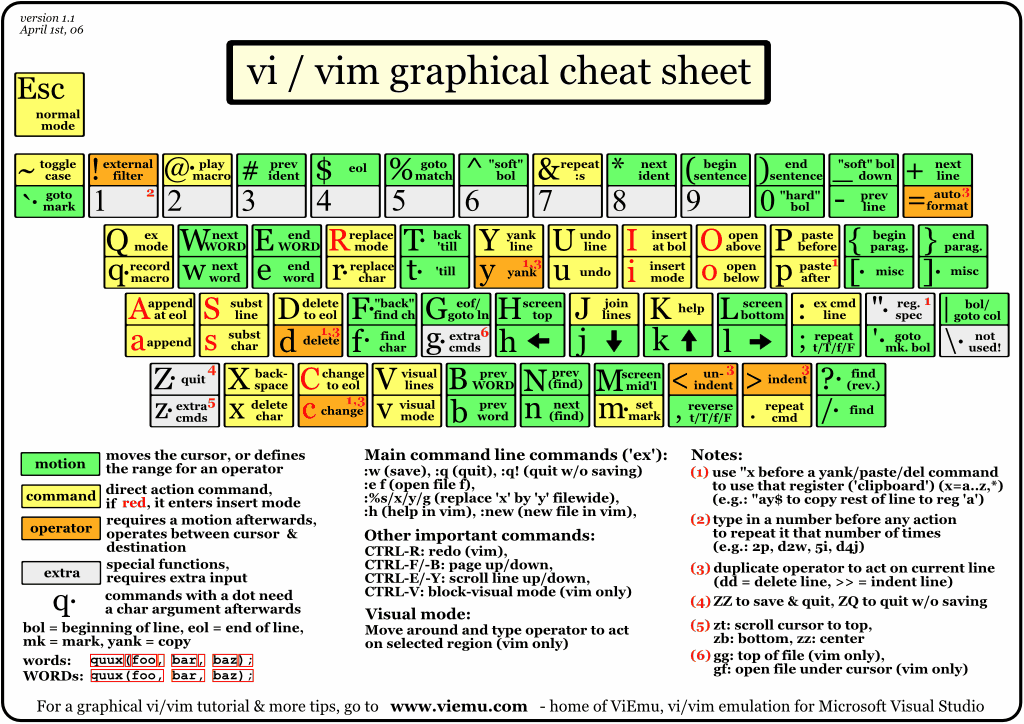
Find and replace whole words in vim You can use \< to match the beginning of a word and \> to match the end:
%s/\<word\>/newword/g
How to include forward slash in vi search & replace? Here are two ways:
escape the / which is the default substitute separator: :s/usrbin/\/usr\/bin use another substitute separator, e.g., using the hash # character: :s#usrbin#/usr/bin. Note that there are characters that you can’t use as a separator: ", \, |
1.6.2. Emacs Style Shortcuts
Emacs 12.5 Documentation on Rectangles has useful information
| Key | Effect |
|---|---|
| C-x h | mark-whole-buffer |
| C-x r t | Replace rectangle contents with string on each line (string-rectangle) |
| M-x “undo” | In addition to SPC a u for the tree, this command can be used for a specific region |
| C-Backspace | Calls backward-kill-sexp which kill previous symbolic expression |
| delete-whitespace-rectangle | Mark region, then call this command. |
| C-M-\ | Indent-region |
| C-q C-l | Insert linebreak |
Emacs Macro
The Emacs way to define macros is available behind the prefix: SPC K
To start recording a keyboard macro:
Press SPC K k (uppercase then lowercase) to start recording a macro. Perform the actions that should be recorded. Press SPC K K (uppercase twice) to stop recording the macro.
To execute the last recorded macro press: SPC K K The macro can be executed again by pressing K one or more times. The single character replay works until another key than K is pressed.
1.6.3. Evil Multiple Cursors
grm - evil-mc-make-all-cursors gru - evil-mc-undo-all-cursors grs - evil-mc-pause-cursors grr - evil-mc-resume-cursors grf - evil-mc-make-and-goto-first-cursor grl - evil-mc-make-and-goto-last-cursor grh - evil-mc-make-cursor-here grj - evil-mc-make-cursor-move-next-line grk - evil-mc-make-cursor-move-prev-line M-n - evil-mc-make-and-goto-next-cursor grN - evil-mc-skip-and-goto-next-cursor M-p - evil-mc-make-and-goto-prev-cursor grP - evil-mc-skip-and-goto-prev-cursor C-n - evil-mc-make-and-goto-next-match grn - evil-mc-skip-and-goto-next-match C-t - evil-mc-skip-and-goto-next-match C-p - evil-mc-make-and-goto-prev-match grp - evil-mc-skip-and-goto-prev-match
1.6.4. Spell Checking
Spelling runs through jinx, not flyspell, and Jinx asks libenchant, which
for English asks aspell. It is switched on in text-mode and its
derivatives only — there is no spell checking in prog buffers until
SPC t s switches it on in one, and then of comments and strings. Words
added with zg (bhw/spell-add-word) go to enchant’s own list,
~/.config/enchant/en_US.dic, not to ~/.aspell.en.pws; aspell still reads
that file, so the words in it pass.
| Key | Effect |
|---|---|
| C-s | Replace the previous misspelling with the next ranked correction, in place |
C-s is bhw/spell-correct-cycle-previous. Press it repeatedly to walk the top
bhw/spell-correct-cycle-count suggestions (3) without leaving insert state and
without a prompt; the press after those puts the original typo back and opens
the interactive picker (bhw/spell-correct-previous-highlight). Any other command
in between — including typing a single character — starts a fresh cycle.
The misspelling has to be one the window shows: nothing above its first
line is changed.
The backend is aspell rather than hunspell because only the top three
candidates are ever reachable inline, so ranking decides whether the cycle is
useful: for quik, aspell ranks quick/quirk/quirky and hunspell ranks
quirk/quick/quin.
1.7. Layouts and Workspaces
Refer to official spacemacs documentation on the same wording.
1.8. Help & Errors & Troubleshooting
1.8.1. General Help & Documentation
When the Emacs daemon freezes for some unknown reason, stop it through its shepherd service, which sends SIGTERM and then, after 30 seconds, SIGKILL, and start it again:
herd stop emacs && herd start emacs
Packages are byte-compiled when Guix builds them, each against the versions of
its dependencies it is built with, so an update leaves no stale .elc files to
delete. If an update breaks something, guix package --roll-back returns the
profile to its previous generation; restart Emacs afterwards.
Emacs itself
I once built Emacs from source, for native compilation, tree-sitter and pure
GTK, none of which Debian’s Emacs then had. Now Emacs comes from Guix like
every package: emacs-lucid in the Home profile, Emacs 31.1 with the Lucid
toolkit, drawn through WSLg’s X server. Guix builds it with
--with-native-compilation=aot and tree-sitter, and C-h v
system-configuration-options shows the rest.
Another build of Emacs is another package in the list, not a checkout
under /usr/local: emacs-pgtk for pure GTK, or Emacs from its git
repository through a package transformation (--with-branch,
--with-commit, --with-git-url; guix build --help-transform lists them),
which the list applies with options->transformation. Guix builds it in
isolation, so no build dependency is ever installed, and guix package
--roll-back undoes it.
1.8.2. Specific Troubleshooting and Known Issues
Copy paste from WSL2 to Windows is broken?
Paste something from the kill ring via
SPC r y. Or restart your computer. Emacs on WSLg: Copying to the Windows Clipboard | Lukas Barth- Whichkey Lag Due to issue described here: justbur/emacs-which-key#226 Lots of time spent inside which-key–maybe-replace
How to use the universal argument in spacemacs, as C-u is evil-scroll-up?
SPC ualso seeevil-want-C-u-scrollvariable.- If you run into graphical issues with VcXsrv or X2Go try starting emacs in
emas -nwmode first, to generate .elc (compiled emacs lisp) files. - Should the numbering of windows be off after resuming from sleep, such that
when creating a new frame window one
SPC 1cannot be selected:SPC F Dshould delete the “hidden” frame. Emacs looks frozen: the frame will not redraw and nothing you type has any effect.
Check whether it is frozen or merely prompting somewhere you cannot see:
emacsclient -e '(list (recursion-depth) (minibuffer-prompt))'
A reply at all means the daemon is healthy. A non-zero depth means it is sitting in a recursive edit — very likely on the headless
F1frame, whereC-gcannot reach it. Get out withSPC q ufrom a working frame, oremacsclient -e '(bhw/unstick-minibuffer)'
See Emacs Config for the guards that are supposed to stop this happening.
1.8.3. Performance
Use the Emacs profiler SPC h T to track performance issues.
If poorly written Emacs lisp packages aren’t a problem, then look at garbage collection.
Afterwards, use SPC h p to browse installed packages and uninstall any
extraneous packages.
Lastly look at the enabled global minor modes and disable any that are unneeded.
WSL-specific:
If you feel input delay and general sluggishness, as in if you press the d
key once and multiple d’s are entered, then it could be likely that Windows
firewall scanning is causing the slowdown. Windows Security > Virus &
threat protection settings > Exclusions > Add or remove exclusions >
Add Folder \\wsl.localhost\Guix and Add Process msrdc.exe.